
 简体中文
简体中文 English
Website review
This review may include AI-generated content and is not individually verified. Domain, certificate and other facts come from the observed data on this page.
What is Attributer?
Attributer is a marketing attribution tool that pushes the source data behind each lead into your CRM and other sales and marketing tools. Instead of leaving attribution trapped inside a separate analytics dashboard, it writes the information onto the contact or deal record, so the person working the lead can see where that person came from. The goal, as described on Attributer, is to show where leads, customers and revenue originate.
What it actually does
When someone fills in a form on your site, Attributer determines how they arrived — organic search, organic social, referral, direct, paid campaigns and similar — and passes that detail through to the connected systems. That covers channels that UTM parameters alone tend to miss, which matters if a large share of your pipeline starts with a plain Google search rather than a tagged ad click.
The practical output is a set of fields on the lead or deal: channel, source, campaign, and the landing page or referrer behind it. From there, the reporting you already run in your CRM becomes attribution reporting.
Who it suits
- B2B teams with a CRM-centred workflow. If sales lives in a CRM and marketing reports from a separate tool, Attributer closes that gap without asking sales to change how they work.
- Companies running mixed paid and organic acquisition. Teams that only measure paid campaigns often under-credit search, referral and direct traffic; this makes those visible in the same place.
- Small marketing teams without a data engineer. The setup is aimed at connecting existing tools rather than building a pipeline.
It is less obviously useful if you already run a warehouse-based attribution model, or if your leads arrive mostly through channels the CRM already tags reliably.
Trade-offs to weigh
Attribution captured at form-fill is first-touch-ish by nature: it records how that visitor arrived at that moment, not every touch across a long, multi-person buying cycle. If your sales cycle involves several stakeholders arriving through different routes, treat the CRM field as one input rather than the whole story. You also need your forms and CRM fields to be set up to receive the data, which is a one-off configuration task.
A concrete next step
Pick one lead source question you cannot currently answer — for example, "how many closed-won deals started with organic search last quarter?" — then check whether your current form-to-CRM setup records the referrer or channel needed to answer it. If it does not, that gap is the case for a tool like this. Pricing starts with a free entry point and paid plans, with a trial available if you want to test it against your own funnel before committing.
How does Attributer get marketing attribution data into my CRM?
Attributer works as a form-level capture layer: when a visitor submits a form on your site, it reads the signals available at that moment, classifies the visit into a channel, and then passes that classification along with the form submission into your CRM. The practical result is that the lead record arrives already tagged with where it came from, rather than you reconstructing the source later from analytics.
What it captures and passes through
The page describes the output as marketing attribution data covering channels including Organic Search, Organic Social, Referral and Direct, deliberately going beyond paid campaigns and UTM parameters. That distinction matters: UTM tags only exist when someone clicks a tagged link, so untagged organic and referral traffic usually lands in your CRM as "unknown" or "direct." Attributer's value is filling that gap with a channel classification attached to the lead itself.
The mechanics you actually care about
- Trigger point: form submission. No source data means no attribution, so forms that bypass your site (phone calls, in-person, imported lists) won't be covered by this mechanism.
- Delivery: via integrations with your CRM, form builder, email marketing or analytics tools. The integration list is the thing to check first, since a missing connector means manual workarounds.
- Destination fields: attribution lands in CRM properties you can report and segment on, which is what makes channel-level ROI reporting possible inside the CRM rather than in a separate dashboard.
A realistic scenario
A B2B team running a demo-request form wants to know whether LinkedIn, organic search or partner referrals produce closed revenue. With Attributer-style capture, each demo request carries its channel into the CRM, so a pipeline report grouped by channel shows which source produces customers, not just leads. The trade-off: you inherit the tool's channel taxonomy, so unusual sources may be bucketed into broader categories than you'd choose yourself.
Next step
Open your CRM's lead object and check how many recent leads have an empty or "unknown" source field. If that number is high and your forms run through a supported integration, attribution capture is worth trialling — the page notes a free start and a 14-day trial, with paid plans mentioned from $29 per month. If your leads mostly arrive by phone or offline, fix capture there first, because this approach won't see them.
For comparison, HubSpot's own form and reporting tools cover similar ground if you're already standardised on it (HubSpot), and Google Analytics 4 can model channels but doesn't write source values into your CRM records the way this does (Google Analytics).
Which CRM, form builder, and analytics tools does Attributer integrate with?
The page confirms that Attributer integrates with CRMs, form builders, email marketing platforms, and analytics tools, but it names no specific products in the supplied material. The integration list lives on a separate integrations page, so treat "which tools exactly" as something to verify there rather than infer from the homepage.
How to check the integration list yourself
- Open the integrations page and look for your CRM first, since that is where the attribution data needs to land for reporting.
- Confirm your form builder appears too, because that is the capture point where the attribution data is collected before it reaches the CRM.
- Check whether your analytics or email tooling is covered if you want campaign performance and nurture reporting in the same place.
Why the pairing matters more than the count
Attribution only works end to end when the capture tool and the destination tool are both connected. A form builder that passes hidden fields into a CRM gives you a clean chain from first touch to closed deal; if either link is missing, the data has to be stitched together manually.
For a practical example: a B2B team using a CRM plus a form builder can tag each lead with channel and campaign at submission, then report on revenue by channel inside the CRM without exporting spreadsheets. A team relying on an unsupported form builder would need custom hidden fields or a middleware step.
If your CRM is not on the list, compare alternatives with established integration directories before switching, for example HubSpot or Salesforce for CRM-side reporting. Attributer's own pricing page indicates a free starting point and paid plans, with a 14-day free trial mentioned on the page.
How much does Attributer cost and what does the free trial include?
Attributer is free to start, with paid plans beginning at $29 per month. The site also advertises a 14-day free trial. Because plan tiers and any usage limits aren't detailed in the supplied page information, check the official Attributer pricing page for current tiers and what each includes.
What the free trial is for
Attributer's core job is to pass marketing attribution data — where leads and customers came from — into your CRM and other sales and marketing tools. The trial is therefore best treated as a test of that data flow, not just a software demo.
A practical trial plan:
- Connect one CRM and one lead-capture form or tool.
- Confirm that new leads arrive with source data attached (for example Organic Search, Organic Social, Referral, Direct, or paid campaign details).
- Compare a week of trial data against what your CRM previously showed, and check whether the extra detail changes any decisions.
- Decide before the trial ends whether the attribution data is accurate enough to justify a paid plan.
Who gets the most from it
Teams that already run campaigns but can't see which ones produce customers and revenue are the clearest fit. If you mainly need basic UTM tracking, your existing tools may cover it; Attributer is aimed at going beyond paid campaigns and UTM parameters into channels like organic search and referral.
Decision criterion
Judge the cost against one question: does the attribution data let you shift budget toward channels that actually produce customers? If it does, $29 per month is easy to justify. If your CRM already captures that reliably, the trial will show it quickly.
How can Attributer help me measure the ROI of my paid campaigns?
Attributer’s role is to capture where each lead and customer came from and pass that attribution data into your CRM and other sales and marketing tools. For paid campaigns specifically, that means you can connect revenue in your CRM back to the campaign or channel that produced it, rather than judging performance only by clicks, form fills or platform-reported conversions.
What that looks like in practice
- Paid campaign ROI: If your CRM records the original source or campaign for each lead, you can compare the revenue from closed-won deals against the cost of the campaign that generated them.
- Beyond paid-only reporting: Attributer also covers channels such as Organic Search, Organic Social, Referral and Direct, so you can see whether paid campaigns are adding incremental customers or simply taking credit for demand that would have arrived anyway.
- Budget allocation: When some campaigns produce customers and revenue while others produce leads that never convert, you have a clearer basis for increasing, pausing or shifting spend.
- Tool flexibility: Because attribution data is sent into your CRM, form builder, email marketing or analytics tools, you can run ROI analysis in the system your team already uses.
A practical example: a B2B company runs Google Ads, LinkedIn Ads and a webinar promotion. Attributer passes the source and campaign into the CRM with each lead. Months later, the sales team can group closed-won revenue by original campaign and compare it with ad spend. The LinkedIn campaign might generate fewer leads but more revenue; the webinar might produce many leads that never close. Those differences are difficult to see from ad platform dashboards alone.
What to check before relying on it
ROI measurement still depends on clean CRM data and accurate campaign costs. Attributer supplies the attribution layer; you or your finance/marketing operations team need to bring in spend data and define how revenue is counted. It is most useful for teams that already work in a CRM and want attribution inside it, rather than in a separate reporting tool.
For a next step, pick one paid campaign with known spend and closed-won revenue, then trace a handful of recent customers back to their original source in your CRM. If that link is missing or unreliable today, Attributer is designed to fill that gap. You can review its integrations and start a free trial via Attributer.
How does Attributer track organic and referral channels beyond UTM parameters?
Attributer captures the visitor's full acquisition path and writes it into your CRM, rather than relying only on UTM-tagged campaign URLs. That distinction matters because most organic and referral traffic arrives with no UTM parameters at all: a Google search result, a LinkedIn post, a link from a partner's blog or a direct visit all look identical in a bare form submission.
What it does differently
- Classifies the channel, not just the campaign. The page names Organic Search, Organic Social, Referral and Direct as channels it reports on, alongside paid campaigns. So a lead with no UTM still gets a channel label instead of landing in an "unknown" bucket.
- Passes the data downstream. The attribution detail is sent into your CRM and other sales and marketing tools, so channel lives on the lead or deal record rather than only inside an analytics dashboard.
- Covers the revenue end, not just the lead end. Because the channel travels with the contact into the CRM, you can compare channels by customers and revenue, not just by form fills.
How to think about the trade-off
Automatic channel classification is a rules-based inference, so it is only as good as the signals the visitor's browser and referrer pass along. Expect "Direct" to absorb a mixed bag — dark social shares, email clients that strip referrers, typed URLs and some app-to-browser handoffs. Treat Referral as a starting point for investigation rather than a finished answer, and check whether your highest-revenue "Direct" leads are actually coming from a channel you can't see.
A practical test
Pick one month of closed-won deals and pull the channel field from your CRM. Compare it against your web analytics channel report for the same period. Where the two disagree, you've found either a tagging gap in your paid campaigns or a referral source worth naming explicitly — for example, a partner site you could approach about a formal arrangement.
If you want a second view of referral and organic traffic patterns, Plausible Analytics and Matomo both report channel-level sources without depending on UTM tags, which makes them a useful cross-check on what your CRM shows.
 GoDaddy
 Vercel
 Google Workspace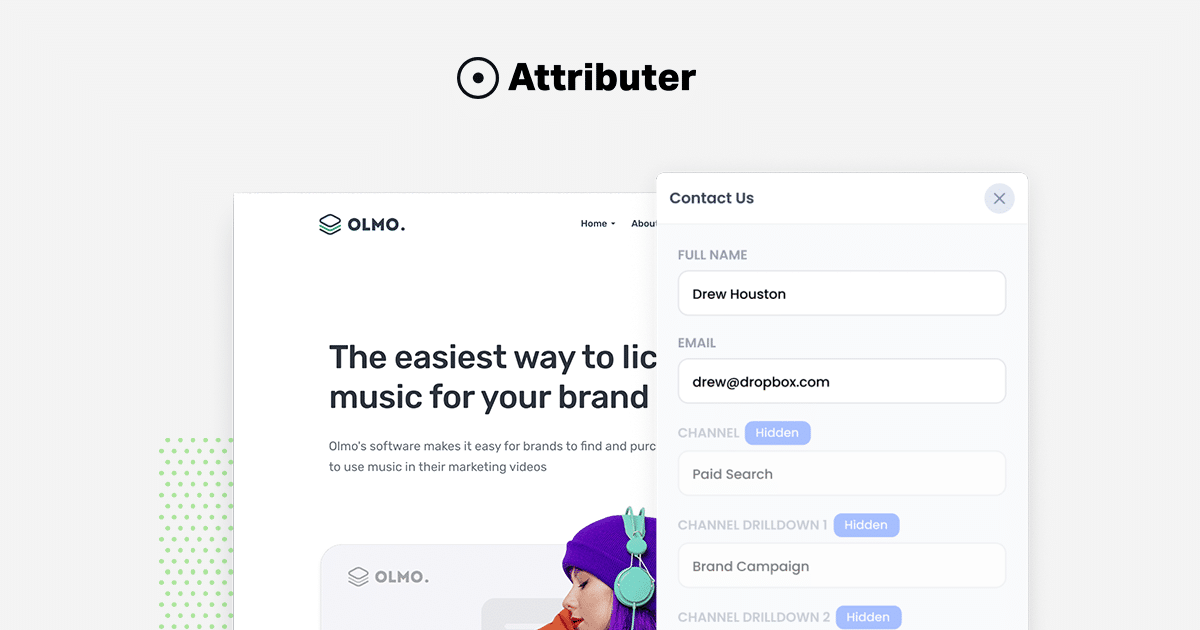

User reviews (0)