Website profiles · Technology insights · Alternatives

boardmix.com

Boardmix is an AI-powered online whiteboard for teams. Brainstorm, mind map, draw flowcharts and collaborate in real time. Start free.

Paid content Multilingual
Visit website
Profile views 0 Outbound visits 0 Normal
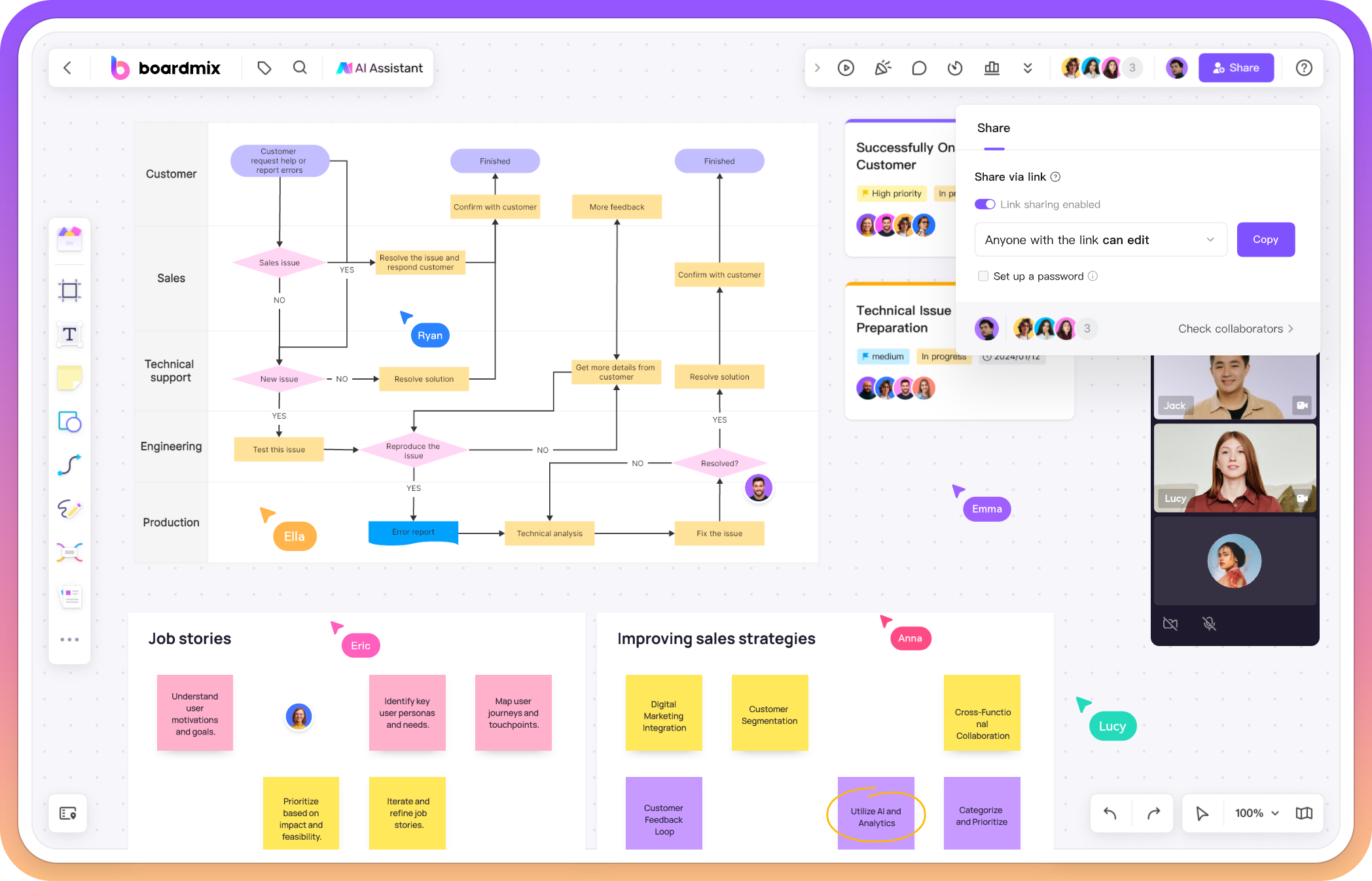
Boardmix Full homepage screenshot

At a glance

Category
Productivity
Language
English
Paid-content signal
Paid contentObserved
Registered
2017
Hosting
Alibaba (US) Technology Co., Ltd.Inferred
HTTPS certificate trusted
PassedObserved
Last updated

Website review

This review may include AI-generated content and is not individually verified. Domain, certificate and other facts come from the observed data on this page.

What is Boardmix?

Boardmix is a browser-based online whiteboard for visual collaboration, aimed at teams that need to think, diagram and plan in one shared space. Its core promise is an infinite canvas where notes, diagrams and plans live together, with real-time collaboration and AI assistance for getting a first draft onto the board rather than starting from a blank page.

What you can do on it

The product organises its use cases around common team activities rather than around drawing tools:

  • Mapping and diagramming — connect steps, map handoffs and keep supporting material next to a process diagram so the team can review it together before deciding what to change.
  • Brainstorming and mind mapping — put a goal at the centre, add workstreams as branches, and park open questions beside the plan for teammates to refine.
  • Strategy and planning — start from a template, compare options, and record priorities, owners and next steps.
  • Agile workflows — arrange a backlog and record next tasks on a shared sprint board.
  • Meetings and workshops — run a session from an agenda and sticky notes, then leave decisions and follow-ups on the board.

The page also frames the tool by team: project management, sales, marketing, IT and UX/design each get suggested starting points, from product roadmaps and account plans to system dependency maps and journey maps.

How the AI fits

Boardmix AI is positioned as a drafting aid: you supply a question, outline or brief, and it produces a starting mind map, flowchart or presentation. You then add your own sources, adjust the structure and work through it with the team. Treat this as a way to skip the empty-canvas problem, not as a substitute for the discussion — the value comes from the board becoming the place where the team edits and agrees.

Who it suits, and the trade-offs

It fits teams already working remotely or across locations who want one artefact to survive a meeting: the diagram, the decisions and the next steps stay visible afterwards. It is less obviously suited to individuals who only need a quick sketch, or to teams that already standardise on another whiteboard and would rather not split their boards across tools. The page mentions a free start and points to subscription and pricing terms, so check the current plan limits against how many boards and collaborators you actually need before committing a whole team.

A practical next step: pick one recurring meeting you already run — a sprint planning session or a project kickoff — and try running just that session on a single board, with the agenda, notes and decisions all in one place. If the board is still useful a week later, that is a better signal than any feature list.

How does Boardmix's AI help me start a project from scratch?

Boardmix uses its AI as a starting-point generator rather than a finished-work tool. You describe a question, outline or brief, and it drafts a first structure — a mind map, flowchart or presentation — that you then edit, add sources to, and refine with your team.

What that looks like in practice

Say you are kicking off a product launch with no existing notes. Instead of opening a blank canvas, you give the AI a short brief. It returns a skeleton mind map: a central goal with branches for workstreams. From there you drag in open questions, assign owners and invite teammates to build on it. The same pattern applies to a process you need to document — the AI proposes steps and handoffs, and you correct the sequence and attach supporting material beside the diagram.

The practical value is skipping the cold start. The trade-off is that a generated draft reflects only what you typed, so treat it as a scaffold to be checked, not as research. For a strategy session, a common route is to begin from a template, use AI to expand the options, then record priorities and next steps yourself.

Where the AI stops and you start

  • Drafting: AI produces the initial mind map, flowchart or slide outline.
  • Grounding: you add your own sources and context, which the draft cannot supply.
  • Structuring: you adjust the hierarchy, merge or cut branches.
  • Deciding: your team reviews, discusses and commits to the plan on the shared board.

Choosing whether to start with AI

Use the AI draft when the blank page is the main obstacle and the topic is familiar enough for you to spot what is missing. Skip it and start from a template when the work is highly specific — a compliance process, a client account plan — because correcting a wrong structure can cost more time than building the right one directly.

A useful next step: open a board, paste in a two- or three-sentence brief for your actual project, and compare the generated structure against what you already know. That comparison tells you quickly whether AI drafting suits your workflow. For teams already using a visual tool such as Miro, the question is less about features than about which canvas your group already opens by habit.

Can I use Boardmix for free, and what are the limitations of the free plan?

Yes—Boardmix can be used for free. The site presents a free starting point and a separate paid subscription tier, so you can evaluate the core whiteboard before committing to a plan. The free tier is best understood as a way to test whether Boardmix fits how your team thinks and meets, not as an unlimited production workspace.

What the free plan covers

Boardmix's core value is a shared canvas that supports several common working modes:

  • Brainstorming and mind mapping — put a goal at the center and add workstreams as branches.
  • Mapping and diagramming — connect steps, map handoffs, and place supporting material beside a diagram.
  • Strategy and planning — start from a template, compare options, and record priorities, owners, and next steps.
  • Agile workflows — arrange a backlog and record next tasks on a shared sprint board.
  • Meetings and workshops — guide a session with an agenda and sticky notes, then keep decisions and next steps on the board.

Real-time collaboration on a shared digital whiteboard is the central feature, and the site also describes AI assistance for drafting a mind map, flowchart, or presentation from a question, outline, or brief.

Where the limitations tend to appear

The site does not publish a detailed free-versus-paid feature comparison in the material provided, so treat the following as practical guidance rather than confirmed free-plan terms. Check the Pricing page for the current limits before you rely on it.

Consideration Why it matters on a free plan
Number of editable boards Teams usually hit a ceiling first when boards accumulate
AI usage AI drafting is often metered or capped on free tiers
Guests and collaborators Inviting external clients or large groups may require a paid seat
History and versioning Long-running projects need to recover earlier states
Export and file formats Sharing outside the tool may be restricted
Templates and advanced diagramming Some templates or diagram types may sit behind a subscription

A quick way to decide

Pick one real piece of work—a sprint planning session or a customer journey map—and run it on the free plan with the people who would actually use it. If the board holds up through a full session and a follow-up review, the free tier is doing its job. If you run into board limits, AI caps, or guest restrictions mid-project, that is the signal to compare tiers on Boardmix against alternatives such as Mural or Miro, which offer similar collaborative canvas models with their own free-tier limits.

How do I collaborate with my team on Boardmix in real time?

Open a board, share it with your team, and everyone can edit the same canvas at once. Boardmix is built around a shared digital whiteboard, so collaboration is less about a separate "co-edit" mode and more about the normal way the board works: teammates join the board, see each other's cursors and changes, and add sticky notes, shapes, diagrams or comments directly on the canvas.

The practical workflow

  1. Create or open a board. Start from a blank canvas or a template for brainstorming, mind mapping, strategy, agile workflows, meetings or workshops.
  2. Invite teammates. Share the board and make sure they have edit access if they need to contribute, not just view.
  3. Work in the same space. One person can map a process while another adds supporting material beside the diagram; someone else can capture open questions on sticky notes.
  4. Use AI as a starting point, not the finish. Boardmix AI can draft a mind map, flowchart or presentation from a question, outline or brief. The team then adjusts the structure and adds its own sources.
  5. Keep discussion and decisions together. Use the board itself for the agenda, options, priorities, owners and next steps so the conversation and the output stay in one place.

A concrete example: for a project kickoff, put the goal in the center of a mind map, add workstreams as branches, place open questions beside the plan, and invite teammates to refine it live. For a sprint, arrange the backlog, discuss priorities and record next tasks on a shared sprint board.

What real-time collaboration is good for

  • Workshops and meetings: an agenda plus sticky notes guides the session, and decisions stay visible afterward.
  • Process mapping: connect steps, map handoffs and review the process together before deciding what to change.
  • Planning: compare strategy options and record priorities, owners and next steps on one canvas.
  • Distributed teams: IT teams can review the same system diagram across locations, and sales or marketing can keep account research or campaign briefs beside the plan.

Trade-offs to expect

Real-time editing is fast for gathering input, but a busy board can become cluttered. Decide in advance where notes go, who owns each section, and when the group moves from diverging ideas to converging decisions. If the team is large, a facilitator who keeps the agenda moving is more useful than everyone editing at once.

Next step

Pick one recurring meeting — a kickoff, sprint planning or workshop — and run it on a single board with an agenda, sticky notes and a decisions area. If you want a comparison point for team whiteboard habits, it also helps to look at how established tools frame the same activity, such as Mural and Miro.

What templates does Boardmix offer for agile workflows like sprint planning?

Boardmix's page evidence points to a shared sprint board as the main agile template: you arrange the backlog, discuss priorities, and record the next tasks directly on the board. That is a working session canvas rather than a full planning tool — it keeps the conversation and the task list in one place, but it does not replace a tracker for velocity, story points or sprint history.

What the templates support

  • Sprint planning sessions — a shared board where the backlog, priorities and upcoming tasks sit side by side, so a remote or hybrid team can point at the same items while deciding what to take on.
  • Strategy and planning — a template for turning a shared goal into a working plan, with options compared and priorities, owners and next steps recorded.
  • Kickoff mind maps — the goal at the centre, workstreams as branches, open questions placed beside the plan for teammates to refine.
  • Meetings and workshops — an agenda plus sticky notes to guide the session, with decisions and next steps left on the board afterwards.
  • Mapping and diagramming — process maps that connect steps and handoffs, useful for reviewing a workflow before changing it.
  • AI-assisted starting points — from a question, outline or brief, Boardmix AI can draft a mind map, flowchart or presentation that you then adjust.

Choosing between them

If your goal is… Start with… Trade-off
Decide what the team does next sprint Sprint board template Great for discussion and visible tasks; not a substitute for backlog metrics
Align on a quarter or project direction Strategy and planning template Strong for priorities and owners; needs discipline to keep updated
Run the planning meeting itself Agenda and sticky-note setup Keeps decisions with the discussion; less structured than a dedicated board
Explain how work flows Mapping and diagramming Clarifies handoffs; static unless someone maintains it

A practical next step: open the sprint board template before your next planning session, paste in the current backlog as sticky notes, and run the meeting on the canvas. Afterwards, copy the agreed tasks into whatever tracker your team already uses, so the board stays a thinking space rather than a second backlog to maintain.

For teams comparing options, it is worth looking at how dedicated agile tools handle sprint mechanics — for example Miro and Atlassian — and treating Boardmix as the collaborative front end where the discussion happens.

How does Boardmix compare to other online whiteboards for remote team workshops?

Boardmix is a strong fit for remote workshops when the priority is getting from a blank canvas to a structured artifact quickly: the page emphasizes AI-drafted mind maps, flowcharts and presentations, alongside real-time collaboration and templates for brainstorming, strategy planning, agile workflows and meetings. That combination suits facilitators who want to open a session with a starting structure rather than build every frame by hand.

Its clearest trade-off is that it presents itself as an all-in-one workspace for ideas, diagrams and plans. Teams that want one board to carry a workshop from discussion through to a documented plan will get more from it than teams looking for a narrowly specialized diagramming tool.

Where it tends to fit best

Workshop need How Boardmix approaches it What to weigh
Kickoff or brainstorm Mind maps with a goal at the center and workstreams as branches; sticky notes for discussion Very large sessions can still need a co-facilitator to keep branches tidy
Process mapping Flowcharts with connected steps, handoffs and supporting material beside the diagram Highly technical notation may suit a dedicated diagramming tool better
Strategy and sprint planning Strategy templates, backlog and sprint boards, priorities and owners recorded on the board Persistent delivery tracking usually belongs in a project tool
Meetings and workshops Agenda plus sticky notes, with decisions and next steps kept on the board Long-running programs may want stronger archive and search habits

How to choose between options

Decide by the artifact you need at the end of the session, not by the feature list. If the output is a shared, editable canvas that doubles as a decision record, Boardmix is a reasonable default. If the output is a polished, standards-heavy system diagram, or a workshop that must plug directly into an existing delivery workflow, compare against tools built around that job.

Three practical criteria:

  • Starting point: does the tool help you draft structure with AI or templates, or do you build from zero?
  • Audience: can non-designers and non-technical teammates contribute without training?
  • Afterlife of the board: will the team revisit it, or does it need to hand off into another system?

For a first test, run one real 45-minute session — a project kickoff mind map or a process review — and judge whether the board is still useful a week later. That single trial tells you more than any feature comparison. If you want a broader benchmark, look at Mural and Miro, which are widely used for facilitated remote workshops, and Figma's FigJam for design-adjacent sessions.

Related questions

More questions →
What Is an Online Collaborative Whiteboard and How Do Teams Use One?

An online collaborative whiteboard is a shared digital canvas where multiple people can add and edit content at the same time. Unlike a plain digital whiteboard, which mainly replaces a physical board for one person or one screen, a collaborative whiteboard is built around simultaneous participation: several teammates open the same board, move ideas around, and leave a record that persists after the meeting. Teams use one for brainstorming, mind mapping, flowcharts, sprint planning, and workshops. Boardmix is an example of this category, positioning itself as an AI-powered online whiteboard for brainstorming, mind maps, flowcharts, and real-time collaboration.

What makes it "collaborative" rather than just digital

The difference is not the drawing surface — it is what happens when more than one person is on it.

  • Shared canvas: everyone works on the same board rather than passing a file around.
  • Real-time editing: changes appear for other participants as they happen, so the board stays current during a live session.
  • A persistent artifact: the board remains after the call, so decisions and next steps stay attached to the work instead of disappearing with the meeting.
  • Multiple content types in one place: notes, diagrams, and plans sit together rather than being split across a doc, a chat thread, and a screenshot.

Boardmix describes this as bringing notes, diagrams, and plans onto one online whiteboard, working together in real time, or using AI to draft a starting point.

Common ways teams use one

The use cases below come from how Boardmix frames its own whiteboard, and they map onto the general patterns most teams follow.

Use case What happens on the board
Brainstorming Ideas go up as notes, then get grouped and refined together
Mind mapping A goal or topic sits at the center, with workstreams as branches
Flowcharts / process mapping Steps are connected, handoffs marked, and supporting material placed beside the diagram
Strategy and planning A template starts the board; options are compared and priorities, owners, and next steps recorded
Agile workflows Backlog, priorities, and next tasks arranged on a shared sprint board
Meetings and workshops An agenda and sticky notes guide the session; decisions and next steps stay on the board

A concrete example: for a project kickoff, you put the goal at the center of a mind map, add workstreams as branches, arrange open questions beside the plan, then invite teammates to refine it together. That single board replaces the usual scatter of a doc, a chat thread, and a photo of a physical whiteboard.

How real-time collaboration actually works

The mechanics are simple, but they change how a session runs:

  1. One person creates the board and shares it with the team.
  2. Everyone opens the same canvas — no version conflicts, because there is only one version.
  3. Participants add and rearrange content live, so the board reflects the discussion as it happens.
  4. The board is kept as the record of the session, including decisions and next steps.

Boardmix also supports starting from a template or a prompt, which matters for the next point.

Where AI fits in

AI in this context is a starting-point tool, not a replacement for the team's thinking. On Boardmix, you can start with a question, outline, or brief, then use Boardmix AI to draft a mind map, flowchart, or presentation. From there you add your own sources, adjust the structure, and work through the result with the team.

The practical value is skipping the blank canvas. Instead of building a mind map branch by branch in the first five minutes of a workshop, you generate a rough structure and spend the session correcting and extending it. The output is only as good as the prompt and the sources you add, so treat the first draft as a scaffold.

What to check before choosing one

  • Free tier: Boardmix offers a free start, which is enough to test whether the collaboration model fits how your team works.
  • Pricing and upgrade path: Boardmix publishes a pricing page and subscription terms, so you can check what paid plans include before committing a team.
  • Template range: the templates decide how fast you get to a useful board. Boardmix lists templates for strategy, sprint boards, and workshops, among others.
  • AI scope: check whether AI drafting covers the formats you need — mind maps, flowcharts, and presentations in Boardmix's case — and whether you can bring your own sources into the result.
  • Fit for your team's use case: Boardmix organizes its whiteboard around project management, sales, marketing, IT, and UX/design workflows, so compare those against your own.

If your team mainly needs a place to think together in real time and keep the result, a collaborative whiteboard covers it. If you only need to draw a diagram once and export it, a simpler diagramming tool may be enough.

What Is a Collaborative Whiteboard and How Do Teams Use One?

A collaborative whiteboard is an online canvas where multiple people edit, draw, and organize ideas at the same time, each seeing the others' changes live. It differs from a solo digital whiteboard in one key way: the board is built for shared presence, not just personal note-taking. You'd use one when a group needs to think or decide together — brainstorming, mapping a process, planning a sprint, or running a workshop — rather than when one person is sketching alone and sharing a finished file later.

Collaborative vs. solo digital whiteboard

Dimension Solo digital whiteboard Collaborative whiteboard
Editing One person at a time Multiple users simultaneously
Presence No live awareness of others Live cursors and participant view
Feedback Comments after the fact Inline comments and reactions during the session
Starting point Blank canvas or personal template Shared templates the whole team can open
Output A file you export and send A living board the team returns to

The practical difference shows up in a kickoff. On a solo board, you'd draft a mind map, export it, and email it — feedback arrives a day later in a thread. On a collaborative board, you put the goal at the center, teammates add workstreams as branches in real time, and open questions get parked beside the plan while everyone is still in the room.

Core real-time features to look for

  • Multi-user editing — several people move, add, and rearrange elements on the same canvas without overwriting each other.
  • Live cursors and presence — you can see who is where, which makes it obvious when someone is about to add to the area you're editing.
  • Comments and sticky notes — discussion stays attached to the item it's about instead of scattering into chat.
  • Shared templates — a strategy, sprint, or workshop template gives the group a structure to fill in rather than a blank page.
  • AI drafting — some boards let you start from a question, outline, or brief and generate a first-pass mind map, flowchart, or presentation, which the team then edits.

Boardmix, for example, describes itself as an AI-powered online whiteboard where teams brainstorm, mind map, draw flowcharts, and collaborate in real time, and it offers AI drafting from a question, outline, or brief as a starting point.

Common team uses

The same canvas adapts to different jobs depending on the template and the goal:

  • Brainstorming — collect ideas as sticky notes, then group and vote.
  • Mind mapping — put a goal or topic at the center and add workstreams, questions, or sub-topics as branches.
  • Flowcharts and process mapping — connect steps, mark handoffs, and place supporting material next to the diagram so the team can review the process together before deciding what to change.
  • Strategy and planning — start from a strategy template, compare options, and record priorities, owners, and next steps.
  • Agile workflows — arrange a backlog, discuss priorities, and record next tasks on a shared sprint board.
  • Meetings and workshops — guide the session with an agenda and sticky notes, then keep decisions and next steps on the board afterward.

Different functions lean on the same board in different ways: project management for roadmaps and progress, sales for account plans and customer journeys, marketing for campaign maps and launch dates, IT for system and dependency diagrams, and UX and design for research insights and design sprints.

How to start a shared board and invite teammates

  1. Pick a starting point. Open a blank canvas, a template (strategy, sprint, workshop), or use AI to draft a mind map, flowchart, or presentation from a brief.
  2. Set the frame before inviting people. Add the goal, the agenda, or the central question so arrivals know what they're contributing to.
  3. Invite teammates to the board. Share the board link or invite them from within the board so they land on the same canvas.
  4. Work in real time. Everyone edits, adds sticky notes, and comments; live cursors show who is active where.
  5. Capture the outcome on the board. Record decisions, owners, and next steps before the session ends, so the board remains the reference rather than a throwaway artifact.

The expected result is a single shared canvas that holds both the discussion and its conclusion — not a file that needs to be reconstructed afterward.

Practical tips for keeping a session organized

  • Assign a facilitator. One person watches the clock, keeps the agenda visible, and pulls stray ideas back into the right area.
  • Use spatial zones. Reserve one region for ideas, one for decisions, and one for open questions so the board doesn't blur into a pile.
  • Park, don't debate. Move contested points to an "open questions" area and keep the main flow moving.
  • Write decisions in full sentences. "Use vendor A for phase one" survives the session; a lone sticky note reading "vendor A?" does not.
  • End with owners and dates. A next step without a name attached tends to disappear after the meeting.

Choosing a board for your team

Match the tool to how your team actually works. If you mainly need a place to think together in real time, prioritize multi-user editing, live cursors, and a low-friction invite flow. If you run recurring structured sessions, prioritize shared templates for sprints, workshops, and strategy. If your team often starts from a blank page, AI drafting that produces an editable first pass can save the opening ten minutes. Boardmix bundles these — real-time collaboration, templates across project management, sales, marketing, IT, and design, plus AI drafting — into one online whiteboard, and its pricing and subscription terms are listed on its site if you need to check plan details before rolling it out.

What Is an Online Whiteboard and How Do Teams Use One?

An online whiteboard is a shared digital canvas where a team works visually in the same space at the same time — or on their own schedules. It replaces the physical whiteboard's single room and single moment with a board that anyone with access can open, edit, and return to. Teams use one for brainstorming, mind mapping, flowcharts, strategy planning, agile boards, and meetings. Boardmix, for example, describes itself as an AI-powered online whiteboard that combines real-time collaboration with AI-generated starting points. The right fit depends on whether you need diagramming depth, templates, or AI drafting more than any single feature.

What makes a whiteboard "online" rather than just digital

A drawing app saves a picture. An online whiteboard keeps a live, editable surface that multiple people share. The difference shows up in three places:

  • Shared state, not shared files. Everyone sees the same canvas update as edits happen, instead of trading exported images back and forth.
  • Persistent context. Notes, diagrams, and decisions stay on the board, so a meeting's output is still there next week.
  • Mixed content on one surface. Sticky notes, shapes, connectors, text, and embedded material sit side by side rather than in separate tools.

Boardmix frames this as bringing "notes, diagrams and plans onto one online whiteboard," with real-time work or an AI-drafted starting point.

Core uses on a shared canvas

The same canvas supports different jobs depending on how you arrange it. Boardmix lists these common patterns:

Use What happens on the board
Mapping & diagramming Connect steps, map handoffs, place supporting material beside the diagram, then review together
Brainstorming Put a goal at the center of a mind map, add workstreams as branches, park open questions beside the plan
Strategy & planning Start from a template, compare options, record priorities, owners, and next steps
Agile workflows Arrange the backlog, discuss priorities, record next tasks on a shared sprint board
Meetings & workshops Guide the session with an agenda and sticky notes, then keep decisions and next steps on the board

The pattern is consistent: the board holds both the working-out and the result, so the discussion and the decision live in the same place.

Real-time collaboration: what actually happens

When several people edit one board, the practical mechanics matter more than the label:

  1. Invite teammates to the board. They open the same canvas rather than a copy.
  2. Edit in parallel. Multiple people add sticky notes, move shapes, and draw connectors at once.
  3. Annotate and comment. Discussion attaches to the content it's about, not to a separate chat thread.
  4. Leave with a record. Decisions and next steps stay on the board for anyone who wasn't in the session.

Boardmix describes this as working "together in real time" on a shared digital whiteboard, with discussion and decisions kept together.

AI-assisted starting points

A blank canvas is the most common reason a session stalls. AI drafting addresses that by producing a first version you then correct. On Boardmix, you start with a question, outline, or brief, and the AI drafts a mind map, flowchart, or presentation. From there you add your own sources, adjust the structure, and work through the result with the team.

Treat the AI output as a rough draft, not an answer. Its value is skipping the empty page, not replacing the team's judgment about what the diagram should say.

How to choose one

Compare candidates on the same dimensions rather than on feature counts:

  • Diagramming depth. Can you connect steps and map handoffs cleanly, or is it mainly sticky notes?
  • Templates. Are there starting points for strategy, sprint boards, and workshops, or do you build from scratch?
  • AI drafting. Does it generate a usable first draft from a prompt, and can you edit the structure afterward?
  • Real-time collaboration. Do multiple people genuinely edit the same board, with comments attached to content?
  • Free vs paid. Boardmix's site links to a Pricing page and Subscription Terms, and its calls to action say "Start free" and "Try for free." Check those pages for what the free tier includes and where paid plans begin before committing a team.

Where to start

Pick the use that matches your next meeting. For a project kickoff, put the goal at the center of a mind map and add workstreams as branches, then invite teammates to refine it. For a process review, map the steps and handoffs first, then discuss changes with the diagram in front of everyone. Either way, the board you leave behind is the point — not the drawing itself.

What Is Mind Mapping and How Do You Make a Mind Map?

Mind mapping is a way of organizing ideas around a single central topic, with related thoughts branching outward instead of sitting in a linear list. You draw (or type) the main idea in the middle, add subtopics on branches, and keep expanding until the structure reflects how the ideas relate. It helps most when you're brainstorming, planning a project, studying, or taking notes and need to see connections rather than a flat sequence. You can build one on paper or in a browser-based tool like Mindmup, which supports creating maps online and importing/exporting Freemind files.

The core idea: one center, many branches

A mind map has three basic parts:

  • Central topic — the single subject the map is about (a project, a chapter, a decision).
  • Branches — the main categories or themes that radiate from the center.
  • Sub-branches — details, examples, or sub-ideas attached to each branch.

The structure mirrors how one idea connects to others, so you can see both the big picture and the specifics at once. Because everything hangs off a central node, it's easy to add a new thought without rewriting a whole outline.

When mind mapping actually helps

Situation Why a mind map fits
Brainstorming You can dump ideas freely and group them later
Project planning Tasks, owners, and dependencies branch from one goal
Studying Chapters and concepts become a visible hierarchy
Note-taking You capture relationships, not just a transcript
Decision-making Options and their consequences sit side by side

If your content is strictly sequential — a numbered procedure, a timeline — a list or outline may serve you better. Mind maps win when relationships and grouping matter more than order.

How to build a mind map, step by step

  1. Write the central topic in the middle. Use a short phrase or single word, not a sentence.
  2. Add main branches for the biggest categories. Ask "what are the main parts of this?" and give each its own branch.
  3. Expand each branch with sub-ideas. Add keywords rather than full sentences so the map stays scannable.
  4. Connect related ideas across branches. If two branches share a theme, note the link so you don't lose the relationship.
  5. Review and reorganize. Move, merge, or delete branches until the structure matches your thinking.
  6. Add emphasis where it helps. Color-code branches by theme, or attach an image to a key node to make it memorable.

The expected result is a single view where the central topic, its main parts, and their details are all visible and editable.

Practical tips for clearer maps

  • Use keywords, not paragraphs. One or two words per node keeps the map readable.
  • Keep one idea per branch. Mixing two concepts on one branch makes the structure ambiguous.
  • Use color to group, not to decorate. Assign a color per theme so related branches read as a set.
  • Add images sparingly. A picture on a key node aids recall; images everywhere add noise.
  • Don't over-nest. If a branch goes many levels deep, it may deserve its own map.

Doing it online

Browser-based tools let you build and edit a map without installing software. Mindmup describes itself as a zero-friction, free online mind mapping canvas that runs in the cloud and supports Freemind mindmap import and export. That combination matters if you want to move maps between tools or keep a portable file format.

When choosing an online tool, check:

  • Export options — can you get your map out in a format other tools accept?
  • Import support — can you bring in maps you already have?
  • Editing speed — can you add and rearrange nodes without friction?
  • Access — does it run in the browser, or does it require an install?

For a quick map, start with the central topic, add three to five main branches, and fill in details as they come. The structure will tell you what's missing.

What Is a Flowchart and How Do You Make One?

A flowchart is a diagram that uses standard symbols and arrows to show the order of steps, the branches a process can take, and where it ends. You make one by defining the process boundary, listing the steps in order, marking each decision point with its possible outcomes, connecting everything with directional arrows, and then reviewing the diagram with the people who actually run the process. Flowcharts work best for processes with clear sequences and decision branches — for example, an approval chain, a troubleshooting path, or a handoff between teams — and they are less useful when the goal is open-ended idea generation or ongoing task tracking.

The basic symbols and what they mean

Most flowcharts use a small set of shapes. Consistency matters more than artistic choice: if a diamond means "decision" in one part of your diagram, it should mean the same everywhere.

Symbol Shape Meaning
Start / End Oval or rounded rectangle Where the process begins or stops
Process step Rectangle An action or task someone performs
Decision Diamond A question with two or more outcomes, each labeled on its outgoing arrow
Input / Output Parallelogram Data or material entering or leaving the process
Connector Small circle A jump point when the diagram continues elsewhere

Arrows show direction. Label the arrows leaving a decision diamond with the condition they represent (for example, "approved" and "rejected"), so a reader can follow the path without guessing.

Common types of flowcharts

  • Basic flowchart — a single linear process with a few decision points. Good for documenting a simple procedure.
  • Cross-functional (swimlane) flowchart — the canvas is divided into lanes, one per role or department, and each step sits in the lane of whoever owns it. This makes handoffs and responsibility gaps visible.
  • Decision flowchart — built around a chain of yes/no or multi-option branches. Useful for troubleshooting guides, eligibility checks, and support scripts.

Choose the type based on what your reader needs to see. If the question is "who does what," use swimlanes. If the question is "which path applies to this case," a decision flowchart is enough.

How to draw one, step by step

  1. Define the goal and the boundary. Write one sentence stating what the process starts with and what counts as finished. This prevents the diagram from drifting into adjacent processes.
  2. List the steps in order. Capture them as plain text first — a numbered list is fine. Include the people or systems involved at each step.
  3. Mark the decision points. For each one, write the question and every possible answer. If a branch has no clear outcome, that is a gap to resolve before drawing.
  4. Connect the steps with arrows. Follow the sequence, and make sure every decision branch leads somewhere — either forward, back to an earlier step, or to an end point.
  5. Label and review. Add a title, a date, and the name of the process owner. Then walk the diagram with someone who runs the process daily and ask them to trace a real case through it.

On a shared canvas, this review step is where collaboration pays off: teammates can trace different scenarios on the same diagram, annotate the steps that are unclear, and place supporting material — a policy document, a screenshot, a form — next to the relevant step. Boardmix describes this pattern directly: connect steps, map handoffs, place supporting material beside the diagram, and review the process together before deciding what to change.

Mistakes that make flowcharts unusable

  • Mixing symbol meanings. Using a rectangle for a decision in one place and a diamond in another forces readers to reinterpret the diagram as they go.
  • Decision branches with no exit. Every diamond needs at least two labeled outgoing paths, and each path must eventually reach an end point or loop back deliberately.
  • Too much or too little detail. A diagram that includes every keystroke is unreadable; one that says "process the request" hides the decisions that matter. Match the level of detail to the audience — a new hire needs more steps than an auditor checking controls.
  • No clear start or end. Without an explicit entry and exit, readers cannot tell where their case enters the process or what "done" looks like.
  • Unlabeled arrows. An arrow leaving a decision without a condition label is ambiguous, especially when the same diamond has three or more outcomes.

When to use a flowchart — and when not to

Use a flowchart when the thing you are describing has a sequence, branches, and a defined end: onboarding steps, an escalation path, a system's data flow, a support decision tree. Use a mind map instead when you are organizing ideas around a central topic without a required order — for example, a project kickoff where the goal sits at the center and workstreams branch out as open questions to refine together. Use a kanban or sprint board when the work is ongoing and status matters more than sequence — arranging a backlog, discussing priorities, and recording next tasks.

A practical middle ground: start a planning session with a mind map to collect the pieces, then convert the agreed sequence into a flowchart so the team can review the actual path and its decision points. Boardmix supports both on the same canvas, and its AI can draft a starting mind map or flowchart from a question, outline, or brief, which you then adjust with your own sources and structure before sharing with the team.

A quick way to check your diagram

Before you circulate it, trace two or three real cases through the flowchart — one that follows the main path and one that takes an exception branch. If you have to stop and interpret a symbol or guess which arrow applies, fix that spot first. A flowchart is finished when someone unfamiliar with the process can follow it from start to end without asking a question.

Website Overview

An established domain and managed infrastructure suggest continuity of operations and may support dependable delivery, although neither guarantees service quality. Page metadata, canonical configuration and social previews work together to provide more consistent search and sharing presentation.

Domain and Registration

Registered in 2017, this domain has about 8 years of history. That suggests continuity, although ownership and purpose may have changed. The registrar is Alibaba Cloud Computing Ltd. d/b/a HiChina (www.net.cn), a widely used domain service provider. The domain uses the common .com extension, which is not an independent safety signal.

DNS and Email

Nameservers are provided by Alibaba Cloud DNS, indicating managed DNS hosting. MX records point to the Alibaba Mail email service. CAA records restrict which certificate authorities are authorized to issue certificates. No CNAME was found; the observed records resolve directly to addresses. SPF and DMARC are configured. DKIM status is unknown.

TLS and Certificates

The certificate issuer is DigiCert Inc, a commercial certificate authority. The certificate uses an RSA 2048-bit public key, offering broad client compatibility. The server supplied a complete certificate chain. No organization name is present in the certificate; the available fields are consistent with domain validation. The certificate is valid for about 177 days in total, with 134 days remaining.

HTTP and Browser Security

The checked browser-security headers were not detected, leaving fewer explicit browser-side safeguards. No X-Powered-By header was found, reducing one common source of backend fingerprinting information. No obvious internal addresses or debug information were found in the headers. No explicit CDN or WAF marker was found in the response headers. No CORS permission header was found, so browsers normally restrict cross-origin script access.

Technology Stack Analysis

The public page identifies Google Tag Manager, Google Analytics without precise versions, leaving fewer clues for version-specific scanning.

Search and Social Sharing

Twitter Card metadata is configured. JSON-LD includes Organization data, helping describe the organization as an entity. The page declares 6 language or regional alternatives using hreflang. The title has 56 characters, within a common display range. A meta description is present, with 134 characters.

Hosting and Email

DNSAlibaba Cloud DNS
HostingAlibaba (US) Technology Co., Ltd.
EmailAlibaba Mail
Approximate IP geolocation (inferred; a CDN or proxy may differ from the origin server) United States flagVirginia, United States Inferred 47.252.3.174

Registration details

RDAP / WHOIS

RegistrarAlibaba Cloud Computing Ltd. d/b/a HiChina (www.net.cn)
Registered2017-11-11
Expires2027-11-11
Domain statusactive
Nameserversvip3.alidns.com、vip4.alidns.com
DNSSECunsigned

DNS records

DNS

TypeNameValueTTLPriority
Aboardmix.com47.252.3.174600—
Aboardmix.com47.253.35.132600—
MXboardmix.commxn.mxhichina.com6005
MXboardmix.commxw.mxhichina.com60010
NSboardmix.comvip3.alidns.com86400—
NSboardmix.comvip4.alidns.com86400—
TXTboardmix.comMS=ms42154505600—
TXTboardmix.comgoogle-site-verification=0TzJf6-869aAF5D05-XJp4VPHz2EEN8XP-SCnMFp5vQ600—
TXTboardmix.comgoogle-site-verification=6P0tkioocQjOeL5G6OUDIpZknV1O05zmZe-_Y0sNrQE600—
TXTboardmix.comgoogle-site-verification=xuTIPEQKLFdK5UWhCNLB1eOX-7VXxSsUeSOHGFmu7bk600—
TXTboardmix.comgoogle-site-verification=zMmhLIcROMPnITe2U6GxfIE65OW7nTowEqWT1rdwoQs600—
TXTboardmix.comv=spf1 include:spf.mxhichina.com -all600—
CAAboardmix.com0 iodef "mailto:[email protected]"600—
CAAboardmix.com0 issue "digicert.com"600—
DMARC_dmarc.boardmix.comv=DMARC1; p=quarantine; rua=mailto:[email protected]; ruf=mailto:[email protected]600—

TLS and certificates

TLS / SSL

AssessmentNormal configuration
Supported protocolsTLSv1.2、TLSv1.3
Negotiated protocolTLSv1.3
Certificate subject*.boardmix.com
IssuerDigiCert Inc
Valid until2027-02-27T23:59 · Remaining when checked: 134 days
Verification detailsCertificate trust: Passed · Hostname match: Passed

HTTP response headers

HTTP

HeaderValue
content-typetext/html
cache-controlprivate, no-cache, must-revalidate, proxy-revalidate

Identified technologies

Google Tag ManagerGoogle Analytics

Pages, Search and Sharing

Meta descriptionBoardmix is an AI-powered online whiteboard for teams. Brainstorm, mind map, draw flowcharts and collaborate in real time. Start free.
Canonical URLhttps://boardmix.com/
LanguageEnglish (default) · Multilingual
Twitter Cardsummary_large_image
All bots 0 allowed · 7 disallowed
  • Disallow/share/
  • Disallow/editor/
  • Disallow/user/login/
  • Disallow/app/share/
  • Disallow/app/editor/
  • Disallow/404/
  • Disallow/help/

Recent Updates

  • Website images
  • Screenshots
  • Pages and Search Information

User reviews (0)

  • No reviews yet.