Website profiles · Technology insights · Alternatives

caveras.net

Classic video game pixel fonts recreated and expanded by Caveras. Free for non-commercial use. Please contact me for commercial requests!

No paid content found
Visit website
Profile views 0 Outbound visits 0 Normal
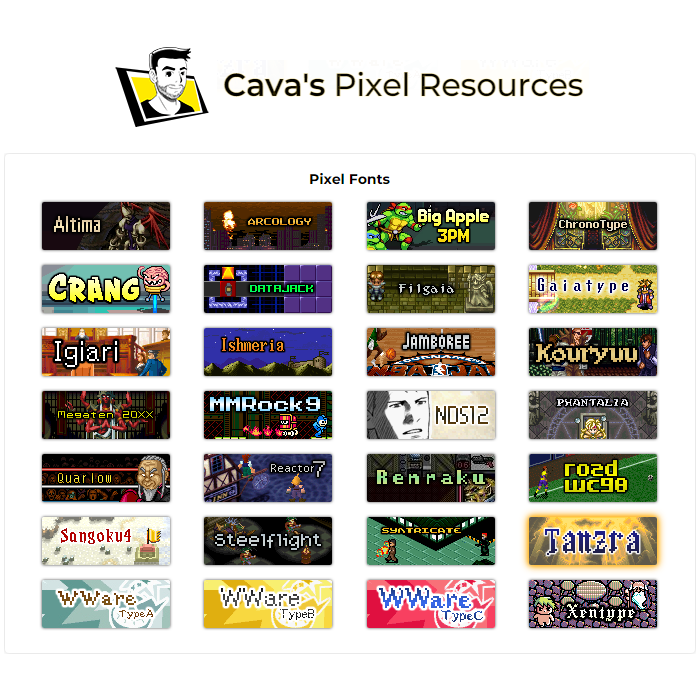
Cava's Pixel Resources Full homepage screenshot

At a glance

Category
Games & Board Games
Language
English
Paid-content signal
No paid content foundObserved
Registered
2014
Hosting
Neue Medien Muennich GmbHInferred
HTTPS certificate trusted
PassedObserved
Last updated

Website review

This review may include AI-generated content and is not individually verified. Domain, certificate and other facts come from the observed data on this page.

What is Cava's Pixel Resources?

Cava's Pixel Resources is a personal font project by a graphic designer who recreates and expands pixel fonts from classic video games. The site collects these fonts for download, mostly under a non-commercial license, and notes that commercial use requires contacting the designer.

The fonts are reconstructions of bitmap typefaces that appeared in specific games, not original designs. Each set is expanded with extra characters—numbers, special glyphs, diacritics, and sometimes full Japanese kana sets—and shipped in webfont-ready formats such as TTF, OTF, WOFF, and SVG with CSS, so they can be used on retro-styled websites as well as in game mockups or fan projects.

Two examples on the page show the range:

Font Based on Notable extras
Altima Final Fantasy Tactics (PlayStation, 1997) Full hiragana and katakana, Cyrillic base set, over 1,000 characters
Arcology Shadowrun (SNES, 1993) Expanded special characters and diacritic variants

If you want to use one, check the license first: the fonts are free under Attribution-NonCommercial-ShareAlike, so a hobby project or personal site is straightforward, while anything commercial needs a separate license request. For a fan game or retro homepage, download the webfont files and credit the designer as the license requires.

Can I use these pixel fonts on a commercial project or website?

For a commercial project: not without permission. For a website: yes, if the site is non-commercial and you credit the creator and keep the same license on anything you build with the fonts. Cava's Pixel Resources states that its fonts are released under an Attribution-NonCommercial-ShareAlike license, and that commercial use requires contacting the designer for a commercial license Cava's Pixel Resources.

What each use looks like in practice

  • Personal or hobby website: a retro-styled fan page or portfolio can use the webfont-ready files (the site says its fonts ship with TTF, OTF, EOT, WOFF, SVG and CSS files) as long as you attribute the font and share adaptations under the same terms.
  • Commercial website or product: a client site, a paid game, merchandise or ad creative falls under the non-commercial restriction. The practical step is to message the designer through the site and ask about a commercial license before you build the design around a specific font.
  • Modified versions: the ShareAlike term means if you extend or alter a font, the result should carry the same license rather than being sold or locked down.

A quick decision check

Ask two questions: does money change hands because of the project, and will you credit the source? If the answer to the first is yes, treat it as a licensing conversation rather than a download. If the answer is no, keep the attribution line visible, for example in the site footer or the font's CSS comment, and you are within the stated terms.

The fonts are recreations of typefaces from games such as Final Fantasy Tactics and Shadowrun, so a commercial project may also raise questions beyond this site's license. For open-licensed pixel fonts intended for commercial use, compare options at Google Fonts or Font Library, where the license for each family is stated on its page.

How do I download and install a font like Altima for use in my design software?

Download Altima from Cava's Pixel Resources, unzip the package, then install the font through your operating system or load it directly from the project folder.

Getting the file

On the site, find the Altima entry and use its download link. The package is a small archive that includes TTF, OTF, EOT, WOFF, SVG and CSS versions of the font, so you may need to unzip it first. For desktop design work, the TTF or OTF is usually the simplest choice.

Installing it

  • Windows: right-click the TTF or OTF file and choose "Install" (or "Install for all users" if others share the machine).
  • macOS: double-click the file and confirm in Font Book, or drag it into Font Book.
  • Design software: restart the application if the font does not appear in the font menu. Some apps only pick up newly installed fonts after a relaunch.

If you would rather not install it system-wide, many design programs let you load a font from a project folder. This is handy when you want to keep a client project self-contained, though support varies by application.

A practical example

Suppose you are building a retro-style game menu mockup. Install Altima, set your text at its intended 16px base size, and disable font smoothing or anti-aliasing where your software allows it. Pixel fonts are designed for exact pixel grids, so scaling them to arbitrary sizes or letting the system blur the edges tends to spoil the crisp look. Export at whole-number scale factors (2x, 3x) rather than odd percentages.

Licensing to keep in mind

Altima is offered under an Attribution-NonCommercial-ShareAlike license, and the site notes that commercial use requires contacting the creator for a license. If your project is commercial, sort out that permission before you build the design around the font. Also credit the source as the license requires.

Choosing the right file format

Situation Suggested file
Desktop design app (Photoshop, Illustrator, Figma desktop) TTF or OTF
A website or web prototype WOFF (with CSS provided)
Legacy web contexts EOT
Vector or embedded use SVG

For a first test, install the TTF, type a short sample at 16px, and confirm the characters render sharply before committing to a full layout.

Which font should I pick if I want the Final Fantasy Tactics look versus a Shadowrun sci-fi style?

Pick Altima for the Final Fantasy Tactics look and Arcology for the Shadowrun sci-fi style; they are separate recreations, so choose by the game atmosphere you want rather than by a single "retro" label. Both come with expanded character sets and webfont-ready files, according to Cava's Pixel Resources.

How they differ in practice

Use case Altima Arcology
Reference game Final Fantasy Tactics (PlayStation, 1997) Shadowrun (SNES, 1993)
Visual character Mixed serif/sans-serif pixel text font Futuristic sans-serif pixel font
Best for Tactical-RPG menus, dialogue boxes, fantasy interfaces Cyberpunk titles, HUDs, tech-themed pages
Language coverage Includes original Japanese hiragana and katakana plus Cyrillic, per the site Described as expanded with special characters and diacritic variants
License Attribution-NonCommercial-ShareAlike; commercial license by request Same non-commercial license terms stated on the site

A practical test: if your project has character names, item lists or narrative text that should feel like a strategy RPG, set a sample paragraph in Altima and check whether the mixed serif/sans shapes stay readable at your intended size. If you are building a title screen, button labels or a sci-fi landing page, try Arcology first, since its futuristic sans-serif forms suit short, high-impact text better than long passages.

Your next step is to download both sets and compare the same short sample—one heading, one menu item and one sentence—at the exact pixel size you plan to use. Keep Altima if the fantasy tone and broader Japanese character support matter; keep Arcology if the cyberpunk mood and clean sans-serif silhouette matter more. For either, confirm the non-commercial license fits your project before publishing.

Do the fonts include Japanese hiragana, katakana, or Cyrillic characters?

Yes—at least some fonts do. Cava's Pixel Resources says each character set has been expanded with extra special characters, and the site calls out Japanese kana and Cyrillic explicitly for individual fonts rather than promising them across the whole collection.

Where the site names them

  • Altima (based on Final Fantasy Tactics): lists a complete Cyrillic base set and the complete original Japanese hiragana and katakana sets, plus many extra special characters and diacritic variants.
  • Arcology (based on Shadowrun): described as expanded with additional special characters, diacritic variants and unique glyphs; the visible description does not name kana or Cyrillic.

What this means in practice

If you are building a retro-styled interface and need Latin text with occasional Cyrillic, Altima is the safer starting point because the site states the coverage directly. If you need Japanese kana for menus or dialogue boxes, Altima is the font to test first; the kana are drawn from the Japanese release, so they should match the game's original look. For any other font on the site, check its own character-set listing before committing, since the "expanded" wording is generic and coverage varies by font.

One trade-off: the fonts are recreations of original game typefaces, so glyph shapes follow those designs rather than a modern typographic standard. Test a sample of your actual text—especially uncommon kana combinations or Cyrillic diacritics—in a browser before layout work, because pixel fonts at their base size can render unevenly when scaled.

A useful next step is to open the Altima entry and compare its character set against the exact strings you need to display; if a glyph is missing, the site's contact option is the route for asking about additions or a commercial license.

How can I support the creator or request a custom font recreation?

You can support the creator or request a custom recreation by contacting Caveras directly through the contact link on Cava's Pixel Resources, and by making a donation if you want to support the work without a commercial need.

Supporting the creator

  • Donate: The site says donations are welcome and provides a donation link. This is the simplest option if you use the fonts personally and want to support ongoing work.
  • Follow the license: The fonts are offered under an Attribution-NonCommercial-ShareAlike license. Keeping attribution and share-alike terms intact, and not using them commercially without permission, is itself a form of support.
  • Request a commercial license: If you want to use a font in a commercial project, the site asks you to contact the creator to obtain a license.

Requesting a custom font recreation

The page describes the creator as a graphic designer who rebuilds fonts from old-school video games, adding special characters, numbers, and game-specific glyphs. For a custom recreation, contact the creator with:

  • the game and the specific font or text screen you want recreated
  • reference images or screenshots
  • the character set you need (for example, Latin, kana, or special glyphs)
  • whether the use is personal or commercial
  • the file formats you need (the site notes webfont-ready files such as TTF, OTF, EOT, WOFF, SVG, and CSS for its own fonts)

A practical next step is to check whether a similar font already exists on the site before asking for a new recreation, then send a concise request with references and intended use so the creator can confirm scope, licensing, and timing.

Related questions

More questions →
What License Applies to the Fonts on Cava's Pixel Resources?

The fonts on caveras.net (Cava's Pixel Resources) are released under a Creative Commons Attribution-NonCommercial-ShareAlike 4.0 license. That means you can use, share, and adapt them for free only for non-commercial purposes, as long as you credit the creator and license any derivative work under the same terms. For commercial use, you must contact the site owner separately to obtain a commercial license.

What the license allows and requires

The site states plainly: "My fonts are free under a Attribution-NonCommercial-ShareAlike license." Each font listing, such as the Altima entry, repeats the license label "CC Attribution-NonCommercial-ShareAlike 4.0."

Condition What it means in practice
Attribution (BY) Credit Caveras / Cava's Pixel Resources when you use or redistribute a font.
NonCommercial (NC) No commercial use without a separate license.
ShareAlike (SA) If you modify or build on a font, distribute your version under the same license.

The fonts are recreations of pixel or bitmap typefaces from older games, and the site notes that most are not original designs—they are rebuilt from the work of the original game designers, with added characters, numbers, and game-specific glyphs. That context matters if you plan to redistribute: the NonCommercial and ShareAlike terms are the operative conditions the site sets.

When you need a commercial license

Any use that generates revenue or serves a business purpose falls outside the free grant. The site's own wording is "Please contact me for commercial requests," and each font page includes a "Get a commercial license for this font" link. If your project is commercial—a product, client work, or a monetized site—treat the free license as unavailable and request terms from the author first.

Practical checklist before you use a font

  1. Classify your use. Personal projects, free fan pages, and non-monetized experiments fit the free license; anything commercial does not.
  2. Add attribution. Include a visible credit to Cava's Pixel Resources with a link to caveras.net where your project allows it.
  3. Keep derivatives open. If you edit the font files, release the result under CC BY-NC-SA 4.0.
  4. Request a commercial license early if there is any chance the project will be monetized, rather than retrofitting permission later.

Donations and updates

The site accepts voluntary donations ("Donations are welcome!") but does not present them as a substitute for a commercial license. Font pages also list version and publication dates—for example, Altima is version 1.2, published 29.01.2019—so check the individual font entry for the current file and license label before downloading.

What Is Cava's Pixel Resources?

Cava's Pixel Resources (caveras.net) is a personal font project by a graphic designer named Caveras, who recreates and expands pixel fonts from classic video games. The fonts are free for non-commercial use under an Attribution-NonCommercial-ShareAlike license; commercial use requires contacting the author for a license. It is a good fit if you want authentic retro game typography for a personal project, a fan page, or a retro-styled website, and a poor fit if you need original typefaces or a ready-made commercial license.

What the site actually offers

Each font is a recreation of a pixel or bitmap font from a specific game, rebuilt and then expanded well beyond the original character set. According to the site, the recreations are based on fonts designed by the respective games' designers, so most are not Caveras's own designs. What the author adds is substantial:

  • Common special characters, numbers, and diacritic variants
  • Game-specific and unique glyphs
  • In some cases, full Japanese kana sets (as with Altima)
  • Webfont-ready files: TTF, OTF, EOT, WOFF, SVG, and CSS

Every font page lists concrete metadata — base size in pixels, spacing (proportional or monospaced), version, publication date, download size, and license — so you can judge compatibility before downloading.

A concrete example: Altima

Altima is a mixed serif/sans-serif pixel font based on the main text font in Final Fantasy Tactics (Square, PlayStation, 1997). Its listing shows what a typical entry looks like:

Field Value
Base size 16px
Spacing Proportional
Characters 1043 total
Coverage Cyrillic base set, original Japanese hiragana and katakana, special characters, zodiac signs
Files TTF, OTF, EOT, WOFF, SVG, CSS
Version / published 1.2 / 29.01.2019
Download 325 kB
License CC Attribution-NonCommercial-ShareAlike 4.0

Arcology, based on the opening credit and title screen text of the SNES game Shadowrun (1993), follows the same pattern: a futuristic sans-serif recreation expanded with additional special characters and glyph variants.

Licensing: what "free" means here

The fonts are released under Creative Commons Attribution-NonCommercial-ShareAlike 4.0. In practice that means:

  • Non-commercial use is free, provided you credit the author and share adaptations under the same license.
  • Commercial use is not covered. The site explicitly asks you to contact the author to obtain a commercial license for a specific font.
  • Donations are welcomed but are not a substitute for a commercial license.

The site does not publish commercial license terms or prices, so those must be requested directly.

Practical considerations before you download

  • Check the base size and spacing first. A 16px proportional font and a monospaced font behave very differently in a game UI or on a web page; the listing tells you which you're getting.
  • Webfont files are included, which matters if you want the retro look on a homepage rather than inside a game engine — you won't need to convert formats yourself.
  • Expect fan-recreation fidelity, not official assets. These are reconstructions matched to the spirit and style of the originals, expanded with characters the originals never had.
  • The catalog grows slowly. Site updates show individual additions and revisions spaced months apart (for example, Hollowetica added 14.07.2026, Gorrister added 03.04.2025, Igiari updated 21.02.2024), so treat it as a curated collection rather than a large library.

Who should use it

Choose Cava's Pixel Resources if you are building something non-commercial — a fan project, a retro-themed personal site, a small indie prototype — and want game-accurate pixel type with broad character coverage and ready-to-use webfont files. Look elsewhere if you need original designs, a large catalog, or a commercial license you can obtain without contacting the author.

Which Classic Video Game Pixel Fonts Are on Cava's Pixel Resources?

Cava's Pixel Resources (caveras.net) hosts pixel font recreations of text from classic video games, and the site's own font list is the authoritative place to see what is currently available. Each entry identifies the game a font comes from and whether it was based on the game's main text, title screen, or opening credits. The site's update log is the fastest way to spot newly added or revised fonts, since the catalog changes over time.

What the site is

Cava's Pixel Resources is a personal project by a graphic designer who rebuilds fonts from old-school video games. The fonts are recreations based on the original pixel or bitmap fonts made by the designers of the games in which they appeared, so most are not original designs. Each character set is expanded with common special characters, numbers, and game-specific glyphs, and webfont-ready files are included for use on a retro-style homepage.

Fonts listed on the site

The page evidence shows two font entries in detail. The full catalog may include more, so check the site's font list and update log for the complete, current set.

Font Based on Source in the game Notes from the entry
Altima Final Fantasy Tactics (Square, PlayStation, 1997) Original main text font Mixed serif/sans-serif; 1,043 characters; complete Cyrillic base set; original Japanese hiragana and katakana sets; additional special characters and zodiac signs; webfont-ready TTF, OTF, EOT, WOFF, SVG and CSS files; base size 16px; proportional spacing; version 1.2; published 29.01.2019; download 325 kB
Arcology Shadowrun (Beam Software, SNES, 1993) Opening credit and title screen text Futuristic sans-serif; expanded with additional special characters, diacritic variants, and unique glyphs

The Altima entry is a useful example of how much detail each font page carries: beyond the game and source text, it lists character count, language coverage, file formats, base size, spacing, version, publication date, and download size. Use those fields to judge whether a font fits your project before downloading.

How to find a font for a specific game

  1. Open the font list on caveras.net and scan the entries, which are named after the fonts rather than the games.
  2. Read each entry's description to confirm the game and whether the source was main text, title screen, or opening credits.
  3. Check the update log for recent additions or revisions. The evidence shows entries such as "Hollowetica font added" (14.07.2026), "Gorrister font added" (03.04.2025), "Igiari font updated" (21.02.2024), and "Montfauçon font added" (15.05.2023).
  4. On the individual font page, review the character set, file formats, base size, and version before downloading.

Licensing and commercial use

The fonts are free under an Attribution-NonCommercial-ShareAlike license. Commercial use requires a separate license obtained by contacting the site owner. Donations are welcomed but are not a substitute for a commercial license. If your project is commercial, plan to request a license before using a font.

Practical checks before you download

  • Character coverage: Confirm the font includes the glyphs your text needs. Altima, for example, covers Cyrillic and Japanese kana in addition to Latin characters, while other fonts may not.
  • File format: The Altima entry lists TTF, OTF, EOT, WOFF, SVG, and CSS files, which suits both desktop and web use. Verify the formats on the specific font page you choose.
  • Size and spacing: Base size and proportional versus monospaced spacing affect how the font renders at small sizes; check these fields against your layout.
  • Version and date: Newer versions may fix glyph issues, so prefer the latest version listed on the font page.
What Character Sets and File Formats Do Cava's Pixel Resources Fonts Include?

Cava's Pixel Resources fonts are expanded recreations of classic video game pixel fonts. Each font starts from the original game's pixel or bitmap design and adds common special characters, numbers, diacritic variants, and game-specific glyphs. The files ship in web-ready formats: TTF, OTF, EOT, WOFF, SVG, and CSS. Coverage varies by font—some include full Cyrillic and Japanese kana sets, while others are limited to Latin-based characters and symbols. Check the individual font page before committing to one for a project that needs non-Latin text.

What Every Font Includes

According to the site, the designer rebuilds fonts from old-school games and then expands each character set beyond what appeared on screen. The standard additions across the collection are:

  • Common special characters and punctuation
  • Numbers
  • Diacritic variants (for accented Latin letters)
  • Unique, game-specific glyphs
  • Webfont-ready files for use on a website

The fonts are recreations based on the original designers' pixel or bitmap work, not original type designs. The site states this directly, which matters if you need to credit or license the typeface for anything beyond personal use.

File Formats

Each font is distributed as a package containing:

Format Typical Use
TTF Desktop install, general design work
OTF Desktop install, print and design apps
EOT Legacy web font embedding (older Internet Explorer)
WOFF Modern web font embedding
SVG Web font embedding, some design tools
CSS Stylesheet to wire the webfont files into a page

Because CSS and WOFF/SVG files are included, you can drop a font into a retro-styled webpage without converting formats yourself. The site describes the files as "webfont-ready."

Character Coverage Varies by Font

Not every font has the same breadth. The Altima font, recreated from Final Fantasy Tactics (PlayStation, 1997), is the fullest example on the page:

  • 1,043 characters total
  • Complete Cyrillic base character set
  • Complete original Japanese hiragana and katakana sets (from the Japanese version of the game)
  • Additional special characters, zodiac signs, and unique glyphs
  • Proportional spacing, 16px base size, version 1.2

Other fonts, such as Arcology (from Shadowrun on SNES), are described as expanded with "countless additional special characters, diacritic variants, unique glyphs," but the page does not list Cyrillic or kana for them. Treat the Altima feature list as the exception rather than the rule.

How to Decide If a Font Fits Your Project

  1. Identify the scripts you need. If your text is Latin-only, most fonts in the collection will work. If you need Cyrillic or Japanese kana, start with Altima and verify the specific font page for others.
  2. Check the character count and base size. Altima lists 1,043 characters at a 16px base with proportional spacing. Smaller counts or fixed-width spacing may not suit dense UI text.
  3. Confirm the format you need. All packages include TTF, OTF, EOT, WOFF, SVG, and CSS, so desktop and web use are both covered.
  4. Review the license before use. The fonts are free under an Attribution-NonCommercial-ShareAlike license. Commercial use requires contacting the designer for a commercial license. If your project is commercial, plan for that step before building around a font.

Common Pitfalls

  • Assuming full Unicode coverage. The expanded sets are generous but font-specific. A font with rich Latin diacritics may still lack Cyrillic or kana.
  • Mixing pixel sizes. These are pixel fonts with defined base sizes (16px for Altima). Rendering them at non-multiples of the base size can blur or distort the pixel grid.
  • Skipping the license check. "Free" here means non-commercial with attribution and share-alike terms, not public domain. Commercial projects need a separate license from the designer.
Can I Use Cava's Pixel Resources Fonts as Webfonts on My Website?

Yes—Cava's Pixel Resources fonts are explicitly prepared for web use: each font page states that webfont-ready TTF, OTF, EOT, WOFF, SVG, and CSS files are included, and the site describes them as suitable for "your own retro-powered homepage." The condition is licensing: the fonts are released under an Attribution-NonCommercial-ShareAlike license, so a personal or other non-commercial site can use them with credit, while a commercial website needs a commercial license obtained by contacting the designer.

What "Webfont-Ready" Means Here

The site's font listings, such as the Altima entry, list the following formats as included:

Format Typical role
WOFF Modern browser webfont
EOT Legacy Internet Explorer
SVG Older mobile/legacy browsers
TTF / OTF Desktop installs and fallback
CSS Stylesheet to wire the font into a page

Because a CSS file is bundled, you do not need to generate the @font-face rules yourself—the package already contains the declarations pointing at the included font files. You upload the font files and CSS to your site and reference the stylesheet.

The Licensing Condition Decides Whether You Can Use It

The license is Attribution-NonCommercial-ShareAlike:

  • Attribution — you must credit Caveras / Cava's Pixel Resources.
  • NonCommercial — you may not use the fonts on a site that is commercial in nature without permission.
  • ShareAlike — adaptations of the font must carry the same license.

For a commercial site, the site says to contact the designer to obtain a commercial license for a specific font. Donations are welcomed but are not a substitute for a commercial license.

Practical test before you build

Ask one question: does the site generate revenue or promote a business? A personal blog, fan page, or hobby project fits the non-commercial terms; a storefront, client site, or product landing page does not, and needs the commercial license first.

Check the Character Set Against Your Actual Text

Webfont suitability is not only about file format—the glyphs must cover the words you will display. The Altima font, for example, lists 1,043 characters, a complete Cyrillic base set, and the original Japanese hiragana and katakana sets, plus special characters and diacritics. Other fonts differ: Arcology is described as a futuristic sans-serif recreation from Shadowrun with an expanded set of special characters and diacritic variants.

Before committing, open the font's character set on its page and confirm it includes:

  • Every letter and punctuation mark your headings and body text use
  • Any accented characters in names or non-English copy
  • Symbols such as currency signs, arrows, or zodiac glyphs if your design relies on them

If a glyph is missing, the browser will substitute it from a fallback font, which breaks the pixel look mid-sentence.

Steps to Put a Font on Your Site

  1. Confirm the license fits — non-commercial with credit, or secure a commercial license first.
  2. Download the font package from its page (Altima, for instance, is a 325 kB download).
  3. Upload the font files and CSS to your site's assets directory.
  4. Link the bundled CSS in your page's <head>, or copy its @font-face rules into your own stylesheet and correct the file paths.
  5. Apply the font family to the elements you want in pixel style—often headings only, since pixel fonts at small body sizes can be hard to read.
  6. Verify in the browser that the rendered text matches the sample and that no fallback glyphs appear.

Common snags

  • Wrong paths after upload — the CSS references files relative to its own location; if you move files, update the URLs.
  • Mixed content or CORS issues — font files served from a different domain may be blocked; hosting them on the same domain avoids this.
  • Missing glyphs — check the character set page rather than assuming full coverage.
  • License drift — if a hobby site later becomes commercial, revisit the license before continuing to use the font.

Bottom Line

Cava's Pixel Resources is a legitimate source of webfont files for retro-styled pages, with the formats and CSS needed to deploy them. The deciding factor is your site's commercial status and your willingness to credit the designer; check each font's character set against your text before building around it.

Website Overview

An established domain and managed infrastructure suggest continuity of operations and may support dependable delivery, although neither guarantees service quality. An active inbound-mail setup with incomplete authentication may leave the domain more open to impersonation. Provider hosting alone does not close that gap.

Domain and Registration

Registered in 2014, this domain has about 12 years of history. That suggests continuity, although ownership and purpose may have changed. Transfer-protection status is present, helping reduce the risk of unauthorized domain transfers. The domain uses the common .net extension, which is not an independent safety signal.

DNS and Email

The observed email authentication setup is incomplete: DMARC is missing. Nameservers are provided by udag.de, indicating managed DNS hosting. MX records point to the udag.de email service. No CNAME was found; the observed records resolve directly to addresses. DNSSEC signatures were not detected, so this additional DNS authenticity protection is not confirmed.

TLS and Certificates

The public key uses EC with 256 bits. The server supplied a complete certificate chain. No organization name is present in the certificate; the available fields are consistent with domain validation. The certificate was issued by Let's Encrypt, commonly associated with automated certificate services. The certificate's total validity is about 89 days, consistent with a short renewal cycle.

HTTP and Browser Security

The checked browser-security headers were not detected, leaving fewer explicit browser-side safeguards. No X-Powered-By header was found, reducing one common source of backend fingerprinting information. No obvious internal addresses or debug information were found in the headers. The Server header identifies nginx without an exact version. No explicit CDN or WAF marker was found in the response headers.

Technology Stack Analysis

The public page identifies jQuery, Bootstrap, nginx without precise versions, leaving fewer clues for version-specific scanning.

Search and Social Sharing

No homepage canonical URL was detected. If duplicate URLs exist, consolidation may be less explicit. The title has 22 characters, within a common display range. A meta description is present, with 137 characters. The observed directives allow indexing and link following. No Generator meta tag is publicly exposed.

Hosting and Email

DNSudag.de
HostingNeue Medien Muennich GmbH
Emailudag.de
Approximate IP geolocation (inferred; a CDN or proxy may differ from the origin server) Germany flagGermany Inferred 85.13.151.37

Registration details

RDAP / WHOIS

Registrarunited-domains GmbH
Registered2014-01-05
Expires2027-01-05
Domain statusclient transfer prohibited
Nameserversns.udag.de、ns.udag.net、ns.udag.org
DNSSECunsigned

DNS records

DNS

TypeNameValueTTLPriority
Acaveras.net85.13.151.37600—
MXcaveras.netmx00.udag.de360010
MXcaveras.netmx01.udag.de360020
NScaveras.netns.udag.de86400—
NScaveras.netns.udag.net86400—
NScaveras.netns.udag.org86400—
TXTcaveras.netv=spf1 include:_smtp.udag.de ~all3600—

TLS and certificates

TLS / SSL

AssessmentNormal configuration
Supported protocolsTLSv1.2、TLSv1.3
Negotiated protocolTLSv1.3
Certificate subjectcaveras.net
IssuerLet's Encrypt
Valid until2026-12-03T22:06 · Remaining when checked: 34 days
Verification detailsCertificate trust: Passed · Hostname match: Passed

HTTP response headers

HTTP

HeaderValue
content-typetext/html; charset=utf-8
cache-controlmax-age=3600
servernginx

Identified technologies

jQueryBootstrapnginx

Pages, Search and Sharing

Meta descriptionClassic video game pixel fonts recreated and expanded by Caveras. Free for non-commercial use. Please contact me for commercial requests!
Canonical URLNot detected
LanguageEnglish (default)
Twitter CardNot detected

No robots.txt found

No sitemaps found

User reviews (0)

  • No reviews yet.