
 简体中文
简体中文 English
Website review
This review may include AI-generated content and is not individually verified. Domain, certificate and other facts come from the observed data on this page.
What is Christian Web Host?
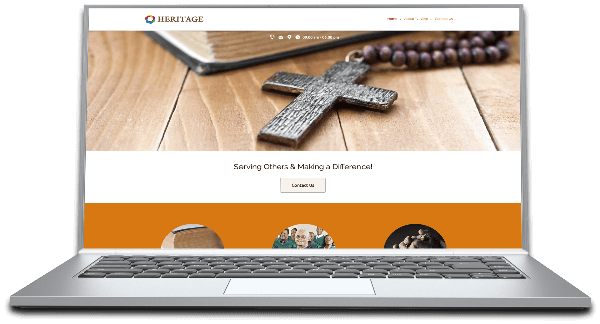
Christian Web Host is a hosting provider aimed at churches and faith-based organizations, combining website hosting with church-oriented templates and domain registration — including the option to register a .church domain.
What it offers
- Church-focused hosting: The platform is positioned around church websites rather than general-purpose hosting.
- Website templates: Professionally designed templates intended for church sites, so a congregation can launch a polished presence without building a design from scratch.
- Domain registration: You can register a domain, with .church presented as a fitting choice for a ministry.
- Tiered solutions: The site organizes options by audience, suggesting different plans depending on the size or needs of the organization.
Who it suits
A small congregation with no dedicated web staff is the clearest fit: pick a template, register a domain, and publish service times, sermons, events and giving information. Larger churches with an existing site and technical volunteers may find a general host more flexible, since template-driven platforms can feel limiting once you want custom integrations.
Next step
Before choosing, list what your site must do — sermon audio or video, online giving, event calendars, member login. Then check whether the templates and plan tiers support each item, and confirm whether you can move your site elsewhere later if your needs change.
How do I choose the right hosting plan for my church's size and needs?
Start with your congregation's actual weekly workflow, not its nominal size. The right plan is the cheapest one that covers your busiest Sunday plus one year of growth.
Christian Web Host organises its offering around church website templates and hosting, with a "Solutions for everyone" section and a "Find the right solution" step — so the intended path is to match a template-and-hosting package to your church type rather than pick a generic server tier.
Match the plan to the job, not the headcount
| Church situation | What drives the plan |
|---|---|
| Small congregation, one service, volunteer-run | One site, a few pages, sermons and a calendar; minimal storage and bandwidth |
| Mid-size church, multiple services and ministries | Several contributors, media library for audio/video, events and giving pages |
| Multi-site or large church | Multiple domains or sub-sites, higher traffic peaks, more storage and admin accounts |
Practical criteria
- Peak traffic, not average. Christmas and Easter services can multiply visitors in a single week; a plan that only survives ordinary Sundays will fail when it matters most.
- Media weight. Sermon audio and video are the biggest storage and bandwidth consumers. If you publish weekly video, size for that first.
- Number of editors. Count everyone who needs a login — office staff, ministry leaders, volunteers. Some plans cap user accounts or admin seats.
- Domain and email. Decide whether you need a
.churchdomain and church-branded email addresses, and confirm whether these are included or added separately. - Support hours. A volunteer updating the site on a Saturday evening needs help then, not Monday morning.
- Growth headroom. Choose one tier above your current need if you plan to add ministries, languages or a building campaign within the year.
A concrete next step
List your five busiest weeks of last year, note what you published in each (video, livestream link, registration form), and write down how many people touched the website. Take that list to the "Find the right solution" step on Christian Web Host and ask which package covers it without paying for capacity you will never use. If your answers are all "one service, one editor, no video", a small shared plan is almost certainly enough — and you can revisit when your media habit changes.
Can I register a .church domain through Christian Web Host, and how does it work?
Yes — Christian Web Host lists .church domain registration as part of its offering. Its page highlights “Find your perfect domain” alongside church website templates and hosting, so the intended flow is to pick a .church name, register it, then build and host the site on the same platform. That bundling is the main appeal for a church that wants one provider instead of coordinating a registrar, a builder, and a host separately.
How it typically works
- Search the domain. You enter your preferred name (for example, yourchurchname.church) and check availability.
- Register it. If it's free, you claim it for a registration term; if not, you adjust the name or choose an alternative.
- Connect hosting. The domain points to your hosting account so visitors reach your site.
- Build the site. You apply a church-oriented template and add your service times, location, staff, giving, sermons, and events.
What to weigh
- One-stop convenience vs. flexibility. Keeping domain, hosting, and templates together simplifies setup and support, but it can make switching hosts later more involved than if the domain sat with an independent registrar.
- Template fit. Church-specific templates suit congregations that need a credible site quickly without a designer. A church with unusual needs (complex member portals, multi-language, heavy media) may outgrow them.
- Domain control. Confirm you can manage DNS records and renewals yourself, and that you retain ownership of the name.
Practical next step
Before registering, check whether your first-choice name is available and whether a matching .org or .com is already in use by another organization — that avoids confusion later. If you expect to change hosts within a year or two, registering the domain separately and pointing it at Christian Web Host gives you more freedom. For a small or mid-sized congregation that wants a finished-looking site fast, the all-in-one route is the simpler choice.
You can explore the options at Christian Web Host.
What church website templates are available, and can I customize them without coding?
Christian Web Host describes its offering as a church website builder and hosting platform with professionally designed website templates, so the short answer is: templates are the starting point, and the platform is positioned so that a church can launch and edit a site without hand-coding. The page evidence names templates as a core feature but does not list individual template names, layouts or design styles, so treat the exact catalogue as something to confirm directly with the provider before you commit.
What the templates are for
These are congregation-facing sites rather than generic blogs: the emphasis on “grow your community” and “solutions for everyone” suggests the templates are meant for churches that need the usual mix of service times, location and contact details, staff or ministry pages, sermons or media, events and giving information. The domain angle matters too — the site promotes registering a .church domain, which is a small but real signal that the product is aimed at churches specifically rather than at small businesses in general.
Customising without coding
The stated design is “professionally designed website templates and hosting,” which points to a template-plus-editor model: you choose a design, then change text, images and sections through a visual interface. That is the normal way non-technical church volunteers work. What you still need to verify is the depth of that editing:
- Can you rearrange page sections, or only swap content inside fixed blocks?
- Can you change fonts, colours and logos to match your church branding?
- Are there separate templates for different church sizes or traditions?
- Can you add sermon audio, video, event calendars or online giving plugins?
- Who handles updates and backups — you or the host?
Who this suits, and the trade-off
This fits a small or mid-sized church whose volunteers have limited time and no developer on staff. The trade-off is flexibility: template-driven builders are fast to launch and hard to break, but they can feel constrained once your site grows into a large media library or a heavily customised member area. If your church needs something highly bespoke, a general-purpose platform with a developer may serve you better.
Next step
Ask the provider for a live demo of the editor and a full template list, then test one template by making three realistic edits: change the service times, replace the hero image, and add an events section. If those take minutes rather than hours, the no-coding promise holds up for your volunteers. For comparison, WordPress-based church themes are widely used and documented at WordPress.org, and you can review general hosting considerations at WordPress.org's hosting documentation.
How does Christian Web Host support growing a church community online?
Christian Web Host supports online community growth mainly by pairing hosting with ready-made church website templates, so a congregation can launch a functional site without starting from a blank page. The page frames this around three tasks: getting a site online, choosing a design, and registering a matching domain such as a .church address.
What the platform actually emphasizes
- Templates built for churches — professionally designed layouts intended for ministry sites, rather than generic business themes.
- Hosting bundled with the builder — one place for the site and its infrastructure, which reduces the number of vendors a volunteer team must coordinate.
- Domain registration — including .church domains, useful when you want an address that signals your identity immediately.
- Solutions by size or need — the page presents multiple options so a small plant and a larger congregation can pick differently.
Where this helps a growing community
A church's website usually does quiet, repetitive work: service times, directions, giving, sermon archives, event calendars, and first-contact information for visitors. Templates shorten the setup phase, and bundled hosting keeps renewals and support in one relationship. The .church domain can also make a small congregation look established and be easier to remember than a long hyphenated name.
Trade-offs to weigh
Bundled convenience can mean less flexibility than assembling separate tools. If you need complex membership management, livestreaming infrastructure, or deep integration with church software, check whether the platform connects to those before committing. Template quality also varies by ministry type — a youth-focused site and a traditional liturgical site need different structures.
A practical next step
List the five things a first-time visitor must find in under ten seconds — service time, location, what to expect, kids' programming, and giving. Then open a few templates and check whether each of those is reachable without scrolling far. If a template passes that test, the hosting choice is usually the easier decision.
For broader comparisons, established church-focused providers include FaithConnector and general-purpose builders like Squarespace; the right fit depends on how much hands-on control your volunteers want.
Is Christian Web Host suitable for a small ministry or only larger churches?
It is suitable for a small ministry. The site’s own framing is broad rather than enterprise-focused: it advertises “Solutions for everyone,” “Find the right solution,” and a “Church Website Builder and Hosting Platform” with “Professionally designed website templates and hosting.” That points to a setup where a small ministry can start from a template instead of commissioning a custom site.
For a small ministry, the practical appeal is speed and fit: a church-specific template, hosting in the same place, and a .church domain option mentioned in the site description. That reduces the number of vendors and decisions a volunteer or part-time administrator has to manage.
The trade-off is that “suitable for everyone” is a positioning claim, not a guarantee of the right tier for your situation. A small ministry with a simple need — service times, location, staff or leader contacts, giving information, sermons or bulletins, and a calendar — is likely to be well served. A larger church with multisite campuses, complex permissions, extensive media libraries, or custom integrations may find template-driven hosting limiting.
A useful next step is to compare the site’s listed solutions against your must-haves before buying:
- If you need a simple public site and want minimal technical overhead, this is a reasonable candidate.
- If you need custom workflows, multiple staff roles, or advanced media handling, check whether the available solutions cover those needs or whether you should look at more configurable church-focused platforms such as Church Plant Media or general-purpose hosts with a separate site builder.
- If you already have a domain, confirm whether you can use it rather than registering a new
.churchdomain.
The deciding factor is not church size but the gap between your required features and the solutions offered.
 Toronto, Ontario, Canada
User reviews (0)