
 简体中文
简体中文 English
Website review
This review may include AI-generated content and is not individually verified. Domain, certificate and other facts come from the observed data on this page.
What is Claru?
Claru is an AI-powered migraine tracking app for iOS and Android that helps you log headaches, look for patterns, and estimate near-term risk. Its pitch is speed and interpretation: instead of filling out a long form mid-attack, you can speak a description and let the app extract the details. As described on its site, it combines voice logging, trigger and symptom tracking, a 7-day risk forecast, and exportable reports for your doctor.
What it covers
- AI voice logging: You describe the attack aloud; Claru transcribes it and pulls out severity, timing, symptoms, triggers, and medications. The site's example is a spoken line about throbbing on the left side at a 7, which becomes structured fields.
- Migraine Mode: A stripped-down, full-screen logging view with larger touch targets and less visual stimulation, plus one-tap access to an emergency contact — designed for use during an attack rather than after.
- Broad tracking: Migraines plus sleep, exercise, and custom events, so potential triggers aren't limited to food and weather.
- 7-day risk forecast: A daily risk estimate built from your history, weather data, sleep patterns, and personal triggers. Claru states these are estimates, not medical predictions or guarantees.
- Pattern discovery: The app analyzes entries for correlations and timing trends — including combinations of variables — that are hard to notice by hand.
- Doctor reports: PDF summaries with frequency analysis, severity charts, and medication logs.
Who it suits
Claru fits someone who finds standard headache diaries tedious and abandons them, or who wants a neurologist-ready summary without building a spreadsheet. It is a poor fit if you want a clinically validated diagnostic tool or a guarantee about when an attack will strike — the forecast is a prompt for caution, not a certainty.
A practical next step: before committing, run a two-week test. Log every attack by voice, then check whether the app's surfaced patterns match what you already suspected. If it shows you something new — a sleep or weather link, or a timing trend — the tracking is earning its place in your routine. If you already keep a detailed paper diary that works, the main upgrade here is the report generation and the low-friction logging during attacks.
For background on migraine triggers and treatment, the Migraine.com community and the American Migraine Foundation are useful independent references to pair with whatever your tracker shows you.
How does Claru's AI voice logging work during a migraine attack?
Claru's AI voice logging lets you describe a migraine out loud and have the app transcribe it and pull out structured details automatically. On the page, a sample entry reads “Throbbing on the left side since 2pm, about a 7,” and Claru extracts severity 7/10, left side, a 2:00 PM onset, and a medication entry. That matters during an attack because typing on a phone is often the last thing you want to do.
What gets captured
- Severity, described in your own words
- Onset time and pain location
- Triggers and symptoms you mention
- Medications you took
Migraine Mode
Claru also describes a Migraine Mode: a full-screen, distraction-free logging view with larger touch targets, reduced stimuli, and one-tap access to an emergency contact. That is the feature to use when speaking is hard or when you want the fewest possible taps.
Practical test
The next time a migraine starts, open Claru and say one sentence covering four things: how bad it is, where it hurts, when it started, and what you took. Then check the extracted fields. If the app gets severity, side, and medication right without cleanup, voice logging will save you real effort. If it consistently misses one of those, fall back to tapping that field and use voice for the rest.
Claru's page states that its 7-day risk estimates are not medical predictions or guarantees, so treat voice-logged entries as a record for you and your clinician, not as a diagnosis. For a second opinion on general migraine tracking habits, the American Migraine Foundation at American Migraine Foundation publishes patient-oriented guidance.
How accurate is Claru's 7-day migraine risk forecast?
Claru does not claim that its 7-day forecast is medically accurate. The page describes it as a "7-day risk estimate" and explicitly states that estimates "are not medical predictions or guarantees." So the honest answer is: treat it as a personal, data-driven signal about elevated-risk days, not a diagnostic or clinically validated prediction.
What the forecast actually uses
According to the site, Claru's risk forecast is "powered by your history, weather data, sleep patterns, and personal triggers." The page shows an example week with Thursday flagged as "elevated," and lists contributing factors such as poor sleep (16%), alcohol (16%), and a pressure drop (13%). That tells you the forecast is a weighted blend of your own logged patterns plus environmental inputs, not a fixed clinical formula.
What that means in practice
- It is personalized, so it depends on your data. A new user with a few entries gives the model very little to work with; someone with months of consistent logs gives it more to correlate. Accuracy, in the everyday sense of "does it flag my bad days," will track how much and how honestly you log.
- It surfaces associations, not causes. Weather pressure drops, poor sleep, and alcohol appearing alongside elevated risk are correlations in your record. They are useful prompts to review, not proof that any one factor triggered an attack.
- It is a planning tool, not a warning system. A reasonable use is to look at the week ahead, notice a flagged day, and decide whether to protect sleep, hydrate, or carry medication. It should not replace a clinician's assessment or be used to rule an attack in or out.
How to judge it for yourself
Keep a simple check for a month or two: each week, note the days Claru marks elevated, then compare them with the migraines you actually had. You are looking for whether flagged days overlap with real attacks more often than not, and whether the listed factors match what you noticed. If the overlap is weak, the likely fix is more consistent logging rather than a different app.
For a broader headache diary that some people use as a comparison point, see Migraine Buddy. If you want to see how Claru presents the forecast and its caveats in context, the product page is at Claru — AI Migraine Tracker.
Can I share Claru's doctor-ready reports with my healthcare provider?
Yes. Claru generates professional PDF reports with frequency analysis, severity charts, and medication logs, described as ready to share with your healthcare provider. You can export a report covering a chosen period—the site shows an example spanning June to August with 18 attacks—and bring it to an appointment.
How to use it in practice
- Log consistently for a few weeks before your visit, including severity, suspected triggers, symptoms, medications, and recovery.
- Generate the report shortly before the appointment so it reflects recent patterns.
- Pair the PDF with a short note of your own questions, since the report summarizes data rather than diagnosing.
What the report does and doesn't do
The report organizes your own entries into charts and logs; it does not replace clinical judgment. Claru's own risk forecasts are described as estimates, not medical predictions or guarantees, and the same caution applies when your provider interprets the report. A neurologist or headache specialist can use the frequency and medication history to assess whether your current treatment is working, but the decision stays with them.
For comparison, other trackers also offer exportable summaries, such as Migraine Buddy. If your priority is a clean, doctor-facing PDF, check what each app includes—date range, medication counts, and trigger charts—before committing to months of logging. A practical next step: open Claru, review a sample report format, and confirm it captures the fields your provider actually asks about.
What migraine triggers and patterns can Claru help me discover?
Claru is built to surface patterns you would likely miss in a paper diary, because it analyzes your entries together rather than one at a time. According to the site, it looks for multi-variable triggers, timing trends, and correlations across your history, weather data, sleep patterns, and personal triggers. The 7-day forecast shown on the page weights factors such as poor sleep (16%), alcohol (16%), and pressure drops (13%) — useful as an illustration of how it combines inputs, though your own percentages will differ.
What it can help you examine
- Combination triggers: not just "wine" or "stress" alone, but situations where several factors line up before an attack.
- Timing trends: whether attacks cluster on particular days, at certain times, or at a consistent interval after a trigger.
- Weather and pressure sensitivity: the page explicitly includes weather and pressure changes in its risk estimates.
- Sleep and lifestyle links: sleep, exercise, and custom events are tracked alongside migraines, so correlations between them and attacks can appear.
- Medication and symptom patterns: severity, symptoms, medications, and recovery are logged, which can reveal whether certain responses tend to follow certain attack types.
A practical way to use it
Spend two to three weeks logging consistently by voice or tap — including the ordinary days, not just the bad ones — then review the pattern summaries before changing anything about your routine. A pattern is only worth acting on if it repeats across several attacks; a single correlation is a hypothesis, not a finding.
Keep the limits in view
Claru's own page states that its risk estimates are not medical predictions or guarantees. Treat discovered patterns as discussion material for your clinician, and use the doctor-ready PDF reports to bring frequency, severity, and medication data to an appointment rather than relying on memory. If you want a second opinion on your data or a different tracking style, established diaries such as Migraine Buddy cover similar ground.
Is Claru free to use on iOS and Android?
Yes — Claru is presented as free to download and use on both iOS and Android, with no credit card required to get started. The page's own badge reads "Free on iOS & Android · No credit card," so there is no paywall standing between you and the core tracking features described there.
What "free" covers on the page
The listed feature set is broad rather than a stripped-down trial:
- AI voice logging that extracts severity, triggers, symptoms and medications from speech
- A 7-day migraine risk forecast drawing on your history, weather, sleep and personal triggers
- Pattern discovery across your entries
- Doctor-ready PDF reports
- Migraine Mode for low-stimulation logging mid-attack
- Tracking for migraines, sleep, exercise and custom events
The catch worth checking yourself
The site does not publish a pricing page or list any paid tier, so nothing there tells you whether a subscription appears later — for example, behind unlimited reports or extended history. Treat "free" as accurate for what the page states, not as a guarantee about future limits. If ongoing cost matters to you, open the app's App Store or Google Play listing and read the "In-App Purchases" section before you commit months of entries.
A practical next step
Download it, log two or three attacks by voice, and generate one report. That tells you within a week whether the free tier covers your real routine — and whether the AI transcription handles how you actually describe pain. If you want a second opinion on the tracking approach, general migraine-diary guidance from Migraine.com or the American Migraine Foundation can help you judge what a good log should contain.
 Namecheap
 Vercel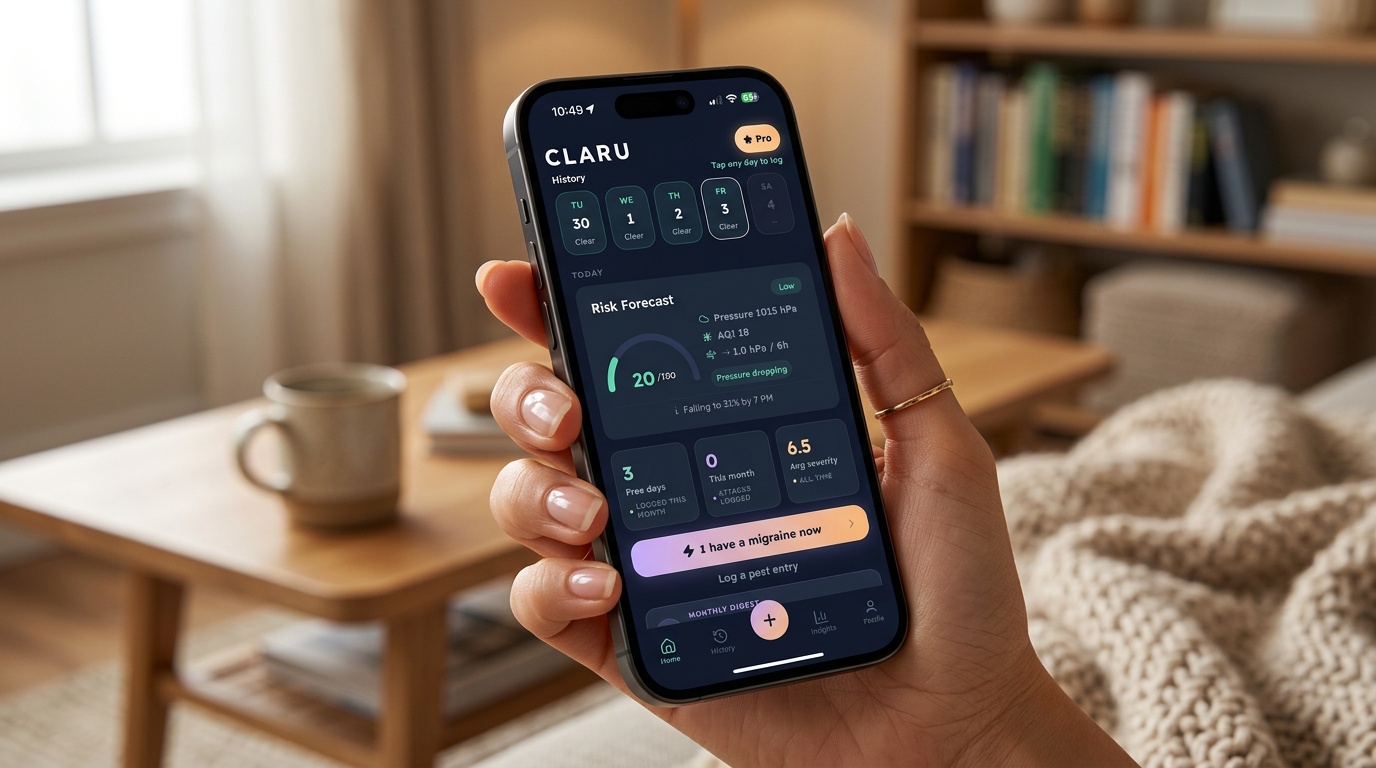

User reviews (0)