
 简体中文
简体中文 English
Website review
This review may include AI-generated content and is not individually verified. Domain, certificate and other facts come from the observed data on this page.
What is Hiracraft?
Hiracraft is a browser-based way to play Minecraft-style gameplay without installing the game. According to the site itself, it runs directly in your browser using Eaglercraft technology, and the page provides options to load the game, play multiplayer, browse Minecraft resources, and view creator content.
Who it suits
- Quick, low-commitment play: useful if you want to build or explore for a short session without downloading a launcher or setting up Java.
- Shared computers or restricted machines: a browser option can help when installing software isn't practical, though school or work network policies may still block it.
- Curious newcomers: a simple way to see whether the core loop of mining, building and exploring appeals before investing in the official game.
Trade-offs to expect
The site explicitly states it is not optimized for mobile screens and recommends a desktop or laptop. Browser-based versions of this kind generally depend on your connection and browser performance, so expect a different experience from the desktop game, particularly on lower-end hardware.
Practical next step
Open it on a laptop or desktop, try single-player first to judge controls and performance, then test multiplayer if you want to play with others. If you later want the full, officially supported experience with updates and broader compatibility, compare with Minecraft.
Can I play Hiracraft on a phone or tablet, or does it require a desktop computer?
Hiracraft is built for desktop and laptop computers, not phones or tablets. The site itself displays a warning that it is "not optimized for mobile screens" and asks visitors to use a desktop or laptop for the best experience. So while a mobile browser might load the page, you should expect a poor or broken experience rather than a playable game.
What this means in practice
- Desktop or laptop: This is the intended way to play. A keyboard and mouse also suit the game's controls far better than a touchscreen.
- Phone or tablet: Not supported as a target device. Small screens, touch controls and mobile browser limits all work against a game designed around a desktop layout.
A useful next step
If you only have a phone or tablet, try the site on a desktop or laptop before committing time to it, or look for a mobile-oriented alternative. If you do have a computer, open Hiracraft there and use the on-page Load Game option to start. For context on browser-based Minecraft options generally, Hiracraft is the reference point here; other browser Minecraft projects exist, but check each one's own device requirements rather than assuming mobile support.
How does Hiracraft run Minecraft in a browser without downloads or installation?
Hiracraft runs Minecraft in a browser through Eaglercraft, a JavaScript/WebAssembly reimplementation of Minecraft that executes inside the browser tab rather than on your desktop. The page describes the game as "powered by Eaglercraft technology," and its interface offers Load Game, Multiplayer, Resources, and Quit Game options — a self-contained web client rather than a launcher that installs files. In practice, the browser handles rendering and input, and the game code is delivered as web assets when you open the page, so there is no separate download or install step.
What this means in use
- Startup: You open the site on a desktop or laptop and choose Load Game. The page itself warns it is not optimized for mobile, so a phone or tablet is a poor fit.
- Multiplayer: The Multiplayer option suggests browser-to-server play, which is the main reason someone would pick a web client over a local install.
- Trade-offs: A browser build prioritizes convenience and quick access over fidelity to the full desktop game. Expect a lighter experience than official Minecraft, and performance depends on your browser and machine rather than a native client.
Practical next step
If you want a quick session without installing anything, use a desktop browser and start with single-player to check performance before joining multiplayer. For comparison, the official Minecraft site covers the desktop and mobile versions if you later want the full game.
What is Eaglercraft, and how does it relate to Hiracraft's gameplay?
Eaglercraft is a browser-based reimplementation of Minecraft that runs in JavaScript/WebAssembly, letting the game run without installing Java or the official launcher. Hiracraft uses that technology as its engine, so its "play in your browser" gameplay is essentially Eaglercraft: you open the page, load the game, and join worlds or multiplayer sessions from the browser.
What this means in practice
- No installation: You skip launchers and downloads, which makes Hiracraft convenient on shared or locked-down computers.
- Desktop-first: Hiracraft's own notice says the site is not optimized for mobile, so plan to use a laptop or desktop with a keyboard and mouse.
- Eaglercraft's limits carry over: Browser Minecraft builds typically target older Minecraft versions and can be more sensitive to browser performance than the desktop Java edition. Treat it as a lightweight way to build and explore, not a full replacement for modern Minecraft.
Choosing between Hiracraft and alternatives
If your goal is quick, no-install play on a desktop, Hiracraft fits. If you need current Minecraft features or mobile play, the official Minecraft is the better reference point, and Eaglercraft is the upstream project if you want to understand the engine itself.
A useful next step: open Hiracraft on a desktop browser, load the game, and test single-player building first. If performance holds up, try a multiplayer session; if it stutters, that is the browser engine's trade-off rather than a setup error.
Does Hiracraft support multiplayer, and how do I join or host a game with friends?
Yes. Hiracraft supports multiplayer through its Multiplayer menu option, alongside single-player play and a resources section. The site is built on Eaglercraft, a browser-based Minecraft-compatible engine, so multiplayer works over the web rather than through a downloaded client or a Mojang account.
Joining a game
The site lists a Multiplayer entry in its main menu. Open it after loading the game to see the available server options and connect to one. The exact server list and any address field live inside the game itself, so check that screen rather than the landing page.
Hosting for friends
The site does not describe a hosting feature on its page. In practice, friends typically join the same public or shared server, or someone runs a server separately and others connect to it by address. Treat "host your own world for friends" as something to verify inside the Multiplayer screen before planning a session around it.
Practical considerations
- Use a desktop or laptop. The site explicitly warns it is "Not Optimized for Mobile" and asks visitors to use a desktop or laptop for the best experience. A phone-based session with friends will likely be frustrating.
- Browser performance matters. Since the game runs in the browser via Eaglercraft, a modest laptop with a current browser will handle small co-op sessions better than a low-end machine with many tabs open.
- Version compatibility. Browser Minecraft ports often support specific client versions; if a friend cannot connect, matching versions is the first thing to check.
A concrete scenario
Two friends want a quick building session without installing anything. Both open Hiracraft on laptops, load the game, and go to Multiplayer to pick a server. If they want a private world, one of them needs a server they can both reach, which may mean checking the in-game server list or running a separate server—confirm that path in the Multiplayer menu first.
For comparison, the official desktop game is at Minecraft, and browser-based alternatives include Eaglercraft.
What Minecraft resources and creator tools are available on Hiracraft, and how do I use them?
Hiracraft's menu lists Minecraft Resources and Creator sections alongside Load Game, Multiplayer and Quit Game, but the page evidence available here gives only those labels and no detail on what either section contains. Treat them as menu entry points rather than a documented toolkit until you open them and see what's actually there.
What the page does establish
- Resources is presented as a separate area from playing, so it is likely reference or download material rather than in-game content.
- Creator is listed as its own menu item, suggesting a distinct workspace rather than something you reach from inside a world.
- Load Game and Multiplayer sit alongside them, which points to a browser-based flow: open the page, pick a mode, then play.
- The page carries a clear notice that it is not optimized for mobile and asks visitors to use a desktop or laptop. That is the one concrete usage constraint stated on the page.
How to approach the two sections
Open the site on a desktop or laptop, since the mobile warning applies to the whole page. Click Minecraft Resources first if you want reference material, or Creator if you intend to build or publish something; check what each screen asks for before committing time. If a section turns out to be a link list or a download page, note whether it needs an account or extra software, because the browser-based promise only covers the game itself.
A realistic scenario
A parent or teacher setting up a session on a classroom laptop would use the browser version to skip installs, then check the Resources section for anything learners need to read beforehand. Someone hoping to make and share their own content should look at Creator early, because that is where the workflow and any limits will show up.
For comparison on how browser Minecraft projects usually handle reference material and creator content, the broader Eaglercraft community pages and Minecraft are the natural reference points; neither is affiliated with Hiracraft.
The practical next step: load the site on a desktop, click Minecraft Resources and Creator, and judge each by what it actually offers before relying on it.
 Cloudflare
 Fastly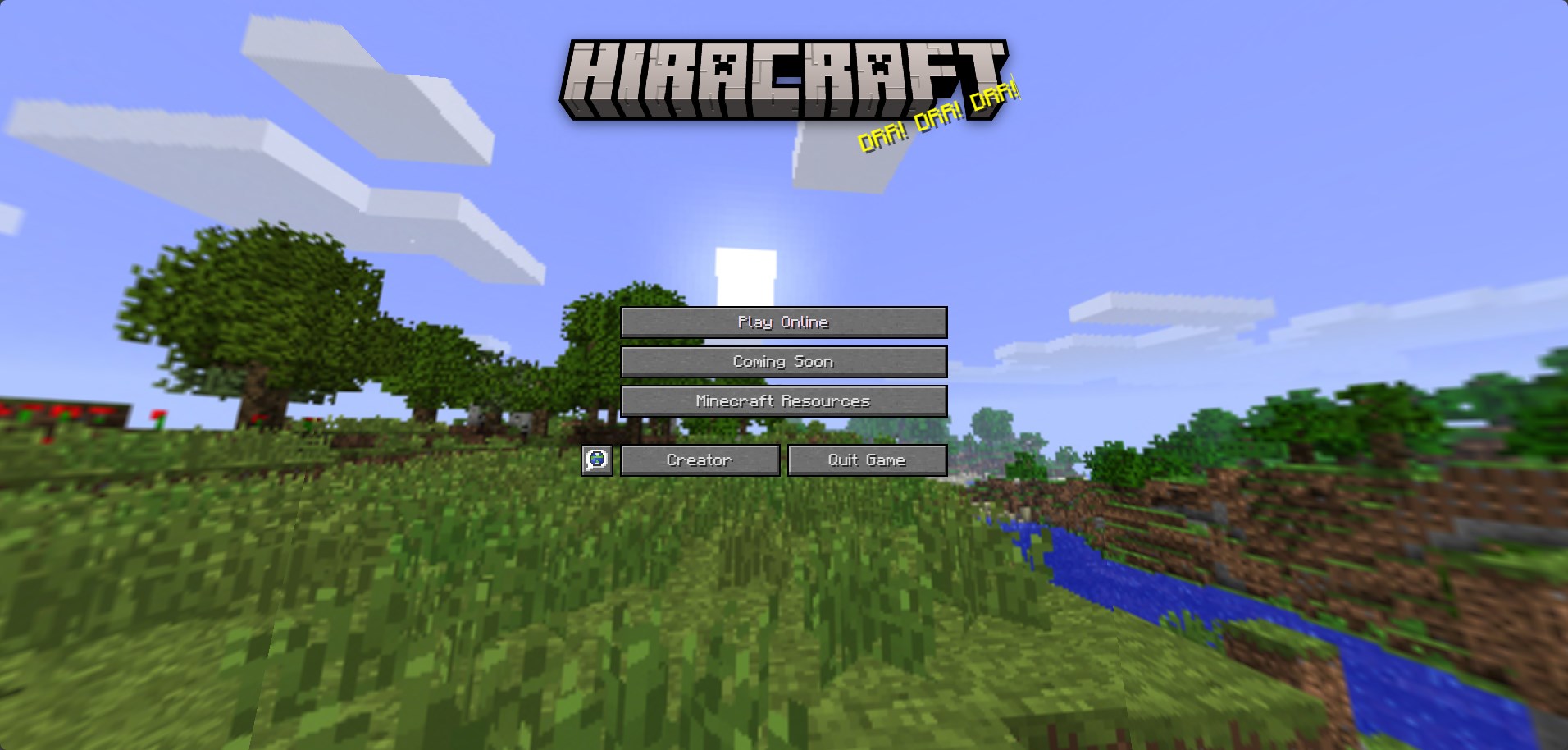

User reviews (0)