
 简体中文
简体中文 English
Website review
This review may include AI-generated content and is not individually verified. Domain, certificate and other facts come from the observed data on this page.
What is DAIZ?
DAIZ is a trip-planning tool that builds day-by-day European itineraries rather than handing you a list of attractions. According to its own description, it produces plans with named restaurants, checked opening hours, and walking routes between stops — designed to be ready to book and easy to change.
What makes it different from a plain list
The core claim on DAIZ is that each place is verified before it lands on your day. Opening days and long closures are checked against your travel dates, so a museum that shuts on Mondays gets moved rather than left in place. Each day is anchored to one neighborhood, with real walking distances between stops, so you aren't crossing the city twice.
The plan also reflects your stated priorities. Must-sees are placed first, and a short rationale accompanies each day — which neighborhood it's built around, what timing drove it, and which of your choices shaped it. The map sits alongside the itinerary, with every stop pinned and the walk between them measured.
Who it suits
- Travelers who want a concrete, hour-by-hour structure they can still edit, rather than a blank map and a long wishlist.
- People planning multi-day city trips in Europe, where opening hours and neighborhood clustering matter most.
- Anyone who has spent an evening cross-checking museum closures and walking times by hand.
Who might look elsewhere
If you prefer to improvise each morning, a fixed day plan can feel constraining. If you're traveling outside Europe, the product's stated focus suggests it may not fit.
A practical next step
Pick one city and one must-see, then see whether the generated day places that must-see sensibly and keeps the rest of the day walkable. That single test tells you whether the routing logic matches how you actually like to travel.
How does DAIZ verify opening hours and closures for each stop?
DAIZ checks opening days, long closures, and timing conflicts before a stop is added to your itinerary, according to the site’s own description. The page says its planning layer uses “real opening hours, closure dates, walking distances, and your own choices, checked against each other” before a place lands on your plan. That means verification is not just a note on a listing; it is a constraint on how the day is built.
For example, the page describes a Paris plan where Musée d’Orsay is closed on Mondays, so the visit is moved to Tuesday; Centre Pompidou is closed until 2030, so it is left out; and Les Cocottes is kept for Sunday lunch because it is open then. It also shows timing adjustments such as moving the Colosseum to the first slot of the day to avoid morning crowds, and anchoring Day 2 in one neighborhood to avoid backtracking.
A practical next step is to treat the plan as a strong starting point, then recheck any time-sensitive booking on the venue’s own official page closer to your dates. Opening hours can change for holidays, strikes, or private events, and no planner can guarantee same-day conditions. If a stop is essential, confirm it directly before you build the rest of the day around it.
Can I customize a DAIZ itinerary with my own must-see attractions?
Yes. DAIZ is built to place your must-sees first, then arrange the rest of each day around them. The site's own example shows “Sacré-Cœur your must-see → placed first,” and it describes the plan as “ready to book, easy to change,” with stops swappable in a tap.
What that means in practice:
- You tell DAIZ which traveler you are and what you care about, and your must-sees become anchors rather than optional extras.
- Each day is anchored to one neighborhood, with walking distances measured between stops, so a must-see doesn't force you to crisscross the city.
- Every place is checked before it lands on your plan — opening days, long closures, and hours against your actual dates. Example: Musée d'Orsay closed Mondays → moved to Tuesday; Centre Pompidou closed until 2030 → left out.
- You can swap any stop for a nearby alternative and see the map and the plan in one view.
A useful way to judge it for your own trip: list your non-negotiables first, then see whether the generated days still hold together geographically. If your must-sees are scattered across distant neighborhoods, a single-anchor day structure may need manual reshuffling — that's a normal trade-off of neighborhood-based planning, not a flaw specific to DAIZ.
Next step: start at DAIZ with your must-see list, then check the day-by-day walking distances before booking anything.
How does DAIZ group stops into walkable neighborhoods for each day?
DAIZ builds each day around a single neighborhood, then keeps stops inside it close enough to walk. Rather than clustering by theme or rating, it anchors the day geographically and measures the actual walking distance between consecutive stops, so you don't cross the city twice in one day.
How the grouping works in practice
- Day-level anchor: Each day is tied to one area, and the plan shows why that day is anchored there — which neighborhood, which timing, and which of your picks shaped it.
- Distance-checked hops: The gap between stops is calculated on foot. Its Paris example shows short hops like 481 m from the Louvre to Café Verlet, 950 m onward, then 1.2 km to a cooking class — all within a connected stretch of the city.
- Constraint-aware ordering: Grouping isn't just proximity. Opening hours, closure dates and your must-sees are checked against each other before a place lands on the plan, so a museum closed on Mondays moves to Tuesday instead of breaking the day's geography.
- Crowd and timing logic: Popular sites can be pushed to the first slot of the day, which also affects how the rest of the day is sequenced.
- Editable afterwards: You can swap any place for a nearby alternative, so the neighborhood grouping stays intact while the specific stops change.
Why this matters for a real trip
If you're planning four days in Paris and want the Louvre, a coffee stop, a market street and a cooking class, a list-based planner would scatter them across the map and leave you on the Métro for an hour. DAIZ's approach trades breadth for coherence: you see fewer far-flung highlights per day, but each day is physically doable on foot.
A quick decision test
Ask yourself whether your priority is covering the most sights or having days that flow without backtracking. If it's the latter, neighborhood-anchored days suit you. If you have one must-see on the far side of town, expect DAIZ to build a day around it rather than bolt it onto an unrelated area.
Next step: Enter your must-sees and travel dates at DAIZ, then check whether the generated days keep each anchor neighborhood walkable — and swap stops freely if a day feels too packed.
What European cities does DAIZ currently cover?
DAIZ does not publish a fixed, exhaustive list of covered cities. Its page shows a “Cities travelers plan with DAIZ” section and examples drawn from Paris, but the supplied page evidence does not name a complete city inventory. So the honest answer is: Paris is clearly represented in the examples, and the product is positioned for European itineraries generally, but the current city coverage is not specified on the pages provided.
How to check coverage for your trip
The practical test is to start a plan for your destination and see whether DAIZ can build a day with named places, checked hours and walking routes.
- If it returns a full day with mapped stops and opening-hours checks, that city is likely supported for the style of trip you want.
- If it returns generic suggestions or cannot place stops in a coherent neighborhood, coverage may be thin or unavailable.
- For multi-city trips, test each city separately before assuming the whole route works.
What the examples suggest
The visible sample itinerary is a four-day Paris plan, with stops such as the Louvre, Café Verlet, Rue Montorgueil and La Cuisine Paris. That tells you Paris is a supported example, not that it is the only city. The product description says “European itineraries,” which is broader than the evidence shown.
For a concrete decision: if you are planning Paris, DAIZ’s examples look directly relevant. If you are planning elsewhere in Europe, treat coverage as something to verify by building a test itinerary rather than relying on a published city list. You can start at DAIZ.
How do I access and use my DAIZ itinerary while traveling?
Your DAIZ itinerary is designed to travel with you: the plan, the map, and any changes live together in one view, so you can open the day you're on and follow it stop by stop. The page describes each stop as pinned on a map with the walk between stops measured, and each day anchored to one neighborhood so you aren't crossing the city twice.
What that looks like on the ground
A realistic use: you're on day two in Paris, starting at the Musée du Louvre for a three-hour visit, then walking 481 m to Café Verlet, then 950 m to Rue Montorgueil. Because the stops are ordered and the distances are stated, you can decide in the moment whether to keep the sequence or swap something nearby.
Practical habits while traveling
- Open the current day rather than the whole trip; the day view is where the anchoring logic and timings matter.
- Check the map view when you're deciding whether a detour is worth it — the measured walk between stops is the deciding number.
- If you change plans, swap a place for a nearby one rather than rebuilding the day, so the neighborhood logic stays intact.
- Keep the itinerary accessible offline or on your phone before you leave Wi-Fi, since you'll often need it while walking.
- Treat verified opening hours as a planning aid, not a guarantee — public holidays and one-off closures still happen.
A next step
Before you leave, walk through each day once and note the first stop's opening time and the neighborhood it's anchored to. That single pass tells you whether your mornings start where you expect and whether any day depends on one place being open. If you want to see how DAIZ structures this, start at DAIZ.
 Cloudflare
 Vercel
 Google Workspace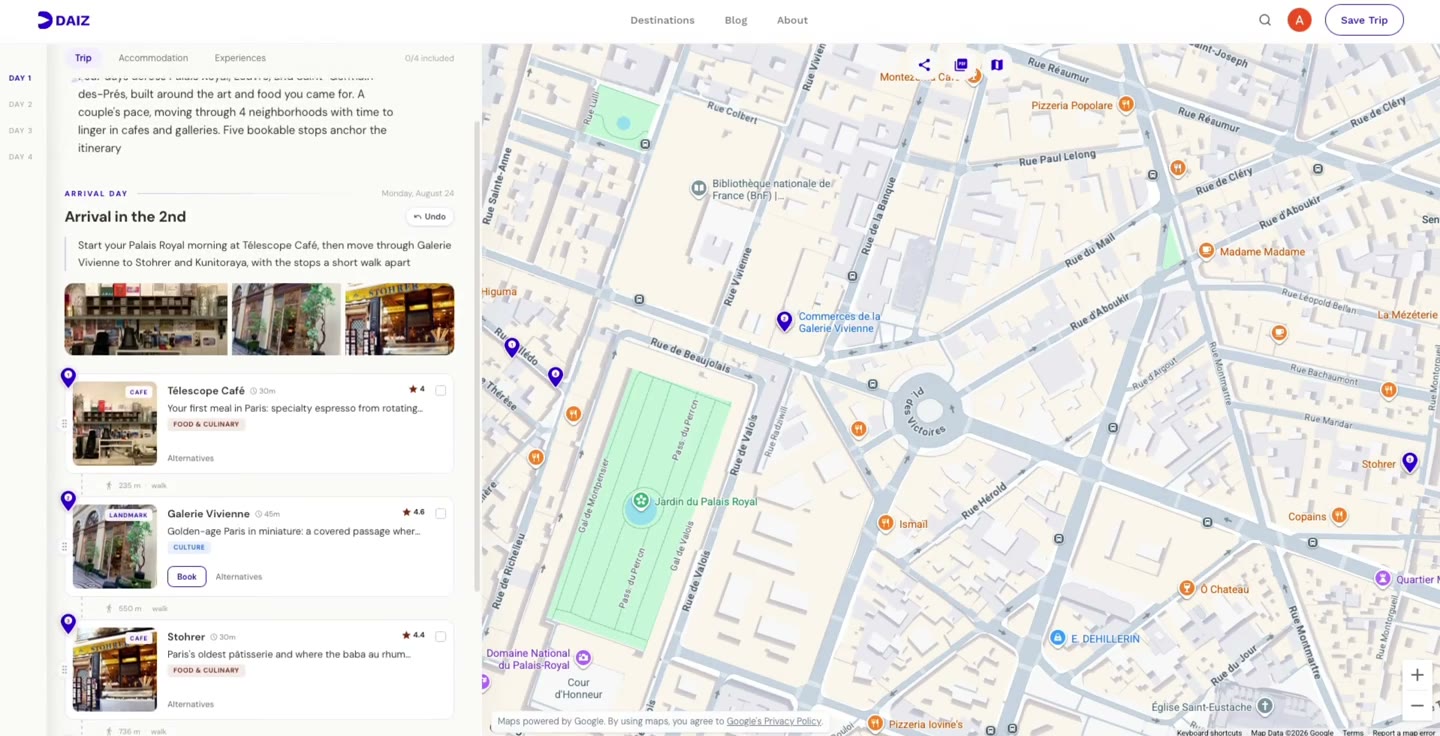

User reviews (0)