Website profiles · Technology insights · Alternatives

digicamfinder.com

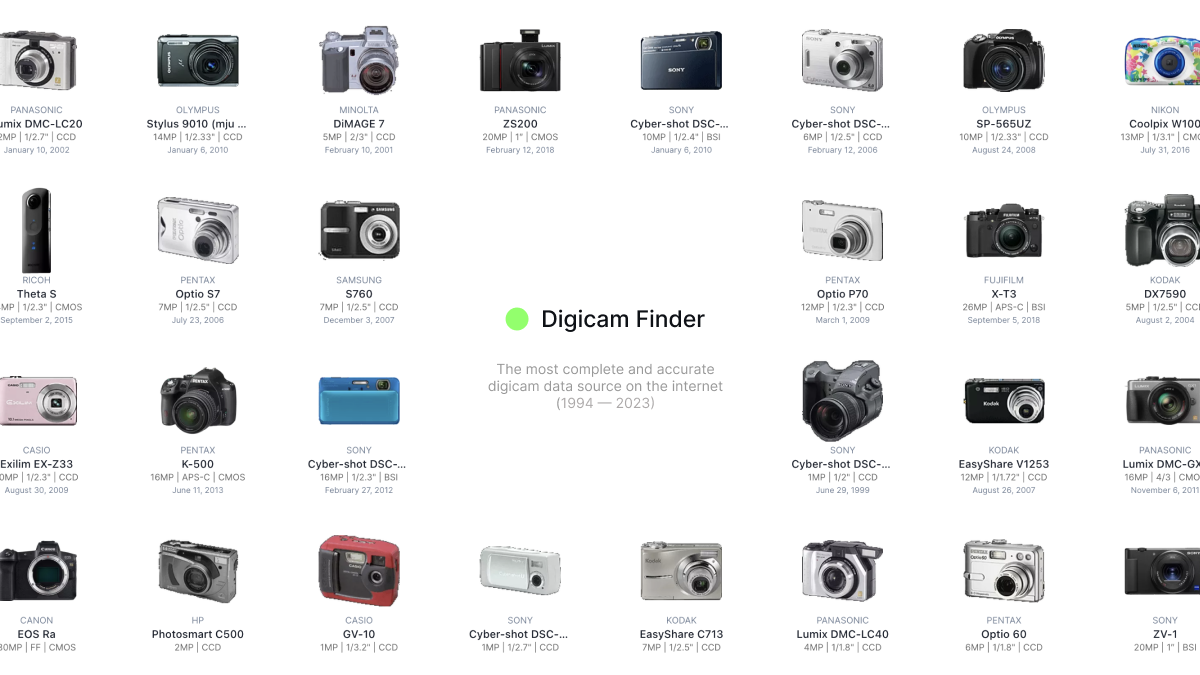
Reviews, full specs, and high-resolution images for 2500+ digital cameras and 1,100+ lenses made since 1994.

No paid content found
Visit website
Profile views 7 Outbound visits 1 Normal
Digicamfinder digicamfinder.com Digicamfinder helps edit, convert, generate, search, or organize images and visual assets. ↗ Full homepage screenshot

At a glance

Category
Technology & Electronics
Language
English
Paid-content signal
No paid content foundObserved
Registered
2023
Hosting
VercelInferred
HTTPS certificate trusted
PassedObserved
Last updated

Website review

This review may include AI-generated content and is not individually verified. Domain, certificate and other facts come from the observed data on this page.

What is Digicamfinder?

Digicamfinder is a reference database for digital photography gear, covering more than 2,500 digital cameras and 1,100+ lenses released since 1994. Its focus is lookup rather than shopping: reviews, full specifications, and high-resolution product images gathered in one place so you can research a body or lens without hopping between scattered sources.

Who it suits

  • Buyers comparing an older DSLR or compact against a newer mirrorless model before purchasing used.
  • Photographers checking whether a specific lens mount, sensor size, or feature set matches their needs.
  • Anyone trying to identify a camera from a photo or model number and confirm its real specifications.

What you can expect

The value is in breadth and depth of specification data plus image galleries. Treat the reviews as one input among several — for handling, autofocus behavior in the field, or long-term reliability, cross-check owner discussions and hands-on tests.

Practical next step

Search the exact model name, then compare two shortlisted cameras side by side on the specs that matter to you: sensor size, mount, stabilization, and video capability. If you are buying used, note the release year to gauge age and likely shutter wear. For current pricing and availability, check retailers or marketplaces directly, since a specification archive does not track live prices.

How can I compare specifications of two digital cameras?

Use the camera database at Digicamfinder to pull up both models and compare them field by field, then judge the differences in the order that actually affects your photography.

A practical comparison order

  1. Sensor size and resolution — Sensor size (full-frame, APS-C, Micro Four Thirds, 1-inch, etc.) matters more than megapixels for low-light noise, dynamic range and depth-of-field control. Resolution mainly decides how much you can crop.
  2. Lens mount and available lenses — A body is only as useful as the glass you can put on it. Check native mount options and third-party support.
  3. Autofocus system — Phase-detect vs. contrast-detect, number of AF points, eye/animal tracking, and subject recognition. This is where older and newer bodies of the same brand diverge most.
  4. ISO range and real high-ISO behaviour — Ignore the marketing maximum; look for sample images at ISO 3200–6400.
  5. Burst rate and buffer depth — Relevant for sports, wildlife and kids. Buffer depth (how many frames before the camera slows) is often the bottleneck, not the headline fps.
  6. Video specs — Resolution, frame rates, crop factor when recording, log profiles, mic/headphone ports, and recording time limits.
  7. Viewfinder, screen and ergonomics — EVF resolution and refresh, articulating vs. tilting screen, grip size, button layout, weather sealing.
  8. Battery life and card slots — Dual slots matter for paid work; CIPA ratings give a rough baseline.
  9. Size and weight — The camera you carry is the camera you use. Compare body weight with a typical lens attached.

Example scenario

A parent shooting indoor birthday parties and weekend football: sensor size and high-ISO performance come first, then AF tracking and burst buffer. A landscape shooter on a tripod: resolution, dynamic range and lens sharpness outrank burst rate and video features.

Decision criterion

Rank your three most common shooting situations, then weight each spec by how often it affects those situations. Two cameras rarely win on every row — pick the one that wins on your top two priorities and is merely acceptable elsewhere.

Next step

Open both models side by side in the database, note the differences that exceed roughly 20–30% (small gaps rarely change real-world results), and check sample images or reviews for the two or three specs that remain close.

Where can I find high-resolution sample images from a specific camera model?

For high-resolution sample images from a specific camera model, Digicamfinder is a strong starting point. Its stated focus is reviews, full specifications, and high-resolution images covering a large catalog of digital cameras and lenses dating back to the mid-1990s, so you can look up a model and browse its image set rather than hunting through scattered forum threads.

How to use it well

  • Search the exact model name, including the version or mark (for example, a camera sold in several regional variants), because sample galleries are usually tied to one body.
  • Check whether the samples are straight-out-of-camera JPEGs or converted RAW files. That distinction matters more than resolution when you are judging color, noise, or dynamic range.
  • Note the lens used. A body's samples often reflect a premium lens, so they may not represent what you would get with a kit zoom.

When another source helps

If you need controlled, repeatable comparisons rather than real-world photos, a test-chart or studio-scene database is more useful. If you want to see how a camera behaves in a specific genre, look for a photographer's own portfolio or a community gallery where EXIF data is visible.

Practical next step

Pick two or three candidate bodies, open their sample galleries side by side, and download full-size files rather than viewing them in a browser. Then compare the same kind of shot — a backlit portrait, a high-ISO indoor scene — before deciding.

How do I choose a compatible lens for my camera?

The most reliable way is to match the lens mount first, then decide on sensor coverage, autofocus support, and whether you need stabilization. Mount compatibility is non-negotiable; everything else is a trade-off between price, size, and image quality.

Digicamfinder is useful here because it documents bodies and lenses made since 1994, so you can look up your camera's mount and then check which lenses were built for it.

The decision order that avoids mistakes

  1. Identify your exact camera model. Not just "Canon EOS" — the specific body, because mount systems changed over time.
  2. Confirm the mount. Lenses from the same brand don't always fit: Canon EF and RF are different, Nikon F and Z are different, Sony A-mount and E-mount are different.
  3. Check sensor coverage. A lens designed for a smaller sensor (APS-C) usually works on a full-frame body only in crop mode, wasting resolution. A full-frame lens on an APS-C body is fine, just larger and heavier than needed.
  4. Decide on autofocus and electronics. Older manual lenses may mount but give you no autofocus, no aperture control from the body, and no EXIF data.
  5. Consider stabilization. In-body stabilization makes lens stabilization less critical; without it, a stabilized lens helps at slow shutter speeds.

Quick comparison of the common situations

Situation What fits Main trade-off
Same brand, same current mount Native lenses Best autofocus and metering, usually highest cost
Same brand, older mount via adapter Adapted lenses Cheap access to used glass, but slower or unreliable autofocus
Third-party lens for your mount Native-mount third-party Often cheaper, occasionally weaker AF or weather sealing
Crop-sensor lens on full-frame body Mounts, but crops Loses resolution and wide-angle reach
Full-frame lens on crop body Mounts fully Works well, but bigger and heavier than necessary

A concrete example

If you shoot a Sony E-mount APS-C body and want a small travel lens, a native APS-C lens keeps the kit light and uses the full sensor. If you later move to a full-frame E-mount body, that same lens will still mount but the camera will crop, so your wide shots get tighter. Buying a full-frame E-mount lens now costs more and weighs more, but survives the upgrade.

Next step

Look up your camera on Digicamfinder to confirm its mount and sensor size, then filter lenses by that mount. If a lens you already own doesn't appear, check the manufacturer's own compatibility notes before assuming it fits.

What are the key differences between DSLR and mirrorless cameras?

Mirrorless cameras omit the reflex mirror and optical viewfinder, so they can be smaller, shoot faster in bursts, and preview exposure through the electronic viewfinder or screen. DSLRs use a mirror and phase-detect autofocus sensor, which historically gave quicker tracking and longer battery life, and their optical viewfinders show no lag.

H3 Practical differences

  • Size and weight: Mirrorless bodies and lenses are often more compact; DSLRs tend to be bulkier, especially full-frame models.
  • Autofocus: Modern mirrorless cameras use on-sensor phase detection and subject recognition; DSLRs rely on a separate AF module that can struggle in live view.
  • Viewfinder: Optical (DSLR) shows the real scene with no delay; electronic (mirrorless) shows exposure, histograms and focus peaking but can lag or drain battery.
  • Battery life: DSLRs typically last longer per charge because the mirror and sensor aren't always active.
  • Lens choice: Both systems have deep used markets, but mirrorless mounts are newer and adapters let you use many older DSLR lenses.

H3 Choosing between them

If you shoot fast action, wildlife or need all-day battery life, a DSLR can still make sense. If you want a lighter kit, silent shooting, and the latest eye-tracking autofocus, mirrorless is the better fit. For a concrete scenario: a travel photographer who wants one small body and two lenses will likely prefer mirrorless; a sports shooter with a bag of older DSLR glass may stay with DSLR or adapt.

H3 Where to check specs

Use a database to compare sensor size, mount, burst rate and viewfinder type before buying. Digicamfinder lists reviews and full specs for thousands of cameras and lenses, which helps you see these trade-offs side by side.

Next step: pick two specific models you're considering and compare their mount, autofocus system and battery rating directly.

How can I find reviews for older digital cameras released before 2010?

For pre-2010 digital cameras, the best results come from databases that index by release date rather than by current popularity. Digicamfinder is built for exactly this: it catalogs 2,500+ digital cameras and 1,100+ lenses made since 1994, with full specifications and high-resolution images alongside reviews. That coverage window means cameras from the 1990s and 2000s — the era most general review sites have quietly dropped — are still searchable there.

A practical search approach

  • Search by the exact model name plus the year, e.g. "Canon PowerShot G2 2001." Model numbers repeat across generations, so the year disambiguates.
  • Start with the spec sheet, then read reviews. On a 15- or 20-year-old camera, sensor size, lens aperture range and battery type matter more than any score.
  • Check owner communities rather than launch-day reviews. Long-term reports on shutter failure, CCD sensor degradation and battery availability are the information that actually decides a purchase today.
  • Look for archived magazine reviews if you want period-accurate opinions; contemporary reviews judged these cameras against film, not against modern sensors.

Where to look

Source Best for Trade-off
Digicamfinder Specs, images and reviews for 1994-onward models Database-style, not long-form narrative
DPReview In-depth historical reviews and forums Older reviews can be hard to locate; site changes over time
Imaging Resource Sample images and test shots from the era Interface is dated
Camera Labs Video and hands-on reviews Coverage starts later than 1994

If you are buying, decide first whether you want a working camera or a collectible. For shooting, confirm the battery and memory card format are still obtainable — that single check rules out more old cameras than image quality does. For collecting, prioritize complete boxed examples with original accessories, since those hold value better than loose bodies.

Related questions

More questions →
How to Use Digicamfinder to Compare Digital Cameras and Lenses

Digicamfinder is a specification and image database covering 2,500+ digital cameras and 1,100+ lenses released since 1994. You can use it to compare models by pulling up full specs and high-resolution images for each one and lining up the numbers yourself. It is a research tool, not a shopping tool — the site's own description mentions reviews, full specs, and images, but no pricing or purchase features, so treat it as the reference layer that sits before you check a retailer.

What the database actually gives you per model

For each camera or lens, the site's stated coverage is three things:

  • Reviews — editorial or aggregated write-ups
  • Full specifications — the technical sheet for the body or lens
  • High-resolution images — product shots you can zoom into

That combination is what makes side-by-side comparison possible. Specs answer the "does it do X" questions; images answer the "how big is it, how does it look, where are the controls" questions that a spec sheet alone won't settle.

Comparing two cameras step by step

  1. Identify both models precisely. Use the full name including the generation or mark (for example, a specific body revision), because spec sheets differ between versions of the same line.
  2. Open each model's page and read the spec section. Note the fields that matter for your decision — sensor size and resolution, mount, viewfinder type, screen articulation, video specs, weight, and dimensions.
  3. Write the two spec sheets next to each other. The site presents specs per model, so the comparison work is yours: put the same field from each camera on the same line.
  4. Use the high-resolution images for the physical questions. Compare body size against a known reference, check button and dial layout, and see how the screen articulates.
  5. Read the review text for the things specs don't capture — handling, autofocus behavior in practice, and known quirks.

Expected result: a two-column sheet where every difference you care about is visible, plus images that confirm the physical trade-offs.

Comparing lenses

Lenses need a slightly different checklist, and the same database structure applies:

Comparison field Why it decides the purchase
Mount / compatibility Determines whether the lens fits your body at all
Focal length and aperture Sets what you can shoot and in what light
Dimensions and weight Affects whether you'll actually carry it
High-resolution images Shows barrel size, rings, and switches

Check mount compatibility first — it eliminates options faster than any other field. Then compare focal length and aperture, then size and weight, then look at the images to judge how the lens will balance on your body.

What Digicamfinder will not do for you

The site's description covers reviews, specs, and images only. There is no mention of pricing, availability, or purchase links, so:

  • You cannot compare prices here — take your shortlist to a retailer for that.
  • You cannot buy through the site.
  • Any "which is better value" judgment has to be made after you leave Digicamfinder.

This is a real limitation for purchase decisions, but it also keeps the comparison clean: you're judging capability and physical fit, not being steered by current pricing.

Practical tips for getting a useful comparison

  • Compare within a purpose, not across everything. Two cameras from different eras or tiers will produce a spec sheet full of irrelevant differences.
  • Decide your must-have fields before you open the pages. Otherwise the full spec sheet becomes noise.
  • Use the images for the questions specs can't answer — grip size, control placement, how the lens looks mounted.
  • Treat the review text as the tiebreaker when two models are close on paper.

If you already know which two or three models you're choosing between, Digicamfinder gives you the spec and image layer to compare them properly. If you're still deciding what to compare, start by browsing the database by category, then narrow to a shortlist before you start the side-by-side work.

Which Digital Cameras and Lenses Are Covered in the Digicamfinder Database?

Digicamfinder covers digital cameras and lenses made since 1994, with the site describing a catalog of more than 2,500 digital cameras and over 1,100 lenses. If the model you want to check was released in 1994 or later, there is a good chance it is listed — but the only reliable way to confirm a specific body or lens is to search the site directly.

What the coverage numbers tell you

The two figures on the site are the clearest guide to scope:

Category Stated coverage Time range
Digital cameras 2,500+ Made since 1994
Lenses 1,100+ Made since 1994

Two things follow from this. First, the database is built around the digital era, so film-era cameras and manual-focus lenses from before 1994 fall outside the stated range. Second, the lens count is much smaller than the camera count, which is typical: a single camera system often shares a handful of lenses across many bodies, and third-party lens makers add fewer entries than the major brands.

Which brands and models are likely included

The site does not publish a brand-by-brand breakdown in the material available, so treat any list of "covered brands" as an inference rather than a confirmed fact. What you can reasonably expect, given the 1994-onward scope and the scale of the catalog:

  • Mainstream consumer and prosumer lines from the major manufacturers, since these account for the bulk of digital camera sales over three decades.
  • Interchangeable-lens system cameras, because the lens count only makes sense if mirrorless and DSLR systems are represented.
  • Compact and bridge cameras, which dominated the late 1990s and 2000s and would be needed to reach 2,500+ bodies.
  • Popular third-party lenses, though coverage here is likely thinner than for first-party glass.

Less certain: very recent releases, niche or regional-only models, and specialty optics such as tilt-shift or cinema lenses. New cameras take time to be added, and low-volume models may never be catalogued.

How to check whether a specific camera or lens is listed

  1. Search by model name. Enter the manufacturer and model as it is commonly written (for example, a brand name plus the model number). Exact naming matters — the same camera can be sold under different names in different regions.
  2. Try the brand or system page. If a direct name search returns nothing, browsing by manufacturer or mount can surface the entry under an alternate spelling.
  3. Check alternate names. Many bodies have a regional alias. If your first search fails, try the other name before concluding the model is missing.
  4. Use the specs and images as confirmation. A matching entry should show full specifications and high-resolution images. If you find a page but the specs look wrong or the images are for a different model, you may be looking at a duplicate or mislabeled entry.

Expected result: a hit gives you a spec sheet and images for that exact model; a miss means either the model predates 1994, is too niche or too new to be catalogued, or is listed under a name you have not tried.

Common snags when searching

  • Regional naming. The same camera may appear under a different model number in another market, so a failed search is not proof of absence.
  • Pre-1994 gear. Film cameras and older manual lenses are outside the stated range and should not be expected.
  • Very new releases. A camera announced recently may not yet have an entry.
  • Lens vs. camera naming. A lens may be catalogued under the mount or the maker rather than the marketing name you know.

If a model matters to you, verify it on the site before relying on the database for a comparison or purchase decision. The coverage figures describe the catalog as a whole, not a guarantee that any one model is present.

What Is Digicamfinder and What Can You Find on the Site?

Digicamfinder is a reference database for digital photography gear. According to the site's own description, it holds reviews, full specifications, and high-resolution images for more than 2,500 digital cameras and over 1,100 lenses made since 1994. It is a research tool rather than a store: you go there to look up what a camera or lens is, not to buy one.

What the site covers

The scope is defined by two numbers and one date:

Dimension Coverage
Digital cameras 2,500+ models
Lenses 1,100+ models
Time range Gear made since 1994

The 1994 start point lines up with the early consumer digital camera era, so the database is aimed at digital bodies and the lenses that fit them rather than film-era equipment.

The three content types

Each entry is built from three kinds of material, and they serve different stages of research:

  • Reviews — editorial assessment of a model, useful when you want an opinion rather than a spec sheet.
  • Full specifications — the structured data: sensor, resolution, mount, and the rest of the technical profile. This is what you use for side-by-side comparison.
  • High-resolution images — product photos at a resolution high enough to inspect body design, controls, and layout.

How people actually use it

The site fits three common tasks:

  1. Identifying an unknown camera. If you have a model name or number and want to know what it actually is, a database entry gives you the specs and photos in one place.
  2. Comparing two bodies or lenses. Because specifications are presented in a consistent format, you can open two entries and check the differences directly instead of hunting across scattered reviews.
  3. Checking compatibility and mount information. Lens entries let you confirm what a given lens is and which system it belongs to before you commit to a purchase or an adapter.

What it is not

Two limits are worth knowing before you rely on it:

  • It is not a shop. Nothing in the site's description indicates pricing, stock, or checkout. Treat it as a catalog, and check a retailer separately for current price and availability.
  • It is not a film camera archive. The coverage starts in 1994 and is described in terms of digital cameras and lenses, so older analog gear falls outside it.

If your question is "what are the specs of this digital camera or lens, and what does it look like," Digicamfinder is built for exactly that. If your question is "where can I buy it today and for how much," you will need a different source.

What Specifications and Images Does Digicamfinder Provide for Each Camera?

Digicamfinder is a reference database covering more than 2,500 digital cameras and 1,100+ lenses released since 1994. For each camera entry, the site provides full specifications, high-resolution product images, and reviews. The depth of coverage varies by model, and the database is strongest for mainstream interchangeable-lens and compact cameras from major manufacturers.

What you can look up for a camera

Each camera entry is built around a specification sheet. Based on the site's stated scope, expect the following categories:

  • Sensor and imaging — resolution, sensor type and size, image processor
  • Lens mount and compatibility — the mount system, plus linked lens entries
  • Exposure and focus — ISO range, shutter speed range, autofocus system
  • Video — resolution and frame-rate capabilities
  • Body and display — dimensions, weight, screen and viewfinder type
  • Connectivity and storage — ports, wireless options, media card type
  • Power — battery model and rated life

The exact fields present depend on the model and how thoroughly it was documented. Older or niche cameras may have shorter sheets.

Images and reviews

  • High-resolution images are attached to camera entries, so you can inspect body design, controls, and ports rather than relying on a thumbnail.
  • Reviews accompany camera entries, giving editorial or aggregated assessment alongside the raw specs.

Lens entries (1,100+) are linked into the same system, so a camera page can lead you to compatible lenses and their own specifications.

How to use it effectively

  1. Search by camera model or browse by manufacturer.
  2. Open the entry and read the specification table first — this is the most consistently populated part.
  3. Check the image set for physical details the spec sheet won't tell you (button layout, grip size, port placement).
  4. Read the review section for real-world assessment.
  5. Follow lens links if you're evaluating the system rather than a single body.

Where it fits and where it doesn't

Good for: comparing specs across two or more camera bodies, confirming a detail like mount type or battery model, and viewing product images before buying used gear.

Weaker for: very recent releases, obscure or regional models, and hands-on testing data. The database starts at 1994, so film-era and pre-1994 cameras are outside its scope.

If you need current pricing or availability, treat Digicamfinder as a specification and image reference and confirm purchase details with a retailer.

Website Overview

Several search or sharing settings need attention. Together they may make snippets, preview images or preferred URLs less consistent across platforms. An active inbound-mail setup with incomplete authentication may leave the domain more open to impersonation. Provider hosting alone does not close that gap.

Domain and Registration

Transfer-protection status is present, helping reduce the risk of unauthorized domain transfers. The domain has about 3 years of registration history; its current configuration provides more context than age alone. The registrar is Squarespace Domains II LLC, a widely used domain service provider. The domain uses the common .com extension, which is not an independent safety signal.

DNS and Email

The observed email authentication setup is incomplete: DMARC is missing. Nameservers are provided by Cloudflare, indicating managed DNS hosting. MX records point to the Cloudflare Email Routing email service. No CNAME was found; the observed records resolve directly to addresses. DNSSEC signatures were not detected, so this additional DNS authenticity protection is not confirmed.

TLS and Certificates

The certificate uses an RSA 2048-bit public key, offering broad client compatibility. The server supplied a complete certificate chain. No organization name is present in the certificate; the available fields are consistent with domain validation. The certificate was issued by Let's Encrypt, commonly associated with automated certificate services. The certificate's total validity is about 89 days, consistent with a short renewal cycle.

HTTP and Browser Security

X-Powered-By exposes backend information: Next.js. The response lacks these common security headers: CSP, X-Content-Type-Options, Referrer-Policy, Permissions-Policy, clickjacking protection. No obvious internal addresses or debug information were found in the headers. The Server header contains the custom value Vercel. Cookie security attributes are unknown.

Technology Stack Analysis

The public page identifies Next.js, Vercel without precise versions, leaving fewer clues for version-specific scanning.

Search and Social Sharing

No homepage title was detected; search engines may construct one from other page content. No homepage meta description was detected, leaving snippet selection more dependent on page text. No homepage canonical URL was detected. If duplicate URLs exist, consolidation may be less explicit. Twitter Card metadata is configured. The observed directives allow indexing and link following.

Hosting and Email

DNSCloudflare
HostingVercel
EmailCloudflare Email Routing
Approximate IP geolocation (inferred; a CDN or proxy may differ from the origin server) United States flagUnited States Inferred 66.33.60.67

Registration details

RDAP / WHOIS

RegistrarSquarespace Domains II LLC
Registered2023-03-22
Expires2027-03-22
Domain statusclient delete prohibited、client transfer prohibited
Nameserversbuck.ns.cloudflare.com、june.ns.cloudflare.com
DNSSECunsigned

DNS records

DNS

TypeNameValueTTLPriority
Adigicamfinder.com66.33.60.67247—
Adigicamfinder.com76.76.21.98247—
MXdigicamfinder.comroute2.mx.cloudflare.net30041
MXdigicamfinder.comroute1.mx.cloudflare.net30075
MXdigicamfinder.comroute3.mx.cloudflare.net30089
NSdigicamfinder.combuck.ns.cloudflare.com86400—
NSdigicamfinder.comjune.ns.cloudflare.com86400—
TXTdigicamfinder.comv=spf1 include:_spf.mx.cloudflare.net ~all300—

TLS and certificates

TLS / SSL

AssessmentNormal configuration
Supported protocolsTLSv1.2、TLSv1.3
Negotiated protocolTLSv1.3
Certificate subjectdigicamfinder.com
IssuerLet's Encrypt
Valid until2026-10-29T22:33 · Remaining when checked: 27 days
Verification detailsCertificate trust: Passed · Hostname match: Passed

HTTP response headers

HTTP

HeaderValue
content-typetext/html; charset=utf-8
cache-controlprivate, no-cache, no-store, max-age=0, must-revalidate
serverVercel
strict-transport-securitymax-age=63072000
set-cookieRedacted

Identified technologies

Next.jsVercel

Pages, Search and Sharing

Meta descriptionNot detected
Canonical URLNot detected
LanguageEnglish (default)
Twitter Cardsummary_large_image

No robots.txt found

No sitemaps found

Recent Updates

  • Website images
  • Screenshots
  • Network details
  • Website Technologies
  • Pages and Search Information
  • TLS and certificates
  • DNS Information
  • Domain Registration

User reviews (0)

  • No reviews yet.