
 简体中文
简体中文 English
Website review
This review may include AI-generated content and is not individually verified. Domain, certificate and other facts come from the observed data on this page.
What is DJ Phonetic?
DJ Phonetic is a free browser-based tool that turns snippets of recorded human speech into a drum pattern. Instead of loading a sample pack, you pick a speaker and it pulls kick, snare and hi-hat sounds out of the natural consonants and plosives in that person's voice, then lets you arrange them as a beat. The page frames it as "beatbox with historical speech," and the speakers come from Library of Congress recordings.
How someone would actually use it
- A quick classroom or podcast demo: choose a speaker, play the extracted sounds, and show how a "p" or "t" becomes a percussion hit. The toggle for the International Phonetic Alphabet and the transcript view make the link between speech sounds and drum sounds visible.
- A producer looking for unusual texture: real vocal-derived hits sound grittier and less polished than synthesized kits, which suits lo-fi, experimental or documentary-style tracks.
- A curious non-musician: the interface is a speaker selector plus playback controls, so there is little to learn before hearing results.
What to keep in mind
The appeal is also the limitation: you are working with a fixed set of historical voices and whatever percussion sounds their speech happens to contain, so you get character and novelty rather than a full, tunable drum library. If you need precise control over pitch, decay or velocity, a conventional sampler will serve you better.
As a next step, open the page, pick one speaker, and listen to the extracted hits before building anything—that tells you quickly whether that voice's texture fits the track you have in mind. For background on the source recordings, see Library of Congress.
How does DJ Phonetic turn human speech into drum beats?
DJ Phonetic turns speech into drum beats by treating the phonetic sounds of recorded voices as a sample library. You pick a speaker from the site, and the tool maps the consonants and vowels in that person's transcribed speech to drum roles — kick, snare and hi-hat — so the rhythm you build is "played" by fragments of a real historical voice rather than by synthesized drum samples. The page shows a transcript, a phonetic (International Phonetic Alphabet) view and audio playback controls, which suggests the workflow is: choose a speaker, browse the transcript, and trigger sounds drawn from that speech.
What that means in practice
- The source is speech, not music. The building blocks are plosive and percussive speech sounds hidden inside spoken words, so the resulting beats have a lo-fi, vocal-textured character rather than a clean studio-drum sound.
- The speaker choice is the main creative decision. Because the page centers on selecting a speaker and reading their transcript, different voices will give you different timbres and rhythms. That's the appeal for anyone wanting a distinctive, archival flavor.
- The phonetic layer adds control. The IPA toggle lets you see which speech sounds are available, which helps if you want to reason about why a particular hit sounds the way it does.
Who it suits
It's a good fit for quick experimentation, classroom demos about phonetics, or adding an unusual vocal-percussion texture to a project. It is not a substitute for a full drum machine or sampler if you need precise timing, mixing and sound design — the page evidence points to a simple pick-a-speaker interface rather than a production suite.
Next step
Start by choosing one speaker and playing the transcript audio to hear the raw material before building a pattern, then toggle the IPA view to see which sounds are likely to work as kicks versus hats. If you want a broader sense of how speech-to-rhythm ideas are explored, the Library of Congress (cited on the page as the audio source) is a useful place to find public-domain speech recordings to compare against.
Which historical speakers and audio clips are available in DJ Phonetic?
The page evidence does not list the speakers or clips. DJ Phonetic presents a speaker selector and a transcript browser, but the available names load dynamically and are not shown in the supplied page content, so no specific historical figures or recordings can be named from it.
What the page does show
- A Select a speaker control, with options that load after the page opens.
- Previous transcript and Next transcript buttons for moving through speech samples.
- Play audio and Stop audio controls for hearing the clip.
- A toggle for the International Phonetic Alphabet, plus a Phones panel showing the phonetic breakdown of the text.
- A stated source of Library of Congress audio, which points to archival speech recordings rather than studio samples.
How to find out
Open DJ Phonetic and read the speaker dropdown once it finishes loading; that list is the authoritative answer. For background on the recordings themselves, the Library of Congress collections are the place to check.
Practical note
Because the tool derives kicks, snares and hi-hats from the consonants and plosives in speech, the useful question is not only who is speaking but how percussive their delivery is. A clipped, emphatic speaker gives sharper transients than a smooth narrator, so audition a few speakers before building a pattern.
How can I use the International Phonetic Alphabet view to understand the sounds in DJ Phonetic?
The International Phonetic Alphabet (IPA) view in DJ Phonetic shows the phonetic transcription of the selected speech transcript, so you can see which speech sounds the tool is working with rather than only hearing the result. The page labels this toggle "Toggle International Phonetic Alphabet" alongside the transcript and its phones, which means you can switch between reading the words as text and reading the sounds as IPA symbols.
What the IPA view helps you do
- Match sounds to beats. Kicks, snares and hi-hats are pulled from speech sounds. Reading the IPA next to the transcript lets you spot which vowels or consonants are likely producing a percussive hit, so you can choose a speaker or passage whose phonetics suit the beat you want.
- Compare speakers. Because the page lets you select a speaker and step through previous and next transcripts, the IPA view makes differences between speakers visible: one voice may be denser in plosives (crisp, snare-like attacks) while another is smoother and vowel-heavy.
- Learn the notation. If you are new to IPA, using it as a live label for audio you can play and stop turns abstract symbols into sounds you can actually hear.
A practical way to use it
Pick a speaker, play a short transcript, then toggle the IPA on and read along as you listen. Note the symbols that coincide with the sharpest hits, then move to the next transcript and look for passages with a similar phonetic profile. This is a reading-and-listening habit rather than a documented feature of the tool, so treat it as a suggested workflow.
For background on the symbol set itself, the International Phonetic Association publishes the official chart and guidance on reading transcriptions.
Can I download or share the beats I create with DJ Phonetic?
DJ Phonetic's page evidence does not describe any download or sharing feature. The visible interface centres on choosing a speaker, playing and stopping audio, stepping through transcripts, and toggling an International Phonetic Alphabet view of the speech sounds. So you should treat it as a browser-based listening and experimenting tool rather than a beat-export studio until you confirm otherwise on the page.
What this means in practice
- Expect to listen, not to collect files. The controls shown are playback and transcript navigation, not export buttons. If your goal is a finished beat file, plan to capture the results another way.
- Sharing a beat likely means sharing the idea, not a file. You could describe the speaker and transcript you used so someone else can recreate the pattern, but that is a workaround, not a built-in share link.
- Check before relying on it for a project. Open DJ Phonetic and look for any save, export or link option near the player. If none appears, assume nothing is saved between sessions.
A concrete scenario
A teacher wants students to hear rhythm inside a historical speech recording. DJ Phonetic suits that: pick a speaker, play the clip, and use the IPA view to point out percussive consonants. For a podcast intro that needs an audio file, the same session would need a separate recording step, and you should confirm the source recording's usage terms before republishing anything derived from it.
Next step: decide whether you need a listen-only demo or a reusable audio file. For the former, DJ Phonetic's speech-to-percussion approach is the point; for the latter, verify export options on the page first, then look for a tool built around exporting.
What do I need to run DJ Phonetic in my browser?
You only need a modern web browser with audio playback and JavaScript enabled. DJ Phonetic runs entirely in the page: you pick a speaker from the list, and the tool loads a historical speech transcript and its audio from the Library of Congress, then extracts kicks, snares and hi-hats from the speech sounds. There is nothing to install and no account or file upload is described.
Practical setup
- Browser: A current version of Chrome, Firefox, Safari or Edge is the safe choice; very old browsers may struggle with the audio and interactive controls.
- Audio output: Speakers or headphones, since you need to hear the speech and the beat you build.
- Connection: The speech clips come from an external source, so expect the initial load to need a working internet connection.
- Screen space: The interface includes speaker selection, transcript navigation, play/stop controls, an IPA toggle and a phones view, so a tablet or desktop screen is more comfortable than a small phone.
A quick first session
Open the page, wait for the speaker list to finish loading, choose a speaker, then press play on the transcript to hear the source audio. Use the IPA and phones toggles to see how individual speech sounds map to drum hits, which helps you decide which syllables to trigger.
If you want to compare approaches, Example-style browser beat tools vary in whether they need samples or logins; DJ Phonetic's distinguishing constraint is simply that it depends on the supplied historical speech rather than your own recordings.
 Amazon Route 53
 Google Workspace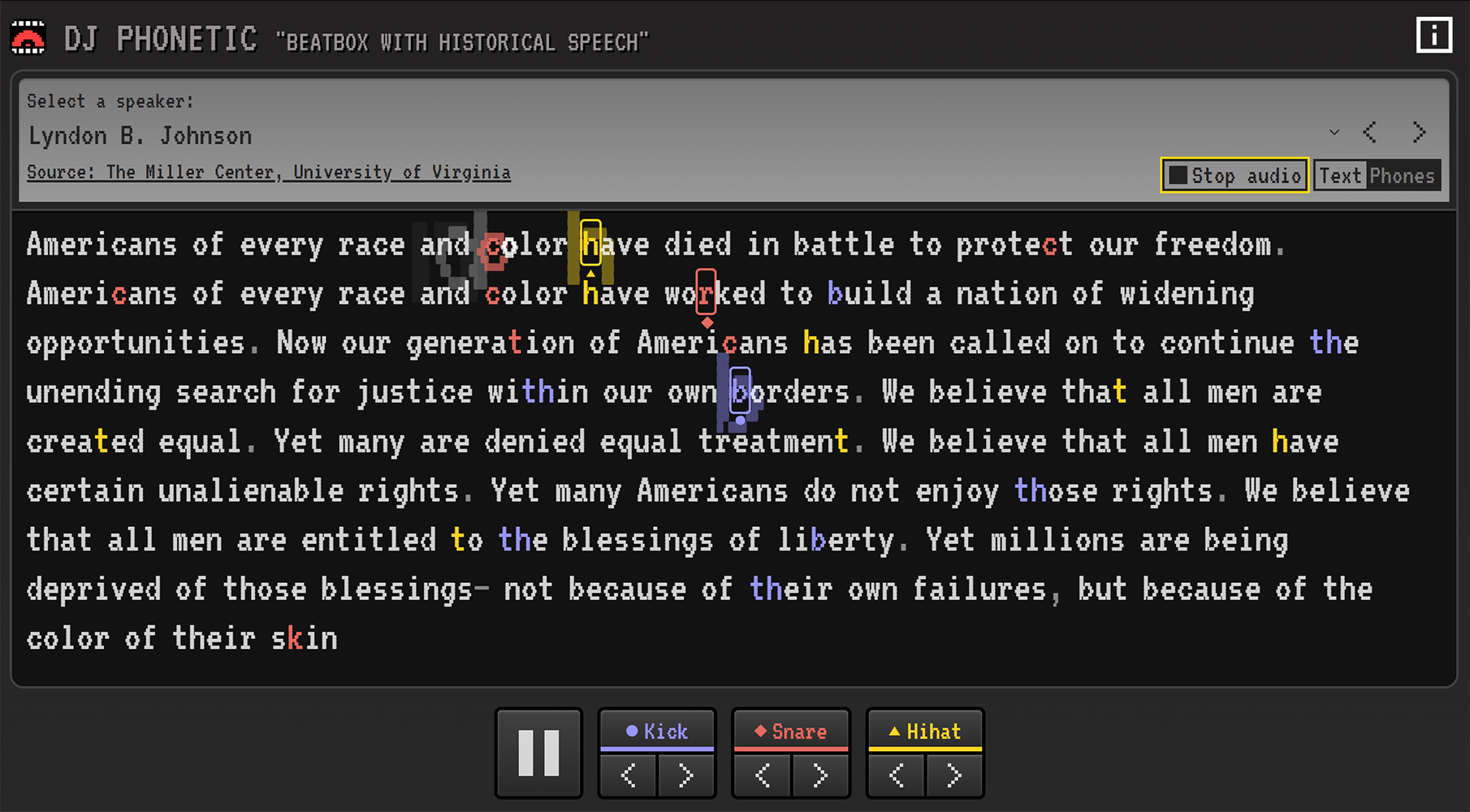
User reviews (0)