Website profiles · Technology insights · Alternatives

voicetoinstrument.com

Turn your voice into any instrument with AI. Upload vocals and convert to piano, guitar, violin, sax and 100+ instruments. Free online tool.

Paid content Multilingual
Visit website
Profile views 1 Outbound visits 0 Normal
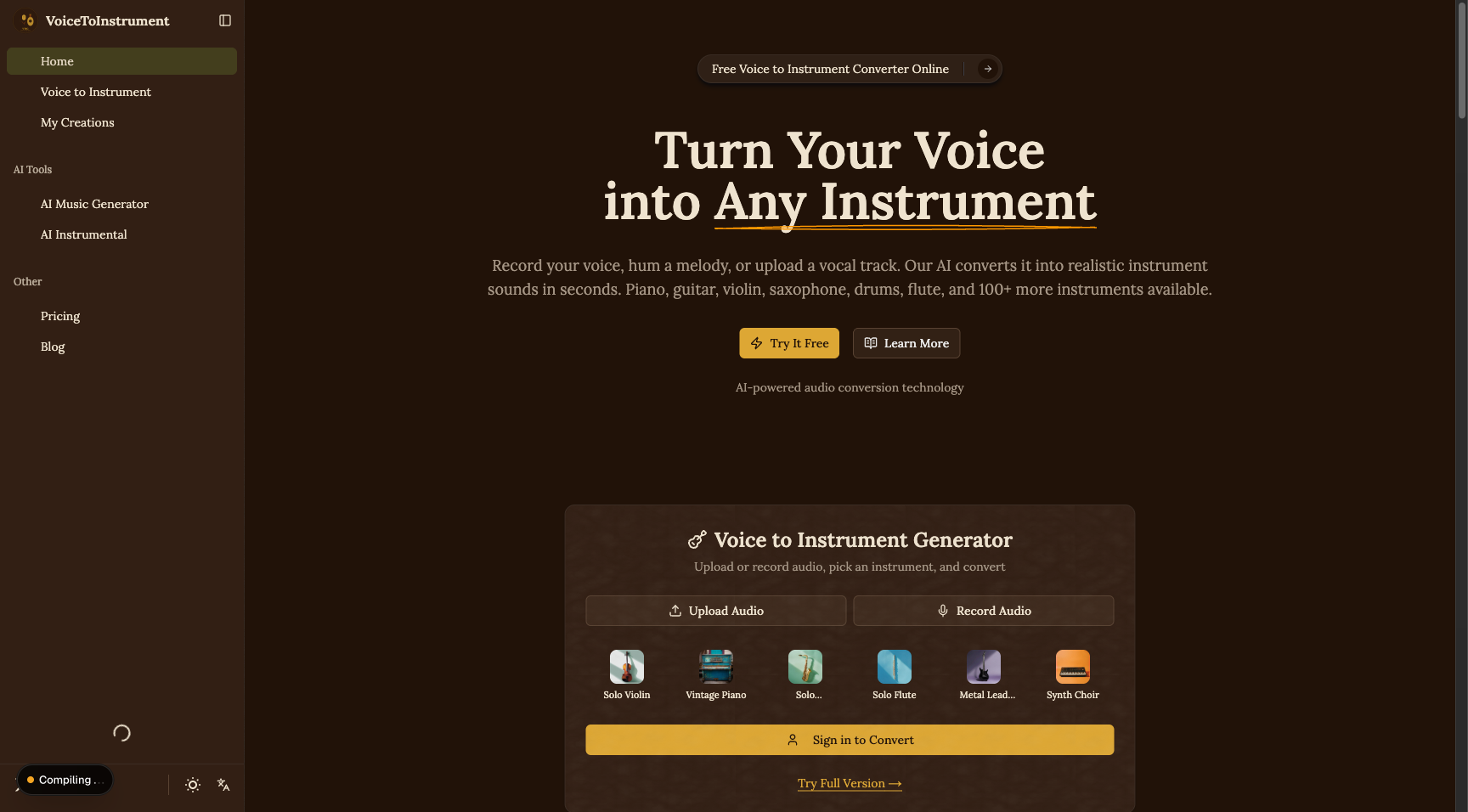
Voice to Instrument Converter Full homepage screenshot

At a glance

Category
Resources & Utilities
Language
English
Paid-content signal
Paid contentObserved
Registered
2026
Hosting
VercelInferred
HTTPS certificate trusted
PassedObserved
Last updated

Website review

This review may include AI-generated content and is not individually verified. Domain, certificate and other facts come from the observed data on this page.

What is Voice to Instrument Converter?

Voice to Instrument Converter is a browser-based AI audio tool that turns a sung, hummed or spoken vocal recording into the sound of a musical instrument. You upload a vocal track or record directly in the page, pick a target instrument, and the service rebuilds your performance in that instrument's tone while keeping your original melody, timing and dynamics. The site lists piano, guitar, violin, saxophone, drums, flute and 100+ other instruments, and describes the process as taking seconds.

What it actually does

  • Input: a vocal recording — a hummed melody, a sung line, or an uploaded vocal file.
  • Processing: the AI analyses pitch, rhythm and expression, then replaces the vocal timbre with an instrument model trained on real recordings.
  • Output: a converted track the site describes as studio-ready for music production, scoring, podcast beds or release.
  • Skill required: none stated — no music theory or production experience.

Who it suits

  • Songwriters who hear a melody but don't play the instrument they want for it.
  • Producers sketching arrangements without hiring session players.
  • Video, film and podcast creators needing quick instrumental beds.
  • Hobbyists curious about how their own voice sounds as a cello, sax or synth.

What to weigh

The pitch is convenience: you perform once, vocally, and audition different instruments from the same take. That is genuinely faster than re-recording parts by hand. The trade-off is control — you are handing the tone and articulation to a model rather than shaping them, and results will vary with how clean and in-tune the source vocal is. Its sibling tools on the same site, including an AI music generator, instrumental generator, sound-effect generator and Stem Splitter, suggest the intended workflow is one part of a larger production chain rather than a finished-song solution.

Next step: record a short, dry, unaccompanied hum of a melody you know well, convert it to two very different instruments (say piano and saxophone), and compare which one preserves your phrasing best. That single test tells you more about fit than any feature list.

How do I convert my voice to an instrument online?

Upload a clean vocal recording or hum a melody, choose a target instrument, and let the converter rebuild your performance as that instrument. On Voice to Instrument Converter, the process is: record or upload audio, pick from 100+ instrument models (piano, guitar, violin, saxophone, drums, flute), and generate a track. The AI analyzes pitch, timing, and expression, then preserves your original melody and rhythm while replacing vocal timbre with instrument tone.

A practical workflow

  1. Capture a clear source. A quiet room, steady mic distance, and no backing music give the AI the cleanest pitch to track.
  2. Hum or sing the exact part you want. Monophonic lines (one note at a time) convert more reliably than dense chords or layered harmonies.
  3. Choose an instrument that matches the register. A low hum suits cello, bass, or baritone sax better than a piccolo or flute.
  4. Generate and review. Listen for timing drift or dropped notes, then re-record that phrase if needed.
  5. Move into the Studio to arrange, layer, or export the result alongside other tracks.

Where this fits

  • Songwriters who hear a melody but don't play the target instrument can sketch parts quickly without hiring a session player.
  • Producers can turn scratch vocals into placeholder instrument tracks for demos or film and video scoring.
  • Beginners with no music theory background can get usable instrument audio from a phone recording.

The trade-off: conversion works best on single-line melodies. Complex polyphonic singing, heavy vibrato, or noisy recordings may produce artifacts. For finished releases, treat the output as a strong starting point and refine it in a DAW.

If you only need the instrumental version of an existing song rather than a melody conversion, a stem splitter or instrumental generator is the better tool for that job.

Can I use Voice to Instrument Converter for free, or do I need to pay?

The site presents itself as a free online tool: its own description says “Free online tool,” and the page offers a “Try It Free” route into the converter. So you can start converting a voice recording or hummed melody without paying upfront.

That said, “free” here describes the ability to try the core conversion, not a guarantee that every use, export or advanced feature is unlimited. The page also links to a separate Pricing page, which is where any paid tiers, usage caps or higher-quality options would be set out. Check that page before you rely on the tool for a long project.

What to expect as a free user

  • You can upload vocals or hum a melody, choose from the listed instruments and generate a converted track.
  • The workflow is designed to be quick: upload, pick an instrument, convert.
  • No music theory or production skill is required, according to the site.

When paying may make sense

If you only want to test an idea — for example, humming a melody and hearing it as piano or guitar — the free route is likely enough. If you plan to use converted tracks in released music, client work or regular production, compare the free limits with the paid options on the pricing page, especially around export quality and how many conversions you need.

A practical next step: run one short test conversion first. If the output fits your project and you hit no blocking limit, you can stay on the free option; if you need more capacity or better output, the pricing page is the place to decide.

What audio file formats can I upload for voice-to-instrument conversion?

The site does not publish a list of accepted upload formats. Its page evidence describes drag-and-drop audio upload and a "Hum & Convert" flow for recorded or hummed input, but it never names specific containers or codecs.

What that means in practice

  • If your file is a standard audio recording, the safest assumption is that common formats such as WAV, MP3, M4A or AIFF are the likely candidates — but treat that as a general expectation, not a documented guarantee for this tool.
  • The page emphasises preserving pitch, timing and dynamics. Lossy formats like MP3 can smear fast pitch movement, so a WAV or AIFF export of the same take usually converts more cleanly, especially for solo voice and humming.
  • If you plan to hum rather than sing, a quiet room and a mono recording matter more than the file type.

How to check before committing a long take

  1. Upload a short 10–20 second test clip in the format you intend to use.
  2. If it converts, keep that format for the full track.
  3. If it fails, re-export as WAV at 44.1 kHz and try again — that is the most widely accepted baseline for audio tools.

For a broader set of audio utilities alongside conversion, see Voice to Instrument Converter.

Is the converted audio good enough for professional music production?

The site claims studio-ready output, but "good enough for professional production" depends on the instrument, the source recording, and whether the part is exposed or buried in a mix. Treat the converter as a sketch-and-demo tool first, and as a release-ready tool only after you've tested it on your own material.

Where it tends to work well

  • Dense arrangements: A converted hum doubling a synth pad, sitting under drums and bass, hides artifacts that a solo passage exposes.
  • Simple, sustained lines: Slow melodies with clear pitch and steady dynamics are the easiest for pitch-tracking to follow.
  • Demo and pre-production: Getting a guitar or sax idea out of your head and into a rough arrangement, then hiring a player or re-recording with a real instrument for the final.

Where it struggles

  • Solo, exposed parts: A lone violin or piano line at the front of a mix leaves nowhere for the conversion to hide unnatural attacks, vibrato, or note transitions.
  • Fast, complex playing: Runs, trills, bends, and percussive consonants in the source vocal can confuse pitch and timing detection.
  • Expressive instruments: Saxophone and violin depend on continuous bowing, breath, and microtonal slides that a vocal-to-instrument model may smooth over.
  • Noisy or reverberant source audio: Room tone, backing music, or heavy reverb in the upload gives the AI more to misread.

A practical test before you commit

  1. Convert a 20–30 second phrase of the actual part you need.
  2. Drop it into your session at the intended mix level, with the rest of the arrangement playing.
  3. Listen on monitors and on earbuds, and solo the track once to hear what's underneath.
  4. Compare against a real recording of the same instrument, if you have one.
  5. Decide: keep it as-is, use it as a guide for a session player, or process it (EQ, transient shaping, reverb) to blend it in.

If the converted track only passes when buried in the mix, that's a legitimate professional use — as a layer, not a lead. If it's meant to be the featured instrument on a release, plan on a real performance or a high-quality sample library instead.

What the page does and doesn't tell you

The page describes the workflow (upload a vocal, choose from 100+ instrument models, get output in seconds) and states that melody, rhythm, and dynamics are preserved. It does not publish audio samples, bit depth, or sample rate for the output, so you can't judge fidelity from the site alone — you have to run your own file through it. The site also lists a Pricing page, so check licensing terms before using converted audio in a commercial release; royalty and ownership details matter as much as sound quality for professional work.

For context on how AI audio tools fit into production workflows, Sound On Sound and Ableton publish practical guides on integrating generated or processed audio into sessions.

How does Voice to Instrument Converter compare to hiring a session musician?

Voice to Instrument Converter is a fast, low-cost way to turn a hummed or sung melody into an instrument track. Hiring a session musician is a collaborative, human performance. They solve different problems.

Where the tool fits

The site describes uploading a vocal or humming a melody, choosing from 100+ instrument models, and getting a converted track in seconds. It says the AI preserves your pitch, timing, and expression while swapping vocal timbre for an instrument sound. That makes it useful for:

  • Demos and scratch tracks where you need to hear an idea as piano, guitar, or strings before committing.
  • Solo creators with no instrument skills who want a melody realized quickly.
  • Video, podcast, and game scoring where a background bed is needed without a recording session.
  • Iteration — trying the same melody across several instruments to find the right color.

Where a session musician wins

A session player brings interpretation, groove, and feel that a conversion cannot invent. They can improvise, respond to your direction, and deliver a performance with phrasing and dynamics that fit the song. They also handle parts that are not simply a sung melody — chord voicings, counterlines, fills, and parts written for the instrument's strengths. For a release where the performance is the point, that human contribution is hard to replace.

Comparison

Factor Voice to Instrument Converter Session musician
Speed Seconds after upload Booking, session, revisions
Cost Free tool with paid options Session fee, studio time, travel
Input needed A vocal or hummed melody A part, arrangement, or direction
Musical range Melodic lines converted to instrument sounds Any part, improvised or written
Human feel Preserves your expression, not theirs Interprets and adds their own
Best for Demos, sketches, background scoring Releases, lead performances, complex parts

Practical next step

Test the tool on one melody you already have in mind. If the converted track gives you the shape and mood you want, use it as a demo or final bed. If it sounds stiff or the part needs real phrasing, take that same demo to a session player as a reference — you will book less time because they can hear exactly what you want.

For a broader set of audio tasks, the same site lists related tools such as an AI music generator, instrumental generator, stem splitter, and vocal remover on Voice to Instrument Converter.

Related questions

More questions →
What is Voice to Instrument Converter (voicetoinstrument.com)?

Voice to Instrument Converter is an online AI audio tool that turns a recorded or uploaded vocal—singing, humming, or a full vocal track—into a realistic instrument performance. You pick a target instrument (piano, guitar, violin, saxophone, drums, flute, and 100+ others), and the AI rebuilds your melody as that instrument in seconds. It fits anyone who has a melody in their head but no instrument skills, or who wants a quick instrument layer without booking a studio or hiring a session player.

What it actually does

The core job is timbre replacement, not composition. According to the site, the AI analyzes your vocal's pitch, timing, and expression, then rebuilds the performance as a real instrument sound while keeping your original melody fully intact. So the notes, rhythm, and dynamics you performed stay the same—only the vocal timbre is swapped for an instrument tone.

Key capabilities from the page:

  • Input: record your voice, hum a melody, or upload a vocal track/audio file.
  • Output: an instrument track you can use in production, film/video scoring, podcast backgrounds, or standalone release.
  • Instrument range: acoustic guitar, electric piano, solo violin, jazz saxophone, concert flute, rock drums, orchestral strings, and "100+ more."
  • Speed: the conversion finishes in seconds.

How it works (step by step)

The site lays out a simple flow inside its "Your Studio" panel:

  1. Choose an instrument — your target sound.
  2. Provide your voice — via Hum & Convert, Describe, Cover, or Upload.
  3. Record or upload audio — drag and drop any audio file, or record directly.
  4. Generate track — hit convert; the result opens in the full Studio when ready.

Expected result: a converted track that preserves your original melody, rhythm, and musical expression, delivered as a studio-ready file.

Who it's for

The page names a few use cases directly:

  • Musicians turning melodies in their head into real instrument tracks without a studio or session musicians.
  • Non-instrumentalists who can sing or hum a tune but don't play an instrument.
  • Creators needing instrument layers for music production, film and video scoring, podcast backgrounds, or standalone release.

The stated selling point is that no music theory or production skills are needed—if you can hum it, you can convert it.

What to check before relying on it

  • Pricing: the site has a dedicated pricing page, so free access and paid tiers may differ. The homepage markets it as a "free online tool," but confirm what the free tier includes (length limits, export quality, watermarks) on the pricing page before committing.
  • Output quality: the page claims each instrument model is "trained on real instrument recordings for authentic sound." Whether that holds for your specific instrument and vocal style is worth testing with a short clip first.
  • Melody fidelity: the promise is that your melody stays intact. Test with a simple hummed phrase to confirm the conversion tracks your pitch accurately before using it on a full track.

Related tools on the same site

Voice to Instrument sits inside a broader AI audio suite, which matters if you need more than one step:

Tool What it does
Voice to Instrument Convert vocals into 100+ instrument sounds
AI Music Generator Create complete songs with vocals and instruments from text
AI Instrumental Generator Generate pure instrumental tracks with style presets
AI Sound Effect Generator Create sound effects from text descriptions
AI Stem Splitter Separate vocals and instruments from any song

If your goal is a full song rather than a single instrument layer, the Music Generator or Instrumental Generator may be the better starting point.

Bottom line

voicetoinstrument.com is a low-friction way to turn a hummed or sung melody into an instrument track without playing an instrument or hiring anyone. It's best for quick melody-to-instrument conversion and for creators who need instrument layers fast. Before depending on it for a release, test a short clip and check the pricing page to confirm what the free tier actually gives you.

How Voice to Instrument Converter Preserves Your Melody and Expression

Voice to Instrument Converter rebuilds your vocal performance as an instrument track while keeping the original melody, rhythm, and dynamics intact. According to the site, the AI analyzes your vocal pitch, timing, and expression, then replaces the vocal timbre with a chosen instrument sound — so what changes is the sound source, not the performance. This matters if you hum or sing an idea and want it to sound like a piano, guitar, violin, or another instrument without re-recording it.

What the AI actually analyzes

The conversion is not a simple effect or filter. The site describes the process as analyzing three things in your vocal:

  • Pitch — the notes you sang or hummed
  • Timing — when each note starts and stops, and the rhythm between them
  • Expression — the dynamics and phrasing of your performance

These are the elements that carry your musical idea. The AI uses them as the blueprint for the new instrument track.

What stays the same after conversion

Per the site, the following are preserved exactly as you performed them:

Element What happens
Melody Kept fully intact
Rhythm Preserved
Dynamics / expression Preserved
Notes Every note retained

The vocal timbre — the characteristic sound of your voice — is what gets replaced. Everything else is rebuilt as the target instrument.

Why the output sounds like a real instrument

Each instrument model is trained on real instrument recordings. The site lists acoustic guitar, electric piano, solo violin, jazz saxophone, concert flute, rock drums, and orchestral strings among its 100+ models. Because the models learn from actual instrument audio, the converted track aims for an authentic tone rather than a synthetic approximation.

What you get at the end

The site states that output files are studio-ready and suitable for:

  • Music production
  • Film and video scoring
  • Podcast backgrounds
  • Standalone release

The conversion is described as finishing in seconds, and no music theory or production skill is required — you record or upload, choose an instrument, and convert.

How to try it on your own melody

  1. Record or upload — sing, hum a melody, or drag and drop a vocal track.
  2. Choose an instrument — pick from the 100+ available models.
  3. Convert — the AI rebuilds your performance as that instrument.
  4. Result — your track opens in the full Studio when ready.

If you want to check how well your specific phrasing survives the conversion, the practical test is to hum a melody with clear dynamics (soft and loud notes) and compare the converted track against your original. That tells you whether the expression you put in came through.

Who Can Benefit from Voice to Instrument Converter?

Voice to Instrument Converter (voicetoinstrument.com) suits anyone who can hum, sing, or upload a vocal track but wants an instrument performance instead. The site describes four clear beneficiary groups: musicians who want to turn a melody in their head into a real instrument track without booking a studio or hiring session players, people who don't play an instrument, content creators who need background music for video or podcasts, and beginners who lack music theory or production skills. If you can carry a tune — even roughly — and you need piano, guitar, violin, sax, drums, flute, or one of 100+ other instrument sounds, this tool is aimed at you.

Musicians: sketch a melody without a session player

The site's pitch is direct: "Turn melodies in your head into real instrument tracks without booking a studio or hiring session musicians." You record or upload the vocal idea, pick the target instrument, and the AI rebuilds the performance as that instrument while keeping your original melody intact.

This is most useful at the demo and arrangement stage — when you know what the part should sound like but don't want to spend studio time or money on a placeholder. The site says output files are "studio-ready," suitable for music production, film and video scoring, podcast backgrounds, or standalone release, so the converted track can go straight into a project rather than serving only as a rough reference.

Non-instrumentalists: compose by humming

If you don't play anything, the workflow removes the instrument as a barrier. The site states plainly: "No instrument skills needed — sing or hum any tune." You supply pitch, timing, and expression with your voice; the AI supplies the instrument tone.

A concrete example: you hum a four-bar melody into your phone, upload it, choose "solo violin," and get back a violin performance of that same melody. You never had to know fingerings, bowing, or notation.

Content creators: background music on demand

The site lists "podcast backgrounds" and "film and video scoring" among the intended uses of the output. For a creator who needs a short instrumental bed, the appeal is speed — the site says the conversion "finishes in seconds" — and the absence of licensing or hiring steps that come with sourcing a real performer.

The practical limit to keep in mind: you still need to supply the melody yourself, so this works best when you have a tune in mind rather than when you need a fully composed track from nothing. For the latter, the site points to its separate AI Music Generator and AI Instrumental Generator tools.

Beginners: no theory or production skills required

The site explicitly targets people without a production background: "No music theory or production skills needed." The stated process is drag-and-drop — upload any audio file, choose your target instrument, hit convert.

That said, "no skills needed" describes the interface, not the input. The quality of your hummed or sung melody still shapes the result, since the AI preserves your original melody, rhythm, and dynamics. A cleaner, more rhythmically steady vocal take will generally give the converter more to work with.

What the tool actually does with your voice

Understanding the mechanism helps you judge whether you're in the target group. According to the site, the AI "analyzes your vocal pitch, timing, and expression" and "rebuilds the performance as a real instrument sound while keeping your original melody fully intact." Every note, rhythm, and dynamic is preserved; only the vocal timbre is replaced.

The instrument models — acoustic guitar, electric piano, solo violin, jazz saxophone, concert flute, rock drums, orchestral strings, and more — are each "trained on real instrument recordings." That's the basis for the site's claim of authentic sound.

Quick fit check

If you are… This tool fits when… Consider something else when…
A musician You need a fast instrument demo of a melody you can sing You need a fully arranged, multi-part production
A non-player You can hum or sing the tune you want You can't produce a recognizable melody vocally
A content creator You need a short instrumental bed and can supply the tune You need a complete song generated from a text prompt
A beginner You want to skip theory and production setup You expect the tool to compose the melody for you

Getting started

The site's own steps: record your voice, hum a melody, or upload a vocal track; choose one of 100+ instruments; convert. The finished track "will automatically open in the full Studio when ready," where you can continue working on it. The site presents the converter as free to try, with a separate pricing page for paid options — check that page for current terms before relying on any usage limits.

Is Voice to Instrument Converter Free? What to Know About Pricing

Voice to Instrument Converter (voicetoinstrument.com) is presented as a free online tool: the site's own copy says "Free Voice to Instrument Converter Online" and invites you to "Try It Free." It also maintains a dedicated Pricing page, which signals that paid options likely exist alongside the free tier. The site does not publish the specific limits of the free version or the price of any paid plan in the material available here, so the practical answer is: you can start without paying, but you should check the Pricing page before relying on it for frequent or commercial work.

What the free tool includes

Based on the site's description, the free entry point covers the core workflow:

  • Upload a vocal recording, hum a melody, or record your voice directly.
  • Choose a target instrument from a catalog described as 100+ instruments, including piano, guitar, violin, saxophone, drums, flute, and orchestral strings.
  • Convert and receive a track that the site says opens in the full Studio when ready.
  • The conversion is described as finishing "in seconds," with no music theory or production skills required.

The site also lists related tools under the same suite — AI Music Generator, AI Instrumental Generator, AI Sound Effect Generator, and AI Stem Splitter — but the page evidence does not state whether these are free, bundled, or separately priced.

What is not confirmed

Several things a buyer would normally want to know are not stated in the available material:

Question What the source says
Exact price of paid plans Not stated; only a Pricing page exists
Free-tier limits (conversions, length, quality) Not stated
Whether output is watermarked Not stated
Commercial-use rights Not stated
Whether login or account is required Not stated
Payment methods accepted No payment platforms listed

Because none of these are confirmed, treat "free" as "free to try" rather than "free with no conditions." The site's own framing — a free tool plus a Pricing page — is the common pattern where the free tier is real but capped.

How to check before you commit

  1. Open the Pricing page at voicetoinstrument.com/pricing and read what each tier includes: number of conversions, maximum audio length, instrument selection, and output quality.
  2. Look specifically for commercial-use terms if you plan to use tracks in videos, podcasts, or releases — the site markets output as "studio-ready" for music production, film and video scoring, podcast backgrounds, or standalone release, but that describes audio quality, not licensing.
  3. Test the free tier with one real file first. Upload a short hum or vocal, pick an instrument, and confirm the output quality and turnaround match your expectations before paying for anything.
  4. Note whether the converted track opens in the "full Studio" automatically — the site says it does — and whether using the Studio is part of the free flow or a paid feature.

Who should consider paying

  • Casual users converting an occasional melody: the free tool is likely enough; verify limits on the Pricing page.
  • Frequent users hitting conversion or length caps: a paid tier is the natural next step, but only after you confirm the caps exist and what the plan costs.
  • Commercial users (video scoring, podcast beds, releases): confirm licensing terms before publishing anything, since the source material does not address rights.

Bottom line

You can try Voice to Instrument Converter for free — the site says so directly. Whether it stays free for your use case depends on limits and pricing that are only described on the Pricing page, so read that page first, then run one test conversion before deciding whether to upgrade.

How to Convert Your Voice to an Instrument with Voice to Instrument Converter

Voice to Instrument Converter (voicetoinstrument.com) turns a vocal recording, hummed melody, or uploaded vocal track into a realistic instrument sound in seconds. You pick one of 100+ instrument models — piano, guitar, violin, saxophone, drums, flute, and more — and the AI rebuilds your performance as that instrument while keeping your original melody, rhythm, and dynamics intact. No music theory or production skills are required. This guide covers the full path from preparing your audio to getting a finished track.

What you need before you start

  • A vocal source. You can record directly in the tool, hum a melody, or upload an existing vocal track. Any audio file works — the process is described as drag-and-drop.
  • A target instrument in mind. The tool offers 100+ models, including acoustic guitar, electric piano, solo violin, jazz saxophone, concert flute, rock drums, and orchestral strings.
  • No instrument skills. You don't need to play the instrument you're converting to; the AI supplies the instrument tone.

Step-by-step: converting your voice

1. Choose your input method

The Studio offers several starting points depending on what you have:

Option Use it when
Hum & Convert You only have a melody in your head and want to hum it
Describe You want to describe the sound rather than sing it
Cover You're working from an existing song
Upload You already have a vocal recording or track

For a straightforward voice-to-instrument conversion, record your voice or hum the melody, or upload a vocal file.

2. Select the target instrument

Pick one instrument from the 100+ available models. Each model is trained on real instrument recordings, which is what gives the output its authentic tone rather than a synthetic approximation.

3. Run the conversion

Upload or record your audio, choose the instrument, and hit convert. The AI analyzes your vocal pitch, timing, and expression, then rebuilds the performance as the chosen instrument. The vocal timbre is replaced, but every note, rhythm, and dynamic is preserved.

Expected result: the process finishes in seconds.

4. Open and finish in the Studio

Your converted track automatically opens in the full Studio when it's ready. From there you can edit further or export. Output files are described as studio-ready, suitable for music production, film and video scoring, podcast backgrounds, or standalone release.

How the conversion actually works

The key mechanism is timbre replacement with performance preservation. The AI separates what you performed (pitch, timing, expression) from how it sounded (your vocal timbre). It then re-renders the same performance using the instrument model's tone. That's why your melody stays fully intact even though the sound source changes completely.

A practical example: if you hum a slightly swung melody with a crescendo on the last note, the converted piano or saxophone track should carry that same swing and that same crescendo — you're changing the instrument, not the musical idea.

Common snags to expect

  • A messy source gives a messy result. Since the AI preserves your timing and dynamics, any rhythmic hesitation or pitch drift in your vocal carries over to the instrument track. Record a clean take if you want a clean conversion.
  • Humming vs. singing. Humming gives the AI pitch and rhythm but no lyrics to work around, which suits instrumental conversion well. A full vocal track with words still converts, but the melody line is what gets rebuilt.
  • Instrument choice matters more than you'd think. A solo violin and rock drums will interpret the same melody very differently. If the first result doesn't fit, try another model before assuming the conversion failed.

Who this is for

The tool is aimed at anyone who has a melody but not the instrument skills to play it — songwriters sketching ideas, producers needing a quick session-instrument stand-in, or creators scoring video and podcasts. Because the whole process is upload, choose, convert, you can go from a hummed idea to an instrument track without booking a studio or hiring a session musician.

Website Overview

Page metadata, canonical configuration and social previews work together to provide more consistent search and sharing presentation.

Domain and Registration

The domain was registered less than a year ago and has limited historical evidence to assess. Transfer-protection status is present, helping reduce the risk of unauthorized domain transfers. The registrar is NameCheap, Inc., a widely used domain service provider. The domain uses the common .com extension, which is not an independent safety signal.

DNS and Email

Nameservers are provided by Namecheap, indicating managed DNS hosting. MX records point to the registrar-servers.com email service. No CNAME was found; the observed records resolve directly to addresses. SPF and DMARC are configured. DKIM status is unknown. TXT records include verification markers for Google. Such markers may also remain after a service stops being used.

TLS and Certificates

The certificate uses an RSA 2048-bit public key, offering broad client compatibility. The server supplied a complete certificate chain. No organization name is present in the certificate; the available fields are consistent with domain validation. The certificate was issued by Let's Encrypt, commonly associated with automated certificate services. The certificate's total validity is about 89 days, consistent with a short renewal cycle.

HTTP and Browser Security

X-Powered-By exposes backend information: Next.js. The response lacks these common security headers: CSP, X-Content-Type-Options, Referrer-Policy, Permissions-Policy, clickjacking protection. No obvious internal addresses or debug information were found in the headers. The Server header contains the custom value Vercel. No explicit CDN or WAF marker was found in the response headers.

Technology Stack Analysis

The public page identifies Next.js, Google Analytics, Vercel without precise versions, leaving fewer clues for version-specific scanning.

Search and Social Sharing

Twitter Card metadata is configured. The page declares 10 language or regional alternatives using hreflang. The title has 50 characters, within a common display range. A meta description is present, with 140 characters. The observed directives allow indexing and link following.

Hosting and Email

DNSNamecheap
HostingVercel
Emailregistrar-servers.com
Approximate IP geolocation (inferred; a CDN or proxy may differ from the origin server) United States flagUnited States Inferred 216.198.79.1

Registration details

RDAP / WHOIS

RegistrarNameCheap, Inc.
Registered2026-03-01
Expires2027-03-01
Domain statusclient transfer prohibited
Nameserversdns1.registrar-servers.com、dns2.registrar-servers.com
DNSSECunsigned

DNS records

DNS

TypeNameValueTTLPriority
Avoicetoinstrument.com216.198.79.11799—
MXvoicetoinstrument.comeforward1.registrar-servers.com180010
MXvoicetoinstrument.comeforward2.registrar-servers.com180010
MXvoicetoinstrument.comeforward3.registrar-servers.com180010
MXvoicetoinstrument.comeforward4.registrar-servers.com180015
MXvoicetoinstrument.comeforward5.registrar-servers.com180020
NSvoicetoinstrument.comdns1.registrar-servers.com1800—
NSvoicetoinstrument.comdns2.registrar-servers.com1800—
TXTvoicetoinstrument.comblogarama-e8a481fd-13a5-43ac-b302-91fbc8d4d82a1799—
TXTvoicetoinstrument.comgoogle-site-verification=FALhhAq6890jP07xJsa32XgAF1ICkNlD2lRfK4eSzwA1799—
TXTvoicetoinstrument.comgoogle-site-verification=tHMbVxTRvwERotlu3xf_NwtNku-ajwOPxMV4aK7NUGU1799—
TXTvoicetoinstrument.comv=spf1 include:spf.efwd.registrar-servers.com ~all1799—
DMARC_dmarc.voicetoinstrument.comv=DMARC1; p=none;1799—

TLS and certificates

TLS / SSL

AssessmentNormal configuration
Supported protocolsTLSv1.2、TLSv1.3
Negotiated protocolTLSv1.3
Certificate subjectvoicetoinstrument.com
IssuerLet's Encrypt
Valid until2026-12-04T12:24 · Remaining when checked: 53 days
Verification detailsCertificate trust: Passed · Hostname match: Passed

HTTP response headers

HTTP

HeaderValue
content-typetext/html; charset=utf-8
cache-controlprivate, no-cache, no-store, max-age=0, must-revalidate
serverVercel
strict-transport-securitymax-age=63072000

Identified technologies

Next.jsGoogle AnalyticsVercel

Pages, Search and Sharing

Meta descriptionTurn your voice into any instrument with AI. Upload vocals and convert to piano, guitar, violin, sax and 100+ instruments. Free online tool.
Canonical URLhttps://voicetoinstrument.com/
LanguageEnglish (default) · Multilingual
Twitter Cardsummary_large_image
All bots 1 allowed · 7 disallowed
  • Allow/
  • Disallow/*?*q=
  • Disallow/privacy-policy
  • Disallow/terms-of-service
  • Disallow/settings/*
  • Disallow/activity/*
  • Disallow/admin/*
  • Disallow/api/*

User reviews (0)

  • No reviews yet.