Website profiles · Technology insights · Alternatives

ev.io

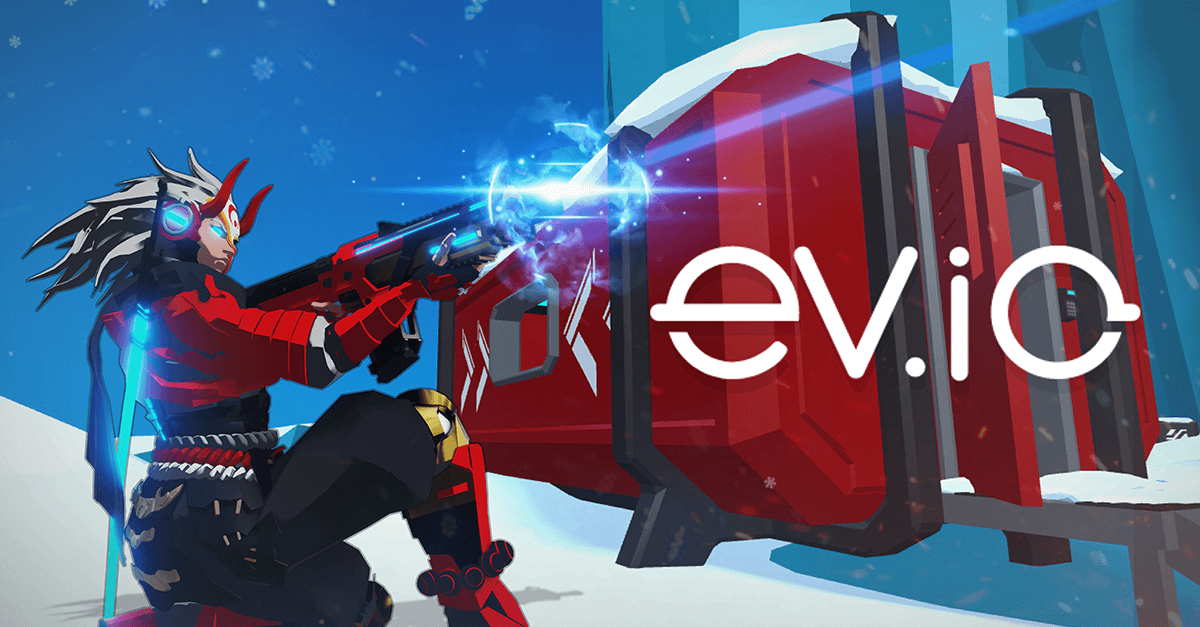
The browser FPS on the future. Play here on the official site!

No paid content found
Visit website
Profile views 8 Outbound visits 13 Normal
Play ev.io Full homepage screenshot

At a glance

Category
Games & Board Games
Language
English
Paid-content signal
No paid content foundObserved
Registered
2020
Hosting
CloudflareInferred
HTTPS certificate trusted
PassedObserved
Last updated

Website review

This review may include AI-generated content and is not individually verified. Domain, certificate and other facts come from the observed data on this page.

What is ev.io?

ev.io is a free browser-based first-person shooter you can play on its official site, Play ev.io. It runs directly in the browser without a download, which makes it easy to try in a few clicks.

The game is built around fast, arena-style FPS matches. Its page evidence shows team-based rounds, a respawn flow, and performance readouts like FPS and ping, so it is designed for quick competitive sessions rather than a long single-player campaign.

It also includes several modes and features beyond a standard match:

  • Tournaments and tourney lobbies for organized play.
  • Minigames as a break from standard matches.
  • Abilities and an inventory system, with loadout-style options.
  • Skins and a storefront, plus a marketplace area.
  • Social features such as friends lists, clans, and profile pages.

The page also mentions crypto and NFT-related features, including a wallet connection and marketplace. If you only want to play the shooter, those are optional parts of the wider site rather than requirements for a basic match.

A practical next step: open the official site, look for a public lobby or quick match, and test your ping and FPS before committing to a tournament. If you are on a shared or older computer, the browser-based setup is convenient, but performance will depend on your connection and hardware.

How do I play ev.io in my browser without downloading anything?

Open Play ev.io in a modern desktop browser and you can be in a match without installing a client. The page loads a multiplayer arena shooter directly: you pick a mode, join a lobby, and play. A stable connection matters more than a fast one, since the game shows your ping and FPS in the match HUD.

The practical steps

  1. Go to Play ev.io in Chrome, Edge, Firefox or Safari on a computer. A mouse and keyboard give you the standard FPS control scheme.
  2. Let the page finish connecting. The loading screen reports connection status before the menu appears.
  3. Choose how you want to play. The main menu offers multiplayer lobbies, tournaments, minigames, and a test mode for practising movement and aim.
  4. Join a lobby or match, then use the in-game settings to adjust sensitivity and graphics before you commit to a round.
  5. If you want to keep progress, skins or clan features, create a profile and log in. Playing as a guest is fine for casual matches, but your loadout and stats will not follow you between sessions.

What to expect in the browser

  • No download, but not no setup. You still need an account for persistent progression, friends lists and the storefront.
  • Performance is visible. The HUD shows ping and FPS, so you can tell whether a bad round is your connection or your aim.
  • Modes vary in commitment. Quick multiplayer lobbies are the easiest entry point; tournaments and clan play assume you already know the maps and abilities.
  • Local test mode exists. The page includes a test mode and replay loading, which is useful for learning abilities and movement before facing other players.

A sensible first session

Spend ten minutes in test mode to learn the movement and one or two abilities, then join a casual lobby. If your ping is consistently high, try a different server region or a wired connection before blaming the game. Once you are comfortable, the progression systems — abilities, inventory, achievements — give you reasons to return, but none of them are required to start playing today.

What are the different game modes available in ev.io?

ev.io is primarily a fast, browser-based arena FPS, and its game modes revolve around online team deathmatch-style play plus a few casual and competitive variants. Based on the page evidence, you can expect these modes and features:

  • Multiplayer team matches — The interface shows Team 1 and Team 2, a round timer, a scoreboard, and a "Round Complete" state. This is the core experience: two teams fighting to win rounds and earn XP.
  • Rankings / leaderboard play — There is a Leaderboard and Rankings section, which implies a competitive track where results are tracked and players are ranked against each other.
  • Tournaments — A Tourney section and tournament lobbies appear in the menu, suggesting organized competitive events beyond regular matchmaking.
  • Minigames — The menu lists Minigames, which points to lighter, alternate modes for when you want a break from standard matches.
  • Private or password-protected games — The evidence includes "This gamemode requires a password" and a "Private" profile area, so custom or private lobbies are supported.
  • Local / test mode — The page notes that multiplayer will not work when the game is running locally, and there is an "Exit test mode" option. This is a practice or testing environment rather than a live match.

The exact names and rules of each mode are not fully detailed in the page evidence, so treat the above as the categories the site exposes rather than a complete rules list.

A useful next step: open the game and look at the main menu and lobby list. If you want competitive play, start with Rankings and Tournaments; if you want a quick casual session, try Minigames or a standard team match. For the official game, visit Play ev.io.

How does the ranking and leaderboard system work in ev.io?

The leaderboard in ev.io is session-level: it appears during matches, showing your team, enemies, the score, and round state, and it updates as rounds complete and XP is awarded. In other words, the ranking you see while playing reflects the current match or lobby rather than a separate page full of career stats. The page also lists a Rankings entry in its menu, so there is a dedicated place to look beyond the in-game scoreboard, but the visible evidence centers on live match scoring and round-by-round XP.

What this means in practice

  • In-game leaderboard: team vs. enemy score, round number, timer, and per-round XP gains.
  • Round-based scoring: the page shows "Round 1 / Round Complete / + XP," which suggests performance is tracked per round and converted into XP.
  • Menu Rankings: a separate menu item implies a broader ranking view exists outside the match HUD.

A concrete scenario

If you finish a round with a strong kill-and-objective performance, expect the scoreboard and XP tally to update immediately. If you want to see how you compare over time, look for the Rankings section in the menu rather than relying on the match scoreboard.

Decision criterion

Use the in-game leaderboard to judge how a specific match is going; use the Rankings menu to judge longer-term standing. If you care about progression, focus on the XP awarded at round completion, since that is the clearest ranking signal shown.

Next step: open the menu and check the Rankings entry to confirm whether it tracks lifetime stats or just recent matches — that will tell you which number actually matters for your goals. You can start at Play ev.io.

Can I earn cryptocurrency or NFTs by playing ev.io?

Yes, ev.io includes crypto and NFT features, but the page evidence suggests they are optional systems layered on top of a browser FPS rather than a guaranteed way to earn money simply by playing. The interface shows a Connect Wallet option, an NFT Marketplace, a Storefront, a Craft section, Collection Explorer, Governance, and an Earn area alongside ordinary game elements like abilities, inventory, achievements, skins, clans and tournaments.

What the page shows

  • Wallet connection is part of the profile and settings area, which implies you need a compatible crypto wallet to use the blockchain features.
  • Earn is listed as a distinct section, so there is some earning-related functionality, but the evidence does not specify how rewards are calculated, what tokens are involved, or whether earnings are paid in cryptocurrency, NFTs, or in-game items.
  • NFT Marketplace and Craft suggest that NFTs can be traded or created, but the page does not show prices, drop rates, or whether you can earn NFTs directly through gameplay.
  • Tournaments and Tourney Lobbies are present, and competitive events are a common route for prize-based earning in games, though the page does not confirm prize details.
  • The game runs in the browser and displays performance stats like FPS and ping, so it is designed for quick access rather than a heavy download.

Practical takeaway

If your goal is specifically to earn cryptocurrency or NFTs, treat ev.io as a game with blockchain features rather than a straightforward earn-by-playing platform. You would likely need to connect a wallet, use the marketplace or crafting systems, and possibly compete in tournaments. The page evidence does not support claims of guaranteed income or specific payout amounts.

A useful next step is to open the official site and check the Earn, NFT Marketplace, and Storefront sections directly: Play ev.io. Look for how rewards are described, whether they require purchases or tournament entry, and what wallet or network is supported before committing time or money.

How do I join or create a clan and team up with friends in ev.io?

Clan and party features exist in ev.io, but the exact steps depend on whether you are in the live multiplayer build or a local/test match. The page evidence shows a Clan Hub, Clan Invites, Friends List, Add a Friend, Leave Party, a team roster (Team 1 / Team 2 / Spectators), and a Tourney Lobbies area. It also includes a warning that “multiplayer will not work on this game as it is running locally,” so if you are testing offline, social and clan functions may not connect.

Joining or creating a clan

  1. Open the Clan Hub from the social or profile area.
  2. If you have an invite, check Clan Invites and accept it there.
  3. If you want to create one, look for a create-clan option inside the Clan Hub. The page evidence confirms the hub exists, but does not list the exact creation fields, so treat the in-game prompts as the source of truth.
  4. To invite others, add them through Add a Friend first, then send a clan invite from the hub or their profile.

Teaming up with friends

  • Add friends via Add a Friend and manage them in Friends List.
  • Join a Tourney Lobbies or standard match, then use the party controls. Leave Party confirms parties are supported.
  • Once in a match, the roster shows Team 1, Team 2, and Spectators, so you can see which side you and your friends land on.
  • If a mode requires a password, the page notes “This gamemode requires a password,” so the host must share it before others can start.

Practical decision criterion

If you mainly want casual grouping, use the Friends List and party flow. If you want organized competition, focus on Clan Hub and Tourney Lobbies. If the game is running locally, expect social features to be unavailable until you are in the official online environment at Play ev.io.

A useful next step: add one friend, create or join a clan, then host a password-protected lobby and confirm both of you appear on the same team before inviting the rest of the group.

Related questions

More questions →
What Are the Crypto and NFT Features in ev.io?

ev.io includes a set of crypto and NFT features that sit alongside its core browser FPS gameplay: a Connect Wallet option, an NFT Marketplace, a Craft section, a Collection Explorer, and a Governance area. You only reach these by connecting a crypto wallet — the game itself is playable without one, but the marketplace, crafting, and governance functions depend on a connected wallet. The exact asset types, prices, and trading rules are not specified on the page, so treat the in-site pages as the source of truth once you're logged in.

The crypto and NFT entry points

Based on the site's navigation and menu labels, these are the relevant sections:

Feature What it appears to do
Connect Wallet Links a crypto wallet to your profile so the NFT-related features become usable
NFT Marketplace A place to browse and trade NFT items
Storefront A store area listed next to the marketplace
Craft Likely for creating or combining items
Collection Explorer Browse collections of items
Governance A section for token- or community-related decisions

These labels appear together in the same menu cluster, which suggests they form one connected economy layer rather than separate tools.

How they connect to gameplay

The crypto features are tied to in-game cosmetics and inventory rather than to core combat:

  • Skins — the profile area includes a "Lend Skins" option and a "Skin Preview Tool," which points to skins being ownable and transferable items.
  • Inventory — a dedicated Inventory section implies items you hold are tracked on your profile.
  • Abilities and Achievements — listed alongside Inventory, so your profile aggregates progression and owned items in one place.

In other words, you can play matches, earn XP, and use abilities without touching any of this. The wallet layer is for owning, previewing, lending, crafting, and trading items.

What you need to do to use them

  1. Open your Profile from the main menu.
  2. Find Crypto → Connect Wallet and connect a supported wallet.
  3. Once connected, the NFT Marketplace, Craft, Collection Explorer, and Governance sections become relevant to your account.
  4. Use Skin Preview Tool and Inventory to see what you hold before trading or lending.

The page does not state which wallets are supported, what fees apply, or which blockchain is used, so confirm those details inside the connected interface rather than assuming.

Practical caveats

  • Wallet connection is the gate. Without it, the marketplace and governance features aren't usable — the page shows them as part of a logged-in, wallet-connected profile.
  • Asset specifics are unconfirmed here. The page evidence lists the feature names but not token names, item rarities, or pricing. Don't assume values or free access.
  • Lending is a listed feature, not a documented process. "Lend Skins" appears as an option, but the mechanics (duration, collateral, return conditions) aren't described on the page.

If your goal is simply to play ev.io, none of this is required. If your goal is to own, craft, or trade items, start with Connect Wallet and treat the in-site marketplace and collection pages as the authoritative source for what's actually available.

How do you play ev.io in a browser?

Open ev.io in a modern desktop browser and the game loads directly on the official site — no download or install step is shown. You play with keyboard and mouse, and the HUD shows your health, ammo, ping, and FPS while you move and shoot. This works best on a desktop or laptop with a stable connection; the page itself reports ping and frame rate so you can judge whether your setup is keeping up.

Getting into a match

  1. Go to the official ev.io site. The page shows a Connecting … state while it loads.
  2. Once loaded, you land in a lobby view with Your Team, Enemies, a round timer, and a leaderboard.
  3. Choose how to enter: JOIN to play, or Exit test mode if you're in a local/test session.
  4. Pick a mode from the lobby options — Tourney Lobbies, Minigames, and tournament entries are listed alongside standard play.
  5. If a gamemode shows a password prompt, you need that password from the host before you can start.

Controls and what the HUD tells you

  • Space — respawn when you're down. The prompt "Press Space to respawn" appears on screen.
  • Mouse — aim and fire; keyboard — movement and abilities.
  • Health — shown as a value out of 100 (e.g. 100/100).
  • Ammo — shown as current/reserve (e.g. 0 / 0 when empty).
  • Ping and FPS — displayed live (the page shows values like Ping: 100, FPS: 60), so you can tell whether lag or low frame rate is affecting you.
  • Round and XP — round number and end-of-round XP gains appear as the match progresses.

Modes, teams, and spectating

The lobby separates players into Team 1, Team 2, and Spectators. You can join a team or watch, and the host can Start the game. Beyond standard matches, the interface lists Tourney Lobbies, Minigames, and tournament options, plus a Load Replay entry.

Common snags

  • Multiplayer won't work in a local session. The page notes that multiplayer will not work when the game is running locally — you'll be limited to test mode.
  • Password-locked modes. Some gamemodes require a password before they'll start.
  • Connection quality. If ping is high or FPS is low, expect delayed hits and choppy movement.

Beyond the match

Your profile area includes Abilities, Inventory, Achievements, Skins, a Store, and a Social section with a friends list and clan hub. There are also Crypto and NFT Marketplace entries in the interface. Whether any of these require a login, a wallet connection, or payment isn't specified on the page, so treat them as features to explore in-game rather than assuming they're free or open.

What is ev.io?

ev.io is a browser-based, futuristic first-person shooter (FPS) available on its official site. You can play it directly in your browser without downloading a client, and the game includes multiplayer matches, leaderboards, abilities, inventory, skins, and additional features like tournament lobbies, minigames, and an NFT marketplace.

Core gameplay

ev.io is an FPS where you join matches, fight with a team against enemies, and respawn when eliminated. The interface shows live match data such as score, timer, FPS, and ping, so you can monitor performance while playing.

From the page evidence, the in-game HUD includes:

  • Team and enemies indicators
  • Match timer (for example, 2:33)
  • FPS counter (for example, 59 FPS)
  • Leaderboard access
  • Respawn prompt (“Press Space to respawn”)
  • Health and ammo (for example, 100/100 and 0 / 0)
  • Ping and FPS readouts (for example, Ping: 100, FPS: 60)
  • Round and XP tracking (for example, Round 1, Round Complete, + 0 XP)

What you can do on ev.io

Beyond standard matches, the site exposes several systems and modes:

Feature What it appears to cover
Multiplayer Team-based matches with rounds and respawns
Leaderboard Ranking and performance tracking
Abilities In-game abilities (shown as 1 / 4)
Inventory Item management
Achievements Progression tracking
Skins Skin preview and lending
Store / Storefront In-game store access
NFT Marketplace Marketplace for NFTs
Crypto / Connect Wallet Wallet connection
Tourney Lobbies Tournament lobbies
Minigames Additional game modes
Clan Hub Clan management, invites, friends list
Social Friends list, add a friend, profile, bio
Settings Game and account settings
Login Account access
Rankings Ranking views
Feedback User feedback
Governance Governance features
Collection Explorer Collection browsing

How to start playing

  1. Open the official ev.io site in your browser.
  2. Wait for the game to connect (the page shows “Connecting …”).
  3. Use the on-screen menu to join a match or select a mode such as Tourney Lobbies or Minigames.
  4. When eliminated, press Space to respawn.
  5. Use the Profile, Abilities, Inventory, and Store sections to manage your loadout and progression.

A few practical notes from the interface:

  • Some modes require a password to start (the page shows “This gamemode requires a password”).
  • Local test mode is available, but multiplayer will not work when the game is running locally.
  • You can share links and games, leave a party, and return to the menu from the in-game UI.

Who it is for

ev.io suits players who want a quick, no-download FPS they can run in a browser, and who are interested in progression systems like abilities, skins, and achievements. It also appeals to users curious about NFT and wallet-connected features, since the site includes an NFT marketplace, wallet connection, and governance options alongside standard shooter gameplay.

If you prefer a traditional downloadable FPS with no crypto or NFT elements, ev.io’s feature set may include more than you need. If you want instant browser access plus optional blockchain-related features, ev.io provides both in one place.

What Game Modes and Features Does ev.io Offer?

ev.io is a browser-based first-person shooter whose official site loads directly into a match interface, so the modes and systems below are the ones you meet as soon as you press play. The lobby screen shows team assignments, a round timer, a respawn prompt, and a live performance readout (FPS, ping, XP), which tells you the game is built around short, repeatable online rounds rather than a single campaign. Everything else — abilities, inventory, social tools, and the marketplace modules — hangs off that core loop.

Core match setup

When a game loads, the interface splits players into Team 1, Team 2, and Spectators, with a round counter and a countdown (the excerpt shows a 2:33 timer and "Round 1 / Round Complete"). A respawn prompt appears when you die, and an XP counter tracks rewards per round. A performance panel reports FPS and ping continuously, which matters because the whole thing runs in a browser tab.

Modes visible in the lobby

  • Standard team multiplayer — the default team-vs-team round format.
  • Tourney Lobbies — a dedicated entry point for tournament-style play.
  • Minigames — a separate category of smaller game variants.
  • Tournament — a distinct option alongside Tourney Lobbies, suggesting organized bracket play.
  • Spectator mode — a third team slot for watching rather than playing.
  • Password-protected games — some gamemodes require a password before they will start, so private or invite-only matches are supported.
  • Test mode — a local practice environment. The interface notes that multiplayer will not work in this mode because it runs locally, so treat it as a solo sandbox for testing rather than a real match.

Match controls you'll actually use

  • Space to respawn after death.
  • Load Replay to review a previous match.
  • Share Game and Share Link to send a match or link to others (the UI confirms with "Copied!").
  • Leave Party and Return To Menu to exit a group or the match.
  • Start to launch a round once teams are set.

Progression and loadout systems

The profile area is where character growth lives. Four tabs are exposed:

System What it covers
Abilities The ability loadout screen, shown with a slot indicator (1 / 4), implying multiple ability slots
Inventory Your item holdings
Achievements Tracked milestones
Lend Skins A skin-lending function, plus a Skin Preview Tool

The Store and Storefront sit alongside these, so cosmetics and items are acquired through in-game storefronts rather than unlocked purely by play. XP accrues per round, giving a second progression track on top of item ownership.

Social and team features

  • Friends List and Add a Friend
  • Clan Hub with Clan Invites
  • My Profile with an editable Set bio
  • Leaderboard for rankings
  • Rankings as a separate menu entry
  • Feedback for reporting issues

The presence of both a Friends List and a Clan Hub means the game supports both ad-hoc grouping and longer-term team structures.

Marketplace, wallet, and governance modules

Beyond the shooter itself, the menu exposes a set of blockchain-adjacent features:

  • Crypto / Connect Wallet — wallet connection is a distinct menu action.
  • NFT Marketplace — appears twice in the interface, as both a top-level entry and a menu item.
  • Craft — a crafting function.
  • Collection Explorer — for browsing collections.
  • Governance — a governance module.

These are optional extensions to the core game; nothing in the interface indicates they are required to play a standard match. Note that the source material does not state pricing, token costs, or whether wallet connection is mandatory, so treat those as unconfirmed rather than assuming any of it is free or required.

Settings and account

A Settings panel and a Login entry round out the menu, along with Privacy Policy and More links. Login is a separate action from playing, which suggests some features (profile, inventory, social) are tied to an account.

How to decide what to try first

  • If you want a quick match: load the game, let it assign you to a team, and use Space to respawn as rounds cycle.
  • If you want to practice without pressure: use Test mode, but remember multiplayer is disabled there.
  • If you want organized play: check Tourney Lobbies or Tournament.
  • If you want variety: try Minigames.
  • If you want to customize: go through Abilities, Inventory, and the Store.
  • If you want the blockchain features: look for Connect Wallet and NFT Marketplace, and verify current terms on the site before committing anything.
Why Is Multiplayer Not Working on ev.io?

Multiplayer on ev.io usually fails for one of three reasons: the game is running in a local or test instance, a password-protected mode hasn't been unlocked, or your connection to the server hasn't completed. The official site itself surfaces the first case directly — when the game runs locally, it states that "multiplayer will not work on this game as it is running locally." If you're seeing that message, no amount of refreshing will fix it until you exit the local/test session and join a real online lobby.

Check whether you're in a local or test session

The most common cause is that you're not actually in a networked match. The ev.io interface includes a test mode and a Load Replay option, both of which run the game locally rather than on a server.

  • If you entered through test mode, exit it and return to the main menu before joining a multiplayer lobby.
  • If you loaded a replay, that's a local playback — it isn't a live match and won't connect you to other players.
  • Look for the Exit test mode control in the interface and use it, then rejoin through the normal multiplayer path.

Expected result: once you're back in a standard lobby rather than a local session, the "running locally" restriction no longer applies.

Confirm the server connection actually completed

When ev.io loads, it shows a Connecting ... state before the match begins. If you never get past that, the client hasn't established a session with the server.

Signs the connection is still pending or unhealthy:

  • The screen stays on Connecting ... instead of showing the match HUD.
  • Your Ping readout is unusually high or not updating (the interface displays a ping value alongside FPS).
  • The Leaderboard and team panels (Your Team / Enemies) don't populate.

What to try:

  1. Wait a few seconds — the connection indicator may simply still be resolving.
  2. Refresh the page and let it reconnect from scratch.
  3. Check your own network: a dropped or unstable connection will stall the handshake.
  4. Rejoin the lobby after the page reloads.

The on-screen Ping and FPS counters are the fastest way to tell a network problem from a performance problem — high ping points to connectivity, while low FPS with normal ping points to your device.

Password-protected modes won't start without the password

Some gamemodes on ev.io are gated. The interface explicitly notes that a given mode requires a password to start. If you try to begin one of these without entering the correct password, the match won't launch — which can look like multiplayer being broken when it's actually a permissions gate.

  • Check whether the mode you selected shows a password requirement.
  • If it does, you need the password from whoever set up the lobby.
  • Switch to a non-password mode if you just want to play a standard match.

Quick troubleshooting checklist

Symptom Likely cause Action
"Multiplayer will not work... running locally" You're in test mode or a replay Exit test mode / leave the replay, rejoin a live lobby
Stuck on "Connecting ..." Server handshake not completed Refresh, check network, rejoin
High ping shown on HUD Network/connection issue Check your connection, reload
Mode won't start Password required Enter the password or pick another mode
Low FPS, normal ping Device performance Lower settings or close other tabs

When it's not something you can fix

If you've exited test mode, confirmed you're not loading a replay, entered any required password, and still can't connect, the problem is likely on the server or network side rather than in your session. In that case, refreshing and retrying later is the practical step — the local-vs-online distinction and the connection indicators are the parts you control.

Website Overview

An established domain and managed infrastructure suggest continuity of operations and may support dependable delivery, although neither guarantees service quality. Several search or sharing settings need attention. Together they may make snippets, preview images or preferred URLs less consistent across platforms.

Domain and Registration

Registered in 2020, this domain has about 6 years of history. That suggests continuity, although ownership and purpose may have changed. Transfer-protection status is present, helping reduce the risk of unauthorized domain transfers. The registrar is GoDaddy.com, LLC, a widely used domain service provider. The domain uses the common .io extension, which is not an independent safety signal.

DNS and Email

Nameservers are provided by Cloudflare, indicating managed DNS hosting. MX records point to the Google Workspace email service. No CNAME was found; the observed records resolve directly to addresses. SPF and DMARC are configured. DKIM status is unknown. TXT records include verification markers for Google. Such markers may also remain after a service stops being used.

TLS and Certificates

The public key uses EC with 256 bits. The server supplied a complete certificate chain. No organization name is present in the certificate; the available fields are consistent with domain validation. The certificate was issued within the Google Trust Services cloud or CDN ecosystem. The certificate's total validity is about 90 days, consistent with a short renewal cycle.

HTTP and Browser Security

The checked browser-security headers were not detected, leaving fewer explicit browser-side safeguards. CORS permits any origin to read this response. This is common for public resources; sensitive responses need narrower handling. No X-Powered-By header was found, reducing one common source of backend fingerprinting information. The cf-ray response header indicates a CDN or caching proxy in the delivery path. No obvious internal addresses or debug information were found in the headers.

Technology Stack Analysis

The public page identifies Drupal, jQuery, Google Analytics, Cloudflare without precise versions, leaving fewer clues for version-specific scanning.

Search and Social Sharing

No homepage canonical URL was detected. If duplicate URLs exist, consolidation may be less explicit. Open Graph is partially configured; og:description is missing. The title has 10 characters, within a common display range. A meta description is present, with 62 characters. The observed directives allow indexing and link following.

Hosting and Email

DNSCloudflare
HostingCloudflare
EmailGoogle Workspace
Approximate IP geolocation (inferred; a CDN or proxy may differ from the origin server) Location unknown Inferred 104.21.92.236

Registration details

RDAP / WHOIS

RegistrarGoDaddy.com, LLC
Registered2020-01-24
Expires2027-01-24
Domain statusclientDeleteProhibited https://icann.org/epp#clientDeleteProhibited、clientRenewProhibited https://icann.org/epp#clientRenewProhibited、clientTransferProhibited https://icann.org/epp#clientTransferProhibited、clientUpdateProhibited https://icann.org/epp#clientUpdateProhibited
Nameserversmarge.ns.cloudflare.com、nick.ns.cloudflare.com
DNSSECunsigned

DNS records

DNS

TypeNameValueTTLPriority
Aev.io104.21.92.236300—
Aev.io172.67.200.28300—
AAAAev.io2606:4700:3035::6815:5cec300—
AAAAev.io2606:4700:3037::ac43:c81c300—
MXev.iosmtp.google.com30010
NSev.iomarge.ns.cloudflare.com86400—
NSev.ionick.ns.cloudflare.com86400—
TXTev.iogoogle-site-verification=JxGKvfNOzpj9mzhtxUNabcL6kRZBn1XLmNpOe05SpQI300—
TXTev.iogoogle-site-verification=NjfFpqNtAJQvU1usIQtzhCTRJiuwLKMWXo8WA1cVyKQ300—
TXTev.iogoogle-site-verification=t_a4nqfHaRJZ0v3bnPhLOc-_I2gUIL3SAlMnZgs0ciY300—
TXTev.iov=spf1 include:_spf.google.com ~all300—
DMARC_dmarc.ev.iov=DMARC1; p=quarantine; rua=mailto:[email protected]; ruf=mailto:[email protected]; fo=1:d:s300—

TLS and certificates

TLS / SSL

AssessmentNormal configuration
Supported protocolsTLSv1.2、TLSv1.3
Negotiated protocolTLSv1.3
Certificate subjectev.io
IssuerGoogle Trust Services
Valid until2026-11-11T02:53 · Remaining when checked: 41 days
Verification detailsCertificate trust: Passed · Hostname match: Passed

HTTP response headers

HTTP

HeaderValue
content-typetext/html; charset=UTF-8
content-languageen
cache-controlmust-revalidate, no-cache, private
servercloudflare
x-content-type-optionsnosniff, nosniff
access-control-allow-origin*

Identified technologies

DrupaljQueryGoogle AnalyticsCloudflare

Pages, Search and Sharing

Meta descriptionThe browser FPS on the future. Play here on the official site!
Canonical URLNot detected
LanguageEnglish (default)
Twitter CardNot detected
amazonadbot 1 allowed · 0 disallowed
  • Allow/
All bots 18 allowed · 22 disallowed
  • Allow/core/*.css$
  • Allow/core/*.css?
  • Allow/core/*.js$
  • Allow/core/*.js?
  • Allow/core/*.gif
  • Allow/core/*.jpg
  • Allow/core/*.jpeg
  • Allow/core/*.png
  • Allow/core/*.svg
  • Allow/profiles/*.css$
  • Allow/profiles/*.css?
  • Allow/profiles/*.js$
  • Allow/profiles/*.js?
  • Allow/profiles/*.gif
  • Allow/profiles/*.jpg
  • Allow/profiles/*.jpeg
  • Allow/profiles/*.png
  • Allow/profiles/*.svg
  • Disallow/core/
  • Disallow/profiles/
  • Disallow/README.txt
  • Disallow/web.config
  • Disallow/admin/
  • Disallow/comment/reply/
  • Disallow/filter/tips
  • Disallow/node/add/
  • Disallow/search/
  • Disallow/user/register/
  • Disallow/user/password/
  • Disallow/user/login/
  • Disallow/user/logout/
  • Disallow/index.php/admin/
  • Disallow/index.php/comment/reply/
  • Disallow/index.php/filter/tips
  • Disallow/index.php/node/add/
  • Disallow/index.php/search/
  • Disallow/index.php/user/password/
  • Disallow/index.php/user/register/
  • Disallow/index.php/user/login/
  • Disallow/index.php/user/logout/

No sitemaps found

User reviews (0)

  • No reviews yet.