Website profiles · Technology insights · Alternatives

feather.so

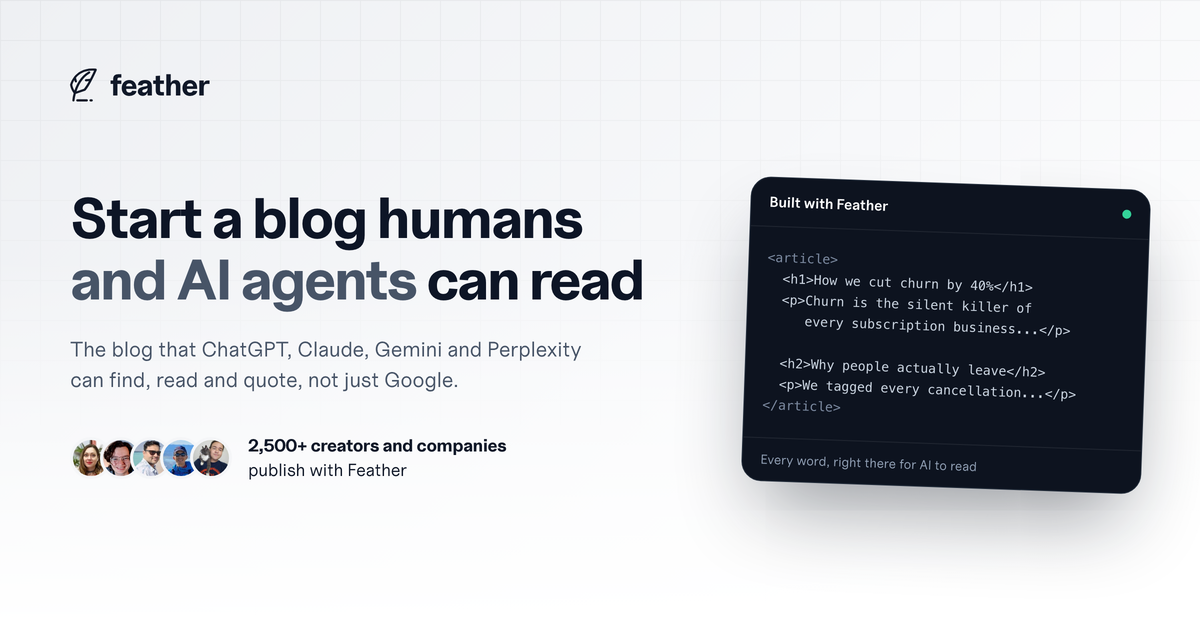
Feather builds you a blog that ChatGPT, Claude, Gemini and Perplexity can find, read and quote, not just Google. Write your post, hit publish, done.

Paid content
Visit website
Profile views 5 Outbound visits 12 Normal
Feather Full homepage screenshot

At a glance

Category
Artificial Intelligence
Language
English
Paid-content signal
Paid contentObserved
Registered
2021
Hosting
CloudflareInferred
HTTPS certificate trusted
PassedObserved
Last updated

Website review

This review may include AI-generated content and is not individually verified. Domain, certificate and other facts come from the observed data on this page.

What is Feather?

Feather is a hosted blogging platform built around a specific idea: your posts should be readable by AI assistants as well as by search engines and people. According to its own site, Feather builds a blog that ChatGPT, Claude, Gemini and Perplexity "can find, read and quote, not just Google." The pitch is aimed at creators and companies who want their writing to be surfaced and cited in AI answers, not only ranked in search results.

What it actually does

  • Hosts your blog and publishes each post as a complete, plain page rather than a JavaScript-dependent shell that loads blank until code runs in the browser. That distinction is the core selling point: content that renders server-side is easier for AI crawlers and assistants to read top to bottom.
  • Supports multiple blog sites under one account, each with its own custom domain and its own analytics.
  • Includes built-in analytics showing page views, visitors, referrers, clicks and popular posts, so you can see where readers arrive from and which links they click.
  • Offers a template-based setup: duplicate a template or connect your own workspace, map fields such as title, slug and cover, choose a domain, and publish.

Who it suits

Writers, consultants, small SaaS teams and content marketers who already publish regularly and want the distribution upside of AI citations without maintaining a site. If your main need is a marketing site with complex layouts, e-commerce or heavy design control, a general-purpose site builder or CMS will fit better. Feather is narrow by design: it is a blog, and the value comes from that focus.

A concrete scenario

Suppose you run a small subscription business and write a post titled "How we cut churn by 40%." On a JavaScript-heavy site builder, an AI assistant may fetch the page and see an empty shell. On Feather, the argument goes, the assistant reads the full text, can quote your numbers, and may point readers to you. That is the trade-off: less layout freedom, more chance your words are legible to the tools people now ask for recommendations.

Next step

If you want to test the claim cheaply, publish one substantial post and then ask an AI assistant a question that post answers directly. If it quotes or links the post, the approach is working for your niche. If not, the problem is more likely your topic and structure than the host. You can see live examples and pricing at Feather.

How does Feather make my blog readable by AI assistants like ChatGPT and Claude?

Feather's core claim is that it publishes your posts as plain, complete pages that AI assistants can read top to bottom, rather than as JavaScript-dependent pages that show up empty to crawlers. The page contrasts this directly with "JavaScript site builders," where the words are locked behind code the assistant skips, leaving a blank shell.

H3 What actually makes a page AI-readable

  • Content arrives as finished HTML. Feather says every post loads as a complete page, not a blank shell, so an assistant fetching the URL sees the full text instead of waiting for scripts to run.
  • Structured metadata is emitted. The page evidence shows BlogPosting schema markup on posts, which helps machines identify the title, author and body of an article.
  • It targets assistants, not just search. Feather names ChatGPT, Claude, Gemini and Perplexity as readers it is built for, alongside Google.
  • Publishing flow stays simple. Connect a workspace or duplicate a template, map your title/slug/cover fields, pick a domain, and the blog goes live.

H3 What this does and does not guarantee

Readability is a prerequisite for being cited, not a promise of it. An assistant still has to crawl your page, judge it relevant, and choose to quote it. Feather handles the access layer; your writing handles the selection layer. Content that answers specific questions in plain language, with clear headings and a stated conclusion, is what tends to get pulled into an answer. If your posts are vague or buried under marketing preamble, clean HTML will not rescue them.

H3 Who benefits most

If you already publish on a JavaScript-heavy builder and suspect your posts are invisible to assistants, the trade-off is straightforward: you would move your blog to a platform that serves static, complete pages, and in exchange accept Feather's own editor, templates and hosting rather than your current stack. If your existing blog already renders as server-side HTML with proper schema, the marginal gain is smaller and mostly comes down to convenience and built-in analytics.

H3 A practical next step

Take one published post and ask an assistant to summarize it from the URL alone. If it cannot quote your actual sentences, your current setup is the bottleneck. If it can, compare that against what Feather produces on a test post before deciding whether to migrate.

How do I set up a blog on Feather from my existing content?

You can bring existing content into Feather by duplicating its template or connecting your own workspace, mapping your title, slug and cover fields, then choosing a domain. Once your blog is live, Feather serves each post as a complete page that AI assistants and search engines can read, rather than a blank JavaScript shell.

A practical setup path

  1. Get your content in place. Either duplicate Feather's template or connect your existing workspace. If your posts already live in a CMS, Notion-style database or spreadsheet, connecting it usually beats copy-pasting because you keep one source of truth.
  2. Map your fields. Tell Feather which fields are your title, slug and cover. Do this carefully: the slug becomes the URL, so changing it later can break links people and AI systems have already cited.
  3. Choose your domain. Use a subdomain to launch quickly, or a custom domain if the blog is part of your main brand. Each site can have its own custom domain.
  4. Publish. Feather describes the flow as write, hit publish, done.

What you get after setup

  • Unlimited blog sites, with no charge for creating additional sites.
  • A custom domain and analytics for each site.
  • Page views, visitors, referrers and clicks across all your blogs.
  • Pricing based on page views, so high-traffic blogs may cost more than quiet ones. Check Feather for current details.

Who this suits, and the trade-off

If your goal is getting existing articles in front of both Google and AI assistants such as ChatGPT, Claude, Gemini and Perplexity, the plain-page rendering is the main draw. The trade-off is design flexibility: this is a focused blogging platform, not a general website builder, so treat it as the home for your writing rather than your whole site.

Next step: export or connect one small batch of posts first, check that titles, slugs and covers land correctly, then confirm a published post appears as readable text rather than an empty shell before migrating everything.

Can I use my own custom domain with Feather, and how many blogs can I create?

Yes. Feather supports a custom domain for each blog, and the platform lets you create unlimited blog sites without charging extra for additional sites, according to its own product description.

Custom domain: During setup, one of the four steps is choosing a domain or a subdomain for your blog. Feather's feature list also states "custom domain for each site," so if you run several blogs, each one can point to its own domain rather than sharing one.

Number of blogs: There is no stated cap on how many blogs you can create. Feather explicitly says it does not charge for creating additional sites, and lists "unlimited blog sites" alongside per-site analytics and per-site custom domains.

A practical implication worth noting: because each site gets its own domain and its own analytics, Feather is structured for people running multiple distinct publications — a company blog plus a personal newsletter, or several niche sites — rather than one blog with many categories. If you were choosing between one big blog and several smaller ones, this setup removes the usual cost penalty for splitting them.

For a concrete example: a consultant could run a main site on their primary domain while spinning up a separate blog on a niche subdomain to test a topic, then later attach a dedicated domain if it gains traction — without paying for an extra site.

Next step: check the Feather pricing page to confirm how billing scales, since the description indicates pricing is based on page views rather than the number of blogs. That distinction matters most if you expect high traffic across several sites rather than just a few.

What analytics does Feather provide to track my blog's performance?

Feather includes built-in analytics for each blog site, so you can see how a post is performing without adding a separate analytics tool. According to the site, the dashboard covers page views, visitors, referrers, clicks and which posts are popular.

H3 What you can track

  • Page views and visitors — overall traffic volume for each site.
  • Referrers — where readers are arriving from, so you can tell which channels actually send people.
  • Clicks — which links inside your posts get the most attention.
  • Popular posts — which articles pull the most readers, useful for deciding what to write next or update.

H3 How to think about it

This is a practical setup for a writer or small team that wants a quick read on content performance rather than a full marketing analytics stack. If your goal is deciding which topics to double down on, referrers plus popular posts answer that directly. If you need funnel tracking, conversion attribution or revenue per post, plan on exporting or pairing it with a dedicated analytics tool.

A concrete use: after publishing for a month, sort posts by views, then check referrers for the top three. If most traffic comes from one channel, that tells you where to invest next.

Pricing is based on page views, so your traffic level is also the thing that affects cost — worth watching alongside the analytics. See Feather for current plan details.

How does Feather's pricing work based on page views?

Feather's pricing is tied to page views rather than to the number of blogs you run. The site states that pricing is based on page views, and separately that you can create unlimited blog sites without being charged extra for additional sites. So the metered unit is traffic to your blog pages, not seats, sites or posts. Analytics are included for each site, which matters here: since cost scales with views, you need view data to predict your bill.

Feather

What this means in practice

  • One busy blog costs more than several quiet ones. If you run five small niche blogs and one high-traffic blog, your bill follows the traffic, not the site count.
  • Page views are the lever you control. Publishing more posts only raises cost if those posts attract readers; a large archive with low traffic stays cheap.
  • Check the definition of a page view. Whether a repeat visit, a bot hit or an AI crawler fetch counts toward the meter changes your bill substantially. Feather's pitch centers on AI agents reading your pages, so it is worth confirming how those reads are counted before you commit.
  • Watch analytics against your plan tier. The included per-site analytics give you the referrer and popular-post data you need to see which content drives the views you are paying for.

A concrete scenario

A consultant writes two posts a week. Most get a few hundred views, but one ranking post pulls tens of thousands a month. Under page-view pricing, that single post — not the publishing habit — drives the cost. The practical move is to treat your analytics dashboard as a budgeting tool: identify the top few posts generating views, and decide whether their leads or ad revenue justify the tier you land in.

Next step

Open Feather's pricing page and compare the view allowances across tiers against your last three months of traffic. If your traffic is spiky or seasonal, model your peak month rather than your average, since a page-view meter will follow the peak.

Related questions

More questions →
What Is Feather and What Does It Do?

Feather is a blogging platform that publishes your writing as complete, plain pages that both human readers and AI assistants can read. Its stated purpose is to make your blog findable not just by Google, but by ChatGPT, Claude, Gemini, and Perplexity — so those tools can find, read, and quote your content. It's aimed at creators and companies who want to publish consistently without managing the technical side of a blog.

The problem Feather targets

Many site builders render content with JavaScript. According to Feather, that means the words on a page don't exist until code runs in the browser — so AI assistants that skip over that code see a blank page instead of your article. Feather's pitch is the opposite: every post loads as a complete page, readable top to bottom by any AI, rather than a blank shell.

How it works

Feather describes a four-step path from draft to live blog:

  1. Add your content — duplicate Feather's template or connect your own workspace.
  2. Map your fields — tell Feather which fields are your title, slug, and cover.
  3. Choose your domain — pick a domain or subdomain for your blog.
  4. Get your blog — the blog goes live and is ready to be read.

The claim is that this takes a few minutes, and that once set up you can "set and forget" it.

What you get

Feature What Feather says it does
Unlimited blog sites Create as many blog sites as you like; no charge for additional sites
Custom domain A custom domain for each site
Analytics Per-site analytics: page views, visitors, referrers, clicks
AI + search readability Posts published as complete pages that Google and AI assistants can read

The analytics are built in for all your sites, and Feather says you can see where people find your blog, which links get clicked most, and which posts are popular.

Who it's for

Feather says it's used by 2,500+ creators and companies. It fits two broad cases:

  • Creators who want to publish regularly and be quoted by AI tools, not just ranked in search.
  • Companies running multiple blogs — the unlimited-sites model and per-site analytics suit teams managing more than one publication.

If your priority is a blog that AI assistants can actually parse and cite, Feather is built specifically around that. If you mainly need a general-purpose website with a blog attached, that's a different tool category.

What to check before deciding

  • Pricing: Feather has a pricing page, and its model is described as based on page views. Check the current tiers there before committing, since page-view-based pricing scales with traffic.
  • Your existing setup: The workflow assumes you either use Feather's template or connect a workspace and map fields. If your content lives somewhere unusual, confirm the connection works for you.
  • Domain choice: You can use a subdomain or your own domain — decide which before you publish, since it affects your URLs.

The core idea is simple: write, hit publish, and have a blog that both people and AI agents can read. Whether that matters to you depends on how much of your audience now arrives through AI assistants rather than search.

How Is Feather Different From Typical Website Builders for Blogging?

Feather is a blogging platform that publishes each post as a complete, plain page that AI assistants like ChatGPT, Claude, Gemini, and Perplexity can read and quote — not just Google. The key difference from typical JavaScript-based site builders is that Feather's pages don't depend on code running in the browser before the words appear. If your goal is to have your writing found and cited by both search engines and AI tools, Feather is built for that. If you need a general-purpose website with complex interactive features, a traditional site builder may still fit better.

The core difference: readable pages vs. blank shells

Many site builders render content with JavaScript. The page arrives as an empty shell, and the text only appears after code runs in the browser. Feather's own explanation puts it plainly: "Many site builders lock the words away behind code that AI assistants skip right over, so their pages show up empty."

Feather takes the opposite approach. As the site describes it, "Feather publishes your words as a plain page any AI can read top to bottom," and "Every post loads as a complete page, not a blank shell."

That distinction matters because AI assistants and crawlers that don't execute JavaScript will see nothing on a JavaScript-rendered blog. On Feather, the content is present from the start.

What Feather does that typical builders don't prioritize

Dimension Typical JavaScript site builder Feather
How content loads Blank page until code runs Complete page, readable top to bottom
Primary audience Human visitors (and Google) Human readers and AI agents
AI readability Often skipped or seen as empty Built so ChatGPT, Claude, Gemini, Perplexity can find, read, and quote
Blog focus General-purpose site building Blogging platform specifically
Setup Varies widely Template or your own workspace, map fields, pick a domain

Feather's positioning is explicit: it builds "a blog that ChatGPT, Claude, Gemini and Perplexity can find, read and quote, not just Google."

How setup works

Feather describes a four-step flow from draft to published blog:

  1. Add your content — duplicate their template or connect your own workspace.
  2. Map your fields — tell Feather which fields are your title, slug, and cover.
  3. Choose your domain — pick a domain or a subdomain for your blog.
  4. Get your blog — your blog is live and ready to be read.

The stated result is a blog "live in a few minutes."

Management and analytics features

Beyond readability, Feather bundles the operational side of running a blog:

  • Unlimited blog sites — create as many as you like; the site states they don't charge for additional sites.
  • Custom domain for each site
  • Analytics for each site — page views, visitors, referrers, clicks, and more across all your blogs.
  • Referrer and click tracking — see where people find your blog and which links they click most.
  • Popular post tracking — see which posts perform.

Pricing is based on page views, and a pricing page exists at feather.so/pricing. The site also states it's trusted by "2,500+ creators & companies."

When Feather is the right choice

Choose Feather if:

  • You want your blog posts to be discoverable and quotable by AI assistants, not only indexed by Google.
  • You're a creator or company publishing content you want AI tools to surface and cite.
  • You want a dedicated blogging platform with built-in analytics and unlimited sites rather than assembling those pieces yourself.
  • You value a fast setup — template or workspace, field mapping, domain, done.

Consider a typical site builder instead if:

  • You need a full website with interactive or app-like functionality beyond blogging.
  • Your content strategy doesn't depend on AI readability.
  • You want to hand-build every aspect of the front end.

The bottom line

The decisive difference is architectural: Feather publishes words as complete pages that any AI can read, while many JavaScript builders leave content hidden behind code that AI assistants skip. If being read and quoted by ChatGPT, Claude, Gemini, and Perplexity alongside Google is your goal, that's exactly what Feather is designed for.

How to Set Up and Publish a Blog with Feather

Feather turns your existing content into a live blog in four steps: add your content (duplicate their template or connect your own workspace), map your fields so Feather knows which ones are your title, slug, and cover, choose a domain or subdomain, and publish. The result is a blog that loads as a complete page so both readers and AI assistants like ChatGPT, Claude, Gemini, and Perplexity can read and quote it. This walkthrough covers what you need before starting, what happens at each step, and where people tend to get stuck.

What you need before you start

  • A content source. Either duplicate Feather's template or connect your own workspace. If you connect an existing workspace, your posts already live there and Feather reads from it.
  • Fields you can identify. You need to know which field in your content holds the title, which holds the slug, and which holds the cover image. Feather asks you to map these explicitly, so decide this before you begin.
  • A domain decision. You can use a Feather subdomain or point a custom domain you control. If you want a custom domain, have access to your DNS settings ready.

Feather's site lists a free start option and a pricing page, but the exact plan limits and what each tier includes aren't specified in the available material, so check the pricing page directly before committing to a setup that depends on a particular limit.

Step 1: Add your content

You have two paths here:

  • Duplicate the template. Fastest route if you're starting fresh. You get a pre-built structure and just fill it in.
  • Connect your own workspace. Better if you already write somewhere else and don't want to migrate by hand.

What to expect: After this step, Feather has access to your content but doesn't yet know how to interpret it. That's what step 2 fixes.

Common snag: Connecting a workspace that uses unusual field names or nested structures can make step 2 harder. If your content lives in deeply nested blocks, flatten it first or expect to spend more time mapping.

Step 2: Map your fields

Tell Feather which fields are your title, slug, and cover. This is the step that determines whether your published posts render correctly.

  • Title — becomes the post headline and the page title AI and search engines read.
  • Slug — becomes the URL path for the post.
  • Cover — becomes the post's cover image.

Why this matters: Feather's core claim is that it publishes your words as a plain page any AI can read top to bottom, rather than a blank shell that only fills in after JavaScript runs. That only works if the mapping is correct. A wrong slug mapping produces broken or duplicated URLs; a missing title mapping leaves posts without a readable headline.

Verification: After mapping, preview one post. If the title, URL, and cover all appear as expected, the mapping is right.

Step 3: Choose your domain

Pick either:

  • A Feather subdomain — no DNS work, live immediately.
  • A custom domain — your own domain, which requires pointing DNS records.

Feather supports a custom domain for each site, and you can create multiple blog sites without being charged for the additional sites (per the site's stated policy). If you plan to run several blogs, each can have its own domain and its own analytics.

Common snag: Custom domains are where most delays happen, because DNS changes take time to propagate. If your blog looks unreachable right after setup, wait and re-check before assuming something is broken.

Step 4: Publish

Hit publish. Your blog is live and ready to be read by both people and AI agents.

What you get after publishing:

  • Inbuilt analytics for every site — page views, visitors, referrers, and clicks.
  • Per-post visibility into which posts are popular and which links get clicked most.
  • AI-readable pages — each post loads as a complete page rather than a JavaScript-dependent shell, which is the specific mechanism Feather uses to make content findable by ChatGPT, Claude, Gemini, and Perplexity as well as Google.

How to verify it worked

  1. Open a published post in a normal browser — confirm the text is present without waiting for anything to load.
  2. View the page source or disable JavaScript and reload — the words should still be there. This is the practical test of the "plain page" claim.
  3. Check your analytics dashboard after some traffic — page views and referrers should populate.
  4. Ask an AI assistant about a topic you covered and see whether it can surface or quote your post. This isn't guaranteed for any single query, but it's the outcome the setup is designed for.

Where people get stuck

Problem Likely cause Fix
Posts render without a headline Title field not mapped Re-check field mapping in step 2
URLs look wrong or duplicated Slug field mapped to the wrong source field Remap the slug
Custom domain not resolving DNS not propagated or records misconfigured Verify DNS records, then wait
AI can't read the page Content still behind a JavaScript shell Confirm you're publishing through Feather rather than a JS-only builder

Is this the right setup for you?

Feather fits well if you already produce content somewhere and want it published as a fast, AI-readable blog without building a site yourself. The four-step flow is short, and the unlimited-sites policy plus per-site analytics suit people running more than one blog.

It fits less well if you need full design control over every layout element, or if your content lives in a structure that's hard to map to title/slug/cover fields. In that case, expect to do cleanup before step 2, or reconsider whether a template-based blog matches how you write.

How Does Feather Make a Blog Readable by AI Agents Like ChatGPT and Claude?

Feather publishes each post as a complete plain page that AI assistants can read from top to bottom, instead of a blank shell that only fills in after JavaScript runs. That matters because ChatGPT, Claude, Gemini, and Perplexity skip over content locked behind client-side code — so on many site builders their view of your page is empty. Feather's stated goal is a blog that these assistants can find, read, and quote, not just one Google can index.

The mechanism: complete pages vs. blank shells

The core difference is what gets delivered when an AI assistant requests your post.

  • Feather's approach: every post loads as a complete page. The words are present in the page itself, so an assistant reading top to bottom gets the full article.
  • The common alternative: many JavaScript site builders render text only after code runs in the browser. Feather describes this as "a blank page until code runs in the browser" — and AI assistants typically skip that code rather than executing it, so the page shows up empty to them.

If an assistant sees an empty page, it can't summarize you, recommend you, or quote you. If it sees the full text, it can do all three — which is the extra traffic path Feather is built around.

Why this matters for content exposure

Search visibility has traditionally meant Google. Feather's premise is that AI assistants are now a second discovery channel, and they need machine-readable text to use your content.

The practical consequences Feather highlights:

  • Your posts can be found by AI assistants, not only by search engines.
  • They can be read in full rather than partially or not at all.
  • They can be quoted, which is how an assistant points people back to you.

For a blog whose purpose is answering real questions, that quoting behavior is the payoff: someone asks an assistant a question your post answers, and your post becomes the source.

How you get there: the publishing flow

Feather describes a four-step path from draft to live blog:

  1. Add your content — duplicate Feather's template or connect your own workspace.
  2. Map your fields — tell Feather which fields are your title, slug, and cover.
  3. Choose your domain — pick a domain or subdomain for your blog.
  4. Get your blog — the blog is live and ready to be read.

The mapping step is what connects your existing content structure to a published page, so the output is a real page rather than a rendering that depends on the browser.

What else comes with it

Beyond AI readability, Feather lists these platform features:

Feature What it gives you
Unlimited blog sites Create as many blog sites as you like; Feather says it doesn't charge for additional sites
Custom domain per site A domain for each blog
Analytics per site Page views, visitors, referrers, and clicks across all your blogs
Post-level insight See which links get clicked most and which posts are popular

Feather states it is trusted by 2,500+ creators and companies, and offers a free start option alongside example blogs and a pricing page.

When this fits — and when it doesn't

Choose Feather if your priority is making written content legible to AI assistants as well as search engines, and you want publishing to stay simple: write, publish, done. The unlimited-sites and per-site analytics setup also suits people running several blogs.

Look elsewhere if you need a full JavaScript application framework for interactive pages rather than a text-first blog, or if your content depends on client-side rendering to appear at all — that's the exact pattern Feather positions itself against.

One thing to verify before committing: Feather's pricing is based on page views, so check the pricing page against your expected traffic if you publish at volume.

What Features Does Feather Offer for Blog Management and Analytics?

Feather is a blogging platform that publishes each post as a complete, plain page that both search engines and AI assistants can read. For blog management and analytics specifically, it offers unlimited blog sites at no extra charge, a custom domain and separate analytics for each site, built-in stats on views, visitors, referrers, clicks and popular posts, and pricing that scales with page views rather than the number of sites. If you run or plan to run more than one blog, that combination is the main reason to consider it.

Blog management features

Feather is positioned as a complete blogging platform rather than a plugin or add-on, so the management features are the core of the product.

  • Unlimited blog sites. You can create as many blog sites as you like. According to Feather, additional sites are not charged for — the site count itself is not the billing unit.
  • Custom domain per site. Each blog can have its own domain or subdomain, so multiple sites don't have to share one address.
  • Per-site analytics. Analytics are tracked separately for each site, not merged into a single account-wide number.
  • Publishing flow. The documented path from draft to live blog is four steps: add your content (duplicate the template or connect your own workspace), map your fields (tell Feather which fields are your title, slug and cover), choose your domain, and get your blog. The stated result is a live blog ready to be read, typically within a few minutes.

The field-mapping step is worth noting if you're connecting an existing workspace: Feather needs to know which of your fields correspond to title, slug and cover before it can publish correctly.

Analytics features

Feather includes built-in analytics for all of your sites, with no separate analytics tool required. The documented metrics are:

Metric What it tells you
Page views How much traffic each post and site receives
Visitors How many people are reading
Referrers Where people are finding your blog
Clicks Which links readers click most
Popular posts Which of your posts perform best

The referrer and click data are the two most actionable signals here. Referrers show whether readers arrive from Google, an AI assistant, social, or elsewhere — useful if AI discoverability is part of why you chose the platform. Click data shows which links inside your posts actually get used, which is closer to engagement than raw traffic.

Why the AI-readability claim matters for analytics

Feather's central technical claim is that many site builders render pages with JavaScript, so the page is blank until code runs in the browser — and AI assistants skip over that blank shell. Feather instead publishes your words as a plain page any AI can read top to bottom, and states that every post loads as a complete page rather than a blank shell.

This connects directly to analytics: if AI assistants can't read your pages, they can't cite or link to them, and that traffic never appears in your referrer data. A blog built on a JavaScript-only builder may show low or zero AI referrers not because nobody asked, but because the content was never readable in the first place.

Pricing structure and what it means for multiple sites

Feather's pricing is based on page views, and the site explicitly states that creating additional blog sites is not charged for. That structure has a practical consequence:

  • Many low-traffic sites cost roughly the same as one site with the same combined traffic, since billing follows views rather than site count.
  • One high-traffic site is billed on its own volume, regardless of how many other sites you run.
  • Custom domains and analytics are listed as per-site features, so they don't require a separate plan per blog.

Feather's pricing page is at feather.so/pricing for current tiers and limits. The source material does not state specific prices, view thresholds, or whether a login is required to start, so check the pricing page directly rather than assuming a free tier.

Who this fits

Feather is a reasonable fit if you:

  • Run or intend to run multiple blogs and don't want to pay per site
  • Want each blog on its own custom domain with its own analytics
  • Care about being readable and quotable by ChatGPT, Claude, Gemini and Perplexity, not just Google
  • Prefer built-in analytics over wiring up a separate tool

It's a weaker fit if you need deep analytics (funnels, cohorts, event tracking) — the documented feature set is page views, visitors, referrers, clicks and popular posts, which covers content performance but not product analytics.

The platform states it is used by 2,500+ creators and companies, which gives a rough sense of scale but isn't a substitute for checking whether the publishing flow matches how you already write.

Website Overview

Page metadata, canonical configuration and social previews work together to provide more consistent search and sharing presentation.

Domain and Registration

Transfer-protection status is present, helping reduce the risk of unauthorized domain transfers. The domain has about 5 years of registration history; its current configuration provides more context than age alone. The registrar is NameCheap, a widely used domain service provider. The domain uses the common .so extension, which is not an independent safety signal.

DNS and Email

Nameservers are provided by Cloudflare, indicating managed DNS hosting. MX records point to the Google Workspace email service. No CNAME was found; the observed records resolve directly to addresses. SPF and DMARC are configured. DKIM status is unknown. TXT records include verification markers for Google. Such markers may also remain after a service stops being used.

TLS and Certificates

The public key uses EC with 256 bits. The server supplied a complete certificate chain. No organization name is present in the certificate; the available fields are consistent with domain validation. The certificate was issued within the Google Trust Services cloud or CDN ecosystem. The certificate's total validity is about 90 days, consistent with a short renewal cycle.

HTTP and Browser Security

The checked browser-security headers were not detected, leaving fewer explicit browser-side safeguards. No X-Powered-By header was found, reducing one common source of backend fingerprinting information. The cf-ray response header indicates a CDN or caching proxy in the delivery path. No obvious internal addresses or debug information were found in the headers. The Server header identifies cloudflare without an exact version.

Technology Stack Analysis

The public page identifies Remix, Google Analytics, Cloudflare without precise versions, leaving fewer clues for version-specific scanning.

Search and Social Sharing

Twitter Card metadata is configured. The title has 56 characters, within a common display range. A meta description is present, with 148 characters. The observed directives allow indexing and link following. No Generator meta tag is publicly exposed.

Hosting and Email

DNSCloudflare
HostingCloudflare
EmailGoogle Workspace
Approximate IP geolocation (inferred; a CDN or proxy may differ from the origin server) Location unknown Inferred 104.26.12.53

Registration details

RDAP / WHOIS

RegistrarNameCheap
Registered2021-09-18
Expires2027-09-18
Domain statusactive https://icann.org/epp#active、clientTransferProhibited https://icann.org/epp#clientTransferProhibited
Nameservershenrik.ns.cloudflare.com、margot.ns.cloudflare.com
DNSSECunsigned

DNS records

DNS

TypeNameValueTTLPriority
Afeather.so104.26.12.53300—
Afeather.so104.26.13.53300—
Afeather.so172.67.71.16300—
AAAAfeather.so2606:4700:20::681a:c35300—
AAAAfeather.so2606:4700:20::681a:d35300—
AAAAfeather.so2606:4700:20::ac43:4710300—
MXfeather.soaspmx.l.google.com36001
MXfeather.soalt1.aspmx.l.google.com36005
MXfeather.soalt2.aspmx.l.google.com36005
MXfeather.soalt3.aspmx.l.google.com360010
MXfeather.soalt4.aspmx.l.google.com360010
NSfeather.sohenrik.ns.cloudflare.com86400—
NSfeather.somargot.ns.cloudflare.com86400—
TXTfeather.socQh-awIxfAqAXrAe076p3Q4a300—
TXTfeather.sogoogle-site-verification=Dr87SidgT5XRZS6FN2wzYz8KUwbgc91v47V1swj2Eqc300—
TXTfeather.sogoogle-site-verification=HPUU1zThZ8w7GYXDFMy_GBVy2AINQpJTcGy-ncgxYEQ300—
TXTfeather.sov=spf1 a mx include:spf.messagingengine.com include:spf.acumbamail.com include:_spf.google.com ~all300—
DMARC_dmarc.feather.sov=DMARC1; p=none;300—

TLS and certificates

TLS / SSL

AssessmentNormal configuration
Supported protocolsTLSv1.2、TLSv1.3
Negotiated protocolTLSv1.3
Certificate subjectfeather.so
IssuerGoogle Trust Services
Valid until2026-12-27T17:59 · Remaining when checked: 88 days
Verification detailsCertificate trust: Passed · Hostname match: Passed

HTTP response headers

HTTP

HeaderValue
content-typetext/html
servercloudflare
set-cookieRedacted

Identified technologies

RemixGoogle AnalyticsCloudflare

Pages, Search and Sharing

Meta descriptionFeather builds you a blog that ChatGPT, Claude, Gemini and Perplexity can find, read and quote, not just Google. Write your post, hit publish, done.
Canonical URLhttps://feather.so
LanguageEnglish (default)
Twitter Cardsummary_large_image
All bots 1 allowed · 0 disallowed
  • Allow/

User reviews (0)

  • No reviews yet.