Website profiles · Technology insights · Alternatives

getpanora.com

Panora automates PO entry for distributors, manufacturers and wholesalers. Stop wrong shipments, block duplicates, reclaim ~80% of your order-entry time.

No paid content found
Visit website
Profile views 8 Outbound visits 1 Normal
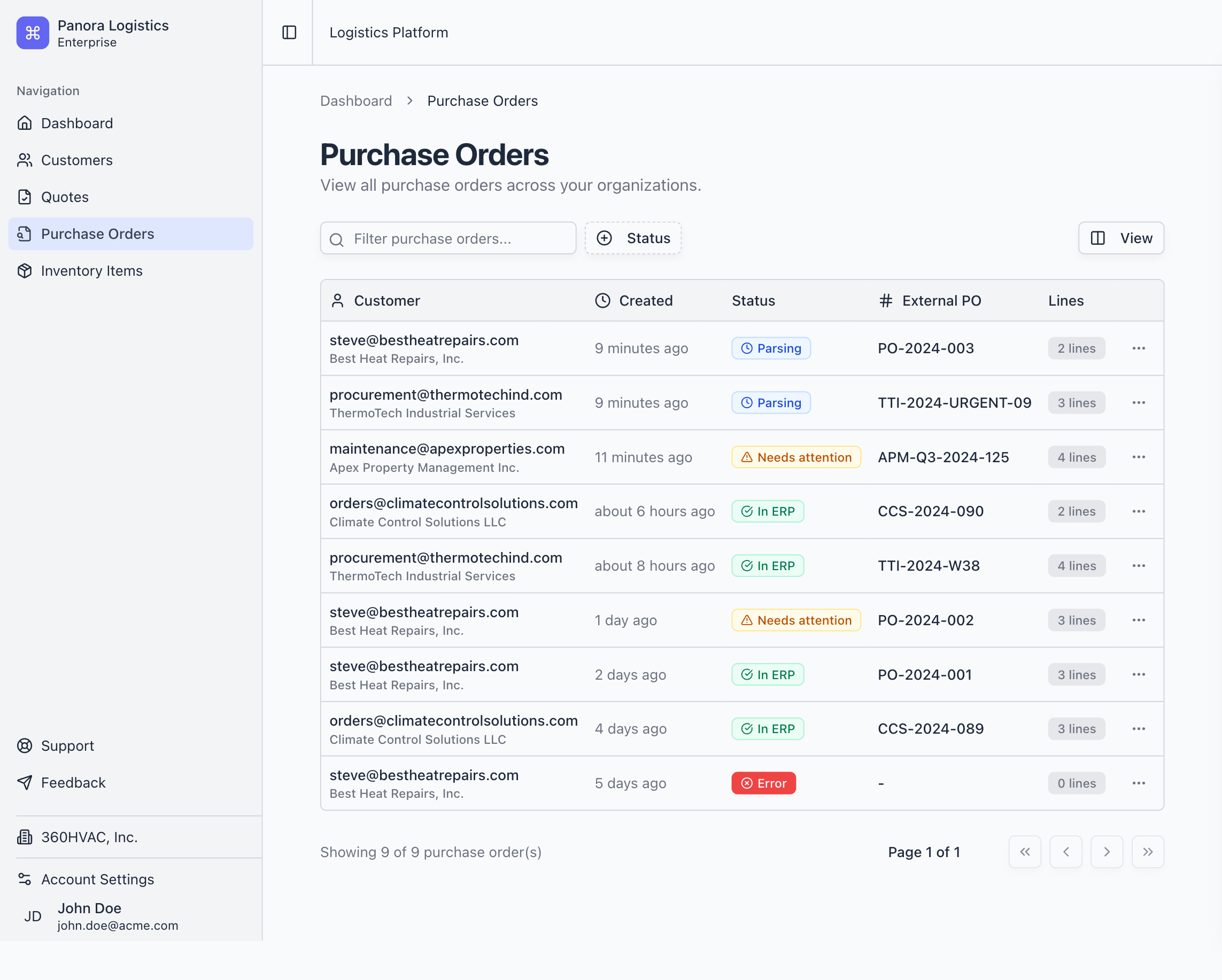
AI Purchase Order Automation for Distributors - Panora Full homepage screenshot

At a glance

Category
Artificial Intelligence
Language
English
Paid-content signal
No paid content foundObserved
Registered
2024
Hosting
Amazon.com, Inc.Inferred
HTTPS certificate trusted
PassedObserved
Last updated

Website review

This review may include AI-generated content and is not individually verified. Domain, certificate and other facts come from the observed data on this page.

What is Panora?

Panora is an AI-powered purchase order (PO) automation tool built for distributors, manufacturers, and wholesalers. It reads incoming purchase orders and RFQs from email inboxes, validates and cleans the data, matches items against your inventory, and posts the finished orders into your ERP system. The core promise on Panora is reclaiming roughly 80% of the time an order-entry team spends typing POs, while cutting errors like wrong parts and duplicate shipments.

H3 What it actually does

  • Email-to-ERP intake: You forward or hand off POs and RFQs by email; Panora processes them and posts structured data to your ERP.
  • Item matching: It identifies the correct item from your catalog, whether you carry dozens or thousands of SKUs.
  • Validation and duplicate blocking: It checks part numbers and flags duplicate orders before they turn into double shipments.
  • Human-in-the-loop control: You decide which cases are handled automatically and which get flagged for manual review.

H3 Who it's for

The primary audience is operations and order-entry teams at distribution, manufacturing, and wholesale companies — businesses where staff currently retype customer POs into an ERP by hand. The pain it targets is specific: one wrong character in an item number causing a wrong shipment, two people processing the same order, and skilled staff spending their day on data entry instead of customers.

H3 A practical example

Say a distributor receives 200 POs a month by email. Today, two employees key them in manually, and a handful of errors slip through each month — each one costing double shipping plus tied-up inventory. With Panora, those emails flow into an automated pipeline: items are matched, duplicates flagged, and clean orders posted. The team reviews only the flagged exceptions. That's the workflow the product is designed around.

H3 How to decide if it fits

Panora makes sense if your order volume is high enough that manual entry is a bottleneck, your POs arrive mainly by email, and your ERP can accept posted data. If you process only a few orders a week, or your orders already arrive as structured EDI, the payoff is smaller. The site offers a savings calculator that estimates time value and error cost based on salary, PO volume, and mistake rate — a useful first step to see whether the math works for your operation before you talk to them.

How does Panora automate purchase order entry for distributors and wholesalers?

Panora automates purchase order entry by taking POs and RFQs that arrive as email attachments or in the body of messages, extracting the order data, validating it against your item catalog, and posting the cleaned result into your ERP. The intended outcome is that your order-entry staff stop retyping orders and only intervene on exceptions.

The workflow, as described on the page

  1. Handoff by email. Customers or sales reps send POs and RFQs to an assistant address; the page frames this as turning a saturated inbox into ERP-ready orders.
  2. Extraction and cleanup. Panora reads the order lines and normalizes them into structured data.
  3. Validation and duplicate blocking. Every part number is checked, and duplicate POs are flagged before they turn into double shipments.
  4. Smart item matching. The system matches incoming line items to your catalog, which the page says works whether you carry dozens or thousands of SKUs.
  5. Review routing. You decide which cases run automatically and which get flagged for a human to review.
  6. Posting to the ERP. Validated orders are written into your ERP in real time.

What each step is meant to prevent

Failure mode What Panora does
Wrong part shipped Validates part numbers and picks the matching catalog item
Duplicate order Flags duplicates before fulfillment
Slow order entry Posts orders without manual typing
Lost control Lets you force manual review on chosen order types

A concrete scenario

A distributor's inside-sales team receives 300 POs a month by email. A rep forwards each one to Panora; the system matches line items to the catalog, flags two orders that duplicate an earlier one, and posts the rest to the ERP. The rep spends the morning on a pricing question and a backorder instead of keyboarding part numbers.

Where the trade-offs sit

  • Exception handling is the real work. Automation shifts effort from typing to reviewing flagged orders. If your catalog has messy or inconsistent item descriptions, expect more flags and more review time.
  • Catalog quality drives accuracy. Matching is only as good as your item master; part numbers with variants and supersessions need clean rules.
  • Fit matters. This suits distributors, manufacturers, and wholesalers with repeat, catalog-based ordering. It fits poorly if orders arrive as free-form prose with no consistent item references.
  • Pricing is not published on the page, so ask for a quote based on order volume.

Next step

Run a one-week pilot: forward a sample of real POs (including a few deliberately messy ones) and measure the match rate, the number of flagged orders, and the minutes your team spends reviewing them. That gives you a defensible basis for deciding whether the time savings justify the cost. For general context on order-to-cash automation, see Panora.

What types of order documents can Panora process from email, such as POs and RFQs?

Panora is built to handle the order documents that typically arrive in a distributor's or wholesaler's inbox. According to the site, it works with purchase orders (POs) and RFQs (requests for quotation) sent by email, then validates, cleans and posts them into your ERP in real time. It also flags duplicates and matches line items to your inventory, so the output is ERP-ready rather than just a parsed email.

What that means in practice

  • Purchase orders: The core use case. A customer emails a PO, Panora reads it, checks part numbers against your catalog, catches duplicates, and pushes it into the ERP. This is aimed at order-entry teams who currently retype POs by hand.
  • RFQs: The site also mentions handing off RFQs to its assistant over email, with quoting time saved as a stated benefit. So quote requests can enter the same email-to-dashboard workflow rather than sitting in a separate inbox.
  • Attachments and email bodies: The evidence describes saturated inboxes as the input, implying POs and RFQs arrive as email content or attached documents. The exact file formats aren't listed on the page, so confirm that with Panora if you receive unusual formats.

Who this fits

If your team receives a steady flow of emailed POs and RFQs and rekeys them into an ERP, Panora targets exactly that bottleneck. It claims around 80% of order-entry time reclaimed and fewer wrong-item and duplicate-order mistakes. The manual-review control is worth noting: you can decide which cases route to a person, which matters if some customers send non-standard documents.

Next step

Before a demo, pull one week of real inbox documents and sort them into POs, RFQs and everything else. Ask Panora to process that sample set and show how it handles your messiest examples — unusual formats, handwritten notes, multi-page attachments. If those pass, the automation is likely to hold up in daily use.

How does Panora integrate with ERP systems to validate and post purchase orders?

Panora is described as sitting between your order inbox and your ERP: it reads incoming purchase orders and RFQs, validates and cleans the data, then posts the resulting purchase orders into your ERP in real time. The page's own framing is "validates, cleans, and posts POs into your ERP," with email handoff to an assistant and a dashboard for visibility.

What the page actually specifies

  • Input: purchase orders and RFQs arrive by email rather than through manual typing.
  • Validation: every part number is checked, and duplicates are flagged before they cause wrong shipments or double orders.
  • Item matching: Panora matches incoming line items to your inventory, described as working whether you have dozens or thousands of items.
  • Control: you choose which cases are handled manually, and Panora flags purchase orders that need review.
  • Output: cleaned, ERP-ready purchase orders posted into your ERP.
  • Claimed impact: about 80% less order-entry time and 80% fewer mistakes.

What the page does not specify

The page does not name supported ERP systems, list integration methods (native connector, API, file import, middleware), describe field-level mapping, or explain how it handles ERP-specific item masters, units of measure, or supplier catalogs. Treat those as questions for the vendor rather than assuming them.

Practical view

A distributor with a shared orders inbox and a small entry team gets the clearest fit: the email-to-dashboard handoff matches how orders already arrive, and duplicate and part-number checks address the two errors that cost the most (wrong shipments and double orders). The trade-off is that validation quality depends on how clean your item master is; if your ERP part numbers are inconsistent, matching will need review rules rather than full automation.

Next step

Ask Panora for a reference customer running your ERP, then test with a sample of your own real POs: confirm which ERP it posts into, how item matching resolves near-miss part numbers, and what lands in the review queue. If you are comparing approaches, it also helps to see how a general automation platform handles the same inbox-to-ERP flow, for example Zapier.

What specific features does Panora offer to prevent wrong shipments and duplicate orders?

Panora addresses wrong shipments and duplicate orders through validation and duplicate-detection steps that run before a purchase order reaches the ERP. According to the product page, it validates every part number, flags duplicates before they become costly mistakes, and uses smart item matching to pick the correct item regardless of inventory size.

Wrong shipments

  • Part-number validation: Each item number is checked as the PO is processed, so a one-character difference that could trigger the wrong part is caught early.
  • Smart item matching: The system matches incoming order lines to the right inventory item, whether the catalog has dozens or thousands of SKUs.
  • Accuracy claim: The page presents item-accuracy and wrong-delivery reduction figures as outcomes of this validation layer.

Duplicate orders

  • Duplicate flagging: Panora detects when the same purchase order is being worked twice and flags it before two shipments go out.
  • Manual review controls: You can choose which cases are handled automatically and which are routed for human review, so edge cases do not slip through.

Practical scenario: A distributor receives the same PO by email from two contacts at one customer. Without a check, both entries post and two shipments leave the warehouse; the customer keeps the extra parts, and the distributor absorbs inventory and freight costs. Panora's duplicate flag interrupts that sequence before posting.

Decision criterion: If your main pain is mistyped item numbers, prioritize the validation and item-matching behavior. If your pain is repeated shipments from shared inboxes, prioritize the duplicate flag and the review-routing controls. Ask for a walkthrough using your own part numbers and a real duplicate PO to see how each case is surfaced.

Next step: request a demo through Panora and test both scenarios with your catalog data.

How can I calculate the potential cost savings and ROI of using Panora for my order entry team?

Panora's own page provides a built-in savings calculator with the exact inputs you need. It estimates annual time value saved as: % of time spent on POs × annual salary × number of employees. It also estimates yearly error cost as: average PO value × mistakes per employee per month. Those two figures together form the core of your ROI case.

Step-by-step calculation

  1. Time savings. For each order-entry employee, multiply salary by the share of their week spent on PO data entry. Panora's page uses 10% as a default, but use your own observed figure. Multiply by the number of employees doing PO entry.
  2. Error savings. Multiply average PO value by mistakes per employee per month, then by 12 and by headcount. This captures double shipping, lost inventory and duplicate orders — the three failure modes Panora names.
  3. Cost side. Panora does not publish pricing on the page, so you will need a quote. Ask for a per-seat or per-volume figure so you can divide total annual benefit by total annual cost.
  4. Payback period. Annual benefit ÷ annual cost gives a rough multiple. Anything above 1 means the tool pays for itself.

A concrete scenario

A distributor with five order-entry staff on $50,000 salaries, each spending 10% of their time on POs, would free roughly $25,000 in annual time value. If each makes two errors a month on $2,000 orders, that is another $240,000 in avoided error cost — though most teams will not see errors that expensive, so treat the error line as the more speculative half.

Where the model is weakest

  • The 80% time-reclaim figure is Panora's own claim, not an independent benchmark. Apply it to your PO volume, not your whole team's hours.
  • Error cost assumes every mistake results in a lost shipment. Some are caught downstream.
  • The calculator ignores implementation time, ERP integration effort and change management.

Practical next step

Run the calculator with your real numbers, then validate it against one month of actual PO data: count duplicates, wrong-item shipments and hours logged. That gives you a defensible baseline before you request pricing. If your PO volume is low or your item catalogue is small, the error-savings line will likely be too thin to justify the tool — the time savings alone may not carry it.

Related questions

More questions →
Who Should Use Panora for Purchase Order Automation?

Panora is built for distributors, manufacturers, and wholesalers whose order-entry teams are buried in purchase orders (POs) and RFQs arriving by email. It fits you if PO data entry consumes a meaningful share of skilled staff time, if wrong-part shipments or duplicate orders are recurring problems, and if you need automation that posts into your existing ERP rather than replacing it. It is not positioned as a general-purpose tool for companies without a high volume of inbound orders or without an ERP to post into.

The core fit: order-heavy B2B operations

Panora's stated audience is distributors, manufacturers, and wholesalers. The common thread is that orders arrive as unstructured email (POs and RFQs) and must be turned into clean, ERP-ready records. If your business looks like that, the product is aimed at you.

Signals you are in the target profile:

  • Your order entry team spends a large share of its day typing POs into an ERP instead of working with customers.
  • You receive POs and RFQs by email, often in inconsistent formats.
  • You already run an ERP and need data posted into it, not a separate system of record.
  • Order volume is high enough that manual entry creates a backlog or customer wait times.

When the problem is errors, not just speed

Panora's page frames the cost of manual entry as more than time. Three failure modes it targets:

Problem What it costs you
Wrong parts shipped A one-character difference in an item number leads to double shipping and lost inventory
Wasted staff time Skilled people type data instead of selling while customers wait
Duplicate orders Two people process the same PO and ship twice; customers keep the extra parts

If any of these are routine in your operation, the accuracy and duplicate-blocking features are the relevant part of the product. Panora says it validates every part number and flags duplicates before they become costly mistakes, and that it always picks the right item regardless of inventory size.

Inventory scale: dozens to thousands of items

Panora states that smart item matching works whether you have dozens or thousands of items in inventory. That means small catalogs are not excluded, and large ones are explicitly supported. The deciding factor is not catalog size but whether matching accuracy is currently a pain point for your team.

Workflow and control requirements

Panora is positioned as automation that "respects your workflows" rather than forcing a replacement. Two control features matter for fit:

  • Manual override: you choose which cases to handle manually.
  • Automatic flagging: POs that require review are flagged automatically.

This suits teams that want automation but are not willing to hand over every order without a human checkpoint. If your process requires full manual review of every PO, the value is lower; if you want selective review, this matches.

What Panora claims to deliver

The site's headline numbers, which you should treat as vendor claims to validate against your own volumes:

  • Reclaim roughly 80% of order-entry time.
  • 80% fewer mistakes.
  • Employees get back hours per week (the page shows a placeholder value in its calculator).

Panora also provides an on-page ROI calculator that estimates annual time value saved, per-employee savings, and yearly error cost from inputs like salary, percentage of time on POs, number of employees, POs per month per employee, average PO value, and mistakes per employee per month. Use it as a rough sizing tool, then check the assumptions against your actual data.

Who should probably look elsewhere

  • Companies with no ERP to post into, since Panora's core function is posting validated POs into your ERP.
  • Operations with very low order volume, where manual entry is not a bottleneck.
  • Teams that need every order manually reviewed end to end, with no tolerance for automated posting.
  • Businesses outside the distributor/manufacturer/wholesaler pattern, whose inbound orders do not arrive as email POs and RFQs.

How to decide

  1. Estimate the share of your order-entry team's time spent on PO data entry. If it is a small fraction, the time-savings case is weak.
  2. Count wrong-shipment and duplicate-order incidents per month and multiply by your average PO value and shipping cost. This is the error cost Panora targets.
  3. Confirm your ERP is the system you want POs posted into.
  4. Decide how much manual review you need, then check whether Panora's manual-selection and auto-flagging controls match it.
  5. Run your own numbers through the on-page calculator rather than relying on the headline percentages.

If steps 1–3 point to a real bottleneck and step 4 matches your review policy, Panora is designed for your situation.

How does Panora automate purchase order entry into an ERP?

Panora takes purchase orders and RFQs that arrive by email and turns them into ERP-ready records in real time. It reads the incoming order, validates and cleans the data, matches each line to the right item in your inventory, flags duplicates, and posts the result into your ERP. Distributors, manufacturers, and wholesalers use it to cut manual order entry, with the vendor claiming roughly 80% of order-entry time reclaimed. The setup assumes your orders reach you as email attachments or message bodies and that you have an ERP to post into.

The problem it targets

Order entry teams at distributors spend their day retyping POs into an ERP instead of working with customers. The vendor frames three specific failure modes:

  • Wrong parts shipped — a one-character difference in an item number causes double shipping and lost inventory.
  • Wasted time — skilled staff type data while customers wait.
  • Duplicate orders — two people process the same PO and ship it twice; customers keep the extra parts, and you absorb both inventory and shipping cost.

How the automation works

1. Orders arrive by email

You hand off purchase orders and RFQs to the assistant over email. No new portal for your customers to learn — the inbox is the input channel.

2. AI validates and cleans the data

Panora validates every part number and flags duplicates before they become costly mistakes. The vendor's claim is zero wrong item deliveries, with the system picking the correct item regardless of inventory size.

3. Smart item matching

Whether you carry dozens or thousands of SKUs, the system matches incoming line items to your catalog. This is the step that prevents the one-letter item-number error from turning into a wrong shipment.

4. Posting into your ERP

Validated, cleaned POs are posted into your ERP in real time. The dashboard shows what the assistant processed, so you can see the work happening rather than trusting a black box.

5. Human review where you want it

Panora lets you choose which cases to handle manually and automatically flags purchase orders that require review. You keep control over exceptions instead of accepting all-or-nothing automation.

What the vendor claims

Metric Claimed result
Wrong item delivery Reduced to 0%
Data entry accuracy 0 errors
Time returned to employees ~80% of order-entry time
Error reduction 80% fewer mistakes

These are vendor-stated figures from the product page, not independently verified results.

Estimating whether it pays off

The site includes a savings calculator with these inputs:

  • Annual employee salary (USD)
  • Percentage of time spent on POs (default 10%)
  • Number of employees doing PO data entry
  • POs per month per employee
  • Average PO value (USD)
  • Mistakes per employee per month

It outputs annual time value saved, per-employee savings, and yearly error cost. The logic: time value saved = % time × salary × employees; yearly error cost = average PO value × mistakes. Adjust the percentage to match your actual operation — the default 10% is an assumption, not a measurement of your team.

Workflow features beyond entry

  • Rerouting — ship from your supplier directly to your customers when stock is low, in a click.
  • Returns watchdog — track expenses in real time and categorize them automatically into predefined categories.
  • Quoting — the page references saving time on quoting, though the excerpt cuts off before detailing it.

What to check before adopting

  • ERP compatibility — the page says POs are posted into "your ERP" but does not list supported systems. Confirm yours is covered.
  • Email format handling — orders arrive as email; verify how the system handles your customers' actual attachment and body formats.
  • Review rules — decide which order types you want flagged for manual review versus auto-posted.
  • Pricing — the page shows no pricing links or payment details, so cost and contract terms require a direct conversation.

The vendor's call to action is "Let's talk," which suggests a sales-led evaluation rather than self-serve signup.

What Results Can Distributors Expect from Panora's PO Automation?

Panora is built for distributors, manufacturers, and wholesalers that receive purchase orders and RFQs by email and re-key them into an ERP. The results it claims are specific: roughly 80% of order-entry time reclaimed, fewer wrong-item shipments, and duplicate orders blocked before they ship. Those numbers are the vendor's own, so treat them as targets to validate against your own order volume rather than guarantees. The clearest way to judge fit is to run your own salary, headcount, and error rates through the savings calculator on the site.

The three problems Panora targets

The site frames the cost of manual PO entry around three failure modes, each with a different kind of loss:

Problem What goes wrong Cost
Wrong parts shipped One character off in an item number Double shipping plus lost inventory
Wasted time Skilled staff type data instead of selling Customers wait; revenue capacity sits idle
Duplicate orders Two people process the same PO Duplicate shipment; customer keeps extra parts; inventory and freight both lost

These are operational losses, not just labor hours. That matters when you build a business case, because the error cost often exceeds the time cost.

What the automation actually does

Panora validates, cleans, and posts POs into your ERP in real time. Three capabilities drive the results:

  • Smart item matching — validates every part number against your inventory and picks the right item, whether you carry dozens or thousands of SKUs.
  • Duplicate flagging — catches repeated orders before they become duplicate shipments.
  • Human-in-the-loop control — you choose which cases route to manual handling, and Panora flags POs that need review automatically.

The intake channel is email: you hand off purchase orders and RFQs to the assistant over email, and the processed output appears in a dashboard.

The results, as stated

  • ~80% of order-entry time reclaimed, described as 80% fewer mistakes and 80% less time.
  • Wrong item delivery reduced — the site presents this as a percentage reduction driven by always selecting the correct item.
  • Employees get back hours per week, with the stated goal of shifting that time to customers and revenue.

The "0 x" and "0 h" figures on the page are placeholders in the calculator, not fixed claims. Your actual result depends on your inputs.

Estimate your own numbers

The site includes a calculator that takes these inputs:

  • Annual employee salary (USD)
  • Percentage of time spent on POs
  • Number of employees doing PO data entry
  • POs per month per employee
  • Average PO value (USD)
  • Mistakes per employee per month

It returns annual time value saved, per-employee savings, and yearly error cost. The error cost formula is average PO value × mistakes, which is why high-value orders with frequent errors produce the largest savings case. If your team spends well under 10% of its time on PO entry, the time savings will be modest and the error-reduction argument should carry more weight.

Who sees the strongest results

The fit is tightest when several of these are true:

  • POs and RFQs arrive as email attachments or in inboxes rather than through EDI or a customer portal.
  • Item numbers are long or similar enough that single-character errors are a recurring problem.
  • More than one person can touch the same order, creating duplicate-shipment risk.
  • Order volume is high enough that manual entry consumes a meaningful share of skilled staff time.

If your orders already flow through structured EDI, the data-entry problem Panora solves is smaller, and the duplicate and wrong-item checks matter more than the time savings.

What to verify before committing

The site does not publish pricing, implementation timelines, or a list of supported ERPs, so those are the first questions to raise. Ask specifically:

  • Which ERPs the posting integration supports today.
  • How item matching is configured against your catalog, and how it handles ambiguous or new items.
  • What the review queue looks like in practice and who owns flagged orders.
  • Whether the ~80% time figure is measured from a comparable customer or is a general benchmark.

The fastest path to a real answer is to run a sample of your own recent POs through the calculator, then request a walkthrough using your actual order formats.

How Panora Handles Duplicate Orders and Orders That Need Review

Panora flags duplicate purchase orders and orders that need human review before they are posted to your ERP, and it lets you decide which cases your team handles manually. According to the site, it "validates every part number and flags duplicates before they become costly mistakes," and it "lets you choose which cases to handle manually, and flags purchase orders that require review automatically." So the short answer: duplicates are caught automatically, review cases are surfaced automatically, and the final call on manual handling stays with you.

Duplicate orders: what gets caught and why it matters

The problem Panora targets is specific. On the site's own framing, "Two people work the same purchase order and ship duplicate orders. Customers keep the extra parts, and you lose both inventory and shipping costs."

Panora's stated behavior is to flag duplicates before they turn into shipments. That means the check happens at the point where a PO is being validated and cleaned, not after goods have left the warehouse. The value is straightforward: a duplicate caught at entry costs nothing, while a duplicate caught after shipping costs inventory plus freight, and often the customer keeps the extra parts.

What this looks like in practice

  • A PO arrives by email, alongside RFQs and other order traffic.
  • Panora validates the part numbers and checks the order against what's already in the system.
  • If it matches an existing order, it is flagged as a duplicate rather than posted.
  • Your team sees the flag and decides what to do.

The site does not describe the exact matching logic (for example, whether it matches on PO number, customer plus line items, or both), so treat the flag as a signal to review rather than a guaranteed block.

Orders that need review: automatic flags, your choice of workflow

Panora's stated position is that "everything is under your control." Two mechanisms support that:

  1. Automatic flags. Purchase orders that require review are flagged automatically. You don't have to build a rule set from scratch to get a review queue.
  2. Manual routing by case type. You choose which cases your team handles manually. This matters for distributors because not every exception is equal — a one-line reorder from a long-standing account is not the same as a large order with an unusual item number.

The practical effect is a split workflow: clean, validated orders move toward ERP posting, while flagged orders wait for a person. That keeps the automation from silently posting something wrong, which is the failure mode that erodes trust in order automation fastest.

Why the review step is the point, not a limitation

The site's accuracy claims are framed around validation and flagging, not around zero human involvement. The headline numbers — "80% fewer mistakes, 80% less time" — describe a reduction, not elimination. A review queue is what makes that reduction safe to adopt: your team stops typing every order but still sees the ones that carry risk.

Where returns and rerouting fit

Panora also lists two adjacent exception flows:

  • Rerouting. "Ship from your supplier straight to your customers when stocks are too low, in a clic[k]." This is a drop-ship style flow for stockouts, which is itself an exception case that would otherwise require manual coordination.
  • Smart returns watchdog. "Track all their expenses in real-time, automatically categorizing them into predefined categories." The site's description here is brief and reads as expense tracking rather than a full returns-management module, so don't assume it replaces a dedicated returns process.

Both are described at a high level on the page. If returns handling is central to your operation, ask for a walkthrough of that specific flow rather than assuming the scope.

What Panora does not tell you on this page

A few things you'd want before deciding, which the page doesn't answer:

  • The exact duplicate-detection logic and whether you can tune its sensitivity.
  • How flagged orders are surfaced (dashboard only, email alert, ERP-side queue).
  • Whether review decisions feed back into the model to reduce future flags.
  • Pricing, plan limits, and whether any of this sits behind a login tier — none of that appears in the page content.

How to evaluate it against your own exception volume

Before a demo, pull two numbers from your last few months: how many duplicate POs reached shipment, and how many orders your team manually corrected before entry. Those two figures are the baseline Panora's flagging and review queue would act on. Then ask specifically:

  • Can we set which order types always route to manual review?
  • What happens when a flag is wrong — how fast can someone override it?
  • Does the duplicate check run before or after ERP posting?

If the answers match how your order entry team already triages exceptions, the review-and-flag model is a reasonable fit. If your exceptions are mostly judgment calls that don't reduce to rules, the value will depend on how much of that judgment Panora's flags actually capture.

What Is Panora and What Does It Do?

Panora is an AI purchase order (PO) automation tool built for distributors, manufacturers, and wholesalers. It takes purchase orders and RFQs that arrive by email, validates and cleans the data, and posts them into your ERP in real time. The core promise is fewer wrong shipments, blocked duplicate orders, and roughly 80% of order-entry time reclaimed.

If your order-entry team spends its day retyping POs from a saturated inbox into an ERP, Panora is aimed at that workflow. If you don't run an ERP-based order desk or your order volume is very low, the value case is weaker.

The problem Panora targets

The site frames the issue around three failure modes that hit distributors specifically:

  • Wrong parts shipped. A single character difference in an item number can cause double shipping costs and lost inventory.
  • Wasted time. Skilled staff type data instead of selling while customers wait.
  • Duplicate orders. Two people working the same PO can ship it twice; customers keep the extra parts, and you lose both inventory and shipping costs.

These are operational costs, not just time costs — which is why the pitch is framed as "costing you more than time."

What Panora actually does

Email-to-ERP PO entry

You hand off purchase orders and RFQs to Panora's assistant over email. The system processes them and surfaces the results in a dashboard. The output is described as ERP-ready purchase orders, posted in real time.

Validation and duplicate blocking

Panora validates every part number and flags duplicates before they turn into costly mistakes. This is the mechanism behind the "wrong item delivery" and duplicate-order claims.

Smart item matching

The site states that whether you have dozens or thousands of items in inventory, Panora finds the item the customer needs. This matters most when item numbers are similar and manual matching is error-prone.

Human-in-the-loop control

Panora lets you choose which cases to handle manually and automatically flags purchase orders that require review. This is the practical answer to "what happens when the AI isn't sure" — uncertain POs route to a person rather than posting silently.

Workflow features

  • Rerouting: ship from your supplier straight to your customers when stock is low.
  • Returns tracking: track expenses in real time and categorize them automatically.

Who it's for

Fit Profile
Strong fit Distributors, manufacturers, wholesalers with an ERP and a dedicated order-entry function
Strong fit Teams where item numbers are similar enough that manual entry causes wrong shipments
Weaker fit Businesses without an ERP to post into
Weaker fit Very low PO volume where the time savings don't justify setup

Estimating whether it pays off

The site provides a savings calculator with these inputs:

  • Annual employee salary (USD)
  • % of time spent on POs (default shown: 10%)
  • Number of employees doing PO data entry
  • POs per month per employee
  • Average PO value (USD)
  • Mistakes per employee per month

It then computes annual time value saved, per-employee savings, and yearly error cost. The stated outputs are 80% fewer mistakes and 80% less time. Treat those as vendor figures and adjust the "% time" input to match your actual operation before drawing conclusions.

What the page does not specify

The source material does not list pricing, a free tier, required logins, supported ERP integrations by name, or implementation timelines. If any of those determine your decision, ask Panora directly rather than assuming.

Website Overview

Identifiable technologies and additional version or configuration signals make the service easier to fingerprint, which may help targeted scanners narrow their checks. Page metadata, canonical configuration and social previews work together to provide more consistent search and sharing presentation.

Domain and Registration

The domain has about 1 years of registration history; its current configuration provides more context than age alone. The domain uses the common .com extension, which is not an independent safety signal.

DNS and Email

Nameservers are provided by Amazon Route 53, indicating managed DNS hosting. MX records point to the Google Workspace email service. No CNAME was found; the observed records resolve directly to addresses. SPF and DMARC are configured. DKIM status is unknown. TXT records include verification markers for Google. Such markers may also remain after a service stops being used.

TLS and Certificates

The public key uses EC with 256 bits. The server supplied a complete certificate chain. No organization name is present in the certificate; the available fields are consistent with domain validation. The certificate was issued by Let's Encrypt, commonly associated with automated certificate services. The certificate's total validity is about 89 days, consistent with a short renewal cycle.

HTTP and Browser Security

The Server header exposes the software version: nginx/1.24.0 (Ubuntu). This makes version-targeted checks easier, but is not proof of an exploitable vulnerability. The checked browser-security headers were not detected, leaving fewer explicit browser-side safeguards. No X-Powered-By header was found, reducing one common source of backend fingerprinting information. No obvious internal addresses or debug information were found in the headers. No explicit CDN or WAF marker was found in the response headers.

Technology Stack Analysis

The public page identifies WordPress 7.1.2, nginx 1.24.0, with exact versions exposed for 2 technologies. These details can narrow vulnerability checks, although exposure alone is not a vulnerability.

Search and Social Sharing

The Generator tag identifies WordPress 7.1.2, making the publishing system easier to fingerprint. Twitter Card metadata is configured. JSON-LD includes Article data describing published content. The title has 54 characters, within a common display range. A meta description is present, with 153 characters.

Hosting and Email

DNSAmazon Route 53
HostingAmazon.com, Inc.
EmailGoogle Workspace
Approximate IP geolocation (inferred; a CDN or proxy may differ from the origin server) United States flagAshburn, Virginia, United States Inferred 3.84.155.186

Registration details

RDAP / WHOIS

RegistrarAmazon Registrar, Inc.
Registered2024-12-04
Expires2026-12-04
Domain statusactive
Nameserversns-1220.awsdns-24.org、ns-2033.awsdns-62.co.uk、ns-238.awsdns-29.com、ns-620.awsdns-13.net
DNSSECunsigned

DNS records

DNS

TypeNameValueTTLPriority
Agetpanora.com3.84.155.18682393—
MXgetpanora.comsmtp.google.com3001
MXgetpanora.cominbound-smtp.us-east-1.amazonaws.com30010
MXgetpanora.commxa.mailgun.org30010
MXgetpanora.commxb.mailgun.org30010
NSgetpanora.comns-1220.awsdns-24.org172800—
NSgetpanora.comns-2033.awsdns-62.co.uk172800—
NSgetpanora.comns-238.awsdns-29.com172800—
NSgetpanora.comns-620.awsdns-13.net172800—
TXTgetpanora.comgoogle-site-verification=bJyvdB291Rdn91h5W3T-ZdiLT72ZKY1SN1DEGw2ByEI3600—
TXTgetpanora.cominclude:mailgun.org3600—
TXTgetpanora.comv=spf1 include:_spf.google.com ~all3600—
DMARC_dmarc.getpanora.comrua=mailto:[email protected],mailto:[email protected],mailto:[email protected];86400—
DMARC_dmarc.getpanora.comruf=mailto:[email protected],mailto:[email protected],mailto:[email protected];86400—
DMARC_dmarc.getpanora.comv=DMARC1; p=reject; pct=100; fo=1; ri=86400; sp=none; adkim=s; aspf=s; 86400—

TLS and certificates

TLS / SSL

AssessmentNormal configuration
Supported protocolsTLSv1.2、TLSv1.3
Negotiated protocolTLSv1.3
Certificate subjectgetpanora.com
IssuerLet's Encrypt
Valid until2026-11-25T05:07 · Remaining when checked: 54 days
Verification detailsCertificate trust: Passed · Hostname match: Passed

HTTP response headers

HTTP

HeaderValue
content-typetext/html; charset=UTF-8
cache-controlmax-age=3600, must-revalidate
servernginx/1.24.0 (Ubuntu)

Identified technologies

WordPress 7.1.2nginx 1.24.0

Pages, Search and Sharing

Meta descriptionPanora automates PO entry for distributors, manufacturers and wholesalers. Stop wrong shipments, block duplicates, reclaim ~80% of your order-entry time.
Canonical URLhttps://getpanora.com/
LanguageEnglish (default)
Twitter Cardsummary_large_image

No robots.txt found

User reviews (0)

  • No reviews yet.