Website profiles · Technology insights · Alternatives

marketing.w3rocks.com

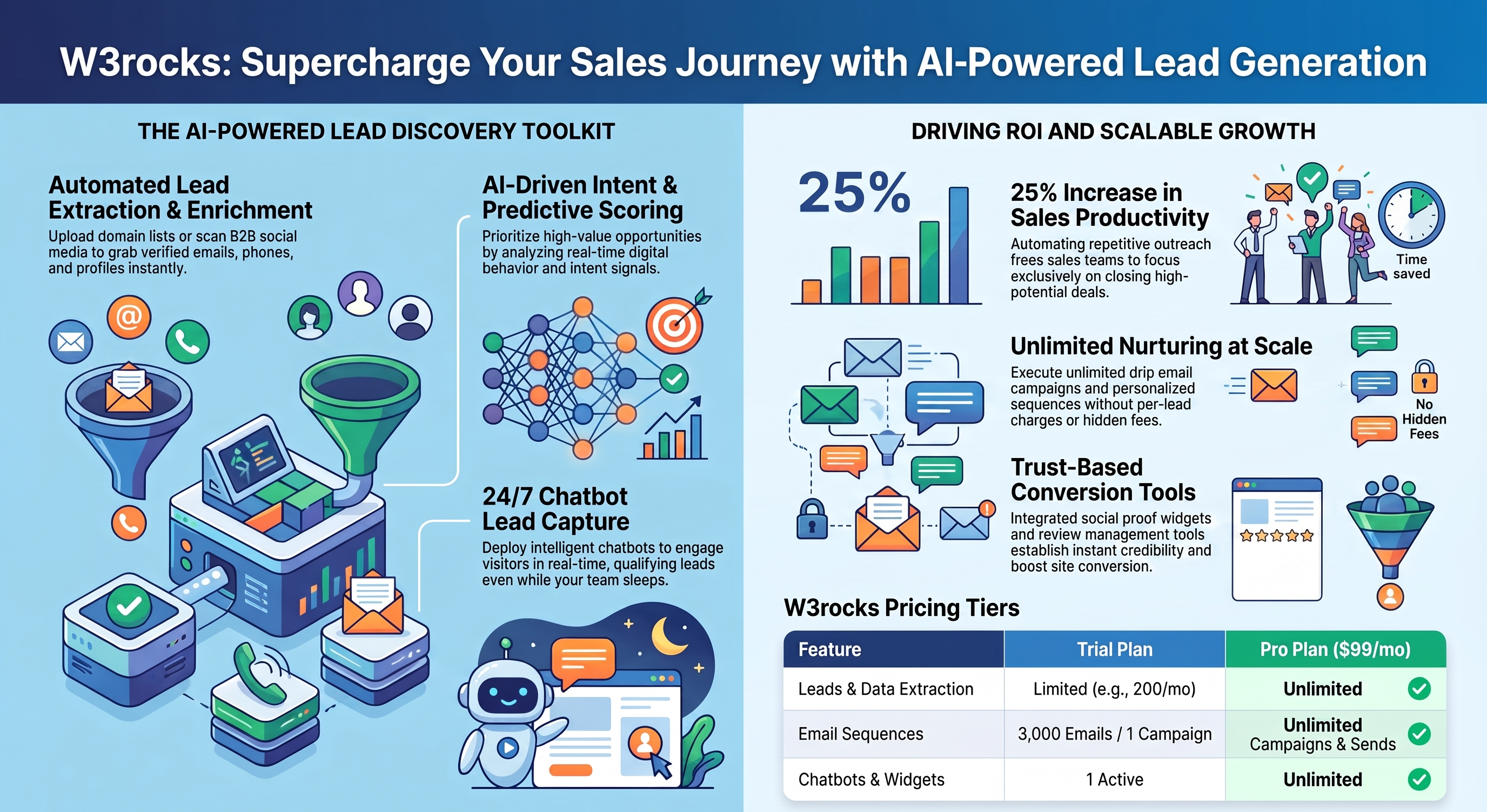
Our platform offers you a suite of products that you can use for your marketing in order to grow your company, find leads, send emails, create a chatbot and more.

Paid content
Visit website
Profile views 6 Outbound visits 1 Normal
Discover all the marketing tools we offer in Unlimited access. - W3rocks Full homepage screenshot

At a glance

Category
Marketing
Language
English
Paid-content signal
Paid contentObserved
Registered
2019
Hosting
OVH SASInferred
HTTPS certificate trusted
PassedObserved
Last updated

Website review

This review may include AI-generated content and is not individually verified. Domain, certificate and other facts come from the observed data on this page.

What is W3rocks?

W3rocks is a marketing software suite: one subscription bundles several AI-assisted tools for lead generation, outreach and content, rather than selling each tool separately. The tools listed on its site include an SEO article and news writer, a social media/B2B email extractor, a social proof notification widget, an email verifier API, email sequences, reviews, a chatbot, an email finder, a data extractor and enrichment. The site also advertises a free forever version, a trial and cancellation at any time.

Who it fits

  • Small teams or solo marketers who want one account for several jobs instead of juggling separate subscriptions.
  • Agencies or freelancers doing repeatable outbound work: building B2B contact lists by job title, country, industry and company size, then verifying and emailing them.
  • Content-led businesses that want AI drafting for SEO articles and news, plus a social proof widget to make a site look busier.

Where it is weaker

  • It is a bundle, so depth per tool may not match a dedicated specialist. If email deliverability or CRM depth is your bottleneck, a focused tool may serve you better.
  • Social proof widgets show random messages; that can raise credibility, but only if the messages are genuine. Treat it as an honesty decision, not just a conversion tactic.
  • AI-written SEO articles still need human editing and original insight to rank and read well.

Practical next step

Pick your single most painful task — say, finding verified B2B emails — and test only that tool during the trial before judging the suite. If it works, expand; if not, you have your answer cheaply. For comparison, established alternatives include HubSpot for an all-in-one CRM-led suite and Mailchimp for email marketing.

How can I use W3rocks to find new leads for my business?

W3rocks bundles several lead-generation tools into one suite, so you can find prospects, verify their contact details and reach out without stitching together separate services. According to the site, the relevant pieces are an AI social media extractor for pulling B2B emails from social platforms, an email finder, a data extractor, an enrichment API and an email verifier.

What each tool does for lead finding

  • Social media extractor: builds targeted lists from B2B social media, filtering by job title, location, country, industry and company size. The page says lists can be created without a stated cap.
  • Email finder and data extractor: locate contact details and pull structured data you can export to Excel or CSV.
  • Enrichment API: adds missing details to records you already have.
  • Email verifier: checks whether an address is real and flags disposable emails, which matters before you send a campaign.
  • Email sequences and chatbot: the outreach and follow-up side, once your list is ready.

A practical workflow

Say you sell software to mid-sized logistics firms in Germany. You would filter the social extractor by industry, country and company size, export the list, run it through the verifier to drop invalid or disposable addresses, enrich the remaining records, then load them into email sequences. That order avoids wasting sends on bad data.

Trade-offs to weigh

A single suite means one login and consistent data handling, but you are trusting one vendor's extraction accuracy and coverage rather than choosing best-in-class tools per step. Verification is also a moving target: always spot-check a sample before a large send.

The site advertises a free forever version and a trial, with pricing on a separate page, so the sensible next step is to register for the free tier, run one small list through the full workflow and judge the match rate before committing.

What is included in the free version of W3rocks?

The free version is the entry point to the whole suite, not just one tool: W3rocks advertises a "free forever version" alongside a trial and paid plans, so you can register and use the products before committing to a subscription.

What the suite covers

  • SEO articles: an AI writer for SEO articles and news, aimed at SEOs, marketers and content creators; the page also mentions bulk rewriting and keyword-opportunity finding.
  • Social media lead extraction: pulls B2B emails and contacts from social platforms and builds targeted lists filterable by country, industry, company size and job title.
  • Social proof: a notification widget for your site, with unlimited websites and notifications, plus geo-targeted messages.
  • Email verifier: an API to check whether an address is real and not disposable, intended to block fake signups; results can be exported to Excel or CSV.
  • Further tools listed: email sequences, reviews, new leads, chatbot, email finder, data extractor, enrichment and API.

What the page does not say

The site does not state which of these tools are fully included in the free version versus limited by credits, list size or export caps. Treat the free tier as a way to test the workflow rather than a full production replacement, and check the limits inside your account after registering.

Practical next step

Pick one job you already do — verifying signup emails or building a small lead list — and run it through the free version for a week. If the output holds up, compare the paid plans at W3rocks against the specific tools you actually used.

Can I cancel my W3rocks subscription at any time?

Yes. W3rocks states that you can cancel anytime, with no contracts, and it also offers a free-forever version alongside a trial. That combination matters: if you are testing one tool in the suite and decide it is not worth paying for, you are not locked into a long-term commitment.

What to check before you subscribe

  • Where cancellation lives. The site links to a pricing page, so confirm the exact steps there or in your account settings before entering payment details.
  • What happens to your data. If you have built lead lists, email sequences, chatbot flows or social proof notifications, ask whether they remain accessible after cancellation or are deleted after a grace period.
  • Which tools you actually use. The suite bundles SEO article writing, social media email extraction, social proof widgets, email verification, sequences, reviews, chatbot, email finder, data extraction and enrichment. Cancelling ends access to all of them, not just the one you signed up for.
  • Trial versus free version. The free-forever tier and the trial are different things. If the free tier covers your needs, you may not need a paid plan at all.

A practical decision rule

If you are running a short campaign, such as building a targeted B2B list for a product launch, subscribe for the months you need and cancel when the campaign ends. If you rely on the email verifier API inside your own signup flow, treat cancellation as a technical change: you will need an alternative verification service before your billing period closes.

For current terms and cancellation mechanics, check the official pricing page at W3rocks.

How do I set up a social proof notification widget on my website with W3rocks?

W3rocks treats its social proof widget as a display-and-notification tool: you install a widget on your site, and it shows short messages to visitors to build credibility and prompt action. According to the page's own description, the widget supports unlimited websites, unlimited notifications, and geo-targeted notifications. The setup flow below follows that description and adds the practical steps the page leaves implicit.

What the widget does

It is part of the W3rocks marketing suite, alongside tools for SEO articles, B2B email extraction, email verification, email sequences, reviews, a chatbot, an email finder, and a data extractor. The social proof product is the piece you would use if your goal is on-site persuasion — showing recent activity, purchases, signups or similar messages — rather than outbound lead generation. It is aimed at site owners and marketers who want a lightweight credibility layer without building notification logic themselves.

Setup steps

  1. Create a W3rocks account. The page offers a free version and a trial, with no contract and cancellation at any time, so you can test the widget before committing.
  2. Open the social proof product from the suite and add your website. Unlimited websites are supported, so you can run the same account across several domains.
  3. Configure your notifications — the messages visitors will see. The page states notifications are unlimited and can be geo-targeted, so you can vary wording or offers by visitor location.
  4. Install the widget on your site. W3rocks does not describe the exact embed method on this page, so treat the installation snippet or plugin instructions you receive inside the product as the authoritative source.
  5. Publish a test message and load your site in a browser to confirm the widget appears where you expect.
  6. Check the placement does not cover navigation, forms or mobile calls to action, then switch on your real notifications.

Decisions worth making before you install

Choice Why it matters
Notification content Real, specific activity ("someone in Leeds just signed up") reads as credible; vague or repeated claims read as noise.
Geo-targeting Useful if you sell in multiple markets; unnecessary complexity if you serve one city or country.
Placement Bottom-left or bottom-right corners are conventional and rarely block content; banners can interrupt reading.
Volume and timing Frequent pop-ups on every page view annoy returning visitors; spacing messages out usually performs better.

A concrete scenario

Suppose you run a small B2B service site with a contact form. You install the widget, add notifications tied to demo requests or trial signups, and geo-target messages so UK visitors see UK activity. You keep the widget off your pricing page if it distracts from the plan comparison, and you review after two weeks whether enquiries changed. That is a realistic first test rather than a permanent commitment.

Next step

Register for the free version or trial, add one website, and run a single notification for a week before expanding to multiple sites or geo-targeted messages. If you also need outbound lead lists or email verification, those are separate products in the same suite and can be evaluated on their own merits. For general background on notification patterns, official documentation from platforms such as Google Developers can help you judge whether a given implementation is sound.

What pricing plans does W3rocks offer for its marketing suite?

W3rocks presents its marketing suite as a bundled "Unlimited access" product with a dedicated pricing page, and the page signals a free-forever version, a free trial, and cancel-anytime subscriptions. The specific plan tiers, prices, and included limits are not listed in the supplied page evidence, so you will need to check the pricing page directly before committing.

What the page does tell you

  • There is a free version described as "Free forever."
  • A trial is offered so you can test before buying.
  • Subscriptions are cancellable at any time, with no contracts mentioned.
  • A separate "Pricing plans" section exists, implying more than one paid tier.

How to decide between plans

Because the suite bundles several distinct tools — AI SEO articles, social media lead extraction, social proof widgets, email verification, email sequences, reviews, chatbots, email finder, data extractor, and enrichment API — the right plan depends on which tools you actually need. A content team might only need the SEO article writer; a sales team would care more about the lead generation and email finder tools. Check whether each plan unlocks the whole suite or only selected products, and compare that against the cost of buying equivalent standalone tools.

Practical next step

Open the pricing page at W3rocks and note three things: which tools are included per tier, any usage limits on lead lists or email credits, and whether the free-forever version covers your core use case. If you mainly need to test lead quality first, start with the trial and run a small list through the email verifier to see whether the data matches your target market before paying for a higher tier.

Related questions

More questions →
What marketing tools are included in the W3rocks suite?

W3rocks bundles a set of AI-assisted marketing tools into one subscription, covering SEO content, B2B lead generation, social proof, and email verification. The suite is aimed at marketers, SEOs, and content creators who want several growth functions under a single account rather than separate point tools. The site lists a free forever version, a free trial, and paid pricing plans, with cancellation allowed at any time and no contracts.

The core tools in the suite

The page groups its products under an "AI Powered" label and names the following:

Tool What it does
AI SEO Articles Writes and rewrites SEO articles and news, and finds keyword opportunities
AI Social Media Extracts B2B emails and contacts from social media to build targeted lists
AI Social Proof A notification widget that displays messages on your site to build credibility
AI Email Verifier An API that checks whether an email is real and blocks disposable addresses
AI Email Sequences Email sequence tooling (listed in the suite menu)
AI Reviews Review-related tooling (listed in the suite menu)
AI Chatbot Chatbot creation (named in the site description)
AI Email Finder Email discovery (listed in the suite menu)
AI Data Extractor Data extraction (listed in the suite menu)
AI Enrichment API Contact/data enrichment (listed in the suite menu)

The four tools with the most detail on the page are described below.

AI SEO Articles

This is positioned as an SEO and news writer for SEOs, marketers, and content creators. According to the page, it can:

  • Write optimized SEO articles
  • Rewrite articles in bulk
  • Find keyword opportunities

The stated goal is producing SEO content with minimal manual effort.

AI Social Media

This tool targets B2B lead generation from social platforms. Per the page, it can:

  • Pull verified emails directly from social media
  • Create unlimited lists
  • Filter by country, industry, company size, and job title
  • Generate B2B and B2C lists in one click

It is built for building targeted contact lists based on role, location, country, industry, and company size.

AI Social Proof

A widget you install on your website that shows random messages to visitors, intended to increase sales and credibility. The page lists these capabilities:

  • Add unlimited websites
  • Add unlimited notifications
  • Create geo-targeted notifications

AI Email Verifier

An API meant to run at signup: each time someone registers, you ping the API to check whether the email is valid and not a disposable address. Stated features:

  • Block fake signups before they happen
  • Verify whether an email exists
  • Export results into Excel or CSV

Who this suite fits

The suite makes sense if you need several of these functions together — for example, generating SEO articles, building a B2B outreach list, and verifying signups — and prefer one account over stitching together separate subscriptions. If you only need one function, such as email verification, a single-purpose tool may be simpler.

Pricing and trial

The page references a "Pricing plans" section, a "Trial" section, and a dedicated pricing page at marketing.w3rocks.com/pricing/en. It also states there is a free forever version and that you can cancel anytime with no contracts. The page does not list specific prices, plan tiers, or payment methods, so check the pricing page for current figures and terms.

How to start

  1. Go to the registration form on the page.
  2. Enter your email, a password, your first name, and your phone number.
  3. Submit to create the account. The page notes a success message on registration and an error if the account may already exist.
  4. Registration implies acceptance of the site's Terms of Use and Privacy Policy.
  5. Use the free version or start the trial before deciding on a paid plan.

A practical way to evaluate it: pick one tool you actually need, run a small task through it (for example, generate a short SEO article or build one filtered lead list), and check the output quality before committing to a paid plan.

How much does W3rocks cost and is there a free trial?

W3rocks offers a free forever version and a free trial before you buy, so you can test the marketing suite at no cost before committing to a paid plan. The site states there are no contracts and you can cancel anytime. Exact prices for paid tiers are listed on the W3rocks pricing page (marketing.w3rocks.com/pricing/en) rather than on the main product page, so check there for current numbers.

What you can try for free

According to the site, two no-cost paths exist:

  • Free forever version — a permanently free tier, described alongside "Cancel Anytime • No Contracts."
  • Free trial — "Try the free version before you buy, start your trial now."

Signing up requires an email, password, first name, and phone number. After registering you get access to the suite; the page confirms a "Success you are registered!" state and notes an error can occur if the account already exists.

What the suite includes

The platform bundles several AI-powered marketing products under one subscription:

Tool What it does
AI SEO Articles Writes and rewrites SEO articles and news, finds keyword opportunities
AI Social Media Extracts B2B emails from social media, builds targeted lead lists by job title, location, country, industry, and company size
AI Social Proof Displays notification widgets on your site to boost credibility and sales
AI Email Verifier API that checks whether an email is real and blocks disposable addresses at signup
AI Email Sequences Email sequence tooling
AI Reviews Review-related tooling
AI New Leads Lead generation
AI Chatbot Chatbot creation
AI Email Finder Finds email addresses
AI Data Extractor Extracts data
AI Enrichment API Enriches contact/company data

The suite is positioned for lead generation, email outreach, chatbots, and content creation, aimed at SEOs, marketers, and content creators.

How to decide whether to pay

Because pricing isn't shown on the landing page, use this sequence:

  1. Open the pricing page to see the current plan tiers and prices.
  2. Start the free trial or free forever version and test the tools you actually need — for example, run one SEO article, build one lead list, or verify a batch of emails.
  3. Compare what the free tier limits against your usage. The site advertises "unlimited access" and "unlimited lists/websites/notifications" in product descriptions, but confirm which of those apply to the free versus paid tiers on the pricing page.
  4. If the free version covers your volume, stay on it; if you hit limits, upgrade — there's no contract, so you can cancel anytime.

Common sticking points

  • Prices aren't on the main page. Don't assume a number; the pricing page is the only stated source.
  • "Free forever" vs. "free trial" are different. One is a permanent tier, the other is time-limited before purchase — check which features each covers.
  • Registration needs a phone number. If you don't want to provide one, that's a blocker to testing.
  • "Unlimited" claims need verification per tier. The marketing copy uses "unlimited" broadly; confirm it applies to your plan before relying on it.
How does W3rocks AI Social Media help with B2B lead generation?

W3rocks AI Social Media extracts B2B emails and contacts from social media and turns them into targeted lists you can filter by job title, location, country, industry, and company size. It is built for teams that need to build prospect lists from social platforms without manual scraping, and it sits inside the broader W3rocks marketing suite, which has a free forever version and a trial you can start before buying.

What the tool actually does

According to the product description on the W3rocks marketing suite page, the AI Social Media product is designed to:

  • Extract B2B emails from B2B social media
  • Build targeted contact lists in one click
  • Find leads based on job title, location, country, industry, and company size
  • Pull verified emails straight from social platforms
  • Create unlimited lists with filters for country, industry, company size, and job title
  • Generate both B2B and B2C lists

The core promise is list building at scale: instead of collecting profiles one by one, you define who you want and the system returns contacts that match.

How the lead generation flow works

The page does not publish a step-by-step walkthrough, so the exact menu names are not documented here. Based on the described capabilities, the working flow is:

  1. Define your target — choose filters such as job title, location, country, industry, and company size.
  2. Run the extraction — the system pulls emails and contacts from B2B social media matching those filters.
  3. Review the list — contacts come back as a targeted list you can organize.
  4. Repeat or expand — you can create unlimited lists, so you can run separate lists per segment (for example, one per country or per industry).
  5. Export or use the data — the suite mentions exporting results into Excel or CSV for its email verifier product, which suggests list data is portable across the suite.

The expected result is a filtered contact list you can act on, rather than a raw dump of profiles.

Why the filters matter for B2B

B2B outreach lives or dies on targeting. A list filtered by job title and company size is far more useful than a generic email dump, because you can:

  • Match messaging to seniority (founder vs. manager vs. specialist)
  • Split campaigns by region or country
  • Focus on specific industries where your offer fits
  • Size accounts by company size to separate SMB from enterprise outreach

The tool supports all of these as filter dimensions, which is the main reason to use it over a generic email finder.

Where it fits in the W3rocks suite

AI Social Media is one product in a larger suite. Related tools that pair naturally with lead generation:

Tool What it does How it complements lead gen
AI Social Media Extracts B2B emails and builds targeted lists Produces the raw prospect list
AI Email Verifier API that checks if an email exists and blocks disposable addresses Cleans the list before you send
AI Email Sequences Sends email sequences Turns the list into outreach
AI Email Finder Finds emails Fills gaps in your list
AI Chatbot Creates a chatbot Handles inbound leads from your site

The practical combination is: build the list with AI Social Media, verify it with the Email Verifier, then run sequences. That reduces bounce rates and protects sender reputation.

What to check before committing

The suite page states there is a free forever version, a trial, and cancel anytime, no contracts. Pricing details are on a separate pricing page, so check that page for current plan limits — in particular:

  • How many contacts or lists the free version allows
  • Whether unlimited lists apply to all plans or only paid ones
  • Whether email extraction volume is capped per month

These limits determine whether the free tier is enough for testing or whether you need a paid plan for real prospecting volume.

Common friction points

  • Email verification is a separate step. The extraction tool pulls emails; the verifier is a different product. If you skip verification, expect higher bounce rates.
  • Filter quality drives list quality. Broad filters (for example, industry only) return noisier lists than narrow combinations (industry + job title + company size).
  • Social platform coverage is not specified on the page. The description says "B2B social media" generally, so confirm which platforms are supported before you build a workflow around it.
  • Unlimited lists is not the same as unlimited contacts. Lists are containers; check the pricing page for contact or extraction caps.

Quick answer

W3rocks AI Social Media helps with B2B lead generation by extracting emails and contacts from social media and letting you filter them by job title, location, country, industry, and company size into unlimited targeted lists. It is best used as the list-building step in a workflow that continues with email verification and email sequences. Start with the free version or trial to test list quality against your target market before paying.

What Is the W3rocks Marketing Suite?

W3rocks is a marketing platform that bundles a set of AI-powered tools into one subscription, covering SEO content, lead generation, email outreach, social proof, and data enrichment. It's aimed at marketers, SEOs, and content creators who want to run several marketing functions from a single suite rather than stitching together separate products. You can try it before paying through a free trial, and a free forever version is also mentioned on the site.

What's included in the suite

The platform describes itself as a suite of products for growing a company, finding leads, sending emails, and building a chatbot. Based on the product list on the page, the tools fall into these areas:

Tool What it does
AI SEO Articles Writes SEO articles and news, rewrites articles in bulk, and finds keyword opportunities
AI Social Media Extracts B2B emails and contacts from social media to build targeted lists
AI Social Proof Displays notification widgets on your site to show visitor activity and build credibility
AI Email Verifier An API that checks whether an email is valid and not disposable, to block fake signups
AI Email Sequences (Listed in the suite navigation)
AI Reviews (Listed in the suite navigation)
AI New Leads (Listed in the suite navigation)
AI Chatbot (Listed in the suite navigation)
AI Email Finder (Listed in the suite navigation)
AI Data Extractor (Listed in the suite navigation)
AI Enrichment API (Listed in the suite navigation)

The page's detailed descriptions focus on the first four tools; the rest appear in the suite's product navigation.

Who it's for

The SEO article tool is explicitly positioned for SEOs, marketers, and content creators. The lead generation and social media tools target B2B outreach — you can filter leads by job title, location, country, industry, and company size. If your work involves producing content at volume, building prospect lists, or verifying signups, those are the use cases the suite is built around.

How the main tools work

AI SEO Articles

You use it to write SEO articles and news, rewrite articles in bulk, and surface keyword opportunities. The site frames it as writing optimized articles "with zero effort," which in practice means generating drafts you'd still review and edit before publishing.

AI Social Media

This pulls verified emails and contacts from B2B social media. You can create unlimited lists and filter by country, industry, company size, and job title, then generate B2B or B2C lists in one click. The output is a targeted contact list for outreach.

AI Social Proof

You install a widget on your website that shows random messages to visitors — the goal is to increase sales and credibility. It supports unlimited websites, unlimited notifications, and geo-targeted notifications.

AI Email Verifier

This is an API you ping when someone registers, to check whether the email is correct and not a disposable address. It blocks fake signups before they happen, and results can be exported to Excel or CSV.

Pricing and trial

The site lists a Pricing page and mentions a free trial plus a free forever version. The signup flow asks for email, password, first name, and phone number, and the page states "Cancel Anytime • No Contracts." Specific plan prices and limits aren't shown in the material available here — check the pricing page for current numbers before committing.

What to check before signing up

  • Confirm which tools are actually live. The suite navigation lists more products (chatbot, reviews, email sequences, data extractor, enrichment API) than the page describes in detail, so verify the ones you need are available.
  • Check trial limits. "Free trial" and "free forever version" are both mentioned, but what each includes isn't specified here.
  • Match tools to your stack. If you already pay for an SEO writer or a lead database, compare whether the bundled approach saves money or just adds overlap.
  • Review the terms. Signup requires accepting the Terms of Use and Privacy Policy, which matter most if you're feeding in contact data or running the verifier API.
How does W3rocks AI Email Verifier prevent fake signups?

W3rocks AI Email Verifier is an API that checks an email address at the moment of registration, so you can block fake or disposable addresses before an account is created. According to the product page, it verifies whether an email is correct and not a disposable email, and it lets you export results into Excel or CSV. This fits teams that accept signups through their own form or app and want a programmatic check rather than manual review.

What the verifier actually does

The page describes it as an "API to prevent fake emails registration on your service." Two checks are named explicitly:

  • Whether the email exists (correctness)
  • Whether it is a disposable email address

The stated purpose is to stop fake registration, and the page frames the timing as "before they happen" — meaning the check runs during the signup flow, not as a cleanup pass afterward.

How the prevention works

The mechanism is a ping to the API each time someone registers. In practice that means:

  1. Input — a visitor submits their email through your registration form.
  2. Action — your form or backend sends that address to the W3rocks Email Verifier API.
  3. Expected result — the API returns a verification result indicating whether the email is valid and non-disposable.
  4. Decision — you accept the signup, or reject/flag it, based on that result.

The page does not publish the exact response fields, endpoint format, or error codes, so treat the response handling as something to confirm against the product's own API documentation before you build the integration.

Where the export fits

Results can be exported into Excel or CSV. That is useful for reviewing what was blocked or flagged, auditing a batch of existing signups, or sharing verification outcomes with a team that works in spreadsheets. It is a reporting and record-keeping feature, separate from the real-time blocking step.

What to check before relying on it

  • Disposable detection scope — the page states disposable emails are caught, but does not list which domains or how often the list updates.
  • Latency in the signup flow — an API call adds a step to registration; test how it behaves under your expected traffic.
  • Failure handling — decide what your form does if the API is slow or unreachable, since the page does not describe fallback behavior.
  • Pricing and trial — the site references pricing plans, a free trial, and a "free forever version," plus "Cancel Anytime • No Contracts." Check the pricing page for current limits, since the excerpt does not state quotas or per-call costs.

If your goal is simply to stop obviously fake signups at the door, an email-existence and disposable-domain check at registration covers the common cases. If you also need to catch role-based or low-quality addresses, confirm whether the verifier reports those categories before assuming it does.

Website Overview

An established domain and managed infrastructure suggest continuity of operations and may support dependable delivery, although neither guarantees service quality. Several search or sharing settings need attention. Together they may make snippets, preview images or preferred URLs less consistent across platforms.

Domain and Registration

Registered in 2019, this domain has about 7 years of history. That suggests continuity, although ownership and purpose may have changed. Transfer-protection status is present, helping reduce the risk of unauthorized domain transfers. The registrar is GoDaddy.com, LLC, a widely used domain service provider. The domain uses the common .com extension, which is not an independent safety signal.

DNS and Email

The observed email authentication setup is incomplete: DMARC is missing. Nameservers are provided by GoDaddy, indicating managed DNS hosting. MX records point to the w3rocks.com email service. No CNAME was found; the observed records resolve directly to addresses. TXT records include verification markers for Google. Such markers may also remain after a service stops being used.

TLS and Certificates

The certificate uses an RSA 2048-bit public key, offering broad client compatibility. The server supplied a complete certificate chain. No organization name is present in the certificate; the available fields are consistent with domain validation. The certificate was issued by Let's Encrypt, commonly associated with automated certificate services. The certificate's total validity is about 89 days, consistent with a short renewal cycle.

HTTP and Browser Security

The response lacks these common security headers: CSP, Referrer-Policy, Permissions-Policy, clickjacking protection. CORS permits any origin to read this response. This is common for public resources; sensitive responses need narrower handling. No X-Powered-By header was found, reducing one common source of backend fingerprinting information. No obvious internal addresses or debug information were found in the headers. The Server header identifies nginx without an exact version.

Technology Stack Analysis

The public page identifies Bootstrap, Google Analytics, nginx without precise versions, leaving fewer clues for version-specific scanning.

Search and Social Sharing

The title has 72 characters and may be truncated in search results. The meta description has 162 characters and may be shortened in search results. No homepage canonical URL was detected. If duplicate URLs exist, consolidation may be less explicit. The observed directives allow indexing and link following. No Generator meta tag is publicly exposed.

Hosting and Email

DNSGoDaddy
HostingOVH SAS
Emailw3rocks.com
Approximate IP geolocation (inferred; a CDN or proxy may differ from the origin server) United States flagOakton, Virginia, United States Inferred 147.135.6.154

Registration details

RDAP / WHOIS

RegistrarGoDaddy.com, LLC
Registered2019-07-09
Expires2030-07-09
Domain statusclient delete prohibited、client renew prohibited、client transfer prohibited、client update prohibited
Nameserversns71.domaincontrol.com、ns72.domaincontrol.com
DNSSECunsigned

DNS records

DNS

TypeNameValueTTLPriority
Amarketing.w3rocks.com147.135.6.154600—
MXw3rocks.commail.w3rocks.com36000
NSw3rocks.comns71.domaincontrol.com3600—
NSw3rocks.comns72.domaincontrol.com3600—
TXTw3rocks.comgoogle-site-verification=vB2lrxRkyU_6J-cWCyoF6deZsAttw5uahS8Op0JJdDg1800—
TXTw3rocks.comv=spf1 include:secureserver.net -all1800—

TLS and certificates

TLS / SSL

AssessmentNormal configuration
Supported protocolsTLSv1.2
Negotiated protocolTLSv1.2
Certificate subjectmarketing.w3rocks.com
IssuerLet's Encrypt
Valid until2027-01-08T01:17 · Remaining when checked: 88 days
Verification detailsCertificate trust: Passed · Hostname match: Passed

HTTP response headers

HTTP

HeaderValue
content-typetext/html; charset=UTF-8
cache-controlno-store, no-cache, must-revalidate, post-check=0, pre-check=0
servernginx
strict-transport-securitymax-age=15768000; includeSubdomains; preload
x-content-type-optionsnosniff
access-control-allow-origin*
set-cookieRedacted

Identified technologies

BootstrapGoogle Analyticsnginx

Pages, Search and Sharing

Meta descriptionOur platform offers you a suite of products that you can use for your marketing in order to grow your company, find leads, send emails, create a chatbot and more.
Canonical URLNot detected
LanguageEnglish (default)
Twitter CardNot detected

Unknown

User reviews (0)

  • No reviews yet.