Website profiles · Technology insights · Alternatives

oldtime.radio

This station broadcasts Old Time Radio shows 24/7 for free. Listen to Superman, X-Minus One, Tarzan, Philip Marlowe, Gunsmoke, Jack Benny and many more

No paid content found
Visit website
Profile views 4 Outbound visits 0 Normal
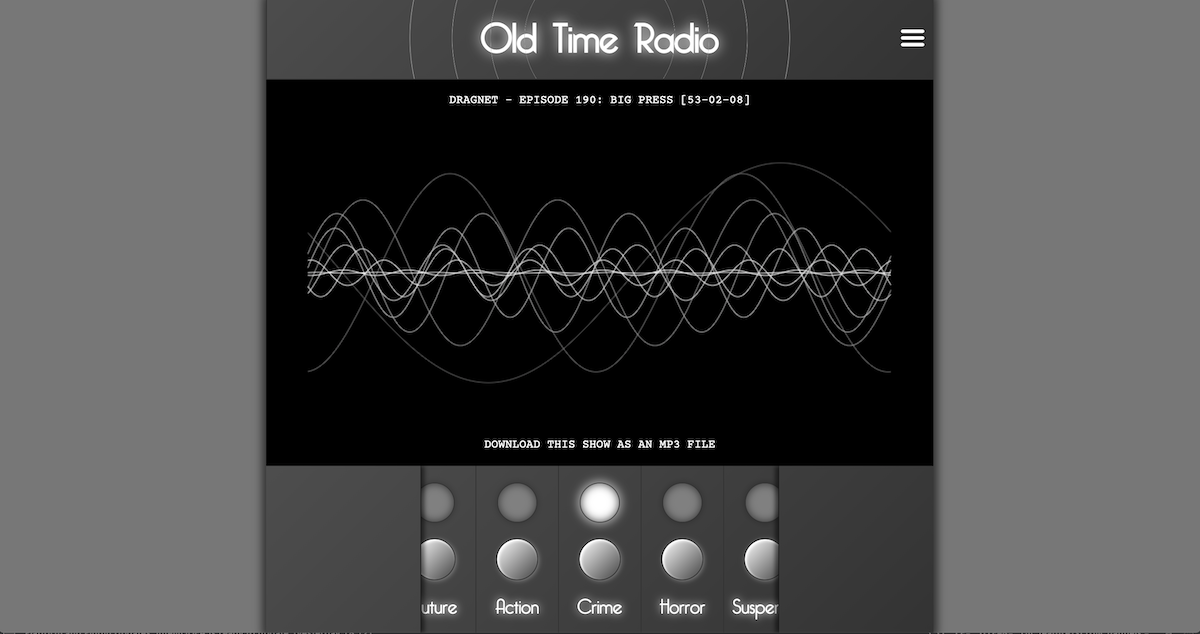
Old Time Radio Full homepage screenshot

At a glance

Category
Development
Language
English
Paid-content signal
No paid content foundObserved
Registered
2020
Hosting
CloudflareInferred
HTTPS certificate trusted
PassedObserved
Last updated

Website review

This review may include AI-generated content and is not individually verified. Domain, certificate and other facts come from the observed data on this page.

What is Old Time Radio?

Old Time Radio is a free, always-on streaming station for vintage American radio drama and comedy. According to its own page, it broadcasts shows 24/7 and names Superman, X-Minus One, Tarzan, Philip Marlowe, Gunsmoke and Jack Benny among its programming. The audio is hosted by the non-profit Internet Archive, and the site itself is open-source software released under the MIT Licence.

It is built for background listening rather than browsing a catalogue. The page is essentially a player: a schedule view shows what is coming up on each channel, a visualiser gives something to watch, and preferences let you manage volume, on-screen messages and a sleep timer. There is also a Station Builder that lets you create your own channels by picking shows from a list, with the option to play commercials between programmes.

A few practical points follow from how it works. Because the station runs continuously, you may tune in partway through an episode; the preferences include an option to show an episode summary when that happens, which is useful if you want to know what you have missed. The sleep timer is aimed at people listening in bed. The reliance on JavaScript means the player will not work if scripts are blocked, so a browser with JavaScript enabled is a basic requirement.

For a concrete use case: if you want familiar mid-century serials playing while you cook, work or fall asleep, and you do not want to choose episodes or manage a queue, this suits that habit well. If instead you want to search for a specific episode, read plot summaries before committing, or download files for offline listening, a general podcast app or the Internet Archive directly will serve you better. The Station Builder is the middle ground: it gives you some control over what plays without turning listening into a browsing task.

As a next step, open the site with JavaScript enabled, check the Schedule for the channel you are considering, and set the sleep timer before you start listening if you plan to listen at night.

How can I listen to Old Time Radio if JavaScript is disabled?

You can't listen to this station through the site itself without JavaScript. The page tells you plainly: "It looks like JavaScript is disabled in your web browser. You will need to enable JavaScript to listen to this station." The player, schedule, visualiser and station builder all depend on scripts running in your browser.

So you have two realistic paths.

Option 1: Enable JavaScript for this site

Most browsers let you allow scripts for a single domain rather than globally, which keeps the rest of your browsing locked down.

  • Chrome/Edge: Settings → Privacy and security → Site settings → JavaScript → add oldtime.radio to the "Allowed" list.
  • Firefox: Settings → Privacy & Security → Permissions → JavaScript → Exceptions → add the site.
  • Safari: Settings → Websites → JavaScript, or use a per-site extension if you prefer granular control.

After enabling, reload the page. You should see the receiver interface with the Schedule, Visualiser, Volume and Preferences controls.

Option 2: Skip the website and go to the source

The station states that all audio it plays is hosted by the non-profit Internet Archive. That means the underlying recordings exist independently of this front end. If you'd rather not run scripts, you can go directly to the archive and search for the same programmes the station lists — Superman, X-Minus One, Tarzan, Philip Marlowe, Gunsmoke, Jack Benny and others. You'll get the same episodes, just without the curated 24/7 channel, sleep timer or station-building features.

What you lose either way

The site's conveniences — scheduling a channel, mixing your own station, playing commercials between programmes, the sleep timer — are all JavaScript features. With scripts off, none of that works. If those extras are what you came for, enabling JavaScript is the only route; if you just want the shows, the Internet Archive is the simpler answer.

A practical compromise: keep JavaScript off by default and enable it only for oldtime.radio, so you get the full experience here without loosening security everywhere else.

Can I create a custom station with only the shows I want?

Yes. Old Time Radio includes a Station Builder that lets you create your own channels by selecting shows from a list, and you can add more than one channel or delete the station you built. You can also choose whether commercials play between programmes, which is useful if you want a continuous, uninterrupted run of a specific series.

Old Time Radio is a free, 24/7 stream of vintage shows such as Superman, X-Minus One, Tarzan, Philip Marlowe, Gunsmoke and Jack Benny. The audio itself is hosted by the non-profit Internet Archive, so custom stations are essentially playlists drawing on that archive rather than a separate paid library. The site also has a schedule view for seeing what is coming up on each channel, plus preferences for episode summaries, information messages, "Now Playing" messages and a sleep timer.

Practical uses

  • One-show marathons: Build a channel containing only Gunsmoke or only X-Minus One if you want to follow a single series rather than jump between genres.
  • Genre channels: Group detective shows like Philip Marlowe on one channel and comedy like Jack Benny on another, then switch between them.
  • Background listening: Use the sleep timer and turn off "Now Playing" messages if you want a custom channel to run quietly while you fall asleep.
  • Commercial-free listening: Disable commercials between programmes if you prefer an uninterrupted block of episodes.

Trade-offs to weigh

The trade-off is control versus discovery. A custom station gives you exactly the shows you selected, but you lose the surprise of the main broadcast and may need to curate a longer list to avoid repetition. The built-in schedule is more useful when you want someone else to make the choices for you.

Next step

Open the Station Builder, add one channel, and start with five to ten episodes from a single series. If the rotation feels too narrow after a few days, add a second channel for a different genre rather than cramming everything into one. If you enjoy the archive material, consider supporting the Internet Archive, since it hosts the audio that makes the custom stations possible.

What shows are included in the Old Time Radio schedule?

The station draws its programming from the Internet Archive's collection of vintage radio broadcasts. According to its own description, the lineup includes Superman, X-Minus One, Tarzan, Philip Marlowe, Gunsmoke, and Jack Benny, with "many more" beyond that short list. In practice, this means a mix of superhero adventure, science fiction, jungle adventure, detective noir, Western drama, and comedy.

Because the site runs 24/7 and lets you build your own channels, the exact schedule you see depends on which channel you select and when you tune in. The "Schedule" section shows upcoming shows per channel, and the "Station Builder" lets you create channels from a show list, so you can effectively decide your own lineup rather than accept a fixed one.

If you want to know what's on right now, open the Schedule panel and pick a channel; if you'd rather control the mix, use Station Builder to add the specific series you care about.

How do I set a sleep timer to stop playing shows automatically?

Open the Preferences panel on the station page and find the Sleep Timer setting. From there you choose how long the station should keep playing before it stops automatically, so you can fall asleep to a show without leaving the audio running all night.

A few practical points:

  • The timer is a fixed countdown you set in advance, not a feature that detects when you've fallen asleep. Pick a duration that comfortably covers the episode you're listening to.
  • Preferences also include options to show an episode summary when you tune in partway through a show, and to control information and "Now Playing" messages. Turning those off can make late-night listening less disruptive.
  • The station's audio comes from the non-profit Internet Archive, so playback depends on an active connection and JavaScript being enabled in your browser.

Your next step: start a show, open Preferences, set the sleep timer to your usual falling-asleep window, and confirm the countdown is running before you settle in. If you tend to drift off at different times, set it slightly longer than you think you need rather than shorter — you can always stop playback manually.

For listeners who want more control, the Station Builder lets you create your own channels from the show list, and you can choose whether commercials play between programmes. That makes it easier to line up a block of episodes that fits neatly inside your timer. The same site is available at Old Time Radio.

Is Old Time Radio free and how is it funded?

Yes. Old Time Radio is free to listen to, and it is funded through listener support rather than subscriptions or ads.

How it works in practice

  • The site streams old-time radio shows 24/7, including series like Superman, X-Minus One, Tarzan, Philip Marlowe, Gunsmoke and Jack Benny.
  • The audio is hosted by the non-profit Internet Archive, and the station asks regular listeners to consider supporting the Archive financially.
  • The site itself is open-source software under the MIT Licence, with source code on GitHub, which suggests low infrastructure costs but does not by itself cover hosting or bandwidth.
  • JavaScript must be enabled in your browser to listen, so the free experience depends on a working modern browser rather than a downloadable app.

What this means for different listeners

  • If you want background listening with no account, this fits: there is no signup mentioned and no payment platform listed.
  • If you want to support the service, the most direct route described is donating to the Internet Archive, since it hosts the audio.
  • If you need offline listening or a mobile app, that is not described here; this is a browser-based stream.

A practical next step Open the site, enable JavaScript, and use the Schedule or Station Builder to create channels from the show list. If you become a regular listener, follow the site's own suggestion and support the Internet Archive, since that is the organisation it identifies as hosting the audio.

For comparison, other free radio options exist, but the funding model here is specifically tied to a non-profit archive rather than advertising or paid tiers.

Related questions

More questions →
How to Listen to Shows on Old Time Radio (oldtime.radio)

Old Time Radio is a free, 24/7 streaming station that plays vintage radio shows such as Superman, X-Minus One, Tarzan, Philip Marlowe, Gunsmoke, and Jack Benny. To listen, open the site in a browser with JavaScript enabled, then use the on-page player controls. The audio itself is hosted by the non-profit Internet Archive, so the site works as a front end for that archive rather than as a download library.

Before you start

  • JavaScript must be on. The site displays "Please Adjust Your Receiver" and a notice that JavaScript is disabled if your browser blocks scripts. Enable JavaScript for the site, then reload the page.
  • No account is mentioned. The page describes the station as free and 24/7, and does not describe a login or sign-up step.
  • Audio source. All audio you hear is hosted by the Internet Archive, which the site links to and asks regular listeners to consider supporting financially.

Listening to the station

  1. Open oldtime.radio in your browser.
  2. If you see the "Please Adjust Your Receiver" message, enable JavaScript and reload.
  3. Use the player controls on the page to start playback.
  4. Adjust Volume as needed using the volume control.
  5. Choose a Visualiser if you want a visual display alongside the audio.

The station plays continuously, so there is no episode list to pick from in the default view — you tune in to whatever is currently broadcasting.

Using the Schedule

The Schedule section lets you see what is coming up.

  1. Go to the Schedule.
  2. Select a channel.
  3. View the shows scheduled for that channel.

This is the main way to find out what will play next rather than only hearing what is on right now.

Setting your Preferences

The Preferences section controls how the player behaves while you listen:

Preference What it does
Show episode summary when tuning in partway through Displays a summary of the episode if you join it already in progress
On Information messages Toggles information messages
On 'Now Playing' messages Toggles messages about the current show
Sleep Timer Stops playback after a set period

Setting the Sleep Timer

Use the Sleep Timer option to stop playing shows after a chosen amount of time — useful if you listen while falling asleep.

Building your own station

The Station Builder lets you create your own radio station instead of only listening to the default stream.

  1. Open Station Builder.
  2. Create channels by selecting shows from the list provided.
  3. Adjust Channel Settings for each channel.
  4. Optionally enable Play Commercials Between Programmes.
  5. Use Listen Now to start your station.
  6. Use Add Another Channel to add more channels, or Delete Station to remove it.

Common snags

  • Nothing plays and you see a receiver message. JavaScript is disabled — enable it and reload.
  • You joined mid-episode. Turn on "Show episode summary when tuning in partway through" in Preferences to see what you missed.
  • You want to know what's next. Check the Schedule and select a channel rather than waiting for the current show to end.
  • You want a specific mix of shows. Use Station Builder to create channels from the show list instead of relying on the default broadcast.

Contact and source

The station can be contacted by email at the address listed on the site. The website is open source software released under the MIT Licence, with source code available on GitHub.

How the Station Builder Works on Old Time Radio

Station Builder on oldtime.radio lets you create your own custom channels by picking shows from a list, then listen to them as a continuous station. You need JavaScript enabled in your browser, since the site states it is required to listen. The builder is free to use, and the underlying audio is hosted by the non-profit Internet Archive.

What Station Builder Does

The main station plays Old Time Radio shows 24/7, but Station Builder gives you control over what plays on your own channels. Instead of relying on the default schedule, you select the specific shows you want and arrange them into channels.

This is useful if you want a channel focused on one genre or performer — for example, a channel of detective shows like Philip Marlowe, or a comedy channel built around Jack Benny.

Step-by-Step: Building a Station

  1. Open Station Builder. On the site, the builder is presented as a section where you "Build your own radio station."
  2. Create a channel. The instructions say to "create some channels by selecting shows from the list below." Pick the shows you want on that channel from the available list.
  3. Adjust Channel Settings. Each channel has its own settings. One documented option is Play Commercials Between Programmes — you can toggle whether commercials play between shows.
  4. Add more channels if you want. Use Add Another Channel to create additional channels, each with its own show selection and settings.
  5. Remove what you don't need. Use Delete Station to remove a station you've built.
  6. Start listening. Use Listen Now to begin playing your custom channel.

The expected result: your selected shows play as a continuous channel, with commercials either included or skipped depending on your Channel Settings choice.

Other Controls You'll See

The site also exposes several playback and display preferences alongside the builder:

  • Schedule — select a channel to see what shows are coming up.
  • Visualiser — choose a visualiser for playback.
  • Volume — adjust playback volume.
  • Preferences — toggle options including showing an episode summary when tuning in partway through, information messages, "Now Playing" messages, and a Sleep Timer.
  • Sleep Timer — set shows to stop playing after a chosen duration.

Common Snags

  • Nothing plays or the builder doesn't respond: The site explicitly notes that JavaScript must be enabled to listen. Check your browser settings first.
  • Commercials appearing unexpectedly: This is controlled by the Play Commercials Between Programmes setting in Channel Settings — adjust it per channel.
  • Want to start over: Use Delete Station rather than trying to edit a channel down to nothing.

Supporting the Source

The site notes that all audio is hosted by the non-profit Internet Archive, and asks regular listeners to consider supporting them financially. The website itself is open source under the MIT Licence, with source code on GitHub, and can be contacted by email.

How the Sleep Timer and Preferences Work on Old Time Radio

The Sleep Timer on oldtime.radio stops playback automatically after a duration you choose, and the Preferences panel controls three notification behaviors: episode summaries when you tune in partway through a show, information messages, and "Now Playing" messages. Both are reached from the station's main interface, and both require JavaScript to be enabled in your browser — the site displays "Please Adjust Your Receiver" and cannot play audio without it.

Setting the Sleep Timer

The Sleep Timer is listed as its own section in the interface, alongside Schedule, Visualiser, Volume, and Preferences.

  1. Open the Sleep Timer control from the main interface.
  2. Choose how long you want shows to keep playing before they stop — the site labels this as "Set the Sleep Timer to stop playing shows after:" followed by a duration.
  3. Leave the station playing. When the chosen time elapses, playback stops on its own.

The practical use case is listening in bed or while falling asleep: you pick a duration long enough to cover the part of a show you want to hear, and the station shuts off without you having to come back to the browser. Note that the timer stops playback — it does not pause and resume later, so if you want to continue a show afterward you would tune back in and rely on the episode summary preference (below) to orient yourself.

What Each Preference Does

Preferences on oldtime.radio are toggles rather than sliders or text fields. The page lists three:

Preference What it controls
Show episode summary when tuning in partway through Whether you see a summary of the current episode when you join a show already in progress
On Information messages Whether information messages are shown
On 'Now Playing' messages Whether messages about the currently playing show are shown

The first is the most useful for regular listening. Because the station broadcasts 24/7, you will often land in the middle of an episode rather than at the start. With this preference on, you get a summary to tell you what you've joined; with it off, you get a cleaner interface with no summary text.

The other two preferences let you reduce on-screen messaging. If you find the information or now-playing notices distracting while listening, turning them off keeps the display quieter without affecting the audio.

Things to Know Before You Rely on These Settings

  • JavaScript is required. The station explicitly states that if JavaScript is disabled you will need to enable it to listen. The Sleep Timer and Preferences are part of the same interface, so they are unavailable without it.
  • Audio is hosted by the Internet Archive. The station notes that all audio you hear is hosted by the non-profit Internet Archive, and asks regular listeners to consider supporting them financially. This matters if you plan to listen heavily — the station itself is a front end, not the host of the recordings.
  • The station is built for continuous listening. Because it broadcasts shows 24/7 rather than offering on-demand episode selection, the Sleep Timer and the "tune in partway through" summary preference are the two settings that most directly shape a normal listening session. The Station Builder is the separate feature for creating your own channels from a show list if you want more control over what plays.

If you only change one thing, set the Sleep Timer before a long listening session and leave the episode summary preference on — together they cover the two situations the station's always-on format creates: falling asleep mid-show, and joining a show already underway.

What is Old Time Radio (oldtime.radio)?

Old Time Radio is a free, 24/7 streaming station that plays classic American radio shows from the 1930s through the 1950s. You can listen in a web browser at oldtime.radio, and the site also lets you build your own custom channels from a list of available programs. The audio is hosted by the non-profit Internet Archive, and the site itself is open-source software released under the MIT Licence.

What you can listen to

The station's catalog draws on the Internet Archive's collection of vintage radio drama, comedy, and adventure serials. Shows named on the site include:

  • Superman — the radio adventures of the Man of Steel
  • X-Minus One — science fiction anthology series
  • Tarzan — jungle adventure serial
  • Philip Marlowe — detective drama
  • Gunsmoke — Western drama
  • Jack Benny — comedy

These are examples rather than a complete list; the full set of shows is what you browse when building a custom station.

How the site works

Listening

The station broadcasts continuously, so there is no episode queue to manage — you tune in and hear whatever is currently playing. JavaScript must be enabled in your browser, since the player depends on it. If JavaScript is disabled, the page shows a "Please Adjust Your Receiver" notice instead of audio.

Schedule

A Schedule panel lets you select a channel and see which shows are coming up next, so you can plan around a specific program rather than catching it by chance.

Visualiser

A Visualiser panel offers a choice of visual displays that react to the audio while you listen.

Volume and preferences

Volume is controlled directly in the player. Under Preferences you can toggle:

  • Show episode summary when tuning in partway through
  • Information messages
  • "Now Playing" messages
  • Sleep Timer, which stops playback after a set interval

Station Builder

Station Builder is the feature that distinguishes oldtime.radio from a plain stream. You create your own radio station by selecting shows from a list and arranging them into channels. Within a channel you can:

  • Adjust channel settings
  • Choose whether to play commercials between programmes
  • Add another channel
  • Delete a station

This means you can, for example, build a channel that plays only detective dramas, or one that mixes comedy and science fiction, instead of relying on the default rotation.

Cost and hosting

The site states that it broadcasts Old Time Radio shows 24/7 for free. All audio is hosted by the non-profit Internet Archive, and the site asks regular listeners to consider supporting the Internet Archive financially. The website's own source code is available on GitHub under the MIT Licence, and the station can be contacted by email.

Who it is for

Old Time Radio suits listeners who want background or focused listening to vintage serials without downloading files or managing a library, and who are willing to keep a browser tab open with JavaScript enabled. If you want to curate what you hear rather than take the default stream, Station Builder is the reason to use this site over a generic archive search.

What Shows and Channels Are Available on Old Time Radio?

Old Time Radio (oldtime.radio) streams vintage radio programs 24/7, and the lineup includes Superman, X-Minus One, Tarzan, Philip Marlowe, Gunsmoke, Jack Benny, and many more. The site organizes this content into channels you can browse through the Schedule, and it also lets you build your own station by picking individual shows. You need JavaScript enabled in your browser to listen, since the player depends on it.

How the Channels Work

The station runs continuously rather than offering an on-demand library you click through episode by episode. Instead, content is grouped into channels, and the Schedule section lets you select a channel to see what shows are coming up. That's the main way to find out what's playing and plan around a specific program.

Because it's a broadcast-style stream, you tune in to whatever is currently airing on a channel rather than choosing a specific episode to start from the beginning. The Preferences panel includes an option to show episode summary when tuning in partway through, which helps if you join a show already in progress.

Shows You Can Expect

The station's own description names a representative sample of its programming:

  • Superman – the classic superhero serial
  • X-Minus One – science fiction anthology
  • Tarzan – adventure serial
  • Philip Marlowe – detective drama
  • Gunsmoke – Western
  • Jack Benny – comedy

The description frames these as examples ("and many more"), so treat this as a starting point rather than a complete catalog. The most reliable way to see the full range is to open the Schedule and browse the channels.

Building Your Own Station

If the preset channels don't match what you want, Station Builder lets you create custom channels by selecting shows from a list. The flow works like this:

  1. Open Station Builder.
  2. Create a channel by selecting shows from the provided list.
  3. Adjust Channel Settings for that channel.
  4. Use Add Another Channel to build additional channels, or Delete Station to remove one.

One setting worth noting is Play Commercials Between Programmes, which you can toggle per channel. If you'd rather not hear commercial breaks between shows, this is where you control it.

Listening Controls and Preferences

Beyond channel selection, the interface includes a few controls that affect the listening experience:

Control What it does
Visualiser Choose a visualiser for the player
Volume Adjust playback volume
Preferences Toggle episode summaries and information messages
Sleep Timer Stop playback after a set period

The Sleep Timer is set to stop playing shows after a chosen duration, and Preferences also lets you control whether information messages and "Now Playing" messages appear.

Where the Audio Comes From

All audio on the station is hosted by the non-profit Internet Archive. The site notes that regular listeners may want to consider supporting the Internet Archive financially, since it provides the underlying audio hosting. The website itself is open source, released under the MIT Licence, with source code available on GitHub.

Practical Notes

  • JavaScript is required. If it's disabled, you'll see a "Please Adjust Your Receiver" message instead of the player.
  • It's free to listen, per the station's description, and broadcasts 24/7.
  • For questions or contact, the site lists an email address on its About section.

If you want to know what's on right now, start with the Schedule and pick a channel. If you want something specific, Station Builder is the path to a lineup built around the shows you actually want to hear.

Website Overview

An established domain and managed infrastructure suggest continuity of operations and may support dependable delivery, although neither guarantees service quality. An active inbound-mail setup with incomplete authentication may leave the domain more open to impersonation. Provider hosting alone does not close that gap.

Domain and Registration

Registered in 2020, this domain has about 6 years of history. That suggests continuity, although ownership and purpose may have changed. Transfer-protection status is present, helping reduce the risk of unauthorized domain transfers. Registration contact information is publicly available through RDAP. The domain uses the common .radio extension, which is not an independent safety signal.

DNS and Email

MX records exist, but SPF, DKIM and DMARC were not detected. Protection against domain impersonation may be incomplete. Nameservers are provided by Cloudflare, indicating managed DNS hosting. MX records point to the Cloudflare Email Routing email service. No CNAME was found; the observed records resolve directly to addresses. TXT records include verification markers for Google. Such markers may also remain after a service stops being used.

TLS and Certificates

The public key uses EC with 256 bits. The server supplied a complete certificate chain. No organization name is present in the certificate; the available fields are consistent with domain validation. The certificate was issued within the Google Trust Services cloud or CDN ecosystem. The certificate's total validity is about 90 days, consistent with a short renewal cycle.

HTTP and Browser Security

X-Powered-By exposes backend information: Express. The checked browser-security headers were not detected, leaving fewer explicit browser-side safeguards. The cf-ray, via response header indicates a CDN or caching proxy in the delivery path. No obvious internal addresses or debug information were found in the headers. The Server header identifies cloudflare without an exact version.

Technology Stack Analysis

The public page identifies Cloudflare, Express without precise versions, leaving fewer clues for version-specific scanning.

Search and Social Sharing

No homepage canonical URL was detected. If duplicate URLs exist, consolidation may be less explicit. The title has 14 characters, within a common display range. A meta description is present, with 151 characters. The observed directives allow indexing and link following. No Generator meta tag is publicly exposed.

Hosting and Email

DNSCloudflare
HostingCloudflare
EmailCloudflare Email Routing
Approximate IP geolocation (inferred; a CDN or proxy may differ from the origin server) Location unknown Inferred 104.21.26.50

Registration details

RDAP / WHOIS

RegistrarSav.com, LLC
Registered2020-07-27
Expires2027-07-27
Domain statusserver transfer prohibited、client transfer prohibited
Nameserversluke.ns.cloudflare.com、malavika.ns.cloudflare.com
DNSSECunsigned

DNS records

DNS

TypeNameValueTTLPriority
Aoldtime.radio104.21.26.50300—
Aoldtime.radio172.67.135.101300—
AAAAoldtime.radio2606:4700:3032::ac43:8765300—
AAAAoldtime.radio2606:4700:3035::6815:1a32300—
MXoldtime.radioroute1.mx.cloudflare.net30031
MXoldtime.radioroute2.mx.cloudflare.net30060
MXoldtime.radioroute3.mx.cloudflare.net30062
NSoldtime.radioluke.ns.cloudflare.com86400—
NSoldtime.radiomalavika.ns.cloudflare.com86400—
TXToldtime.radiobrave-ledger-verification=c98e3c39f38def43b0a076ab224ff6840b0b74410026d2a710027e08cd5621f93600—
TXToldtime.radiogoogle-site-verification=0v2-vZGBssHI5_8DtuCVl89Mz22Z6RoyUztF8sprf9c3600—
TXToldtime.radiogoogle-site-verification=5mw88d5z2JVBueX9pJHpnnO4yf2-abAir0cuwgvQag83600—

TLS and certificates

TLS / SSL

AssessmentNormal configuration
Supported protocolsTLSv1.2、TLSv1.3
Negotiated protocolTLSv1.3
Certificate subjectoldtime.radio
IssuerGoogle Trust Services
Valid until2026-12-09T23:19 · Remaining when checked: 69 days
Verification detailsCertificate trust: Passed · Hostname match: Passed

HTTP response headers

HTTP

HeaderValue
content-typetext/html; charset=utf-8
servercloudflare

Identified technologies

CloudflareExpress

Pages, Search and Sharing

Meta descriptionThis station broadcasts Old Time Radio shows 24/7 for free. Listen to Superman, X-Minus One, Tarzan, Philip Marlowe, Gunsmoke, Jack Benny and many more
Canonical URLNot detected
LanguageEnglish (default)
Twitter CardNot detected
All bots 1 allowed · 0 disallowed
  • Allow/

User reviews (0)

  • No reviews yet.