Website profiles · Technology insights · Alternatives

queensgame.io

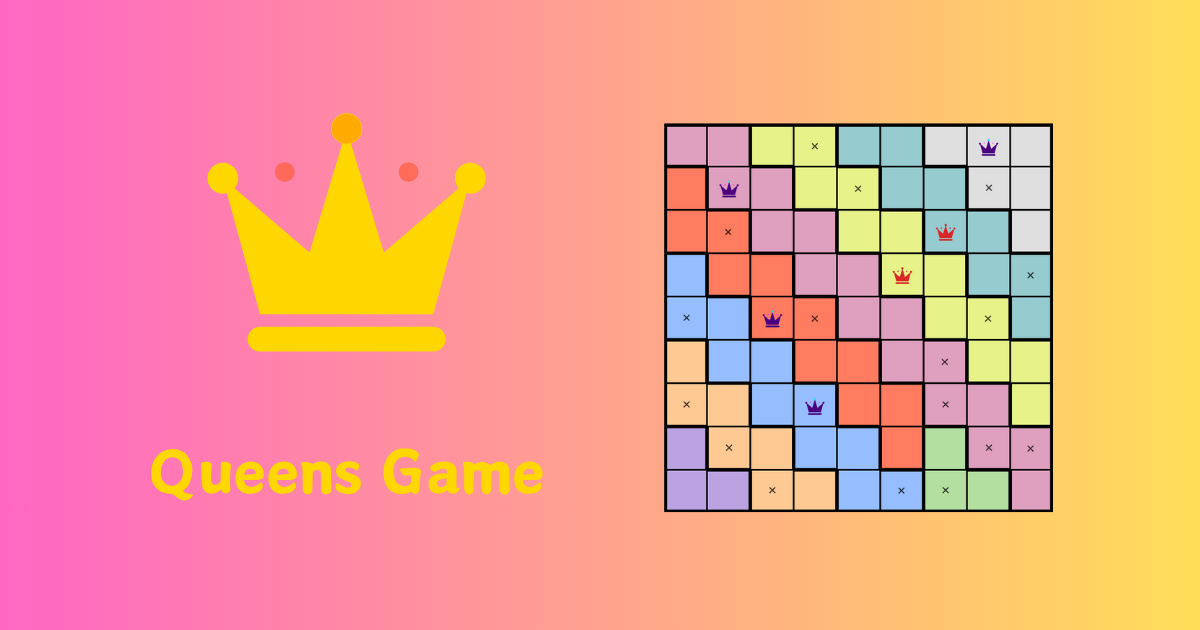
Play Queens Game Unlimited for free. No daily limits. Track streaks, access the full archive & solve logic puzzles. The best LinkedIn game alternative.

No paid content found Multilingual
Visit website
Profile views 0 Outbound visits 0 Normal
#1 Play Queens Game Online | Free & Unlimited Logic Puzzles Full homepage screenshot

At a glance

Category
Games & Board Games
Language
English
Paid-content signal
No paid content foundObserved
Registered
Unknown
Hosting
CloudflareInferred
HTTPS certificate trusted
PassedObserved
Last updated

Website review

This review may include AI-generated content and is not individually verified. Domain, certificate and other facts come from the observed data on this page.

What is Queens Game?

Queens Game is a browser-based logic puzzle in which you place exactly one queen in every row, every column and every colored region, with no two queens touching—not even diagonally. It combines the row-and-column restrictions of classic N-Queens with colored regions and a no-touch rule, so each placement eliminates options across several parts of the board at once. The rule set resembles a one-star Star Battle puzzle, but Queens uses crowns and a clear one-queen-per-region goal.

On Queens Game, you can start with a five-puzzle homepage Quick Set (three core boards plus two optional bonus challenges), play a shared Daily Challenge, or pick from a library of 2,500 standard and community puzzles. Boards range from 4×4 to 12×12, and no download or account is needed to begin. Controls let you place a queen, mark an X, or clear a square by tapping to cycle through states.

Where to start, depending on your goal

  • First time playing: try a 5×5 or 6×6 board in the Quick Set to learn the placement cycle before moving to 7×7 or 8×8.
  • A quick daily habit: the Daily Challenge gives you one shared board per day, but it is separate from the Quick Set.
  • A longer session: the 9×9 and 10×10 bonus boards and the wider puzzle library offer deeper deductions.

As a practical next step, finish the three core Quick Set puzzles first—completing them counts as finishing the core set—then decide whether to continue into the bonus boards or switch to the Daily Challenge.

How do the no-touch and one-queen-per-region rules change how I solve a Queens puzzle compared to classic N-Queens?

The no-touch rule and the one-queen-per-region rule turn Queens from a placement puzzle into a constraint-elimination puzzle. In classic N-Queens you only avoid rows, columns and diagonals; here every queen you place also blocks its entire colored region and all eight neighboring squares, so each move prunes far more of the board and you spend most of your time marking Xs rather than guessing queens.

What each rule changes

  • No-touch (including diagonals): A queen rules out the eight squares around it. This makes adjacent regions interact: placing a queen near a region border often leaves only one legal square in the neighboring region, which is your next deduction. In classic N-Queens, diagonal conflicts are a bookkeeping nuisance; here they are the main source of forced moves.
  • One queen per region: Each region is a closed set that must contain exactly one queen. A region squeezed to a single candidate square forces a placement immediately, and a region whose only candidates share a row or column tells you that row or column is effectively taken. This region-first view has no equivalent in N-Queens, where the board is uniform.

How this changes your solving order

  1. Scan for small or narrow regions first—they collapse fastest.
  2. Mark Xs around every placed queen before looking for the next move.
  3. When a region has two candidates in the same row, treat that row as occupied and eliminate elsewhere in it.
  4. Only then fall back to row/column counting, which in N-Queens would be your starting point.

The trade-off: puzzles feel more deductive and less search-heavy, but early placements matter more—a wrong queen can wipe out a region's only valid square. On a site like Queens Game, the 4×4 to 6×6 boards are a good place to practice reading regions before moving to 9×9 or 10×10, where the interaction between regions and the no-touch rule becomes the whole game.

A useful test of whether you have internalized the difference: on your next puzzle, try solving without ever counting rows or columns. If region constraints and no-touch eliminations alone get you to the end, you are solving Queens rather than N-Queens.

What is the difference between the homepage Quick Set and the shared Daily Challenge, and which should I start with?

The Quick Set is a short, self-contained warm-up path on the homepage; the Daily Challenge is a single shared board that everyone plays on the same day. The Quick Set is designed as an entry point, while the Daily Challenge is a one-off daily puzzle.

How they differ

Quick Set Daily Challenge
What it is A five-puzzle starter path: three progressively larger core puzzles, then two optional bonus challenges One shared board of the day
Length A few puzzles, starting at 5×5 or 6×6 and growing to 7×7 or 8×8, with 9×9–10×10 bonus boards A single puzzle
Commitment Finishing the first three counts as completing the core set; bonuses are optional One solve, then done for the day
Best for Learning the rules, sampling the game, a quick session A fixed daily habit or comparing your result with other players

Which to start with

Start with the Quick Set if you are new or unsure. Its first boards are compact, so you can learn the four rules — one queen per row, column and colored region, and no two queens touching, including diagonally — without a long commitment. Move to the Daily Challenge once you can clear a 7×7 or 8×8 board without hints.

If you already know these region-based puzzles, the Daily Challenge is the more interesting start: one board, one attempt, and a natural reason to return tomorrow. The Quick Set then works as a warm-up before it.

A useful rule of thumb: pick the Quick Set when you have five minutes and want to learn or loosen up; pick the Daily Challenge when you want a single focused solve. Both are available on Queens Game.

How do I choose the right grid size and difficulty level as a beginner versus an experienced solver?

Match grid size to how much deduction work you want per move, not to a vague sense of "hard." In Queens Game, the board grows from 4×4 to 12×12, and the homepage Quick Set walks you through 5×5 or 6×6 first, then 7×7 or 8×8, with 9×9 and 10×10 as bonus boards.

Beginner path

Start at 5×5 and stay there until you can finish without hints. The rules are simple—one queen per row, column and color region, with no two queens touching, even diagonally—but a small board lets you see how a single placement eliminates squares across several rows, columns and regions at once. Move to 6×6 once you can spot those eliminations before placing a queen, then try the 7×7 or 8×8 core puzzles. The Quick Set's first three puzzles count as the core set, so it doubles as a short daily warm-up.

A practical reader scenario: if you have five minutes on a phone, a 5×5 or 6×6 board is a complete session; if you have twenty minutes at a desk, step up one size.

Experienced path

Go to 9×9 or 10×10, or the 12×12 boards in the wider puzzle library, where the constraint web is dense enough that early placements are rarely obvious. If large boards feel slow rather than hard, the bottleneck is usually scanning discipline, not difficulty—work region by region and mark Xs aggressively instead of placing queens speculatively.

Choosing between the two modes

Need Better fit
Short, repeatable session Quick Set (3 core puzzles, 2 optional bonus)
Comparing your result with others Daily Challenge (one shared board per day)
Practicing a specific size Unlimited practice boards
Long, deep solving 9×9–12×12 library puzzles

The Daily Challenge is a single shared board, so it is good for a consistent habit but not for calibrating difficulty; the Quick Set and practice boards let you pick the size that matches your current skill.

Next step: play one 5×5 and one 8×8 back to back and note where you slow down. If the 8×8 stalls only on diagonal no-touch checks, keep the size and drill that rule; if you run out of ideas entirely, drop a size before adding hints. The site's own strategy and practice tips section is a reasonable place to reinforce the no-touch and region logic. For a second opinion on the puzzle family, the original N-Queens problem is documented at Wikipedia.

What strategies help when I get stuck on larger 9×9 or 10×10 Queens boards?

On large boards, stop hunting for squares to fill and start eliminating squares that cannot hold a queen. The extra rows and columns mostly add places for a placement to fail, so the fastest progress comes from the "no-touch" rule and from region shapes that are cramped.

Practical strategies for 9×9 and 10×10

  • Work the smallest or most awkward region first. A region squeezed into a corner or a thin strip has few legal squares. Placing or excluding queens there cascades into its neighbouring rows and columns.
  • Use the no-touch rule aggressively. Every queen you place rules out its eight surrounding squares. On a 10×10 board this is often a bigger constraint than the row or column count, so mark those squares immediately rather than holding them in your head.
  • Mark exclusions instead of guessing. The site's controls let you cycle a square to an X or clear it, so record "cannot be a queen" as you go. A board full of honest Xs is easier to read than a nearly empty one.
  • Check rows and columns that are almost resolved. If a row has only two candidate squares left, and one is blocked by a neighbouring queen, the other is forced. Scan for these near-complete lines after every placement.
  • Look for regions that span only one or two rows. Such a region must take its queen from a narrow band, which removes those rows from consideration elsewhere. This is where large boards become tractable.
  • Step back when you stall. Use Undo rather than layering assumptions on a shaky placement. If you do guess, note the guess and be ready to reverse it, because a single wrong queen invalidates a wide area.

A concrete example

Suppose a 10×10 board has a two-square-wide region running down the left edge. Its queen must sit in one of those narrow columns, so the rest of that column pair is closed off for other regions. Combine that with a queen you have already placed two rows away, and the no-touch rule may leave only one viable square in the strip. That single deduction can unlock several rows at once.

Choosing how to practise

Approach Best for Trade-off
Smaller boards (4×4 to 6×6) Learning the rule interactions quickly Little practice with long deduction chains
9×9 and 10×10 with X-marking Building disciplined elimination habits Slower per puzzle; easy to lose track without marks
Timed or streak play Testing whether your method is reliable Pressure can push you toward guessing

If you want structured warm-ups before tackling the big grids, the site's Quick Set escalates from compact boards to larger ones, which is a reasonable way to rehearse the same habits at lower cost. For a second source of puzzle variants and rule explanations, Puzzle Queens is worth a look, though its board set differs from this one.

A useful decision rule: if you have made no forced placement in two minutes on a large board, stop scanning the whole grid and re-examine the smallest region instead. That is usually where the next deduction is hiding.

Can I play Queens Game unlimited without an account, and how do streaks and the puzzle archive work?

Yes. Queens Game is playable free and unlimited in a browser, and you can start without an account or download. The site also offers a shared Daily Challenge alongside the unlimited practice mode. Streak tracking and the full puzzle archive are part of what the site advertises as the reason to keep playing; the archive is described as a library of 2,500 standard and community puzzles, with boards from 4×4 to 12×12.

How the modes differ

Mode What it is Best for
Quick Set Three core puzzles that grow in size, then two optional bonus boards A short warm-up or a first taste
Daily Challenge One shared board for the day A common puzzle to compare results on
Unlimited practice Any board size you choose, no daily cap Learning at your own pace or long sessions

Streaks and the archive in practice

Treat the streak as a habit tool, not a score: it rewards returning on consecutive days, so it pairs naturally with the Daily Challenge rather than with long practice sessions. The archive is the place to go when you want a specific difficulty instead of whatever today's board happens to be—useful if you're learning the no-touch rule on 5×5 and 6×6 boards before moving up.

A sensible routine: use the Quick Set to warm up, play the Daily Challenge to keep the streak alive, then dip into the archive at a fixed size while you build pattern recognition. If you want a second daily logic puzzle to alternate with, LinkedIn hosts the Queens game this site positions itself as an alternative to.

Related questions

More questions →
How to Use Ahrefs for Your First SEO Audit: A Step-by-Step Tutorial

If you're new to Ahrefs and want to run your first SEO audit, the fastest path is: open Site Explorer, enter your target URL, review the Overview for a health snapshot, then dig into Organic Keywords, Top Pages, and Site Audit to find specific problems. From there, build a short prioritized to-do list instead of trying to fix everything at once.

This tutorial walks through that workflow using a realistic starting scenario, explains what the numbers mean, and shows how to turn findings into actions.

Before You Start: Pick a Narrow Scope

A common beginner mistake is auditing an entire large website on day one. The reports become overwhelming, and you can't tell which issues matter.

Instead, choose one of these starting points:

  • A single important page (your homepage or a key product/service page)
  • A small site (under ~50 pages, e.g., a personal blog or small business site)
  • One section of a bigger site (e.g., /blog/)

For this tutorial, assume you're auditing a small business site with about 30 pages. The same steps scale up later.

You'll need an Ahrefs account to follow along. Ahrefs offers paid plans, and pricing and feature limits change over time, so check the current Pricing page for what's included in each tier before committing.

Step 1: Enter Your Target in Site Explorer

Site Explorer is Ahrefs' core tool for analyzing any website or URL.

  1. Open Site Explorer from the top navigation.
  2. In the search box, paste your domain (e.g., example.com).
  3. Choose the Exact URL or Domain mode depending on scope. For a full-site view, use Domain or Prefix; for a single page, use Exact URL.
  4. Press Enter.

You'll land on the Overview report. Don't try to absorb everything — focus on four numbers first.

Reading the Overview Snapshot

Metric What it tells you How to use it
Ahrefs Rank (AR) Relative strength of the site's backlink profile vs. others in the database Useful for comparing against competitors, not as a standalone goal
Organic traffic Estimated monthly visits from search A rough trend indicator, not exact analytics
Organic keywords Estimated number of keywords the site ranks for Shows breadth of visibility
Backlinks / Referring domains Total links and unique sites linking to you Referring domains matter more than raw backlink count

Important caveat: Ahrefs' traffic and keyword numbers are estimates based on its own data. They won't match Google Search Console or your analytics exactly. Treat them as directional, not absolute.

Step 2: See What You Already Rank For

Go to Organic Keywords in the left sidebar. This shows queries where your site appears in search results.

Sort by Traffic (descending) to see which pages bring the most estimated visitors. Then look for:

  • Keywords ranking in positions 4–15 — these are often the easiest wins. A small content or on-page improvement can push them onto page one.
  • Keywords with high volume but low position — potential opportunities if the topic is relevant.
  • Irrelevant keywords — if you rank for something off-topic, it may signal thin or mismatched content.

Write down 5–10 of the position 4–15 keywords. These become your first optimization targets.

Step 3: Find Your Best and Weakest Pages

Open Top Pages. This ranks your URLs by estimated organic traffic.

Look for two things:

  1. Your top performers — understand what topics and formats work. Can you create more content like this?
  2. Pages with traffic but poor rankings — these may need on-page fixes (title, headings, internal links).

If a page gets zero traffic and targets a topic you care about, it's a candidate for a rewrite or consolidation.

Step 4: Run a Technical Site Audit

Now move to Site Audit. This crawls your site and flags technical and on-page issues.

  1. Click Site Audit → New project.
  2. Enter your domain and set crawl settings (default is usually fine for a small site).
  3. Start the crawl and wait for it to finish.

Once complete, you'll see a Health Score and a list of issues grouped by category.

Which Issues to Fix First

Not all issues are equal. Prioritize in this order:

Priority Issue type Why it matters
1 Broken links (404s) Bad for users and crawl efficiency
2 Pages blocked from indexing They can't rank at all
3 Missing or duplicate title tags Directly affects click-through and relevance
4 Slow-loading pages Affects experience and rankings
5 Thin content Low value to users and search engines

Ignore low-impact warnings (like minor meta description length) until the big items are handled.

Step 5: Turn Findings Into a To-Do List

You now have raw data. Convert it into a short, actionable list. Example:

  1. Fix 3 broken links found in Site Audit.
  2. Rewrite title tags on 5 pages with duplicate titles.
  3. Improve 4 pages ranking in positions 6–12 by adding missing subtopics and internal links.
  4. Remove or update 2 thin pages with no traffic.

Keep the list to 5–10 items max for your first audit. Finishing a short list beats starting a long one.

Common Beginner Mistakes

  • Chasing every red flag. Site Audit flags many minor issues. Fix what affects rankings and users first.
  • Trusting estimates as exact numbers. Ahrefs data is modeled, not measured from your analytics.
  • Auditing a huge site too early. Start small to learn the interface.
  • Ignoring search intent. A page can be technically perfect but still fail if it doesn't match what searchers want.
  • Forgetting to re-crawl. After fixes, run Site Audit again to confirm improvements.

Where to Go Next

Once your first audit is done:

  • Compare with competitors using Site Explorer's Competing Domains and Content Gap reports.
  • Track keyword rankings over time with Rank Tracker.
  • Explore backlink opportunities in the Backlinks and Link Intersect reports.
  • Set up recurring Site Audit crawls so new issues surface automatically.

Your first audit isn't about perfection — it's about building a repeatable habit: enter a target, read the key reports, pick the highest-impact fixes, and act. Do that once a month and your site's health compounds.

What Is QueensGame.io and What Can You Do on the Site?

QueensGame.io is a free browser-based logic puzzle site built around the Queens game, a region-based puzzle where you place exactly one queen in every row, column, and colored region with no two queens touching, even diagonally. You can start playing immediately without downloading anything or creating an account. The site offers a homepage Quick Set of three core puzzles plus two bonus challenges, a shared Daily Challenge, and a library of roughly 2,500 standard and community puzzles on boards from 4×4 to 12×12.

What the Queens Game Actually Is

Queens combines the row-and-column restrictions of the classic N-Queens problem with colored regions and a no-touch rule. Each puzzle requires exactly one queen per row, per column, and per colored region, and no two queens may touch, including diagonally. Because every placement eliminates options across several rows, columns, and regions at once, the puzzle rewards deduction rather than guessing.

The rule set is close to a one-star Star Battle puzzle, but Queens uses crowns and a clear one-queen-per-region goal. The smallest boards (4×4) work as a tutorial; the largest (12×12) give experienced solvers longer deduction chains.

What You Can Do on QueensGame.io

Feature What it is Best for
Quick Set Three progressively larger core puzzles (starting at 5×5 or 6×6, finishing on 7×7 or 8×8) plus two optional bonus boards (9×9 or 10×10) A fast warm-up or a short daily session
Daily Challenge One shared board per day Comparing your solve with other players
Puzzle library About 2,500 standard and community puzzles, 4×4 to 12×12 Practice at a chosen size and difficulty

Finishing the first three Quick Set puzzles always counts as completing the core set; the two bonus challenges are optional. Quick Set and the Daily Challenge are separate: Quick Set is the homepage starter path, while the Daily Challenge is the single shared board of the day.

How to Play: Step by Step

  1. Open the site. The homepage Quick Set loads in the browser; no download or account is needed to start.
  2. Read the board. Note the grid size and the colored regions. Every row, column, and region needs exactly one queen.
  3. Place a queen. Tap or click a square once to place a queen. The controls cycle: tap again to mark an X, and again to clear the square.
  4. Use the tools when stuck. Undo, Hint, and Reset are available on the board.
  5. Verify your solve. The puzzle is complete when every row, column, and region holds exactly one queen and no two queens touch, including diagonally.

Expected result: a filled board with one queen per row, column, and region, and no adjacent or diagonal contact between queens.

Choosing a Board Size and Difficulty

  • New to the puzzle: start at 4×4 or 5×5 to learn the move cycle and the no-touch rule.
  • Comfortable with the rules: the 6×6 to 8×8 range, which covers the Quick Set core levels, offers a moderate deduction load.
  • Want a deeper challenge: move to 9×9 to 12×12 boards, including the Quick Set bonus challenges and larger library puzzles.

Strategy and Practice Tips

  • Start with the tightest region. A small colored region has few possible squares, so placing its queen early constrains several rows and columns at once.
  • Mark eliminations as you go. Use the X mark to record squares ruled out by a placed queen, since the no-touch rule removes neighbors diagonally as well as directly.
  • Work region by region, then check rows and columns. If a region has only one viable square left, that placement often resolves a row or column elsewhere.
  • Use Hint sparingly. It helps you past a genuine block, but solving without it builds the deduction pattern faster.
  • Practice at a fixed size. Repeated solves on the same board size make the region-and-row interactions easier to recognize before you move up.

Common Stumbles

  • Forgetting the diagonal rule. Queens cannot touch diagonally, so a placement eliminates up to eight surrounding squares, not just four.
  • Treating Quick Set and Daily Challenge as the same. They are separate paths; completing one does not complete the other.
  • Assuming a wrong placement is permanent. The tap cycle clears a square, and Undo and Reset are always available.

The site's own description presents it as a free, unlimited alternative to daily-limited Queens games, with no download or account required to start.

Queens Game Quick Set vs. Daily Challenge: What's the Difference?

The Quick Set is the homepage starter path: three progressively larger core puzzles plus two optional bonus challenges, and finishing the first three counts as completing it. The Daily Challenge is the single shared board of the day. Both are free to start in your browser with no download or account required, according to QueensGame.io, so the choice comes down to whether you want a short guided session (Quick Set) or one common puzzle everyone is solving that day (Daily Challenge).

Side-by-side comparison

Dimension Quick Set Daily Challenge
Location Homepage warm-up Separate daily puzzle
Structure 3 core puzzles + 2 optional bonus puzzles One shared board per day
Completion Finishing the first three core puzzles Solving that day's single board
Difficulty path Starts compact (5×5 or 6×6), core set on 7×7 or 8×8, bonus on 9×9 or 10×10 Not specified in the source
Purpose Faster to enter, easier to sample, bridge into the puzzle library A common board shared across players
Limits No daily limits stated; unlimited practice available Tied to the day's board

What the Quick Set actually contains

The Quick Set is built as a short ramp rather than a single puzzle:

  • Core levels (3): begin with a compact 5×5 or 6×6 board, then complete the core set on 7×7 or 8×8.
  • Bonus challenges (2): unlock after the core set and move to larger 9×9 or 10×10 boards for a deeper challenge.
  • Completion rule: finishing the first three always counts as completing the core Quick Set, so the bonus boards are optional.

This makes the Quick Set a natural first stop if you are new to the puzzle or want a session with a clear beginning and end.

What the Daily Challenge is

The Daily Challenge is the single shared board of the day. Unlike the Quick Set's multi-puzzle path, it is one board, which makes it the better fit if you want a common reference point with other players or a single fixed task rather than a sequence.

How the rules work in both modes

The puzzle is the same in either mode: a region-based logic puzzle combining the row-and-column restrictions of classic N-Queens with colored regions and a no-touch rule.

  • Place exactly one queen in every row.
  • Place exactly one queen in every column.
  • Place exactly one queen in every colored region.
  • No two queens may touch, including diagonally.

Because each placement removes options from several parts of the board at once, the no-touch rule is usually the constraint that drives deductions. The rule set is similar to a one-star Star Battle puzzle, but Queens uses crowns and a clear one-queen-per-region goal.

Which one should you pick?

  • Choose the Quick Set if you want a fast entry point, a guided difficulty ramp from 5×5 up to 10×10, or a session that ends after three puzzles.
  • Choose the Daily Challenge if you want one shared board for the day and prefer a single fixed puzzle over a sequence.
  • Use both if you want a warm-up plus the day's common board; the source presents the Quick Set as a bridge into the wider library rather than a replacement for the Daily Challenge.

Beyond both: the puzzle library

QueensGame.io also offers a library of 2,500 standard and community Queens puzzles, with boards ranging from 4×4 to 12×12. That range gives new players a compact place to learn and experienced solvers room for longer deductions. If you finish the Quick Set and want more than the day's single board, the library is the next step.

Controls and getting started

The source describes a tap cycle: tap or click once to place a queen, with options to mark an X or clear a square, plus Undo, Hint, and Reset controls. To start, open the site in your browser and either begin the homepage Quick Set or open the Daily Challenge; no download or account is needed to start.

Which Queens Game Board Size and Difficulty Should You Start With?

Start with a 5×5 or 6×6 board if you are new to the Queens Game, then move to 7×7 or 8×8 to complete the core Quick Set, and try 9×9 or 10×10 bonus boards once those feel comfortable. The full range on QueensGame.io runs from 4×4 to 12×12, so the right starting point depends on whether you are learning the rules or looking for a longer deduction challenge.

Match the Board to Your Experience

Your situation Suggested board size Where it fits on the site
First time playing, learning the rules 5×5 or 6×6 Opening puzzles of the homepage Quick Set
Know the rules, want a steady solve 7×7 or 8×8 Completing the three core Quick Set puzzles
Comfortable solver wanting a deeper challenge 9×9 or 10×10 Optional bonus puzzles after the core set
Very new or very experienced 4×4 up to 12×12 Full puzzle library

The Quick Set is a fixed path: three progressively larger core puzzles, then two optional bonus challenges. Finishing the first three always counts as completing the core Quick Set, so you are never required to attempt the bonus boards to finish the day's starter set.

Why Board Size Changes the Difficulty

Every Queens puzzle asks for exactly one queen in each row, each column, and each colored region, with no two queens touching, including diagonally. A larger board adds more rows, columns, and regions, so each placement constrains more of the grid at once. That makes bigger boards harder in two ways: there are more squares to track, and a single early mistake can block several rows and regions rather than just one.

A compact 5×5 board keeps the same rules but with fewer moving parts, which is why it works as a learning size. By the time you reach 9×9 or 10×10, the same rule set demands longer chains of deduction before a queen can be placed with confidence.

Quick Set vs. Daily Challenge

These are different entry points, and the choice affects which board size you meet first:

  • Quick Set is the homepage starter path. It begins with a compact 5×5 or 6×6 board, continues on 7×7 or 8×8 for the core set, and unlocks 9×9 or 10×10 bonus boards. It is faster to enter and easier to sample.
  • Daily Challenge is the single shared board of the day. Everyone solves the same puzzle, so the size is set for you rather than chosen.

If you want to control your starting difficulty, use the Quick Set or the puzzle library. If you want a shared result to compare with other players, the Daily Challenge is the fit.

A Practical Progression

  1. Learn on 5×5. Place queens one at a time and use the tap cycle to mark squares. The controls let you tap once to place a queen, mark an X, or clear a square, so you can test placements without committing.
  2. Confirm the rules on 6×6. Check that every row, column, and region holds exactly one queen and that no two touch diagonally.
  3. Complete the core set on 7×7 and 8×8. These are the boards that count toward finishing the Quick Set.
  4. Try 9×9 or 10×10 bonus boards when the core set feels routine.
  5. Explore the wider library (2,500 standard and community puzzles, 4×4 to 12×12) when you want variety beyond the daily path.

Common Sticking Points

  • Skipping straight to large boards. The no-touch rule means diagonal conflicts are easy to miss on a crowded 10×10 grid. A few 5×5 and 6×6 solves build the habit of scanning diagonals first.
  • Confusing Quick Set with the Daily Challenge. Only the Quick Set follows the 5×5-to-10×10 progression; the Daily Challenge is one shared board.
  • Forgetting the region rule. One queen per row and column is not enough; each colored region must also hold exactly one queen.
  • Treating bonus boards as required. The two bonus challenges are optional. The core Quick Set is complete after three puzzles.

No download or account is needed to start, and the site describes its puzzles as free and unlimited, so you can practice board sizes repeatedly before settling on a preferred difficulty.

Queens Game Strategy: How to Solve Puzzles Faster and More Reliably

To solve Queens puzzles faster, treat every placement as a three-way elimination: a queen rules out its entire row, its entire column, and all eight surrounding squares (including diagonals). Combine that with the one-queen-per-region rule, and most boards can be cracked by deduction alone—no guessing. The tips below work on any board size on QueensGame.io, from the 4×4 starter grids up to the 12×12 community puzzles.

Start with the Most Constrained Regions

Before placing anything, scan the board for small or oddly shaped color regions. A region with only a few squares, or one squeezed into a corner, has very few valid queen positions. When a region has only one or two candidate squares, you can often place a queen immediately or mark the alternatives with X.

For example, if a three-square region sits in a corner, the queen must go in one of those squares—so every other square in those rows and columns can be eliminated right away.

Use the No-Touch Rule Aggressively

The diagonal restriction is the most underused tool for new players. Each queen eliminates up to eight neighboring squares, which frequently collapses whole regions. After every placement:

  • Mark X on the queen's row and column.
  • Mark X on all four diagonal neighbors.
  • Re-check any region that just lost most of its squares.

This habit prevents the most common failure: placing queens that seem fine by row and column but violate the no-touch rule later.

Track All Three Constraints Together

A square is only a valid queen position if it satisfies row, column, and region simultaneously. When you evaluate a candidate, ask three questions in order:

  1. Does this row already have a queen?
  2. Does this column already have a queen?
  3. Does this region already have a queen, or would placing here leave the region with no legal square?

The third question is the one that catches contradictions early. If placing a queen would strand a region with zero available squares, that placement is wrong even if rows and columns look clean.

Use X Marks as a Record, Not Decoration

The tap-cycle control (place queen → mark X → clear) exists so you can externalize your deductions. Two practical rules:

  • Mark every elimination you're confident about. A board full of X marks shows you exactly where forced moves are hiding.
  • Clear marks when they become unreliable. If you undo a placement, remove the X marks that depended on it—stale marks are the main cause of "I'm stuck and the board is lying to me" moments.

If you reach a contradiction, use Undo and Reset rather than guessing forward. Guessing on a Queens board usually creates a cascade of violations that's harder to untangle than starting the deduction over.

Practice on Small Boards First

The homepage Quick Set is built as a difficulty ramp: three core puzzles starting at 5×5 or 6×6, then 7×7 or 8×8, with optional 9×9 and 10×10 bonus boards. Finishing the first three counts as completing the core set.

Use this progression deliberately:

Board size What to practice
4×4–6×6 Rule mechanics, tap-cycle controls, spotting forced moves
7×7–8×8 Combining region constraints with diagonal elimination
9×9–12×12 Longer deduction chains, patience with X-mark bookkeeping

Small boards teach the pattern recognition that makes large boards tractable. Jumping straight to 12×12 tends to produce guessing habits rather than deduction skills.

Build a Repeatable Solving Loop

A reliable routine for any board:

  1. Scan regions for forced placements (one or two candidate squares).
  2. Place or mark based on those constraints.
  3. Propagate eliminations from each new queen—row, column, diagonals.
  4. Re-scan for newly constrained regions.
  5. Repeat until the board is solved or no forced move remains.

When no forced move remains, look for "either-or" pairs: two squares in a region where the queen must be one or the other. In both cases, certain squares elsewhere get eliminated—mark those X and the board usually opens up again.

Where to Practice

QueensGame.io offers a shared Daily Challenge (one board per day), the homepage Quick Set for a fast session, and a library of roughly 2,500 standard and community puzzles across 4×4 to 12×12 boards. No download or account is required to start, and the site describes unlimited practice without daily limits. Rotating between the Daily Challenge and free practice boards gives you both a fixed benchmark and room to experiment with the strategies above.

Website Overview

Page metadata, canonical configuration and social previews work together to provide more consistent search and sharing presentation.

Domain and Registration

Unknown

DNS and Email

Nameservers are provided by Cloudflare, indicating managed DNS hosting. MX records point to the Cloudflare Email Routing email service. No CNAME was found; the observed records resolve directly to addresses. SPF and DMARC are configured. DKIM status is unknown. TXT records include verification markers for Google. Such markers may also remain after a service stops being used.

TLS and Certificates

The public key uses EC with 256 bits. The server supplied a complete certificate chain. No organization name is present in the certificate; the available fields are consistent with domain validation. The certificate was issued within the Google Trust Services cloud or CDN ecosystem. The certificate's total validity is about 90 days, consistent with a short renewal cycle.

HTTP and Browser Security

The checked browser-security headers were not detected, leaving fewer explicit browser-side safeguards. No X-Powered-By header was found, reducing one common source of backend fingerprinting information. The cf-ray response header indicates a CDN or caching proxy in the delivery path. No obvious internal addresses or debug information were found in the headers. The Server header identifies cloudflare without an exact version.

Technology Stack Analysis

The public page identifies Google Analytics, Cloudflare without precise versions, leaving fewer clues for version-specific scanning.

Search and Social Sharing

Twitter Card metadata is configured. JSON-LD includes Organization data, helping describe the organization as an entity. The page declares 3 language or regional alternatives using hreflang. The title has 59 characters, within a common display range. A meta description is present, with 151 characters.

Hosting and Email

DNSCloudflare
HostingCloudflare
EmailCloudflare Email Routing
Approximate IP geolocation (inferred; a CDN or proxy may differ from the origin server) Location unknown Inferred 104.21.57.65

Registration details

RDAP / WHOIS

Unknown

DNS records

DNS

TypeNameValueTTLPriority
Aqueensgame.io104.21.57.65300—
Aqueensgame.io172.67.189.96300—
AAAAqueensgame.io2606:4700:3032::6815:3941300—
AAAAqueensgame.io2606:4700:3037::ac43:bd60300—
MXqueensgame.ioroute3.mx.cloudflare.net3007
MXqueensgame.ioroute2.mx.cloudflare.net30018
MXqueensgame.ioroute1.mx.cloudflare.net30033
NSqueensgame.iogabe.ns.cloudflare.com86400—
NSqueensgame.ionora.ns.cloudflare.com86400—
TXTqueensgame.iogoogle-site-verification=yeVvrY9vY6fCmDCXowsHJcNp6qUbnu68MCxEz46alEk300—
TXTqueensgame.ioopenai-domain-verification=dv-Ybd8t1Xst5HrZWWwehzZXA55300—
TXTqueensgame.iov=spf1 include:_spf.mx.cloudflare.net ~all300—
TXTqueensgame.ioyandex-verification: bbdd00ed7a1904b6300—
DMARC_dmarc.queensgame.iov=DMARC1; p=reject;300—

TLS and certificates

TLS / SSL

AssessmentNormal configuration
Supported protocolsTLSv1.2、TLSv1.3
Negotiated protocolTLSv1.3
Certificate subjectqueensgame.io
IssuerGoogle Trust Services
Valid until2026-12-15T06:45 · Remaining when checked: 49 days
Verification detailsCertificate trust: Passed · Hostname match: Passed

HTTP response headers

HTTP

HeaderValue
content-typetext/html; charset=utf-8
servercloudflare

Identified technologies

Google AnalyticsCloudflare

Pages, Search and Sharing

Meta descriptionPlay Queens Game Unlimited for free. No daily limits. Track streaks, access the full archive & solve logic puzzles. The best LinkedIn game alternative.
Canonical URLhttps://queensgame.io/
LanguageEnglish (default) · Multilingual
Twitter Cardsummary_large_image
All bots 1 allowed · 4 disallowed
  • Allow/
  • Disallow/api/
  • Disallow/blog
  • Disallow/profile
  • Disallow/*?*q=

User reviews (0)

  • No reviews yet.