Website profiles · Technology insights · Alternatives

resumequick.app

Two minutes for a resume — or a CV — then ResumeQuick finds matching jobs, shows what's holding you back, and tells you the next step. Resume, job matching, interview practice and offer help, all from one profile.

No paid content found Multilingual
Visit website
Profile views 13 Outbound visits 4 Normal
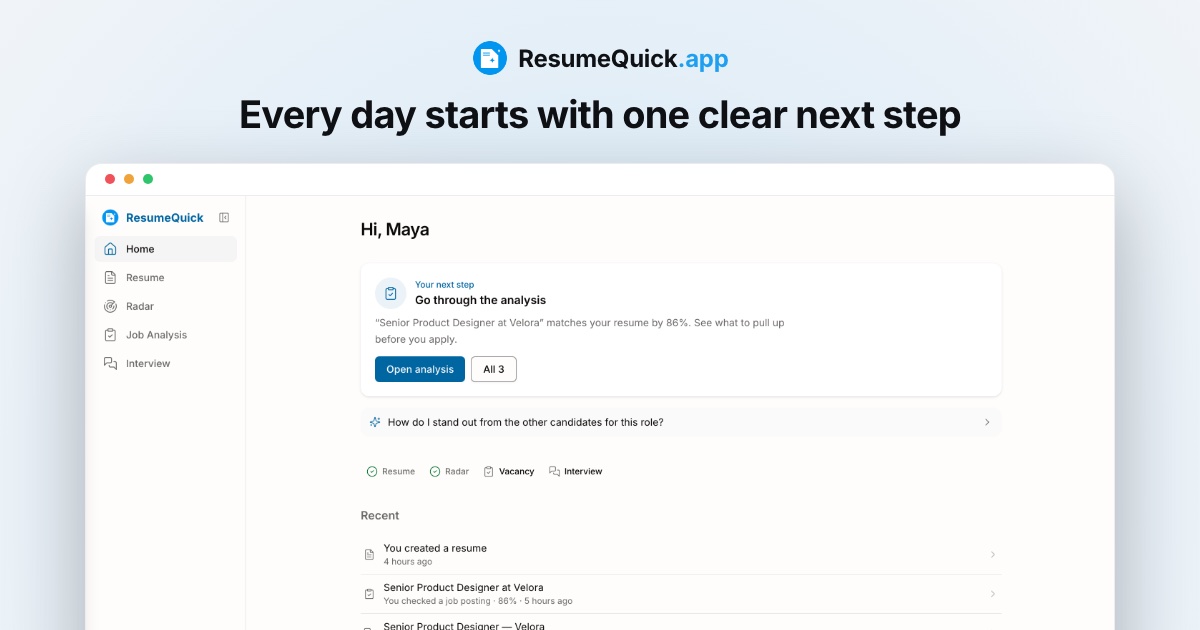
ResumeQuick Full homepage screenshot

At a glance

Category
Jobs & Careers
Language
English
Paid-content signal
No paid content foundObserved
Registered
2025
Hosting
CloudflareInferred
HTTPS certificate trusted
PassedObserved
Last updated

Website review

This review may include AI-generated content and is not individually verified. Domain, certificate and other facts come from the observed data on this page.

What is ResumeQuick?

ResumeQuick is a career tool built around a single profile: you generate a resume, then use that same resume as the brief for job matching, gap analysis, interview practice and offer-stage guidance. Its pitch is speed — the site claims a resume in about two minutes — followed by ongoing help rather than a one-off document.

The workflow the site describes runs in four stages:

  1. Resume creation. Upload an existing resume or answer five short questions, and it returns a document scored for applicant tracking systems (the page shows an example ATS score).
  2. Job radar. It searches job boards using your resume as the search brief, and your saves and skips refine future matches.
  3. Per-vacancy analysis. Before applying, you see what fits, what's missing and what could block you for that specific role.
  4. Career agent. It suggests the next step, drafts fixes and runs mock interviews using questions drawn from your own background.

Who it suits. The page names three starting points: writing a resume from scratch, changing field (its example is retail into product), and struggling specifically with behavioral interviews. That last case is the most distinctive — practicing ten questions derived from your own experience, scored before the real thing, addresses a gap that generic question lists don't.

Pricing structure. Free tier: one AI-generated resume a month, unlimited manual edits, a weekly radar search, one vacancy analysis, one mock interview and one cover letter monthly, and three agent messages a day. A paid 30-day option raises those limits sharply (five generated resumes, 100 vacancy analyses, five mock interviews, unlimited cover letters, 40 agent messages a day). The free tier is enough to test whether the matching is useful; the paid tier makes sense mainly if you're applying at volume within a short window.

Trade-offs to weigh. The resume is built from your answers and existing material, so output quality depends on input quality — a thin profile produces a thin resume. The radar's value depends on how well it reads your field, which you can only judge by running a search or two. And the gap analysis tells you what's missing; it doesn't close the gap for you.

Practical next step: create the free resume first, then run one radar search and one vacancy analysis on a job you'd genuinely apply for. If the matches and the "what's missing" list feel accurate for your target roles, the paid tier is worth considering; if not, the matching layer is the part you'd be paying for.

How does ResumeQuick's job radar find matches for my resume?

ResumeQuick's job radar works by using your resume as the search brief rather than a set of keywords you type in. According to the site, it "sweeps the job boards with your resume as the brief," then you save or skip the results and it learns from those choices what you actually want.

What that means in practice

  • You start by building or uploading a resume, so the radar has something concrete to match against.
  • Matches come back graded. The example on the page shows a "Senior Product Manager · 78% match" flagged as a strong match, plus a "possible match" alongside it.
  • It doesn't just rank jobs — it names the gap. For that 78% match, the missing item was "stakeholder metrics," and the agent drafted a fix for the summary line.
  • Your save/skip behavior feeds back in, so the results should drift toward your real preferences over repeated searches.

The trade-off to weigh

Resume-as-brief matching is convenient if your resume already represents the job you want. It's weaker if you're changing field, because the radar will keep surfacing roles that resemble your current title. The site does address this: it says the resume is built from what you actually did, "so the experience stops hiding behind an old job title." Still, if you're pivoting, expect to steer the radar deliberately rather than trust the first week of matches.

How to test it in one sitting

Run one search, save two or three roles that genuinely interest you, and skip the rest. Then look at the next batch: if the matches tighten toward what you saved, the learning loop is doing real work for you. If they don't, your resume is probably describing a different job than the one you want, and the fix belongs in the resume first.

If you want the radar to keep running without much input, the free tier limits you to a search every week and one vacancy analysis a month, while the paid Sprint tier raises that to 100 vacancy analyses per 30 days — useful if you're applying in volume rather than browsing.

What does the free plan include, and when should I pay for Sprint or Career?

ResumeQuick's free tier is a real working plan, not a trial: one AI-generated resume per month, unlimited manual edits, a weekly job-radar search, and one each of vacancy analysis, mock interview, cover letter and PDF per month, plus three AI Career Agent messages a day. Sprint ($9.99 once for 30 days) raises the ceilings for a short burst: 5 AI resumes and 5 mock interviews per 30 days, 100 vacancy analyses, 20 AI resume edits a week, unlimited cover letters and 40 agent messages a day. Career is the same idea stretched to a year for $179.99 once.

When each tier makes sense

  • Stay free if you're exploring, or you're applying to a handful of roles and only need one tailored resume plus the occasional analysis. The weekly radar search is enough to see whether the matching is any good before you spend anything.
  • Pay for Sprint when you're in an active search: many applications in a few weeks, several interviews to rehearse for, and you want to check each posting against your resume before applying. The jump from 1 to 100 vacancy analyses and 1 to 5 mock interviews is the part that matters.
  • Pay for Career only if you expect the search to run for months — a career change, a move into a competitive field, or a long notice period. It's cheaper per month than repeating Sprint, but it's a year-long commitment paid up front.

A concrete way to decide

Run one week on the free plan and count how often you hit a limit. If you're blocked on mock interviews or vacancy analyses more than once or twice, Sprint pays for itself. If you're still job-hunting two months in, the yearly plan starts to look reasonable.

The trade-off to weigh: Sprint and Career buy volume, not better output. If your problem is that your resume isn't landing at all, more generated versions won't fix it — the free plan's single analysis and the "what's holding you back" feedback are where you should start. For general resume guidance alongside this, Ask a Manager and The Balance are useful free references.

Can ResumeQuick help me switch fields, like from retail to product management?

Yes. ResumeQuick is explicitly designed around career changers, with a field-switch scenario (retail into product) named on the page. The core idea is that it rebuilds your resume from what you actually did rather than from your old job title, so retail experience is presented in terms a product hiring manager recognizes instead of being filtered out before a human reads it.

Why that matters for a retail → product move

The hardest part of this switch usually isn't lacking relevant work — it's that your resume reads as "store manager" to an applicant tracking system and to a recruiter skimming for product keywords. ResumeQuick's pitch is that it scores your resume against the filter before you send it and shows what's missing. That feedback loop, not the writing itself, is the useful part for a changer.

What the tool offers at each stage

Stage What ResumeQuick does Why a career changer cares
Build Resume from five short questions or an upload Reframes duties as transferable outcomes
Match Job radar sweeps boards using your resume as the brief Surfaces roles you might not have thought to search
Check Per-vacancy fit, gaps and blockers Shows whether "no product experience" is truly disqualifying
Prepare Mock interviews drawn from your own background Behavioral rounds are where changers get tripped up

A realistic reader scenario

Suppose you've managed a retail team for six years. You answer the questions, get a resume back, and the gap analysis on a product role flags "stakeholder metrics" and "roadmapping." That tells you something concrete: your resume needs to show how you set targets, prioritized competing demands and reported results upward — all things retail managers genuinely do. You can then decide whether to apply now or spend a month building one demonstrable product artifact first.

Trade-offs to weigh

  • The resume is generated, so it will need your own voice and specific numbers before it sounds like you. Generic phrasing is the main risk with any AI resume builder.
  • The matching and gap analysis are only as good as the resume you feed in. If you under-describe your retail work, the radar will under-match you.
  • A field switch still requires a story a human believes. The tool shortens the drafting and targeting work; it doesn't substitute for a portfolio, a side project or a referral.

Practical next step

Run one product job description you'd genuinely apply for through the vacancy analysis and read the "missing" list as a study plan rather than a rejection. If the gaps are things you can demonstrate from retail — prioritization, cross-team coordination, metrics — fix the resume and apply. If they're technical, use the list to decide what to learn first.

For comparison while you decide, general-purpose builders such as Zety and NovoResume focus on formatting and templates rather than post-application job matching.

How does ResumeQuick prepare me for behavioral interviews?

ResumeQuick's interview practice is built around your own background rather than a generic question bank. According to the site, the career agent draws ten questions from your experience and rehearses them with you, scoring your answers before the real interview. The page frames this specifically for people who handle technical screens fine but struggle with behavioral rounds.

What that looks like in practice

  • You get a set of behavioral questions generated from your resume and work history, not a fixed list.
  • You answer them in a mock interview and see them scored, so you can spot weak spots before the real thing.
  • The same agent that drafts resume fixes also runs the rehearsal, so your practice stays connected to the profile you built.

Practical read

Behavioral rounds reward specific stories with a clear situation, action and result. A tool that pulls questions from your own experience is more useful than one that asks you to memorize stock answers, because you're rehearsing material you can actually defend under follow-up questions. The scoring is the part worth leaning on: use it to find answers that ramble or lack a measurable outcome, then tighten those before interview day.

If you're evaluating whether this fits you, a reasonable test is to run one mock session and check whether the questions feel like they came from your history. If they do, the practice transfers to the real round. If they feel generic, the scoring still helps but you'll need to supply your own stories.

Where it sits in the wider flow

The interview practice is one step in a longer sequence the site describes: build the resume, let the radar surface matching jobs, check each vacancy against your profile, then rehearse. If you're earlier in that process, ResumeQuick starts with a resume you can generate from five short questions. For comparison shopping on interview prep generally, Big Interview and interviewing.io are established options, though neither is built around a single resume-to-offer pipeline the way this one claims to be.

Next step

Run one mock interview, save the scored feedback, and rewrite your two weakest answers using the situation-action-result structure. Then re-run the same questions a few days later to confirm the improvement sticks.

What should I do after applying and getting no response?

Treat silence after an application as a signal to change the next application, not to send more of the same. Most no-response situations come down to one of three gaps: the resume doesn't match the keywords a screener or ATS looks for, the role was a weak fit to begin with, or the application never reached a human. Fix the first two before you apply again.

A practical sequence

  1. Score the resume against the actual posting. Pull the terms the employer repeats — tools, metrics, scope — and check whether they appear in your bullets. If a requirement is genuinely absent, don't fake it; reframe your real experience around the closest thing you did.
  2. Re-check fit before you invest. A quick match estimate tells you whether to spend an hour tailoring or move on. Applying to ten strong matches beats fifty generic ones.
  3. Fix the top of the resume first. Recruiters read the summary and most recent role before anything else. One rewritten summary line often changes more than a full redesign.
  4. Widen the search rather than repeat it. If the same title keeps going quiet, test adjacent titles and the skills that transfer.
  5. Prepare for the interview you don't have yet. Behavioral rounds are where career-changers most often stumble, and rehearsal is cheap.

Where a tool like ResumeQuick fits

ResumeQuick's own framing is that it builds a resume in minutes from what you already have, then keeps working after that: it sweeps job boards using your resume as the search brief, flags what's missing for a specific vacancy before you apply, and drafts fixes or runs mock interview questions drawn from your experience. That "what's holding you back" step is the part that speaks directly to your question — it's aimed at diagnosing a weak application instead of just producing another document.

Its free tier is a reasonable way to test whether the diagnosis is useful: the page describes one AI-generated resume a month, a weekly radar search, one vacancy analysis and one mock interview a month, and limited agent messages. The paid Sprint option is a one-off 30-day pass with higher limits, which suits a concentrated job search rather than an ongoing subscription. Check current terms on the site before relying on any specific limit.

When it's worth it, and when it isn't

Your situation Better move
Applying broadly with one generic resume Fix targeting first — a tool won't help until the resume matches the role
Career change, old job title hiding relevant work Reframing tools help most here
Strong resume, still no replies The problem may be the channel — referrals and direct outreach
Getting interviews, failing behavioral rounds Practice and structured feedback matter more than resume edits

For comparison, general resume builders and job boards handle parts of this: LinkedIn for referrals and recruiter visibility, and Indeed for volume searching. Neither diagnoses fit the way a match-scoring tool claims to.

Next step: take the posting that most stung, list the five requirements it repeats, and mark which ones your resume actually evidences. If two or more are missing, rewrite before you send anything else.

Related questions

More questions →
What Situations Is ResumeQuick Designed For?

ResumeQuick is built around three starting points: writing a resume from scratch, changing fields, and preparing for behavioral interviews. It also addresses a fourth situation that shows up on its homepage — you applied and nobody answered. If you recognize yourself in one of these four scenarios, the product is aimed at you. If you already have a polished resume and a working interview pipeline, most of what it does overlaps with tools you probably already use.

Writing a resume from scratch

The product's pitch is "two minutes for a resume." Instead of opening a blank document, you answer five short questions — the page describes it as "no writing, just pick and tap." What comes back is described as a resume built on your role, skills, and last job rather than a template you fill in yourself.

You can also upload an existing resume instead of answering the questions. Either way, the result comes back "built for the filter and scored before you send it" — the homepage shows an example with an ATS score of 86 out of 100.

This fits you if: you have work history but no resume, or a resume you've never checked against applicant tracking systems.

This fits you less if: you already have a resume that gets interviews, since the main value here is the first draft and the score, not ongoing editing.

Changing field

The homepage uses a concrete example: moving from retail into product. The claim is that the resume is built from what you actually did, so "the experience stops hiding behind an old job title."

That's the mechanism worth understanding. A traditional resume leads with your title, and a recruiter scanning for "Product Manager" may never reach the bullet points that show product-adjacent work. Building from tasks and skills instead of the title changes what the filter sees first.

This fits you if: your target role doesn't match your current or most recent job title.

Worth checking yourself: whether the generated resume actually surfaces the transferable work, or just relabels the same job. Read the output before you send it.

Behavioral interview preparation

The page separates this from technical screens explicitly: "Technical screens fine, behavioral ones not?" The described flow is rehearsing ten questions drawn from your own experience, with your answers scored before the real interview.

The homepage shows this triggered by context — an example prompt reads "Interview on Thursday? Let's rehearse ten questions drawn from your own experience."

This fits you if: you freeze on "tell me about a time when" questions, or you haven't interviewed in a few years.

This fits you less if: your gap is technical — the product doesn't claim to drill coding or domain knowledge.

"You applied. Nobody answered."

This is the situation the homepage leads with, and it's the thread connecting the other three. After your resume exists, the radar sweeps job boards using your resume as the search brief. You save or skip matches, and it adjusts. Before you apply to anything, you see what fits, what's missing, and what would block you — the example lists "Roadmapping, SQL, A/B tests" as present and "Stakeholder metrics" as missing.

Then it tells you the next step and drafts the fix. In the homepage example: "Fix the summary line first — I've drafted it."

This fits you if: you're applying into a void and want a gap analysis per posting rather than more applications.

This fits you less if: you already know exactly which roles you're targeting and why you're being filtered out.

What each situation costs

The free tier covers one AI-generated resume per month, unlimited manual edits, a weekly job radar search, one vacancy analysis and one mock interview per month, one cover letter and one PDF per month, and three AI Career Agent messages a day. The Sprint tier is listed at $9.99 once for 30 days, with five AI-generated resumes, 20 AI resume edits per week, 100 vacancy analyses, five mock interviews, unlimited cover letters, and 40 agent messages per day.

If you're in the "from scratch" or "changing field" situation, the free tier's single resume per month is likely enough to test whether the output is usable. If you're in the "applied, no answer" situation, the vacancy analysis limit matters more — one per month on free versus 100 on Sprint is the difference between testing the feature and actually running a job search with it.

How to decide

Your situation Does it fit? What to check first
No resume, or an unchecked one Yes Whether the generated draft reads like you
Switching fields Yes Whether transferable work actually surfaces
Behavioral interviews are the weak point Yes Whether the ten questions feel drawn from your experience
Applying with no responses Yes Whether the gap analysis tells you something you didn't know
Polished resume, active pipeline Probably not Whether the radar finds roles you'd miss otherwise

The homepage anticipates skepticism directly — one section is titled "You're right to be skeptical." That's a reasonable posture here. The product makes specific claims about scoring and matching, and the only way to evaluate them is to put your own resume in and read what comes back. Start with the free tier, run one real job posting through the vacancy analysis, and judge the output against what you already know about your own candidacy.

ResumeQuick Free vs Sprint: What You Get and Which to Pick

ResumeQuick's Free plan is permanent and covers light job searching: 1 AI-generated resume per month, unlimited manual edits, a weekly job search, 1 vacancy analysis and 1 mock interview per month, 1 cover letter and 1 PDF per month, and 3 career-agent messages per day. Sprint costs $9.99 once for 30 days and raises those limits sharply — 5 AI resumes per 30 days, 20 AI resume edits per week, 100 vacancy analyses per 30 days, 5 mock interviews per 30 days, unlimited cover letters, and 40 career-agent messages per day. Choose Free if you're applying casually or testing the product; choose Sprint if you're in an active search where you'll analyze many postings and rehearse interviews in the same month.

Side-by-side comparison

Feature Free ($0, forever) Sprint ($9.99 once, 30 days)
AI-generated resumes 1 per month 5 per 30 days
Manual resume edits Unlimited Unlimited
AI resume edits Not listed separately 20 per week
Job radar / search 1 search per week Not restated as a limit
Vacancy analyses 1 per month 100 per 30 days
Mock interviews 1 per month 5 per 30 days
Cover letters 1 per month Unlimited
PDF exports 1 per month Not restated as a limit
AI Career Agent messages 3 per day 40 per day

The pattern is consistent: Free is built for one resume and a slow trickle of job activity, while Sprint is built for volume — many postings checked, several interviews rehearsed, and a career agent you can actually talk to throughout the day.

What the limits mean in practice

The numbers only matter relative to how you search, so translate them into a week of activity:

  • Vacancy analyses. Free gives you 1 per month. If you're comparing several postings to see what fits, what's missing, and what would block you, that's used up almost immediately. Sprint's 100 per 30 days is roughly 3+ per day — enough to screen a real pipeline.
  • Mock interviews. Free's 1 per month suits a single upcoming interview. Sprint's 5 per 30 days fits a week with multiple rounds, or repeated rehearsal of the same behavioral questions until they're scored well.
  • AI Career Agent. Free's 3 messages per day is a quick nudge — enough to ask "what's my next step?" Sprint's 40 per day turns it into a working session where you draft fixes and iterate.
  • AI resumes. Free's 1 per month means one tailored version. Sprint's 5 per 30 days lets you produce variants for different roles or fields.

Which plan fits your situation

Free is likely enough if:

  • You have one target role and one resume to polish.
  • You're exploring the product before committing — the page notes no forms and no credit card to start.
  • You apply to a handful of jobs a month and don't need repeated interview practice.

Sprint is worth the $9.99 if:

  • You're changing field (for example, retail into product) and need the resume rebuilt around what you actually did, plus several tailored versions.
  • You have interviews already scheduled — behavioral rounds especially — and want to rehearse more than once.
  • You're screening many postings and want each one checked against your resume before you apply.

The cost question

Sprint is a one-time $9.99 for 30 days, not a subscription — so the decision is whether one month of higher limits matches your search intensity, not whether you want an ongoing commitment. If your search is concentrated into a few weeks, that single payment covers the period when you need the most analyses and interview practice. If your search is spread thin over months, Free's monthly allowances may cover it without spending anything.

One caveat: the page lists a third tier, Career, at $179.99 once for 365 days, but its feature limits aren't detailed in the available material, so compare Free and Sprint on the numbers above rather than assuming Career scales the same way.

How ResumeQuick Turns a Resume Into Job Matches and Next Steps

ResumeQuick is a single-profile job search tool that starts with a resume and ends with a next action. You either upload an existing resume or answer five short questions, and it returns a resume built for applicant tracking system (ATS) filters with a score attached. From there, a job radar searches boards using your resume as the brief, each vacancy is checked against your background, and a career agent tells you what to fix or practice next. It fits job seekers who want the resume, matching, and interview prep handled in one place rather than across separate tools.

Step 1: Build the resume from what you already have

You have two input options, and neither requires writing from scratch:

  • Upload the resume you already have.
  • Answer five short questions — the site describes this as "no writing, just pick and tap."

What comes back is a resume built on your role, skills, and last job rather than a blank template. It is scored before you send it; the site's example shows an ATS score of 86 out of 100 for a product manager profile.

The stated time cost is about two minutes. The practical value here is the score: it gives you a number to react to before you apply, instead of guessing whether the document will clear a filter.

Step 2: Let the radar search with your resume as the brief

Once the resume exists, the job radar sweeps job boards using that resume as the search brief. You save or skip results, and the radar learns from those choices.

The site's own example shows a radar state of "12 matches found, 3 strong matches," with a Senior Product Manager role at 78% match and a note that two of them are worth applying to today. Matches are labeled by strength — the example distinguishes "strong match" from "possible match."

This is the part that replaces manual board browsing: you are not writing new search queries, you are reacting to a shortlist.

Step 3: See what fits, what's missing, and what blocks you

Before you apply, each job is checked against your profile. You see three things:

What you see Example from the site
What fits Roadmapping, SQL, A/B tests
What's missing Stakeholder metrics
What would block you Flagged alongside the missing items

The 78% match on the Senior Product Manager role comes with "Missing: stakeholder metrics" attached. That is the difference between a match percentage and an actionable gap — you know which line to fix before sending anything.

Step 4: Get the next step, a drafted fix, and interview rehearsal

The career agent keeps the process moving. It tells you the next step, drafts the fix, and rehearses interviews with you. In the site's example, the instruction is concrete: "Fix the summary line first — I've drafted it."

For interviews, the agent draws questions from your own experience rather than a generic bank. The example shows a Thursday interview triggering a rehearsal of ten questions, scored before the real thing. The site positions this specifically for people whose technical screens go fine but behavioral rounds do not.

What it costs and what each tier includes

The site lists three tiers. Prices below are as stated on the page.

Free Sprint Career
Price $0 forever $9.99 once · 30 days $179.99 once · 365 days
AI-generated resumes 1 per month 5 per 30 days Not itemized on page
Manual edits Unlimited — —
AI resume edits — 20 per week —
Job radar 1 search per week — —
Vacancy analyses 1 per month 100 per 30 days —
Mock interviews 1 per month 5 per 30 days —
Cover letters 1 per month Unlimited —
AI Career Agent 3 messages per day 40 messages per day —

The page labels Sprint "Most Popular." The Career tier is listed at $179.99 for 365 days, but the page evidence does not itemize its limits, so treat the Free and Sprint columns as the ones with confirmed detail.

Note that the free tier's radar runs one search per week and one vacancy analysis per month — enough to test whether the matching is useful, not enough to run an active search on.

Who this is built for

The site names three starting situations:

  • Writing a resume from scratch — you answer five questions and pick and tap rather than compose.
  • Changing field — for example, moving from retail into product. The resume is built from what you actually did, so experience stops hiding behind an old job title.
  • Behavioral rounds — you rehearse ten questions drawn from your own experience and see them scored before the real interview.

If your situation is one of these three, the flow above maps directly onto it. If you already have a polished resume and only need board alerts, the radar is the relevant piece and the free tier's weekly search is the cheapest way to judge it.

Do I Need a Credit Card to Start Using ResumeQuick?

No. ResumeQuick's own page states you can start with "No forms. No credit card." You begin by uploading an existing resume or answering five short questions, then open the app and turn on the job radar to see matches. A free tier exists, so you can use the product without paying anything up front.

What "No credit card" actually covers

The no-card claim applies to getting started and to the Free plan. According to the page, the Free tier is $0 forever and includes:

  • 1 AI-generated resume a month
  • Unlimited manual edits
  • Job radar: a search every week
  • 1 vacancy analysis and 1 mock interview a month
  • 1 cover letter and 1 PDF a month
  • AI Career Agent: 3 messages a day

So the entry path — build a resume, run the radar, look at a match — does not require payment details.

When you would pay

Payment only enters the picture if you choose the paid tier. The page lists two options:

Plan Price Term What stands out
Free $0 Forever 1 AI resume/month, weekly radar search, limited analyses and interviews
Sprint $9.99 once 30 days 5 AI resumes per 30 days, 20 AI resume edits/week, 100 vacancy analyses, 5 mock interviews, unlimited cover letters, 40 agent messages/day
Career $179.99 once 365 days Annual tier listed on the pricing section

The page marks Sprint as "Most Popular." Note that the excerpt cuts off mid-sentence on the Career row, so treat the $179.99 / 365-day figure as the listed price without assuming details the page didn't finish stating.

How to start without entering payment info

  1. Go to resumequick.app and choose to start with your resume.
  2. Either upload the resume you already have or answer five short questions — the page describes this as picking and tapping, not writing.
  3. Open the app and turn on the radar. The page's example shows a radar result like "12 matches found, 3 strong matches."
  4. Review a match to see what fits, what's missing, and what would block you before you apply.

Expected result: you get a scored resume (the example shows an ATS score of 86/100) and a list of job matches, all on the Free tier.

Common sticking points

  • The no-card statement is about starting, not about every feature. Heavy use — many resumes, many vacancy analyses, many mock interviews — runs into Free-tier limits, and that's where Sprint becomes relevant.
  • "Once" pricing. Sprint is listed as $9.99 once for 30 days, not a recurring subscription, based on the page wording. Confirm at checkout before assuming auto-renewal either way.
  • The page does not state which payment methods are accepted. If that matters to you, check at the point of upgrade rather than assuming.

If your goal is simply to test whether the resume builder and job radar are useful, you can do that without a credit card. Upgrade only if you hit the monthly caps and want the higher Sprint allowances.

What is ResumeQuick and what can it do for job seekers?

ResumeQuick is a job-search app built around one profile: you create a resume in about two minutes, then the same profile powers job matching, gap analysis, interview practice, and next-step guidance. It fits job seekers who want to move from "resume done" to "what do I do today" without juggling separate tools — especially people writing a resume from scratch, changing fields, or preparing for behavioral interviews.

The core idea: one profile, four stages

The product is organized as a sequence rather than a menu of unrelated tools.

  1. Build the resume. Upload an existing resume or answer five short questions. The output is scored before you send it — the page shows an example with an ATS score of 86/100.
  2. Let the radar search. The radar sweeps job boards using your resume as the brief. You save or skip results, and it learns your preferences.
  3. Check each job against you. Before applying, you see what fits, what's missing, and what could block you.
  4. Get pushed to the next step. A career agent tells you the next action, drafts the fix, and rehearses interviews with you.

The through-line is that every stage reuses the same profile, so you don't re-enter your background each time.

What each feature actually does

Resume creation

Two paths: upload the resume you already have, or answer five short questions by picking and tapping rather than writing. The result is built from your role, skills, and last job — not a blank template. It comes back "built for the filter and scored before you send it."

Job radar

The radar searches job boards continuously using your resume as the search brief. Matches come back labeled by strength — the example shows 12 matches found, 3 strong, with a Senior Product Manager role at 78% match and a noted gap ("Missing: stakeholder metrics"). You save or skip, and the radar adapts.

Vacancy analysis

For each job, you see three things before applying: what fits, what's missing, and what would block you. The example lists roadmapping, SQL, and A/B tests as present, with stakeholder metrics flagged as missing.

Interview practice

The agent runs mock interviews drawn from your own experience — the example rehearses ten questions for a Thursday interview, with answers scored before the real thing.

Career agent

A message-based assistant that tells you the next step and drafts fixes. In the example, it flags that two matches are worth applying to today and offers a rewritten summary line.

Who it's designed for

The site names three starting points:

Situation What the product does
Writing a resume from scratch Five short questions, no writing — pick and tap; output built on your role, skills, and last job
Changing field Builds the resume from what you actually did, so experience stops hiding behind an old job title (example: retail into product)
Behavioral rounds Rehearses ten questions drawn from your own experience, scored before the real interview

If your problem is technical screens rather than behavioral ones, the site doesn't claim to cover that — the interview feature is framed around behavioral preparation.

Pricing and what each tier includes

The site lists three tiers. All figures below are as stated on the page.

Free Sprint Career
Price $0 forever $9.99 once · 30 days $179.99 once · 365 days
AI-generated resumes 1/month 5 per 30 days —
Manual edits Unlimited — —
AI resume edits — 20/week —
Job radar 1 search/week — —
Vacancy analysis 1/month 100 per 30 days —
Mock interviews 1/month 5 per 30 days —
Cover letters 1/month Unlimited —
PDFs 1/month — —
AI Career Agent 3 messages/day 40 messages/day —

Two things worth noting before you decide:

  • The Free tier is genuinely usable for evaluation — one resume, one vacancy analysis, and one mock interview per month is enough to test whether the matching and feedback are useful to you.
  • Sprint is a 30-day burst, not a subscription. At $9.99 once, it's aimed at an active job search window. If your search runs longer than a month, you'd be buying it again.
  • The Career tier's row is incomplete in the source — the page shows the price ($179.99 once · 365 days) but the feature list for that column isn't visible in the provided content. Confirm what's included before paying for it.

Practical things to know

  • No forms, no credit card to start. The page states you can open the app and turn on the radar without either. That doesn't mean everything is free — the Free tier limits above still apply.
  • The radar learns from save/skip behavior, so early results may be rougher than later ones. Give it a few rounds before judging match quality.
  • The gap analysis is the most decision-relevant feature. Knowing "stakeholder metrics" is missing before you apply is more actionable than a match percentage alone — it tells you whether to fix the resume or skip the role.
  • The agent drafts fixes rather than just flagging them, which shortens the loop between "I see the gap" and "the gap is closed."

How to decide

Start with the Free tier if you want to test the resume builder and see whether the radar surfaces roles you'd actually apply to. Move to Sprint if you're in an active search and the monthly caps on vacancy analysis and mock interviews are the thing slowing you down — 100 analyses and 5 interviews in 30 days covers a real application push. Treat the Career tier as a longer-horizon option only after confirming its full feature list, since the source doesn't spell it out.

Website Overview

An active inbound-mail setup with incomplete authentication may leave the domain more open to impersonation. Provider hosting alone does not close that gap.

Domain and Registration

The domain was registered less than a year ago and has limited historical evidence to assess. Transfer-protection status is present, helping reduce the risk of unauthorized domain transfers. The registrar is Namecheap Inc., a widely used domain service provider. The domain uses the common .app extension, which is not an independent safety signal.

DNS and Email

The observed email authentication setup is incomplete: SPF is missing. Nameservers are provided by Cloudflare, indicating managed DNS hosting. MX records point to the forwardemail.net email service. No CNAME was found; the observed records resolve directly to addresses. TXT records include verification markers for Google. Such markers may also remain after a service stops being used.

TLS and Certificates

The public key uses EC with 256 bits. The server supplied a complete certificate chain. No organization name is present in the certificate; the available fields are consistent with domain validation. The certificate was issued within the Google Trust Services cloud or CDN ecosystem. The certificate's total validity is about 90 days, consistent with a short renewal cycle.

HTTP and Browser Security

X-Powered-By exposes backend information: Next.js. All six checked browser-security headers are present. Their effectiveness still depends on the policy values and application behavior. The cf-ray response header indicates a CDN or caching proxy in the delivery path. No obvious internal addresses or debug information were found in the headers. The Server header identifies cloudflare without an exact version.

Technology Stack Analysis

The public page identifies Next.js, Google Analytics, Cloudflare without precise versions, leaving fewer clues for version-specific scanning.

Search and Social Sharing

The meta description has 213 characters and may be shortened in search results. Twitter Card metadata is configured. JSON-LD includes Organization data, helping describe the organization as an entity. The page declares 13 language or regional alternatives using hreflang. The title has 62 characters, within a common display range.

Hosting and Email

DNSCloudflare
HostingCloudflare
Emailforwardemail.net
Approximate IP geolocation (inferred; a CDN or proxy may differ from the origin server) Location unknown Inferred 104.21.91.154

Registration details

RDAP / WHOIS

RegistrarNamecheap Inc.
Registered2025-12-11
Expires2027-12-11
Domain statusclient transfer prohibited
Nameserversjohnny.ns.cloudflare.com、kelly.ns.cloudflare.com
DNSSECunsigned

DNS records

DNS

TypeNameValueTTLPriority
Aresumequick.app104.21.91.154300—
Aresumequick.app172.67.223.117300—
AAAAresumequick.app2606:4700:3030::ac43:df75300—
AAAAresumequick.app2606:4700:3031::6815:5b9a300—
MXresumequick.appmx1.forwardemail.net30010
MXresumequick.appmx2.forwardemail.net30010
NSresumequick.appjohnny.ns.cloudflare.com86400—
NSresumequick.appkelly.ns.cloudflare.com86400—
TXTresumequick.appforward-email=QXBSQllNOUNwYmxuVDlsQ2owbWVjN2ExczFxTktZT1NhWE95TEc1R25sYmpwek9SSmU2YW9MUWV6ckRXYkRWWE5sVQ==300—
TXTresumequick.appgoogle-site-verification=cxExxO--23jwTQpdvtR7J_zfArngXIL-wyMkMoH-1O8300—
TXTresumequick.appv=MCPv1; k=ed25519; p=mowTb2SXISyLr8E6u8l/8Lmm9cF2cJVBSoFsGbpjVls=300—
DMARC_dmarc.resumequick.appv=DMARC1; p=none; rua=mailto:[email protected]300—

TLS and certificates

TLS / SSL

AssessmentNormal configuration
Supported protocolsTLSv1.2、TLSv1.3
Negotiated protocolTLSv1.3
Certificate subjectresumequick.app
IssuerGoogle Trust Services
Valid until2026-12-31T12:22 · Remaining when checked: 88 days
Verification detailsCertificate trust: Passed · Hostname match: Passed

HTTP response headers

HTTP

HeaderValue
content-typetext/html; charset=utf-8
cache-controls-maxage=604800, stale-while-revalidate=30931200
servercloudflare
strict-transport-securitymax-age=63072000; includeSubDomains; preload
content-security-policydefault-src 'self'; script-src 'self' 'unsafe-inline' https://www.googletagmanager.com https://connect.facebook.net https://analytics.tiktok.com https://us.i.posthog.com https://us-assets.i.posthog.com https://*.sentry.io https://telegram.org; connect-src 'self' https://us.i.posthog.com https://us-assets.i.posthog.com https://*.sentry.io https://*.googleapis.com https://accounts.google.com https://www.linkedin.com https://api.linkedin.com https://oauth.telegram.org https://www.google-analytics.com https://*.google-analytics.com https://*.analytics.google.com https://www.googletagmanager.com wss://api.resumequick.app; img-src 'self' https: data:; font-src 'self' https://fonts.gstatic.com; style-src 'self' https://fonts.googleapis.com 'unsafe-inline'; worker-src 'self' blob:; frame-src https://accounts.google.com https://www.linkedin.com https://*.sentry.io https://oauth.telegram.org; frame-ancestors 'none'; object-src 'none'; base-uri 'self'; form-action 'self' https://accounts.google.com https://www.linkedin.com https://oauth.telegram.org
x-frame-optionsDENY
x-content-type-optionsnosniff
referrer-policystrict-origin-when-cross-origin
permissions-policycamera=(), microphone=(self), geolocation=(self)

Identified technologies

Next.jsGoogle AnalyticsCloudflare

Pages, Search and Sharing

Meta descriptionTwo minutes for a resume — or a CV — then ResumeQuick finds matching jobs, shows what's holding you back, and tells you the next step. Resume, job matching, interview practice and offer help, all from one profile.
Canonical URLhttps://resumequick.app/en
LanguageEnglish (default) · Multilingual
Twitter Cardsummary_large_image
All bots 1 allowed · 45 disallowed
  • Allow/
  • Disallow/api/
  • Disallow/*/auth/
  • Disallow/*/admin
  • Disallow/*/career-agent
  • Disallow/*/interview$
  • Disallow/*/interview/
  • Disallow/*/offers
  • Disallow/*/onboarding
  • Disallow/*/profile
  • Disallow/*/earn/referral
  • Disallow/*/earn/bounty
  • Disallow/*/resume$
  • Disallow/*/resume/
  • Disallow/*/vacancy
  • Disallow/*?*
  • Disallow/home$
  • Disallow/home/
  • Disallow/resume$
  • Disallow/resume/
  • Disallow/interview$
  • Disallow/interview/
  • Disallow/vacancy$
  • Disallow/vacancy/
  • Disallow/profile$
  • Disallow/profile/
  • Disallow/onboarding$
  • Disallow/onboarding/
  • Disallow/offer$
  • Disallow/offer/
  • Disallow/offers$
  • Disallow/offers/
  • Disallow/radar$
  • Disallow/radar/
  • Disallow/career-agent$
  • Disallow/career-agent/
  • Disallow/earn/referral$
  • Disallow/earn/referral/
  • Disallow/earn/bounty$
  • Disallow/earn/bounty/
  • Disallow/admin$
  • Disallow/admin/
  • Disallow/collection$
  • Disallow/collection/
  • Disallow/checkout$
  • Disallow/checkout/

User reviews (0)

  • No reviews yet.