
 简体中文
简体中文 English
Website review
This review may include AI-generated content and is not individually verified. Domain, certificate and other facts come from the observed data on this page.
What is Saner.AI?
Saner.AI is an AI personal assistant aimed at people with ADHD and other professionals who struggle with scattered notes, email and to-dos. Instead of a traditional notes app with a separate task manager, it puts notes, email, calendar and tasks behind a chat interface: you ask it to search, schedule or create something, and it also proactively plans your day and checks in.
What it actually does
- Capture in one place — quick notes from Chrome, voice notes, and imports, so you don't lose a thought while switching apps.
- Find and synthesize — ask questions across your saved material rather than manually filing and hunting. It can connect topics across notes and pull insights from selected files.
- Task planning via "Skai" — turn emails into tasks, brain dumps into plans, then prioritize and schedule in a click, with a timeline/calendar view.
- Integrations — pulls information from Calendar, Slack, Drive and Gmail.
- Automatic organizing — suggests tags based on a note's content and your past tags, surfaces similar past notes, and offers a "Smart Inbox" for new captures.
- Folder system — a conventional folder structure alongside AI search, for people who still want manual control.
Who it suits, and the trade-off
| You'll likely get value if… | Think twice if… |
|---|---|
| Your notes, email and tasks live in separate apps and you keep losing track | You want a pure, offline note-taking tool with no AI processing |
| You respond well to proactive nudges and a daily plan | You dislike assistants that act on your inbox or calendar |
| You capture a lot by voice or on the go | Your work is highly sensitive and you need strict data controls |
The core trade-off is the familiar one for AI assistants: the more it can read (email, calendar, Drive), the more useful its proactive planning becomes — and the more you're trusting it with. The page describes hardened security and says the AI "won't spare a word," but anyone in a regulated role should verify data handling and retention directly before connecting work accounts.
One user quoted on the site, Jerry, an information security manager, notes that the biggest benefit for him is the proactive AI: many tools can read email and calendar but still require you to ask for summaries, whereas Saner does this automatically and suggests what to follow up on. That matches the product's stated design goal, though it's one person's experience rather than a guarantee — the value of proactivity depends heavily on how well it learns your priorities in the first weeks.
Next step: pick your messiest workflow — usually email-to-task — and test just that for a week. If Saner's automatic prioritization saves you a daily triage session, the rest of the features are worth exploring; if you find yourself re-correcting its suggestions, a simpler notes-plus-tasks setup may serve you better. Details and current plans are at Saner.AI.
How does Saner.AI help manage ADHD symptoms in daily life?
Saner.AI is designed around the friction points that make ADHD management hard: capturing thoughts before they vanish, finding information you never filed, and deciding what to do next without burning energy on planning. Its core loop is conversational — you chat with the assistant to search notes, turn emails into tasks, and schedule work, rather than navigating menus and folder trees.
Where it targets ADHD symptoms
- Working memory and distraction: Quick capture is deliberately low-step. You can write in the browser, dictate a voice note, or import files, all into one place instead of scattering notes across apps and tabs. Voice-to-text matters here because typing a thought can be the step where the thought is lost.
- Disorganization without guilt: Instead of requiring you to tag and file everything up front, the assistant suggests tags based on a note's content and your past tagging habits, and surfaces relevant notes you saved earlier. This is the "I'll organize it later" problem answered by search rather than structure.
- Task initiation and overwhelm: The Skai task assistant turns brain dumps and emails into plans, then prioritizes and schedules in one click. A timeline/calendar view lays tasks out visually, which helps when a flat to-do list feels like an undifferentiated wall.
- Context switching: Search across your notes and the internet happens alongside your working document, so you are not tab-hopping to look something up and losing your thread.
- Proactive prompting: The product positions itself as checking in and planning your day rather than waiting to be asked. One reviewer quoted on the page, an information security manager named Jerry, specifically calls this out: he says the proactive AI is the biggest benefit for him, and that while many tools can read email and calendar, Saner is the only one he has used that feels like a personal assistant because it prioritizes follow-ups and tasks automatically instead of requiring him to ask for summaries.
Practical reading of that
Jerry's point is the one worth weighing, because proactivity is a double-edged feature for ADHD. External prompting helps with time blindness and follow-through, but too many nudges become noise you learn to ignore. The useful test is whether the check-ins arrive at a moment you can act on them, and whether you can tune them down. That is something to verify in a trial rather than assume.
A concrete scenario
Say you are a freelancer with ADHD. A client email arrives asking for a revised quote by Friday. You forward or capture it, the assistant turns it into a task with a date, and it appears in your timeline next to your other commitments. Later, when you cannot remember where you saved the original scope notes, you ask in plain language and it pulls the relevant note. The value is not any single feature — it is removing two or three decision points per item, which is where ADHD days tend to unravel.
Trade-offs and next step
The approach assumes you are comfortable connecting email, calendar, Slack, and Drive so the assistant has something to work with; if you keep those siloed, much of the proactive value disappears. It also rewards people who think in natural language rather than strict systems. If your existing setup is a rigid method you actually maintain, the gain will be smaller.
Start with one narrow job — email-to-task conversion or note retrieval — for a week, and judge it on whether you stopped losing things, not on how clever the assistant seems. Pricing details are on the site's own pricing page if you want to check tiers before committing.
Can Saner.AI turn emails into tasks and schedule them automatically?
Yes. Saner.AI is built around exactly that workflow: its Skai task assistant turns emails into tasks, converts brain dumps into plans, and lets you prioritize and schedule them in one click. It also pulls information from Gmail and Calendar automatically, so scheduling isn't entirely a manual copy-and-paste job.
H3 What "automatic" actually covers
- Email → task: a message becomes a to-do item rather than staying buried in your inbox.
- Scheduling: tasks can be placed onto a timeline/calendar view with a single click, rather than you typing dates and times.
- Proactive planning: the assistant plans your day and checks in, which is the part one reviewer, Jerry (an information security manager quoted on the site), singled out — he notes that many tools read email and calendar but still require you to ask for summaries, whereas Saner does this unprompted.
That last point is the real distinction. Most task apps automate storage; Saner aims to automate decisions about what to work on next. Treat the "proactive" behavior as assistance, not autopilot — you should still expect to confirm priorities, since an AI guessing wrong about a deadline is worse than no guess.
H3 A concrete scenario You wake up to 40 emails. Instead of triaging manually, you ask Saner to surface follow-ups, it drafts tasks from the relevant threads, and you approve or adjust the schedule it proposes. For someone with ADHD, the value is skipping the "where do I even start" step.
H3 How it compares in kind
| Approach | Typical behavior | Trade-off |
|---|---|---|
| Plain to-do app | You create and date every task | Full control, high friction |
| Email client with flags | Emails marked, not scheduled | Stays inside the inbox |
| Saner.AI | Emails become scheduled tasks, AI proposes order | Less manual work, less manual control |
H3 Next step Connect Gmail and Calendar first, then test with one week's worth of email. If the tasks it generates match your real priorities, expand; if you find yourself correcting most of them, the automation isn't saving you time yet. You can check current plan details at Saner.AI.
How does Saner.AI integrate with Gmail, Google Calendar, Slack, and Drive?
Saner.AI connects to Gmail, Google Calendar, Slack, and Google Drive so it can pull information from those sources into one workspace, rather than making you check each app separately. According to the product page, the integrations work automatically: Saner.AI "automatically pull[s] information from Calendar, Slack, Drive, and Gmail," and you can then chat with it to search, schedule, and create items. For example, a task buried in an email can be turned into a to-do, and calendar events feed into a timeline view of your tasks.
The practical value is less about any single integration and more about the combined flow. A freelancer juggling client emails in Gmail, meetings in Calendar, shared files in Drive, and team messages in Slack could ask Saner.AI to surface what needs attention, then schedule it, without switching tabs. The page also mentions a "Smart Inbox" that shows new notes and an AI that suggests tags, which is where pulled-in information starts to get organized.
What the page does not spell out is the depth of each connection — whether it is read-only or can write back, how often it syncs, and what permissions are required. Those details matter if you rely on Slack for time-sensitive messages or keep sensitive files in Drive. Check the official integration or security documentation before connecting work accounts: Saner.AI.
Is Saner.AI free or paid, and what are the pricing options?
Saner.AI is a paid product with a free entry point: its site points visitors to a pricing page, and the signup line states you can get started with "no credit card required," which usually signals a free tier or trial rather than a fully free tool. The exact tiers, limits and prices live on that page, so treat any number you see elsewhere as unverified.
Saner.AI
How to decide
- If you only want to test whether an ADHD-oriented assistant fits your workflow, start with the no-card option and judge it on one real task: forward a messy email thread, ask it to pull out action items, and see whether the output is usable without heavy editing.
- If you already pay for a notes app plus a task manager plus an AI add-on, compare the combined cost against Saner.AI's paid plan — the value case is consolidation, not a single feature.
- If your notes contain sensitive client or personal data, check the paid plan's data-handling terms before committing, since the free tier often has tighter limits on storage, integrations or AI usage.
A practical next step: open the pricing page, note which tier includes the integrations you actually rely on (calendar, email, cloud drive), and run the free option for a week against that one workflow before upgrading.
How does Saner.AI's proactive AI assistant work compared to other AI tools?
Saner.AI's distinguishing claim is that its assistant is proactive rather than purely reactive: instead of waiting for you to ask for a summary or a plan, it plans your day and checks in on you. Most AI note and email tools are prompt-driven — you type a request, you get an answer. Saner.AI positions itself as doing some of that initiation for you.
What the page says it does
- Turns emails into tasks and brain dumps into plans, with prioritising and scheduling in one click
- Proactively plans your day and checks in, rather than only responding when asked
- Pulls information automatically from Calendar, Slack, Drive and Gmail
- Lets you search across your own notes and the internet alongside your working documents
- Suggests tags based on a note's content and your previous tags, and surfaces relevant past notes
- Captures notes via Chrome, voice, or upload/import
How that differs in practice
| Prompt-driven AI tools | Saner.AI's stated approach | |
|---|---|---|
| Trigger | You ask each time | Assistant initiates plans and check-ins |
| Inputs | Whatever you paste or connect | Notes, email, calendar, Slack, Drive |
| Output style | Answers, drafts, summaries | Prioritised tasks, schedule, follow-up suggestions |
| Organisation | Often manual | AI-suggested tags and relevant past notes |
The page includes a testimonial from Jerry, an information security manager, who says the biggest benefit is the proactive AI: he notes that many AI tools can read email and calendar but still require you to manually ask for schedule summaries and next-step recommendations, whereas Saner does this automatically and highlights which emails to follow up on and what to work on next. That is his experience, not a benchmark — but it points to the real trade-off: proactivity only helps if the assistant's judgement about what matters matches yours, and if you're comfortable letting a tool read across your mail, calendar and files.
Who this suits, and a way to decide
If you already know what to ask an AI and just want faster answers, a prompt-driven assistant is usually enough and involves less setup. If the bottleneck is deciding what to do next — common for people with ADHD, or anyone juggling several calendars and a heavy inbox — the proactive model is aimed squarely at you.
A practical test: connect one calendar and one inbox for a week, and check whether the daily plan and check-ins actually match your priorities. If you spend more time correcting its suggestions than you save, the proactivity isn't earning its place. You can see the current plans at Saner.AI.
 Namecheap
 Vercel
 Google Workspace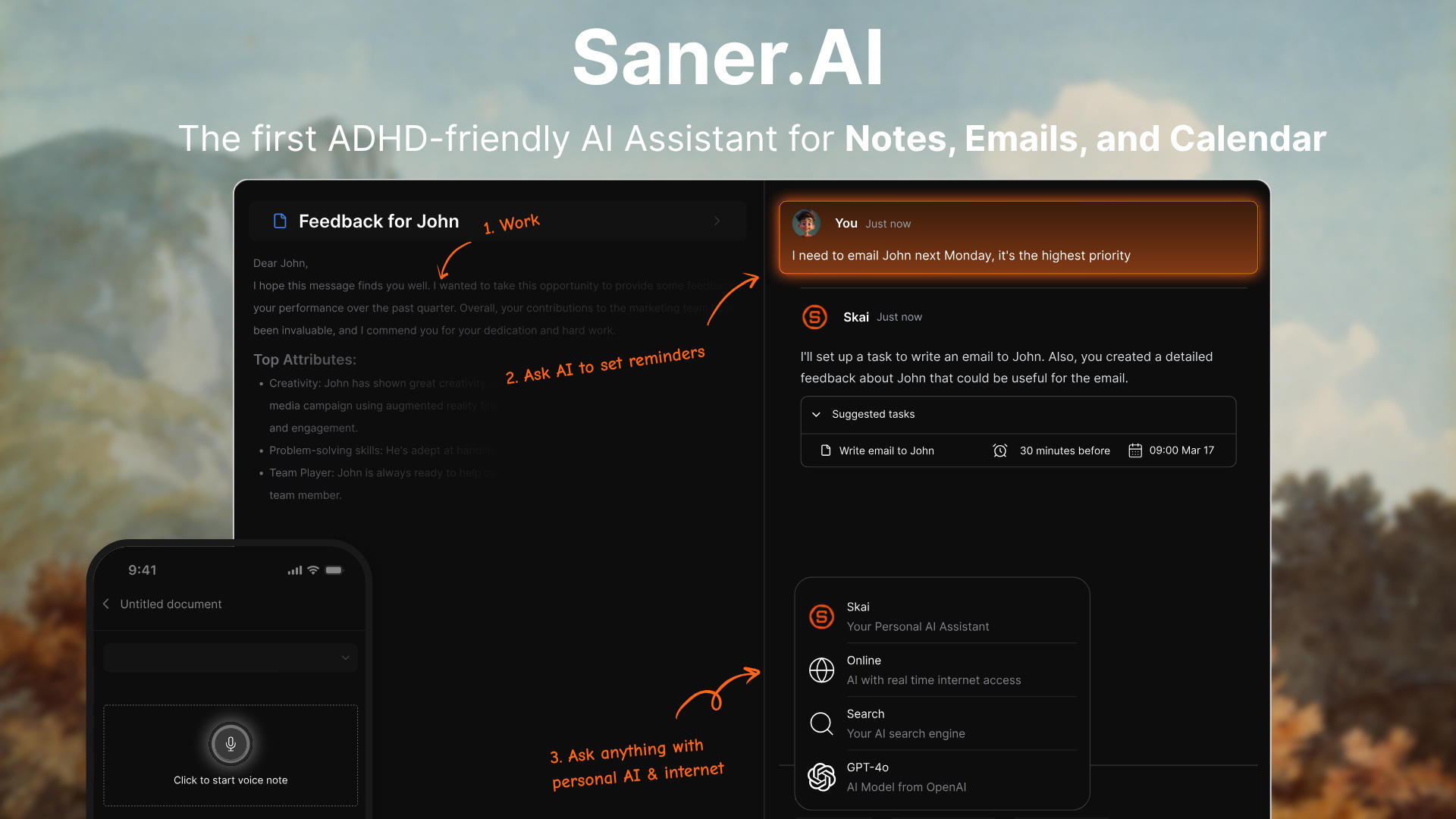

User reviews (0)