Website profiles · Technology insights · Alternatives

shellshock.io No paid content found

Categories: Games & Board Games

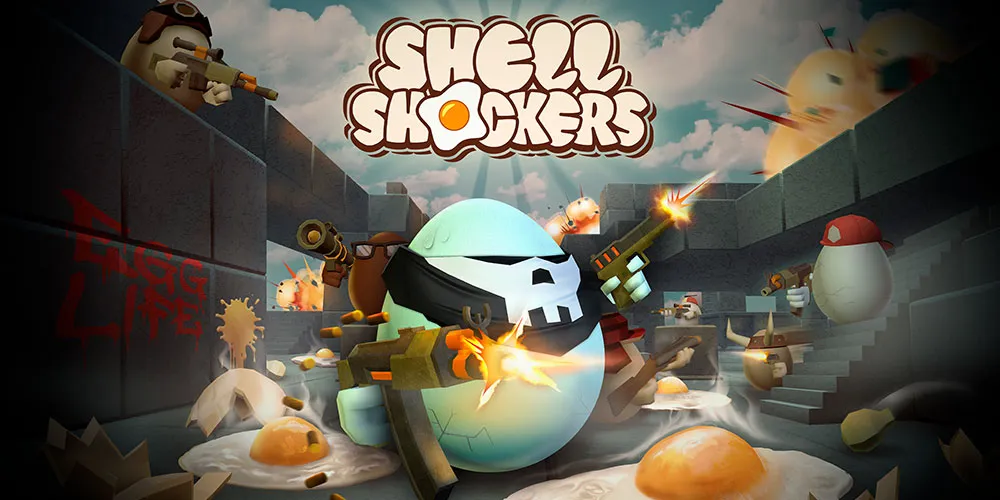
Blocked? Try shellgame.me | The OFFICIAL home of Shell Shockers, the world’s best egg-based shooter! It’s like your favorite FPS battlefield game… with eggs.

Visit website

Updated: 2026-10-01 18:08 Language: English (default) Access: Normal

Profile views 3 Outbound visits 0
Shell Shockers 🍳 Also at shellgame.me Full homepage screenshot
Editorial Review

Website Review

What is Shell Shockers?

Shell Shockers is a free browser-based multiplayer first-person shooter where every player is an armed egg. You pick a class, drop into a match with other players, and try to crack opponents before they crack you. Matches are quick and chaotic, which makes it easy to jump in for a few rounds without downloading anything.

What you actually do

  • Move around small arena-style maps and shoot other eggs.
  • Choose from several egg classes, each with different weapons and movement feel.
  • Play team or free-for-all modes depending on the lobby.
  • Earn experience and unlock cosmetic items for your egg.

Who it suits

It works best for players who want a light, fast FPS they can run in a browser tab, including school or office settings where installing a game isn't an option. If you want deep progression, realistic gunplay or ranked competition, it will feel shallow by comparison.

Trade-offs to know

  • No download or account needed to start, but browser performance and input lag can be worse than a native game.
  • The egg theme is comedic, so expect a younger and more casual crowd than a typical shooter.
  • Some networks block the main domain; the site notes an alternate address at shellgame.me.

Next step: open Shell Shockers in a desktop browser, try two or three classes in a single match, and see which weapon type fits how you like to move. If the main site won't load, try the alternate address listed on the page.

How do I play Shell Shockers online for free?

Open Shell Shockers in a desktop or mobile browser, pick a server, choose an egg class, and start shooting — no download or account is required to play. The site is the official home of the game, and it also points to shellgame.me as an alternate address if the main domain is blocked on your network.

H3 Practical steps

  1. Go to Shell Shockers in your browser.
  2. Let the game load; if it doesn't, try the alternate address listed on the page.
  3. Enter a nickname (or play as a guest, depending on the prompt).
  4. Choose a match or server, then pick a class/weapon loadout.
  5. Use WASD to move, mouse to aim and click to shoot; check the in-game controls for exact keys.

H3 What makes it easy to start

  • Runs in the browser, so it works on school Chromebooks, library PCs and phones without installing anything.
  • Free-to-play with no payment details needed to get into a match.
  • Short rounds and simple objectives suit quick sessions between classes or during a break.

H3 Trade-offs to expect

  • Browser games depend on a stable connection; lag or a blocked network is the most common reason it won't load.
  • Mobile touch controls are workable but less precise than a mouse and keyboard.
  • If your school or workplace filters game sites, the alternate domain is the first thing to try.

H3 If it won't load Try the alternate address shown on the page, switch networks (for example, from school Wi-Fi to a phone hotspot), disable a strict content blocker for the site, or try a different browser. If the page loads but the match doesn't, refreshing usually resolves it.

What makes Shell Shockers different from other first-person shooter games?

Shell Shockers swaps soldiers for eggs, and that single decision changes almost everything about how the game feels to play. It's a browser-based, free-to-play multiplayer FPS where every character is an egg with a face, a gun and a name like "Scrambled" or "Yolker." The tone is comic rather than military, so matches read as chaotic and lighthearted instead of tense and tactical.

The practical differences matter more than the joke:

  • Instant access. It runs in a web browser, so there's no download, install or launcher. That makes it easy to try in a spare five minutes or on a school or work machine where installing software isn't an option.
  • Short, low-stakes sessions. Rounds are quick and death is cheap, so it suits players who want a fast burst of shooting rather than a ranked grind.
  • Simplified arsenal. The weapon set is small and readable, which lowers the learning curve compared with shooters built around loadouts, attachments and unlock trees.
  • Casual audience. The egg theme signals that this isn't aiming at the competitive, mil-sim crowd. Expect a younger and more relaxed player base than in titles like Counter-Strike or Call of Duty.

Where it gives ground: a browser FPS usually can't match the map scale, weapon depth, matchmaking or graphical fidelity of a full desktop shooter. If you want progression systems, ranked ladders or realistic ballistics, this isn't the game for that. If you want to shoot something silly with friends in under a minute, it is.

A useful next step: open it in one tab and play a single round before deciding. That one round will tell you whether the arcade pacing and small weapon pool hold your attention better than a deeper shooter would. If you enjoy it, the official alternate address is worth bookmarking for times when the main site is blocked: Shell Shockers (shellgame.me).

Can I play Shell Shockers with friends in multiplayer mode?

Yes — Shell Shockers is built around online multiplayer, so playing with friends is the normal way to use it. You join a match in your browser and can share a room or server link so others land in the same game. The site also notes an alternate domain, shellgame.me, if the main one is blocked.

How to set up a friend match

  • Open Shell Shockers and pick a multiplayer room.
  • Copy the room or match link and send it to your friends.
  • Have them open the same link; they'll spawn into the same lobby.
  • Coordinate teams or free-for-all rules before the round starts.

What to expect It's a fast, browser-based arena shooter where everyone is an egg with a gun. Rounds are short, so it's easy to drop in and out. No download is needed, which makes it convenient for quick sessions with friends on different devices.

Trade-offs

  • Pros: instant play, easy link sharing, low setup friction.
  • Cons: browser performance and connection quality depend on your device and network; public lobbies can include strangers unless you use a private or shared room.

Practical next step If you want a private session, create a room first, then send that specific link rather than pointing friends to the homepage — otherwise they may land in a different public match.

What are the different egg characters and weapons in Shell Shockers?

Shell Shockers is a browser-based first-person shooter where every player is an egg, and the main variety comes from choosing a character class (each tied to a specific weapon) and then customizing its appearance. The official site at Shell Shockers is the place to play, and it points to shellgame.me as an alternative address if the main one is blocked.

H3 Classes and their weapons Each class is effectively a weapon choice with its own handling profile:

  • Scrambler: standard rapid-fire rifle-style weapon; the most forgiving, good for learning maps and movement.
  • EggK-47: automatic rifle with heavier recoil and damage, suited to players who can control burst fire at mid range.
  • Free Ranger: scoped, single-shot rifle for long sightlines; punishing if you miss.
  • RPEGG: rocket launcher with splash damage; strong against groups but slow and risky up close.
  • Whipper: fast-firing, low-damage weapon that rewards constant pressure and close-quarters movement.
  • Crackshot: shotgun-style spread weapon; dominant in tight corners, weak across open ground.
  • Popper: pistol-style sidearm; light and precise, but you will lose straight fights against automatics.

H3 How to choose Pick based on the map and your aim, not on looks. If you are new, start with the Scrambler or EggK-47 to learn the flow, then move to the Free Ranger on open maps or the Crackshot on cramped ones. The RPEGG is a good pick when teammates are pushing a choke point together.

H3 Customization Beyond the class, players unlock cosmetic skins, hats and egg colors. These change appearance only; they do not alter stats. If you want to stand out without changing how you play, cosmetics are the safe route.

A useful next step: load a match, try two or three classes in the same map, and note which one you win the most duels with — that is a faster signal than any tier list.

What should I do if Shell Shockers is blocked at my school or workplace?

Try the official mirror at shellgame.me before anything else. The site itself lists that alternate address as the fallback for blocked access, so it's the intended workaround rather than a random proxy.

A few practical notes:

  • Same game, different door. A mirror typically serves the same multiplayer game, so your progress and lobbies should behave normally — but if one address is blocked, the other often is too, since both point to the same product.
  • Networks block by category, not just by name. School and workplace filters usually flag "games" as a category. That means unblocked-proxy sites and VPNs may also be blocked, and using them can violate an acceptable-use policy.
  • Ask before you route around it. If this is a school or employer network, the person who manages the filter can often whitelist a site for a legitimate reason (a club, a lesson, a break room). That's a cleaner fix than a workaround that could get your account or device flagged.

If you just want to play, the honest next step is: check shellgame.me first, and if that's blocked too, ask whoever administers the network whether games are permitted at all. If they aren't, playing elsewhere — your own connection, your own device — is the option that doesn't create a problem for you.

Related questions

More questions →
How Multiplayer Works in Code Breaker's Mastermind-Style Game

Code Breaker is an online Mastermind-style logic game where you crack a hidden colour code using deduction and feedback. The site describes it as a single-player puzzle with a Top 10 Players list, and the available page evidence does not document a live two-player or head-to-head multiplayer mode. So if you are looking for "multiplayer" here, the practical answer is: treat it as you against the game's secret code, with the shared leaderboard as the competitive layer. The steps below cover how that works, how to set a code for someone else to try, and what to check if a session will not start.

What "multiplayer" means in Code Breaker

Interpretation Supported by the site? What it looks like in practice
Two players on one device, taking turns Not documented You would need to pass the device and agree on a secret code manually
Online matchmaking against another player Not documented No lobby, invite, or room system is described
You vs. the computer's hidden code Yes — this is the core game You make guesses, the game returns feedback until the code is cracked
Competition via a shared scoreboard Yes — the Top 10 Players list Your result is compared with other players' results over time

The site's own description — "the classic game of logic and deduction. Can you crack the code?" — frames the challenge as solver versus code, not solver versus solver. The Top 10 Players list is the only competitive element named in the source material.

How a round actually plays out

The game follows standard Mastermind rules:

  1. A secret code of coloured pegs is set (by the game, or by a friend if you are playing a manual two-player variant).
  2. The code breaker makes a guess by placing a row of coloured pegs.
  3. The game returns feedback, usually as black and white pegs:
    • Black peg — correct colour in the correct position.
    • White peg — correct colour in the wrong position.
  4. You use that feedback to narrow down the possibilities and guess again.
  5. You win by matching the code exactly within the allowed number of turns; you lose if you run out of guesses.

If you want to play against another person without an online mode, the workable approach is a shared screen: one player sets a code and keeps it hidden, the other guesses, and you swap roles after each round. The feedback logic stays the same — the person who set the code gives the black and white peg counts.

Setting up a code for an opponent

Because the site does not document an opponent-invite flow, setting a code for someone else is a manual arrangement:

  • Agree on the number of pegs in the code and the number of colours in play before you start.
  • The code setter writes the code down or memorises it and does not reveal it.
  • After each guess, the setter calculates black and white pegs and reports only the counts, never which peg is which.
  • Track turns so both players get the same number of attempts.

Winning, losing, and scores

  • Win condition: the guessed row matches the secret code exactly.
  • Lose condition: you exhaust your allowed guesses without matching the code.
  • Scoring: the site maintains a Master CodeBreaker Top 10 Players list, so results feed into a public ranking rather than a private match score.

If a multiplayer game won't start

Since no online multiplayer session is documented, most "it won't connect" problems come from expecting a feature that is not described. Check these in order:

  • Confirm you are on the correct game page and that the game itself loads and accepts guesses.
  • If you are attempting a two-player variant, confirm both players agree on code length and colour set — mismatched rules cause confusing feedback.
  • If you expected an invite or lobby, note that none is listed in the site's description; use the shared-screen method instead.
  • If the page will not load at all, that is a site or connection issue, not a multiplayer setup issue.

Bottom line

Code Breaker is a solo deduction game with a public Top 10 leaderboard, not a documented online multiplayer title. Play it as you versus the hidden code, and if you want a head-to-head game, run it manually with a friend on one screen using the same black-and-white peg feedback.

What Is Britannica Online and How Do You Use It for Research?

Britannica Online is the web version of the Encyclopaedia Britannica: a general-reference platform with fact-checked articles, biographies, videos, and images written or reviewed by named experts. It works best as a starting point for research—use it to build background and vocabulary on a topic, then follow its citations and "Further Reading" links to primary and scholarly sources. Some content is free to read; other features sit behind a Britannica Premium subscription, so expect a mix of open and gated material rather than assuming everything is either free or paid.

What Britannica Online actually contains

The site describes itself as a fact-checked online encyclopedia with hundreds of thousands of objective articles, biographies, videos, and images from experts. In practice that means several content types you can use differently:

  • Encyclopedia articles — overviews of people, places, events, concepts, and disciplines.
  • Biographies — profiles of notable figures, useful for quick factual grounding.
  • Videos and images — media that can clarify a concept or give you a visual reference point.
  • Dictionary and thesaurus entries — short definitions and word relationships, handy for pinning down terminology before you search deeper.

Because it is a general encyclopedia, its strength is breadth and reliability of overview, not depth on narrow research questions. Treat it as orientation, not as your final source.

Free access vs. Britannica Premium

Britannica mixes open pages with subscription-gated ones. The site surfaces SUBSCRIBE and Subscribe to Britannica Premium links in its navigation, login box, and page footers, which signals that a meaningful portion of the experience is tied to a paid membership.

What this means for you:

  • You can generally read many articles and use basic search without paying.
  • Premium membership is the mechanism the site uses to unlock additional content and features.
  • The exact boundary between free and premium content isn't fixed per article, so check whether a specific page is gated before you plan your research around it.

If you hit a paywall on a page you need, note the citation and look for the same information in a library database or an open scholarly source.

How to use it for research

1. Start with search, then narrow by topic

Enter your topic in the search bar. If results are too broad, browse by subject area to see how the encyclopedia organizes the field—this often reveals sub-topics and related terms you hadn't considered. Expected result: a shortlist of relevant articles and a clearer map of the topic.

2. Read for orientation, not citation

Use the opening sections to get definitions, key dates, and the main debates. Write down unfamiliar terms and names as you go—these become your next search queries in more specialized sources.

3. Check authorship and review

Britannica articles are attributed to contributors and reviewed by editors. Look for the author byline and any listed credentials. An article with a named expert and an editorial review is a stronger background source than an unattributed page.

4. Check the update date

Reference topics change—especially science, technology, politics, and law. Find the "last updated" or publication date and judge whether the information is current enough for your question. For fast-moving fields, an older article may still be useful for history but not for current facts.

5. Follow the citations and further reading

This is the highest-value step. Britannica articles typically point to external sources. Use those references to reach primary documents, scholarly articles, and books. Your final paper should cite those deeper sources, with Britannica credited only as background.

6. Verify anything you'll rely on

Cross-check key facts against at least one independent source. Encyclopedias are reliable for consensus overviews, but a single reference work shouldn't be your only support for a contested or high-stakes claim.

Evaluating a Britannica article: quick checklist

Check What to look for Why it matters
Authorship Named contributor with relevant expertise Signals subject-matter reliability
Editorial review Editor or review credit Indicates fact-checking
Update date Recent "last updated" for current topics Prevents using outdated facts
Citations References and further reading Gives you a path to deeper sources
Scope Overview vs. narrow detail Tells you if it's the right tool for the question
Access Free page or premium-gated Affects whether you can use it now

Common pitfalls

  • Citing an encyclopedia as a primary source. Use it for background, then cite the sources it points to.
  • Assuming everything is free. Subscription prompts appear throughout the site, so verify access before building a plan around a specific page.
  • Ignoring the date. A well-written article can still be out of date for your question.
  • Stopping at the overview. The real research value is in the references, not the summary.

When Britannica is the right tool—and when it isn't

Use it when you need a reliable, citable overview, a quick biography, or a way to learn the vocabulary of an unfamiliar field before diving into databases.

Skip it when you need original data, cutting-edge findings, or deep specialist analysis. For those, go straight to scholarly databases, journals, and primary documents—using Britannica only to frame your search terms.

What Are .io Games and How Do You Start Playing Them in Your Browser?

.io games are free, browser-based multiplayer games that you can start playing without downloading or installing anything. You open a website, enter a nickname, and join a live match in seconds. They are identified mainly by the .io domain many of them use, though the label now describes a style of game more than a strict technical category. If you want fast, short, real-time matches against other players and you have a working browser plus an internet connection, this format is for you.

What makes a game an ".io game"

The defining traits are practical rather than technical:

  • No download or install. The game runs in the browser, usually on HTML5 or WebGL.
  • Instant multiplayer. You are matched with other real players, often within seconds of loading the page.
  • Short sessions. A round typically lasts a few minutes, so you can play one match or many.
  • Simple controls. Most use a mouse plus a few keys, which keeps the learning curve low.
  • Free to open. The games are generally accessible by visiting a URL, though individual sites may add accounts, cosmetics, or other optional features.

The .io part comes from the country-code top-level domain for the British Indian Ocean Territory, which became popular with indie developers because short, memorable names were available. Over time, "io game" became shorthand for this whole genre of lightweight online multiplayer games.

Common types and well-known examples

.io games cluster into a handful of recognizable genres. The table below maps each type to what you actually do in it.

Type What you do Representative example
Shooter / FPS Move, aim, and shoot other players in real time Shell Shockers
Snake / growth Eat and grow while avoiding collisions Snake-style .io games
Tank / vehicle Drive a tank and battle for territory Tank-style .io games
Arena / survival Outlast other players in a shrinking space Various arena .io titles
Drawing / guessing Sketch or guess words with other players Drawing-guess .io games

Shell Shockers is a clear example of the shooter category. Its official site describes it as "the world's best egg-based shooter," comparing it to a favorite FPS battlefield game "with eggs." That description captures the genre well: familiar shooter mechanics, a lighthearted theme, and a browser-first design. The site also notes an alternate address, shellgame.me, which matters for the next section.

How to start playing in your browser

  1. Pick a game or a portal. Go directly to a specific game's official site, or browse a .io game collection site to see what's available.
  2. Open the page and let it load. The game needs to download its assets into your browser. Give it a moment, especially on a slower connection.
  3. Allow the browser to run it. Some games need permission for sound or fullscreen. If a game uses WebGL, make sure hardware acceleration is enabled in your browser settings.
  4. Enter a nickname. Most games ask for a display name before you join. This is usually all the setup required.
  5. Join a match. Click play or join, and you'll be placed into a live game with other players.
  6. Learn the controls. Nearly all .io games use the mouse for aiming or direction and the keyboard for movement or actions. Check the on-screen instructions on your first round.

Expected result: within a minute or two of opening the page, you should be in an active multiplayer match.

When a game won't load

The most common obstacle is a network block. Schools and workplaces frequently filter game domains, so a site that works at home may be unreachable on a restricted network.

  • Try an alternate address. Some games publish a mirror or backup domain for exactly this reason. Shell Shockers, for instance, lists shellgame.me alongside its main site, and its page title explicitly asks "Blocked? Try shellgame.me."
  • Check browser compatibility. An outdated browser or disabled hardware acceleration can stop a WebGL game from running.
  • Confirm your connection. Because these are real-time multiplayer games, a dropped or very slow connection will prevent you from joining a match even if the page loads.

If you're on a network you don't control, respect its rules — a mirror domain is a technical workaround, not permission to bypass a policy.

Choosing where to play

If you want a specific game, go straight to its official site for the most reliable version and the latest updates. If you're exploring, a .io game portal lets you sample many titles quickly. Either way, the entry cost is the same: a browser, an internet connection, and a nickname.

Unblocked Games at School: How to Play Free Block Games Like Minecraft in Your Browser

"Unblocked games" are browser-based games that a school or workplace network filter hasn't blocked, so they load directly in a tab instead of requiring an app install. Miniblox is one of them: a free blocky multiplayer game like Minecraft that runs in the browser with no download and no login, and its own site states it is unblocked at school or on a Chromebook. That combination — no install, no account, playable in a browser tab — is what makes it usable on a locked-down school device. If your school blocks the domain itself, or your device requires a sign-in you don't have, it won't load regardless of how the game is built.

What "unblocked" actually means

A game is "unblocked" when it isn't on your network's blocklist and doesn't need anything your device won't allow. Two separate things have to line up:

  • The network allows it. School filters usually block categories (game sites, streaming, social) rather than individual games. A browser game on a domain the filter hasn't flagged will load.
  • The device allows it. Chromebooks and managed school laptops often can't install software. A game that runs entirely in the browser sidesteps that restriction.

Miniblox fits both: it starts in the browser, needs no download, and needs no login. Note that "unblocked" is a statement about typical school filters, not a guarantee — filters change, and a school can block any domain at any time.

How to start playing in a browser

  1. Open a browser tab on your Chromebook, school laptop, or phone.
  2. Go to the game site (for Miniblox, miniblox.io).
  3. Pick a mode from the game list — the site lists Skywars, EggWars, Murder Mystery, KitPvP, Block Hunt, One in the Quiver, Bridge Duels, Spleef, Blitz Build, Parkour, Creative, Survival, Skyblock, and OneBlock.
  4. Click and play. Per the site, there's no sign-up step — you click and you're in. If a mode asks you to join a match, you're dropped into a round with other players.

Expected result: you're in a live match or world within a few seconds of clicking, with no account creation and nothing installed.

Modes that fit a short break

Multiplayer minigames are built as short rounds, which suits a lunch break or a few minutes between classes. From the site's own descriptions:

Mode What you do Round length
Skywars Grab a kit, drop onto a sky island, be the last one standing Short, match-based
EggWars Protect your egg, smash everyone else's, solo or in teams Short, match-based
Murder Mystery Find the killer before the killer finds you Short, match-based
Spleef Break the blocks under your friends and drop them Very short
Bridge Duels Bridge across the gap and out-duel your rival Very short
Parkour Race through jump-and-run courses Varies by course
Creative / Survival Build anything, or gather, craft, and survive Open-ended

For a quick session, the match-based modes (Skywars, EggWars, Murder Mystery, Spleef, Bridge Duels) end on their own. Creative and Survival are open-ended, so they're better when you have more time.

Browser block games vs. Minecraft

They share the blocky look and the build-and-survive loop, but they differ in ways that matter at school:

  • Access: Minecraft normally needs a purchase and an install; Miniblox runs free in a browser with no download or login, per the site.
  • Device fit: A browser game works on a Chromebook that can't install apps. Minecraft generally can't run that way.
  • Content: Miniblox centers on multiplayer minigames (Skywars, EggWars, and similar) plus Creative and Survival. Minecraft is a full sandbox with its own progression. If you want the minigame loop, the browser option covers it; if you want the full single-player sandbox, it doesn't.
  • Bedwars: The site notes you can play Bedwars free as EggWars — the same protect-your-base idea under a different name.

If it won't load at school

Work through these in order:

  1. Try a different network. Switch from school Wi-Fi to a phone hotspot. If it loads there, the school filter is the cause, not the game.
  2. Try a different browser or a fresh tab. A stale tab or an aggressive extension can stop a browser game from starting.
  3. Check whether the domain is blocked. If the page itself won't open, the filter has flagged it — no in-game setting will fix that.
  4. Check device policy. On a managed Chromebook, some sites are restricted by admin policy rather than by the network. That's outside your control.
  5. Wait and retry. Filters are updated on schedules; a site blocked this week may not be next week, and vice versa.

If none of these work, the block is coming from your school's network or device policy, and the fix isn't on the game's side.

What Is Kenney and How Can Its Free Game Assets Help You Build a Game?

Kenney is a game asset and tool provider that offers thousands of completely free game assets, plus open source Starter Kits for learning game development. You can download individual free assets, buy an all-in-one package that bundles everything with free updates, or use Kenney's tools to create 3D models without deep knowledge of complex software or frameworks. It fits best if you need ready-made art and quick-start project templates for common game engines, and you want to spend your time on game logic rather than asset creation.

What Kenney actually provides

Kenney's site organizes its offering into a few clear categories:

  • Games – finished or experimental game projects.
  • Tools – software for creating assets, including 3D model creation aimed at people without complex software or framework knowledge.
  • Assets – the core offering: thousands of completely free game assets you can use in your projects.
  • Starter Kits – free and open source project templates covering various game genres, designed to help you kickstart your next game.

The site also mentions a Knowledge Base and Support section, which is where you'd look for troubleshooting and usage guidance.

Free assets vs. the all-in-one package

The most important distinction for a new user is between the free downloads and the paid bundle.

Option What you get Best for
Free assets Download assets individually at no cost Trying specific asset packs or filling a single gap in your project
All-in-1 package Everything at once, plus free updates Building multiple games or wanting a complete library without picking files one by one
Kenney Club Early access to new creations, goodies, and club channel entry, while supporting asset creation People who want new assets first and want to support ongoing creation

The site states plainly that there are "thousands of completely free game assets for you to use," and separately offers the all-in-one package for downloading everything at once with free updates. If you only need a handful of sprites or models, start with the free downloads. If you expect to work on several projects, the all-in-one route saves repeated searching and downloading.

Using a Starter Kit to begin a project

Learning game development can be a daunting task, which is the problem the Starter Kits are built to solve. They are free and open source, and they cover various game genres.

A practical workflow looks like this:

  1. Pick a genre close to your idea – the Starter Kits are organized by genre, so choose the one that matches the game you want to build.
  2. Download the kit – it's free and open source, so you can inspect and modify it.
  3. Open it in your engine – the assets are intended to work with most game engines, so you can bring the kit into the engine you already use.
  4. Replace or extend the assets – swap in other Kenney assets or your own art as your project grows.
  5. Verify – run the kit as-is first to confirm your engine and project setup work before changing anything.

The expected result is a running project skeleton in your chosen genre, so you spend your early time on mechanics and level design instead of building a project structure from scratch.

Compatibility and tools

Kenney states that its tools let you create 3D models without knowledge of complex software or frameworks, and that results "can be used in most game engines." That phrasing matters: the assets and tool output are positioned as engine-agnostic rather than tied to one platform. Before committing to a large asset set, confirm the file formats your engine accepts and test one asset end to end.

The tools are described as available "at a very affordable price," which indicates they are a paid product separate from the free assets. The site does not list specific prices in the material available here, so check the Tools page directly for current pricing.

Where to get help

If something doesn't work as expected, the site points to two resources:

  • Knowledge Base – for documented answers and guidance.
  • Support – for direct help.

There is also a newsletter you can subscribe to for updates on new assets and releases.

How to decide if Kenney fits your project

Choose Kenney's free assets if you need a broad, no-cost art library and want to prototype quickly across genres. Choose the all-in-one package if you'd rather download once and receive updates. Choose the Starter Kits if your main obstacle is not art but not knowing how to structure a game project. Look at the Tools if you specifically need to produce 3D models and want a simpler path than full 3D software. In every case, start with one small download or one Starter Kit, get it running in your engine, and expand from there.

Website Overview

An established domain and managed infrastructure suggest continuity of operations and may support dependable delivery, although neither guarantees service quality.

Domain and Registration

Registered in 2017, this domain has about 9 years of history. That suggests continuity, although ownership and purpose may have changed. Transfer-protection status is present, helping reduce the risk of unauthorized domain transfers. The registrar is GoDaddy.com, LLC, a widely used domain service provider. The domain uses the common .io extension, which is not an independent safety signal.

DNS and Email

Nameservers are provided by Cloudflare, indicating managed DNS hosting. No CNAME was found; the observed records resolve directly to addresses. No MX record was found. A conventional explicit inbound-mail route is not configured. DNSSEC signatures were not detected, so this additional DNS authenticity protection is not confirmed. The lowest observed DNS TTL is 270 seconds.

TLS and Certificates

The public key uses EC with 256 bits. The server supplied a complete certificate chain. No organization name is present in the certificate; the available fields are consistent with domain validation. The certificate was issued within the Google Trust Services cloud or CDN ecosystem. The certificate's total validity is about 90 days, consistent with a short renewal cycle.

HTTP and Browser Security

The checked browser-security headers were not detected, leaving fewer explicit browser-side safeguards. No X-Powered-By header was found, reducing one common source of backend fingerprinting information. The cf-ray response header indicates a CDN or caching proxy in the delivery path. No obvious internal addresses or debug information were found in the headers. The Server header identifies cloudflare without an exact version.

Technology Stack Analysis

The public page identifies Google Tag Manager, Google Analytics, Cloudflare without precise versions, leaving fewer clues for version-specific scanning.

Search and Social Sharing

No homepage canonical URL was detected. If duplicate URLs exist, consolidation may be less explicit. Twitter Card metadata is configured. The title has 37 characters, within a common display range. A meta description is present, with 157 characters. The observed directives allow indexing and link following.

Hosting and Email

DNSCloudflare
HostingCloudflare
EmailUnknown
Location Location unknown 104.26.8.148

User reviews (0)

  • No reviews yet.

Pages, Search and Sharing

Meta descriptionBlocked? Try shellgame.me | The OFFICIAL home of Shell Shockers, the world’s best egg-based shooter! It’s like your favorite FPS battlefield game… with eggs.
Canonical URLNot detected
LanguageEnglish (default)
Twitter Cardsummary_large_image
All bots 1 allowed · 0 disallowed
  • Allow/

No sitemaps found

Registration details RDAP / WHOIS

RegistrarGoDaddy.com, LLC
Registered2017-05-26
Expires2027-05-26
Domain statusclientDeleteProhibited https://icann.org/epp#clientDeleteProhibited、clientRenewProhibited https://icann.org/epp#clientRenewProhibited、clientTransferProhibited https://icann.org/epp#clientTransferProhibited、clientUpdateProhibited https://icann.org/epp#clientUpdateProhibited
Nameserversgina.ns.cloudflare.com、rodney.ns.cloudflare.com
DNSSECunsigned

DNS records

TypeNameValueTTLPriority
Ashellshock.io104.26.8.148270—
Ashellshock.io104.26.9.148270—
Ashellshock.io172.67.69.62270—
AAAAshellshock.io2606:4700:20::681a:894300—
AAAAshellshock.io2606:4700:20::681a:994300—
AAAAshellshock.io2606:4700:20::ac43:453e300—
NSshellshock.iogina.ns.cloudflare.com86400—
NSshellshock.iorodney.ns.cloudflare.com86400—
TXTshellshock.iofirebase=shellshockio-181719300—
TXTshellshock.iov=spf1 a mx include:websitewelcome.com ~all300—
TXTshellshock.iov=spf1 include:_spf.firebasemail.com ~all300—

TLS and certificates

AssessmentNormal configuration
Supported protocolsTLSv1.2
Negotiated protocolTLSv1.2
Certificate subjectshellshock.io
IssuerGoogle Trust Services
Valid until2026-11-17T12:16 · Remaining when checked: 46 days
Verification detailsCertificate trust: Passed · Hostname match: Passed

HTTP response headers

HeaderValue
content-typetext/html; charset=UTF-8
cache-controlmax-age=14400
servercloudflare

Identified technologies

Google Tag ManagerGoogle AnalyticsCloudflare