

 Visit website
 Updated: 2026-10-01 19:41
 Language: English (default)
 Access: Normal
 Profile views 5
  Outbound visits 0
 Website Review
What is Snowify?
Snowify is a free, open-source music player for desktop, currently in beta at v1.0.0. It is pitched as an ad-free, subscription-free alternative for people who want a clean listening app rather than a streaming service bundled with extras. The page lists Windows, macOS, and Linux downloads, with Android and iOS marked "coming soon."
What it does
- Searches and streams from a large music library without ads or subscriptions, according to the site.
- Shows synced, scrolling lyrics, with sources named as Musixmatch, LrcLib, and Netease.
- Imports playlists from Spotify.
- Syncs your library, playlists, and liked songs across devices.
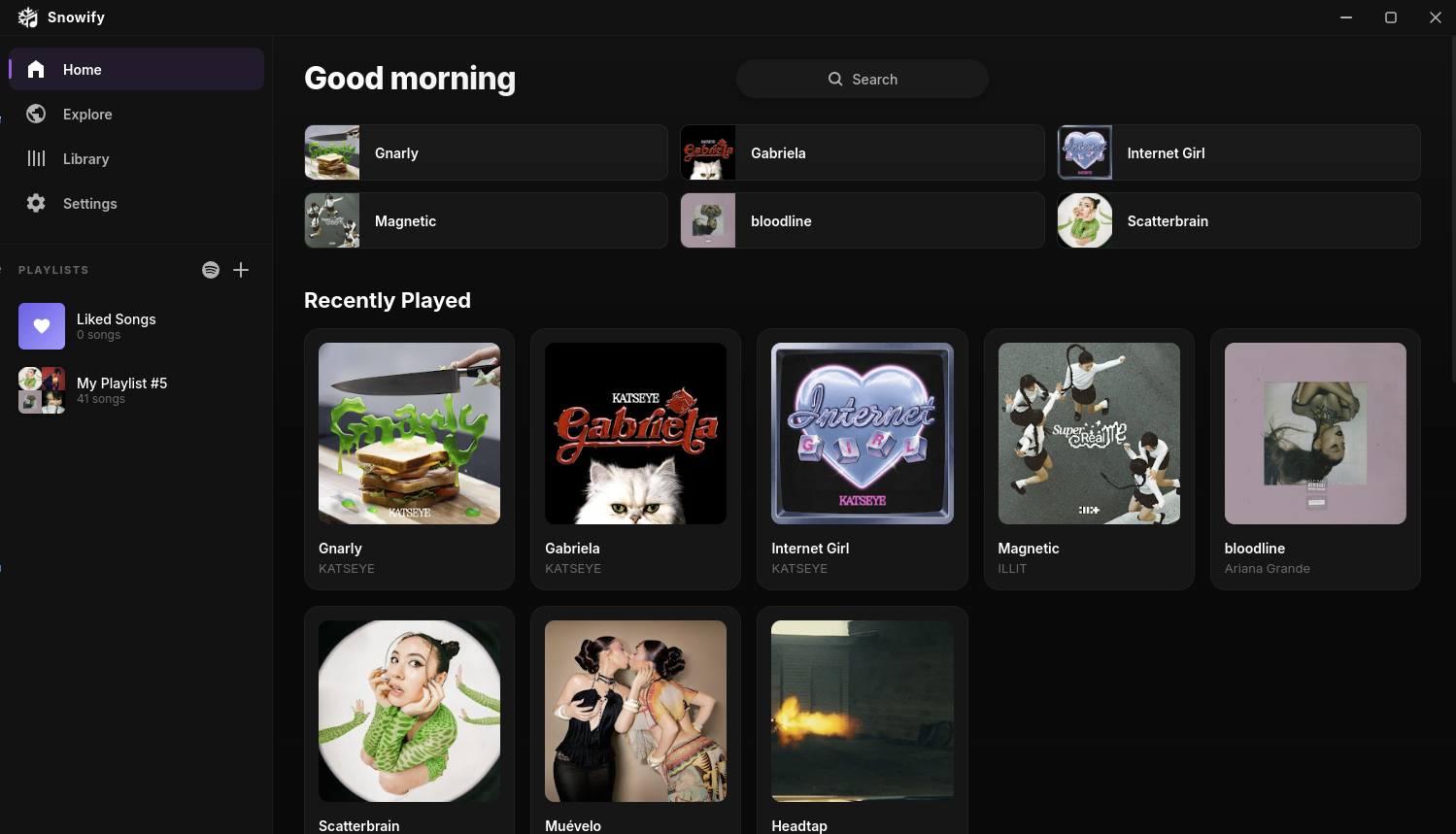
- Supports playlists with drag-and-drop, artist pages, a smart queue that adds similar songs, music videos, follow-artist release updates, Discord rich presence, keyboard shortcuts, and multiple themes.
Who it suits
Someone who already has a music source or library and wants a tidy desktop player with lyrics and cross-device sync. It is less useful if you expect a full streaming catalog and account system built in, since the site does not present itself as a subscription service.
What to check before installing
Because it is beta software, expect rough edges. Confirm where the streaming library comes from and whether it is legal in your region, and check the GitHub releases page for the current build for your OS. If you rely on Spotify playlists, test the import with a small playlist first.
For a wider look at open-source players, see Snowify and compare with GitHub releases for update history.
How do I import my Spotify playlists into Snowify?
Snowify lists "Spotify Import" as a built-in feature, described as bringing your existing playlists over from Spotify instantly. Based on the page evidence, the intended flow is inside the app rather than a separate tool: install Snowify, then look for the Spotify import option, which is most likely surfaced during setup or from the playlist/library area. Because the page does not spell out the exact menu path or whether it requires a Spotify login or an export file, treat the first attempt as a short experiment: open Snowify, check the main navigation and any "Import" or settings entry, and follow the prompts.
What the page does confirm:
- Spotify Import is listed as a core feature, alongside playlists, synced lyrics and cloud sync.
- Snowify is free and open-source, with no ads or subscriptions, so importing does not sit behind a paywall.
- It runs on Windows 10/11, macOS 10.15+, and Linux (AppImage). Android and iOS are marked "Coming Soon", so mobile import is not an option yet.
If the in-app option is not obvious, the practical next step is the project's GitHub releases page, which the site links to for all builds and is the usual place for documentation and issue threads about import quirks. For background on how playlist portability generally works across players, Spotify documents its own export and account data tools, and GitHub hosts the Snowify project where maintainers and users discuss feature behaviour.
A realistic scenario: you have years of Spotify playlists and want them in a local player with synced lyrics and no subscription. Import the playlists first, then verify a few tracks that are likely to be region-locked or unavailable, since any importer can only match songs the new library actually carries. After that, enabling cloud sync keeps the imported library consistent if you install Snowify on a second computer.
Can I sync my music library and playlists across Windows, macOS, Linux, and Android devices?
Yes — cross-device sync is a stated feature of Snowify. The site describes "Cloud Sync" as keeping your library, playlists, and liked songs in sync across all your devices automatically. It also lists a Spotify Import feature for bringing existing playlists over, which pairs naturally with sync: import once, then let sync carry the playlists to your other machines.
Two practical caveats from the same page:
- Snowify is labeled Beta (v1.0.0). Sync behavior in a beta is worth testing with a small playlist before you rely on it for a large library.
- Platform availability is uneven. Windows, macOS, and Linux have downloads listed; Android and iOS are marked "Coming Soon." So a Windows/macOS/Linux mix is the realistic setup today — Android sync is something to plan for, not something you can use yet.
What this means for a typical setup
If you run a Windows desktop and a Linux laptop, the workflow the page implies is: install on both, sign in the same way on each, import your Spotify playlists once, and let liked songs and playlists propagate. A sensible first test is to create one throwaway playlist, add a few tracks, and confirm it appears on the second device before importing everything.
Alternatives worth knowing
If Android support is a hard requirement right now, compare against players with mature mobile apps and established sync:
| Option | Sync approach | Notes |
|---|---|---|
| Snowify | Built-in cloud sync (beta) | Desktop-first; Android/iOS not yet released |
| Spotify | Account-based, all platforms | Subscription for ad-free listening; the source of your imports |
| MusicBrainz Picard | Not a player | Useful for tagging a local library that other players then sync |
Decision criterion
Choose Snowify for cross-device sync if your devices are desktop/laptop only and you're comfortable being an early beta user. If you need Android today, wait for the Android release or use a service that already ships a mobile app. Either way, verify sync with a test playlist before migrating a large library.
How does Snowify's synced lyrics feature work and where does it get lyrics from?
Snowify's synced lyrics display real-time, line-by-line lyrics that scroll in step with the currently playing track, so the highlighted line follows the song's position rather than showing a static block of text. According to the product's own page, the lyrics are pulled from three external sources: Musixmatch, LrcLib, and Netease. Snowify itself does not generate or host the lyrics — it fetches timed lyric data from those providers and syncs it to playback.
What this means in practice
- The three sources are a fallback chain, not a single library. Musixmatch and Netease are large commercial/regional catalogues; LrcLib is a community-driven, openly licensed lyrics database. Where one source lacks a track or lacks timing data, another may still have it.
- Sync quality depends on the source. Community-submitted timed lyrics (the LrcLib style) can be accurate or slightly off; professionally timed data tends to be tighter. Expect variation between tracks.
- Coverage will be uneven. Popular Western releases are well served by Musixmatch; East Asian catalogues are a particular strength of Netease. Obscure, instrumental, or very new tracks are the most likely to fall back to unsynced or missing lyrics.
- Because lyrics come from third parties, availability can change over time as those services add, remove, or relicense content.
If synced lyrics are your deciding feature
Test it against your own library before committing. Install Snowify, play five or six tracks you know well — ideally a mix of a chart hit, an album deep cut, and something non-English — and check whether the highlighting tracks the vocal line or drifts. That single test tells you more about real-world lyric coverage than any feature list.
Snowify is free and open source, available for Windows, macOS, and Linux, with Android and iOS listed as coming soon. The project is at Snowify, and the page points to GitHub for all releases.
What are the main differences between Snowify and Spotify?
Snowify is a free, open-source desktop music player, while Spotify is a commercial streaming service. The core difference is what you're actually getting: Snowify is the player software, and it leans on existing music sources rather than running its own licensed catalog. Spotify bundles the player and the catalog into one subscription-or-ads product.
How they differ in practice
| Aspect | Snowify | Spotify |
|---|---|---|
| Cost model | Free, open-source, no ads or subscriptions stated | Free tier with ads, or paid ad-free tiers |
| Platforms | Windows, macOS, Linux; Android and iOS listed as coming soon | Broad platform coverage including mobile, TV, consoles, web |
| Catalog | "Millions of songs" via search and streaming, no first-party catalog described | Large licensed catalog tied to the service |
| Spotify relationship | Imports your Spotify playlists | Native home for those playlists |
| Extras | Synced lyrics, Discord RPC, smart queue, themes, music videos, artist pages, keyboard shortcuts | Podcasts, algorithmic playlists, social features, integrations |
| Control | Open source, so the code can be inspected and forked | Closed source |
What this means for different listeners
- If you mainly listen on a desktop or laptop and want no ads, no subscription and a clean interface, Snowify's positioning fits. The synced lyrics, smart queue and keyboard shortcuts are aimed at people who sit at a computer while music plays.
- If you rely on your phone as your main player, Spotify is the more practical choice today, since Snowify lists Android and iOS as coming soon.
- If you've built years of Spotify playlists, the import feature is the obvious bridge. Treat it as a one-way move for playlists rather than full account migration; liked songs, followed artists and recommendations won't necessarily carry the same weight.
- If you care about software you can audit or modify, open source matters. If you care about discovery algorithms and podcast libraries, Spotify's ecosystem is the draw.
The trade-off is essentially convenience and catalog certainty versus cost, openness and a desktop-first design. Snowify removes the subscription and ad layer, but it also depends on external lyric sources (Musixmatch, LrcLib, Netease) and doesn't describe its own licensing arrangements for the music itself.
Next step: check whether your day-to-day listening happens on a desktop or a phone. If it's the desktop and you already have Spotify playlists, download the build for your OS, import a playlist and test the synced lyrics and queue for a week before deciding whether to make it your default.
Is Snowify safe and legal to use for streaming music?
Snowify is best understood as an open-source player that streams from a large music library and adds synced lyrics, Spotify playlist import, and cloud sync. Its own page presents it as free, ad-free, and subscription-free, and lists downloads for Windows, macOS, and Linux, with Android and iOS marked "coming soon."
Safety
- The project is described as open-source and points to a GitHub repository, which is the main trust signal: you can inspect the code, see release history, and check whether builds are signed or reproducible.
- Practical risk is mostly about where you get it. Download installers from the project's own site or its GitHub releases rather than third-party mirrors, and prefer signed packages where offered.
- Cloud sync and any account-like features mean some data leaves your machine. If that matters to you, check the project's privacy documentation before enabling sync.
- Electron-based players are ordinary desktop apps; they don't need unusual system permissions, so be skeptical of any build that asks for more.
Legality
Legality depends on the source of the streams, not on the app being open-source. Open-source code is legal to use; the legal question is whether the service it connects to is licensed to distribute the music in your country. Snowify's page doesn't state its licensing arrangements, so you can't conclude from the page alone that streaming through it is authorized where you live. In many jurisdictions, streaming from unlicensed sources is a civil matter that typically falls on the service and, in some countries, on users. If you need certainty, stick to services you know are licensed in your region, such as Spotify or Apple Music, and treat Snowify as an experiment rather than a replacement.
A reasonable way to decide
- Install it on a secondary machine or a separate OS user profile first.
- Run it without cloud sync or account features for a week.
- Check the GitHub issues for security or takedown discussions.
- Only then decide whether to migrate playlists and enable sync.
If your priority is a licensed catalog with predictable legality, a mainstream service is the safer default. If your priority is an ad-free, open-source player and you accept the licensing uncertainty, Snowify is worth testing — but keep your expectations about legality separate from your judgment about the software itself.
 Hosting and Email
 Cloudflare
 Hosting
 Fastly
 Location
 Pages, Search and Sharing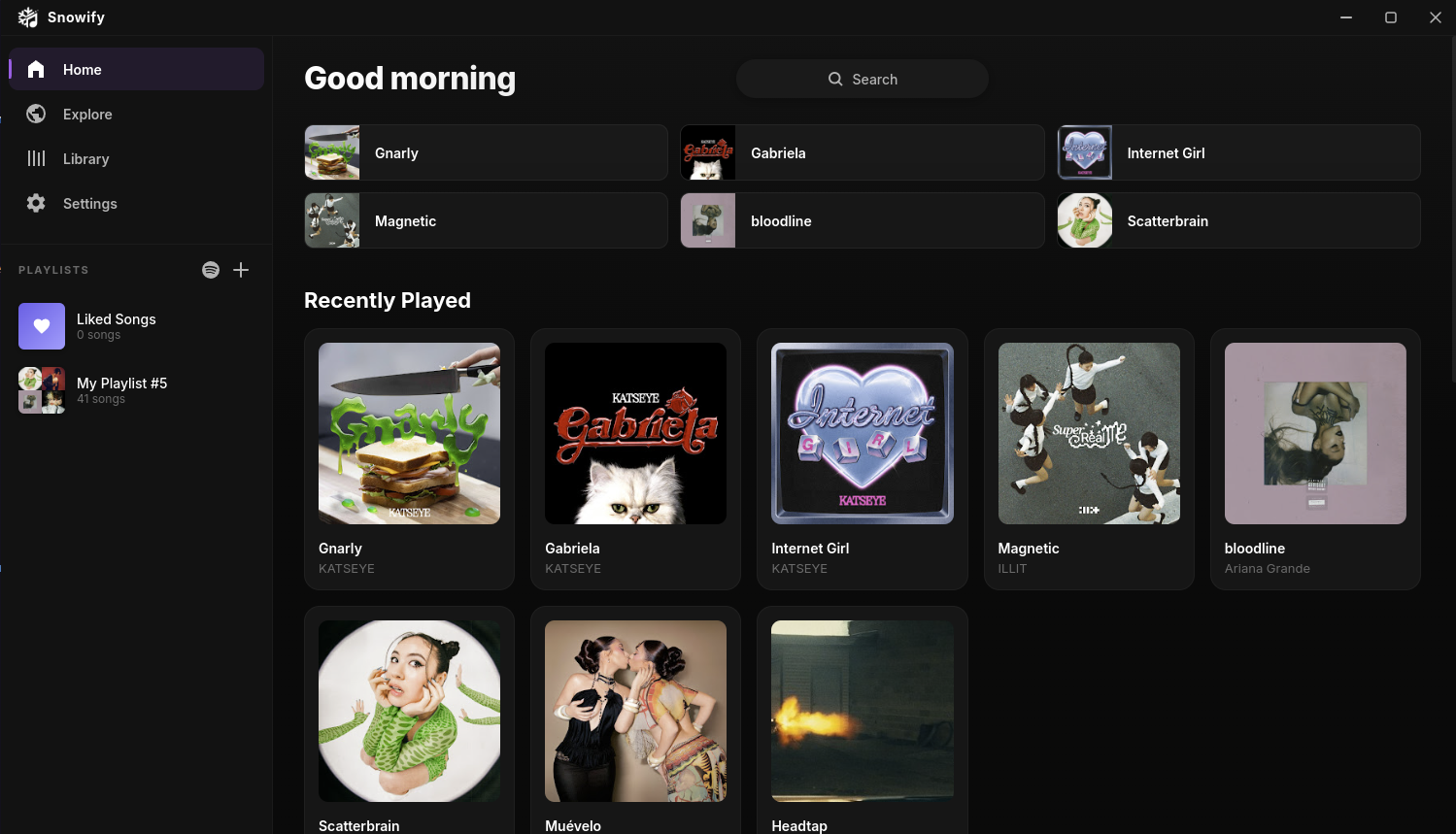



 All bots


 Registration details

 Identified technologies
User reviews (0)