Website profiles · Technology insights · Alternatives

spokio.pro

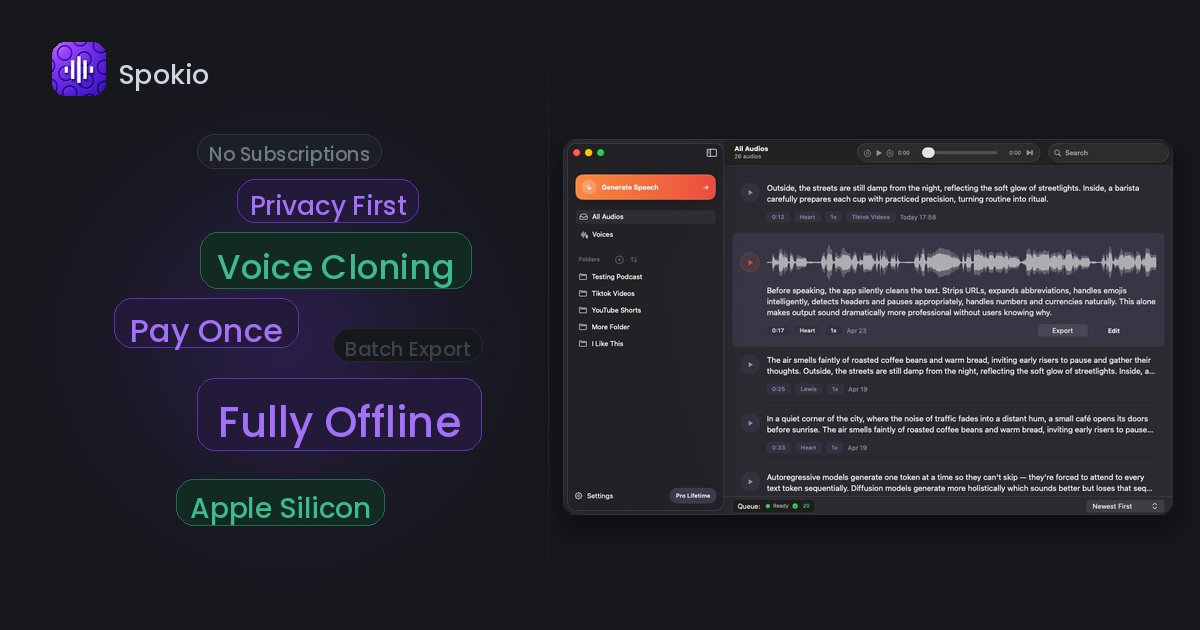
Offline text-to-speech for iPhone and Mac with 185 English voices, local voice cloning, and no cloud uploads.

Paid content
Visit website
Profile views 11 Outbound visits 3 Normal
Spokio Full homepage screenshot

At a glance

Category
Software & Apps
Language
English
Paid-content signal
Paid contentObserved
Registered
2026
Hosting
VercelInferred
HTTPS certificate trusted
PassedObserved
Last updated

Website review

This review may include AI-generated content and is not individually verified. Domain, certificate and other facts come from the observed data on this page.

What is Spokio?

Spokio is an offline text-to-speech app for Mac and iPhone aimed at content creators who want voice generation to stay on their own device. According to its page, it offers 185 built-in English voices spanning American, British, Australian, Irish, and Canadian accents, plus local voice cloning — meaning the audio work happens on your machine rather than by uploading text or voice samples to a cloud service. The page also frames it as a single upgrade that unlocks everything, rather than a tiered subscription.

The practical appeal is privacy and predictability: if you narrate videos, draft podcast scratch tracks, or produce accessibility audio from scripts, you can generate speech on a plane, in a studio with poor connectivity, or under an NDA without sending source material to a third party. The trade-off is that offline tools depend on your hardware and on the voice library the developer ships — you won't get the constantly refreshed cloud voice catalogs some hosted services offer. If accent variety and local processing matter more to you than always-newest voices, it's worth a look; check the pricing page for the current unlock terms.

For a concrete test, take a real 300-word script you'd actually publish, run it through two or three of the accents, and listen for pacing and pronunciation on names and technical terms. That tells you more than any voice count.

Spokio

How does Spokio's offline text-to-speech work on Mac and iPhone?

Spokio runs text-to-speech locally on the device, so your text is turned into audio without being uploaded to a cloud service. On both Mac and iPhone, the app ships with a library of built-in English voices — the page describes 185 voices covering American, British, Australian, Irish, Canadian and other accents — and it also supports local voice cloning, meaning a cloned voice is generated and stored on your machine rather than on a remote server. The Mac version is presented as the main desktop workspace, while the iPhone version lets you use the same offline approach on the go.

What that means in practice

  • Privacy: Since nothing is uploaded, sensitive scripts, client work or unpublished drafts stay on your device.
  • Reliability: No internet connection is needed once the app and voices are installed, which helps on flights, in secure offices or anywhere with poor connectivity.
  • Speed: Local generation avoids round-trip latency, though very long documents can still take time to render depending on your Mac or iPhone.
  • Voice choice: The 185 built-in voices give you accent variety without downloading extra cloud voices; local cloning adds a personal voice when you need one.

A concrete workflow

A podcaster writing a script on a Mac could paste the text into Spokio, pick a British or Australian voice for a segment, preview it, then export the audio for editing. The same project can continue on an iPhone if they want to draft or listen while away from the desk. A creator who needs a consistent brand voice might clone their own voice once and reuse it locally across episodes.

Trade-offs to weigh

Offline processing trades cloud convenience for control. You manage storage for voices and cloned models yourself, and performance depends on your device rather than a server farm. If you need hundreds of languages or frequent voice updates, a cloud service may cover more ground; if privacy and no-upload workflows matter more, Spokio's local approach is the point. For a fuller picture of what is included, check the official Spokio page and its pricing details before committing.

Can I clone my own voice with Spokio, and how does local voice cloning work?

Yes. Spokio supports local voice cloning, meaning the processing happens on your own iPhone or Mac rather than by uploading recordings to a cloud service.

What "local" means in practice

  • You record or supply a sample of your voice.
  • The voice model is built and stored on your device.
  • Generating speech from that voice runs on-device, so your recordings and scripts are not sent to a server.

This matters if you narrate scripts, client work, or unpublished material and would rather not send raw audio to a third party. The trade-off is that on-device processing depends on your hardware; longer scripts and larger models can take longer than a cloud service would.

How it fits a creator workflow

A practical setup: record a clean sample in a quiet room, clone the voice once, then reuse it for drafts, revisions, or multiple videos without re-recording every line. Spokio also ships with 185 built-in English voices across American, British, Australian, Irish, Canadian, and other accents, which is useful when you want a placeholder narrator or a second voice without cloning anyone.

Next step

Check the official Spokio page and its pricing page to confirm current voice-cloning limits and device requirements before committing, since those details determine whether it fits your project size.

What are the 185 English voices and accents available in Spokio?

Spokio's page describes a library of 185 English voices spanning American, British, Australian, Irish, Canadian and other accents. The exact roster isn't itemised on the page, so treat 185 as the size of the built-in English set rather than a published list.

What the page does confirm

  • The voices are bundled with the app, so they work offline on iPhone and Mac.
  • Accent variety is the selling point: multiple English regions rather than a single generic voice.
  • Voice cloning runs locally, meaning you can create a personal voice without uploading recordings to a cloud service.

How to choose among them

Think in terms of fit, not count. A US audience usually reads an American accent as neutral; a UK or Irish audience may find a matching accent more credible for narration, ads or e-learning. For character work, switching accents between speakers is often more useful than having many near-identical voices.

A practical test: write one paragraph with a number, an acronym and a question, then play it back in three accents. The voice that handles those cleanly is the one to keep.

Next step

Open the app and audition voices against your own script rather than sample text, since pacing and pronunciation problems only show up on real copy. If you need a specific accent that isn't in the built-in set, check whether cloning from your own recording covers it. Commercial terms are listed on Spokio's Pricing page.

How much does Spokio cost, and what does the one-time upgrade include?

Spokio is sold as a one-time upgrade rather than a subscription, and the page frames it as unlocking everything at once — no tiers or add-ons mentioned. The site points to a dedicated Pricing page for the actual figure, which is the right place to confirm the current amount before buying.

What the upgrade covers (per the product page)

  • 185 English voices across American, British, Australian, Irish, Canadian and other accents
  • Offline text-to-speech on iPhone and Mac
  • Local voice cloning, with no cloud uploads
  • A workflow that stays on your device

Who this suits

A podcaster or video creator who records drafts and scratch tracks will feel the difference: fixed cost, no recurring fee, and no need to send scripts to a server. If you only need occasional speech output, a free or subscription tool may be easier to justify.

Next step

Open the pricing page, check the exact one-time price and whether it covers both iPhone and Mac under a single purchase, then compare it against what you'd pay a subscription service over the first year of use.

Is Spokio suitable for content creators who need to keep their voice data private?

Yes. Spokio is aimed squarely at that use case: it is an offline text-to-speech tool for Mac and iPhone, and its own material says your voice workflow stays local, with no cloud uploads. For a creator whose scripts, unreleased client work or personal voice recordings must not leave the machine, that design removes the biggest privacy risk in typical text-to-speech services, where you paste text into a browser and it is processed on someone else's server.

What the privacy claim actually covers

The relevant features from the product page:

  • Offline operation — speech generation happens on your device rather than through a remote service.
  • Local voice cloning — a cloned voice is created and stored on your machine, not in a vendor account.
  • 185 English voices across American, British, Australian, Irish and Canadian accents, built in rather than downloaded on demand.
  • One upgrade unlocks everything, so you are not pushed into a per-use or credit-based cloud tier to reach the better voices.

Where it fits and where it does not

A realistic reader is a YouTuber or podcast producer with pre-release footage. Narration for a rough cut, scratch tracks, or a temporary voice for a client review can all be generated without sending the script anywhere. If you handle medical, legal or embargoed material, or you are cloning your own voice and do not want a biometric-style sample sitting on a vendor's servers, the local model is the deciding factor.

Trade-offs to weigh: offline engines on a laptop generally trail the largest cloud models on the most expressive, emotive delivery, and voice-library breadth is narrower than services offering hundreds of languages. If your priority is maximum naturalness in many languages, a cloud tool may still win — but only if your material is not sensitive.

How to decide

Ask one question first: would it matter if this script and this voice sample were stored on a third party's servers? If yes, test Spokio on your own machine with a short script and a clone of your voice before committing, and check Spokio for the current platform requirements and upgrade terms. If no, compare it against cloud alternatives on voice quality alone.

Related questions

More questions →
What Voices and Accents Are Available in Spokio?

Spokio ships with 185 English voices covering American, British, Australian, Irish, Canadian, and other accents, and it runs entirely on-device for iPhone and Mac. That combination matters if your project needs a specific regional accent and you don't want to send scripts to a cloud service. The main limitation to check before committing: the built-in library is described as English-only, so if you need other languages, the stock voices won't cover you.

The built-in voice library

According to Spokio's own description, the app includes 185 English voices with a spread of accents rather than a single generic English voice. The accents named in the site's excerpt are:

  • American
  • British
  • Australian
  • Irish
  • Canadian
  • "and more accents built in"

That last phrase is the honest boundary of what's published. The site confirms those five named accents plus additional ones, but it doesn't enumerate the full list or break the 185 voices down by accent count. If your script depends on a less common accent — say South African, Indian, or New Zealand English — treat it as unconfirmed until you check inside the app rather than assuming it's included.

What "185 voices" does and doesn't tell you

A voice count is a breadth signal, not a quality or variety guarantee. 185 voices could mean many distinct speakers, or several speakers with multiple styles each. What the page does establish is that the variety is organized around accent coverage, which is the axis most people actually care about when casting a voice for narration.

Voice selection vs. local voice cloning

Spokio offers two separate ways to get a voice, and they solve different problems:

Approach What it gives you When to use it
Built-in library (185 English voices) Ready-to-use accents across American, British, Australian, Irish, Canadian, and more You need a standard accent fast, or you're matching an existing regional style
Local voice cloning A voice modeled on a specific source, processed on-device You need a consistent custom voice, e.g. a brand narrator or your own voice

The key shared property is that both stay local — the site states there are no cloud uploads. So cloning a voice doesn't mean shipping audio to a server; the workflow is described as staying on your machine or phone.

One practical consequence: if you clone a voice, you're no longer limited to the 185 built-in options, but you're also responsible for the source audio quality. The built-in voices are the safer default when you just need a clean accent match.

How to pick a voice for your project

Match the accent to the audience and the format, not to novelty:

  • Narration and e-learning — pick a neutral accent your audience expects. American or British are the safest defaults for broad English audiences.
  • Regional or localized content — use Australian, Irish, or Canadian voices when the material is written for that market; a mismatched accent reads as inauthentic.
  • Character or multi-voice work — draw several voices from the library so speakers are distinguishable, then reserve cloning for a recurring signature voice.
  • Brand or personal voice — clone once and reuse it so every asset sounds consistent.

A quick verification step

Because the full accent list isn't published, the reliable way to confirm coverage is to open the app and browse the voice picker before you build a workflow around it. Check specifically for the accent your script needs, preview a line of your own text, and confirm it's available offline. If it's there, you're set; if not, cloning is your fallback.

What to confirm before you rely on it

  • Language scope — the library is described as English. If your project is multilingual, the built-in voices won't be enough on their own.
  • Exact accent inventory — five accents are named; the rest are unspecified. Verify the one you need.
  • Pricing and unlock terms — the site references a pricing page and an "one upgrade, everything unlocked" model, so check the current terms there rather than assuming what's included.

If your need is English narration with a common regional accent and you want it processed locally, Spokio's 185-voice library is likely to cover you. If you need a specific unlisted accent or a non-English language, confirm it in the app first — or plan on local voice cloning to fill the gap.

How Do Content Creators Combine AI-Generated Assets With Licensed Stock Media in One Project?

Yes, you can combine AI-generated assets with licensed stock media in a single project, but the two categories carry different rights, and that difference is where most problems start. The practical rule: treat AI output and stock media as two separate asset classes with two separate paper trails, then document both before you publish. Below is how the rights differ, where creators get tripped up, and a workflow you can run in any editor.

AI assets vs. licensed stock: the core difference

AI-generated assets Licensed stock media
Who owns it Often unclear; depends on the tool's terms and your jurisdiction The creator or library; you get a license, not ownership
What you receive A generated file, sometimes with commercial-use rights granted by the tool A defined license (royalty-free, rights-managed, editorial-only)
Attribution Rarely required, sometimes prohibited from claiming authorship Sometimes required, often restricted from redistribution
Main risk Training-data provenance, platform terms changing, unclear copyrightability Scope creep — using editorial-only footage in a commercial ad, for example

The key point: a stock license tells you exactly what you can do. An AI tool's terms tell you what the platform permits, which is not the same as what copyright law allows. When you mix them, both sets of rules apply to the same final video.

Common licensing pitfalls when mixing the two

Editorial-only stock inside a monetized video

Many libraries label certain footage as "editorial use only" — news clips, celebrity shots, branded products. Dropping that into a YouTube video with ads or a client project can breach the license even if the rest of your timeline is clean AI output. Check the license tag on every stock clip, not just the ones you think are risky.

Assuming AI music is automatically "royalty-free"

AI-generated music may be free of royalties to a rights holder, but the tool's terms can still restrict commercial use, require a paid tier, or prohibit redistribution as a standalone track. If you upload your video to a platform that fingerprints audio, an AI track can still trigger a claim if it closely resembles training data.

Voiceover and likeness rights

AI voiceover that mimics a real person, or AI images of recognizable faces, can create publicity-rights issues that no stock license covers. Keep AI voice and likeness generic, or use a tool that explicitly grants commercial rights for the output.

Stacking licenses you didn't read

A single subscription may cover music, SFX, footage, and AI tools — but each category can have its own terms page. One plan does not mean one uniform license.

A practical workflow for one project

  1. Create two folders before you edit. Name them AI_generated and Licensed_stock. Never let files mix on disk; you will need to prove origin later.

  2. Log every asset as you import it. A simple spreadsheet works:

    File name Source Type License/tier Attribution required? Restrictions
    intro_music.wav AI tool Music Pro plan No No standalone resale
    city_broll_04.mp4 Stock library Footage Royalty-free No Not for editorial use
  3. Tag clips in your editor. Most editors let you add color labels or keywords. Mark AI assets one color, licensed stock another. This makes a final rights check fast.

  4. Do a pre-export audit. Walk the timeline and confirm every clip's license permits your intended use — commercial, monetized, client work, or broadcast.

  5. Keep the export clean of metadata conflicts. Some stock files carry embedded license metadata; AI files usually don't. Don't strip or fake either one.

How to verify one subscription covers both

Before you rely on a single platform for AI tools and stock media, confirm:

  • The pricing page lists both categories under the same plan. If AI tools sit on a separate tier, your "one subscription" assumption is wrong.
  • The terms of use have a section for AI output and a separate section for stock assets. One combined clause is a warning sign.
  • Commercial use is explicit for both. Look for the words "commercial use" tied to each asset type, not just the plan overall.
  • Attribution rules are stated per category. Music often differs from footage.
  • There's a clear answer on client work and redistribution. If you can't find it, ask support in writing and save the reply.

Questions to ask before committing to one platform

  • Does my plan cover AI music, SFX, footage, and voiceover, or only some of them?
  • If I cancel, can I keep using assets downloaded during my subscription in existing videos?
  • Are AI-generated assets covered for client and monetized work, or personal projects only?
  • What happens if a stock clip is later reclassified as editorial-only?
  • Is there a per-project or per-channel limit I might hit?
  • Can I get written confirmation of commercial rights for both asset types?

Bottom line

Combining AI-generated and licensed stock assets is workable if you treat them as two licensed streams feeding one project. Separate your files, log every asset's origin and terms, audit before export, and verify that any single platform actually covers both categories in writing. The creative mix is easy; the paperwork is what keeps the project publishable.

How Spokio's Offline Text-to-Speech Works Without Cloud Uploads

Spokio runs text-to-speech entirely on your own iPhone or Mac: the text you paste in and the audio it produces stay on the device, and no part of the generation depends on a network connection. That matters if your scripts contain unreleased product details, client work under NDA, or personal voice recordings you don't want leaving your machine. The trade-off is that you're using your own hardware to do the work, so speed and quality depend on your device rather than on a server farm.

What "offline" actually means here

The site describes Spokio as "offline text-to-speech for iPhone and Mac" with "no cloud uploads," and its stated design goal is that "your voice workflow stays local." In practice that means three things:

  • Input stays put. The text you feed the app isn't transmitted to a remote service for processing.
  • Generation happens on-device. The voice model runs locally, so producing audio doesn't require a request to a server.
  • Output is written locally. The resulting audio file is created on your device, not downloaded back from somewhere else.

This is different from the typical cloud TTS pattern, where you send text to an API, a remote model synthesizes it, and you get an audio file back. With Spokio, that round trip doesn't happen at all.

Why the local approach changes your workflow

No network dependency

Because nothing is sent out, you can generate voiceover on a plane, in a studio with locked-down Wi-Fi, or anywhere with no signal. There's no "request timed out" failure mode and no per-character quota tied to a connection.

Privacy by default, not by policy

With cloud TTS, privacy usually rests on a provider's promise about what they do with your text. With local generation, the text simply never leaves the machine — the guarantee is architectural rather than contractual. For confidential scripts, that's a meaningfully different level of assurance.

Voice cloning stays on-device

Spokio lists "local voice cloning" alongside its offline generation. The implication is that reference audio you use to build a voice is processed locally too, rather than uploaded to train a remote model. If you're cloning your own voice or a consented speaker's, that keeps the source recording under your control.

What you give up compared with cloud TTS

Dimension Spokio (offline) Typical cloud TTS
Where text goes Stays on device Sent to provider servers
Network needed No Yes
Speed Depends on your device Depends on provider infrastructure
Resource use Your CPU/GPU and storage Provider's
Collaboration Files you share manually Often built into shared platforms
Privacy basis Architectural (nothing sent) Provider policy and terms

The honest trade-off: cloud services can throw large amounts of compute at synthesis, so they may generate faster or offer voices you can't run locally. Offline generation shifts that cost onto your hardware — expect longer render times on older devices and more local storage used by voice models.

Voice coverage and the upgrade model

Spokio advertises 185 English voices spanning American, British, Australian, Irish, Canadian, and other accents, all built in. Because they ship with the app rather than streaming from a server, they're available offline once installed.

The site's framing — "one upgrade, everything unlocked" — points to a single paid unlock rather than a subscription or per-use metering. The pricing page is at spokio.pro/pricing; check it directly for current terms, since the available material doesn't specify exact figures or whether a free tier exists.

When offline TTS is the right call

Choose a local tool like Spokio when:

  • Your scripts are confidential and can't be sent to a third-party API.
  • You work in environments without reliable internet.
  • You want voice cloning without uploading source recordings.
  • You prefer a one-time unlock over ongoing per-character costs.

Stick with cloud TTS when:

  • You need the fastest possible turnaround on long scripts and your device is modest.
  • You depend on team features like shared projects and cloud libraries.
  • You need a specific voice that only a particular provider offers.

A concrete test before you commit

  1. Install Spokio on your Mac or iPhone.
  2. Turn off Wi-Fi and disconnect from any network.
  3. Paste a paragraph of your real script and generate it.
  4. Confirm audio is produced with no connection — that verifies the offline claim on your own hardware.
  5. Time the render and check how much storage the installed voices consume, so you know whether your device handles your typical workload.

If step 4 succeeds with the network off, you've confirmed the core promise: generation that never touches the cloud.

Who Is Spokio Best Suited For Compared With Cloud-Based TTS Tools?

Spokio is best suited to individual creators on iPhone or Mac who want text-to-speech and voice cloning to stay on their own device, and who prefer a one-time upgrade over an ongoing subscription. Cloud-based TTS tools remain the better fit when several people need to edit the same project, when you work across Windows and mobile, or when you need voices in many languages beyond English. The deciding factors are privacy requirements, which devices you work on, and whether you prefer paying once or paying monthly.

Where Spokio's positioning differs

Spokio describes itself as offline text-to-speech for iPhone and Mac, with 185 English voices, local voice cloning, and no cloud uploads. Those three claims define its niche: the processing happens on your hardware, the voice set is deep in one language rather than broad across many, and the upgrade model is framed as "one upgrade, everything unlocked" rather than a recurring plan.

That combination points to a specific kind of user — someone who treats voice as part of a personal creative workflow, not as a shared team service.

Scenarios where Spokio fits well

  • Podcast and video narration by a solo creator. You write a script, generate a voiceover, and re-generate lines as the script changes. Because everything runs locally, iterating on a draft doesn't consume credits or require a connection.
  • Voice cloning for a consistent personal brand. Local cloning means a sample of your own voice stays on your device. If you are uncomfortable uploading a voice sample to a third-party server, this is the main reason to choose it.
  • Working on a plane, in a studio with restricted Wi-Fi, or anywhere with unreliable internet. Offline generation removes the dependency on a live connection.
  • Accent-specific English content. With American, British, Australian, Irish, Canadian and other accents built in, you can cast a narrator to match a regional audience without switching tools.
  • Creators who dislike subscriptions. If your usage is bursty — heavy one month, idle the next — a one-time upgrade avoids paying for months you don't use.

Scenarios where a cloud tool is the better choice

  • Multi-person collaboration. Cloud TTS platforms typically let teammates share projects, comment, and hand off files. Spokio's local model is built around a single user's device.
  • Cross-platform teams. If some collaborators are on Windows or Android, a browser-based tool reaches everyone; Spokio is scoped to iPhone and Mac.
  • Many languages in one project. Spokio's documented strength is 185 English voices. A project that needs Spanish, Japanese, and German narration in the same pipeline is better served elsewhere.
  • Very large batch jobs. Cloud services can scale compute on demand; local generation is bounded by your device.

Comparing on the dimensions that matter

Dimension Spokio Typical cloud TTS
Processing location On-device, no cloud uploads Remote servers
Voice cloning Local Usually uploaded to the provider
Language coverage 185 English voices across multiple accents Often broad multi-language
Devices iPhone and Mac Browser-based, often cross-platform
Collaboration Single-user, device-bound Shared projects and handoffs
Payment model One upgrade unlocks everything Commonly subscription or usage credits

Use this as a filter rather than a scorecard: no row is universally better, and the right column depends on your constraints.

How to decide

  1. Write down your privacy constraint. If a voice sample or script cannot leave your device, that alone rules out cloud tools for that project.
  2. List the devices everyone touches. If it's just your iPhone and Mac, Spokio's scope is not a limitation. If it includes Windows or Android, it is.
  3. Count the languages you actually need. One language with regional accents favors Spokio; several languages favors a cloud service.
  4. Model your usage pattern. Steady monthly output suits a subscription; occasional bursts suit a one-time upgrade.
  5. Check the current price and unlock terms on the Spokio pricing page before committing, since the site presents the upgrade as a single purchase rather than a plan.

If steps 1 through 4 all point the same way, the choice is usually clear. If they conflict — for example, you need privacy but also multi-language output — split the work: keep sensitive or English narration local and route the rest to a cloud tool.

Is Spokio a one-time purchase, and what does the upgrade unlock?

Spokio is presented on its site as a single upgrade that unlocks everything, rather than a subscription — the page heading reads "One upgrade, everything unlocked." That makes it a one-time purchase model as described by the vendor. Before buying, confirm the current version's voice count and cloning capability, since those are the two features that determine long-term value. Spokio runs on iPhone and Mac, so the purchase only makes sense if you work on those devices.

What the upgrade unlocks

Based on the site's own description, the paid unlock covers:

  • 185 English voices — American, British, Australian, Irish, Canadian, and other accents built in.
  • Local voice cloning — cloning happens on your device.
  • Offline text-to-speech — no cloud uploads, so your text and audio stay local.
  • Cross-device use — the product is built for iPhone and Mac.

The phrase "one upgrade, everything unlocked" is the vendor's framing, so treat the exact feature list as version-dependent. Check the pricing page at the time of purchase for what that specific release includes.

Why the one-time model matters for your decision

A one-time purchase pays off differently depending on how you use it:

Your situation One-time purchase tends to make sense when…
Frequent, ongoing use You generate speech regularly and would otherwise pay a recurring fee
Privacy-sensitive work You need text and voice data to stay on-device with no cloud upload
Occasional use The math depends on the price versus how many months of a subscription you'd otherwise pay
Multi-device workflow You work across both iPhone and Mac and want the same unlocked tool on each

If you only need a few voiceovers once, a one-time price can still be worth it if you'll reuse the tool — but that's a judgment only you can make against the current price.

What to verify before you buy

  1. Current voice count — the site states 185 English voices; confirm this matches the version you're buying.
  2. Cloning scope — check whether local voice cloning is included in the single upgrade or gated separately.
  3. Device coverage — confirm iPhone and Mac are both covered by the same purchase.
  4. Price and terms — the pricing page is the authoritative source; the site does not state here whether the upgrade is per-device or per-account, so check before paying.

The bottom line

Spokio is marketed as a one-time upgrade that unlocks its full feature set — offline TTS, 185 English voices, and local voice cloning — for iPhone and Mac. It's a reasonable fit if you want on-device speech generation without cloud uploads and expect to use it repeatedly. Verify the current voice count, cloning inclusion, and price on the pricing page before committing, since those details can change between versions.

Website Overview

Identifiable technologies and additional version or configuration signals make the service easier to fingerprint, which may help targeted scanners narrow their checks. Page metadata, canonical configuration and social previews work together to provide more consistent search and sharing presentation.

Domain and Registration

The domain was registered less than a year ago and has limited historical evidence to assess. Transfer-protection status is present, helping reduce the risk of unauthorized domain transfers. The registrar is NameCheap, Inc., a widely used domain service provider. The domain uses the common .pro extension, which is not an independent safety signal.

DNS and Email

The observed email authentication setup is incomplete: DMARC is missing. Nameservers are provided by Namecheap, indicating managed DNS hosting. MX records point to the registrar-servers.com email service. No CNAME was found; the observed records resolve directly to addresses. TXT records include verification markers for Google. Such markers may also remain after a service stops being used.

TLS and Certificates

The certificate uses an RSA 2048-bit public key, offering broad client compatibility. The server supplied a complete certificate chain. No organization name is present in the certificate; the available fields are consistent with domain validation. The certificate was issued by Let's Encrypt, commonly associated with automated certificate services. The certificate's total validity is about 89 days, consistent with a short renewal cycle.

HTTP and Browser Security

The response lacks these common security headers: CSP, X-Content-Type-Options, Referrer-Policy, Permissions-Policy, clickjacking protection. CORS permits any origin to read this response. This is common for public resources; sensitive responses need narrower handling. No X-Powered-By header was found, reducing one common source of backend fingerprinting information. No obvious internal addresses or debug information were found in the headers. The Server header contains the custom value Vercel.

Technology Stack Analysis

The public page identifies Gatsby 5.16.1, Google Analytics, Vercel, with exact versions exposed for 1 technologies. These details can narrow vulnerability checks, although exposure alone is not a vulnerability.

Search and Social Sharing

The Generator tag identifies Gatsby 5.16.1, making the publishing system easier to fingerprint. Twitter Card metadata is configured. JSON-LD includes Product or Offer data, potentially supporting eligible product search features. The title has 39 characters, within a common display range. A meta description is present, with 109 characters.

Hosting and Email

DNSNamecheap
HostingVercel
Emailregistrar-servers.com
Approximate IP geolocation (inferred; a CDN or proxy may differ from the origin server) United States flagUnited States Inferred 216.198.79.1

Registration details

RDAP / WHOIS

RegistrarNameCheap, Inc.
Registered2026-05-04
Expires2027-05-04
Domain statusclient transfer prohibited
Nameserversdns1.registrar-servers.com、dns2.registrar-servers.com
DNSSECunsigned

DNS records

DNS

TypeNameValueTTLPriority
Aspokio.pro216.198.79.11799—
MXspokio.proeforward1.registrar-servers.com180010
MXspokio.proeforward2.registrar-servers.com180010
MXspokio.proeforward3.registrar-servers.com180010
MXspokio.proeforward4.registrar-servers.com180015
MXspokio.proeforward5.registrar-servers.com180020
NSspokio.prodns1.registrar-servers.com1800—
NSspokio.prodns2.registrar-servers.com1800—
TXTspokio.progoogle-site-verification=pJMz5krestOiDTK1hTx84GbZZZ8szf4zpIp_L3SVYPo1799—
TXTspokio.prov=spf1 include:spf.efwd.registrar-servers.com ~all1799—

TLS and certificates

TLS / SSL

AssessmentNormal configuration
Supported protocolsTLSv1.2、TLSv1.3
Negotiated protocolTLSv1.3
Certificate subjectspokio.pro
IssuerLet's Encrypt
Valid until2026-12-05T02:46 · Remaining when checked: 60 days
Verification detailsCertificate trust: Passed · Hostname match: Passed

HTTP response headers

HTTP

HeaderValue
content-typetext/html; charset=utf-8
cache-controlpublic, max-age=0, must-revalidate
serverVercel
strict-transport-securitymax-age=63072000
access-control-allow-origin*

Identified technologies

Gatsby 5.16.1Google AnalyticsVercel

Pages, Search and Sharing

Meta descriptionOffline text-to-speech for iPhone and Mac with 185 English voices, local voice cloning, and no cloud uploads.
Canonical URLhttps://spokio.pro/
LanguageEnglish (default)
Twitter Cardsummary_large_image
All bots 0 allowed · 0 disallowed

User reviews (0)

  • No reviews yet.