Website profiles · Technology insights · Alternatives

suprpo.st

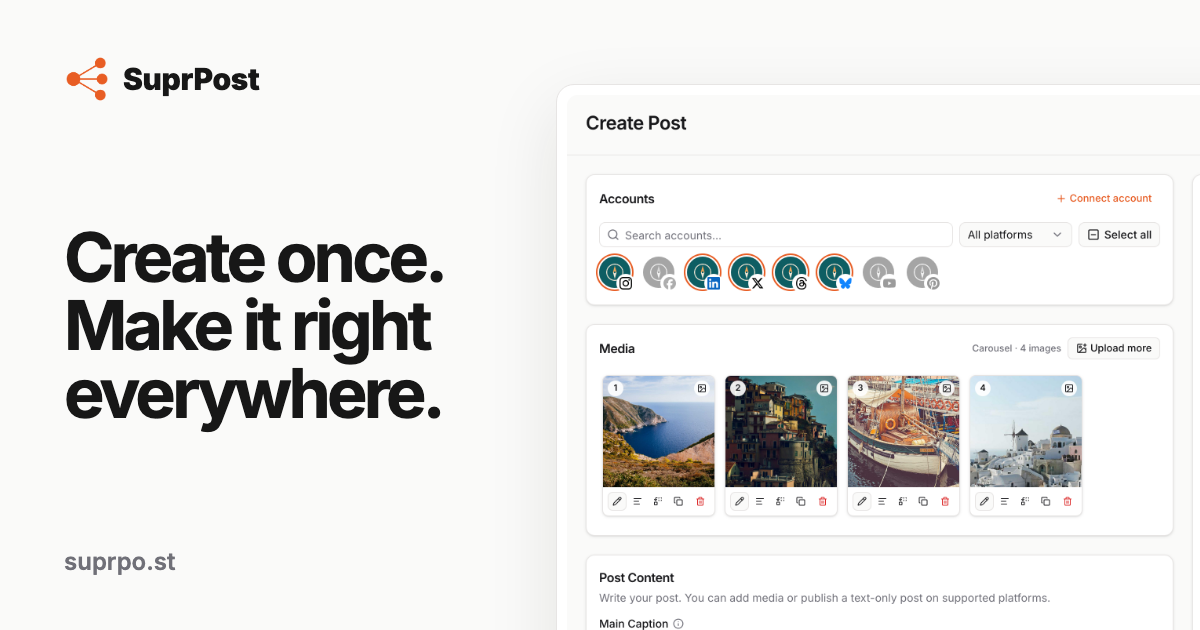
Publish to all your social platforms without manually resizing media, rewriting posts, fixing platform limits, or scheduling every account separately.

No paid content found
Visit website
Profile views 10 Outbound visits 2 Normal
SuprPost Full homepage screenshot

At a glance

Category
Social & Community
Language
English
Paid-content signal
No paid content foundObserved
Registered
2026
Hosting
VercelInferred
HTTPS certificate trusted
PassedObserved
Last updated

Website review

This review may include AI-generated content and is not individually verified. Domain, certificate and other facts come from the observed data on this page.

What is SuprPost?

SuprPost is a social media publishing tool built around a single idea: write a post once, then send it to multiple platforms without rebuilding it for each one. It handles the tedious parts of cross-posting — resizing media, adjusting captions, checking platform limits, and scheduling separate accounts — so you work from one draft instead of five.

Its core workflow has a few distinct pieces:

  • One draft, many destinations. You start with a single post, then customize the caption, media, or settings only for the accounts that need something different. Everything else inherits the original.
  • Pre-publish checks. Before anything goes out, SuprPost inspects each destination and flags what would fail or look wrong, with a suggested fix.
  • Platform-aware media editing. When an image would crop badly or be rejected, you can adjust it for that platform while keeping the original file intact. Crop, sizing, exposure, contrast, saturation, plus brand colors, fonts, logo, and watermark.
  • Scheduling and automation. Queues, recurring posts, and evergreen reuse let you set a publishing rhythm once rather than picking a date and time for every post.
  • Batch publishing. If you have 50 posts, you can create them from files, folders, or pasted text, apply account settings once, edit them together, and spread them across your schedule.
  • Reliable delivery. Each destination reports its own result, so a single failure doesn't force you to republish everything — you retry just the account that failed.
  • A reusable media gallery. Images and videos stay in a browsable library instead of scattered across folders.
  • Developer and AI access. MCP, a REST API, and signed webhooks let AI assistants or your own applications publish through the same engine. The page lists 27 MCP tools.

SuprPost names Instagram, Facebook, LinkedIn, Threads, X, YouTube, Pinterest, and Bluesky as supported destinations.

Who it suits

The clearest fit is someone running several accounts across several networks — a small marketing team, a solo creator, or an agency handling client profiles — where the bottleneck is repetitive formatting and scheduling rather than writing. If you only post to one platform, most of the value disappears.

The developer angle is worth noting separately: the MCP and REST access make it usable as a publishing backend for automation or AI-driven workflows, not just a manual dashboard.

A useful next step

The page advertises a 7-day free trial with no credit card required and all features included. The fastest way to judge it is to take one real post you'd normally adapt by hand for three or four networks, run it through SuprPost, and see how much of the resizing and rewriting it actually removes. That single test tells you more than a feature list.

Pricing is described as simple and all-inclusive, with the plan tiers chosen based on usage, so check the current pricing page for the actual limits and figures.

How does SuprPost handle different social media platform requirements when publishing the same post?

SuprPost starts from one post and adapts it per destination rather than forcing identical output everywhere. You write the caption and choose media once, then override captions, images, or settings only for the accounts that need something different. Before anything goes out, it checks each destination and shows what would fail—for example, an image that would crop badly or a caption that breaks a platform limit—along with the quickest fix. Media can be cropped and sized for a specific platform while the original stays intact, and you can apply brand colors, fonts, logo, and watermark. Each account publishes independently, so if one fails you retry just that destination instead of republishing the ones that succeeded, and publishing history and failures stay visible.

Where the differences show up

Requirement How SuprPost handles it
Captions and text Per-account captions, so you can rewrite only where needed
Image fit Platform-aware crop and sizing, original preserved
Platform rules Pre-publish checks flag issues per destination with fixes
Scheduling One rhythm via queues, recurring posts, evergreen reuse
Multiple accounts Bulk account and caption changes, grouped compatibility issues
Failure recovery Per-account results, retry only what failed

A practical example: you publish a product photo to Instagram, LinkedIn, and X. Instagram gets a square crop and a longer caption; LinkedIn keeps the original aspect ratio with a professional tone; X gets a short caption. If X rejects the post, you fix and retry only X.

Next step: if you manage many accounts or repurpose the same content across networks, test the workflow with one post aimed at three platforms with different image ratios and caption limits. That will quickly show whether the per-account overrides and pre-publish checks match how you actually work.

How does SuprPost's bulk publishing and batch scheduling work for large content volumes?

SuprPost treats bulk publishing as a batch workflow rather than a series of individual posts. The page describes creating a batch from files, folders, or pasted text, setting the destination accounts once, editing many posts together, and then spreading the batch across a schedule. The intent is that 50 posts do not need to be created 50 times.

What the batch workflow covers

  • Batch creation: Build a set of posts from files, folders, or pasted text.
  • Shared account setup: Choose the destination accounts once for the batch.
  • Group editing: Make bulk account and caption changes across many posts at once.
  • Cadence scheduling and queues: Spread the batch across your publishing rhythm instead of picking a date and time for every post.
  • Grouped compatibility checks: See platform issues across the batch before publishing, rather than discovering them one post at a time.

How scheduling fits in

The scheduling layer is built around a publishing rhythm you set once. Queues, recurring posts, and evergreen reuse keep content moving without manually choosing a new slot for every item. For a large batch, that means you define the cadence and let the posts flow into it.

Reliability at volume

Each destination reports its own result. If one account fails, you can retry just that destination without republishing the successful ones. Publishing history and failure visibility stay available, which matters when a batch touches many accounts and you need to know exactly what went out.

A practical scenario

Suppose you have 40 product images and captions in a folder. You create one batch, assign the accounts, adjust captions or media only where a platform needs something different, then spread the batch across your queue. Before publishing, SuprPost surfaces compatibility issues grouped together. After publishing, you review per-account results and retry only failures.

Decision criterion

This approach suits teams or creators publishing the same content across many accounts and platforms, especially when media needs platform-aware resizing and captions need per-account tweaks. If you publish one-off posts to a single platform, the batch machinery may be more structure than you need.

For the exact limits, supported file types, and scheduling options, check the product directly at SuprPost.

What happens if a post fails to publish to one platform but succeeds on others?

SuprPost treats each destination separately, so a single failed platform does not undo or block the successful ones. According to the product page, every destination has its own publishing result, and you can retry just the account that failed without republishing the posts that already went out. Publishing history and failure visibility are also listed, so you can see what happened and where.

What that looks like in practice

Suppose you publish one post to Instagram, LinkedIn, X and Threads. Instagram succeeds, LinkedIn succeeds, Threads succeeds, but X fails. The three successful posts stay live. You review the failure, fix whatever caused it, and retry only X. You do not rebuild the post or resend it to the other three networks.

Why per-destination results matter

  • No duplicate posts: Retrying only the failed destination avoids accidentally posting twice on networks that already succeeded.
  • Clearer troubleshooting: Because results are shown per account, you can tell whether the problem is account-specific, media-specific or platform-specific.
  • Better for batches: When publishing many posts to many accounts, grouped compatibility issues are surfaced before publishing, which reduces the chance of scattered failures later.

A useful next step

Before retrying a failed destination, check whether the issue is something SuprPost flags as a platform rule, such as media size, caption length or an unsupported format. Fix it for that destination only, then retry. If you manage several brands or clients, this per-account model is the main reason to use a multi-platform publisher rather than posting natively on each network. For a broader comparison of scheduling tools, see Buffer and Later.

Can SuprPost connect to AI assistants or custom applications through its API?

Yes. SuprPost exposes the same publishing engine used by its dashboard to outside tools, so an AI assistant or your own application can create and manage posts programmatically rather than through the web interface. The page lists MCP, a REST API, signed webhooks and OAuth for this purpose, and mentions 27 MCP tools.

What that means in practice

  • AI assistants (MCP): An MCP-capable assistant can be pointed at SuprPost and given publishing tasks in conversation — for example, drafting a batch of posts and scheduling them across connected accounts. The 27 listed tools suggest coverage of the main workflow steps (creating posts, adapting per-account captions and media, scheduling, and checking results), though the page does not enumerate them individually.
  • Custom applications (REST API + OAuth): Your own app can authenticate on a user's behalf via OAuth and publish through the API. This suits internal tools, client portals, or a content pipeline that already lives in another system.
  • Webhooks: Signed webhooks let your system react to events — useful for logging publishing results or triggering follow-up steps when a post succeeds or fails.

Who gets the most from it

A small agency running several client accounts could keep its own project tracker as the source of truth and push approved posts into SuprPost via the API, while an individual creator is more likely to use the dashboard directly. The API path matters most when publishing is one step in a longer automated workflow.

Decision criteria

  • If you need an assistant to publish on command, check whether your assistant supports MCP and whether the specific tools you need are among the 27.
  • If you are building an integration, confirm the REST API's rate limits, media handling and error semantics before committing — the page does not state these.
  • If you only need webhook notifications, verify which events are emitted and how signature verification works.

A useful next step is to test the integration path against a single destination account before wiring up all of them, since per-account results and retry-only-what-failed behaviour are central to how SuprPost handles multi-platform publishing.

What does SuprPost's pricing include and is there a free trial?

SuprPost's pricing page states that its plan is "everything included," and the product page advertises a 7-day free trial that does not require a credit card. The page also says all features are included during the trial. Beyond those claims, the supplied page evidence does not list a specific price, a number of tiers, or a per-month figure, so those details would need to be confirmed on the live pricing page.

What "everything included" covers

Based on the feature sections on the page, a subscription is presented as covering the full publishing workflow rather than a limited set of tools:

  • Publishing to multiple platforms from one post, with per-account captions, media, and platform-specific settings.
  • Pre-publish compatibility checks that flag what needs fixing at each destination.
  • Platform-aware image cropping and sizing, plus brand colors, fonts, logo, and watermark controls.
  • Scheduling tools: queues, recurring posts, and evergreen reuse.
  • Batch creation from files, folders, or pasted text, with bulk account and caption changes.
  • Per-account publishing results, retrying only failed destinations, and publishing history.
  • A media Gallery for reusable images and videos.
  • Developer and AI access through MCP, REST API, webhooks, and OAuth.

The platforms named on the page are Instagram, Facebook, LinkedIn, Threads, X, YouTube, Pinterest, and Bluesky.

Is the trial worth using as a test?

The trial is most useful if you treat it as a stress test of the parts that usually break multi-platform posting. A practical approach for a small team or solo creator:

  1. Connect two or three accounts with different media rules, such as Instagram and X.
  2. Publish one image-heavy post and let the compatibility check flag problems before publishing.
  3. Schedule a small batch of five to ten posts to see whether queues and bulk edits match how you actually work.
  4. Deliberately let one destination fail, then check whether retrying only that destination works as described.

If your main need is simply drafting and scheduling to one network, the breadth here may be more than you need. If you regularly post the same content across several networks and lose time resizing, rewriting, and rescheduling per account, the all-inclusive framing and the free trial make it reasonable to evaluate directly. Confirm current price and trial terms on the site before committing: SuprPost.

Related questions

More questions →
Can developers or AI agents publish through SuprPost?

Yes. SuprPost exposes the same publishing engine it uses for its dashboard to developers and AI agents through MCP, a REST API, signed webhooks, and OAuth. According to the site, this includes 27 MCP tools. If your goal is to let an AI assistant or your own application schedule and publish posts without going through the web UI, SuprPost is designed for that. If you only need manual posting, the standard dashboard is enough and the developer surface is optional.

What the developer and AI surface includes

The site lists four integration points, all connected to the same publishing engine that powers the dashboard:

  • MCP — for connecting AI assistants to the publishing engine. The site states 27 MCP tools are available.
  • REST API — for your own applications to call the publishing engine directly.
  • Signed webhooks — for receiving events, with signatures so you can verify they came from SuprPost.
  • OAuth — for authorization when connecting assistants or apps.

The key detail is that these are not a separate, reduced product. The site describes them as connecting "to the same publishing engine," so the platform-aware behavior described elsewhere (per-account captions and media, platform-specific settings, compatibility checks before publishing, per-account results) is what the API and MCP layer sit on top of.

When this is the right fit

Use the developer surface if:

  • You want an AI assistant to create and publish posts on your behalf, rather than drafting text you copy into each platform manually.
  • You have an internal tool or app that should push content to social platforms without rebuilding per-platform logic.
  • You need event-driven workflows — for example, reacting to a publish result or a failure via webhooks.
  • You want to automate at a scale where the dashboard alone is tedious, such as batches of posts across many accounts.

Stick with the dashboard only if your workflow is occasional manual posting and you have no system that needs to trigger publishing programmatically.

What the publishing engine handles for you

Because the API and MCP tools sit on the same engine, the automation inherits the platform-handling behavior the site describes:

  • Create once, adapt where needed — start from one post, then customize caption, media, and settings only for destinations that need something different.
  • Compatibility checks before publishing — the engine checks every destination and surfaces what's wrong and how to fix it, instead of you memorizing each platform's rules.
  • Platform-aware media — when an image may crop badly or be refused, it can be fixed for that platform while the original stays intact.
  • Per-account results and retries — each destination has its own result, so a single failure can be retried without republishing the ones that succeeded.
  • Scheduling primitives — queues, recurring posts, and evergreen reuse, plus bulk creation from files, folders, or pasted text.

For an AI agent, that means the agent can focus on content and intent while the engine enforces platform constraints and reports per-destination outcomes.

Practical notes before you build

  • Start from the documented entry points. The site names MCP, REST API, webhooks, and OAuth but does not publish endpoint-level detail in the material available here. Treat the site's developer section as the source for exact tool names, endpoints, and auth flow.
  • Plan for partial failure. Since results are per account, design your integration to read individual destination outcomes rather than assuming an all-or-nothing publish.
  • Verify webhook signatures. Signed webhooks exist specifically so you can confirm authenticity; use that rather than trusting payloads blindly.
  • Pricing and access terms are not specified here. The site mentions a 7-day free trial with no credit card required and "all features included," and references a pricing section, but the available material does not state API-specific limits, rate limits, or plan restrictions. Check the pricing page before committing to a production integration.

Bottom line

SuprPost is usable by developers and AI agents, not just human posters. If you want an assistant or an application to publish through the same engine that handles platform adaptation, compatibility checks, and per-account retries, the MCP, REST API, webhook, and OAuth surface is the intended path. Confirm current pricing and any API-specific terms on the site before you build, since those details are not covered in the material summarized here.

What is SuprPost?

SuprPost is a social media publishing tool built around one idea: create a post once, then let the platform adapt it for every destination. It supports Instagram, Facebook, LinkedIn, Threads, X, YouTube, Pinterest, and Bluesky. If you publish to several of those networks and are tired of resizing images, rewriting captions, and scheduling each account separately, SuprPost is aimed at you. It offers a 7-day free trial with all features included and no credit card required.

The problem it solves

Each platform has its own rules: image ratios, caption limits, formatting quirks, posting settings. The usual workaround is to rebuild the same post several times, or to publish something that gets cropped or rejected. SuprPost's stated goal is to remove that manual step. You start with one post and only customize the destinations that actually need something different.

How it works

Create once, adapt where needed

You write the post once, then adjust the caption, media, and settings only for the accounts that require it. Per-account captions and media are supported, along with platform-specific publishing settings, so you keep a single workflow instead of rebuilding every post.

Checks before publishing

Rather than memorizing every platform's rules, SuprPost checks each destination before publishing. If something needs attention, it shows what's wrong and the fastest way to fix it. Compatibility issues across a group of posts are surfaced together before anything goes out.

Media that fits

When an image might crop badly or be refused, you can fix it for that specific platform while keeping the original intact. The tool covers platform-aware crop and sizing, adjustments like exposure, contrast, and saturation, plus brand colors, fonts, logo, and watermark.

Scheduling and automation

You set your publishing rhythm once. Queues, recurring posts, and evergreen reuse keep content moving without picking a new date and time for every post.

Publishing at scale

For larger volumes, you can create a batch from files, folders, or pasted text, set accounts once, edit many posts together, and spread the batch across your schedule. Bulk account and caption changes are part of this.

Reliable publishing

Every destination gets its own result. If one account fails, you retry just that destination without republishing the ones that succeeded. Publishing history and failure visibility are kept in the dashboard alongside scheduled, published, and draft posts.

Reusable media

A Gallery lets you browse and organize reusable images and videos instead of hunting through folders each time you create a post.

For developers and AI agents

SuprPost exposes the same publishing engine through MCP, a REST API, and signed webhooks, with OAuth support and 27 MCP tools. This lets AI assistants or your own applications publish through it.

Who it's for

  • Multi-platform creators and small teams who post the same content to several networks and want to stop rebuilding it each time.
  • High-volume publishers who need batch creation, bulk edits, and cadence scheduling.
  • Developers and AI builders who want programmatic publishing via API, MCP, or webhooks.

Pricing and trial

The site lists "Simple pricing. Everything included." with a 7-day free trial, all features included, and no credit card required. Specific price tiers are not stated in the available material, so check the pricing page for current numbers before committing.

What to Know About SuprPost Pricing and Free Trial Before Signing Up

SuprPost offers a 7-day free trial with no credit card required, and its pricing page states that every feature is included in the plan you choose — you select based on account count or publishing volume rather than unlocking features tier by tier. That means the trial should let you test the full publishing workflow, not a stripped-down version. The exact dollar amounts and plan tiers are not published in the material available here, so treat the trial as the way to confirm cost and fit before committing.

What the free trial includes

According to SuprPost's own page, the trial runs for 7 days and requires no credit card to start. The same page says "All features included," which suggests the trial is not a limited preview of a paid tier.

What you can evaluate during those 7 days:

  • Multi-platform publishing to Instagram, Facebook, LinkedIn, Threads, X, YouTube, Pinterest, and Bluesky from one post.
  • Pre-publish checks that flag platform-specific problems (caption length, media rules) before you publish.
  • Platform-aware media resizing so one image gets the right crop per destination without altering the original.
  • Scheduling tools — queues, recurring posts, and evergreen reuse.
  • Bulk publishing from files, folders, or pasted text, with bulk account and caption edits.
  • Per-account results and retries, so a single failed destination doesn't force a full republish.
  • Developer and AI access via MCP (27 tools), REST API, webhooks, and OAuth.

If your goal is to confirm whether the tool handles your specific platform mix and media formats, the trial is the right place to test that — not the pricing page.

How pricing is structured

SuprPost describes its pricing as "Simple pricing. Everything included." and says you "Choose based on the..." — the sentence is cut off in the source, but the pattern matches account count or publishing volume as the deciding variable.

What you're choosing What it affects What it doesn't affect
Number of connected accounts How many destinations you can publish to Feature access
Publishing volume How much you can schedule or push out Feature access

The practical implication: you don't need to worry about a feature being locked behind a higher tier. You need to estimate how many accounts and how much volume you'll actually use.

What to check before the trial ends

Because the source doesn't list prices, the trial is your cost-discovery step. Before day 7:

  1. Count your real accounts. Connect every platform you'd actually publish to, not just one or two. This tells you which tier you'd need.
  2. Estimate your monthly volume. Use the bulk publishing feature to push a realistic batch and see whether your cadence fits a lower or higher plan.
  3. Test the failure path. Deliberately publish to a destination with a known issue (wrong aspect ratio, over-length caption) and confirm the per-account retry works as described.
  4. Check the developer surface if relevant. If you plan to publish through AI agents or your own app, verify the MCP tools and REST API during the trial — API access is a feature, and the page says all features are included.
  5. Ask about pricing directly. Since dollar figures aren't in the available material, contact SuprPost or check the pricing page for current numbers before your trial lapses.

Who this fits

SuprPost is aimed at people publishing the same content across many platforms who are tired of manually resizing media, rewriting captions per network, and scheduling each account separately. The bulk and batch features (create from files, folders, or pasted text; edit many posts together) suggest it's built for higher-volume publishers, not someone posting once a week to one account.

If you're a solo poster with two accounts, the value is mostly in the pre-publish checks and resizing. If you're managing dozens of accounts or running an AI-driven pipeline, the MCP tools, REST API, and per-account retry logic are the parts worth testing hardest during the trial.

The trial's no-credit-card condition means you can start without a payment commitment, but it also means you should treat the 7 days as a real evaluation window rather than a passive look — the pricing decision depends on data only you can generate.

How does SuprPost help publish one post to multiple social platforms?

SuprPost is a cross-platform publishing tool built around a single idea: write your post once, then let the system adapt it to each destination instead of rebuilding it per account. It handles caption and media differences, checks platform rules before publishing, resizes images per platform, and reports results per account so a single failure doesn't force you to republish everything. It fits anyone posting the same content to several networks — Instagram, Facebook, LinkedIn, Threads, X, YouTube, Pinterest, Bluesky are the listed destinations — who wants one workflow rather than a separate one per platform.

Start with one post, customize only where needed

The core workflow is "create once, adapt where needed." You begin with a single post, then customize the caption, media, and settings only for the destinations that actually require something different. That means:

  • Per-account captions and media, so a platform with a different tone or format gets its own version without a separate post.
  • Platform-specific publishing settings, applied only to the accounts they apply to.
  • One workflow instead of rebuilding every post from scratch for each network.

The practical effect: you don't maintain N copies of the same idea. You maintain one, plus the exceptions.

It checks platform rules before publishing

A common source of friction in cross-posting is memorizing each platform's limits and quirks. SuprPost checks every destination before publishing. If something needs attention, it shows you exactly what's wrong and the fastest way to fix it. When you're publishing in bulk, compatibility issues are grouped before publishing rather than surfacing one at a time.

This matters most when you're sending to many accounts at once — you see the problems up front instead of discovering them mid-publish.

Images are resized per platform, original kept intact

When an image may crop badly or be refused on a given platform, SuprPost fixes it for that platform while keeping the original intact. The listed capabilities include:

  • Platform-aware crop and sizing.
  • Adjustments such as exposure, contrast, and saturation.
  • Brand colors, fonts, logo, and watermark.

So one image becomes the right version everywhere, without you manually exporting a different file for each network.

Per-account results, retry only what failed

Publishing is tracked per destination. Each destination has its own result, and if one account fails, you retry just that destination without republishing the ones that succeeded. Publishing history and failure visibility stay available, so you can see what went out and what didn't.

This is the difference between "one failure means starting over" and "one failure means fixing one thing."

Scheduling, queues, and bulk publishing

You set your publishing rhythm once. Queues, recurring posts, and evergreen reuse keep content moving without picking a new date and time for every post. For larger volumes, you can create a batch from files, folders, or pasted text, set accounts once, edit many posts together, and spread the batch across your schedule — with bulk account and caption changes.

For developers and AI agents

SuprPost exposes the same publishing engine through MCP, a REST API, and signed webhooks, with OAuth. The page lists 27 MCP tools. This lets AI assistants or your own applications publish through the same system rather than a separate integration.

Pricing and getting started

The site describes "simple pricing, everything included," with a 7-day free trial and no credit card required, and states all features are included. The page does not list specific price figures, so check the pricing section for current numbers before committing.

If your main problem is keeping one post consistent across several networks without manual resizing, rewriting, and per-account scheduling, SuprPost is aimed directly at that. If you only post to one platform, the cross-platform adaptation features won't do much for you.

What automation and bulk publishing features does SuprPost offer?

SuprPost automates two separate parts of publishing: the calendar (queues, recurring posts, evergreen reuse) and the post volume (batches built from files, folders, or pasted text). It also isolates failures per destination, so one broken account doesn't force you to republish everything. These features apply if you're publishing to multiple accounts or platforms and want to stop setting dates and rebuilding posts one at a time.

Calendar automation: queues, recurring posts, evergreen reuse

The core idea is that you set your publishing rhythm once instead of choosing a date and time for every individual post.

  • Queues — posts move through a defined schedule rather than needing a manual slot each time.
  • Recurring posts — content repeats on a cadence you define.
  • Evergreen reuse — existing content can be pulled back into rotation.

Expected result: once the rhythm is set, new content flows into it without you re-deciding when each piece goes out. The tradeoff is that you need to define the cadence up front — if your posting times change week to week, a fixed queue may need adjusting rather than just working.

Bulk publishing: build a batch, not 50 posts

SuprPost's stated scenario is "Got 50 posts? Don't create them 50 times." The batch workflow:

  1. Create a batch from files, folders, or pasted text.
  2. Set accounts once for the batch.
  3. Edit many posts together — including bulk account and caption changes.
  4. Spread the batch across your schedule using cadence scheduling and queues.

Before publishing, SuprPost groups compatibility issues across the batch so you see what needs fixing in one pass rather than discovering problems post by post.

This suits anyone with a backlog of content — a content calendar export, a folder of drafts, or a list of captions. It fits less well if your posts are genuinely one-off and unrelated, since batching adds setup overhead you won't recover.

Failure handling: retry only what failed

Each destination reports its own publishing result. If one account fails:

  • The successful destinations are not republished.
  • You retry just the failed destination.

Publishing history and failure visibility stay available from the dashboard, alongside scheduled, published, drafts, and recent activity. This matters most when you're publishing to many accounts — a single failure in a 20-account batch costs you one retry, not a full re-run.

Automation for developers and AI agents

SuprPost exposes the same publishing engine through:

  • MCP — 27 tools listed
  • REST API
  • Signed webhooks
  • OAuth

This lets AI assistants or your own applications publish through the same pipeline rather than a separate integration. Relevant if you want automated publishing driven by an agent or an internal tool.

What to check before relying on it

  • Pricing and trial terms: the site references a 7-day free trial, "no credit card required," and "all features included," plus a "Simple pricing. Everything included." section. Confirm current plan details and limits on the pricing page before committing, since the source material doesn't specify tiers or caps.
  • Platform coverage: Instagram, Facebook, LinkedIn, Threads, X, YouTube, Pinterest, and Bluesky are listed. Verify your specific accounts are supported.
  • Cadence fit: queues and recurring posts assume a repeatable rhythm. If your schedule is irregular, plan to adjust manually.

If your main pain is rebuilding the same post for each platform, the batch and compatibility-grouping features address that directly. If your pain is deciding when to post, the queue and cadence features are the relevant ones — and they work best when set up once and left alone.

Website Overview

An active inbound-mail setup with incomplete authentication may leave the domain more open to impersonation. Provider hosting alone does not close that gap.

Domain and Registration

The domain was registered less than a year ago and has limited historical evidence to assess. Transfer-protection status is present, helping reduce the risk of unauthorized domain transfers. The registrar is Gandi, a widely used domain service provider. The domain uses the common .st extension, which is not an independent safety signal.

DNS and Email

The observed email authentication setup is incomplete: DMARC is missing. Nameservers are provided by Cloudflare, indicating managed DNS hosting. MX records point to the Google Workspace email service. No CNAME was found; the observed records resolve directly to addresses. TXT records include verification markers for Google. Such markers may also remain after a service stops being used.

TLS and Certificates

The certificate uses an RSA 2048-bit public key, offering broad client compatibility. The server supplied a complete certificate chain. No organization name is present in the certificate; the available fields are consistent with domain validation. The certificate was issued by Let's Encrypt, commonly associated with automated certificate services. The certificate's total validity is about 89 days, consistent with a short renewal cycle.

HTTP and Browser Security

The response lacks these common security headers: CSP, X-Content-Type-Options, Referrer-Policy, Permissions-Policy, clickjacking protection. CORS permits any origin to read this response. This is common for public resources; sensitive responses need narrower handling. No X-Powered-By header was found, reducing one common source of backend fingerprinting information. No obvious internal addresses or debug information were found in the headers. The Server header contains the custom value Vercel.

Technology Stack Analysis

The public page identifies Next.js, Vercel without precise versions, leaving fewer clues for version-specific scanning.

Search and Social Sharing

No homepage canonical URL was detected. If duplicate URLs exist, consolidation may be less explicit. Twitter Card metadata is configured. The title has 49 characters, within a common display range. A meta description is present, with 150 characters. The observed directives allow indexing and link following.

Hosting and Email

DNSCloudflare
HostingVercel
EmailGoogle Workspace
Approximate IP geolocation (inferred; a CDN or proxy may differ from the origin server) United States flagUnited States Inferred 216.150.1.193

Registration details

RDAP / WHOIS

RegistrarGandi
Registered2026-09-21
ExpiresUnknown
Domain statusclientTransferProhibited, serverTransferProhibited
Nameserversmina.ns.cloudflare.com、seth.ns.cloudflare.com
DNSSECunknown

DNS records

DNS

TypeNameValueTTLPriority
Asuprpo.st216.150.1.193300—
Asuprpo.st216.150.16.193300—
MXsuprpo.stsmtp.google.com30010
NSsuprpo.stmina.ns.cloudflare.com86400—
NSsuprpo.stseth.ns.cloudflare.com86400—
TXTsuprpo.stgoogle-site-verification=gTz4v-0fIWOG2JbX9eIGgOXKM1ZiwFUJrfzrsI944nk300—
TXTsuprpo.stgoogle-site-verification=txe1GKp2J8H83H2oF8Fr4-SGYDfq5sjXAx_jCQqVl2k300—
TXTsuprpo.sttiktok-developers-site-verification=geoZOxJySEYBCXvUVcLkWGPpvnayT3nd300—
TXTsuprpo.sttiktok-developers-site-verification=ss3EtTjkzOudAak2qjgmsWCMP4LzIPn4300—
TXTsuprpo.stv=spf1 include:_spf.google.com ~all300—

TLS and certificates

TLS / SSL

AssessmentNormal configuration
Supported protocolsTLSv1.2、TLSv1.3
Negotiated protocolTLSv1.3
Certificate subjectsuprpo.st
IssuerLet's Encrypt
Valid until2026-12-25T14:09 · Remaining when checked: 79 days
Verification detailsCertificate trust: Passed · Hostname match: Passed

HTTP response headers

HTTP

HeaderValue
content-typetext/html; charset=utf-8
cache-controlpublic, max-age=0, must-revalidate
serverVercel
strict-transport-securitymax-age=63072000
access-control-allow-origin*

Identified technologies

Next.jsVercel

Pages, Search and Sharing

Meta descriptionPublish to all your social platforms without manually resizing media, rewriting posts, fixing platform limits, or scheduling every account separately.
Canonical URLNot detected
LanguageEnglish (default)
Twitter Cardsummary_large_image

No robots.txt found

No sitemaps found

User reviews (0)

  • No reviews yet.