Website profiles · Technology insights · Alternatives

wagnermeters.com

Wagner Meters, the world leader in moisture meters, offers proven technology to eliminate wood and concrete moisture problems.

No paid content found Multilingual
Visit website
Profile views 4 Outbound visits 1 Normal
Wagner Meters Full homepage screenshot

At a glance

Category
Industry & Manufacturing
Language
English
Paid-content signal
No paid content foundObserved
Registered
2008
Hosting
TierPoint, LLCInferred
HTTPS certificate trusted
PassedObserved
Last updated

Website review

This review may include AI-generated content and is not individually verified. Domain, certificate and other facts come from the observed data on this page.

What is Wagner Meters?

Wagner Meters is a manufacturer of wood and concrete moisture measurement tools, based on its own site. Its lineup centers on three jobs: checking moisture in wood and lumber, testing moisture in concrete slabs, and monitoring ambient conditions and wood-floor data over time. It presents itself as equipment for professionals—flooring installers, woodworkers, sawmill and kiln operators, and building inspectors—rather than as a general-purpose consumer brand.

What the product range covers

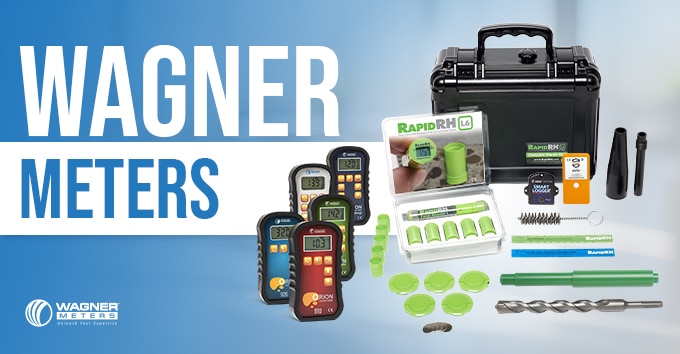
  • Wood moisture meters: pinless Orion meters and handheld industrial models, plus sawmill, planer and kiln options such as an in-line system, stack probe and industrial handhelds.
  • Concrete moisture testing: the Rapid RH L6 in-situ test and reusable 5.0 sensors, the C555 concrete moisture meter, DataGrabber logger and remote monitoring.
  • Monitoring and logging: Floor Sentry for wood-floor ambient data, Smart Logger, and remote monitoring for jobsites.
  • Supporting resources: guides, ASTM F2170 checklist, floor map, calculators, webinars and a "which product is right for you" selector.

Who it suits

A flooring installer deciding whether a slab is dry enough for a wood floor is the clearest fit: an in-situ concrete test plus ambient logging addresses the two things that most often cause callbacks. A small woodshop, by contrast, likely needs only a handheld meter, while a sawmill or kiln operation would look at in-line and stack-probe measurement. The trade-off is that the range is specialized and layered—concrete testing, wood metering and environmental monitoring are separate purchases, so matching the tool to your actual workflow matters more than buying the most featured option.

Next step

Start with the site's product selector and the "pin vs pinless" guidance, then confirm which measurement method your work or spec requires. For concrete work, check whether the job calls for in-situ testing under ASTM F2170 before choosing between the Rapid RH and C555 approaches.

How do I choose between a pinless wood moisture meter and a concrete moisture testing system for my project?

Choose based on what you are measuring, not on which meter looks more advanced. A pinless wood moisture meter measures moisture in wood; a concrete moisture testing system measures moisture conditions in a concrete slab before a floor covering goes down. If your project involves wood, start with wood measurement. If it involves a slab receiving flooring, start with concrete testing. Many flooring jobs need both, because the slab and the wood must each be within acceptable ranges before installation.

Match the tool to the material and decision

Your situation Tool to start with Why
Checking boards, lumber, or wood flooring for moisture content Pinless wood moisture meter Gives quick readings across a board surface without pins; useful for screening and comparing areas
Preparing to install flooring over a concrete slab Concrete moisture testing system Answers whether the slab is dry enough for the covering, which is a different question from wood moisture content
Installing wood flooring over concrete Both The slab condition and the wood's moisture content are separate checks
Sawmill, planer, or kiln workflow Wood moisture measurement, often with stack or in-line options Moisture control matters across many boards, not just one spot
Building inspection or general troubleshooting Wood meter first, then concrete testing if a slab is involved Start with the material most likely to be the source of the problem

Wagner Meters organizes its products around these distinct jobs: Orion pinless wood meters, industrial hand-held meters, sawmill/planer/kiln options, and concrete testing built around Rapid RH sensors, the C555 concrete meter, and data logging. That structure reflects the practical split: wood measurement is usually about moisture content in a board, while concrete testing is about whether a slab is ready for a floor.

A practical way to decide

Ask what decision the reading will support. If the decision is "is this wood dry enough to machine, install, or finish," a pinless wood meter is the direct tool. If the decision is "can this slab receive flooring," use a concrete moisture testing system and follow its test method. For a combined wood-over-concrete project, plan the concrete test first, because a failed slab check can change the whole schedule.

As a next step, list the materials on your project and the pass/fail decision for each. Then use Wagner's product selector or compare-wood-meters page to narrow the specific model, and confirm the test method your flooring manufacturer or specification requires before buying.

How does the Rapid RH in-situ concrete moisture test work and when should I use it instead of a surface meter?

Rapid RH is an in-situ relative humidity test: small sensors are placed in holes drilled into a concrete slab, and the humidity in the hole is read over time to estimate the slab's moisture condition. It measures the moisture inside the slab rather than only at the surface. Wagner Meters presents it as part of its concrete moisture testing line, including single-use and reusable sensor versions, a data logger and remote monitoring, and it publishes an installation guide and an ASTM F2170 checklist Wagner Meters.

When to choose it over a surface meter

Use Rapid RH when the decision depends on what is happening inside the slab—typically before installing flooring, coatings or other moisture-sensitive finishes, and when a project specification calls for in-situ testing under ASTM F2170. A surface meter is quicker and useful for screening many spots or checking surface conditions, but it reads near the surface and can miss moisture deeper in the slab. The trade-off is time and preparation: in-situ testing requires drilling, sensor placement and waiting for readings to stabilize, while a surface meter gives an immediate indication.

For a concrete contractor preparing a slab for a wood floor, the practical sequence is to screen the slab with a surface meter to find suspect areas, then use Rapid RH at the specified locations and record the readings. Check the project specification and the sensor instructions for hole depth, number and timing before relying on either result.

Can I trade in my old wood moisture meter for a discount on an Orion, and how does the upgrade program work?

Yes. Wagner Meters advertises a trade-in credit toward a new Orion: the site's current offer is $75 toward a new Orion when you trade in an old wood moisture meter, described as a limited-time upgrade to pro-level accuracy. The page shows the offer but not the full terms, so the exact mechanics — which old meters qualify, whether the credit is a rebate or applied at purchase, and how long the offer runs — need to be confirmed with Wagner Meters before you count on the discount.

How to work the program in practice

  1. Check eligibility first. The offer says "old wood meter" without naming brands or models. If you're trading in a non-Wagner meter, confirm it qualifies before shipping anything.
  2. Ask where the credit lands. A $75 credit applied to the order is very different from a mail-in rebate that arrives weeks later — especially if you're buying during a busy flooring season.
  3. Compare against the Orion model you actually need. The Orion line is pinless, and the site directs buyers to a "Compare Wood Meters" page and a "Which Wagner Meters Product Is Right For You?" tool. Run your typical stock — kiln-dried flooring, rough lumber, or thick timbers — through that comparison so the $75 doesn't pull you toward a model that measures at the wrong depth for your work.
  4. Keep your old meter until the new one is in hand. If the trade-in requires shipping first, plan for a gap; a flooring installer mid-project may prefer to buy first and settle the trade-in afterward if Wagner allows it.

Who this suits

The trade-in makes most sense for woodworkers and flooring installers still using a pin-type meter who want pinless convenience and are ready to step up in price. For a sawmill or kiln operation, the bigger question is whether an industrial hand-held unit or in-line system fits better than a handheld Orion — the trade-in credit is small next to that decision.

A sensible next step: call Wagner Meters at the number listed on the site (800-634-9961) and ask three things — eligible trade-in meters, credit timing, and the offer's end date — then use their wood meter comparison page to pick the Orion model before you commit. For independent background on pin vs. pinless measurement, Wood Magazine and Fine Woodworking publish practical explainers worth reading alongside the manufacturer's own guidance.

Which Wagner meter fits my specific role—flooring installer, woodworker, or sawmill/kiln operator?

Wagner groups its meters by trade rather than by one universal model: flooring installers, woodworkers and sawmill/kiln operators each have a different bottleneck, so the right choice depends on what you measure, where you measure it and how often. Use the product pages' own "Find the Right Moisture Measurement Tool for Your Needs" guide as the final check, since it maps roles to specific tools.

Match the role to the measurement job

Role What you mainly need to measure Wagner tools aimed at this role Main trade-off
Flooring installer Moisture in concrete slabs and ambient conditions before and during installation Rapid RH L6 in-situ test, C555 concrete meter, DataGrabber logger, Floor Sentry ambient monitoring In-situ testing is more involved than surface metering but gives slab-depth readings tied to documented test methods
Woodworker Moisture in boards and project stock, usually checked quickly at the bench Orion pinless meters, industrial hand-held meters Pinless scanning is fast and non-damaging; pin meters can still be preferred for pinpoint checks
Sawmill / planer / kiln operator Moisture across stacks, in-line production and kiln schedules Industrial hand-held meters, L722 lumber stack probe, in-line system Higher throughput needs stack probes or in-line measurement rather than a single hand-held reading

How to decide

Start from the decision you have to defend. A flooring installer is usually answering "is this slab dry enough to cover, and can I prove it?"—which points toward in-situ concrete testing plus ambient logging. A woodworker is answering "is this board ready to machine and finish?"—where a fast pinless scan over many boards matters more than documentation. A sawmill or kiln operator is answering "where in this stack or run is moisture out of spec?"—which favors stack probes and in-line systems over spot checks.

Frequency and volume are the second filter. Occasional spot checks suit a hand-held meter; daily production and kiln charge after kiln charge justify the L722 stack probe or an in-line setup. If you also monitor the building or drying space, Floor Sentry and Smart Logger cover ambient conditions separately from wood or concrete readings.

A practical next step: write down your three most common measurements (for example, slab readings at depth, board scans at the planer, stack checks after drying), then use Wagner's product-selection guide and its wood meter comparison page at Wagner Meters to confirm which tool covers all three before buying. For method background, the pin-versus-pinless article and the ASTM F2170 checklist in the resources section are worth reading first.

How do I calibrate a Wagner moisture meter and adjust it for different wood species?

Wagner Meters publishes calibration and species-setting guidance for its wood meters, so the practical answer is to use Wagner's official calibration process and species settings rather than a generic method. On the site, look under Resources → Wood/Moisture Meters for "Calibration Process" and "Species Settings and Manuals," which cover calibration and the species adjustments for Wagner's Orion and other wood meters.

What to do in practice

  • Identify your model first. Species settings and calibration steps differ across Wagner's wood meters, so match the instructions to the exact meter you own.
  • Set the species before measuring. Use the meter's species setting or correction table so readings reflect the wood you're testing; the manual lists the supported species and their settings.
  • Recalibrate only as the manual directs. Follow Wagner's stated calibration process and interval, and use its documented calibration reference rather than improvising with a shop standard.
  • Check the meter against known-dry stock. A practical cross-check is a piece of lumber you know is at a stable, documented moisture content; a large gap suggests a settings or calibration issue.

A concrete scenario

A woodworker comparing a fresh board against kiln-dried stock should set the species, confirm the meter's calibration status per the manual, then take several readings across the board—not one spot—since surface and internal moisture can differ.

Next step: download the manual for your specific meter from the Species Settings and Manuals page at Wagner Meters, and note the species setting and calibration interval for your model before your next project.

Related questions

More questions →
What Is the Difference Between Pin and Pinless Wood Moisture Meters?

Pin meters send current through two metal pins pushed into the wood and read the electrical resistance between them; pinless meters scan the surface with an electromagnetic field and infer moisture content from the dielectric properties of the wood beneath the sensor. The practical split is this: pin meters give you a reading at a specific point and depth (the pin tips), while pinless meters average moisture over a small patch of surface and into the wood below it, without leaving holes. Choose pin if you need to probe deep or check a precise spot; choose pinless if you need fast, non-damaging scans across many boards or finished surfaces.

How each type works

Pin meters: resistance at the pin tips

Two insulated pins are driven into the wood, and the meter measures how much electrical resistance exists between them. Dry wood resists current strongly; wet wood resists less. Because the reading depends on the wood between the pin tips, the measurement depth is essentially the pin length — short pins read the surface layers, longer pins read deeper.

What this means in practice:

  • Point measurement. You get the moisture at the exact spot the pins enter, not the board as a whole.
  • Depth control. Insulated pins let you read at a chosen depth rather than averaging the whole pin path.
  • Visible marks. Every reading leaves two small holes. On rough lumber or hidden framing that is irrelevant; on a finished floor or a board that will be sanded and finished, it matters.

Pinless meters: electromagnetic scan of a surface patch

A pinless meter presses a sensor pad against the wood and generates an electromagnetic field. The field's behavior changes with the wood's dielectric properties, which track moisture content. The meter converts that into a moisture reading.

What this means in practice:

  • No holes. You can scan a finished or visible surface repeatedly.
  • Averaged reading. The value represents the wood under the sensor footprint, not a single point — useful for finding wet pockets across a board, less useful for pinpointing a thin wet layer.
  • Depth depends on the field and the wood. Reading depth is a function of the sensor design and the material, not something you set with pin length. Thick stock and species density both affect how deep the scan effectively reaches.

Side-by-side comparison

Dimension Pin meter Pinless meter
Contact method Pins driven into wood Sensor pad pressed on surface
Surface damage Leaves pin holes None
Reading type Point reading at pin tips Averaged reading over sensor area
Depth control Set by pin length / insulation Set by sensor design and material; not user-selected
Speed on many boards Slower (insert, read, withdraw) Fast (press and scan)
Best fit Deep probes, spot checks, thick stock, framing Finished surfaces, rapid scanning, large batches

Which one fits your work

Use the questions below to decide; the right answer usually follows from the surface and the thickness.

  • Will the surface stay visible or finished? If yes — installed flooring, furniture faces, anything that will be sanded and finished — pinless avoids holes you would have to fill or sand out.
  • Do you need to read deep into thick stock? Pin meters with long or insulated pins let you measure at a chosen depth. Pinless depth is governed by the sensor and the wood, so confirm the meter's stated capability for your thickness before relying on it.
  • Are you checking many boards quickly? Pinless scanning is faster per board and is well suited to sorting a stack or finding outliers before you commit to a cut.
  • Do you need to confirm one suspicious spot? A pin meter gives you a precise point reading; a pinless scan tells you where to look.

Many shops end up using both: pinless to scan broadly and flag problem areas, pin to confirm a specific spot or probe deeper. Wagner Meters' own resource library frames the choice the same way, with a dedicated "Pin vs Pinless Moisture Meters" article and a wood meter comparison page, plus species settings and manuals for calibrating readings to the wood you're using.

Practical checks before you buy

  • Match the meter to the material. Wood meters are set for wood; concrete moisture testing is a separate product line (Wagner's concrete side includes the C555 meter and the Rapid RH in-situ system). Don't expect one meter to cover both.
  • Check species settings. Moisture readings vary by species, so confirm the meter supports the species you work with or that you can apply the correct correction.
  • Confirm depth for your thickest stock. Ask specifically how deep the reading reaches in your species and thickness — this is the main limitation of pinless meters.
  • Plan for calibration. Wagner publishes its calibration process and species manuals; factor that routine into ownership.
  • Verify current pricing and offers directly. Wagner's site lists products and promotions (for example, a trade-in credit toward an Orion meter and an industrial pinless model), but prices and offer terms are not stated in the page content — check the product pages or call (800) 634-9961 before budgeting.
How to Calibrate a Wagner Meters Moisture Meter and Verify Accuracy

Wagner Meters publishes a calibration process and product manuals as resources, but the site does not spell out a single step-by-step calibration procedure for every meter. The practical answer: treat calibration as a factory or support-guided process, and treat accuracy verification as routine checks you can do yourself with the meter's manual, species settings, and known references. Before adjusting anything, confirm which model you own and pull its manual from the Resources section, because pinless wood meters, pin-type meters, and concrete meters are handled differently.

Calibration vs. verification: know which one you need

These are two different tasks, and mixing them up is the most common source of trouble.

  • Calibration adjusts the meter's internal response so readings match a reference standard. On Wagner wood meters this is generally a controlled, factory-level process; the site lists "Calibration Process" under Wood/Moisture Meter resources rather than offering a user-facing adjustment menu.
  • Verification is a check that the meter is reading sensibly. You do this in the field or shop without changing the instrument.

If a reading looks wrong, verify first. Only escalate to calibration or support when verification fails.

Step 1: Identify your meter and get its manual

  1. Note the model name or SKU on the meter (for example, an Orion series pinless meter, an industrial hand-held meter, or the C555 concrete meter).
  2. Go to wagnermeters.com and open the Resources area for your product category — Wood/Moisture Meters, Concrete Moisture Testing, or Sawmill/Planer/Kiln.
  3. Download the manual for your exact model. The site also offers a "Shop by SKU" lookup and a "Compare Wood Meters" page if you are unsure which model you have.

Expected result: you have the manufacturer's instructions for your specific instrument, including any stated calibration or service guidance.

Step 2: Verify accuracy with practical checks

Use these checks in order. Each one isolates a different cause of a bad reading.

Check the species setting (wood meters)

Pinless wood meters depend on a correct species setting to convert an electrical reading into a moisture content value. The site lists "Species Settings and Manuals" as a resource, which tells you the setting matters. If the species is wrong, the meter is not inaccurate — it is being asked the wrong question.

  • Confirm the species group for the wood you are measuring.
  • Re-read the same board after correcting the setting.
  • Expected result: readings shift to a plausible range for the material's condition.

Check surface contact and measurement depth

Pinless meters read a volume of material below the surface, and the L5300 is marketed on measuring deeper. Poor contact on rough, curved, or cold lumber produces low or erratic readings.

  • Measure on a flat, clean surface.
  • Take several readings along the board and compare.
  • Expected result: consistent readings across the same board; large scatter points to contact or material variation, not necessarily a calibration fault.

Use a reference comparison

Compare the meter against an independent method on the same material — for example, a pin-type reading, a oven-dry sample result, or a second meter of known good status. Agreement within the tolerance stated in your manual supports the meter's accuracy; a consistent offset across many samples is the pattern that justifies a calibration inquiry.

Check the concrete side separately

Concrete moisture testing is a different discipline. The Rapid RH L6 in-situ test, the C555 concrete meter, and the DataGrabber logger each have their own procedures, and the site provides a Rapid RH Installation Guide, an ASTM F2170 checklist, and a Rapid RH floor map. For concrete, follow the test method and installation guide rather than treating the meter as a hand-held wood-style device.

Step 3: Decide whether to recalibrate or contact support

Escalate when you see one of these patterns:

Signal Likely meaning Action
Readings consistent with references Meter is fine No calibration needed
Wrong species setting User error Correct setting and re-measure
Consistent offset across many samples Possible calibration drift Contact Wagner support; follow the published calibration process
Erratic readings on good contact Contact, material, or hardware issue Re-check technique, then contact support
Concrete readings disputed Test method issue Review the ASTM F2170 checklist and installation guide

Wagner Meters lists phone support at (800) 634-9961, along with free webinars, a video library, and downloadable literature. Use the manual first, then support, and avoid improvising adjustments that are not described in your model's documentation.

Common sticking points

  • Assuming every meter is user-calibratable. The site frames calibration as a process with published guidance, not a universal do-it-yourself menu.
  • Skipping the species setting. This is the most frequent cause of "wrong" wood readings.
  • Judging a meter from one board. Moisture varies within and between boards; compare multiple samples.
  • Mixing concrete and wood procedures. They use different standards and accessories; follow the category-specific guides.
  • Ignoring service notices. The site posts closures and shipping changes, which affect turnaround if you send a meter in.

Bottom line

Verify before you calibrate: confirm the model and manual, check species settings and surface contact, compare against an independent reference, and use the category-specific guides for concrete. If a consistent offset persists, use Wagner's published calibration process and support channels rather than adjusting the meter yourself.

What Is Wagner Meters and What Does wagnermeters.com Offer?

Wagner Meters is a manufacturer of moisture measurement instruments for wood and concrete, and wagnermeters.com is its official product and resource site. It is aimed at professionals who need to verify moisture conditions before installing, machining, or drying wood and concrete—flooring installers, woodworkers, sawmill and kiln operators, and building inspectors. The site is organized around product lines, buying options, and technical resources rather than general consumer content.

Main Product Categories

The site groups its offerings into four functional areas:

Concrete Moisture Testing

  • Rapid RH® L6 — in-situ relative humidity test, available as single-use sensors
  • Rapid RH® 5.0 — reusable sensor version
  • C555 Concrete Moisture Meter — handheld concrete moisture measurement
  • DataGrabber® — concrete data logger
  • True Remote Monitoring™ — remote data collection

Wood Moisture Meters

  • Orion® line of pinless wood moisture meters
  • Industrial handheld meters
  • L5300 Industrial Pinless Wood Moisture Meter (highlighted as a newer product)
  • A wood meter comparison page for choosing between models

Sawmill, Planer, and Kiln Measurement

  • Industrial handheld meters
  • L722 Lumber Stack Probe
  • In-Line System for continuous measurement
  • Consultation scheduling for mill operations

Ambient Conditions and Building Inspection

  • Floor Sentry® wood floor data logger
  • Smart Logger™ ambient conditions monitoring
  • Building inspection tools

Who Each Line Is For

User Typical need Relevant products
Flooring installers Verify slab or wood moisture before install Rapid RH L6/5.0, C555, Floor Sentry
Woodworkers Check stock moisture before machining Orion pinless meters
Sawmill/kiln operators Monitor drying and stack moisture L722 stack probe, in-line system, industrial meters
Building inspectors Document moisture conditions C555, DataGrabber, Smart Logger

Beyond Products: Resources and Support

The site also functions as a reference library. Available resources include:

  • Concrete: Rapid RH installation guide, ASTM F2170 checklist, Rapid RH floor map, slab moisture testing spec, articles, videos, and FAQs
  • Wood: articles and videos, a pin vs. pinless explainer, calibration process documentation, species settings and manuals
  • Sawmill/kiln: resource guide and catalog, lumber price tracker, and an overdrying/underdrying calculator
  • General: free webinars, downloadable literature, a video library, industry events, mobile apps, and support pages

There is also a Find a Distributor tool and a "Which Wagner Meters Product Is Right For You?" selector for matching a tool to a task.

Buying Notes

The site references an upgrade path—for example, a limited-time trade-in offer of $75 toward a new Orion when trading in an old wood meter. Product pages and a shop-by-SKU option exist, but the provided material does not list prices or confirm whether purchases require an account. Check individual product pages or contact the company at the listed phone number (800-634-9961) for current pricing and availability.

If you are deciding whether the site is useful to you: start with the product selector if you know your application, or go directly to the Rapid RH resources if your work involves concrete slab testing under ASTM F2170.

How to Choose the Right Wagner Meters Moisture Meter for Your Needs

Choose by application first, not by model number. Wagner Meters organizes its products around four jobs: woodworking, wood flooring installation, sawmill/planer/kiln measurement, and concrete moisture testing. Pick the category that matches what you measure, then decide whether you need a hand-held meter, a data logger, or a fixed in-line system. The site's "Which Wagner Meters Product Is Right For You?" tool and its "Compare Wood Meters" page are the fastest ways to narrow the field once you know your category.

Start With the Material You Measure

The product lines map directly to material and workflow:

Your job Relevant Wagner product families What the site says they cover
Woodworking and general wood measurement Orion® pinless wood moisture meters; industrial hand-held meters Pinless wood moisture measurement; hand-held industrial use
Wood flooring installation Orion® meters; Floor Sentry® wood floor data logger; Smart Logger™; True Remote Monitoring™ Meter plus ambient conditions monitoring and remote data
Sawmill, planer, or kiln Industrial hand-held meters; L722 lumber stack probe; in-line system Stack probing, in-line measurement, kiln-related measurement
Concrete moisture testing Rapid RH® L6 in-situ test; C555 concrete moisture meter; DataGrabber® concrete data logger; True Remote Monitoring™ In-situ testing, surface metering, and data logging

If you work across more than one material, expect to need more than one tool. A pinless wood meter does not substitute for an in-situ concrete test, and the site treats concrete testing as its own product family with its own installation guide and ASTM F2170 checklist.

Decide Between Hand-Held and Fixed or In-Line Systems

This is the second decision, and it follows from volume and workflow:

  • Hand-held meters suit spot checks, job-site inspections, and installers moving between locations. The Orion® line and the industrial hand-held meters fall here.
  • Stack probes and in-line systems suit sawmill and kiln operations where lumber is measured in stacks or on a production line. The L722 lumber stack probe and the in-line system are listed under sawmill/planer/kiln.
  • Sensors and data loggers suit concrete slabs where you need a documented, time-based record rather than a single reading. Rapid RH® L6 sensors, the DataGrabber® logger, and True Remote Monitoring™ serve this.

A practical rule: if you need a number at one moment, a hand-held meter is enough. If you need a record over time or across many points, add a logging or monitoring product.

Add Data Logging or Environmental Monitoring Only If You Need It

Wagner separates ambient conditions monitoring from moisture measurement. Floor Sentry® is described as a wood floor data logger, and Smart Logger™ and True Remote Monitoring™ appear under ambient conditions monitoring. These matter when the question is not just "what is the moisture content" but "what were the temperature and humidity conditions, and can I show them later?"

For flooring installers, this combination is the site's stated focus: a meter for the wood plus ambient monitoring for the space. For a woodworker doing one-off projects, the meter alone is usually the relevant purchase.

Use the Site's Own Selection and Comparison Tools

The homepage offers two direct paths:

  1. "Which Wagner Meters Product Is Right For You? Find Out →" — a guided selection entry point.
  2. "Compare Wood Meters" — a side-by-side comparison within the wood meter line.

Both are linked from the main navigation under the product categories, so you can reach them without hunting. The site also publishes a "Pin vs Pinless Moisture Meters" resource, which is worth reading before choosing a wood meter, since the measurement principle affects what the reading means.

Check Support and Resource Fit Before Buying

Wagner publishes material that signals how each product is meant to be used:

  • Concrete: Rapid RH installation guide, ASTM F2170 checklist, Rapid RH floor map, and a concrete slab moisture testing spec.
  • Sawmill/kiln: resource guide and catalog, a lumber price tracker, and a sawmill overdrying and underdrying calculator.
  • Wood: calibration process, species settings and manuals, and free webinars.

If a product family has an installation guide and a testing spec, that tells you it is intended for documented, standards-referenced work. If it has species settings and calibration documentation, it is intended for varied wood species. Match the resource set to the rigor your job requires.

A Short Decision Sequence

  1. Identify your material: wood, wood flooring, lumber in stacks or kilns, or concrete.
  2. Decide whether you need a single reading (hand-held) or a record over time (logger, sensor, or remote monitoring).
  3. If wood, read "Pin vs Pinless Moisture Meters" and use "Compare Wood Meters."
  4. If concrete, review the Rapid RH installation guide and ASTM F2170 checklist to confirm the method fits your project.
  5. Use "Which Wagner Meters Product Is Right For You?" to confirm the shortlist, then check distributor availability via "Find a Distributor."

Pricing and promotional details, including the trade-in offer mentioned on the homepage, are time-limited and should be confirmed on the site or with a distributor rather than assumed.

How the Rapid RH System Tests Concrete Moisture

Wagner Meters' Rapid RH® system tests concrete moisture by measuring relative humidity (RH) inside a drilled hole at a specified depth, following the in-situ method described by ASTM F2170. You drill and clean a hole, seal in a Rapid RH sensor, let it equilibrate, then read the RH and temperature. The system comes in single-use (Rapid RH® L6) and reusable (Rapid RH® 5.0) sensor versions, with readings collected by a handheld reader or the DataGrabber® data logger.

What the test measures and why depth matters

A surface meter reads only the top layer of a slab, but moisture deeper in the slab can migrate upward after flooring is installed. In-situ testing places the sensor at a defined depth so the reading reflects the slab's internal humidity. ASTM F2170 is the standard Wagner references for this method, and the site provides an ASTM F2170 checklist and a concrete slab moisture testing spec you can hand to a project team.

The Rapid RH test sequence

The exact hole depth, number of holes, and equilibration time are set by the ASTM F2170 procedure and the project spec—confirm both before drilling. The general sequence:

  1. Prepare the hole. Drill to the specified depth, then clean the hole thoroughly. Dust left in the hole skews the reading.
  2. Seal and place the sensor. Insert the Rapid RH sensor and seal the hole so the sensor is isolated from ambient air.
  3. Let it equilibrate. Wait the period the standard and sensor instructions require before taking a reading.
  4. Read and record. Use the handheld reader or the DataGrabber® data logger to capture RH and temperature.
  5. Map the results. Log each reading against its location so the floor plan shows where the slab is wetter.

Single-use vs. reusable sensors

Rapid RH® L6 (single-use) Rapid RH® 5.0 (reusable)
Sensor Left in place after reading Retrieved and reused
Best for One-time verification, documented records Multiple projects or repeated checks
Trade-off No retrieval step Requires recovery and care between uses

Choose single-use when you want a permanent record in the slab; choose reusable when sensor cost across many jobs matters more than leaving sensors behind.

Resources that support the test

Wagner publishes a Rapid RH installation guide, a Rapid RH floor map, an ASTM F2170 checklist, and concrete moisture articles and videos. The floor map is the practical tool for tracking hole locations and readings across a large slab; the checklist keeps the sequence from being skipped.

Common pitfalls

  • Skipping hole cleaning. Dust and debris are a frequent cause of readings that don't match later floor performance.
  • Reading too early. Equilibration time is not optional; a rushed reading understates or overstates slab humidity.
  • Too few test locations. The standard and project spec define how many holes a slab needs—follow them rather than sampling one spot.
  • Confusing surface and in-situ results. A C555 concrete moisture meter and the Rapid RH in-situ test answer different questions; don't substitute one for the other in a flooring decision.

For product selection across concrete and wood, Wagner's "Which Product Is Right For You?" tool and its distributor locator are the next stops.

Website Overview

An established domain and managed infrastructure suggest continuity of operations and may support dependable delivery, although neither guarantees service quality. Page metadata, canonical configuration and social previews work together to provide more consistent search and sharing presentation.

Domain and Registration

Registered in 2008, this domain has about 18 years of history. That suggests continuity, although ownership and purpose may have changed. Transfer-protection status is present, helping reduce the risk of unauthorized domain transfers. The registrar is GoDaddy.com, LLC, a widely used domain service provider. The domain uses the common .com extension, which is not an independent safety signal.

DNS and Email

Nameservers are provided by GoDaddy, indicating managed DNS hosting. MX records point to the Microsoft 365 email service. No CNAME was found; the observed records resolve directly to addresses. SPF and DMARC are configured. DKIM status is unknown. TXT records include verification markers for Google, Apple, Microsoft. Such markers may also remain after a service stops being used.

TLS and Certificates

The certificate uses an RSA 4096-bit public key, offering broad client compatibility. The server supplied a complete certificate chain. No organization name is present in the certificate; the available fields are consistent with domain validation. The certificate was issued by Let's Encrypt, commonly associated with automated certificate services. The certificate's total validity is about 89 days, consistent with a short renewal cycle.

HTTP and Browser Security

X-Powered-By exposes backend information: PHP/8.4.27. The response lacks these common security headers: CSP, X-Content-Type-Options, Referrer-Policy, Permissions-Policy, clickjacking protection. CORS permits any origin to read this response. This is common for public resources; sensitive responses need narrower handling. No obvious internal addresses or debug information were found in the headers. The Server header contains the custom value LiteSpeed.

Technology Stack Analysis

The public page identifies WordPress, HubSpot CMS, jQuery, Google Tag Manager, PHP without precise versions, leaving fewer clues for version-specific scanning.

Search and Social Sharing

Twitter Card metadata is configured. JSON-LD includes Organization data, helping describe the organization as an entity. The page declares 13 language or regional alternatives using hreflang. The title has 47 characters, within a common display range. A meta description is present, with 126 characters.

Hosting and Email

DNSGoDaddy
HostingTierPoint, LLC
EmailMicrosoft 365
Approximate IP geolocation (inferred; a CDN or proxy may differ from the origin server) United States flagUnited States Inferred 72.249.68.159

Registration details

RDAP / WHOIS

RegistrarGoDaddy.com, LLC
Registered2008-08-18
Expires2028-08-18
Domain statusclient delete prohibited、client renew prohibited、client transfer prohibited、client update prohibited
Nameserversns45.domaincontrol.com、ns46.domaincontrol.com
DNSSECunsigned

DNS records

DNS

TypeNameValueTTLPriority
Awww.wagnermeters.com72.249.68.159196—
MXwagnermeters.comwagnermeters-com.mail.protection.outlook.com4320010
NSwagnermeters.comns45.domaincontrol.com3600—
NSwagnermeters.comns46.domaincontrol.com3600—
TXTwagnermeters.comMS=ms775963023600—
TXTwagnermeters.comapple-domain-verification=qKclgzdpkliUs1FL3600—
TXTwagnermeters.comev0dj3pnesdmdeukd9c7qlfeb63600—
TXTwagnermeters.comgoogle-site-verification=dkWkzUkRnP7d-XscSBipI2QXjn76-eUFHMJtepImJNM3600—
TXTwagnermeters.comv=spf1 ip4:72.249.68.159 ip4:72.47.239.238 include:spf.protection.outlook.com -all3600—
DMARC_dmarc.wagnermeters.comv=DMARC1; p=quarantine; pct=75; rua=mailto:[email protected]; ruf=mailto:[email protected]3600—

TLS and certificates

TLS / SSL

AssessmentNormal configuration
Supported protocolsTLSv1.2
Negotiated protocolTLSv1.2
Certificate subjectwagnermeters.com
IssuerLet's Encrypt
Valid until2027-01-19T03:04 · Remaining when checked: 88 days
Verification detailsCertificate trust: Passed · Hostname match: Passed

HTTP response headers

HTTP

HeaderValue
content-typetext/html; charset=UTF-8
cache-controlmax-age=600, private, must-revalidate
serverLiteSpeed
strict-transport-securitymax-age=15552000; includeSubDomains
access-control-allow-origin*
set-cookieRedacted

Identified technologies

WordPressHubSpot CMSjQueryGoogle Tag ManagerPHP

Pages, Search and Sharing

Meta descriptionWagner Meters, the world leader in moisture meters, offers proven technology to eliminate wood and concrete moisture problems.
Canonical URLhttps://www.wagnermeters.com/
LanguageEnglish (default) · Multilingual
Twitter Cardsummary_large_image
All bots 0 allowed · 27 disallowed
  • Disallow/concreteforum/calendar.php?action=addevent
  • Disallow/concreteforum/Calendar-Default-Calendar?*
  • Disallow/concreteforum/private.php?action=send
  • Disallow/concreteforum/usercp2.php?action=addsubscription
  • Disallow/concreteforum/member.php?action=emailuser
  • Disallow/concreteforum/ratethread.php
  • Disallow/concreteforum/sendthread.php
  • Disallow/concreteforum/newreply.php
  • Disallow/concreteforum/newthread.php
  • Disallow/concreteforum/attachment.php
  • Disallow/concreteforum/User-
  • Disallow/concreteforum/search.php?action=finduser
  • Disallow/concreteforum/search.php?action=finduserthreads
  • Disallow/concreteforum/usercp.php?action=editsig
  • Disallow/concreteforum/printthread.php
  • Disallow/concreteforum/archive/index.php
  • Disallow/concreteforum/polls.php*
  • Disallow/Wmdemo/
  • Disallow/wmdemo2/
  • Disallow/*add-to-cart=*
  • Disallow/printthread.php*
  • Disallow/pdf/WMFL.LIT.ComprehensiveGuide-2014.pdf
  • Disallow/vouchers/
  • Disallow/phone-shopping/
  • Disallow/forest-products-phone-only/
  • Disallow/tickets.xml
  • Disallow/support/wp-content/plugins/wp-video-lightbox/misc_functions.php
rogerbot 0 allowed · 27 disallowed
  • Disallow/concreteforum/calendar.php?action=addevent
  • Disallow/concreteforum/Calendar-Default-Calendar?*
  • Disallow/concreteforum/private.php?action=send
  • Disallow/concreteforum/usercp2.php?action=addsubscription
  • Disallow/concreteforum/member.php?action=emailuser
  • Disallow/concreteforum/ratethread.php
  • Disallow/concreteforum/sendthread.php
  • Disallow/concreteforum/newreply.php
  • Disallow/concreteforum/newthread.php
  • Disallow/concreteforum/attachment.php
  • Disallow/concreteforum/User-
  • Disallow/concreteforum/search.php?action=finduser
  • Disallow/concreteforum/search.php?action=finduserthreads
  • Disallow/concreteforum/usercp.php?action=editsig
  • Disallow/concreteforum/printthread.php
  • Disallow/concreteforum/archive/index.php
  • Disallow/concreteforum/polls.php*
  • Disallow/Wmdemo/
  • Disallow/wmdemo2/
  • Disallow/*add-to-cart=*
  • Disallow/printthread.php*
  • Disallow/pdf/WMFL.LIT.ComprehensiveGuide-2014.pdf
  • Disallow/vouchers/
  • Disallow/phone-shopping/
  • Disallow/forest-products-phone-only/
  • Disallow/tickets.xml
  • Disallow/support/wp-content/plugins/wp-video-lightbox/misc_functions.php
ahrefsbot 0 allowed · 1 disallowed
  • Disallow/*.css?*

User reviews (0)

  • No reviews yet.