
 简体中文
简体中文 English
Website review
This review may include AI-generated content and is not individually verified. Domain, certificate and other facts come from the observed data on this page.
What is Web Paint-by-Number?
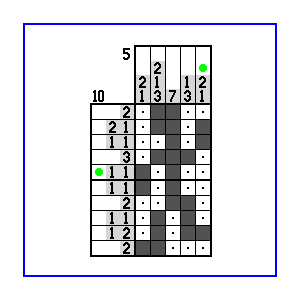
Web Paint-by-Number is a website for solving nonogram-style logic puzzles, also known as paint-by-number or picross puzzles. In these puzzles, you fill in grid squares based on number clues at the end of each row and column; the numbers tell you how many consecutive filled squares appear in that line and in what order. Solving correctly reveals a hidden picture.
Who it suits and how it is used
- Logic-puzzle newcomers get a gentle way to learn the row-and-column deduction rules, since each puzzle is self-contained and mistakes show up quickly.
- Regular nonogram solvers use it for short, screen-based sessions without printing grids on paper.
- Casual break-time players benefit from puzzles that can be paused and resumed rather than timed arcade play.
A practical example: a commuter solving a small grid on a phone during a train ride can work out each row's blocks, cross-check against column clues, and finish a picture in a few minutes.
Trade-offs to expect
Digital solving is tidy and portable, but it lacks the tactile pencil-and-eraser feel some solvers prefer, and very large grids can be fiddly on a small screen. If you want a quick first impression, open Web Paint-by-Number and start with a small puzzle to confirm the interface suits you before committing to bigger grids.
How do I solve a paint-by-number logic puzzle?
Start by treating each row and column as a small arithmetic problem: the clue numbers tell you how many filled cells form each block and that blocks are separated by at least one blank. Mark what must be filled (■) and what must be empty (×) as you go; every deduction you make constrains the next line.
A workable solving loop
- Fill forced blocks first. If a line's clue is longer than half the line, its middle cells must be filled regardless of placement. For example, in a 10-cell row with the single clue "6," cells 5 and 6 are always filled.
- Use the gaps. Between two blocks you need at least one empty cell. Counting block lengths plus mandatory gaps often shows a block cannot fit at one end, so you can mark that end empty.
- Overlay possibilities. For an uncertain line, sketch where the block could start and end; cells filled in every possible placement are filled, and cells empty in every placement are empty.
- Cross-check with crossing lines. A cell you filled in a row must be consistent with its column clue. When a column's count is nearly satisfied, mark the remaining cells empty.
- Work from the edges and dense areas. Long clues and crowded regions usually resolve first and cascade into easier lines.
- Use contradiction cautiously. If a tentative fill makes a line impossible, mark that cell the opposite way. Save guessing for last, and keep notes so you can backtrack.
When it gets hard
Small puzzles with single-digit clues are good practice; larger grids reward pencil marks or an on-screen marking tool. If you get stuck, re-scan every line rather than staring at one—newly marked cells often unlock a line you already checked.
Web Paint-by-Number provides puzzles in this style, useful for practicing the marking habits above. For a different interface and a large puzzle library, Conceptis Puzzles is a known alternative.
Can I create and publish my own puzzles on Web Paint-by-Number?
Yes. Web Paint-by-Number is built around user-contributed puzzles, so the intended path is to solve puzzles and also to author and publish your own for others to play. The site is a logic-puzzle community rather than a commercial puzzle store, and its focus is on nonogram-style grid puzzles solved by deduction.
What creating and publishing typically involves
- Designing the grid: You choose the grid size and fill in cells to form a picture, then the site derives the row and column clues from your solution.
- Checking solvability: A good puzzle should be solvable by logic alone, without guessing. Expect to test your own puzzle before publishing, since a picture that looks fine can still produce ambiguous or unsolvable clue sets.
- Publishing to the community: Once submitted, other solvers can attempt it, and the puzzle becomes part of the site's shared catalogue.
Practical decision criteria
| If you want to… | What matters most |
|---|---|
| Share occasional puzzles with friends | Small grids, simple pictures, quick testing |
| Build a reputation as a puzzle author | Clean logic-only solutions, consistent difficulty, varied themes |
| Learn puzzle design | Start by solving many published puzzles and noting which clue patterns feel fair |
| Avoid frustration | Test for uniqueness; a puzzle with multiple valid solutions will annoy solvers |
A concrete example: a newcomer might design a 15×15 heart, publish it, and find solvers complaining that the middle rows can be filled two different ways. The fix is to adjust a few cells so the clues force exactly one arrangement.
For broader context on nonogram conventions and solving techniques, Wikipedia's nonogram article is a reasonable reference, and Puzzle Nonograms offers another place to see how published grids are presented.
Your next step: solve a handful of highly rated puzzles on the site first, then draft a small grid and verify it has a single logical solution before publishing.
What puzzle sizes and difficulty levels are available?
Web Paint-by-Number does not publish a fixed menu of puzzle sizes or named difficulty levels on the page provided, so there is no reliable list to quote. In practice, the puzzles on this kind of site vary from small grids that take a few minutes to large ones that run to many rows and columns, and difficulty rises mainly with grid size, the amount of initial information and how much guessing the logic requires.
What to expect in practice
- Small grids: good for learning the notation and for short sessions; usually solvable with simple line and column counting.
- Medium grids: need overlap reasoning and keeping track of partial candidates.
- Large grids: demand patience, careful bookkeeping and often several passes over the same rows and columns.
Difficulty is best judged puzzle by puzzle, not by a site-wide label. A compact grid with sparse clues can be harder than a larger one with generous starting numbers.
A useful next step
Open a puzzle and check the grid dimensions and the clue counts before committing. If the first few rows and columns have long runs and many filled cells, it will usually go quickly; if clues are short and scattered, expect to spend longer. Start with a small grid to confirm you are comfortable with the interface, then move up in size as your solving speed improves.
Are there tutorials or solving tips for beginners?
Yes. Web Paint-by-Number is built around nonogram-style logic puzzles, and it is aimed at people who want to solve them on the web rather than in print. For a beginner, the useful starting point is the site's own guidance on how the puzzles work and how to mark squares, since the solving method depends on reading the number clues along each row and column.
Practical beginner approach
- Start with the largest numbers. A row or column with a long run, or a number equal to the full line length, gives you squares you can fill immediately.
- Use overlap logic. If a run is longer than half the line, the middle squares must be filled regardless of where the run sits.
- Mark what is empty. Crossing out squares you have ruled out is as important as filling squares, because it narrows later deductions.
- Work in short passes. Move between rows and columns rather than forcing one line to completion; each pass usually unlocks the next.
- Expect to get stuck. On harder puzzles, progress comes from combining partial information across several lines, not from a single obvious clue.
A concrete scenario: a first-time solver opening a small puzzle should look for a row whose clue fills the whole width, fill it, then use the resulting column clues to place the next runs. That single habit carries through most beginner puzzles.
For a second opinion or extra practice, general nonogram resources such as Wikipedia's nonogram article explain the logic behind the clues, and puzzle communities like Reddit host beginner threads where solvers describe how they break through a stall. The trade-off is that outside explanations are generic, while the site's own instructions match its specific grid and marking conventions, so read those first.
Can I play puzzles online without registering an account?
Yes. Web Paint-by-Number lets you solve its nonogram (paint-by-number) puzzles in the browser, so you can start with a puzzle without creating an account first.
What that means in practice
- Casual solving: open a puzzle, work out the grid from the number clues, and close the tab when you're done.
- No commitment: useful if you just want to try the logic style before deciding whether to make it a regular habit.
- Account features: registration on puzzle sites typically exists to save progress, track solved puzzles or post times. Treat those as likely benefits of signing up rather than confirmed features here.
A sensible next step
Pick one small grid to learn the rules, then move to a larger one once row-and-column elimination feels automatic. If you later want your solve history saved across devices, check whether the site offers that with an account before registering.
User reviews (0)