Website profiles · Technology insights · Alternatives

websvg.com

Discover everything about SVG (Scalable Vector Graphics) - from its basics and advantages to resources for downloading, creating, and implementing SVG graphics in web design. Engage with tutorials, community forums, and expert insights to enhance your design skills.

No paid content found
Visit website
Profile views 2 Outbound visits 1 Normal
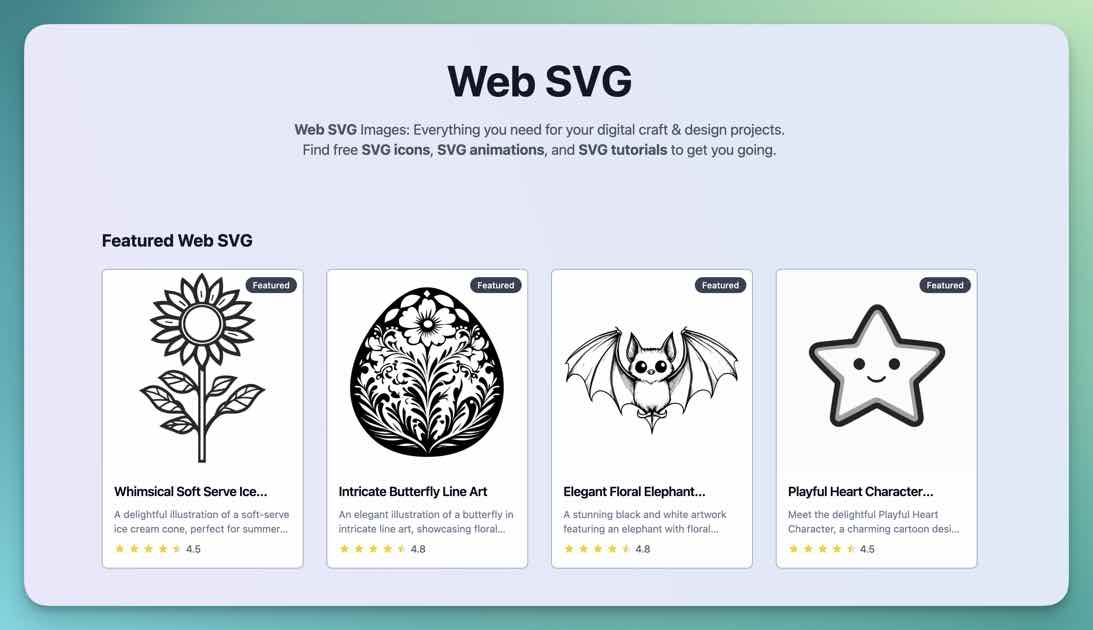
Web SVG Full homepage screenshot

At a glance

Category
Design & Creativity
Language
English
Paid-content signal
No paid content foundObserved
Registered
2024
Hosting
CloudflareInferred
HTTPS certificate trusted
PassedObserved
Last updated

Website review

This review may include AI-generated content and is not individually verified. Domain, certificate and other facts come from the observed data on this page.

What is Web SVG?

Web SVG is a resource hub for Scalable Vector Graphics, aimed at people who need SVG images or want to get better at using them in web design. Its own description frames it as a collection of SVG images and resources for creating designs, and the page is organised around free SVG downloads, SVG apps, a broader browse-all section, and a FAQ. The stated scope also includes tutorials, community forums and expert insight, so it reads as a learning-and-reference site as much as an asset library.

Who it suits

  • Designers and front-end developers who want vector assets that stay sharp at any size and can be styled or animated in code.
  • Beginners who need plain explanations of what SVG is and why it differs from JPEG or PNG.
  • People comparing tools for creating or editing SVG, since the site lists SVG apps alongside downloadable images.

What to expect, and the trade-offs

A general-purpose SVG collection is convenient when you need a quick icon, illustration or starting point, but it is rarely a complete design system. Before downloading, check the licence terms for commercial use, whether files are optimised, and whether they rely on embedded fonts or raster images that would undermine the vector advantage. If you are building a product, a curated library you can rely on may serve you better than a broad directory.

A practical next step

Start with the free SVG section to judge quality and licensing, then use the tutorials and FAQ to learn how to clean up and embed what you download. If you want to go deeper into the format itself, the W3C's SVG pages at W3C are the authoritative reference, while MDN Web Docs covers practical implementation in HTML and CSS. For ready-made icon sets with clear licences, Google Fonts and Heroicons are useful complements.

Decision criterion: use a broad SVG resource like Web SVG for inspiration and one-off assets, but choose a maintained library or your own optimised sprite sheet when consistency, performance and licensing certainty matter.

How can I download free SVG images from Web SVG?

Web SVG presents itself as a collection of SVG images and resources for design work, and its “Want free SVGs?” section is the starting point for finding downloadable graphics. The practical route is to browse that section, open an individual image or resource, and look for a download control or a direct file link on the item’s page.

What to expect from the site

  • The page is organised around a free-SVG area, an apps section, a full listing of content, and an FAQ, so the FAQ is the best place to check for any stated download terms.
  • Because the site is a curated collection rather than a single generator, the download experience can differ from item to item.

A concrete workflow

  1. Start at the free SVGs section and use the full listing to scan categories or styles.
  2. Open the item you want and check whether the download gives you an .svg file directly or a packaged archive.
  3. Before using it in a project, open the file in a vector editor such as Inkscape or Illustrator to confirm the paths, viewBox and colours are intact.
  4. Check the licence or attribution note on the item page, since free images often carry conditions even when no payment is involved.

Trade-offs and alternatives

Web SVG is useful when you want ready-made vector artwork and a lightweight browsing experience. If you need a broader library with clearer per-item licensing, SVG Repo and Public Domain Vectors are established alternatives. For generating your own simple icons rather than downloading them, Inkscape is the practical tool to reach for.

If a download link is not visible on an item page, treat the FAQ as the authoritative explanation of how that particular resource is delivered.

What are the advantages of using SVG graphics in web design?

SVG's core advantage is that it stores shapes as math rather than pixels, so the same file stays crisp at any size, from a favicon to a full-width hero. A single SVG logo can replace a stack of PNG exports, which simplifies asset management and avoids the blurry edges that appear when a bitmap is scaled up.

Practical benefits for web design work:

  • Resolution independence: one file serves phones, desktops and print-resolution displays without separate @2x or @3x versions.
  • Small file sizes for simple graphics: icons, logos, charts and line illustrations are often lighter than equivalent bitmaps, which helps page weight.
  • Styleable with CSS: colors, strokes and fills can be changed in code, so hover states, dark mode and theming do not require new files.
  • Editable and animatable: SVG can be animated with CSS or JavaScript, and text inside it stays selectable and searchable.
  • Accessible when authored well: titles, descriptions and ARIA roles let screen readers describe the graphic.

The trade-offs matter too. Complex photographic imagery or illustrations with thousands of paths can become larger and slower than a well-compressed JPEG or WebP, and heavy SVG animation can tax the main thread. SVGs also need deliberate accessibility work and, when loaded from another origin, can raise cross-origin handling questions.

A concrete scenario: a design team maintaining a product site's icon set. Keeping icons as SVG lets them recolor icons for a dark theme in CSS, swap a single symbol across 40 pages, and animate a loading spinner without extra image files. For a full-bleed photograph on the homepage, a raster format is still the better choice.

If you are starting out, browse an SVG resource collection such as Web SVG to see how existing files are structured, then inspect one in a code editor before building your own. For broader reference material, MDN's SVG documentation and the W3C's SVG specification are the authoritative sources, and Can I Use is useful for checking browser support of specific SVG features.

Which Web SVG apps are available for creating or editing SVGs?

Web SVG is a directory-style resource for SVG images, tutorials and community material rather than a single SVG editor. Its "Web SVG Apps" section is where it groups tools for creating or editing vector graphics, so the practical answer is that it points you outward to apps instead of hosting one editor itself.

What to expect from the apps section

  • A curated list, not one product. The page presents a collection of SVG images and resources to help you create designs, with apps as one category among them.
  • Creation and editing tools grouped together. Expect both full vector editors and lighter utilities, since the site covers SVG from basics through implementation in web design.
  • Mixed audiences. Beginners looking for a free starting point sit alongside developers who need to hand-tune markup, so the list will not suit everyone equally.

Choosing between app types

Your situation Better fit Trade-off
New to vector design, need a guided interface A full-featured vector editor More learning time, but handles complex illustrations
Editing a single icon or logo quickly A lightweight or browser-based editor Fast, but limited path and layer control
Hand-editing paths, optimizing file size A code-oriented editor or optimizer Precise output, but requires comfort with SVG syntax
Working inside an existing design workflow An app that exports clean SVG Convenient, but export settings can bloat files

A concrete case: a front-end developer receives a 40 KB logo export, opens it in a code-oriented editor, strips metadata and rounds coordinates, and ends up with a file small enough to inline in the page header. A designer with the same file would more likely open a full vector editor to adjust shapes visually before exporting.

If you are unsure where to start, open the Web SVG Apps list, pick one full vector editor and one browser-based option, then run the same small task — recoloring a two-path icon — through both. The one you finish faster is the one to keep. For broader tool comparisons, MDN Web Docs covers SVG fundamentals, and Inkscape is a well-known open-source vector editor worth evaluating alongside whatever the list recommends.

How do I implement SVG graphics in my website?

Implement SVG in a website by choosing the delivery method that matches how the graphic needs to behave. Inline SVG is usually the most flexible for interactive, styleable graphics; an <img> tag is simplest for static artwork; CSS background-image works for decorative patterns; and <object> or <iframe> suits isolated documents. Web SVG is a resource collection for finding and learning about SVG graphics, with sections for free SVGs, apps and FAQs, so it can help with assets and orientation before you write the embedding code.

Choose the embedding method

Method Best for Trade-off
Inline <svg> Icons, logos, interactive diagrams Adds markup to the page; can bloat HTML if overused
<img src="file.svg"> Static logos, illustrations Cannot style internal parts with page CSS or script them
CSS background-image Decorative shapes, repeating patterns Not semantic; harder to make accessible
<object> / <iframe> Standalone SVG documents Extra document boundary; scripting and styling are isolated

For an inline SVG, paste the <svg> element directly into the HTML and set viewBox so it scales cleanly:

<svg viewBox="0 0 24 24" role="img" aria-label="Search">
  <path d="..." fill="currentColor"/>
</svg>

Using fill="currentColor" lets the icon inherit the surrounding text colour, which is useful for buttons, navigation and dark-mode themes.

Practical steps

  1. Get or create the SVG. Optimise it first by removing editor metadata and unnecessary decimal precision; tools such as SVGO are commonly used for this.
  2. Decide between inline, <img>, CSS background or <object> based on whether you need CSS styling, scripting, or simple caching.
  3. Set viewBox, and use width/height or CSS sizing so the graphic scales without distortion.
  4. Add accessibility: role="img" with aria-label for meaningful graphics, or aria-hidden="true" for purely decorative ones.
  5. Test rendering in the browsers your audience uses and check file size, especially if you inline many icons.

A concrete scenario

A small business site wants a logo, a set of navigation icons and a decorative wave divider. The logo could be an <img> so it caches and stays out of the HTML; the icons could be inline so their colour changes on hover and in dark mode; the wave could be a CSS background or an inline SVG with preserveAspectRatio="none". This mix keeps the page light while giving each graphic the behaviour it needs.

As a next step, browse the free SVG section of Web SVG to find base assets, then run them through an optimiser and embed them using the method above. If you are new to SVG, the site's tutorials and community discussions are a reasonable place to learn the syntax and compare implementation approaches.

Where can I find community forums and expert insights to improve my SVG design skills?

For community discussion and expert SVG guidance, Web SVG is a reasonable starting point: its page describes itself as a collection of SVG images and resources, with tutorials, community forums and expert insights aimed at improving design skills. Treat that as a hub rather than a single answer source — the useful next step is to decide whether you need feedback on your own files or structured learning, because those lead to different communities.

Matching the venue to what you need

Goal Best fit Trade-off
Feedback on a specific file or animation Web SVG's forum and resource sections General design communities move faster but often lack SVG-specific critique
Learning SVG structure and workflow Tutorials on a dedicated SVG site Slower than copying ready-made graphics, but builds transferable skill
Inspiration and ready-made graphics Web SVG's image collection and app listings Convenient, but licensing and editability vary per asset
Standards and browser behaviour MDN Web Docs Authoritative but reference-style, not conversational
Vector editing technique and file preparation Inkscape Tool-focused rather than a broad community

A practical way to use a forum well

Post a minimal reproducible example rather than a screenshot: the SVG source, the intended rendering, and the browser or tool you are using. State whether the problem is geometry, viewBox scaling, path data, animation timing or export settings. That specificity is what attracts expert replies, because it shows where the difficulty actually lies.

Example scenario

A designer exports a logo from a vector editor, and it renders blurry on a retina screen. In a forum thread, the fix usually turns out to be a missing or mismatched viewBox rather than image quality. Reading a short tutorial on coordinate systems before posting often resolves it without waiting for a reply.

Decision criterion

Choose a general community when you want critique, career context or tool comparisons. Choose an SVG-focused site when you need path syntax, optimisation, accessibility or animation detail. If a resource offers both, start with its tutorials, then use its forum for review of your own work.

Related questions

More questions →
How to Use Ahrefs for Your First SEO Audit: A Step-by-Step Tutorial

If you're new to Ahrefs and want to run your first SEO audit, the fastest path is: open Site Explorer, enter your target URL, review the Overview for a health snapshot, then dig into Organic Keywords, Top Pages, and Site Audit to find specific problems. From there, build a short prioritized to-do list instead of trying to fix everything at once.

This tutorial walks through that workflow using a realistic starting scenario, explains what the numbers mean, and shows how to turn findings into actions.

Before You Start: Pick a Narrow Scope

A common beginner mistake is auditing an entire large website on day one. The reports become overwhelming, and you can't tell which issues matter.

Instead, choose one of these starting points:

  • A single important page (your homepage or a key product/service page)
  • A small site (under ~50 pages, e.g., a personal blog or small business site)
  • One section of a bigger site (e.g., /blog/)

For this tutorial, assume you're auditing a small business site with about 30 pages. The same steps scale up later.

You'll need an Ahrefs account to follow along. Ahrefs offers paid plans, and pricing and feature limits change over time, so check the current Pricing page for what's included in each tier before committing.

Step 1: Enter Your Target in Site Explorer

Site Explorer is Ahrefs' core tool for analyzing any website or URL.

  1. Open Site Explorer from the top navigation.
  2. In the search box, paste your domain (e.g., example.com).
  3. Choose the Exact URL or Domain mode depending on scope. For a full-site view, use Domain or Prefix; for a single page, use Exact URL.
  4. Press Enter.

You'll land on the Overview report. Don't try to absorb everything — focus on four numbers first.

Reading the Overview Snapshot

Metric What it tells you How to use it
Ahrefs Rank (AR) Relative strength of the site's backlink profile vs. others in the database Useful for comparing against competitors, not as a standalone goal
Organic traffic Estimated monthly visits from search A rough trend indicator, not exact analytics
Organic keywords Estimated number of keywords the site ranks for Shows breadth of visibility
Backlinks / Referring domains Total links and unique sites linking to you Referring domains matter more than raw backlink count

Important caveat: Ahrefs' traffic and keyword numbers are estimates based on its own data. They won't match Google Search Console or your analytics exactly. Treat them as directional, not absolute.

Step 2: See What You Already Rank For

Go to Organic Keywords in the left sidebar. This shows queries where your site appears in search results.

Sort by Traffic (descending) to see which pages bring the most estimated visitors. Then look for:

  • Keywords ranking in positions 4–15 — these are often the easiest wins. A small content or on-page improvement can push them onto page one.
  • Keywords with high volume but low position — potential opportunities if the topic is relevant.
  • Irrelevant keywords — if you rank for something off-topic, it may signal thin or mismatched content.

Write down 5–10 of the position 4–15 keywords. These become your first optimization targets.

Step 3: Find Your Best and Weakest Pages

Open Top Pages. This ranks your URLs by estimated organic traffic.

Look for two things:

  1. Your top performers — understand what topics and formats work. Can you create more content like this?
  2. Pages with traffic but poor rankings — these may need on-page fixes (title, headings, internal links).

If a page gets zero traffic and targets a topic you care about, it's a candidate for a rewrite or consolidation.

Step 4: Run a Technical Site Audit

Now move to Site Audit. This crawls your site and flags technical and on-page issues.

  1. Click Site Audit → New project.
  2. Enter your domain and set crawl settings (default is usually fine for a small site).
  3. Start the crawl and wait for it to finish.

Once complete, you'll see a Health Score and a list of issues grouped by category.

Which Issues to Fix First

Not all issues are equal. Prioritize in this order:

Priority Issue type Why it matters
1 Broken links (404s) Bad for users and crawl efficiency
2 Pages blocked from indexing They can't rank at all
3 Missing or duplicate title tags Directly affects click-through and relevance
4 Slow-loading pages Affects experience and rankings
5 Thin content Low value to users and search engines

Ignore low-impact warnings (like minor meta description length) until the big items are handled.

Step 5: Turn Findings Into a To-Do List

You now have raw data. Convert it into a short, actionable list. Example:

  1. Fix 3 broken links found in Site Audit.
  2. Rewrite title tags on 5 pages with duplicate titles.
  3. Improve 4 pages ranking in positions 6–12 by adding missing subtopics and internal links.
  4. Remove or update 2 thin pages with no traffic.

Keep the list to 5–10 items max for your first audit. Finishing a short list beats starting a long one.

Common Beginner Mistakes

  • Chasing every red flag. Site Audit flags many minor issues. Fix what affects rankings and users first.
  • Trusting estimates as exact numbers. Ahrefs data is modeled, not measured from your analytics.
  • Auditing a huge site too early. Start small to learn the interface.
  • Ignoring search intent. A page can be technically perfect but still fail if it doesn't match what searchers want.
  • Forgetting to re-crawl. After fixes, run Site Audit again to confirm improvements.

Where to Go Next

Once your first audit is done:

  • Compare with competitors using Site Explorer's Competing Domains and Content Gap reports.
  • Track keyword rankings over time with Rank Tracker.
  • Explore backlink opportunities in the Backlinks and Link Intersect reports.
  • Set up recurring Site Audit crawls so new issues surface automatically.

Your first audit isn't about perfection — it's about building a repeatable habit: enter a target, read the key reports, pick the highest-impact fixes, and act. Do that once a month and your site's health compounds.

What Does the Arts & Recreation Foundation of Overland Park Support?

The Arts & Recreation Foundation of Overland Park is a nonprofit organization that raises money and builds community partnerships to support arts, culture, and recreation in Overland Park, Kansas. If you live in or near the city, its work shows up in places you may already visit: Deanna Rose Children's Farmstead, the Overland Park Arboretum & Botanical Gardens, and public art projects across the community. The foundation itself is not a city department; it works alongside the city and donors to fund enhancements, programs, and special projects that go beyond what tax dollars alone cover.

What the Foundation Actually Does

Think of the foundation as a charitable partner for Overland Park's cultural and recreational assets. Its role generally includes:

  • Fundraising: Accepting donations and gifts that are directed toward specific attractions, programs, or public art.
  • Community partnerships: Working with businesses, civic groups, and residents who want to support local amenities.
  • Events: Hosting or supporting events that both raise funds and give the community a reason to gather.
  • Project support: Helping pay for improvements, additions, and experiences at the destinations it serves.

Because it is a nonprofit, money raised goes back into the community rather than to private owners. That structure is what allows residents and local businesses to contribute directly to the places they care about.

The Destinations and Initiatives It Supports

Deanna Rose Children's Farmstead

Deanna Rose Children's Farmstead is a family-oriented attraction that gives children and adults a hands-on look at farm life, animals, and Kansas history. Foundation support for the Farmstead typically means helping fund enhancements, educational experiences, and community events that keep the site engaging for repeat visitors and first-timers alike.

Overland Park Arboretum & Botanical Gardens

The Arboretum & Botanical Gardens is a living collection of gardens, trails, and natural areas. Supporting it can involve funding plantings, garden features, educational programming, and long-term care that keeps the grounds beautiful and accessible through the seasons.

Public Art Projects

Public art is another core focus. The foundation helps bring sculptures, installations, and other artistic works into shared spaces, making art part of everyday life rather than something you only see in a museum. These projects often depend on donations and partnerships to move from idea to installation.

How Community Partnerships and Events Fit In

The foundation's model relies on the community, not just on institutional funding. Local businesses may sponsor an event or a project. Residents may attend a fundraiser, buy a ticket, or make a donation. Civic organizations may partner on a specific initiative.

Events serve two purposes at once: they raise money and they build awareness. A well-attended event introduces new people to the Farmstead, the Arboretum, or a public art effort, and some of those people become ongoing supporters. Over time, this cycle of participation and giving is what sustains projects that a city budget alone might not fully fund.

Practical Ways Residents Can Get Involved

If you want to support this work, you do not need to be a major donor. Here are realistic starting points:

  1. Visit the attractions. Attendance and word-of-mouth support matter. Spend a day at the Farmstead or the Arboretum and bring friends or family.
  2. Attend a foundation event. Events are the easiest entry point. You get an experience, and your ticket or participation helps fund projects.
  3. Donate. Contributions can often be directed toward a specific area, such as the Farmstead, the Arboretum, or public art. Check the foundation's website for current giving options.
  4. Volunteer. Nonprofits frequently need help with events, outreach, and administrative tasks. Volunteering is a low-cost way to contribute time and skills.
  5. Partner as a business. If you own or manage a local business, sponsorship or in-kind support can align your brand with community assets people genuinely value.
  6. Spread the word. Sharing events and projects with neighbors, school groups, or community boards helps the foundation reach people who might want to help.

For current details on events, donation methods, and volunteer needs, go directly to the foundation's website, since programs and opportunities change over time.

Why This Matters for Local Quality of Life

Arts, culture, and recreation are not extras. They shape how a city feels to live in. A children's farmstead gives families a shared destination. Botanical gardens provide green space and seasonal beauty. Public art makes ordinary streets and parks more interesting. When residents and businesses invest in these things through a foundation, they are effectively choosing the kind of community they want.

The Arts & Recreation Foundation of Overland Park exists to make that choice easier and more organized. It connects people who care about these places with the projects that need support, and it keeps the benefits local.

A Simple Way to Think About It

If you are trying to understand the foundation in one sentence: it is the community's fundraising and partnership arm for Overland Park's arts, culture, and recreation, with a focus on Deanna Rose Children's Farmstead, the Overland Park Arboretum & Botanical Gardens, and public art. You benefit from its work when you visit these places, and you can contribute by attending, donating, volunteering, or partnering. Start with a visit, then decide how you want to take part.

Website Overview

Several search or sharing settings need attention. Together they may make snippets, preview images or preferred URLs less consistent across platforms. An active inbound-mail setup with incomplete authentication may leave the domain more open to impersonation. Provider hosting alone does not close that gap.

Domain and Registration

Transfer-protection status is present, helping reduce the risk of unauthorized domain transfers. The domain has about 2 years of registration history; its current configuration provides more context than age alone. The registrar is NameCheap, Inc., a widely used domain service provider. The domain uses the common .com extension, which is not an independent safety signal.

DNS and Email

The observed email authentication setup is incomplete: DMARC is missing. Nameservers are provided by Cloudflare, indicating managed DNS hosting. MX records point to the Fastmail email service. No CNAME was found; the observed records resolve directly to addresses. TXT records include verification markers for Google. Such markers may also remain after a service stops being used.

TLS and Certificates

The public key uses EC with 256 bits. The server supplied a complete certificate chain. No organization name is present in the certificate; the available fields are consistent with domain validation. The certificate was issued within the Google Trust Services cloud or CDN ecosystem. The certificate's total validity is about 90 days, consistent with a short renewal cycle.

HTTP and Browser Security

The checked browser-security headers were not detected, leaving fewer explicit browser-side safeguards. No X-Powered-By header was found, reducing one common source of backend fingerprinting information. The cf-ray response header indicates a CDN or caching proxy in the delivery path. No obvious internal addresses or debug information were found in the headers. The Server header identifies cloudflare without an exact version.

Technology Stack Analysis

The public page identifies SvelteKit, Cloudflare without precise versions, leaving fewer clues for version-specific scanning.

Search and Social Sharing

The meta description has 266 characters and may be shortened in search results. Open Graph is partially configured; og:type is missing. The title has 7 characters, within a common display range. The observed directives allow indexing and link following. No Generator meta tag is publicly exposed.

Hosting and Email

DNSCloudflare
HostingCloudflare
EmailFastmail
Approximate IP geolocation (inferred; a CDN or proxy may differ from the origin server) Location unknown Inferred 104.21.73.254

Registration details

RDAP / WHOIS

RegistrarNameCheap, Inc.
Registered2024-05-12
Expires2027-05-12
Domain statusclient transfer prohibited
Nameserversclay.ns.cloudflare.com、connie.ns.cloudflare.com
DNSSECunsigned

DNS records

DNS

TypeNameValueTTLPriority
Awebsvg.com104.21.73.254300—
Awebsvg.com172.67.167.139300—
AAAAwebsvg.com2606:4700:3035::6815:49fe300—
AAAAwebsvg.com2606:4700:3035::ac43:a78b300—
MXwebsvg.comin1-smtp.messagingengine.com30010
MXwebsvg.comin2-smtp.messagingengine.com30020
NSwebsvg.comclay.ns.cloudflare.com86400—
NSwebsvg.comconnie.ns.cloudflare.com86400—
TXTwebsvg.comgoogle-site-verification=kJNdJhsbVPWFCvd-5F7Xw_tBjNy47TYl39Ib423jsZ0300—
TXTwebsvg.compinterest-site-verification=71e1a6a09c4d4362ebd5abf6701b314d300—
TXTwebsvg.comv=spf1 include:spf.messagingengine.com ?all300—

TLS and certificates

TLS / SSL

AssessmentNormal configuration
Supported protocolsTLSv1.2、TLSv1.3
Negotiated protocolTLSv1.3
Certificate subjectwebsvg.com
IssuerGoogle Trust Services
Valid until2026-11-18T08:38 · Remaining when checked: 33 days
Verification detailsCertificate trust: Passed · Hostname match: Passed

HTTP response headers

HTTP

HeaderValue
content-typetext/html
servercloudflare

Identified technologies

SvelteKitCloudflare

Pages, Search and Sharing

Meta descriptionDiscover everything about SVG (Scalable Vector Graphics) - from its basics and advantages to resources for downloading, creating, and implementing SVG graphics in web design. Engage with tutorials, community forums, and expert insights to enhance your design skills.
Canonical URLhttps://websvg.com/
LanguageEnglish (default)
Twitter CardNot detected
All bots 0 allowed · 0 disallowed

User reviews (0)

  • No reviews yet.