

 Paid content
 Multilingual
 Visit website
 Updated: 2026-09-27 11:02
 Access: Normal
 Profile views 2
  Outbound visits 1
 Website Review
What is Wipperoz?
Wipperoz is a video-first online resume and virtual CV builder. Instead of sending a static PDF, you create a single shareable link that combines video, structured text and supporting evidence. The pitch on its own site is blunt: "Stop sending PDFs to humans." The idea is that a link can speak, be updated, and be read by both software and people.
What it actually is
- A builder for a "Virtual CV" — a hosted profile page rather than a file attachment.
- A video element, so candidates can introduce themselves or explain a result in their own voice.
- Structured content (experience, skills, contact details) presented in a layout the product says is ATS-friendly.
- A recruiter side: hiring teams can post a role and read applications as Virtual CVs.
- A verification feature, shown on the site with a colleague or manager signing off on a claim.
Why the format matters
The site's central argument is that most rejections happen before a human sees the application. Its own illustrative comparison scores two candidates against a role: a two-column PDF with an image header lands at 47% qualification match and is filtered out, while a clean single-column profile reaches 92%. That example is the company's own, and Wipperoz states plainly that parsing behaviour varies and it does not promise interviews or jobs. Treat the numbers as a demonstration of the principle, not a guarantee.
The practical takeaway is real, though: parsers struggle with images of text, multi-column layouts and missing keywords. A structured page avoids those specific failure modes.
Who it suits
| Reader | Fit |
|---|---|
| Job seekers in competitive, keyword-screened fields | Strong — structure plus video differentiates |
| People applying through a company's own system | Weaker — the site itself notes a Virtual CV is worth more when the reader is in the same system |
| Recruiters wanting richer applications | Relevant, via the hiring-team side |
| Anyone needing a plain PDF for a portal upload | Keep a PDF as a fallback |
Next step
Before committing, open a sample Virtual CV and read it as a recruiter would: does the video add something a bullet point could not, and does the text still make sense with the video ignored? If yes, build one and keep a conventional PDF alongside it for portals that only accept files.
How does a virtual CV improve my chances of passing an ATS scan compared to a traditional PDF resume?
A virtual CV improves your ATS odds mainly by changing the format of what you submit, not by adding secret keywords. Applicant tracking systems parse text; a clean, single-column, text-based page gives the parser fewer ways to mangle your name, contact details, dates and role titles. Wipperoz is built around that idea: its page copy contrasts a two-column PDF with an image header (parsed poorly, contact block unreadable) against a single-column layout with text contact details and role vocabulary, and shows an illustrative score of 47% versus 92% for the same role. That example is a demonstration, not a promise — parsing behaviour varies by system.
H3 What actually changes in the scan
- Contact details as text, not an image. A PDF header designed in a graphics tool often contains no machine-readable name or email. A web page stores them as text in the order parsers expect.
- One column instead of two. Multi-column PDFs interleave lines when extracted, so sentences arrive shuffled and context is lost.
- Headings a parser recognises. Standard section labels (Experience, Skills, Education) map more reliably than creative headings.
- Role vocabulary in context. The Wipperoz example shows a candidate whose React, TypeScript and design-system work appears inside the roles that describe it, rather than in a keyword list.
- A link you control. Because it is a page rather than a file, you can update wording without resending anything.
H3 Where the video and the "video-first" angle fits — and where it does not
Video does not help an ATS scan; parsers read text. Treat the video and interactive elements as a human-stage asset: they matter once a recruiter opens the link. The practical sequence is ATS-friendly text first, video second.
H3 A concrete reader scenario
Suppose you apply to a Frontend Engineer role with a two-column PDF that has a designed header. The parser may return no email and jumbled bullets, and the recruiter never sees the application. Submitting the same content as a single-column virtual CV with text contact details and the role's own terms (React, TypeScript, design systems) gives the parser a clean extraction. The ATS then scores you on the substance you already had.
H3 Decision criteria
| Situation | Virtual CV likely helps | Traditional PDF likely fine |
|---|---|---|
| Large employer using an ATS | Yes — parsing is the first filter | Riskier if layout is complex |
| Small team, human reads first | Useful for the video/link | Fine |
| Strict "PDF only" portal | Check the portal rules first | Required |
| Design-heavy roles | Yes — link shows work in context | Portfolio PDF may be expected |
Next step: before switching, test your current PDF. Copy its text into a plain editor and see whether your name, email, dates and job titles survive intact and in order. If they scramble, that is the problem a virtual CV is designed to remove. You can compare formats on Wipperoz alongside a conventional builder such as Canva or a plain document approach.
What should I include in a video-first virtual CV to make it stand out to recruiters?
Focus on making the video earn its place rather than repeating your written CV. Recruiters skim; a video that adds nothing new wastes their time.
What a video-first virtual CV should contain
- A 30–90 second spoken intro covering who you are, your focus area, and one concrete result. Skip "Hi, my name is..." filler.
- Your strongest quantified achievement, stated plainly — the kind of number a hiring manager can verify with a reference.
- A short explanation of how you work (how you scope, prioritise, or collaborate), which a bullet list compresses badly.
- Structure around the video, not just video: clear headings, text-based contact details, and role-specific keywords so automated screening can still read you.
- Evidence attached to claims — links to work, verification from a manager or client, or a brief note on what you personally owned versus what the team did.
Why the structure matters as much as the video
Wipperoz's own framing is that most rejections happen before a human sees the application, and that a PDF with an image-based contact block or two-column layout can be parsed badly — its illustrative example shows one candidate scored at 47% and another at 92% against the same role, purely on how readable the structure was. That example is the company's, and parsing behaviour genuinely varies by system, but the underlying point is sound: a video is a differentiator only if the rest of the page survives the first automated pass. Keep contact details as text, use a single column, and name the tools and skills the role asks for.
A practical way to decide what goes in
| Include in video | Keep as text |
|---|---|
| Motivation for this specific role | Contact details, dates, employers |
| One or two signature achievements | Full work history |
| How you approach a hard problem | Skills and tool lists |
| Context a résumé can't convey (career change, relocation, a gap) | Certifications and education |
If a line works equally well written down, write it down and use the video for what text does poorly: tone, reasoning, and personality.
Next step
Draft a 60-second script, read it aloud, and cut anything a recruiter could learn from your CV in five seconds. Then check the page in plain text — if your name, email, and key skills don't appear as readable text, fix that before recording. Wipperoz offers a free starting tier, so you can test the format before committing; you can see how it presents itself at Wipperoz. If you want a second reference point on video-first profiles, LinkedIn's own profile video feature and personal portfolio sites serve similar purposes, though neither is built around automated screening the way Wipperoz claims to be.
How can hiring teams use Wipperoz to review candidates as virtual CVs instead of PDFs?
Hiring teams use Wipperoz by opening a recruiter account, posting a role, and reading incoming applications as Virtual CVs — interactive web pages with video, structured experience and skills — rather than as attached PDF files. The same candidate content that would arrive as a document instead renders as a page the reviewer can click through, with sections like Experience and Skills laid out for on-screen reading.
What changes for a reviewer
- Applications arrive as one link per candidate instead of files in an inbox or ATS attachment queue.
- Video is part of the profile, so a candidate can introduce themselves or explain a project in their own words before any call is scheduled.
- Evidence can be attached to specific claims. On the example profile shown on the site, an experience entry cites a deployment-frequency improvement, and a named verifier signs off on the figure — the observation is the platform's illustrative example, not a guarantee that every profile carries verification.
- The site's own comparison shows a clean single-column Virtual CV scoring 92% against a role's vocabulary while a two-column PDF with an image contact block scored 47%, and it notes that parsing behaviour varies by system. Treat that as an illustration of why structure matters, not a promised score.
Where this fits and where it doesn't
| Situation | Virtual CV review | PDF review |
|---|---|---|
| Early screening at volume | Fast visual scan; role vocabulary visible in context | Familiar, but layout can break parsing |
| Roles where communication or presence matters | Video adds signal a document can't carry | No equivalent |
| Candidates without reliable bandwidth or devices | Video and interactive pages can be a barrier | Works offline once downloaded |
| Formal records, panels, offline committees | Needs a stable link and a fallback export | Easier to archive and circulate |
A practical scenario: a small engineering team posts a backend role, receives twenty links, and the hiring manager spends the first pass watching only the 60-second intros and skimming the experience sections, then shortlists five for a technical screen. That saves scheduling calls for candidates the team would have rejected on a document alone — but it also means the first pass is now partly a video review, which takes real time and can introduce its own bias.
Next step
Before switching a whole pipeline, run one open role through both formats: send the Virtual CV link alongside your normal process and ask two reviewers which gave them a clearer basis for a shortlist decision. Decide from that whether to make it the default for candidate-facing roles, keep it optional, or reserve it for later-stage conversations.
Wipperoz also lists separate pricing pages for the candidate product and for hiring teams, so check the recruiter-side terms before committing a team to it: Wipperoz.
What does Wipperoz cost, and are there free credits or a trial available?
Wipperoz lists pricing pages for its Orbit product and for hiring teams, but the supplied page evidence does not state specific prices. The one concrete cost signal on the page is the job-seeker offer: start with 500 free credits, no card required, and the builder is described as taking about five minutes.
H3 What that means in practice
- If you are job hunting, you can likely test the video-first Virtual CV format without paying upfront, using the 500 free credits.
- If you are hiring and want to read applications as Virtual CVs, check the separate Orbit pricing page — the free-credit offer appears aimed at individuals building a CV, not at recruiter accounts.
- Credits imply a usage meter rather than an unlimited subscription, so the real question is how many credits one complete Virtual CV consumes and what happens when they run out.
H3 How to decide Treat the free credits as an evaluation budget, not a free tier. Build one complete Virtual CV first — video, experience entries, skills — and see whether the result feels better than your PDF. Then compare the paid tiers on the official pricing pages before committing.
For context on the alternative, LinkedIn profiles and traditional CV tools remain the default for most recruiters, though they serve a different purpose than a link-based video CV.
How do I create and share my Wipperoz virtual CV link in about five minutes?
Wipperoz is built around a single idea: your CV becomes one link you control, containing video, structured text and evidence, instead of a PDF attachment. The site claims a roughly five-minute setup and 500 free credits with no card required, so treat the first pass as a fast draft you refine later.
The five-minute path
- Create your Virtual CV — start from the site's builder entry point and pick the role you're targeting. The page stresses that the same candidate can be scored very differently depending on whether the role's own vocabulary appears in the text.
- Fill in structure first, video second. Add contact details as text (not an image), keep to a single column, and use headings a parser recognises. The illustrative example on the page contrasts a PDF that scored 47% against a clean Wipperoz layout at 92% — the difference came from readable contact text, no interleaved columns, and role keywords like React and TypeScript appearing where the work is described.
- Record the short video pitch. The site's own sample line is a good template: state the outcome and how you think about it ("I built a system that cut deployment time by 70% — here's how I think about scale"), rather than reciting your history.
- Add evidence where you can. The demo CV attaches a verified quote and sign-off to a specific metric, which is what makes the numbers credible rather than decorative.
- Copy your link and share it. The page shows short links in the form
wprz.me/…, which you control and can put in applications, email signatures or messages.
What to check before you send it
- Open the link on a phone and on a desktop; video is the part most likely to look different across devices.
- Read the text aloud without watching the video. If it doesn't stand alone, a recruiter skimming without sound loses your case.
- Keep one link per target role if you're applying to genuinely different jobs, since the keyword match shifts with the role.
Where the trade-off sits
A link-based CV works best when the reader is already in a system that displays it — the page notes a Virtual CV is worth more when the hiring side reads applications in the same environment, and Wipperoz offers a recruiter-side product for that. For a traditional employer that still demands a PDF upload, keep a clean single-column PDF as a fallback rather than sending a link they won't open.
If you want to see how the format compares with conventional builders, look at Canva for quick visual resumes or LinkedIn for a profile recruiters already search. For the video-first angle specifically, start with your Wipperoz draft, then decide whether the recording adds enough to justify the extra step.
 Hosting and Email
 Amazon Route 53
 Hosting
 Vercel
 Google Workspace
 Location
 United States
 Pages, Search and Sharing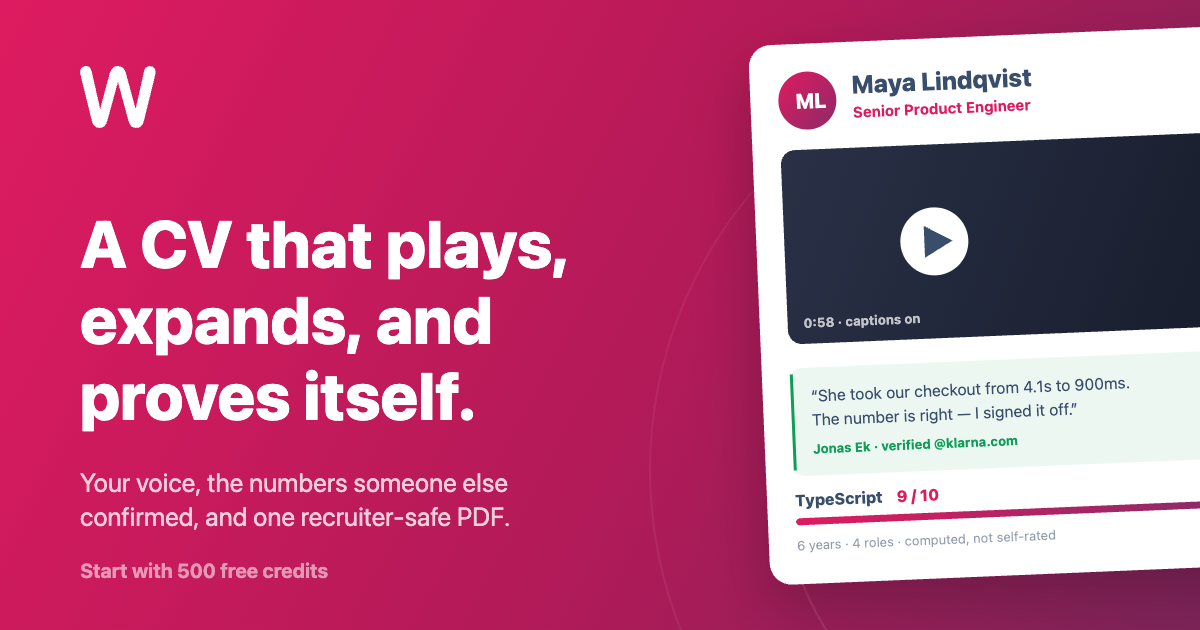



 All bots


 Registration details

 Identified technologies
User reviews (0)