Website profiles · Technology insights · Alternatives

workingsolutions.com

Transform your business with Working Solutions' customer service outsourcing. Achieve unmatched scalability, enhanced CX, and significant cost reductions. Trusted by top brands for 25+ years, our virtual agent network and AI + IA solutions deliver flexible and empathetic BPO services proven to reduce handle times.

No paid content found
Visit website
Profile views 8 Outbound visits 1 Normal
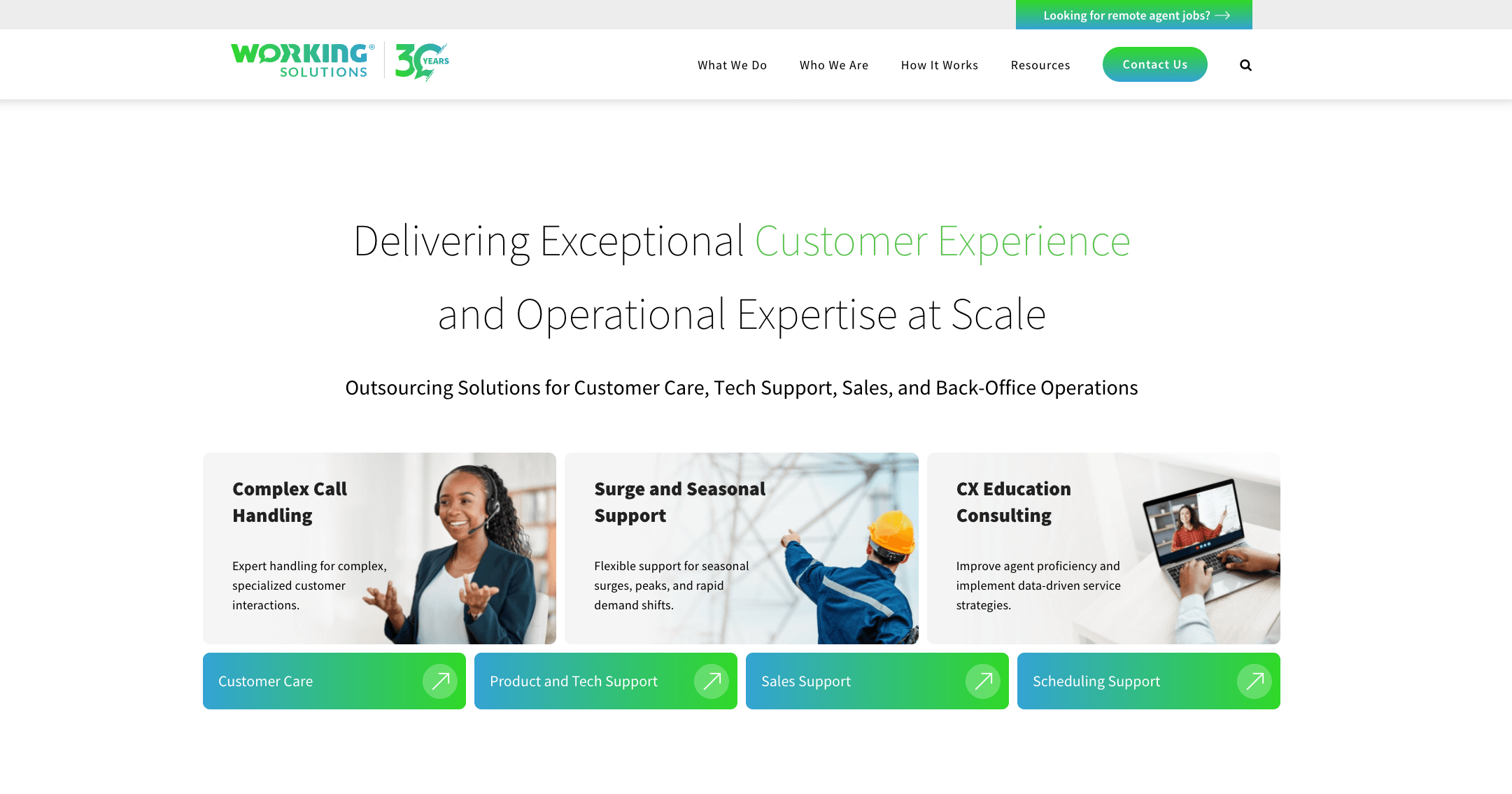
Contact Center Outsourcing | Scalable CX Solutions by Working Solutions Full homepage screenshot

At a glance

Category
Business Services
Language
English
Paid-content signal
No paid content foundObserved
Registered
1997
Hosting
CloudflareInferred
HTTPS certificate trusted
PassedObserved
Last updated

Website review

This review may include AI-generated content and is not individually verified. Domain, certificate and other facts come from the observed data on this page.

What is Working Solutions?

Working Solutions is a business process outsourcing (BPO) provider focused on contact center and customer experience (CX) services. Rather than running a traditional brick-and-mortar call center, it operates a virtual network of independent agents and pairs that human capacity with AI-assisted tools — what the company describes as "AI + IA" (artificial intelligence plus intelligent automation). Its stated aim is to help brands scale support up and down, improve CX, and lower cost per contact, including reducing handle times.

What it actually offers

  • Outsourced customer service and contact center operations — handling inbound and outbound customer interactions on a brand's behalf.
  • Scalable staffing — flexing agent capacity to match demand, which matters most during predictable volume spikes.
  • AI plus human agents — automation for routine or high-volume contacts, with people handling the empathetic or complex parts.
  • CX and operational expertise — process design and management layered on top of the staffing.

Who it suits

The clearest fit is a mid-size to large organization with volatile contact volumes: seasonal retail peaks, insurance or benefits open enrollment, product launches, or billing cycles. The page specifically highlights maintaining member experience and service levels during open enrollment spikes — a scenario where a fixed in-house team is either overstaffed in quiet months or overwhelmed in busy ones. Smaller businesses with steady, low-volume support needs will usually find a BPO of this type hard to justify against an in-house team or a simpler answering service.

The trade-offs to weigh

Consideration What outsourcing to a virtual network buys you What it costs you
Flexibility Fast ramp-up and down for spikes Less direct control over daily scheduling
Cost Variable cost instead of fixed headcount Per-contact or per-hour pricing can exceed in-house at stable, high volume
Talent Access to a distributed agent pool Brand immersion and product depth take longer to build
Technology AI and automation bundled in Integration work with your CRM and systems

A useful next step

Before contacting any BPO, write down three numbers: your average monthly contact volume, your peak-to-trough ratio, and your current cost per contact. If the peak-to-trough ratio is high — say 3x or more — outsourcing is likely worth pricing out; if volumes are flat, an in-house team usually wins on cost and control. Then ask specifically how onboarding, quality monitoring, and data security work, since those are where virtual-agent models most often disappoint.

For context on the wider category, see Working Solutions for the company's own description of its services, and compare against established BPO operators such as Teleperformance or Concentrix if you are evaluating multiple vendors.

How does Working Solutions compare to hiring in-house customer service agents for my business?

Working Solutions is a contact center outsourcing provider, so the comparison is really "outsourced virtual agent network" versus "your own employed support team." The page positions its offer around scalability, cost reduction, and a mix of AI plus human agents, with a virtual agent network and claimed reductions in handle times. For a business weighing this choice, the deciding factors are usually volume variability, how much control you want over hiring and culture, and whether you can absorb fixed payroll.

H3 Where each model tends to win

Factor Working Solutions (outsourced) In-house team
Ramp speed Faster to add or remove agents because the provider recruits from its existing network Hiring, onboarding and training take weeks per cohort
Cost structure Variable, usage- or seat-based; easier to flex down in slow periods Fixed salaries, benefits, equipment, management overhead
Control You set scripts, SLAs and brand guidelines, but day-to-day management sits with the provider Direct control over hiring, coaching, culture and escalation
Coverage Typically easier to staff evenings, weekends and peaks Requires shift planning or paying premiums
Institutional knowledge Knowledge stays with the provider's agents and account team Knowledge accumulates inside your company

H3 A practical scenario

Suppose you run an e-commerce or membership business with a predictable baseline but sharp seasonal spikes — open enrollment, holiday sales, a product launch. In-house staff handle the baseline well and know your products deeply, but you would need to hire and train temporary agents for a six-week surge, then either let them go or carry the cost. An outsourced network is designed for exactly that shape of demand. The trade-off is that surge agents may be less fluent in your niche, so your onboarding materials and quality monitoring have to do more work.

H3 Decision criteria

  • Choose outsourcing when demand is volatile, you need coverage outside business hours, or support is not a core competency you want to build.
  • Stay in-house when the interaction requires deep product or technical expertise, when the customer relationship itself is the product, or when data sensitivity makes third-party access difficult.
  • Consider a hybrid: keep a small in-house core for escalations and complex cases, and route routine or overflow contacts to the outsourced partner.

H3 Next step

Before committing, ask any provider — Working Solutions included — for the specifics that determine fit: how agents are recruited and trained for your industry, how quality is measured, what the minimum commitment and ramp timeline look like, and how they handle data security and compliance. Then run a small pilot on one contact type and compare handle time, first-contact resolution and customer satisfaction against your in-house baseline. For broader context on the outsourced model, see Working Solutions and, if you want to benchmark alternatives, TTEC and Teleperformance operate in the same space.

What types of companies or industries benefit most from Working Solutions' contact center outsourcing?

Working Solutions suits organizations that need flexible, at-scale customer contact capacity rather than a fixed in-house call center. Its model combines a virtual agent network with AI plus human support, so the best fit is a company whose contact volume rises and falls sharply, or whose internal team cannot cover peaks without overhiring.

Likely best-fit organizations

  • E-commerce and retail brands handling seasonal spikes, promotions, and post-purchase questions such as order status, returns, and exchanges.
  • Healthcare and insurance organizations that face enrollment-driven surges, as the page specifically cites maintaining member experience and service levels during open enrollment volume spikes.
  • Financial services and fintech companies with regulated, trust-sensitive interactions where empathy and accuracy matter as much as speed.
  • SaaS and technology businesses needing tiered support that can scale with user growth without building a large internal team.
  • Travel and hospitality companies with weather, holiday, and disruption-driven contact surges.
  • Utilities, telecom, and subscription services with recurring billing, outage, and retention conversations.

When it may not be the right fit

  • Very small operations with steady, low contact volume may find outsourced scale unnecessary.
  • Companies whose entire value proposition depends on in-person or highly specialized expert support may prefer to keep that function in-house.
  • Organizations unwilling to integrate AI-assisted workflows should weigh whether the model's efficiency gains still apply.

A practical next step

Map your last 12 months of contact volume by week and channel. If the peaks are more than roughly 20–30% above your baseline, or if hiring and training lag behind demand, an outsourced flexible model is worth evaluating. Ask providers how they ramp during your specific peak and how they measure handle time, resolution, and customer satisfaction. You can review the company's own description at Working Solutions. For broader comparison, the official sites of TTEC and Concentrix describe alternative enterprise BPO models.

How does Working Solutions integrate AI with human agents to improve customer experience?

Working Solutions combines AI with a virtual network of human agents rather than replacing agents outright. Its model is contact center outsourcing: brands hand over some or all of their customer service, and Working Solutions routes work between automation and people depending on the task. The stated goal is to improve contact center operations and ROI while keeping interactions empathetic.

The division of labor is the core idea:

  • AI handles the repetitive layer. Routine, high-volume contacts such as simple status questions or basic triage can be automated, which reduces the load on human agents.
  • Human agents handle the judgment layer. Complex, emotional or high-value conversations go to people, which is where empathy and problem-solving matter most.
  • The network scales elastically. Working Solutions uses a distributed agent model, so capacity can rise and fall with demand rather than being fixed to a single site.

A concrete example from the page is open enrollment. When member contact volume spikes, the AI-plus-human mix is meant to hold service levels steady without a permanent staffing increase. That is the practical trade-off: you get flexibility and potentially lower cost per contact, but you give up some direct control over who handles your customers and you depend on the provider's routing quality.

If you are evaluating this approach, ask two questions before a demo: which contact types will be automated versus escalated, and how the provider measures resolution quality, not just handle time. Those answers will tell you whether the AI is genuinely assisting agents or simply deflecting customers.

What is the process for scaling customer support up or down during peak seasons with Working Solutions?

Working Solutions scales contact center staffing by combining a virtual, work-from-home agent network with AI + IA (intelligent automation) tooling, so capacity can be added or reduced as contact volumes change. From the page evidence, the emphasis is on flexible, empathetic BPO services that are "proven to reduce handle times," with the company positioning itself around scalability, enhanced CX and cost reduction for enterprise clients.

How the scaling model works in practice

H3 What the page indicates

  • A virtual agent network rather than a fixed brick-and-mortar site, which is the structural reason rapid up/down scaling is possible.
  • AI + IA solutions layered with human agents, aimed at improving contact center operations and ROI.
  • An explicit use case: maintaining member experience and service levels during open enrollment volume spikes.
  • A "How It Works" section on the page, which is where the specific onboarding and ramp steps would be detailed.

H3 A realistic scaling scenario A health insurer or benefits provider faces a predictable but steep surge during open enrollment. A typical approach with a model like this would be to forecast volume by week, pre-onboard a pool of trained agents before the surge, route routine inquiries to automation, and reserve human agents for complex or sensitive contacts. After the peak, capacity is dialed back down, avoiding the cost of idle full-time staff.

Scaling direction Practical mechanism Main trade-off
Up Add virtual agents from a distributed network; lean on AI for routine volume Ramp time for training and quality calibration
Down Reduce agent hours or assignments after peak Retaining trained agents for the next cycle

Next step Ask Working Solutions directly for their ramp timeline, minimum volume commitments, and how training and quality monitoring are handled during a surge. If you are comparing providers, also look at TTEC and Concentrix, which offer similar outsourced CX models, and check each one's stated onboarding lead time.

How does Working Solutions ensure data security and compliance for outsourced customer service?

Working Solutions addresses security and compliance primarily through its operating model: it uses a virtual, work-from-home agent network rather than large brick-and-mortar centers, and pairs human agents with AI and intelligent automation ("AI + IA"). The page evidence emphasizes enterprise CX delivery, scalability, and ROI rather than publishing a detailed security certification list, so treat any specific framework claims as things to verify directly with the vendor.

What the model implies for security

  • Distributed agents: A virtual network removes some physical site risks but shifts the burden to identity verification, device standards, background screening, and secure remote access. These are the controls to ask about.
  • AI + human handling: Automation can reduce how much sensitive data humans touch, but it also creates new questions about where data is processed, what is logged, and how models are governed.
  • Enterprise clientele: The page cites 25+ years and top brands, which suggests experience with enterprise procurement and compliance reviews—not proof of any specific certification.

Questions that actually determine fit

Area Ask Working Solutions Why it matters
Certifications SOC 2 Type II, PCI DSS, HIPAA, ISO 27001, GDPR/CCPA posture Confirms independent audit, not just policy claims
Agent screening Background checks, identity proofing, device and network requirements Remote agents are the main control point
Data handling Encryption in transit/at rest, data residency, retention and deletion Affects regulated and cross-border work
AI governance Which AI tools, training data use, human review, audit logs Prevents uncontrolled data exposure
Incident response Breach notification timelines, SLAs, right to audit Defines recourse if something goes wrong

Practical next step: before a demo, send a security questionnaire and request the latest audit reports under NDA, then map the answers to your own regulatory obligations (for example, HIPAA for healthcare or PCI DSS for payments). If your industry is highly regulated, compare against providers that publish certifications openly, such as Teleperformance or Concentrix, and use their disclosures as a benchmark for what Working Solutions should provide.

Related questions

More questions →
Contact Center Outsourcing: How to Decide If It Fits and What to Look For

Contact center outsourcing fits when you need to absorb volume swings, extend coverage hours, or scale headcount faster than internal hiring allows—and when you can define service levels clearly enough to hold a partner accountable. It fits less well when your support depends on deep, undocumented institutional knowledge or when brand voice is so specialized that every interaction needs senior-level judgment. The decision usually comes down to three variables: volume predictability, how much control you need over daily operations, and whether your metrics can be written into a contract.

When outsourcing makes sense

Outsourcing tends to pay off in a few recognizable situations:

  • Seasonal or event-driven spikes. Open enrollment, product launches, or promotional periods create volume that a fixed internal team can't absorb without overtime or burnout. A partner with a flexible agent pool can staff up and down around the curve.
  • 24/7 or extended coverage. Maintaining overnight, weekend, and holiday shifts internally is expensive per contact. A partner spreads that cost across multiple clients.
  • Rapid growth or new markets. If you're entering a region or channel you don't have staff for, outsourcing buys time while you decide whether to build internally.
  • Routine, high-volume contacts. Order status, password resets, and basic troubleshooting are easier to hand off than complex escalations.

If your contacts are mostly low-variance and your metrics are stable, outsourcing is a straightforward capacity decision. If most contacts require judgment calls and cross-team coordination, the case is weaker.

Build vs. outsource: the trade-offs

Dimension In-house team Outsourced partner
Cost structure Fixed salaries, benefits, facilities, management overhead Variable per-contact or per-hour pricing; lower fixed cost
Scalability Limited by hiring and training cycles Faster ramp if the partner has bench capacity
Control Direct over hiring, scripting, and culture Indirect; exercised through SLAs and governance
Speed to launch Weeks to months of recruiting and training Depends on partner onboarding; can be faster for standard work
Brand consistency Easier to enforce day to day Requires documented tone, QA, and calibration
Institutional knowledge Retained and deepened over time Must be transferred and maintained deliberately

The honest trade-off: you give up some day-to-day control in exchange for flexibility and lower fixed cost. Whether that's a good deal depends on how much of your customer experience depends on tacit knowledge that's hard to write down.

What to evaluate in a partner

Scalability and staffing model

Ask how the partner sources agents, how quickly they can add or remove capacity, and what happens during your peak. A virtual or distributed agent network can flex more easily than a single-site operation, but confirm the ramp timeline in writing rather than assuming it.

AI and human collaboration

Many providers now pair automation with human agents. The useful question isn't whether they use AI but where it sits in the workflow: does it handle triage and deflection, assist agents with suggested responses, or both? Ask for evidence that it reduces handle time or improves resolution rather than just adding a layer. Working Solutions, for example, positions its offering around a virtual agent network combined with AI and intelligent automation, and claims reduced handle times—treat vendor claims as a starting point for your own pilot, not a settled fact.

Industry and channel experience

A partner with experience in your vertical will ramp faster and ask better questions during transition. Match their experience to your channels too—phone, chat, email, and social each need different staffing and QA approaches.

Data security and compliance

Confirm how the partner handles customer data, where agents are located, what certifications they hold, and how they handle breaches. This is a gating requirement, not a nice-to-have.

Governance and reporting

Ask what dashboards you get, how often you meet, and who owns performance improvement. A partner that can't show you live metrics will be hard to manage.

Metrics and SLAs to put in the contract

Define these before you sign, with target ranges and consequences for missing them:

  • Average handle time (AHT) — efficiency, but watch for agents rushing calls to hit it.
  • First contact resolution (FCR) — whether the customer's issue was actually solved.
  • Customer satisfaction (CSAT) — measured consistently across your internal and outsourced teams so you can compare.
  • Service level — percentage of contacts answered within a target time.
  • Quality score — from call/chat monitoring against a rubric you help define.
  • Abandonment rate — for voice queues.

Pair efficiency metrics with quality metrics. Optimizing AHT alone tends to push problems into repeat contacts.

Typical rollout steps

  1. Scope the work. Separate contacts into tiers by complexity and decide which tiers go out.
  2. Document processes and tone. Write the playbooks, escalation paths, and brand guidelines the partner will follow. Gaps here become quality problems later.
  3. Run a pilot. Start with one channel or one contact type, with a defined success threshold.
  4. Calibrate QA. Have your team and the partner's team score the same interactions until ratings align.
  5. Review and expand. Use pilot data to decide whether to scale, adjust, or stop.

Common pitfalls

  • Underestimating transition time. Knowledge transfer and calibration take longer than most teams plan for.
  • Skipping the pilot. Going all-in on day one removes your ability to catch problems cheaply.
  • Metric mismatch. If your internal team is measured differently than the outsourced team, you can't compare performance or hold anyone accountable.
  • Thin documentation. Tacit knowledge that lives in your agents' heads doesn't transfer automatically.
  • Ignoring brand drift. Without ongoing QA and calibration, tone erodes over months.

How to decide

If your volume is spiky, your contacts are largely routine, and you can express performance in clear metrics, outsourcing is worth piloting. If your support depends on deep product expertise, tight cross-team coordination, or a brand voice that's hard to codify, weigh the control you'd give up carefully—and if you proceed, start small and keep governance tight. The right answer is usually a hybrid: outsource the predictable volume, keep the complex and high-stakes work in-house.

How to Deliver Cost-Effective Customer Service Without Sacrificing Quality

Cost-effective customer service means lowering the cost per contact while holding or improving resolution quality, handle time, and satisfaction. It is not the same as cutting headcount or squeezing vendor rates. The practical path is to measure your true cost per contact first, then apply the cheapest tool that can still resolve the issue: self-service, then AI deflection, then human agents, whether in-house or outsourced. Outsourcing or an AI-plus-human mix fits best when your contact volume is variable, your processes are documented, and you can define quality in measurable terms.

Start With Cost per Contact, Not Headcount

Most teams compare vendors on hourly rates and miss the bigger number. Cost per contact captures everything that determines whether service is actually cheap to run.

Metric What it tells you Why it matters for cost
Cost per contact Total service cost ÷ contacts handled The only fair basis for comparing channels, teams, and vendors
Average handle time (AHT) Time per interaction Working Solutions states its BPO services are proven to reduce handle times, which directly lowers cost per contact
First-contact resolution Issues closed in one interaction Repeat contacts are the most common hidden cost
Customer satisfaction (CSAT) Perceived quality A cheap contact that fails and returns is not cheap
Attrition and training hours Ramp and replacement cost High turnover quietly doubles the cost of every seat

Calculate cost per contact separately by channel and by contact reason. A blended average hides the fact that your cheapest channel may be handling your hardest problems.

The Cost Reduction Levers, in Order of Preference

Apply these in sequence. Each step should be validated before you move to the next, because a deflection tool that pushes customers into repeat contacts costs more than it saves.

  1. Self-service for predictable questions. Order status, password resets, and billing explanations are candidates. Measure containment rate, not just page views.
  2. AI deflection with a clear escalation path. Working Solutions frames its approach as "AI + IA" (artificial and intelligent automation) combined with human expertise, and its own content is explicit about "cutting through AI hype" — a useful caution that AI delivers only where the use case is narrow and measurable.
  3. Route the remainder to the lowest-cost capable agent. Simple contacts to lower-cost tiers, complex or high-value contacts to experienced agents.
  4. Outsource or flex the variable portion. Keep core, brand-critical work in-house if you prefer; outsource spikes and after-hours coverage.
  5. Optimize the internal team last. Scheduling, knowledge base quality, and tool consolidation usually yield more than further pressure on rates.

When Outsourcing or an AI-Human Mix Actually Fits

Outsourcing is a reasonable fit when several of these are true:

  • Volume swings are large and hard to forecast, such as open enrollment spikes. Working Solutions specifically cites maintaining steady member experience and intact service levels during open enrollment volume spikes.
  • Your processes can be written down and trained in weeks, not years.
  • You can define quality with metrics you already track (CSAT, FCR, AHT, compliance checks).
  • You need coverage across time zones or languages without building permanent infrastructure.
  • You want to test a new channel or product line without a long hiring cycle.

It fits less well when your service depends on deep, undocumented institutional knowledge, when regulatory constraints require named in-house staff, or when your contact volume is small and stable enough that a fixed internal team is already efficient.

Hidden Costs and Risks to Price In

The line items below rarely appear in a vendor quote but show up in your results.

  • Training and knowledge transfer. Every new provider or AI model needs onboarding; budget the hours.
  • Attrition. Working Solutions describes a virtual agent network, which changes the cost structure of recruiting and facilities, but turnover still drives retraining cost.
  • Compliance and data handling. Confirm who is liable, how data is stored, and what audit rights you have.
  • Seasonal elasticity. Confirm how fast the provider can scale up and, more importantly, scale down without penalty.
  • Experience drift. Quality can slip after the initial pilot team rotates out. Build ongoing calibration into the contract.
  • AI failure modes. Deflection that frustrates customers produces repeat contacts, negative sentiment, and sometimes higher total cost.

Validate Savings With a Pilot

Do not commit on a proposal. Run a bounded test.

  1. Pick one contact reason with meaningful volume and a clear success definition.
  2. Establish a baseline for cost per contact, AHT, FCR, and CSAT on that reason.
  3. Run the new model — outsourced team, AI deflection, or a mix — alongside the existing process.
  4. Compare on the same metrics, including repeat-contact rate, not just the ones the vendor reports.
  5. Check sustainability. Re-measure after 60–90 days, once the novelty and the initial hand-picked team are gone.

If cost per contact falls but FCR or CSAT drops, you have moved cost, not removed it. If all three hold or improve across two measurement cycles, the savings are real enough to expand.

A Practical Decision Shortcut

  • Stable, low volume, high complexity: keep it in-house and invest in knowledge and tooling.
  • Stable, high volume, simple contacts: self-service and AI deflection first, then consider outsourcing the remainder.
  • Volatile or spiky volume: outsource the variable portion; keep a small internal core for escalations and brand-critical work.
  • New channel or product launch: pilot with an outsourced or hybrid team before hiring permanently.

The consistent principle across all four: define quality in numbers before you define the cost target, and test on a small scale before you restructure the whole operation.

Outsourced Customer Service: How to Choose a Provider and What to Compare

Outsourced customer service is a fit when you need to lower cost per contact, absorb seasonal volume spikes, extend coverage to 24×7, or add human agents behind automation — and when you can define service levels precisely enough to hold a vendor accountable. It is a poor fit when your support depends on deep, proprietary judgment that takes months to learn, or when you cannot spare internal staff to manage the relationship. This guide covers how to scope the work, which vendor dimensions to compare, what metrics to demand, and how to start small before committing.

First, decide what you are actually outsourcing

"Outsourced customer service" is often used loosely. The scope you pick changes which vendors qualify and what you should pay for.

Scope What the vendor owns Typical trigger
Single-channel customer service Phone, chat, or email support for defined queues Overflow or after-hours coverage
Contact center outsourcing Multiple channels plus workforce scheduling and QA Full front-line support, often 24×7
End-to-end BPO Support plus back-office steps (order changes, claims, refunds) You want to hand off a whole process, not just conversations

Working Solutions positions its offering as contact center outsourcing with a virtual agent network and "AI + IA" (artificial intelligence plus intelligent automation) solutions, aimed at scalability, customer experience, and cost reduction. That framing sits in the middle of the table above: front-line CX at scale, with automation handling part of the volume. If your need is a single overflow queue, a full BPO engagement may be more than you need; if you need claims adjudication, a pure contact center vendor may be too narrow.

Write one sentence before you talk to vendors: "We need [channel(s)] support for [volume] contacts per month, [hours], with [systems] access, and we will measure success by [metric]." Every comparison below depends on that sentence.

Compare providers on these dimensions

Use the same dimensions for every vendor so the comparison is real rather than impressionistic.

Scalability and staffing model

  • Virtual/remote agent network — vendors like Working Solutions build on remote agents, which can flex faster than brick-and-mortar sites but depends on their recruiting pipeline in your time zones and languages.
  • Site-based or nearshore/offshore — more predictable supervision, less flexible for sudden spikes.
  • Ask: how fast can you add seats, and what is the minimum notice for a volume change?

AI plus human collaboration

The site's own framing — "Cutting Through AI Hype: Where It Actually Delivers for Enterprise CX" — is a useful caution. Ask vendors to separate:

  • What automation handles end-to-end (e.g., order status, password resets)
  • What it only assists (agent copilot, suggested replies)
  • What always routes to a human

A vendor claiming "AI reduces handle times" should be able to show which contact types and by how much.

Industry and channel experience

Match the vendor's existing clients to your contact mix. A vendor strong in retail seasonal spikes may be weak in regulated member services. The site cites a use case — "Maintain a Steady Member Experience and Intact Service Levels During Open Enrollment Volume Spikes" — which is a specific, checkable claim about healthcare-style seasonal volume. Ask for references in your vertical and your channels.

Systems and integration

Confirm which platforms the vendor's agents already work in, and what it costs to connect yours (CRM, ticketing, knowledge base, telephony). Integration effort is a common source of delay and hidden cost.

Metrics to require before you sign

Vendors should commit to numbers, not adjectives. Request these in the proposal and in the contract:

  • Average handle time (AHT) — the site claims its approach is "proven to reduce handle times"; ask for the baseline and target on your contact types.
  • Service level — e.g., X% of contacts answered within Y seconds, per channel.
  • Customer satisfaction (CSAT) — measured the same way you measure it internally, so results are comparable.
  • Cost per contact — not just hourly rate; this is the number that reflects automation and efficiency.
  • Ramp/onboarding time — weeks from contract to first live contact, and to full volume.
  • Quality score / QA sampling rate — how many interactions are reviewed and against what rubric.

If a vendor will not put a metric in writing, treat it as marketing.

Pricing and contract terms to scrutinize

The source material signals a "premium" positioning but does not publish rates, minimums, or platform fees. That means pricing is quote-based, and you should assume nothing is included until it is itemized. Ask specifically about:

  • Minimum seat or minimum monthly volume — you may pay for capacity you do not use.
  • Seasonal or surge pricing — how spikes are billed versus baseline.
  • Technology/platform fees — separate from labor.
  • Setup, integration, and training fees — one-time versus recurring.
  • Performance penalties and bonuses — do missed SLAs cost the vendor anything?
  • Exit and transition terms — notice period, data return, and knowledge transfer back in-house.

Get all of these in the same document so you can compare total cost of ownership, not headline rate.

De-risk with a pilot before a long contract

A phased start protects you from a bad fit and gives you real data.

  1. Pick one queue or one channel with clear volume and measurable outcomes.
  2. Set a 60–90 day pilot with the same metrics you would use at full scale.
  3. Define the exit criteria up front — the CSAT, SLA, and cost thresholds that justify expansion.
  4. Review weekly during the pilot: quality scores, escalation rate, and any automation accuracy issues.
  5. Expand only after the pilot hits targets, and negotiate the long-term rate using pilot performance as leverage.

This mirrors the "How It Works" structure vendors typically present, but run it on your terms: you control the scope, the duration, and the go/no-go decision.

Common pitfalls

  • Buying AI you cannot measure. Automation that deflects easy contacts can inflate CSAT on the remainder while hiding a worse overall experience. Track end-to-end resolution, not just handled contacts.
  • Underestimating internal management load. Outsourcing still requires a vendor manager, QA calibration, and knowledge-base upkeep on your side.
  • Comparing rates instead of cost per contact. A higher hourly rate with better automation and lower AHT can be cheaper overall.
  • Skipping the pilot. Long contracts signed on demos rarely survive contact with real volume.

If your goal is cost reduction, seasonal flex, or 24×7 coverage and you can specify service levels, outsourced customer service is worth evaluating — start with a scoped pilot and a metrics-driven contract. If your support requires deep proprietary expertise or you cannot assign internal ownership of the relationship, fix those constraints first.

Customer Experience Solutions: How to Evaluate Outsourcing Providers and AI-Human Mix

Customer experience (CX) solutions from outsourcing providers generally combine three elements: contact center outsourcing, business process outsourcing (BPO), and an AI-plus-human agent model. They fit companies that need to scale support up and down without building all capacity in-house, and that want measurable gains in handle time, service levels, and cost. They fit less well if your volume is small and stable, or if you need deep in-house product expertise on every interaction. The deciding factor is rarely the AI feature list — it is whether the provider can hold service levels during peak demand and show you the data behind its claims.

What "CX solutions" actually includes

The term covers several distinct services that are often sold together. Knowing which one you need prevents paying for capability you won't use.

Component What it is Typical fit
Contact center outsourcing An external team handles inbound/outbound customer contacts You need coverage, scale, or after-hours support
Business process outsourcing (BPO) External handling of a broader back-office or customer process You want to offload an end-to-end function, not just calls
AI + human ("AI + IA") mix Automation handles routine contacts; human agents handle complex or empathetic ones High volume with a meaningful share of repetitive requests
Virtual agent network A distributed, remote workforce rather than a single brick-and-mortar site You need flexible capacity across time zones

Working Solutions frames its offering around exactly this combination: a virtual agent network plus AI + IA solutions, positioned to deliver "flexible and empathetic BPO services proven to reduce handle times." That is the shape of the market — the useful question is not whether a provider offers AI, but how the human layer is staffed and managed when AI can't finish the job.

The questions that separate real providers from AI marketing

Vendors compete on AI messaging, so evaluate the operating model behind it.

  • How is the human network structured? A virtual, distributed agent network scales differently than a fixed site. Ask how agents are recruited, trained, and quality-monitored.
  • What happens when automation fails? The handoff from AI to a human agent is where CX breaks down. Ask for the escalation path and expected wait at handoff.
  • Which metrics does the provider own? Handle time, service level, first-contact resolution, and CSAT should be named explicitly, with targets.
  • How long has the provider operated? Working Solutions cites 25+ years and top-brand clients — longevity is a reasonable proxy for surviving volume spikes, but ask for references in your industry.
  • Is the AI claim specific or generic? "Cutting through AI hype" is itself a provider talking point; treat any AI claim without a metric attached as unverified.

Peak-demand proof is the hardest test

The most useful evidence a provider can give you is performance during a predictable surge. Working Solutions highlights maintaining "a steady member experience and intact service levels during open enrollment volume spikes" — a concrete, checkable scenario.

When you evaluate providers, ask for:

  1. A named peak event (open enrollment, holiday, product launch) they supported.
  2. The volume increase over baseline.
  3. Service level and handle time before, during, and after the spike.
  4. How they staffed up — ramp time and training method.

A provider that can't produce this data for a comparable peak is a risk, regardless of its AI story.

Comparing AI + human against pure human or pure AI

Use the same dimensions across options so the comparison is fair.

Dimension Pure human AI + human mix Pure AI
Handle time Baseline Often reduced on routine contacts Lowest on simple, scripted requests
Complex / empathetic issues Strong Strong if escalation is clean Weak
Scalability at peak Slower to ramp Flexible if agent network is distributed Fast but brittle
Cost structure Highest per contact Middle Lowest per contact, higher failure cost
Main risk Cost and ramp time Handoff friction Poor CX on anything non-routine

The AI + human mix is the default recommendation for most enterprise CX because it captures handle-time and cost gains on repetitive work while keeping humans for the interactions that drive loyalty. Pure AI only makes sense when your contact reasons are genuinely narrow and stable.

How to run the evaluation

  1. Map your contact reasons. Split them into routine and complex. This tells you the realistic automation ceiling.
  2. Set your peak scenario. Define the surge you must survive and the service level you must hold.
  3. Request peak-performance data from each provider, as above.
  4. Ask for the escalation design in the AI + human model — who handles what, and at what wait.
  5. Compare cost structures on the same volume and mix, not on headline per-contact rates.
  6. Check references in your sector and size band.

Common pitfalls

  • Buying the AI roadmap instead of the operating model. The agent network and quality process determine CX more than the automation layer.
  • Ignoring the handoff. Most CX failures in hybrid models happen at the AI-to-human transition.
  • Accepting "proven to reduce handle times" without the number. Ask for the baseline and the measured change.
  • Assuming flexibility is free. A distributed network scales well, but onboarding and training still take time — confirm the ramp.

If a provider can show you peak-period service levels, a clear escalation path, and named metrics it owns, the AI-versus-human question becomes a detail rather than the whole decision.

Business Process Outsourcing: What It Is and How to Decide If It Fits

Business process outsourcing (BPO) is the practice of handing an entire business function—not just a task—to an outside provider that owns the people, process, and often the technology that deliver it. It fits when a process is repeatable, measurable, high-volume, and not a source of competitive advantage. It does not fit when the work depends on proprietary judgment, tight cross-team iteration, or data you cannot legally or practically share. Contact center outsourcing is one common form of BPO, but the two are not interchangeable: BPO covers the broader set of back-office and front-office functions, while contact center outsourcing is specifically the customer-facing slice.

BPO vs. contact center outsourcing

The distinction matters because it changes what you're buying and how you govern it.

Dimension Business process outsourcing Contact center outsourcing
Scope A whole function (e.g., payroll, claims, order management, finance ops) Inbound/outbound customer interactions
Primary output Process completion, accuracy, cycle time Resolution rate, CSAT, handle time, service level
Typical buyer Operations, finance, HR, shared services Customer experience, support, sales leadership
Success metric Cost per transaction, error rate, throughput First-contact resolution, response time, satisfaction

If your problem is "our agents can't keep up with ticket volume," that's contact center outsourcing. If your problem is "our claims team is buried and the process is standardized," that's broader BPO. Many providers, including Working Solutions, sit at the customer-experience end and market themselves as contact center outsourcing rather than full-scope BPO—so confirm which one a provider actually delivers before you scope a deal.

Which processes are good outsourcing candidates

A process is a strong candidate when most of these are true:

  • Repeatable and documented. You can write down the steps and a new hire can learn them in weeks, not years.
  • High-volume and steady or spiky. Volume justifies dedicated capacity, and spikes (like open enrollment) are hard to staff internally.
  • Measurable. You can define quality and speed with numbers.
  • Not core to your differentiation. Customers don't choose you because of how you run this process.
  • Data-shareable. You can expose the systems and data the provider needs without unacceptable risk.

Commonly outsourced functions include customer service and support, order processing, claims and back-office administration, finance and accounting tasks, HR operations, and IT helpdesk. Working Solutions specifically positions its virtual agent network and AI + human model around customer experience work, including scaling support during volume spikes such as open enrollment.

Comparing delivery models

The model you choose drives cost, control, and how fast you can scale.

Model Cost profile Control Scalability Best when
In-house Highest fixed cost Full Slow to flex Process is core or highly sensitive
Offshore Lowest labor cost Lower, time-zone gap High Work is standardized and async-friendly
Nearshore Mid Moderate, closer time zones High You need real-time overlap and cultural proximity
Virtual / work-from-home network Variable Moderate, depends on governance High, elastic Volume is spiky and you need rapid ramp

A virtual-agent model—where providers like Working Solutions staff from a distributed network rather than a single site—tends to flex faster than brick-and-mortar centers, which is useful for seasonal or enrollment-driven spikes. The trade-off is that governance and culture-building take more deliberate effort when the workforce isn't co-located.

How to evaluate a provider before committing

Screen on these dimensions, in this order:

  1. Scope clarity. Get a written process map of exactly what the provider owns and what stays with you. Ambiguity here is the most common source of later disputes.
  2. Security and compliance. Ask how data is accessed, stored, and audited. Confirm the provider meets the standards your industry requires.
  3. Service levels. Insist on measurable SLAs tied to your actual outcomes (resolution, accuracy, response time), not vanity metrics.
  4. Cultural and communication fit. Test with a pilot or small ramp before a full transition.
  5. Technology model. Understand how much is human vs. automated. Working Solutions frames its approach as "AI + IA" alongside human agents—ask any provider to show where automation actually improves outcomes versus where it just cuts cost.

Common failure points

  • Unclear scope. The process was never fully documented, so the provider and you disagree on what's included.
  • Weak governance. No single owner on your side, no regular review cadence, and problems surface only at renewal.
  • Hidden costs. Transition, technology, and change-request fees that weren't in the original pricing. Note that provider pages often signal "premium" positioning without publishing rates—get a full cost breakdown in writing.
  • Over-automation. Deploying AI where customers need human judgment, which can hurt satisfaction even as it lowers cost per contact.
  • No exit plan. You can't bring the process back in-house or switch providers without major disruption.

A quick decision test

Outsource the process if it is standardized, measurable, high-volume, and non-core, and you can govern it with clear SLAs and security terms. Keep it in-house if it depends on proprietary expertise, tight real-time collaboration with other teams, or data you can't share. If you're unsure, run a bounded pilot on one process or one channel before scaling—that's the cheapest way to learn whether a provider's model actually fits how your business runs.

Website Overview

Identifiable technologies and additional version or configuration signals make the service easier to fingerprint, which may help targeted scanners narrow their checks. An established domain and managed infrastructure suggest continuity of operations and may support dependable delivery, although neither guarantees service quality.

Domain and Registration

Registered in 1997, this domain has about 29 years of history. That suggests continuity, although ownership and purpose may have changed. Transfer-protection status is present, helping reduce the risk of unauthorized domain transfers. The registrar is GoDaddy.com, LLC, a widely used domain service provider. The domain uses the common .com extension, which is not an independent safety signal.

DNS and Email

Nameservers are provided by Azure DNS, indicating managed DNS hosting. MX records point to the Microsoft 365 email service. No CNAME was found; the observed records resolve directly to addresses. SPF and DMARC are configured. DKIM status is unknown. TXT records include verification markers for Google. Such markers may also remain after a service stops being used.

TLS and Certificates

The public key uses EC with 256 bits. The server supplied a complete certificate chain. No organization name is present in the certificate; the available fields are consistent with domain validation. The certificate was issued by Let's Encrypt, commonly associated with automated certificate services. The certificate's total validity is about 89 days, consistent with a short renewal cycle.

HTTP and Browser Security

X-Powered-By exposes backend information: WP Engine. The checked browser-security headers were not detected, leaving fewer explicit browser-side safeguards. CORS permits any origin to read this response. This is common for public resources; sensitive responses need narrower handling. The cf-ray, x-cache response header indicates a CDN or caching proxy in the delivery path. No obvious internal addresses or debug information were found in the headers.

Technology Stack Analysis

The public page identifies WP Rocket 3.23.3.3, WordPress, jQuery, Google Tag Manager, Google Analytics, Cloudflare, with exact versions exposed for 1 technologies. These details can narrow vulnerability checks, although exposure alone is not a vulnerability.

Search and Social Sharing

The title has 71 characters and may be truncated in search results. The meta description has 315 characters and may be shortened in search results. The Generator tag identifies WP Rocket 3.23.3.3, making the publishing system easier to fingerprint. Twitter Card metadata is configured. JSON-LD includes Organization data, helping describe the organization as an entity.

Hosting and Email

DNSAzure DNS
HostingCloudflare
EmailMicrosoft 365
Approximate IP geolocation (inferred; a CDN or proxy may differ from the origin server) United States flagUnited States Inferred 141.193.213.10

Registration details

RDAP / WHOIS

RegistrarGoDaddy.com, LLC
Registered1997-02-14
Expires2028-02-15
Domain statusclient delete prohibited、client renew prohibited、client transfer prohibited、client update prohibited
Nameserversns1-01.azure-dns.com、ns2-01.azure-dns.net
DNSSECunsigned

DNS records

DNS

TypeNameValueTTLPriority
Aworkingsolutions.com141.193.213.103600—
Aworkingsolutions.com141.193.213.113600—
MXworkingsolutions.comworkingsolutions-com.mail.protection.outlook.com36000
NSworkingsolutions.comns1-01.azure-dns.com172800—
NSworkingsolutions.comns2-01.azure-dns.net172800—
NSworkingsolutions.comns3-01.azure-dns.org172800—
NSworkingsolutions.comns4-01.azure-dns.info172800—
TXTworkingsolutions.comgoogle-site-verification=Fr2dQEfBugufEbn5hiX8YRYg4_EpaZbOaA_-CVADNoE3600—
TXTworkingsolutions.comgoogle-site-verification=dGoOA0YkZ-ffl16JZ4J-hhE41PI-igFC7pjVN65tdCE3600—
TXTworkingsolutions.comv=spf1 ip4:66.33.205.157 include:spf.protection.outlook.com include:netblocks.dreamhost.com include:spf.constantcontact.com include:500000.spf03.hubspotemail.net include:sendgrid.net -all3600—
DMARC_dmarc.workingsolutions.comv=DMARC1; p=quarantine; pct=100; rua=mailto:[email protected]; sp=none; aspf=r;3600—

TLS and certificates

TLS / SSL

AssessmentNormal configuration
Supported protocolsTLSv1.2、TLSv1.3
Negotiated protocolTLSv1.3
Certificate subjectworkingsolutions.com
IssuerLet's Encrypt
Valid until2026-11-27T04:01 · Remaining when checked: 57 days
Verification detailsCertificate trust: Passed · Hostname match: Passed

HTTP response headers

HTTP

HeaderValue
content-typetext/html; charset=UTF-8
cache-controlmax-age=600, must-revalidate
servercloudflare
access-control-allow-origin*
set-cookieRedacted

Identified technologies

WP Rocket 3.23.3.3WordPressjQueryGoogle Tag ManagerGoogle AnalyticsCloudflare

Pages, Search and Sharing

Meta descriptionTransform your business with Working Solutions' customer service outsourcing. Achieve unmatched scalability, enhanced CX, and significant cost reductions. Trusted by top brands for 25+ years, our virtual agent network and AI + IA solutions deliver flexible and empathetic BPO services proven to reduce handle times.
Canonical URLhttps://workingsolutions.com
LanguageEnglish (default)
Twitter Cardsummary_large_image
All bots 1 allowed · 5 disallowed
  • Allow*/wp-content/uploads/
  • Disallow*/trackback/
  • Disallow*/xmlrpc.php
  • Disallow/wp-*.php
  • Disallow/cgi-bin/
  • Disallow/wp-admin/

User reviews (0)

  • No reviews yet.