
 简体中文
简体中文 English
Website review
This review may include AI-generated content and is not individually verified. Domain, certificate and other facts come from the observed data on this page.
What is WriterSolo?
WriterSolo is a screenwriting application that runs in a web browser and as desktop and mobile apps. Its pitch is aimed at professional writers: a free tool for drafting scripts, with the same project accessible across devices.
What it does
The core job is writing in screenplay format. That means industry-standard layout — scene headings, action, character cues, dialogue, parentheticals, transitions — handled automatically as you type, rather than manually indented. The web/desktop/mobile spread matters because screenwriters often draft on a laptop but revise on a phone or tablet between locations, and a shared project avoids export-and-email cycles.
Who it suits
- Working screenwriters who want a no-cost drafting tool and are comfortable working in a browser.
- Writers on multiple devices who want one script available everywhere.
- New screenwriters learning format, since the software enforces conventions rather than leaving margins to guesswork.
It is less obviously aimed at novelists, journalists or academics; the format engine is built around scripts, so prose writers would gain little from it.
How it compares
| Tool type | Strength | Trade-off |
|---|---|---|
| WriterSolo | Free, cross-device, script-specific | Smaller ecosystem than established paid suites |
| Paid screenwriting suites | Production features, collaboration, industry familiarity | Cost, and features many drafters never use |
| General word processors | Familiar, flexible | Format must be managed manually |
A practical next step
If you already have a script in progress, test WriterSolo on one scene before committing: paste or retype a page and check that the formatting, page count and navigation behave the way you expect. Page-length estimates matter in screenwriting because runtime is inferred from page count, so confirm that what you see matches your usual standard. If you collaborate with producers or a writers' room, check what file formats they expect before making it your only tool — free drafting software is easiest to adopt when exports are painless.
For alternatives, established options include Final Draft and WriterDuet, both of which target professional screenwriters with different pricing and collaboration models.
Is WriterSolo really free, or are there hidden costs?
WriterSolo is presented as free software, with no pricing signals on the page indicating paid tiers, subscriptions or add-ons. That means the core writing tool is available at no cost across web, desktop and mobile, and there's no evidence of a paywall or upgrade fee in what the site itself states.
What "free" likely covers
Based on how this category of software usually works:
- The writing application itself — screenwriting formatting, scene navigation and export are typically the free core.
- Cross-platform access — web, desktop and mobile versions are described as part of the same free product.
- No account requirement for basic use — many free writing tools let you draft without signing up, though cloud sync may need an account.
Where costs can still appear indirectly
Free doesn't always mean zero expense. Practical things to check before committing:
| Consideration | Why it matters |
|---|---|
| Cloud storage or sync | May require a third-party account or paid storage tier |
| PDF/Final Draft export | Some tools charge for certain export formats |
| Collaboration features | Real-time sharing is sometimes a paid extra |
| Support and updates | Free tools may have slower or community-only support |
A concrete way to decide
If you're a screenwriter who mainly needs correct formatting and a reliable place to draft, start by writing a short scene, exporting it to PDF, and opening the file on another device. If that works without a prompt to pay, the tool is genuinely free for your workflow. If you hit a paywall at export or sync, that's your hidden cost — and you'll know it within ten minutes rather than after weeks of drafting.
For a second opinion on free vs. paid screenwriting options, The Writers Store and Final Draft show what paid tools typically include, which makes the free trade-offs easier to judge.
How does WriterSolo compare to Final Draft or other paid screenwriting software?
WriterSolo is best understood as a free, cross-platform screenwriting tool (web, desktop, and mobile) aimed at writers who want the core craft workflow without a paid license. Final Draft and comparable paid programs compete on industry-standard formatting, collaboration features, and production-oriented tooling rather than on the fundamentals of writing a screenplay.
Where the difference usually shows up
- Cost and access: WriterSolo is positioned as free across web, desktop, and mobile. Paid competitors typically require a one-time purchase or subscription, which buys features rather than the ability to write at all.
- Formatting standards: Final Draft is widely treated as the reference point for screenplay formatting in professional settings. A free tool can produce correctly formatted pages, but the paid incumbent often has deeper handling of edge cases and revisions.
- Collaboration and production: Paid software tends to bundle revision tracking, production drafts, and multi-user workflows. Free tools usually cover writing and exporting rather than the full production pipeline.
- Platform flexibility: WriterSolo's web/desktop/mobile spread matters if you switch devices often. Some paid tools are stronger on one platform than others.
A practical way to decide
Ask what the script is for. If you are drafting, rewriting, and sharing PDFs with a few readers, a free tool like WriterSolo is usually enough, and you can put the saved money toward coverage or a contest fee. If you are delivering drafts to a studio, working with a writers' room, or need revision colors and production reports, the paid standard is often the safer choice because collaborators expect it.
A useful test: write your next ten pages in WriterSolo. If formatting and navigation stop slowing you down, stay. If you keep hitting a missing feature, note exactly which one, then compare that specific need against Final Draft or another paid option. For general screenwriting guidance rather than software, resources such as Writers Guild of America can help clarify professional expectations, though they are not a software comparison.
Can I collaborate with a co-writer or share my screenplay using WriterSolo?
WriterSolo is built for individual screenwriting rather than real-time collaboration. If you need to work with a co-writer, the practical route is to treat the app as your writing tool and use a separate service for sharing.
What this means for a co-writing workflow
WriterSolo runs in a browser and as a desktop or mobile app, so the natural exchange format is a screenplay file rather than a live shared document. A common setup looks like this:
- One writer drafts in WriterSolo and exports the script.
- The file goes to the co-writer through email or cloud storage.
- The co-writer opens it in their own copy of WriterSolo or another screenwriting program.
- Pages are swapped back and forth, with one person responsible for merging changes.
This works well for partners who divide scenes, write in alternating passes, or live in different time zones. It is clumsier for two people who want to see each other's cursor and type in the same scene at the same time.
How to decide
| Situation | Sensible approach |
|---|---|
| Co-writer also uses WriterSolo | Exchange exported script files and agree on a version-numbering habit |
| Co-writer uses different software | Confirm both apps can open a common format such as Fountain or plain text before you start |
| Producer or reader only needs to read | Send a PDF export so formatting stays fixed |
| You need simultaneous editing | Use WriterSolo for drafting, and a separate shared document for notes and brainstorming |
A practical next step
Before writing a full draft, run a short test: export a few pages from WriterSolo, send them to your co-writer, and have them open the file and send back an edited version. If the formatting and scene headings survive the round trip, your workflow is sound. If not, switch to a plain-text or Fountain-based exchange, which is far more portable between screenwriting tools.
For general screenwriting software options that emphasize collaboration, you can compare WriterDuet and Final Draft.
Does WriterSolo work offline, or do I need an internet connection?
WriterSolo is built to work offline. It runs as a web app, a desktop app, and a mobile app, and the desktop and mobile versions are the ones to choose if you want to write without an internet connection. The web version, by contrast, lives in your browser, so treat it as the option for when you have connectivity.
Which version to pick
| Situation | Sensible choice |
|---|---|
| Long writing sessions, flights, unreliable Wi-Fi | Desktop app |
| Writing on a tablet or phone away from home | Mobile app |
| Quick edits on a borrowed or shared computer | Web app |
The practical trade-off is convenience versus independence. The web app is the easiest to open anywhere, but it depends on your browser and connection. Installed desktop and mobile apps are the ones that keep working when the network drops, which matters for screenwriters who write in long, uninterrupted blocks.
A concrete test
Before relying on it for a deadline, open the desktop or mobile app, disconnect from Wi-Fi and mobile data, then write a scene, close the app, and reopen it. If your work is still there, you have confirmed offline writing and local saving on your own machine — a more useful check than any feature list.
If you also want a second tool for comparison, WriterDuet is another screenwriting option worth evaluating on the same offline test.
How do I import a script from another screenwriting program into WriterSolo?
WriterSolo does not appear to offer a direct "import from Final Draft" or "import from another screenwriting app" command. The practical route is to bring your script in as a plain-text or Fountain file, then let WriterSolo apply its own formatting.
What to do instead
- In your current program, export the script as plain text (.txt) or, if available, Fountain (.fountain). Fountain is the better choice because it encodes scene headings, character cues, dialogue, and transitions with simple conventions, so less cleanup is needed.
- Open WriterSolo and create a new script.
- Paste or open the exported file, then check that scene headings, character names, parentheticals, and transitions landed on the right element types.
- Use WriterSolo's element shortcuts to fix anything that came through as plain action or stray text.
What tends to break
- Final Draft (.fdx) and .fdr files: these are proprietary formats. Without a dedicated importer, they generally won't open directly, so export to text or Fountain first.
- PDF exports: PDFs preserve appearance, not structure. Pasting from a PDF often produces hard line breaks and lost element types, so treat this as a last resort.
- Page numbers, revision marks, and title-page fields: these usually don't survive a text export and need to be re-entered.
- Smart quotes and special dashes: some apps export these as unusual characters; a quick find-and-replace may be needed.
Choosing your export format
| Source format | Fidelity in WriterSolo | Effort after import |
|---|---|---|
| Fountain | High — element types usually preserved | Low: spot-check headings and dialogue |
| Plain text | Medium — structure inferred from conventions | Medium: fix misclassified elements |
| Low — layout only | High: rebuild formatting | |
| Final Draft .fdx/.fdr | Depends on whether an importer exists | Varies; convert first if not |
If you write in more than one tool, keeping a Fountain master copy is the simplest long-term habit — it moves cleanly between apps, including WriterSolo, and avoids being locked into any single program's format.
 Fastly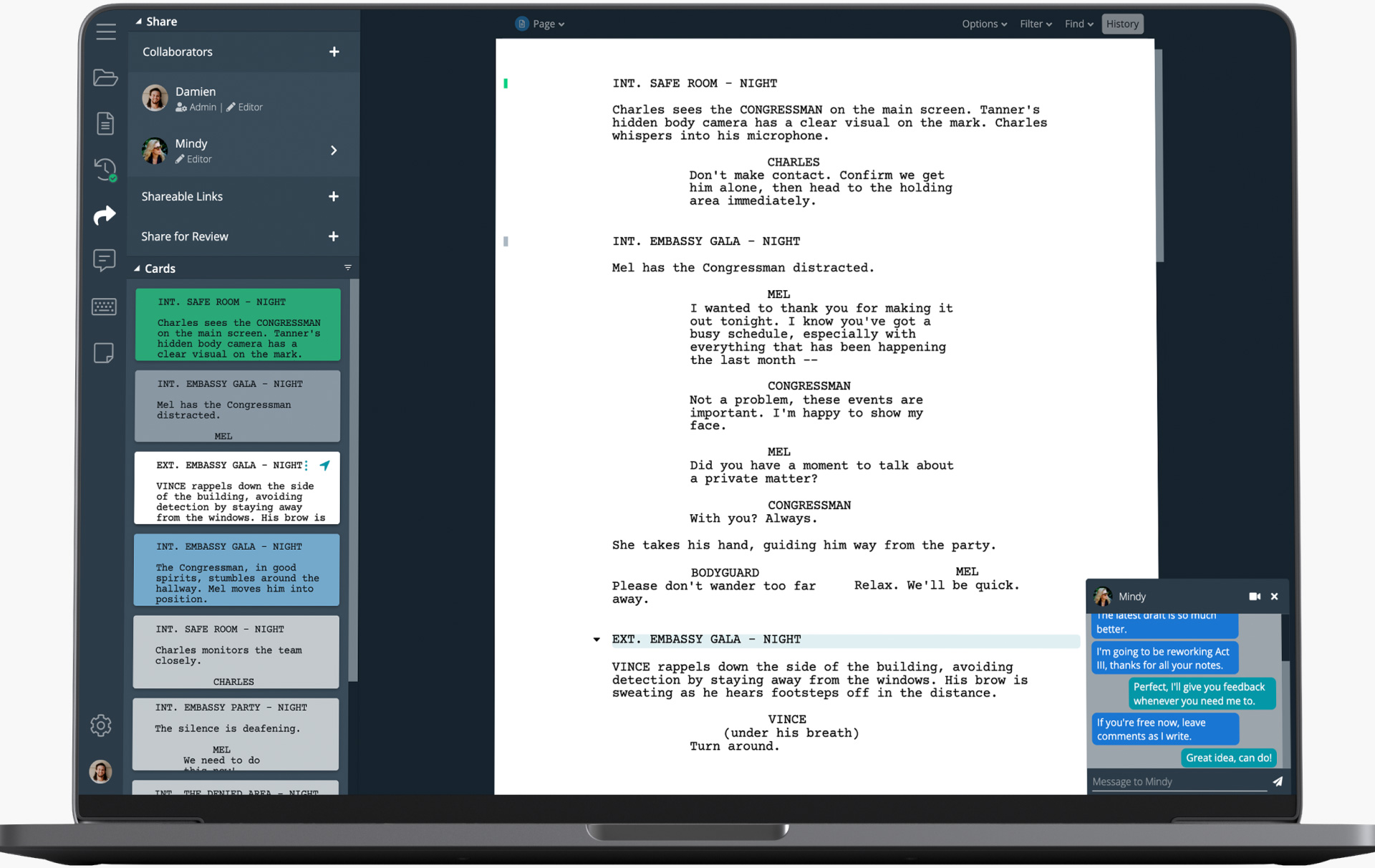
User reviews (0)