Website profiles · Technology insights · Alternatives

apparelmagic.com

The fashion industry’s top apparel software choice for ERP, PLM, CRM, inventory management software, accounting software, training, and support.

Paid content
Visit website
Profile views 2 Outbound visits 0 Normal
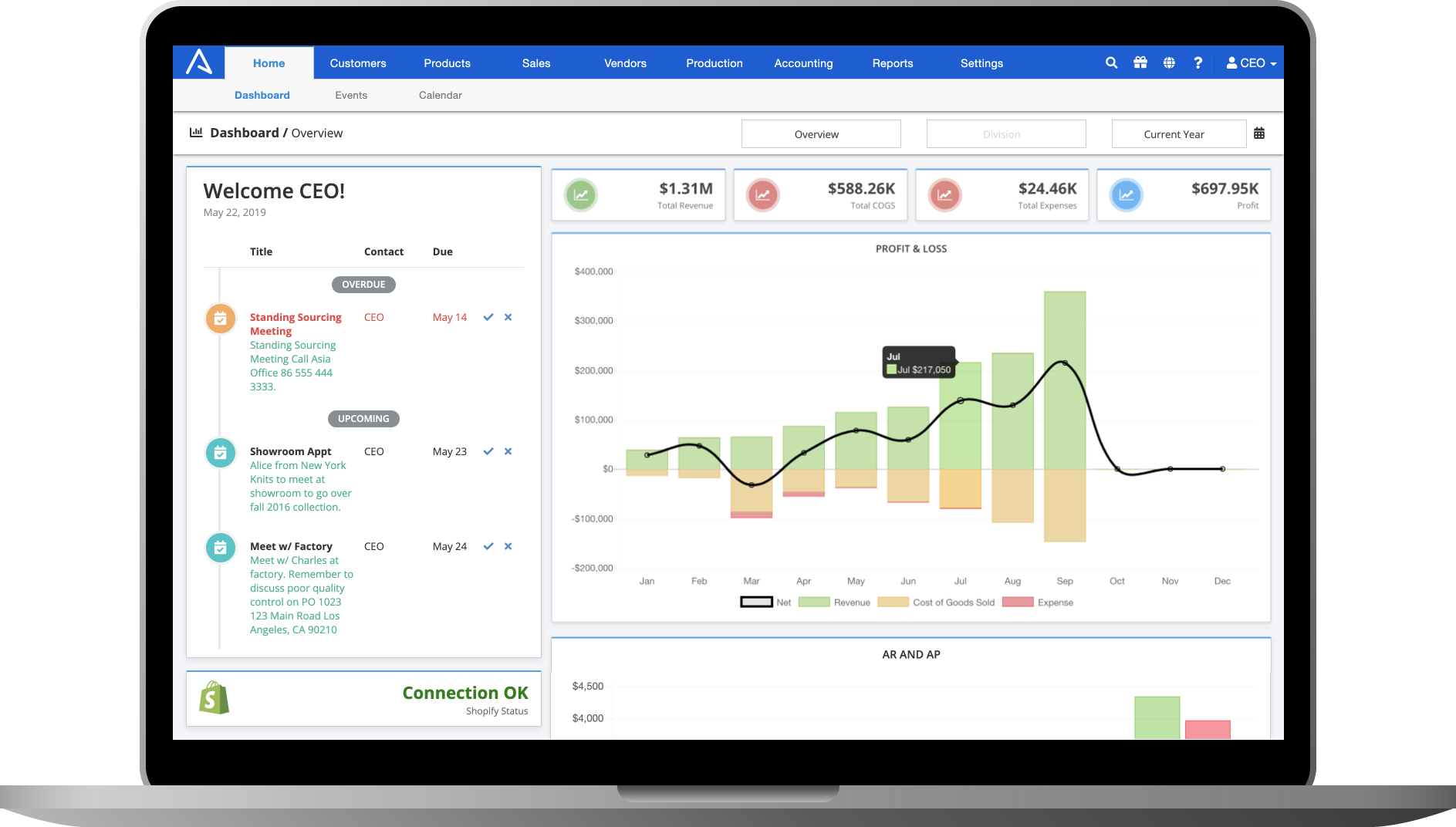
ApparelMagic Full homepage screenshot

At a glance

Category
Business Services
Language
English
Paid-content signal
Paid contentObserved
Registered
1999
Hosting
CloudflareInferred
HTTPS certificate trusted
PassedObserved
Last updated

Website review

This review may include AI-generated content and is not individually verified. Domain, certificate and other facts come from the observed data on this page.

What is ApparelMagic?

ApparelMagic is an ERP platform built specifically for fashion and apparel businesses. Rather than a general-purpose accounting or inventory tool adapted to clothing, it is designed around the way apparel companies actually operate—style, color and size matrices, seasonal collections, purchase orders, and wholesale or direct-to-consumer channels. Its stated scope covers ERP, PLM (product lifecycle management), CRM, inventory management, and accounting, with training and support included.

ApparelMagic

Who it tends to fit

  • Brands managing variants: If every product exists in multiple sizes and colorways, a system that treats those as first-class data saves constant workarounds.
  • Wholesale-led businesses: Order entry, customer records and inventory need to stay in sync across many retail accounts.
  • Growing labels: Companies that have outgrown spreadsheets and a standalone bookkeeping package, but are not ready for a heavily customized enterprise rollout.

Where the trade-offs sit

An industry-specific ERP reduces the customization you pay for, but it also means your processes should roughly match standard apparel workflows. Businesses with unusual manufacturing or distribution models may find a general ERP more flexible. The page emphasizes automation and customization, which suggests configuration is possible, but the practical question is how much of your workflow fits out of the box versus how much needs setup.

A useful next step

Before comparing vendors, write down two things: your monthly order volume by channel, and the three tasks your team currently does manually. Then ask each vendor to show those exact tasks in a demo. That turns a feature list into a concrete test. If you want a broader shortlist, ApparelMagic is one option to weigh against general ERPs and other fashion-focused systems.

How much does ApparelMagic cost?

ApparelMagic does not publish a single flat price. The site has a dedicated Pricing page, but it does not list public rates, and there are no payment platforms or cost figures in the available information. This usually means pricing is quoted based on your business — user count, modules, order volume, or implementation needs.

What that means in practice

  • Expect a sales conversation rather than a self-serve checkout.
  • Budget for more than the software subscription: onboarding, data migration, and training are commonly separate line items for ERP-style systems.
  • Ask for a written quote covering named users, transaction volume, add-on modules, support level, and contract length.

Who should care

ApparelMagic is aimed at fashion and apparel businesses that need ERP, PLM, CRM, inventory, and accounting in one system. If you are a small brand comparing lightweight inventory apps, a custom quote may be more than you need. If you run wholesale, DTC, and production across multiple channels, the value comes from replacing several disconnected tools.

Next step

Request a quote and ask two questions: what is the all-in first-year cost including implementation, and what triggers a price increase later (users, orders, storage, or modules)? Compare that total against your current stack of separate tools. For general market context, you can look at Cin7 or NetSuite, which also serve inventory-heavy businesses, though their pricing models and fashion fit differ.

Can ApparelMagic integrate with AI tools like the MCP connector?

Yes. ApparelMagic describes an MCP connector that links AI tools to your apparel ERP data, so the AI assistant can work from the same styles, orders, inventory and customer records you already manage in ApparelMagic rather than from a separate export.

What that looks like in practice

  • You ask an AI tool a question such as which styles are running short before a production run, or which accounts have slowed their reorders this season.
  • The connector supplies the ERP context, so answers reflect live ApparelMagic records instead of a stale spreadsheet.
  • The useful work happens on top of that data: drafting account summaries, flagging replenishment needs, or preparing a buying review.

Who benefits most

Teams already running ERP, PLM, CRM and inventory in one system get the clearest gain, because the AI tool has a single consistent source. Brands still keeping critical data in spreadsheets will see weaker results, since the connector can only reach what the ERP holds.

Trade-offs to weigh

  • Data access needs governance. Decide which records an AI tool may read before connecting it.
  • AI output still needs a human check, especially for purchasing, pricing and customer communication.
  • Integration value depends on data hygiene. Duplicate styles or outdated customer records will produce confident but wrong answers.

Next step

Before connecting anything, pick one recurring question your team answers manually each week, such as reorder timing or inventory exposure. Test the connector on that single workflow, confirm the numbers match your ERP reports, then expand. For background on the platform, see ApparelMagic.

Is ApparelMagic suitable for small fashion brands or only large enterprises?

ApparelMagic is built to serve both small fashion brands and larger enterprises, but its real strength shows up as a brand grows into multi-channel, multi-season complexity. The platform combines fashion ERP, PLM, CRM, inventory management and accounting, with automations and customization aimed at apparel-specific workflows rather than generic retail. For a small brand, that means you can start with core inventory, order and accounting functions and avoid stitching together separate tools; for a larger enterprise, the same system can support deeper product development, customer and financial processes.

Where the fit differs

Brand stage Likely fit Main trade-off
Emerging label, few SKUs, one sales channel Workable if you want fashion-specific structure early May be more system than a very small team needs at first
Growing brand, wholesale plus DTC, seasonal lines Strong fit: inventory, orders, CRM and accounting in one place Requires setup discipline and staff training
Larger enterprise, multiple channels and teams Strong fit: automations and customization support scale More configuration and process design up front

A practical next step

List your current pain points in order: stock accuracy, wholesale order management, production tracking, customer history or accounting reconciliation. If two or more of those already hurt, ApparelMagic is worth a demo. If you are pre-launch with a handful of styles, compare it against simpler inventory tools first. You can review the official pricing page at ApparelMagic Pricing and the main product overview at ApparelMagic to see which modules match your stage.

How does ApparelMagic handle inventory management for apparel businesses?

ApparelMagic treats inventory as a core module of a fashion-specific ERP rather than a standalone stock tracker. Its page positions the product around "total control" for apparel businesses, with inventory management listed alongside ERP, PLM, CRM, and accounting. The practical implication: stock levels, style/color/size variants, purchasing, sales orders, and financials are meant to live in one system instead of being reconciled across spreadsheets and separate tools.

What that means in practice

For an apparel brand, inventory is rarely just "how many units." A single style can exist in dozens of color–size combinations, with seasonal buys, pre-orders, and reorders. An ERP-style approach typically lets you:

  • Track stock at the variant level (style, color, size) rather than as one lump quantity.
  • Connect purchase orders and receiving to what is actually available to sell.
  • Tie sales orders and invoicing back to the same inventory records, so accounting reflects stock movements.
  • Use automation to reduce manual data entry across those steps.

The page also highlights "powerful automations" and "customization," which suggests the system is designed to be adapted to a brand's own workflows rather than forcing one fixed process. That matters most for businesses with unusual channel mixes or made-to-order models.

Who benefits most

A growing apparel label juggling wholesale, e-commerce, and possibly retail is the clearest fit: the pain of mismatched inventory across channels is exactly what a unified ERP addresses. A very small brand selling one product line through a single channel may find a full fashion ERP heavier than needed, and could do fine with simpler inventory software until order volume and channel complexity grow.

A practical next step

Before evaluating any system, list your current inventory pain points — overselling, slow reconciliation, unclear landed costs, or wholesale/retail mismatches — and rank them. Then ask a vendor demo to walk through those exact scenarios using your own style/color/size structure. If you want a broader market view first, ApparelMagic itself is the natural starting point, and you can compare its positioning against general ERP options before committing.

What training and support does ApparelMagic offer?

ApparelMagic presents training and support as part of its core offering, alongside its fashion ERP, PLM, CRM, inventory and accounting tools. The site's own framing — “All the tools and resources needed to grow your apparel business” — places onboarding help and ongoing support in the same bucket as the software itself, rather than as a paid add-on you discover later.

H3 What that likely covers in practice Because the platform spans several connected modules (ERP, PLM, CRM, inventory, accounting), training usually has to be role-specific rather than one generic session:

  • Buyers and merchandisers learning PLM and product development workflows
  • Operations and warehouse staff learning inventory and order management
  • Finance teams learning the accounting side and how it links to orders
  • Owners and managers learning reporting, dashboards and automations

Support in a fashion ERP context tends to mean help with data migration at go-live, questions during seasonal peaks, and configuration changes as your line sheet or sales channels expand.

H3 How to judge whether it fits you Ask three questions before committing:

  1. Is training live, self-serve, or both — and is it included or billed separately?
  2. Who answers support tickets, and what are the response hours across your selling seasons?
  3. How much of your historical data (styles, SKUs, customers, open orders) will they help migrate?

If you run a small brand with one or two admins, self-serve documentation plus email support may be enough. If you have multiple departments, warehouses or wholesale accounts, insist on named onboarding and role-based sessions.

H3 Next step Book a demo and ask them to walk through the exact onboarding sequence for a company your size, including how long training takes and what happens in your first peak season. Confirm current pricing and support terms directly at ApparelMagic. If you are still comparing options, it also helps to look at broader fashion ERP coverage from WhichPLM to see how support and implementation are typically structured across vendors.

Related questions

More questions →
What Modules and Features Does ApparelMagic Offer?

ApparelMagic is a fashion-industry software platform that combines ERP, PLM, CRM, inventory management, and accounting into one system, with training and support included. It is built specifically for apparel and fashion businesses rather than adapted from general-purpose software. The modules below reflect what the platform's own site describes; exact feature depth and pricing per module are not published in the source material, so treat this as a map of capabilities rather than a feature-by-feature spec sheet.

ERP: The Core Business Management Layer

ERP (Enterprise Resource Planning) is the center of the platform. In ApparelMagic's framing, ERP is what gives a fashion business "total control" over day-to-day operations — orders, purchasing, production, and financial data flowing through one system instead of separate tools.

For a fashion company, this matters because the operational chain is unusually interconnected: a style gets designed, sourced, produced, stocked, sold, and invoiced, and each step affects the others. An ERP that understands apparel-specific concepts (styles, colorways, sizes, seasons) avoids the workarounds that generic ERP systems require.

PLM: Product Lifecycle Management

PLM covers the product side of the business — managing a style from concept through development to production. In a fashion context, this typically means tracking tech packs, materials, samples, and the progression of a design into a sellable product.

The practical value is keeping product development data connected to the ERP, so that once a style is finalized, its information is already available for purchasing, inventory, and sales rather than being re-entered.

CRM: Customer Relationship Management

CRM handles the customer side — accounts, contacts, and the history of the relationship. For fashion brands selling wholesale, this is where buyer accounts, order history, and communication live alongside the operational data in the ERP.

Because CRM sits inside the same platform, a sales rep can see a customer's past orders, current inventory availability, and account status without switching systems.

Inventory Management

Inventory management tracks stock across styles, sizes, and colors — the dimensions that matter in apparel. The site positions this as one of the platform's core tools for growing an apparel business.

The reason inventory is a distinct concern in fashion: SKU counts multiply quickly (one style × several colors × several sizes), and stock needs to be visible across sales channels, warehouses, and production runs.

Accounting

Accounting software is included as part of the platform, which means financial data ties back to the same orders and inventory records used elsewhere in the system. This reduces reconciliation between an operational system and a separate accounting package.

Training and Support

ApparelMagic lists training and support as part of what it offers, not as an afterthought. For a multi-module system, onboarding and ongoing help are part of the practical value — the modules only pay off if a team can actually use them.

Automation and Customization

Two themes from the site's own headings are worth noting:

  • Powerful automations — the platform emphasizes automating repetitive operational work.
  • Customization — it is positioned as adaptable to how a specific fashion business operates, rather than forcing a rigid workflow.

AI Connectivity (MCP)

One item in the source material stands out: ApparelMagic MCP, described as connecting AI tools with your apparel ERP data. This suggests the platform exposes its ERP data to AI tooling through an MCP (Model Context Protocol) connection — relevant if you want AI assistants or agents to work with your operational data rather than exporting it manually.

How the Modules Fit Together

Module What it covers Why it matters in fashion
ERP Core operations: orders, purchasing, production, financials Connects the whole operational chain in one system
PLM Product development from concept to production Keeps design data linked to operations
CRM Customer accounts, contacts, order history Sales sees customer + inventory in one place
Inventory Stock by style, color, size Handles high SKU counts across channels
Accounting Financial records tied to orders/inventory Less reconciliation between systems
Training & Support Onboarding and ongoing help Multi-module systems need adoption support

What This Means for Choosing It

If you run a fashion or apparel business and your current stack is a patchwork of generic tools, ApparelMagic's pitch is consolidation: one platform where product development, inventory, customers, and finances share the same data. The modules are not sold as isolated products in the source material — they are presented as one connected system.

What the source does not tell you: per-module pricing, implementation timelines, or which modules are optional versus included. The site has a pricing page, so that is the place to check current terms. If AI-assisted workflows matter to you, the MCP connection is the feature to ask about specifically.

How ApparelMagic Connects AI Tools with Apparel ERP Data

ApparelMagic exposes its apparel ERP data to AI tools through a connector it calls ApparelMagic MCP. Based on the site's own framing, the purpose is to let AI assistants and automation tools read and act on the same ERP records your team already uses — orders, inventory, customers, and product data — rather than exporting spreadsheets into a separate AI product. This is relevant if you run a fashion business on ApparelMagic and want AI or automation to work from live ERP data instead of stale copies.

What "MCP" means here

MCP stands for Model Context Protocol, an open standard that lets an AI application (a chat assistant, an agent, or an automation platform) request data and actions from an external system through a defined interface.

In ApparelMagic's case, the ERP acts as the data source, and MCP is the bridge. Instead of building a custom integration for every AI tool, the ERP exposes a consistent interface that compatible tools can call.

The practical difference from a plain API:

Approach Who builds the integration What the AI can see
Custom API integration You or a developer, per tool Only the endpoints you wire up
MCP connector ApparelMagic exposes the interface The ERP data and actions the connector is scoped to

What data and actions this touches

ApparelMagic describes itself as covering ERP, PLM, CRM, inventory management, and accounting for fashion businesses. Those are the domains the connector is positioned to serve. In practice, that means AI tools could be pointed at questions like:

  • "Which styles are below reorder point this week?"
  • "Summarize open purchase orders by vendor."
  • "What's the current on-hand and committed quantity for this SKU?"
  • "Draft a customer summary from CRM and order history."

The site emphasizes powerful automations and customization as core themes, which is consistent with an MCP layer: the value is not a fixed set of canned reports but the ability to route ERP data into whatever AI or automation workflow you configure.

How the connection works, conceptually

  1. The ERP holds the source of truth. Orders, inventory, customers, and product records live in ApparelMagic.
  2. The MCP connector exposes that data through a defined interface rather than a one-off export.
  3. An AI tool or automation platform connects to the connector and issues requests.
  4. The tool receives ERP data and uses it to answer questions, generate documents, or trigger downstream actions.
  5. Results stay tied to live records, so the AI is working from current data rather than a snapshot.

The exact setup steps, authentication method, and which AI tools are supported are not detailed in the available page evidence — check ApparelMagic's own documentation or pricing page before assuming a specific tool works out of the box.

Who this is for

This matters most if you are:

  • Already running ApparelMagic and want AI assistance grounded in real ERP data.
  • Building internal automations (reorder alerts, vendor summaries, customer briefs) that need ERP inputs.
  • Evaluating whether your ERP can feed AI tools without a custom middleware project.

It matters less if you are pre-purchase and still comparing ERPs — the connector's value depends on having ApparelMagic data to connect to in the first place.

What to verify before relying on it

  • Which AI tools are compatible. MCP is a standard, but support varies by application.
  • What the connector can read vs. write. Reading data and triggering actions are different permission levels.
  • Security and access scope. Confirm how credentials are managed and whether access can be limited by role.
  • Cost and plan requirements. The site has a pricing page, but the available evidence does not state whether MCP access is included or gated to a tier.

For a fashion business already on ApparelMagic, the MCP connector is the mechanism that turns "we have ERP data" into "our AI tools can use ERP data." The decision point is less about whether it exists and more about which tools you connect and what access you grant them.

What Types of Fashion Businesses Is ApparelMagic Designed For?

ApparelMagic is designed for fashion and apparel businesses that need to manage products, inventory, customers, and finances in one system. Its site positions it as "apparel software for total control" and as "designed for fashion," with messaging that it is trusted by leading fashion brands. That framing points to a specific fit: companies whose core challenge is running a fashion product lifecycle and the operations around it, rather than a generic business looking for a one-size-fits-all ERP.

The core fit: fashion brands managing product and operations together

The strongest signal is the combination of functions named on the site: ERP, PLM, CRM, inventory management, and accounting. A business that only needs one of these — say, a simple inventory tracker — is not the target. The target is a team that wants product development, stock, customer relationships, and financials connected, because in fashion those areas constantly affect each other.

Typical matches include:

  • Apparel and fashion brands that design, produce, and sell their own lines.
  • Teams managing both product data and inventory, where style, size, color, and season variations make generic tools awkward.
  • Businesses that also need customer and financial tracking in the same system, since CRM and accounting are part of the stated scope.
  • Growing brands — the site frames its tools and resources around growing an apparel business, and highlights automation and customization as ways to scale without adding manual work.

What the "designed for fashion" claim actually implies

Generic ERP and inventory systems usually treat a product as a single SKU. Fashion products multiply fast: one style becomes many variants across size, color, and season. ApparelMagic's emphasis on being fashion-specific suggests it handles that structure natively, which matters most when variant count is high and changes often.

The page also highlights powerful automations and customization. In practice, these matter to businesses with repeatable but non-standard workflows — for example, a brand that needs purchase orders, production tracking, and sales channels to update each other automatically instead of through spreadsheets.

Where it is less clearly a fit

The available site material does not describe support for non-fashion retail categories, and it does not present itself as a general-purpose ERP. If your business is outside apparel and fashion, or if you only need basic bookkeeping or a standalone CRM, the fashion-specific design is not an advantage. The site also does not state pricing on the pages reviewed here; a pricing page exists, so cost needs to be checked directly rather than assumed.

How to decide

Use these questions to test fit before evaluating further:

  1. Do you manage apparel or fashion products with size, color, and seasonal variants?
  2. Do you need product, inventory, customer, and financial data connected rather than in separate tools?
  3. Do you have repeatable workflows you want automated, and processes that need customization?
  4. Are you growing in a way that adds operational complexity, not just sales volume?

If most answers are yes, ApparelMagic is aimed at your scenario. If you mainly need one function, or you operate outside fashion, the industry-specific design is likely more than you need. The next practical step is to check the pricing page and confirm which modules and support options apply to your business size.

How to Find ApparelMagic Pricing and Get Started

ApparelMagic publishes a dedicated pricing page at apparelmagic.com/pricing/ — that is the only official source for current pricing, and the site does not list rates directly on its homepage. If you are evaluating the platform, start there, then use the same site's training and support resources to judge whether the system fits your business before you commit. The site does not state whether pricing is public, quote-based, or gated, so treat the pricing page as the first step rather than the answer.

Where to Find Pricing

What you need Where to look What to expect
Current pricing apparelmagic.com/pricing/ The site's own pricing link; exact figures are not published on the homepage
Product scope Homepage sections on ERP, PLM, CRM, inventory, accounting Confirms what a subscription covers
Fit for your business "Designed for fashion" and "Trusted by leading fashion brands" sections Signals the target customer profile
Onboarding help Training and support resources referenced on the site Relevant to evaluating total cost of ownership

Because the site does not publish rates outside the pricing page, avoid relying on third-party summaries or older screenshots — pricing for ERP platforms changes with modules, users, and contract length.

What You Are Actually Buying

ApparelMagic positions itself as fashion-industry software spanning several functions in one system:

  • ERP — core operations and financials
  • PLM — product lifecycle management
  • CRM — customer relationship management
  • Inventory management — stock across styles, sizes, and channels
  • Accounting — built into the same platform
  • Training and support — included as part of the offering

The homepage emphasizes "powerful automations" and "customization," which matters for pricing conversations: automation and customization requests are common reasons quotes differ between businesses of similar size.

How to Get Started

  1. Open the pricing page. Go to apparelmagic.com/pricing/ and read what is listed there. Note whether it shows tiers, a quote request, or a demo booking.
  2. Match modules to your operation. List the functions you need — for example, PLM plus inventory plus accounting — and check them against the modules described on the site. This prevents paying for scope you will not use.
  3. Check the fit signals. Read the "Designed for fashion" and customer-brand sections. If your business looks like the brands shown, the platform is aimed at you; if not, ask directly during your pricing inquiry.
  4. Ask about training and support. The site lists training and support as part of the offering. Confirm what is included versus billed separately, since this affects real cost.
  5. Request a demo or quote if pricing is not listed. If the pricing page does not show numbers, that is your signal to contact the company directly with your module list and business size.

Common Sticking Points

  • No rates on the homepage. Do not assume free, freemium, or fixed pricing — the site simply does not say. Only the pricing page or a direct inquiry will tell you.
  • Module-based cost. Because ERP, PLM, CRM, inventory, and accounting are separate functions, your quote depends on which you adopt. Bring a specific list to the conversation.
  • Customization and automation requests. These are highlighted as strengths, which usually means they are also variables in pricing. Describe your workflows precisely so the quote reflects reality.
  • AI/ERP integration. The site references connecting AI tools with apparel ERP data (ApparelMagic MCP). If this matters to you, confirm availability and any cost implications during your inquiry.

A Practical Next Step

Before contacting ApparelMagic, write down three things: the modules you need, the number of users, and any customization or automation you require. Then open apparelmagic.com/pricing/. If pricing is listed, compare it against your list. If it is not, use your list as the basis for a quote request — it will get you a more accurate answer than asking "how much does it cost?"

What Is ApparelMagic?

ApparelMagic is a software platform built specifically for the fashion and apparel industry. It combines ERP, PLM, CRM, inventory management, and accounting functions in one system, aimed at apparel brands and related businesses rather than general-purpose operations. If you run or work inside a clothing company and need a single place to manage products, orders, stock, customers, and finances, ApparelMagic is positioned as that kind of tool.

What it covers

The platform is described as covering the core systems an apparel business typically runs on:

  • ERP (Enterprise Resource Planning) — the backbone for coordinating day-to-day operations.
  • PLM (Product Lifecycle Management) — managing products from development through production.
  • CRM (Customer Relationship Management) — tracking and managing customer relationships.
  • Inventory management — keeping control of stock across the business.
  • Accounting — financial tracking integrated with the rest of the system.

Alongside these, the site highlights training and support as part of the offering.

Who it's for

ApparelMagic is designed for fashion and apparel companies. The site states it is "trusted by leading fashion brands" and emphasizes that it is "designed for fashion" rather than adapted from a generic business tool. That distinction matters: apparel businesses deal with styles, sizes, colors, seasons, and collections — structures that general ERP or inventory software often handles awkwardly.

If your business revolves around apparel products and you've outgrown spreadsheets or disconnected tools, this is the category of software to evaluate.

What it emphasizes

Two themes stand out in how the product is presented:

  • Powerful automations — reducing manual work across recurring processes.
  • Customization — adapting the system to how a specific brand operates.

The site also references an MCP (Model Context Protocol) connection that links AI tools with your Apparel ERP data, suggesting the platform is extending into AI-assisted workflows on top of the core ERP.

What to check before deciding

  • Fit with your product model — confirm it handles your specific mix of styles, sizes, and channels.
  • Module coverage vs. your gaps — decide which of ERP, PLM, CRM, inventory, or accounting you actually need now.
  • Pricing and terms — the site has a dedicated pricing page; review it directly, since plan details and costs are not summarized here.
  • Migration and training — the platform lists training and support, so ask how onboarding works for a business your size.

For a closer look, the official site is apparelmagic.com, with pricing details at apparelmagic.com/pricing.

Website Overview

An established domain and managed infrastructure suggest continuity of operations and may support dependable delivery, although neither guarantees service quality.

Domain and Registration

Registered in 1999, this domain has about 26 years of history. That suggests continuity, although ownership and purpose may have changed. Transfer-protection status is present, helping reduce the risk of unauthorized domain transfers. The registrar is Cloudflare, Inc., a widely used domain service provider. The domain uses the common .com extension, which is not an independent safety signal.

DNS and Email

Nameservers are provided by Cloudflare, indicating managed DNS hosting. MX records point to the Google Workspace email service. No CNAME was found; the observed records resolve directly to addresses. SPF and DMARC are configured. DKIM status is unknown. TXT records include verification markers for Google. Such markers may also remain after a service stops being used.

TLS and Certificates

The public key uses EC with 256 bits. The server supplied a complete certificate chain. No organization name is present in the certificate; the available fields are consistent with domain validation. The certificate was issued by Let's Encrypt, commonly associated with automated certificate services. The certificate's total validity is about 89 days, consistent with a short renewal cycle.

HTTP and Browser Security

X-Powered-By exposes backend information: WP Engine. The checked browser-security headers were not detected, leaving fewer explicit browser-side safeguards. The cf-ray, x-cache response header indicates a CDN or caching proxy in the delivery path. No obvious internal addresses or debug information were found in the headers. The Server header identifies cloudflare without an exact version.

Technology Stack Analysis

The public page identifies Elementor 4.3.3; features: e_font_icon_svg, additional_custom_breakpoints; settings: css_print_method-external, google_font-disabled, font_display-auto, WordPress, jQuery, Google Tag Manager, Cloudflare without precise versions, leaving fewer clues for version-specific scanning.

Search and Social Sharing

The title has 66 characters and may be truncated in search results. The Generator tag identifies Elementor 4.3.3; features: e_font_icon_svg, additional_custom_breakpoints; settings: css_print_method-external, google_font-disabled, font_display-auto, making the publishing system easier to fingerprint. Twitter Card metadata is configured. A meta description is present, with 144 characters. The observed directives allow indexing and link following.

Hosting and Email

DNSCloudflare
HostingCloudflare
EmailGoogle Workspace
Approximate IP geolocation (inferred; a CDN or proxy may differ from the origin server) Location unknown Inferred 104.26.10.134

Registration details

RDAP / WHOIS

RegistrarCloudflare, Inc.
Registered1999-10-13
Expires2027-10-13
Domain statusclient transfer prohibited
Nameserversblakely.ns.cloudflare.com、piotr.ns.cloudflare.com
DNSSECunsigned

DNS records

DNS

TypeNameValueTTLPriority
Aapparelmagic.com104.26.10.134300—
Aapparelmagic.com104.26.11.134300—
Aapparelmagic.com172.67.70.32300—
AAAAapparelmagic.com2606:4700:20::681a:a86300—
AAAAapparelmagic.com2606:4700:20::681a:b86300—
AAAAapparelmagic.com2606:4700:20::ac43:4620300—
MXapparelmagic.comaspmx.l.google.com3005
MXapparelmagic.comalt1.aspmx.l.google.com30010
MXapparelmagic.comalt2.aspmx.l.google.com30010
MXapparelmagic.comalt3.aspmx.l.google.com30015
MXapparelmagic.comalt4.aspmx.l.google.com30015
NSapparelmagic.comblakely.ns.cloudflare.com86400—
NSapparelmagic.compiotr.ns.cloudflare.com86400—
TXTapparelmagic.comgoogle-site-verification=pKVor26YFRO3rIJz6bH1x7ZJXgrMtTzwVKp2xO1GHeA300—
TXTapparelmagic.comgoogle-site-verification=qbQ9hBJKw1ZNcHBWFVwxKNnT9pKOgpk4mO7pnTi_dE0300—
TXTapparelmagic.comv=spf1 include:_spf.google.com include:mailer.chargify.com include:6600552.spf03.hubspotemail.net ~all300—
DMARC_dmarc.apparelmagic.comv=DMARC1; p=none;300—

TLS and certificates

TLS / SSL

AssessmentNormal configuration
Supported protocolsTLSv1.2、TLSv1.3
Negotiated protocolTLSv1.3
Certificate subjectapparelmagic.com
IssuerLet's Encrypt
Valid until2026-11-23T19:12 · Remaining when checked: 49 days
Verification detailsCertificate trust: Passed · Hostname match: Passed

HTTP response headers

HTTP

HeaderValue
content-typetext/html; charset=UTF-8
cache-controlmax-age=600, must-revalidate
servercloudflare

Identified technologies

Elementor 4.3.3; features: e_font_icon_svg, additional_custom_breakpoints; settings: css_print_method-external, google_font-disabled, font_display-autoWordPressjQueryGoogle Tag ManagerCloudflare

Pages, Search and Sharing

Meta descriptionThe fashion industry’s top apparel software choice for ERP, PLM, CRM, inventory management software, accounting software, training, and support.
Canonical URLhttps://apparelmagic.com/
LanguageEnglish (default)
Twitter Cardsummary_large_image
All bots 1 allowed · 16 disallowed
  • Allow/wp-admin/admin-ajax.php
  • Disallow/wp-admin/
  • Disallow/wp-login.php
  • Disallow/readme.html
  • Disallow/refer/
  • Disallow/page/
  • Disallow*/page/*
  • Disallow/*?paged=*
  • Disallow/comments/feed/
  • Disallow/*?utm_*
  • Disallow/*?gclid*
  • Disallow/*?fbclid*
  • Disallow/*?_ga*
  • Disallow/?s=
  • Disallow/search/
  • Disallow/xmlrpc.php
  • Disallow/trackback/

User reviews (0)

  • No reviews yet.