

 Visit website
 Updated: 2026-10-05 04:59
 Language: English (default)
 Access: Normal
 Profile views 12
  Outbound visits 0
 Website Review
What is Asciify?
Asciify is a free, browser-based ASCII and Unicode character reference aimed at developers. Its core job is fast lookup: you search for a character by name, code point, or by pasting the glyph itself, then copy what you need — hex codes, HTML entities, or the character — without digging through spec tables.
The site groups characters into practical sets rather than one giant list: standard ASCII, extended/DOS, compact, control codes, whitespace, punctuation and symbols, numbers, uppercase and lowercase letters. A "jump to any character, emoji, or category" search with a Ctrl+K shortcut reflects the intended workflow — quick keyboard-driven lookup while you're already in an editor or terminal.
What you'd use it for
- Checking whether a code point is ASCII or extended ASCII before writing parsing or validation logic.
- Grabbing an HTML entity or hex escape for a symbol you can't type.
- Comparing how an emoji or symbol renders across vendor emoji sets (Apple, Google Noto, Microsoft Fluent, OpenMoji and others are shown for reference).
- Confirming control-character ranges when debugging whitespace or line-ending problems.
Who it suits
Developers, students, and anyone doing encoding work who wants a lookup rather than a library. The privacy posture is unusually explicit: no accounts, no ads, no tracking cookies, no stored IP addresses, with only anonymous aggregate page and search counts. That matters if you're using it on a work machine under strict data policies.
Trade-offs to weigh
It's a reference and copy tool, not a converter or encoder — don't expect it to transform a whole file or explain Unicode normalization. Emoji artwork comes from third parties under their own licenses, and Apple's and Facebook's styles are shown as proprietary reference only, so anything you ship should use assets you're licensed to redistribute. The site also states it isn't affiliated with or endorsed by those rights holders.
A practical next step: if you're deciding between this and a full Unicode database tool, ask whether you need one-off lookups (this fits) or programmatic bulk data (you'll want the underlying Unicode data files or a library instead).
How do I find the ASCII or Unicode code point for a specific character?
Use a character reference that lets you search by glyph, name, or code point, then copy the value you need. On Asciify, you can type a character, an emoji, or a category name into the search box and it will jump to the matching entry; you can also toggle between Standard, Extended, DOS, Compact, and Control views to narrow what you see. Once you find the character, the page presents its hex code and HTML entity for copying.
A typical workflow:
- Search by the character itself (paste it in) or by its Unicode name.
- Confirm you have the right one — many glyphs look similar but have different code points.
- Copy the hex code point, decimal value, or HTML entity depending on where it will be used.
- If you need a control character or an extended-set value, switch to the Control or Extended view rather than assuming the standard set covers it.
For a concrete scenario: you're writing HTML and need the entity for a non-breaking space or a curly quote. Searching by glyph gives you the entity immediately, which is faster than recalling that U+00A0 is . Conversely, if you're debugging a string in code and see an unexpected byte, searching the hex value tells you which character it represents.
Two decision criteria matter most:
- Search by name vs. by glyph. Names are reliable when the character is hard to type or visually ambiguous; glyph search is fastest when you can copy the character from somewhere.
- Standard vs. extended. The original ASCII range is 0–127. Anything above that is not ASCII, even if a tool groups it under "extended ASCII." If you need compatibility with strict ASCII systems, verify the code point falls in that range.
If you work with emoji or multilingual text, remember that a single visible emoji can be a sequence of multiple code points, so the reference may show several values rather than one. Check the full sequence before copying.
What is the difference between standard ASCII and extended ASCII character sets?
Standard ASCII covers code points 0–127: 128 characters including control codes, whitespace, digits, punctuation, and the English letters. Extended ASCII is not a single set — it is a family of 8-bit encodings that use values 128–255 for extra glyphs, and each variant fills that range differently.
The practical difference is portability. A byte like 0xE9 is unambiguous in standard ASCII terms only because that range is undefined there; in extended sets it might be é, a box-drawing character, or a Greek letter depending on the code page.
| Aspect | Standard ASCII | Extended ASCII |
|---|---|---|
| Range | 0–127 | 128–255 (on top of 0–127) |
| Size | 128 code points | Usually 256 per code page |
| Standardized by | ANSI X3.4 / ISO 646 lineage | Many competing vendor and DOS/Windows code pages |
| Letters covered | English A–Z, a–z | Adds accented Latin, currency, line-drawing, symbols |
| Interchange risk | High, universally consistent | Low across systems unless the code page is agreed |
On Asciify, the reference exposes this split directly: a Standard view for the 0–127 set and an Extended view, plus a DOS grouping, so you can see which characters exist only in the extended range and inspect their hex codes and HTML entities. Its search jumps to a character by name, code point, or glyph, which is the fastest way to check whether a symbol you need is genuinely ASCII or requires an extended code page.
What this means in practice
- If you are writing a protocol, config key, or filename that must survive any system, stick to 0–127. Punctuation like
-,_, and.is safe;é,£, and°are not. - If you need accented characters, treat encoding as an explicit contract. Declare UTF-8 or a named code page rather than assuming "extended ASCII".
- Modern text should normally be UTF-8, which is a superset of ASCII for 0–127 but not a superset of any particular extended code page. Bytes 128–255 do not map to the same characters.
Concrete scenario: you have a CSV with a café label that renders as café after a round trip. That is almost always a UTF-8 file read as Windows-1252 or Latin-1 — an extended-ASCII mismatch, not a standard-ASCII problem. Confirm the byte sequence in a reference, then fix the encoding declaration at the read step.
Decision rule: use standard ASCII when the data must be universally safe; use a named extended code page only when an existing system forces it; otherwise use UTF-8 and stop thinking in terms of "extended ASCII".
How can I copy a character's hex code or HTML entity for use in my code?
Open the character you need in Asciify's reference, then use the copy controls next to its hex code or HTML entity. Search by name, code point, or glyph (Ctrl K), and if the character isn't in the standard set, switch to Extended or DOS view before copying.
Practical workflow
- Search the character — e.g.
&,U+00A0, or "em dash". - Confirm the set: Standard, Extended, DOS, or Compact. The same glyph can have different code points depending on the set, so pick the one your encoding expects.
- Copy the value you need:
- Hex code for CSS
content, JavaScript\uXXXX, or regex. - HTML entity for markup — named entities like
&where they exist, numeric entities like—otherwise.
- Hex code for CSS
- Paste and test in a minimal file before trusting it in production.
Which value to use
| Situation | Better choice | Why |
|---|---|---|
| HTML/email templates | Named entity, else numeric | Survives encoding mismatches |
CSS content |
Hex escape with a trailing space | Terminates the escape cleanly |
| JS strings / regex | \uXXXX or \u{XXXXX} |
Matches how the runtime parses strings |
| Plain text files | The literal character | Entities would appear verbatim |
Concrete example
For an em dash in HTML, a numeric entity avoids any ambiguity about document encoding. In CSS, write the hex escape followed by a space so the next character isn't swallowed into the escape sequence. In JavaScript, use the Unicode escape rather than pasting the raw glyph if the file might be saved in an unexpected encoding.
Trade-offs to keep in mind
- Named entities are readable but only exist for a limited set of characters; you'll fall back to numeric forms for most symbols and emoji.
- Hex codes are compact and universal in code contexts, but a bare hex value means nothing outside an escape sequence — always include the correct prefix for the language.
- Extended and DOS sets include characters that look like standard ones but differ in code point, so a copy from the wrong tab can produce a visually identical but functionally wrong character.
Next step
If the character renders differently after pasting, check your file's encoding (UTF-8 is the safe default), then verify the code point against the same set you copied from. For quick lookups between tasks, Asciify keeps search and copy in one place; for browsing the full standard with official names, Unicode is the authoritative reference.
Which emoji styles can I compare on Asciify, and what are their licenses?
Asciify's reference includes a set of emoji styles you can view side by side, which is useful when you need to check how a glyph renders across platforms or pick a style for a design mockup. The styles listed are:
- Twemoji — CC-BY 4.0
- Noto Color Emoji — Apache 2.0
- Fluent UI Emoji — MIT
- OpenMoji — CC-BY-SA 4.0
- Toss Face — SIL OFL 1.1
- JoyPixels — Free Limited Use License
- SerenityOS Emoji — BSD-2-Clause
- EmojiTwo — CC-BY 4.0
- Apple Color Emoji — proprietary, shown for reference and comparison
- Facebook Emoji — proprietary, shown for reference and comparison
What this means in practice
If you're building a product and need emoji artwork you can legally redistribute, the open-licensed sets are the practical choices. MIT and Apache 2.0 are permissive and business-friendly. CC-BY 4.0 requires attribution but allows commercial use. CC-BY-SA 4.0 (OpenMoji) adds a share-alike condition, so derivative artwork may need to carry the same license. SIL OFL 1.1 (Toss Face) is designed for fonts but is also used for emoji assets. JoyPixels' "Free Limited Use License" is the one to read carefully, since "limited" usually means restrictions on commercial or high-volume use.
Apple and Facebook emoji are proprietary and appear only for comparison. You can look at them to see how a character renders on those platforms, but you shouldn't extract or redistribute the artwork.
A sensible next step
Decide your use case first: if you're just checking how an emoji looks on different systems, any of the listed styles works for reference. If you're shipping assets, shortlist the MIT, Apache 2.0, CC-BY 4.0 and OFL sets, then confirm attribution requirements for your chosen license. For a quick visual check, open Asciify and compare the same character across styles before committing to one.
Does Asciify track my searches or require an account?
No. Asciify is built as a no-account, no-tracking reference: there is no signup or login, and the site states it sets no tracking cookies, stores no IP addresses, and builds no user profiles. Its analytics are described as anonymous, aggregated page and search counts that are not tied to individual visitors. Cloudflare handles hosting, request delivery, and security.
What that means in practice
If you paste a sensitive string into the search box to find a character or code point, the site's own design intent is that the query isn't linked back to you. That's a meaningful difference from character-reference tools that require an account or log queries per user. Still, the search request has to travel to the server to return results, so "no tracking" describes the site's own data practices rather than a guarantee about every network hop.
Where it matters most
- Quick lookups during code review or debugging, where you don't want another login.
- Checking hex codes, HTML entities, or extended/DOS character sets without creating a profile.
- Teams that block tools requiring accounts for compliance reasons.
A practical next step
If privacy is your deciding factor, open the site's privacy policy from the footer and read the analytics paragraph yourself before relying on it for sensitive work. For anything truly confidential, the safer habit is to look up the character by name or code point rather than pasting the full sensitive string.
For comparison, the Unicode Consortium's official code charts at Unicode are a no-account reference too, though they're documentation rather than a fast search tool.
 Hosting and Email
 Cloudflare
 Hosting
 Location
 Pages, Search and Sharing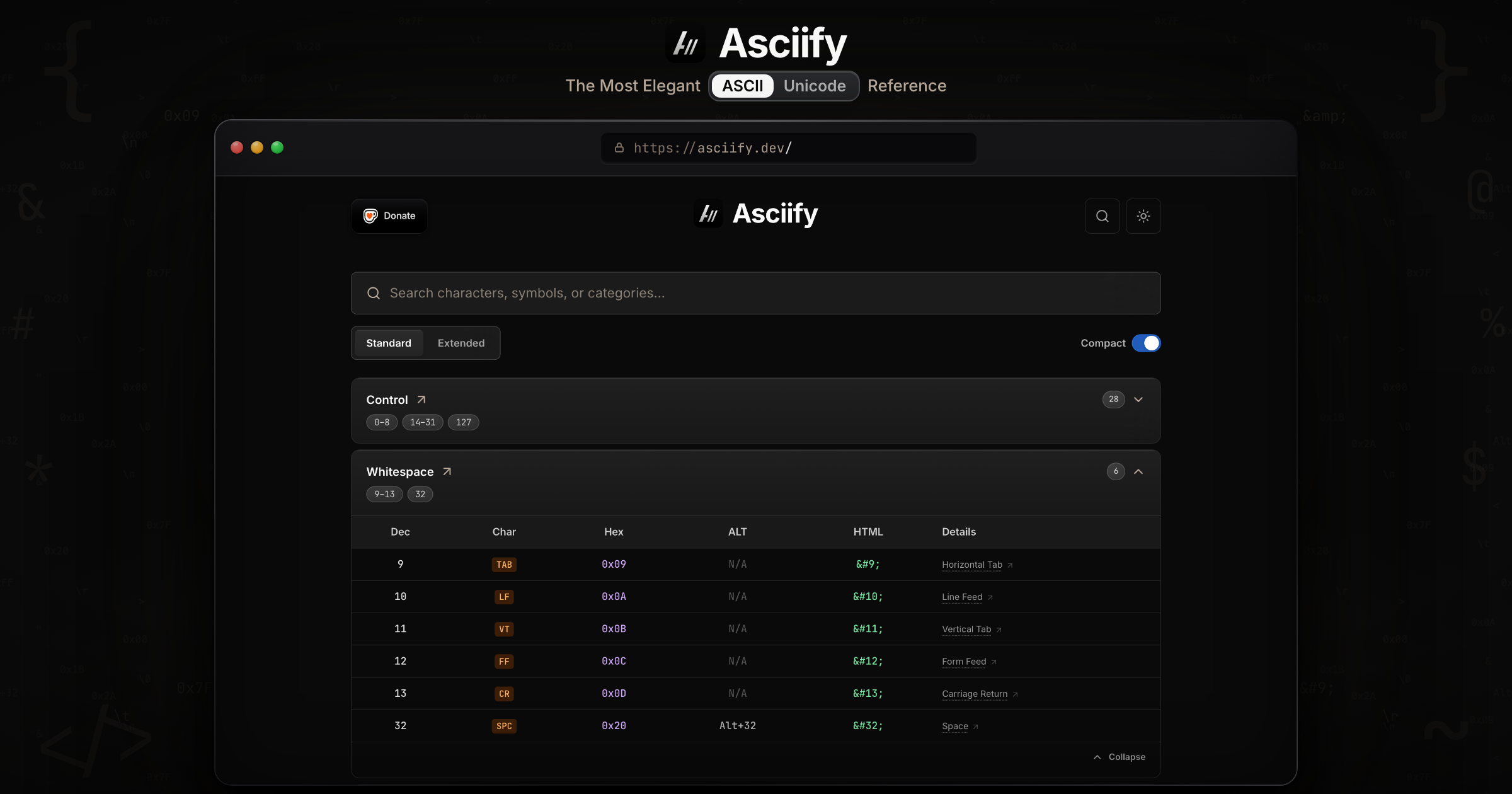



 semrushbot


 Registration details

 Identified technologies
User reviews (0)