 Paid content
 Multilingual
 Visit website
 Updated: 2026-09-01 13:39
 Access: Normal
 Profile views 3
  Outbound visits 2
 Website Review
What is Bitbucket?
Bitbucket is a Git-based platform for hosting, reviewing and managing source code, with built-in continuous integration and delivery (CI/CD) pipelines. It is developed by Atlassian and is closely tied to the wider Atlassian ecosystem, especially Atlassian.
What it is used for
- Code hosting: Store Git repositories and collaborate through pull requests, inline comments and branch permissions.
- CI/CD: Run automated builds, tests and deployments using Pipelines, without maintaining separate build servers.
- Team workflow: Connect commits, branches and deployments to issues and tasks in Jira, so engineering work stays visible alongside planning.
Who it suits
Bitbucket is typically most attractive to teams already using Jira, Confluence or other Atlassian tools, because integration is native rather than bolted on. Small teams may value its free tier and simple setup; larger organisations may prefer its access controls, audit features and premium plans.
Trade-offs
Its main strength is tight Atlassian integration and an all-in-one workflow. The trade-off is that teams outside that ecosystem may find GitHub or GitLab more natural fits, since those platforms have broader standalone communities and marketplace ecosystems. Pricing varies by user count, deployment type and feature tier, so check current Atlassian plan details.
How does Bitbucket integrate with Jira?
Bitbucket is a Git-based code hosting and CI/CD platform built by Atlassian, and its closest integration is with Jira, Atlassian’s issue-tracking tool. The connection is designed for software teams that plan work in Jira and store code in Bitbucket.
H3 What the integration does
- Links commits, branches and pull requests to Jira issues by including an issue key (for example, in a branch name or commit message).
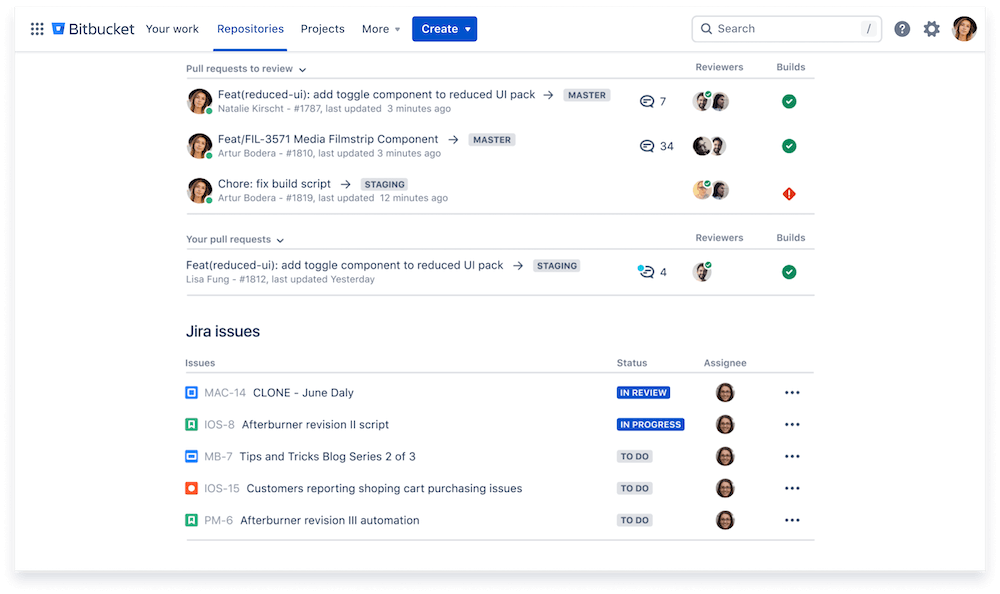
- Shows development information inside the Jira issue, such as related branches, commits and pull request status.
- Supports traceability from a requirement or bug report to the code changes that address it.
- Enables Jira-based automation and reporting, since development activity becomes visible alongside issue status.
H3 Who benefits Teams already using Jira for planning and Bitbucket for repositories typically get the most value, because status updates and code activity appear in one workflow. Teams using other issue trackers may find the integration less relevant, though Bitbucket still works as a standalone Git host.
H3 Trade-offs The main benefit is reduced context switching and clearer audit trails. The main constraint is ecosystem alignment: the deepest features assume Atlassian tools. Setup usually requires administrative permissions and project configuration, and pricing depends on the chosen Bitbucket plan.
What are the differences between Bitbucket Cloud and Bitbucket Server?
Bitbucket is Atlassian's Git-based platform for source code hosting and CI/CD. The two main deployment options differ chiefly in hosting model, administration and how tightly they integrate with other Atlassian tools.
Bitbucket Cloud
- Hosted by Atlassian at Bitbucket; no server maintenance.
- Suited to distributed or smaller teams that want quick setup and automatic updates.
- Integrates closely with Jira and other Atlassian cloud products.
- Access is typically managed through Atlassian accounts and cloud permissions.
Bitbucket Server / Data Center
- Self-hosted on your own infrastructure, so your organisation controls data location, backups and upgrades.
- Data Center adds features for larger, high-availability enterprise environments.
- Often chosen by organisations with strict compliance, security or network-isolation requirements.
- Administration, patching and scaling are your responsibility.
Trade-offs
Cloud reduces operational overhead and scales easily, but offers less infrastructure control. Server/Data Center gives control and customisation, at the cost of maintenance effort and capital expense. Feature sets and naming have evolved over time, so verify current capabilities against your requirements.
How does Bitbucket's CI/CD tool work?
Bitbucket's built-in CI/CD tool, Pipelines, runs automated build, test and deployment steps in the cloud whenever code is pushed or a pull request is opened. Configuration lives in a bitbucket-pipelines.yml file in your repository, so the pipeline is versioned alongside the code it builds.
How a pipeline runs
- A trigger (push, pull request, tag or schedule) starts a pipeline.
- Bitbucket provisions a Docker container from an image you specify.
- Steps run in sequence: install dependencies, run tests, build artifacts, then deploy.
- Parallel steps can shorten feedback time; manual triggers can gate production deploys.
Where it fits
Pipelines is most comfortable for teams already using Bitbucket for Git hosting, and especially those on Jira and Confluence, since commits, branches and issues link together. It is a hosted service, so you trade some infrastructure control for less setup than a self-managed runner. Self-hosted runners are available for workloads needing private network access or specific hardware.
For comparison, GitLab offers similar integrated CI/CD at GitLab, GitHub Actions at GitHub, and Jenkins at Jenkins for heavily customized, self-managed setups.
Typical trade-offs: convenience and tight Atlassian integration versus less flexibility than fully self-managed tooling, plus build-minute limits that vary by plan.
What are the pricing plans for Bitbucket?
Bitbucket Cloud is offered through Atlassian with a free tier and paid plans, but the exact prices are not included in the supplied information. The site's pricing signals point to two paid options: Standard and Premium, alongside a free plan for small teams.
What the plans generally mean
- Free — suited to individuals and very small teams getting started with Git hosting and basic CI/CD.
- Standard — typically aimed at growing teams that need more collaboration features and additional build minutes.
- Premium — designed for larger or more demanding organizations, often adding stronger controls, support and scaling limits.
Practical trade-offs
The main decision is team size and how much CI/CD capacity you need. Free works for personal projects or small groups; Standard fits teams that have outgrown those limits; Premium is usually chosen when governance, reliability and support matter more than cost.
Where to check
Because prices change and vary by user count and billing period, confirm current figures directly:
- Bitbucket
- Atlassian
Bitbucket is especially relevant if your team already uses Jira, since the integration is a core part of its value.
Is Bitbucket free for small teams?
Bitbucket is a Git-based code hosting and CI/CD platform, and it does offer a free tier for small teams. The free plan is generally aimed at individuals and small groups getting started, while paid tiers add more advanced controls and scale.
What the free tier typically suits
- Small teams that need private repositories and basic pull-request workflows
- Projects already using other Atlassian tools, since Bitbucket is optimized for Jira integration
- Groups that want to try Git hosting and built-in pipelines before committing to a paid plan
Trade-offs to consider
- Team-size and user limits may apply on the free plan, so larger groups often move to a paid option
- Advanced features such as stricter access controls, compliance options or higher usage limits are usually reserved for paid tiers
- Pricing depends on user count and plan level, so costs are not fixed
Where it fits Bitbucket is best known as a Git solution for teams using Jira, making it a natural choice for organizations already in that ecosystem. Teams that prefer a standalone Git host or a different CI/CD approach may find alternatives better suited to their workflow.
For current limits and plan details, check Bitbucket Home Page and the official pricing information.
 Hosting and Email
 Amazon Route 53
 Hosting
 Proofpoint
 Location
 United States
 Pages, Search and Sharing


 All bots

 Registration details RDAP / WHOIS
 TLS and certificates
 HTTP response headers
 Identified technologies
User reviews (0)