
 简体中文
简体中文 English
Website review
This review may include AI-generated content and is not individually verified. Domain, certificate and other facts come from the observed data on this page.
What is Bonjourr?
Bonjourr is a browser extension that replaces your new tab page with a minimalist, customisable startpage inspired by Apple's iOS design language. Its appeal is the combination of a clean, calm default look with a surprising amount of optional depth: dynamic photo backgrounds curated from Unsplash, quick links, a search bar, custom fonts, a clock, widgets, notes and checkboxes, quotes, a Pomodoro timer, dark mode, multilanguage support and custom CSS.
It is aimed at people who want their new tab to feel like a quiet, personal dashboard rather than a portal full of feeds. The project is open source, made by two independent developers, and requires no account or login, which suits users who prefer to avoid signing in just to open a tab. Because it is free and funded by donations, it is not built around advertising or data collection.
The main trade-off is that it is a startpage, not a productivity suite: the notes, timers and links are lightweight conveniences rather than replacements for dedicated task or note apps. If you want a focused, attractive landing page with room to tinker, Bonjourr fits well; if you need deep integrations or team features, look elsewhere.
A practical next step: install it, keep the default background and clock for a week, then add only the widgets you actually reach for. If the Pomodoro timer and notes get daily use, expand with quick links and custom CSS; if not, you have lost nothing but a few minutes of setup.
How do I install Bonjourr on my browser?
Bonjourr installs as a browser extension that replaces your new tab page. The official site lists install options for several browsers under an "Install on" heading, and you can also try it online before committing.
Typical install steps
- Open the Bonjourr site at Bonjourr and find the "Install on" section.
- Choose your browser. If your browser isn't listed, the site offers a "Searching for other browsers?" route, which usually points to the extension store for that browser.
- Confirm the install in your browser's extension prompt.
- Open a new tab. Bonjourr should load automatically; if it doesn't, check that the extension is enabled and that your new tab page hasn't been overridden by another extension.
- Customize it from the settings: backgrounds, clock style, fonts, quick links, widgets and dark mode are all adjustable.
Before you install
- No account needed. Bonjourr states it doesn't require sign-up or login, so installation is immediate.
- Safari users: a site update notes the App Store version for Safari is being discontinued. If Safari is your main browser, check the current guidance on the site rather than relying on an older App Store listing.
- Try first if unsure. The "Try online" option lets you preview the layout and settings before adding an extension.
A practical example
If you switch between Chrome at work and Firefox at home, install Bonjourr separately in each browser and set them up to match—same quick links, same clock format—so your new tab feels consistent. Settings generally live per browser, so expect to configure each one.
As a next step, decide what you want from a startpage before installing: a calm photo-and-clock view, or a denser dashboard with notes, a Pomodoro timer and quick links. Bonjourr supports both, but starting minimal and adding widgets later keeps the page from feeling cluttered.
Can I use Bonjourr without creating an account, and does it collect any personal data?
Yes. Bonjourr can be used immediately without creating or logging into an account, and the developers state that they do not collect users' personal data. The page describes the startpage as open source and privacy focused, built by two independent developers, with donations as its funding model rather than data collection or selling.
What that means in practice
- No sign-up step: You install the extension and start using the new tab page right away. There is no profile, login or onboarding account to manage.
- Settings live in your browser: Customisations such as fonts, backgrounds, clock style, quick links, widgets, notes and checkboxes are configured on the startpage itself, so your setup is tied to that browser rather than to an online account.
- Caveats worth knowing: The page's privacy claim concerns personal data collection by Bonjourr itself. It does not describe every technical detail, such as how background photos are fetched or what your browser or extension store records. If you need a strict audit, the open-source code is the place to check.
A useful next step
If you sync browsers or use several devices, decide whether you are comfortable re-creating your layout on each one, since there is no account-based sync described. For a work laptop where you want a calm, clock-and-links startpage with no login prompts, Bonjourr fits that scenario well. If you want to verify the privacy behaviour yourself, review the project's source and documentation via Bonjourr.
How do I customize Bonjourr's background, clock, and widgets to match my preferences?
Bonjourr's customization lives in its settings panel, accessible from the startpage itself (usually a gear or settings icon). From there you can change background, clock, and widgets independently, so it's worth adjusting one area at a time and checking the result on a fresh tab.
Background
Bonjourr ships with a curated set of Unsplash photos whose mood shifts with the time of day. If you want your own look, the settings let you add personal backgrounds instead of the default rotation — useful if you prefer a solid color, a photo of your own, or a calmer image for focused work. Pick a background that keeps text legible against your clock and widgets; a busy photo behind a light clock font is the most common readability problem.
Clock
The clock's appearance is adjustable, including its look and font. If you use Bonjourr as a work startpage, a larger, high-contrast clock reads at a glance; if you mainly want a quiet landing page, a smaller clock with a custom font fits the minimalist intent better.
Widgets
Widgets are toggled on and off in settings, and the page lists quick links, a search bar, notes and checkboxes, quotes, a Pomodoro timer, dark mode, and custom CSS among its options. A practical split:
- Work-focused setup: clock, search bar, quick links, Pomodoro timer, notes.
- Calm personal setup: clock, a single background, quotes; leave quick links off to reduce clutter.
Custom CSS is the deepest lever — use it only if the built-in options don't cover a specific tweak, since it adds maintenance you'll need to revisit after updates.
As a next step, decide your primary use (glanceable dashboard vs. quiet new tab), enable only the widgets that serve it, then set the background last so it complements the clock and widget layout rather than competing with it.
If Bonjourr is free, how is it funded and what happens if I donate?
Bonjourr is funded by donations. The two independent developers behind it state that donations are the only way the project keeps running, since the extension is free, collects no personal data and doesn't sell user data. There is no paid tier or account requirement described on the page—you can use it immediately without signing in.
If you donate, the stated thank-you is recognition rather than extra features: donors' names are shown in Bonjourr the following month. Donations go through Ko-Fi, and the developers describe the goal as dedicating more time to the project, including working on it full-time.
Practically, this means you should treat a donation as support for ongoing maintenance, not as a purchase. A reasonable decision rule: if Bonjourr already replaces your new tab page daily and you value its privacy stance, a one-off or small recurring donation is the direct way to sustain it; if you're still evaluating it, use it free first and decide later. For context on how other privacy-oriented browser tools handle funding, see Signal and uBlock Origin.
What happened to the Safari App Store version of Bonjourr, and what are my options now?
The Safari App Store version of Bonjourr is being discontinued. According to the site's March 29, 2026 update, the App Store release is being retired because of high maintenance costs and low usage. The announcement promises to explain what this means for current users and what comes next, but the visible page text doesn't spell out those migration steps, so check the linked update for the exact path.
What this means in practice
- If you already have it installed: expect the App Store build to stop receiving updates. It may keep working for a while, but new features (such as the Pomodoro timer and right-click menu added in Bonjourr 22) won't necessarily reach it.
- If you're setting up a new Mac: don't count on the App Store listing as your install route. Look for the alternative distribution method described in the update post.
- If you're on iPhone or iPad: Safari extensions there are tied to the App Store, so this change matters most for that audience. Confirm current availability before relying on it.
- If you're on Chrome, Firefox, Edge or another desktop browser: this announcement doesn't affect you; install through that browser's extension store as usual.
How to decide your next step
Your settings are the main thing to protect. Before switching, note down your custom background, fonts, clock layout, quick links and any notes, since a reinstall in a different form may not carry them over. Then choose based on your device: stay on the App Store build only if you accept it being frozen, or move to the maintained version if you want ongoing updates. The project is open source, so the code and documentation are also a fallback if the packaged version is unavailable for your setup.
For background on the extension's features and privacy stance, see Bonjourr.
 Cloudflare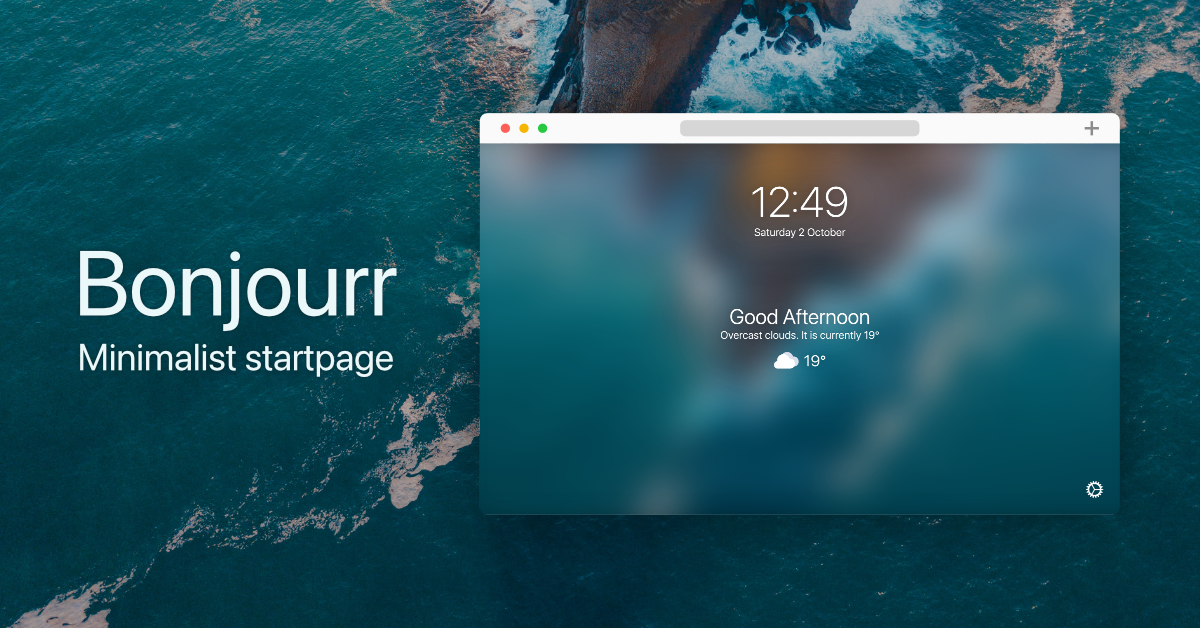

User reviews (0)