Website profiles · Technology insights · Alternatives

bootstrapstudio.io

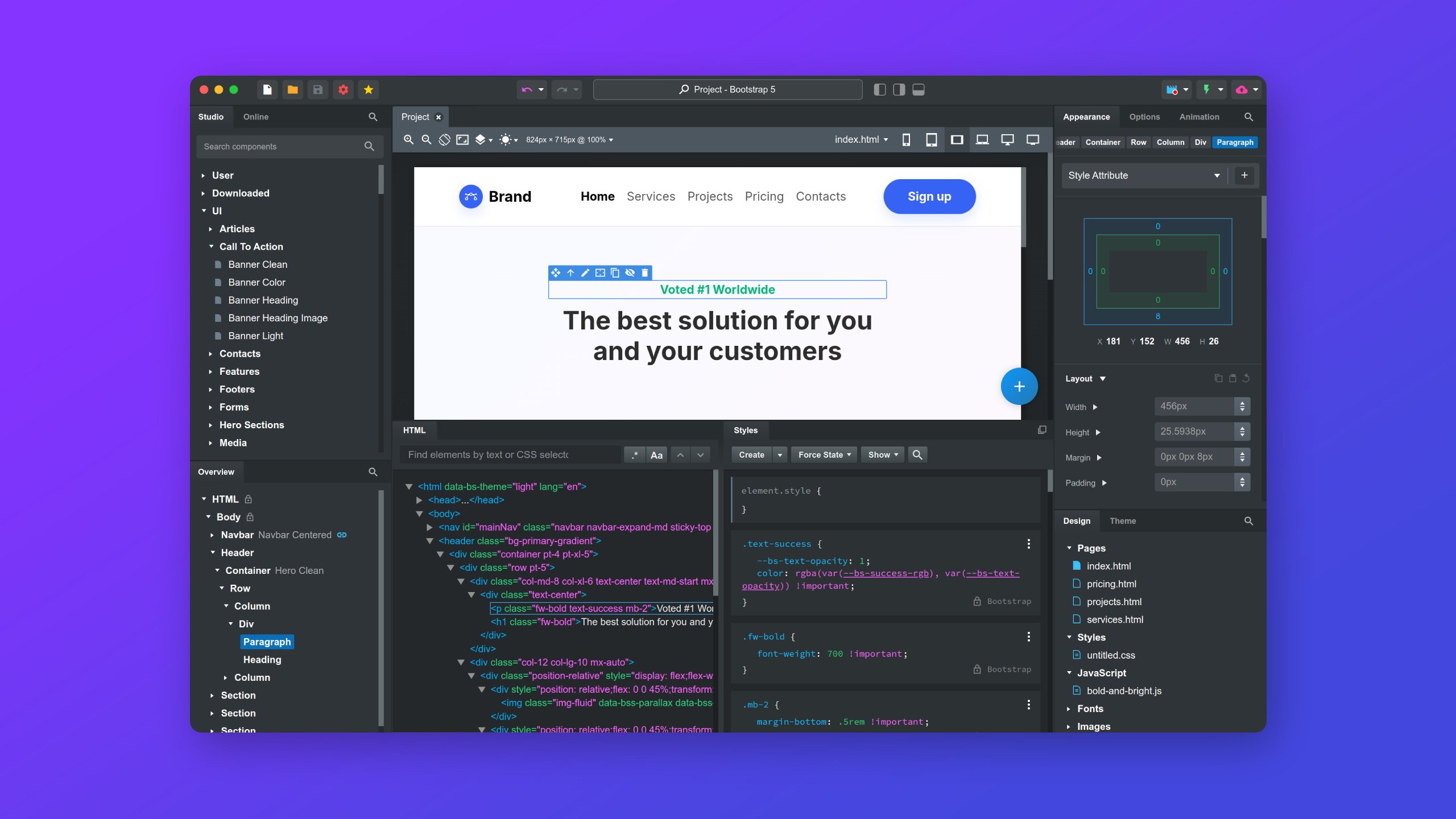
A powerful web design tool for creating responsive websites using the Bootstrap framework.

Paid content
Visit website
Profile views 0 Outbound visits 0 Normal
Bootstrap Studio Full homepage screenshot

At a glance

Category
Design & Creativity
Language
English
Paid-content signal
Paid contentObserved
Registered
Unknown
Hosting
Akamai Connected CloudInferred
HTTPS certificate trusted
PassedObserved
Last updated

Website review

This review may include AI-generated content and is not individually verified. Domain, certificate and other facts come from the observed data on this page.

What is Bootstrap Studio?

Bootstrap Studio is a desktop application for building responsive websites visually, primarily by dragging and dropping components rather than writing code. It runs locally on your computer and is aimed at designing and publishing sites built on the Bootstrap framework.

What it does

  • Visual drag-and-drop editing: You assemble pages from components and adjust the design with on-screen controls instead of hand-coding layout and styling.
  • Templates and customization: It offers a library of templates that you can adapt, with the page describing the ability to tweak "every part of your design."
  • AI assistance: An AI Assistant is presented as able to make edits and even build entire sites, per the page.
  • Publishing: The page describes it as helping you "design and publish" websites, so it covers the build-to-live step, not just mockups.
  • Adjacent features: The navigation lists Smart Forms, Ecommerce, and an App Gallery, and the page cites "10k+ Happy Users."

Who it suits

The page frames it for "designers, developers and students." The most concrete fit is someone who wants Bootstrap-based output without writing CSS by hand. One quoted user, Neceros, describes himself as "a developer like me (not a designer)" and notes it was easy to hook into a Python Flask backend — a useful signal if you plan to pair the front end with your own server code. Another commenter, davidharrington1133, recommends it "for anyone who is not very familiar with CSS."

Trade-offs to weigh

The page presents the tool positively, so treat these as practical considerations rather than criticisms from the site. A visual builder is fastest when your design stays within its component library and Bootstrap conventions; highly custom layouts or non-Bootstrap stacks may push you back into code. Because it is a desktop app, your workflow is tied to that machine rather than a browser tab, which suits focused local work but differs from cloud-based builders. The page also signals it is a paid product, so evaluate the purchase against how often you build Bootstrap sites.

Next step

If you mainly produce Bootstrap sites and want to skip hand-written CSS, start with the demo and a template, then test whether a real page of yours (including any backend integration) fits the drag-and-drop model before committing. If your work depends on a framework other than Bootstrap or on collaborative cloud editing, compare that requirement first.

Is Bootstrap Studio a good choice for someone who doesn't know how to code?

Yes—Bootstrap Studio is a reasonable fit for a non-coder who wants to build responsive sites visually, provided you accept that "no code required" doesn't mean "no concepts required." It is a desktop application built around drag-and-drop editing of Bootstrap-based pages, with templates and visual controls for customizing designs, and it can publish sites directly. The main caveat is that Bootstrap itself is a CSS framework with a component and grid vocabulary; you will spend some time learning what a container, row, column, navbar or card is, even if you never type code.

Where it suits a non-coder well

  • Template-first starts. Choosing a template and editing it visually is much faster than starting from a blank canvas, and the visual controls let you change styling without writing CSS.
  • Local desktop workflow. It runs on your computer, so you can experiment freely without a browser-based editor's constraints.
  • Publishing in one place. Building and publishing from the same app removes a separate hosting setup step for simple sites.
  • A realistic bridge to code. The editor exposes the underlying markup, so you can peek at what your drag-and-drop actions produce—useful if you eventually want to learn.

Where it will still feel like coding

  • Layout thinking. Responsive design requires deciding how columns stack on small screens; the tool makes this visual but not automatic.
  • Custom branding. Anything beyond template-level changes—unusual typography, bespoke animations, third-party integrations—tends to push you toward custom CSS or JavaScript.
  • Debugging. When something looks wrong, you need enough vocabulary to describe the problem, even if the fix is a click.

How it compares in intent

Approach Best for Trade-off for a non-coder
Bootstrap Studio Template-based responsive sites with a desktop editor Bootstrap concepts and occasional custom code
Site builders like Wix or Squarespace Fully hosted, all-in-one editing Less control over markup; platform lock-in
Visual WordPress builders like Elementor Content-heavy sites with blogging Requires WordPress hosting and maintenance
Hand-coded Bootstrap Full control and learning Requires coding from the start

A practical next step

Pick one real page you want—say, a one-page site for a small service business with a header, three service cards, a testimonial and a contact form. Rebuild it from a template in the trial, then try the same page in a hosted builder. If the template route gets you 80% there in an afternoon and the remaining 20% feels like a manageable learning curve rather than a wall, Bootstrap Studio is a sensible choice; if every customization sends you searching for CSS answers, a fully hosted builder will save you time.

How does Bootstrap Studio's AI Assistant help when building a website?

Bootstrap Studio's AI Assistant is presented as a design partner inside its visual editor: it can make edits to your design and build entire websites from a prompt, according to the product page. That positions it as a way to skip repetitive layout work and get a starting point you then refine by drag and drop.

What that means in practice

  • Starting from zero: describe the site you want (for example, a portfolio for a photographer), and use the generated result as a first draft rather than a finished product.
  • Making edits: instead of hunting through panels, you can ask for changes in plain language, then fine-tune visually.
  • Staying in the same tool: because the assistant sits inside the desktop editor, generated work lands in the same project you are already styling and exporting.

Where it helps most, and where it doesn't

Situation Likely benefit Watch out for
Non-coders who know what they want visually High: prompt-to-draft then visual tweaks You still need to judge layout and content quality
Developers needing custom backend logic Moderate: fast scaffolding Generated markup may need cleanup before integration
Polished brand-specific design Lower: a starting point only Expect real design work to finish the job

The page's user quotes lean toward "easy and flexible" and "no code required" rather than AI specifics, so treat AI output as a draft to review. One commenter notes it is easy to hook into a Python Flask backend, which suggests the exported code is meant to be handed off, not locked in.

Next step: pick one small page you already know well, generate it with the assistant, and compare the result against building it by hand. That tells you quickly whether the assistant saves you time or just adds a review pass. For framework context, see Bootstrap.

What templates and components come with Bootstrap Studio out of the box?

Bootstrap Studio ships with a template library and a drag-and-drop component set, but the product page describes these in broad terms rather than listing every item. What the page confirms is a "rich library of templates" you can customize, plus a visual editor built around drag-and-drop components that let you assemble pages without writing code. It also advertises Smart Forms and Ecommerce features, which suggests ready-made form and store-related building blocks sit alongside standard layout elements.

What to expect, based on the page

  • Templates: A library of prebuilt designs you adapt with visual controls, rather than starting from a blank page.
  • Components: Drag-and-drop elements for building layouts and pages visually; the page frames the whole editor as "no code required."
  • Add-on blocks: Smart Forms and an Ecommerce section, useful if you need contact forms or a simple storefront.
  • AI Assistant: Can generate edits or entire sites, so it can fill gaps in the template library.

Practical read

The page's own testimonials come from users: one developer notes it is "easy to hook into my backend (python flask)," and another praises it as approachable for someone "not very familiar with CSS." That fits a workflow where you use templates and components for structure and styling, then export clean Bootstrap markup to wire into your own backend.

Next step

Before committing, open the Templates and Components sections in the app or its demo and check whether the categories you need (navigation patterns, pricing tables, checkout forms) are covered. If your project depends on a specific component type, confirm it exists there rather than assuming the "rich library" includes it.

Can I connect Bootstrap Studio designs to my own backend, such as Python Flask?

Yes. Bootstrap Studio produces standard HTML, CSS and JavaScript, so the output can be served by any backend, including Python Flask. The design work happens in the desktop editor; Flask then serves the exported files and handles your routes, data and templates.

How the pieces fit

  • Export and serve: Export the project from Bootstrap Studio, place the files in Flask's static/ and templates/ folders, and render them from your routes.
  • Keep dynamic data in Flask: Use Jinja placeholders for content that changes per request, rather than hard-coding it in the visual editor.
  • Forms: Point forms at your Flask endpoints; the editor's form-building features handle layout, while Flask validates and stores submissions.
  • JavaScript calls: Any fetch or AJAX calls in the exported scripts can target your Flask API routes as usual.

Who this suits

A developer who wants visual layout control but prefers to own the backend logic is the natural fit. One user in the page's testimonials, posting as Neceros, describes being a developer rather than a designer and notes it was easy to hook into a Python Flask backend — that is their experience, not a guarantee. Practically, the main trade-off is that you maintain two places: design changes are re-exported, while backend logic stays in Flask, so agree on a clear export-and-replace routine to avoid overwriting custom edits.

Next step

Build one small page in Bootstrap Studio, export it, and wire a single Flask route plus one form POST. If that round trip is clean, scale up; if you expect heavy templating, decide early which parts live in Jinja and which stay static in the export. For framework reference, see Flask and Bootstrap.

How much does Bootstrap Studio cost and how do I purchase a license?

Bootstrap Studio is a paid desktop application rather than a free tool, and licenses are bought directly from the vendor's own site. The product page lists a "Purchase" entry and names Paddle as its payment platform, so checkout runs through Paddle as the merchant of record. The page itself does not publish a price, and there is no free tier described beyond a demo you can try before buying.

How buying works in practice

  • Where: Start from the Purchase link on Bootstrap Studio; payment is handled by Paddle, which typically issues the receipt and handles tax/VAT.
  • What you get: A license for the desktop app that runs locally on your machine, which the page describes as usable as much as you wish once licensed.
  • Try first: Use the "Play Demo" option to check the drag-and-drop editor and template library against your needs before paying.

What to confirm at checkout

Because the page omits figures, verify these on the purchase screen before paying:

  1. License type — single-user vs. team/multi-seat, and whether it is perpetual or subscription-based.
  2. Updates — whether the price includes future versions (the page highlights version 9.0.0) or only a period of updates.
  3. Refund terms — Paddle's policy as the seller.
  4. Currency and taxes — shown at checkout, since these vary by country.

A quick decision guide

Your situation Sensible move
Occasional static site, tight budget Compare with free editors before committing
Building Bootstrap-based sites regularly The page's user quotes stress ease for non-CSS users; weigh that against your own workflow
Team or client work Confirm seat count and update terms first

As a next step, open the Purchase page, note the license and update terms, and only then decide — the demo is the cheapest way to test whether the visual editor suits how you work.

Related questions

More questions →
What Features Does Bootstrap Studio Offer for Building Websites?

Bootstrap Studio is a desktop application for designing and publishing responsive websites on the Bootstrap framework, built around visual drag-and-drop editing rather than hand-written code. It suits designers, developers, and students who want a local tool that produces Bootstrap-based pages; it is a paid product (the site routes users to a Purchase page and mentions "premium" and "purchase"), so evaluate it as a commercial tool rather than a free one.

Visual Drag-and-Drop Editor

The core of the product is a visual web design editor: you place components on a canvas and adjust them with visual controls instead of writing markup. The site describes it as "no code required" and says it is "built around drag and drop." Two practical implications follow from the page:

  • It runs locally on your computer. The site states you can "use it as much as you wish," which matters if you prefer offline work or want to avoid a browser-based builder.
  • It targets the Bootstrap framework. Pages are built on Bootstrap, so the output follows that framework's conventions — useful if you already work with Bootstrap or want a Bootstrap-compatible starting point.

The site also offers a demo you can play before deciding.

Templates and Visual Customization

Bootstrap Studio ships with a template library ("Beautiful Templates" is one of the page's sections). You start from a template and then customize "every part of your design with intuitive visual controls," per the site. This is the fastest path for common site types: pick a template, adjust layout and styling visually, then publish.

The trade-off is the usual one for template-driven builders: you get speed and a polished starting point, but highly unusual layouts may require working within the editor's component model rather than designing from scratch.

AI Assistant

The site highlights an AI Assistant that "can do any edit, build entire websites," and positions it as a way to "supercharge" design work. Treat this as an accelerator for edits and initial builds, not a replacement for reviewing the result — AI-generated structure still needs visual checking in the editor before publishing.

Forms, Ecommerce, and the App Gallery

The site's navigation lists Smart Forms, Ecommerce, and an App Gallery alongside Features, Templates, and Sites. These indicate the product covers more than static pages: forms and ecommerce-oriented components are part of the offering, and the App Gallery suggests a showcase of sites or apps built with the tool. The page excerpt does not detail how these modules work, so confirm specifics in the app or documentation before relying on them for a store or complex form workflow.

Who It Fits

Your situation Fit
You want a local, visual builder for Bootstrap sites Strong — this is the product's core design
You are comfortable with code and want full control Weaker — the value proposition is visual editing; the site notes one user hooks it into a Python/Flask backend, so integration is possible
You need a free tool Not indicated — pricing signals point to a paid purchase
You want AI-assisted site building Relevant — an AI Assistant is a headline feature

The site reports "10k+ Happy Users" and displays user testimonials praising ease of use and value, including comments from developers who are "not a designer." Those are marketing claims from the vendor's page, not independent benchmarks — weigh them accordingly.

Next Step

Play the demo on the site to test the drag-and-drop workflow against a real page you need to build, then check the Purchase page for current terms before committing. If your project depends on Smart Forms or Ecommerce, verify those features in the demo first, since the landing page describes them only at a high level.

How Bootstrap Studio Differs from Online Website Builders and Coding from Scratch

Bootstrap Studio is a desktop application that you install and run locally, where you design pages through visual drag-and-drop editing and export Bootstrap-framework websites. It differs from online builders in that it is not browser-based and not a hosted service, and it differs from coding from scratch in that you assemble layouts visually rather than writing markup by hand. Choose it if you want local control and Bootstrap output; choose an online builder if you need hosting and editing from any browser, or hand-coding if you need full control over every line.

The three approaches side by side

Dimension Bootstrap Studio Online website builders Coding from scratch
Where it runs Desktop app, runs locally on your computer In the browser Any editor you choose
How you build Visual drag-and-drop, no code required Visual, template-driven You write HTML/CSS/JS yourself
Output Bootstrap-framework websites Hosted site on the provider's platform Whatever you build
Starting point Rich template library plus visual controls Provider templates and themes Blank file or your own boilerplate
Speed aids AI Assistant that can make edits and build entire sites Built-in themes and blocks Depends on your own setup and snippets
Hosting You design and publish; hosting is your concern Usually bundled with the plan Entirely your responsibility

The site describes Bootstrap Studio as "a powerful desktop application that helps you design and publish beautiful websites" and as "a revolutionary website builder for designing web pages and apps visually" with "no code required." It also states the app "runs locally on your computer and you can use it as much as you wish."

Where it differs from online website builders

The most consequential difference is locality. An online builder lives in a browser tab and typically ties your site to that provider's hosting and account. Bootstrap Studio is installed software: your project files sit on your machine, and the editing session does not depend on a remote service being up.

The second difference is the output format. Bootstrap Studio produces sites built on the Bootstrap framework, so the result is standard front-end code you can host anywhere and hand to a developer. Online builders generally produce a site that lives inside their platform, which is convenient until you want to move it.

The third difference is the starting point. Bootstrap Studio ships a template library and lets you "customize every part of your design with intuitive visual controls." Online builders also offer templates, but they are usually tied to the provider's component system rather than an open framework.

One caveat worth checking before you commit: the site's pricing signals mention "premium" and "purchase," with Paddle listed as the payment platform. The materials do not state exact prices or whether a trial or free tier exists, so confirm licensing terms on the purchase page rather than assuming.

Where it differs from coding from scratch

Bootstrap Studio does not remove code from the picture; it changes who writes it. You drag components onto a canvas and adjust them with visual controls, and the app generates the underlying Bootstrap markup. That is a real time saving for layout work, but it means your design vocabulary is shaped by Bootstrap's grid and components.

The AI Assistant extends this: the site says it "can do any edit, build entire websites," which is useful for scaffolding and repetitive changes. Treat that as a speed aid, not a substitute for understanding the output, especially if you plan to hand the code to a team.

Coding from scratch remains the better fit when you need a stack that is not Bootstrap, when you want precise control over every dependency, or when the project's performance budget rules out a framework you did not choose. Bootstrap Studio is the better fit when you know the site should be Bootstrap-based and you would rather spend time on design than on markup.

The site's own user comments point at this audience: one reviewer describes it as "perfect for a developer like me (not a designer)" who wants to "hook into my backend," and another recommends it "for anyone who is not very familiar with CSS." Those are user testimonials on the product page, not independent testing, but they describe the same trade-off.

How to decide

Use these conditions to pick:

  • Pick Bootstrap Studio if you want a locally installed design tool, your sites should be Bootstrap-based, and you want visual editing plus template and AI assistance without giving up code you can host anywhere.
  • Pick an online builder if you need to edit from any browser, want hosting bundled in, and do not care about exporting framework code.
  • Code from scratch if you need a non-Bootstrap stack, exact control over dependencies, or you are building something a visual editor cannot express.

A practical check before buying: open the demo on the site, drag a few components, and inspect the generated markup. If the output matches how you would want to maintain the site, the local desktop model is likely the right fit. If you find yourself fighting the generated code, hand-coding will cost you less over the project's life.

What Is Bootstrap Studio and What Is It Used For?

Bootstrap Studio is a desktop application for visually designing and publishing responsive websites built on the Bootstrap framework. You drag and drop components instead of writing code, and the app runs locally on your computer. It suits designers, developers, and students who want a visual editor but still need clean Bootstrap-based output they can extend by hand.

What the tool actually does

The site describes it as "a powerful desktop application that helps you design and publish beautiful websites," built around drag-and-drop editing. The core workflow is:

  • Visual editing — you assemble pages from a component library and adjust them with visual controls rather than CSS.
  • Bootstrap foundation — output is based on the Bootstrap framework, so the resulting markup follows a widely used, well-documented system.
  • Local operation — it runs on your own machine, and the site states you "can use it as much as you wish," which matters if you work offline or want to keep projects local.
  • Publishing — the app covers publishing, not just design, so you can go from layout to a live site without a separate build pipeline.

Templates and customization

The site highlights a "rich library of templates" and "intuitive visual controls" for customizing "every part of your design." In practice, this means you can start from a prebuilt layout and then adjust structure, spacing, and styling visually — useful when you want a head start but not a locked-in theme.

AI Assistant

Bootstrap Studio includes an AI Assistant that the site says "can do any edit, build entire websites," and is presented as a way to "supercharge" design work. Treat this as an accelerator for drafting and repetitive edits; you should still review the generated structure and styling before publishing.

Who it fits, and when it doesn't

Situation Fit
You want to build responsive sites visually, without hand-writing CSS Strong fit — drag-and-drop is the core model
You already work in Bootstrap and want a faster layout tool Strong fit — output stays in the Bootstrap ecosystem
You need to hand off code to a backend (e.g., Python/Flask) Reasonable — one user quoted on the site notes it's "easy to hook into my backend"
You want a browser-based, nothing-to-install editor Not a fit — it's a desktop application
You need a fully code-free hosted site builder with no local install Not a fit — this is a local desktop tool

The site's own framing supports the first two rows: it markets the product to "designers, developers and students" and emphasizes "No code required." The testimonials on the page lean heavily on value-for-money ("Best money I ever spent," "worth every penny"), which tells you the audience is people who expect to pay for a serious tool rather than a free utility.

Practical things to know before you start

  • It's a paid product. The site's pricing signals include "premium" and "purchase," and payments run through Paddle. The page does not state a price, so check the Purchase page for current terms rather than assuming a free tier.
  • Version to expect. The site lists the latest version as Bootstrap Studio 9.0.0.
  • Verify output, don't assume. Because the editor is visual, open the exported HTML/CSS and confirm the structure matches what you intended — especially after AI-assisted edits or heavy template customization.
  • Plan for the Bootstrap dependency. If your project must avoid Bootstrap, this tool's core value proposition doesn't apply.

A concrete example of where it helps: you need a responsive marketing page with a navbar, hero section, feature grid, and contact form, and you want it done in an afternoon without writing media queries. You pick a template, drag in the sections, adjust spacing visually, preview at mobile and desktop widths, then publish — and later hand the exported files to a developer who extends them in Flask. That is the workflow the product is built for.

How to Purchase Bootstrap Studio and What to Check Before Buying

Bootstrap Studio is a paid desktop application, not a free web tool. The site describes it as a premium product and routes buyers through a Purchase link, with payment processed by Paddle. Before you pay, confirm the current version (the site lists Bootstrap Studio 9.0.0), review the "What's new" notes, and try the demo so you know the drag-and-drop workflow fits how you build. The site does not publish prices on the page evidence provided, so check the Purchase page for the actual amount and license terms rather than assuming a cost.

What you are actually buying

Bootstrap Studio is a desktop app for designing responsive websites with the Bootstrap framework. The site's core claims:

  • Visual drag-and-drop editor — build pages without writing code.
  • Runs locally on your computer — the site says you can use it as much as you wish.
  • Template library — start from templates and customize with visual controls.
  • AI Assistant — described as able to make edits and build entire websites.
  • Publish workflow — the app is positioned as helping you "design and publish" sites.

The site also lists Smart Forms, Ecommerce, App Gallery, Academy, Docs, and Forum as sections, and claims 10k+ happy users. Treat the user quotes as marketing testimonials, not independent reviews.

Purchase steps

  1. Open the Purchase page from the site navigation. This is the only purchase entry point shown in the page evidence.
  2. Read the license and price details there. The page evidence does not state the price, so do not rely on secondhand figures.
  3. Complete checkout through Paddle. Paddle is the listed payment platform; the exact methods (card, PayPal, etc.) are not specified in the provided material, so confirm on the checkout screen.
  4. Keep your receipt and license email. You will need them for activation and support.

Pre-purchase checklist

Check Why it matters Where to look
Current version The site lists 9.0.0; buying an outdated build or expecting features from a different version causes confusion Version label on the homepage
"What's new" notes Shows what changed in the latest release before you commit "What's new →" link
Demo Lets you test the drag-and-drop editor before paying "Play Demo" on the homepage
License scope The evidence does not state how many machines or users a license covers Purchase page terms
Refund policy Not described in the provided material Purchase page / Paddle checkout
Platform requirements It is a desktop application; confirm your OS is supported Docs or download page

Who it fits, and who should look elsewhere

Reasonable fit if you want a visual builder for Bootstrap-based sites, prefer a local desktop app over a browser tool, and are comfortable paying for a premium product.

Look elsewhere if you need a free tool, need a hosted/browser-only editor, or require pricing and license details confirmed before any research — those specifics are not in the page evidence and must come from the Purchase page itself.

Common sticking points

  • Assuming it is free. The site's own keywords include "premium" and "purchase"; the demo is for evaluation, not unlimited free use.
  • Skipping the demo. The main selling point is the drag-and-drop workflow. If that style does not suit you, the purchase is wasted regardless of testimonials.
  • Ignoring version notes. Check "What's new" so you are not surprised by changes between the version you researched and the one you download.
  • Not checking license terms first. Machine limits, update entitlements, and refund rules are not in the provided page content — read them on the Purchase page before paying.
Do You Need to Know How to Code to Use Bootstrap Studio?

No. Bootstrap Studio is built around visual drag-and-drop editing, and its site states plainly that you can “design great websites without writing code.” You can start with zero coding knowledge and still produce a working, responsive site. Coding knowledge becomes useful only when you want to go beyond the visual editor — for example, wiring the exported site into a custom backend.

What “no code required” actually means

The site describes Bootstrap Studio as “a revolutionary website builder for designing web pages and apps visually. No code required.” In practice:

  • Layout and styling are done by dragging components onto a canvas and adjusting them with visual controls, not by hand-writing HTML and CSS.
  • Templates give you a starting point; the site says you can “customize every part of your design with intuitive visual controls.”
  • The output is Bootstrap-based, since the tool is built for “creating responsive websites using the Bootstrap framework.” You get standard Bootstrap markup rather than a proprietary format.

So the no-code claim is about the authoring process. The result is still a normal Bootstrap site.

Who it suits, by skill level

The site says the tool is “used and loved by thousands of designers, developers and students.” That maps to three practical situations:

Your situation What you get from Bootstrap Studio
Designer with little or no coding experience Full visual control; you can build and publish without writing code
Student learning web design A visual way to see how Bootstrap components fit together
Developer who doesn't want to hand-build layouts Fast visual scaffolding you can extend with your own code

One user quoted on the site describes themselves as “not a designer” but a developer, and says it is “easy to hook into my backend (python flask).” That is the pattern to expect: the visual editor handles the front end, and code knowledge helps at the integration stage.

Where coding knowledge starts to matter

The visual editor covers design, but some tasks sit outside it:

  • Custom backend logic — forms, authentication, or data-driven pages need server-side code. The site's own feature list includes “Smart Forms” and “Ecommerce,” but connecting a site to your own Python Flask (or other) backend is a coding task.
  • Fine-grained behavior — anything the visual controls don't expose will eventually mean editing the underlying Bootstrap/HTML/CSS.
  • Debugging — when something renders unexpectedly, understanding the generated markup helps you fix it faster.

If your goal is a marketing site, portfolio, or landing page, you can likely stay entirely in the visual editor. If your goal is a web app with accounts and a database, plan on some coding.

A realistic way to decide

Ask yourself which describes your project:

  1. “I need a good-looking responsive site and I don't write code.” Bootstrap Studio's drag-and-drop model is designed for exactly this. Expect to spend your time learning the editor's controls and templates, not syntax.
  2. “I can write some HTML/CSS and want to move faster.” You'll use the visual editor for layout and drop into code for the parts that need it.
  3. “I'm building an app with a custom backend.” Treat Bootstrap Studio as your front-end builder and budget time for the integration work.

The site offers a playable demo, which is the cheapest way to test whether the visual workflow matches how you think — try rebuilding a simple page you already know before committing.

Common sticking points for beginners

  • Assuming “no code” means “no Bootstrap knowledge.” The output is Bootstrap-based, so understanding Bootstrap's grid and components (even at a conceptual level) makes the visual controls much easier to use.
  • Expecting the tool to run your backend. It is a desktop design and publishing application; server-side logic is yours to build.
  • Skipping the templates. The site highlights a “rich library of templates” — starting from one is faster than building from a blank canvas while you learn the interface.

In short: you can use Bootstrap Studio without knowing how to code, and the site explicitly supports that. Code becomes relevant only when your project needs custom logic beyond what the visual editor and Bootstrap components provide.

Website Overview

Page metadata, canonical configuration and social previews work together to provide more consistent search and sharing presentation.

Domain and Registration

Unknown

DNS and Email

Nameservers are provided by Cloudflare, indicating managed DNS hosting. MX records point to the Google Workspace email service. No CNAME was found; the observed records resolve directly to addresses. SPF and DMARC are configured. DKIM status is unknown. TXT records include verification markers for Google. Such markers may also remain after a service stops being used.

TLS and Certificates

The certificate uses an RSA 2048-bit public key, offering broad client compatibility. The server supplied a complete certificate chain. No organization name is present in the certificate; the available fields are consistent with domain validation. The certificate was issued by Let's Encrypt, commonly associated with automated certificate services. The certificate's total validity is about 89 days, consistent with a short renewal cycle.

HTTP and Browser Security

The response lacks these common security headers: HSTS, CSP, X-Content-Type-Options, Referrer-Policy, Permissions-Policy. No X-Powered-By header was found, reducing one common source of backend fingerprinting information. No obvious internal addresses or debug information were found in the headers. The Server header identifies nginx without an exact version. Cookie security attributes are unknown.

Technology Stack Analysis

The public page identifies jQuery, nginx without precise versions, leaving fewer clues for version-specific scanning.

Search and Social Sharing

Twitter Card metadata is configured. JSON-LD includes Product or Offer data, potentially supporting eligible product search features. The title has 52 characters, within a common display range. A meta description is present, with 90 characters. The observed directives allow indexing and link following.

Hosting and Email

DNSCloudflare
HostingAkamai Connected Cloud
EmailGoogle Workspace
Approximate IP geolocation (inferred; a CDN or proxy may differ from the origin server) United States flagCedar Knolls, New Jersey, United States Inferred 69.164.217.35

Registration details

RDAP / WHOIS

Unknown

DNS records

DNS

TypeNameValueTTLPriority
Abootstrapstudio.io69.164.217.35300—
MXbootstrapstudio.ioaspmx.l.google.com3001
MXbootstrapstudio.ioalt1.aspmx.l.google.com3005
MXbootstrapstudio.ioalt2.aspmx.l.google.com3005
MXbootstrapstudio.ioaspmx2.googlemail.com30010
MXbootstrapstudio.ioaspmx3.googlemail.com30010
NSbootstrapstudio.ioarya.ns.cloudflare.com86400—
NSbootstrapstudio.iojim.ns.cloudflare.com86400—
TXTbootstrapstudio.iogoogle-site-verification=WtNKTYWSyR2FhWFhUXyDSFIFvpq7cXps2YD2oQsHB4M300—
TXTbootstrapstudio.iogoogle-site-verification=c4Qrg-Vuxd8wwDBc5jskak44lYNlo6BNT_Jj4Ix78S8300—
TXTbootstrapstudio.iogoogle-site-verification=yhk2kgWPyYh7bwfMaWV38F_5WR0EaDiQsMRcuCHbRq8300—
TXTbootstrapstudio.iov=spf1 a mx include:spf.mtasv.net include:_spf.google.com include:amazonses.com ~all300—
DMARC_dmarc.bootstrapstudio.iov=DMARC1; p=none; pct=100; rua=mailto:[email protected]; sp=none; aspf=r;300—

TLS and certificates

TLS / SSL

AssessmentNormal configuration
Supported protocolsTLSv1.2
Negotiated protocolTLSv1.2
Certificate subjectbootstrapstudio.io
IssuerLet's Encrypt
Valid until2026-11-27T23:55 · Remaining when checked: 37 days
Verification detailsCertificate trust: Passed · Hostname match: Passed

HTTP response headers

HTTP

HeaderValue
content-typetext/html; charset=UTF-8
cache-controlno-cache, private
servernginx
x-frame-optionsSAMEORIGIN
set-cookieRedacted

Identified technologies

jQuerynginx

Pages, Search and Sharing

Meta descriptionA powerful web design tool for creating responsive websites using the Bootstrap framework.
Canonical URLhttps://bootstrapstudio.io/
LanguageEnglish (default)
Twitter Cardsummary_large_image
All bots 0 allowed · 3 disallowed
  • Disallow/demo/*
  • Disallow/releases/*
  • Disallow/app/*

No sitemaps found

User reviews (0)

  • No reviews yet.