Website profiles · Technology insights · Alternatives

bytemailapp.com

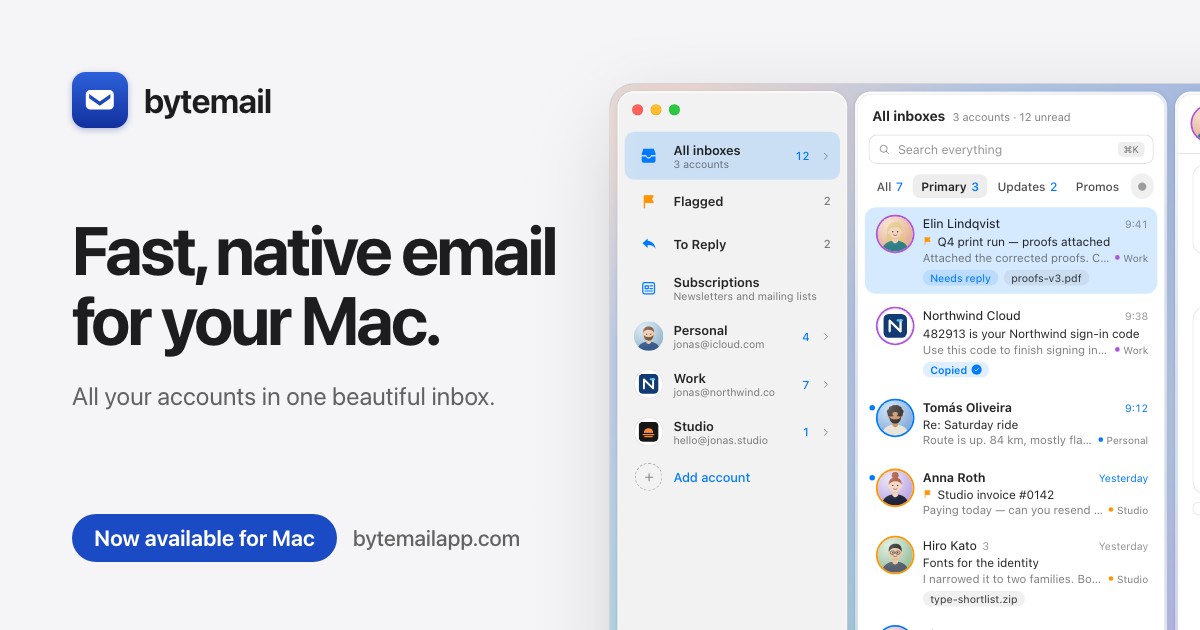
bytemail is a fast, native email app for macOS, built in Swift. Gmail, iCloud, Outlook, Yahoo and IMAP in one clean, modern window.

Paid content
Visit website
Profile views 0 Outbound visits 0 Normal
Fast, native email for Mac · bytemail Full homepage screenshot

At a glance

Category
Other
Language
English
Paid-content signal
Paid contentObserved
Registered
2026
Hosting
CloudflareInferred
HTTPS certificate trusted
PassedObserved
Last updated

Website review

This review may include AI-generated content and is not individually verified. Domain, certificate and other facts come from the observed data on this page.

What is bytemail?

bytemail is a native email application for macOS. It is built in Swift specifically for the Mac rather than as a web wrapper or bundled browser, and it puts Gmail, iCloud, Outlook, Microsoft 365, Yahoo, Fastmail and any IMAP account into one unified window. Each account keeps its own icon, colour and unread count, so you can tell at a glance where a message arrived.

What it does

  • One inbox for every account. Personal, work and side-project addresses sit side by side instead of in separate apps or browser tabs.
  • Conversation-style threads. Messages read as clean bubbles, newest at the bottom, with the reply field directly underneath. Accounts can be switched back to a classic quoted-reply layout if you prefer.
  • Fast search across accounts. A keyboard shortcut searches senders, subjects, message text and attachment names across all accounts at once, with local results appearing first and older mail filling in from the servers.
  • Privacy by default. Mail goes from your provider to your Mac; the app's servers are not in the path. Tracking pixels are blocked and tracking tags are stripped from links.
  • On-device AI features. Summaries and rewriting run locally on the Mac rather than in the cloud, and an MCP integration connects inboxes to AI apps such as Claude and Codex.
  • iPhone companion. A Mac licence includes the iPhone app, which was in App Store review at the time of writing.

Who it suits

It fits Mac users who juggle several mail accounts and want a single fast window without a browser-based client. The trade-off is platform lock-in: there is no Windows, Linux or web version, and the Mac app requires macOS 14 or later on Apple silicon. Anyone who needs cross-platform access should look elsewhere.

Trying it

A seven-day free trial is available from inside the app, and paid plans are listed at bytemail. The practical next step is to download it, add your busiest two accounts, and test whether the unified inbox and cross-account search actually replace your current setup during the trial.

How does bytemail keep my email private on my Mac?

bytemail keeps your email private mainly by staying out of the path between your mail provider and your Mac. According to the product's own page, your mail goes straight from your provider to your Mac and "never touches our servers." It is a native Swift app rather than a web wrapper, so there is no browser-based middle layer relaying your inbox.

Privacy features described on the site

  • Direct connections. Gmail, iCloud, Outlook, Yahoo, Fastmail and other IMAP accounts are fetched directly to your Mac rather than routed through bytemail's infrastructure.
  • On-device intelligence. Summaries and Rewrite run locally on your Mac, not in the cloud, so message content used for those features is not sent to a third-party AI service.
  • Tracking-pixel blocking. Remote pixels that report when you opened a message are blocked by default.
  • Link cleaning. Links are stripped of the tags that tell senders who clicked, so clicking through does not hand over a per-recipient identifier.

A practical scenario

Say a newsletter with a hidden tracking pixel arrives in your iCloud account. In a typical webmail client, opening it can ping the sender's server and confirm your address is live and that you read it. In bytemail, the pixel is blocked and the link you eventually click has its tracking parameters removed, so the sender learns less about your behaviour.

Where the trade-off sits

Privacy here is mostly about architecture and defaults, not about encryption you control. The site does not present bytemail as an end-to-end encrypted or anonymous service — it is a client that talks to your existing providers, so your provider still holds your mail and your account credentials still matter. Local AI features also depend on your Mac's hardware, which is why the app targets macOS 14+ on Apple silicon.

A sensible next step

If you want to verify the claims rather than take them on trust, run a test: send yourself a message containing a tracking pixel from a service you control, open it in bytemail, and check whether the pixel fires. You can start with the 7-day trial inside the app and compare the result against your current client. If you use multiple providers, bytemail may also replace several separate apps with one window, which is a convenience benefit rather than a privacy one.

Does bytemail work with Gmail, iCloud, Outlook, and other IMAP accounts?

Yes. bytemail is built to pull Gmail, iCloud, Outlook, Microsoft 365, Yahoo, Fastmail and any standard IMAP server into a single window, so you can keep a personal iCloud address, a work Outlook account and a side-project Gmail side by side instead of switching between apps or browser tabs. Each account keeps its own colour, picture and unread count, which matters once you have three or more inboxes and need to tell at a glance where a message arrived.

A few practical points worth knowing before you commit:

  • One licence covers Mac and iPhone. The iPhone app is listed as in App Store review and included free, so the same licence is intended to follow you across devices.
  • Privacy is the design premise, not an add-on. Mail goes from your provider to your Mac without passing through bytemail's servers, and tracking pixels are blocked with link tags stripped. That is a real trade-off if you rely on open-rate or click-tracking data for outbound campaigns — you would lose that signal.
  • Search spans accounts. One search covers senders, subjects, body text and attachment names across every account, with local results appearing first and server results filling in older mail.
  • AI features run on-device. Summaries and Rewrite are described as running locally rather than in the cloud.

Choosing between this and the alternatives

If your priority is… bytemail fits when… Consider something else when…
Native Mac feel You want a Swift-built app, not a web wrapper You need Windows or Android too
Many account types You mix Gmail, Outlook, Yahoo and IMAP You only use one provider's own app
Privacy You dislike server-side processing You need server-side rules or shared inboxes
Price model You prefer a one-off lifetime licence You want a free tier indefinitely

The trial is the sensible next step: add two accounts of different types — say an iCloud and a work Outlook — and spend the week testing unified search and the chat-style thread view, since that is where a mail client either fits your habits or does not. If you share mailboxes with a team, or depend on provider-side filtering, check that behaviour early rather than after the trial ends.

What do bytemail's pricing plans cost, and is there a free trial?

bytemail offers three ways to pay, plus a 7-day free trial on its subscription plans.

Plan Price Notes
Monthly $3.99 /month 7 days free, then billed monthly
Yearly $39.90 /year 7 days free, then billed yearly; shown as saving 17%
Lifetime $69 once (launch offer, normally $99) Pay once, use forever; 5 devices, one licence

The trial is the practical starting point: you get full use for 7 days before any charge, and you can also download the app and begin the trial from inside it. The licence covers Mac and iPhone, with the iPhone version described as included free and still in App Store review. Requirements are macOS 14 or later on Apple silicon.

Choosing between monthly, yearly and lifetime

  • Monthly suits anyone testing whether a native Mac client fits their habits, or who expects their email setup to change within a few months.
  • Yearly makes sense once you know you'll keep it; the discount is modest but real, and it's the cheapest way to stay subscribed long-term.
  • Lifetime is the better deal if you dislike subscriptions and expect to stay on macOS for years. At $69 it pays for itself in under two years of monthly billing, and it includes the iPhone app.

One caveat worth noting: the lifetime tier is framed as a limited launch offer with staged pricing ($19 and $29 tiers shown as taken, $49 also taken, then $69 for the next 50 users, then $99). If you want the lower price, deciding sooner matters more than with the subscriptions, which you can start and stop freely.

What the money buys

The pitch is speed and privacy rather than extra storage or server-side features. It's built in Swift for macOS with no web wrapper, mail goes from your provider straight to your Mac without passing through bytemail's servers, and on-device summaries and rewriting run locally rather than in the cloud. It handles Gmail, iCloud, Outlook, Microsoft 365, Yahoo, Fastmail and any IMAP server in one unified inbox, with per-account colours and unread counts. There's also an MCP integration for AI apps such as Claude and Codex.

If you mainly need a single Gmail account on a phone, this is more than you need. If you juggle several accounts on a Mac and care about a fast, private client, the trial is the sensible first step — then pick yearly if you're unsure about commitment, or lifetime if you're confident.

Can I use bytemail's MCP integration with Claude, Codex, or other AI apps?

Yes — bytemail advertises an MCP integration that its page says works with Claude, Codex and other AI apps, giving those tools access to every account from your Mac. MCP (Model Context Protocol) is the connector standard AI assistants use to reach outside data, so the practical effect is that an AI app can query your mail through bytemail rather than you copying and pasting messages into a chat window. The page frames it as "one MCP for every inbox," covering the same Gmail, iCloud, Outlook, Microsoft 365, Yahoo, Fastmail and generic IMAP accounts that feed the unified inbox.

What that looks like in practice

A concrete scenario: you ask Claude or Codex to find the Northwind invoice from a print-production thread, and it pulls the message and attachment name through bytemail instead of you forwarding anything. The page also pairs MCP with on-device Summaries and Rewrite, which it says run on your Mac rather than in the cloud — a meaningful distinction if the AI app you connect is itself cloud-hosted, since the mail content may still leave your machine once the assistant processes it.

Points to check before relying on it

  • Which AI apps are officially supported versus merely "works with" — the page names Claude and Codex as examples, not an exhaustive list.
  • Whether the MCP server is local-only or exposes an endpoint, since that determines what leaves your Mac.
  • Account scope: whether you can limit the connection to one account rather than the whole unified inbox.
  • Platform limits: bytemail is macOS 14+ on Apple silicon, so the integration is Mac-bound. The iPhone app is described as in App Store review and included free with a licence.

Decision criterion

If your main goal is letting an AI assistant read and act on mail without exporting it, MCP plus on-device summarisation is the reason to pick bytemail over a web-wrapper client. If your AI tools are all cloud-based and you handle sensitive mail, test the connection with a single low-risk account first and confirm what bytemail sends outward. Compare against Apple's built-in Mail if you only need unified accounts, and against Superhuman if speed and keyboard-driven triage matter more than AI access.

Does bytemail have an iPhone app, and is one licence enough for all my devices?

Yes, an iPhone app is planned, but it isn't available yet. The site states that bytemail for iPhone is "in App Store review, coming soon," so Mac is the only platform you can use today. On licensing, one purchase covers up to 5 devices, and the site says the iPhone app is included free with a Mac licence.

What that means in practice

Question Answer from the site
iPhone app available now? No — in App Store review, "coming soon"
Devices per licence 5
Does the licence cover iPhone? Yes, Mac + iPhone under one licence, included free
Mac requirements macOS 14+, Apple silicon
Trial 7 days free, then billed

A realistic setup: your Mac plus an iPhone would use 2 of the 5 device slots, leaving room for a second Mac or a replacement machine later. If you own several Macs and an iPhone, count them before buying — five sounds generous until a work laptop, a home desktop and a phone are all in the mix.

How to decide

If you need mobile email right now, this isn't the tool for you yet — you'd be paying for a Mac-only experience while waiting on an App Store review that has no guaranteed date. If your email life happens mainly at a Mac and you can live without phone access for a while, the licence terms are unusually forgiving, since the iPhone app is bundled rather than sold separately.

Before buying, open bytemail and run the 7-day trial from inside the app. Test the two things that decide whether a mail client sticks: whether your accounts (Gmail, iCloud, Outlook, Yahoo or plain IMAP) all connect cleanly, and whether ⌘K search finds old mail across every inbox. Then check the pricing page for the current lifetime tier, since the site shows a launch offer with a limited number of slots at each price.

Related questions

More questions →
What Is bytemail and What Does It Do?

bytemail is a native email app for macOS, built in Swift, that puts Gmail, iCloud, Outlook, Yahoo, and any IMAP account into a single window. It's aimed at Mac users who want a fast, private client that doesn't route mail through a third-party server. You can try it free for 7 days, then pay either $3.99/month, $39.90/year, or a one-time lifetime fee (currently $69, rising to $99).

What it actually does

bytemail is a desktop email client, not a web app or a wrapper around a browser. It runs natively on macOS 14+ on Apple silicon, with light and dark modes.

The core features, based on the site's own description:

  • Unified inbox — Gmail, iCloud, Outlook, Microsoft 365, Yahoo, Fastmail, or any IMAP server in one window. Each account keeps its own icon, color, and unread count, so you can tell where a message came from.
  • Conversation-style threads — messages display as clean bubbles, newest at the bottom, with the reply field directly underneath. You can switch any account back to a classic email layout if you prefer.
  • Search across all accounts — press ⌘K to search senders, subjects, message text, and attachment names at once. Local results appear instantly, then older mail loads from your servers going back to your first message.
  • Privacy by default — tracking pixels are blocked, and links are stripped of the tags that tell senders who clicked. Mail goes straight from your provider to your Mac; bytemail says it never sees your messages.
  • On-device AI — summaries and rewrite run locally on your Mac rather than in the cloud.
  • MCP support — works with Claude, Codex, and other AI apps, giving them access to every account from your Mac.

Who it's for

bytemail makes sense if you:

  • Use a Mac and want a native app instead of Gmail's web interface or a cross-platform client.
  • Manage several accounts (work, personal, side projects) and want them in one place without mixing them up.
  • Care about not handing your mail to another server, and want tracking protection built in.
  • Want AI features that run locally rather than sending your email to a cloud service.

It's less relevant if you're not on macOS, or if you rely on a web client you can open from any device. The iPhone app is listed as "in App Store review, coming soon" and is included free with a licence.

Pricing and licensing

Plan Price Notes
Trial Free for 7 days No charge during the trial; cancel anytime
Monthly $3.99/month Billed monthly after trial
Yearly $39.90/year Saves 17% vs. monthly
Lifetime $69 once (launch offer) Regular price $99; pay once, use forever

The lifetime licence covers 5 devices under one licence, and the site states the iPhone app will be included free. Launch pricing is tiered and limited — the page shows earlier tiers ($19, $29, $49) as sold out, with $69 available for the next 50 users before it goes to $99. Keys are delivered instantly, and checkout requires JavaScript for the spam check.

How to get started

  1. Check your Mac meets the requirement: macOS 14+ on Apple silicon.
  2. Either buy a plan from the pricing page or download bytemail and start the 7-day trial from inside the app.
  3. Add your accounts — Gmail, iCloud, Outlook, Yahoo, or any IMAP server.
  4. Optionally set an account to Classic layout if you don't want conversation bubbles.

One thing worth verifying before you commit: the site says mail never touches its servers, which is a claim about how the app connects directly to your provider — if that's your main reason for choosing it, it's worth confirming how account authentication works for your specific provider during the trial.

How bytemail Handles Privacy and On-Device AI

bytemail keeps your mail out of its own infrastructure: messages travel from your email provider straight to your Mac, and the AI features that summarize or rewrite text run locally on the machine rather than in the cloud. That combination is the core of its privacy story. It applies if you use macOS 14 or later on Apple silicon and connect accounts over Gmail, iCloud, Outlook, Microsoft 365, Yahoo, Fastmail, or any IMAP server.

Where your email actually goes

bytemail describes a direct path: your provider sends mail to your Mac, and the company states it never sees your messages. There is no bytemail mail server sitting in the middle of that transfer.

This matters because many email clients route or store data on their own backend. Here the app is a native macOS client built in Swift, not a web wrapper, so the local app is the endpoint.

One practical consequence: because mail lives on your Mac and is fetched from your provider, the app depends on your provider's own security and on your Mac's security. bytemail is not adding a separate cloud layer of protection — it is removing one.

Tracking and link hygiene

bytemail blocks tracking pixels by default and strips the tags that identify you when you click links. Tracking pixels are the invisible images senders embed to confirm you opened a message; link tags are the extra parameters that tell a sender which campaign or recipient clicked.

Both are handled without you configuring anything. The result is that opening mail and clicking links reveals less about your behavior to senders than a typical client would.

On-device AI: Summaries and Rewrite

The AI features — Summaries and Rewrite — run on your Mac, not in the cloud. That means the text being summarized or rewritten is processed locally rather than sent to a remote model.

If your concern is "does my email content leave my machine when I use AI features," the answer here is no, based on how bytemail describes the implementation. The trade-off is typical of on-device processing: capability is bounded by your Mac's hardware rather than by a large remote model.

MCP: connecting AI apps to your inbox

bytemail exposes an MCP interface that works with Claude, Codex, and other AI apps. MCP (Model Context Protocol) is a standard way for AI tools to connect to a data source — here, your email accounts, accessed from your Mac.

This is the piece worth thinking about carefully. The privacy guarantee above is about bytemail's own servers. When you connect a third-party AI app through MCP, that app's own data handling applies to whatever it reads. So the question shifts from "does bytemail see my mail" to "what does the AI app I connect do with it."

A reasonable approach:

  • Use on-device Summaries and Rewrite when you want processing to stay on the Mac.
  • Treat MCP connections as you would any integration — check what the connected AI app does with the data it can reach.
  • Keep the scope of connected accounts in mind, since MCP is described as reaching every account.

Quick reference

Concern How bytemail handles it
Mail in transit Provider → your Mac directly; company states it never sees mail
Storage On your Mac, not on bytemail servers
Tracking pixels Blocked
Link tracking tags Removed
Summaries / Rewrite Run on-device, not in the cloud
Third-party AI access Via MCP (Claude, Codex, others) — their policies apply

What this means for your decision

If your priority is keeping email content off a vendor's servers and keeping AI processing local, bytemail's design matches that goal, provided you stay with the built-in on-device features. If you plan to wire your inbox into external AI apps through MCP, the local-processing guarantee no longer covers that path — the connected app's terms govern. The two features serve different needs, and it is worth deciding which one you actually want before connecting accounts.

Which email accounts can I use with bytemail?

bytemail works with Gmail, iCloud, Outlook, Microsoft 365, Yahoo, Fastmail, and any standard IMAP server. All of them can live in a single unified inbox, while each account keeps its own icon, colour, and unread count so you can tell at a glance where a message came from. It runs on macOS 14+ on Apple silicon.

Supported account types

Provider Supported Notes
Gmail Yes Listed as a supported account
iCloud Yes Listed as a supported account
Outlook Yes Listed as a supported account
Microsoft 365 Yes Listed as a supported account
Yahoo Yes Listed as a supported account
Fastmail Yes Listed as a supported account
Any IMAP server Yes Works with any IMAP server

If your provider isn't named above but offers IMAP access, you can still add it. That covers most self-hosted and smaller-provider mailboxes.

How accounts are managed together

bytemail puts every account into one window rather than making you switch between separate inboxes:

  • Unified inbox — Gmail, iCloud, Outlook, Microsoft 365, Yahoo, Fastmail, and IMAP accounts all appear in one place.
  • Per-account identity — each account "wears its own picture and colour," so the source of a message is always visible.
  • Separate unread counts — each account keeps its own unread number, so you can see which mailbox needs attention without opening it.
  • Unified search — pressing ⌘K searches every account at once across senders, subjects, message text, and attachment names. Results come back newest first, with older mail filled in from your servers.

Choosing a view per account

Threads are shown as a conversation by default: each message is a clean bubble, newest at the bottom, with the reply field directly underneath, so you don't scroll past walls of quoted replies. If you prefer a traditional layout, you can switch any individual account to Classic view — the choice is per account, not global.

What to check before you commit

  • Platform: macOS 14+ on Apple silicon only. There is no Windows, Linux, or Intel Mac version.
  • iPhone: bytemail for iPhone is listed as in App Store review and "coming soon," included free with a licence.
  • Privacy model: mail goes from your provider straight to your Mac — the app states it never touches bytemail's servers. Summaries and Rewrite run on-device.
  • Trial and pricing: a 7-day free trial is offered, with plans starting at $3.99/month or $39.90/year, plus a lifetime option. You can also download the app and start the trial from inside it.

If your mail lives in one of the named providers or any IMAP server, bytemail can consolidate it into a single native Mac window. If you need a non-Mac client or an Intel Mac build, this app won't fit that requirement.

bytemail Pricing and Licensing: Plans, Trial, and Device Limits

bytemail offers three ways to pay: $3.99/month, $39.90/year (about 17% cheaper than monthly), or a one-time lifetime licence currently priced at $69 (down from $99). Every option starts with a 7-day free trial, and a single licence covers 5 devices, including the iPhone app once it ships. If you want the lowest long-term cost and don't mind paying upfront, the lifetime tier is the cheapest path; if you'd rather spread the cost or test the app first, the monthly plan is the safest entry point.

The three plans at a glance

Plan Price Billing Notes
Monthly $3.99 / month Recurring monthly 7 days free, then billed monthly
Yearly $39.90 / year Recurring yearly 7 days free, then billed yearly; saves ~17% vs monthly
Lifetime $69 once (launch offer, normally $99) One-time Pay once, use forever

All three include the same core app: a native Swift email client for macOS 14+ on Apple silicon, with Gmail, iCloud, Outlook, Microsoft 365, Yahoo, Fastmail, and any IMAP server supported in one unified inbox.

How the 7-day trial works

  • The trial runs for 7 days and you are not charged during that period.
  • You can start it either from the pricing page or from inside the app after downloading bytemail.
  • Subscriptions can be cancelled anytime — cancelling before the trial ends means no charge.
  • Lifetime purchases are not subscriptions, so there is nothing to cancel; you get an instant key delivery after checkout.

One practical detail: the checkout page requires JavaScript to run its spam check, so if the buy button appears unresponsive, that's usually why.

Lifetime licence: the launch pricing ladder

The lifetime tier is sold in limited batches that increase in price as each batch sells out:

Batch Price Status
First 10 $19 10/10 taken
First 100 $29 100/100 taken
Next 50 $49 50/50 taken
Current batch $69 46 of 50 remaining
After current batch $99 Standard price

The current $69 price applies to the next 50 users, with 4 already claimed. Once that batch is gone, the price moves to $99. If you're comparing lifetime against subscription, $69 is roughly equivalent to 17 months of the monthly plan or under two years of the yearly plan — after that point the lifetime licence is pure savings.

Licensing terms: devices and platforms

  • 5 devices, one licence. A single purchase activates up to five machines.
  • Mac + iPhone share the same licence. The iPhone app is in App Store review and, when released, is included free with your licence rather than sold separately.
  • The Mac app requires macOS 14 or later and Apple silicon.

What the price includes beyond the inbox

The paid app is not just a mail viewer. The same licence covers:

  • Unified inbox across Gmail, iCloud, Outlook, Microsoft 365, Yahoo, Fastmail, and any IMAP server, each account with its own colour and unread count.
  • On-device AI — Summaries and Rewrite run locally on your Mac rather than in the cloud.
  • MCP support, so the app works with Claude, Codex, and other AI tools across every account.
  • Privacy features such as tracking-pixel blocking and stripped link tags.
  • Full-history search via ⌘K, covering senders, subjects, message text, and attachment names across all accounts.

Which plan fits which situation

  • Just want to try it: start the 7-day trial, no payment needed.
  • Unsure you'll stick with it: monthly at $3.99 keeps commitment low.
  • Confident you'll use it for years: yearly at $39.90, or lifetime at $69 if you want to stop paying entirely.
  • You own multiple Macs or plan to use the iPhone app: the 5-device licence covers both, so the per-device cost drops the more hardware you have.

The main decision point is time horizon. Under roughly 17 months of use, subscriptions cost less upfront; beyond that, the $69 lifetime licence wins — and it locks in before the price rises to $99.

bytemail system requirements and installation

bytemail runs on macOS 14 or later on Apple silicon. If your Mac meets that bar, you can download it from bytemailapp.com and start the 7-day free trial from inside the app — no account setup on the website required first. Intel Macs are not listed as supported, so check your chip before downloading.

System requirements

Requirement Detail
Operating system macOS 14+
Processor Apple silicon
App type Native SwiftUI app, built in Swift
Appearance Light and dark mode
Licence coverage 5 devices, one licence

The "Apple silicon" requirement is the one most likely to rule out an older Mac. To check yours, open the Apple menu → About This Mac and look at the Chip line. If it says Apple M-series, you're fine. If it says Intel, bytemail is not listed as compatible.

How to install bytemail

  1. Go to bytemailapp.com and download the app.
  2. Open the downloaded file and move bytemail to your Applications folder.
  3. Launch bytemail. The 7-day free trial starts from inside the app, so you can evaluate it before paying.
  4. Add your email accounts — Gmail, iCloud, Outlook, Microsoft 365, Yahoo, Fastmail, or any IMAP server.

Your mail goes straight from your provider to your Mac; bytemail states it never touches their servers, and summaries and rewrite features run on-device rather than in the cloud.

What you get after installing

  • Unified inbox — every account in one window, each with its own icon, colour, and unread count.
  • Threads — messages shown as clean bubbles, newest at the bottom, with the reply field underneath. You can switch any account back to Classic view if you prefer.
  • Search — press ⌘K to search all accounts at once by sender, subject, message text, or attachment name. Your Mac answers instantly, then servers fill in older mail.
  • Privacy defaults — tracking pixels are blocked and links are stripped of click-tracking tags.

Pricing after the trial

The 7-day trial leads into one of three plans:

  • Yearly — $39.90/year (listed as saving 17%)
  • Monthly — $3.99/month
  • Lifetime — $69 once as a launch offer, rising to $99; a limited number of discounted slots at $19, $29, and $49 are shown as already taken

One licence covers 5 devices, and you can cancel anytime with no charge during the first 7 days.

The iPhone app

bytemail for iPhone is in App Store review and listed as coming soon. It is included free with a Mac licence — the site describes it as "Mac + iPhone, one licence."

Common snags

  • Download won't run — confirm you're on macOS 14+ and Apple silicon; an Intel Mac is the most likely blocker.
  • Checkout page won't load — the site notes checkout needs JavaScript enabled, for its spam check.
  • Not sure yet — you can skip the website checkout entirely and start the trial from inside the app after downloading.

Website Overview

Page metadata, canonical configuration and social previews work together to provide more consistent search and sharing presentation.

Domain and Registration

The domain was registered less than a year ago and has limited historical evidence to assess. Transfer-protection status is present, helping reduce the risk of unauthorized domain transfers. The registrar is Cloudflare, Inc., a widely used domain service provider. The domain uses the common .com extension, which is not an independent safety signal.

DNS and Email

Nameservers are provided by Cloudflare, indicating managed DNS hosting. MX records point to the Google Workspace email service. No CNAME was found; the observed records resolve directly to addresses. SPF and DMARC are configured. DKIM status is unknown. TXT records include verification markers for Google. Such markers may also remain after a service stops being used.

TLS and Certificates

The public key uses EC with 256 bits. The server supplied a complete certificate chain. No organization name is present in the certificate; the available fields are consistent with domain validation. The certificate was issued by Let's Encrypt, commonly associated with automated certificate services. The certificate's total validity is about 89 days, consistent with a short renewal cycle.

HTTP and Browser Security

The response lacks these common security headers: X-Content-Type-Options. No X-Powered-By header was found, reducing one common source of backend fingerprinting information. The cf-ray response header indicates a CDN or caching proxy in the delivery path. No obvious internal addresses or debug information were found in the headers. The Server header identifies cloudflare without an exact version.

Technology Stack Analysis

The public page identifies Cloudflare without precise versions, leaving fewer clues for version-specific scanning.

Search and Social Sharing

Twitter Card metadata is configured. The title has 37 characters, within a common display range. A meta description is present, with 131 characters. The observed directives allow indexing and link following. No Generator meta tag is publicly exposed.

Hosting and Email

DNSCloudflare
HostingCloudflare
EmailGoogle Workspace
Approximate IP geolocation (inferred; a CDN or proxy may differ from the origin server) Location unknown Inferred 104.21.26.180

Registration details

RDAP / WHOIS

RegistrarCloudflare, Inc.
Registered2026-09-19
Expires2027-09-19
Domain statusclient transfer prohibited
Nameserverscora.ns.cloudflare.com、remy.ns.cloudflare.com
DNSSECunsigned

DNS records

DNS

TypeNameValueTTLPriority
Abytemailapp.com104.21.26.180300—
Abytemailapp.com172.67.138.67300—
AAAAbytemailapp.com2606:4700:3032::ac43:8a43300—
AAAAbytemailapp.com2606:4700:3036::6815:1ab4300—
MXbytemailapp.comaspmx.l.google.com36001
MXbytemailapp.comalt1.aspmx.l.google.com36005
MXbytemailapp.comalt2.aspmx.l.google.com36005
MXbytemailapp.comalt3.aspmx.l.google.com360010
MXbytemailapp.comalt4.aspmx.l.google.com360010
NSbytemailapp.comcora.ns.cloudflare.com86400—
NSbytemailapp.comremy.ns.cloudflare.com86400—
TXTbytemailapp.comgoogle-site-verification=Txc4qdVV1AogD1mjKvP_wdi3wbHdTSNsHr0s9nFhOw4300—
TXTbytemailapp.comgoogle-site-verification=psjx-BmXO-A-etaJzBchJUp_18ODFp_NtBBZWiVLQBI300—
TXTbytemailapp.comv=spf1 include:_spf.mx.cloudflare.net include:_spf.google.com ~all300—
DMARC_dmarc.bytemailapp.comv=DMARC1; p=none; rua=mailto:[email protected]300—

TLS and certificates

TLS / SSL

AssessmentNormal configuration
Supported protocolsTLSv1.2、TLSv1.3
Negotiated protocolTLSv1.3
Certificate subjectbytemailapp.com
IssuerLet's Encrypt
Valid until2026-12-18T09:21 · Remaining when checked: 65 days
Verification detailsCertificate trust: Passed · Hostname match: Passed

HTTP response headers

HTTP

HeaderValue
content-typetext/html; charset=utf-8
cache-controlno-cache, private
servercloudflare
strict-transport-securitymax-age=31536000; includeSubDomains
content-security-policydefault-src 'self'; script-src 'self' 'unsafe-inline' https://datafa.st https://cdn.affonso.io https://challenges.cloudflare.com; style-src 'self' 'unsafe-inline'; img-src 'self' data: https:; font-src 'self'; connect-src 'self' https://datafa.st https://api.affonso.io; frame-src https://challenges.cloudflare.com https://theroadmapai.com; frame-ancestors 'self'; form-action 'self' https://checkout.stripe.com; base-uri 'self'; object-src 'none'; upgrade-insecure-requests
x-frame-optionsSAMEORIGIN, SAMEORIGIN
x-content-type-optionsnosniff, nosniff
referrer-policystrict-origin-when-cross-origin
permissions-policycamera=(), microphone=(), geolocation=(), payment=(), usb=(), interest-cohort=()

Identified technologies

Cloudflare

Pages, Search and Sharing

Meta descriptionbytemail is a fast, native email app for macOS, built in Swift. Gmail, iCloud, Outlook, Yahoo and IMAP in one clean, modern window.
Canonical URLhttps://bytemailapp.com
LanguageEnglish (default)
Twitter Cardsummary_large_image
All bots 0 allowed · 1 disallowed
  • Disallow/admin

User reviews (0)

  • No reviews yet.