Website profiles · Technology insights · Alternatives

chromegoldmine.com

Discover 9,656 expired Chrome extensions across 6 categories. Find high-potential rebuild opportunities for indie makers in 2026.

No paid content found
Visit website
Profile views 5 Outbound visits 1 Normal
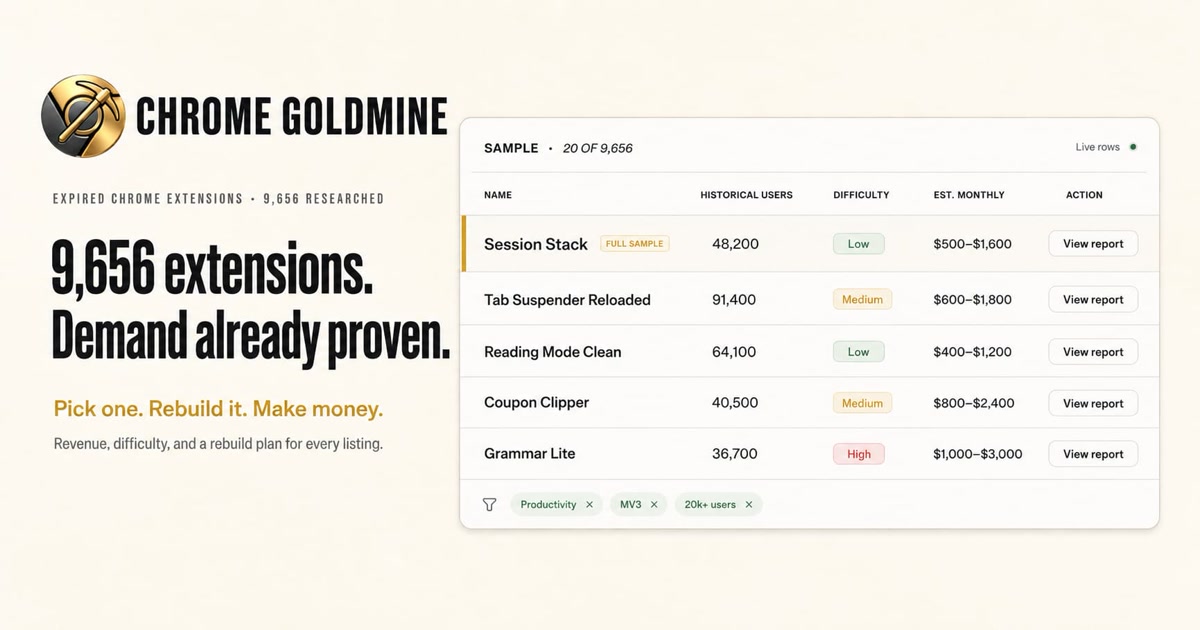
Chrome Goldmine Full homepage screenshot

At a glance

Category
Development
Language
English
Paid-content signal
No paid content foundObserved
Registered
2025
Hosting
CloudflareInferred
HTTPS certificate trusted
PassedObserved
Last updated

Website review

This review may include AI-generated content and is not individually verified. Domain, certificate and other facts come from the observed data on this page.

What is Chrome Goldmine?

Chrome Goldmine is a paid research database of expired Chrome extensions. It catalogs 9,656 extensions that once had real users but are no longer maintained, and packages each entry with the context an indie developer would need to decide whether rebuilding it is worth the effort.

Each listing covers the extension's historical user count, category, rebuild difficulty, why it died, who currently competes, and a step-by-step rebuild plan. Buyers get an instant Notion workspace plus a CSV, with quarterly updates. The site offers a free sample of 20 live rows and one full 12-point report before purchase.

Who it's for

  • Indie developers looking for validated ideas instead of guessing at a market.
  • Solo makers who want a starting point with a known audience rather than a blank page.
  • Anyone comfortable reading market data and shipping a Manifest V3 extension themselves.

What it isn't

It's a research product, not a finished business. You still choose, build, launch, and market the extension. Historical users are a signal of past demand, not a guarantee those people will return — many will have moved to a competitor or stopped needing the tool altogether.

A practical way to use it

Start with the free sample and pick one row where you already understand the problem, say a tab manager or a coupon tool. Check the "died because" and "who competes now" fields carefully: an extension that died from a Manifest V3 migration is usually an easier rebuild than one abandoned because the category became unprofitable. Then look at rebuild difficulty against your own skills before committing.

For broader Chrome extension market context, Chrome Web Store shows current listings and review activity, which is useful for sanity-checking whether a niche still has active competition.

How do I choose which expired Chrome extension to rebuild?

Start by filtering for the intersection of three things: a large historical user base, a failure reason you can actually fix, and a category where you can reach users cheaply. Chrome Goldmine's own sample illustrates the logic: Session Stack (48,200 users, low difficulty, died to Manifest V3) is a cleaner rebuild target than Grammar Lite (36,700 users, high difficulty, also MV3), because the technical work is smaller and the demand is comparable.

A practical filter

  1. Failure reason first. "Died because MV3" usually means the code needs porting, not reinvention — a bounded job. "Abandoned" is murkier: the developer may have quit because monetization never worked. Treat abandoned listings as demand signals, not as proof the business model was viable.
  2. Difficulty against your actual skills. A low-difficulty extension in a crowded category beats a high-difficulty one you ship in eight months. Grammar and writing tools tend to involve models, inference costs and quality expectations; tab and theme utilities are mostly browser APIs.
  3. Category economics. Shopping and writing extensions can monetize through affiliate or subscription, but they attract competition and platform policy risk. Productivity and customization tools often monetize through a simple paid tier, which suits a solo builder.
  4. Reachability. Ask how you would get the first 500 users. If the answer is only "Chrome Web Store search," assume slow growth.

Comparison of two sample listings

Listing Users Difficulty Stated cause Practical read
Session Stack 48,200 Low MV3 Bounded port; tab management is a durable need
Coupon Clipper 40,500 Medium Abandoned Affiliate revenue, but constant maintenance against retailer changes
Reading Mode Clean 64,100 Low Abandoned Accessibility niche; unclear willingness to pay

Next step

Pick two or three candidates, then spend an afternoon validating before buying anything: search the Chrome Web Store for current competitors, check whether the old extension still has reviews complaining about its removal, and estimate whether you could build a rough version in two weeks. If a listing survives that test, the rebuild is worth starting.

Chrome Goldmine itself is a paid database of these listings, with a free sample of 20 rows — useful for browsing patterns, less useful as a substitute for your own competitor research. You can see it at Chrome Goldmine. For general market context on extension demand, the Chrome Web Store developer documentation and community forums such as Reddit's extension-building communities are reasonable places to sanity-check assumptions.

What information is included in each extension listing?

Each listing bundles the research you would otherwise do yourself: historical user count, category, rebuild difficulty, the reason the extension died, current competitors, and a step-by-step rebuild plan. Listings also carry an estimated monthly revenue range, so you can compare opportunity size against effort before committing.

Fields shown in the sample rows

Field What it tells you
Name The expired extension, e.g. Session Stack, Tab Suspender Reloaded
Historical users Installed base before it died — a demand signal
Category Productivity, Accessibility, Customization, Shopping, Writing, New Tab
Difficulty Low, Medium or High rebuild effort
Died because MV3 migration failure or plain abandonment
Est. monthly Revenue range, e.g. $500–$1,600
Action A link to the full report

The full 12-point report

The complete report behind each row is described as a 12-point breakdown, with the sample entry for Session Stack (48,200 users, Productivity, Low difficulty) given as the worked example. Expect the report to expand on why the extension died, who competes now, and how to rebuild it, rather than just repeating the summary row.

How to use it

Treat the table as a shortlist filter, then open reports only for rows that pass your own bar. If you can ship a Manifest V3 extension in a weekend, sort toward Low difficulty with high historical users — Session Stack and Dark Sites fit that shape. If you want pricing power, Coupon Clipper and Grammar Lite show higher revenue ceilings but Medium and High difficulty respectively. The 20-row sample is browsable without signing up, so start there and check whether the report depth matches how you actually evaluate a build.

How much does Chrome Goldmine cost and what do I get for the price?

Chrome Goldmine is a one-time purchase, not a subscription. The page lists a standard price of $29, with a 20% launch discount bringing it to $23.20 for the first 100 buyers. A 30-day money-back guarantee is offered "no questions."

What you get for the price

  • Access to a database of 9,656 expired Chrome extensions across 6 categories.
  • For each listing: historical user counts, category, rebuild difficulty, why the extension died, current competitors, and a step-by-step rebuild plan.
  • Delivery as an instant Notion workspace plus a CSV.
  • Lifetime quarterly updates.
  • A free sample of 20 live rows (including one full 12-point report) you can browse without signing up.

What the price is really buying

You are paying for research, not code. The value is in the pre-work: someone has already identified extensions that had real installs before dying, and packaged the demand signal alongside a rebuild plan. If you are an indie maker who can build a Manifest V3 extension but doesn't want to spend weeks hunting for a viable idea, that trade-off makes sense. If you enjoy open-ended idea discovery or already have a backlog, the database may duplicate work you'd do yourself.

A concrete way to decide

Browse the free sample first. Pick one listing — say a productivity extension with a large historical user base and low rebuild difficulty — and ask yourself three things:

  1. Could I ship a working MV3 version in a few weekends?
  2. Do I understand why it died, and can I avoid that cause?
  3. Is the estimated monthly revenue range enough to justify the build time?

If you answer yes to all three, the $23.20 is a small bet against a much larger time investment. If the sample rows don't excite you, the full 9,636 likely won't either.

Next step

Open the sample, read the one full report end to end, and check whether the rebuild plan is specific enough to act on. That single report tells you more about fit than the headline count of 9,656.

Can I see a sample of the database before buying?

Yes. The sample is the main way to judge whether the database is worth buying: it shows 20 live rows out of 9,656, plus one full 12-point report, with no signup required.

What you can inspect before paying

  • 20 sample rows with the fields used across the full database: name, historical users, category, rebuild difficulty, why it died, and estimated monthly revenue.
  • One complete report (the "Session Stack" example) showing what the 12-point structure looks like in full.
  • Filters on the sample view, so you can see how browsing works.

The sample rows give a sense of the range. Session Stack (48,200 users, Productivity, low difficulty, died to MV3) and Tab Suspender Reloaded (91,400 users, Productivity, medium difficulty) sit alongside smaller or harder entries like Grammar Lite (36,700 users, Writing, high difficulty). That mix tells you more than the headline count does.

How to use the sample as a buying test

  1. Pick one row that matches skills you already have — a low-difficulty productivity or customization extension is the easiest first check.
  2. Open the full report for that row and ask whether the "why it died" reasoning and rebuild plan are specific enough to act on without more research.
  3. Check whether the competitor field names real current alternatives. If it does, the research is doing work you would otherwise do yourself.
  4. If two or three sample rows pass that test, the remaining 9,636 are likely similar in structure.

Trade-offs to weigh

The sample is deliberately small and curated, so it will not reveal how consistent quality is across all 9,656 entries, or how many rows sit in crowded categories. Historical user counts also describe past installs, not guaranteed demand today — a 90,000-user extension that died two years ago may face a very different market now. Treat the estimated monthly figures as the seller's projections rather than verified earnings.

If the sample rows you care about already look thin or generic, that is a signal to skip it. If they read like research you would have had to assemble yourself, the full set is the natural next step. Chrome Goldmine is at Chrome Goldmine.

What are the best categories of expired Chrome extensions for indie makers to rebuild?

The strongest categories for an indie rebuild are Productivity and Shopping, with Accessibility and Customization as lower-effort options. The best choice depends on whether you want a fast, low-risk launch or a higher-revenue product that demands more engineering.

Chrome Goldmine's sample data illustrates the trade-off: extensions like Session Stack (48,200 historical users, Low difficulty) and Reading Mode Clean (64,100 users, Low difficulty) sit in categories where the rebuild is mostly UI and browser API work. Shopping tools such as Coupon Clipper (40,500 users, Medium) and Price Watch (31,800 users, Medium) carry more complexity because they depend on scraping retailer pages and affiliate or coupon feeds, but their estimated monthly revenue is often double.

Category comparison

Category Rebuild difficulty Typical historical users Main risk Best for
Productivity Low–Medium 48k–91k Crowded, built-in browser features First extension, fast launch
Shopping Medium 31k–40k Retailer anti-scraping, affiliate rules Makers with API/scraping experience
Accessibility Low 64k Small niche, slow monetization Portfolio building, low maintenance
Customization Low 55k Users expect free tools Simple freemium or donation model
Writing High 36k AI competition, API costs Technical founders with budget
New Tab Medium 27k Low willingness to pay Audience building, not direct sales

How to choose

Start with the reason the extension died, not just the category. A Manifest V3 death usually means the code needs a straightforward migration; an "abandoned" listing often means the original developer lost interest, which is a better signal that demand still exists. Match that against your own skills: if you can handle OAuth and API rate limits, Shopping offers the best revenue per user. If you want to ship in a weekend, Productivity or Customization is safer.

A practical next step is to pick two listings from different categories, read their full reports, and estimate your build time honestly. You can browse the sample rows first at Chrome Goldmine before committing to the full database.

Related questions

More questions →
What Is Chrome Goldmine?

Chrome Goldmine is a paid database of 9,656 expired Chrome extensions, packaged as a Notion workspace plus CSV, aimed at indie developers looking for extensions to rebuild. Each listing includes historical user counts, category, rebuild difficulty, why the extension died, current competitors, and a step-by-step rebuild plan. It costs $23.20 during a launch discount for the first 100 buyers, then $29, with a 30-day money-back guarantee and lifetime quarterly updates. It is not a tool for building extensions — it is research you buy before you decide what to build.

What you actually get

The product is a research database, not software. According to the site, each of the 9,656 listings covers:

  • Historical users — how many people had installed the extension before it died
  • Category — one of 6 categories (sample rows show Productivity, Accessibility, Customization, Shopping, Writing, and New Tab)
  • Rebuild difficulty — rated Low, Medium, or High
  • Why it died — for example "MV3" (Manifest V3 migration) or "Abandoned"
  • Who competes now — current alternatives in the space
  • A step-by-step rebuild plan — the site describes a 12-point report per listing
  • Estimated monthly revenue — a range, e.g. $500–$1,600/mo

Delivery is an instant Notion workspace plus a CSV export, with lifetime quarterly updates.

The sample data tells you what a listing looks like

The site publishes 20 live rows out of 9,656 without requiring signup. A few examples:

Name Historical users Category Difficulty Died because Est. monthly
Session Stack 48,200 Productivity Low MV3 $500–$1,600
Tab Suspender Reloaded 91,400 Productivity Medium MV3 $600–$1,800
Reading Mode Clean 64,100 Accessibility Low Abandoned $400–$1,200
Coupon Clipper 40,500 Shopping Medium Abandoned $800–$2,400
Grammar Lite 36,700 Writing High MV3 $1,000–$3,000

One full report (Session Stack) is shown in the sample; the remaining 9,636 rows unlock at checkout. The revenue figures are the seller's estimates, not verified earnings — treat them as a starting point for your own validation.

Who it fits, and who it doesn't

It fits you if:

  • You're an indie developer or solo maker choosing what to build next
  • You want demand signals (historical installs) rather than guessing at ideas
  • You're comfortable rebuilding a Chrome extension in Manifest V3
  • You'd rather pay once for research than spend weeks scanning the Web Store yourself

It doesn't fit you if:

  • You want a done-for-you extension or code — this is research only
  • You need guaranteed revenue; the estimates are ranges, not promises
  • You're not willing to do the build and launch work yourself

The site says the database is used by 50+ indie makers.

Pricing and what the money buys

  • $23.20 — 20% launch discount, limited to the first 100 buyers
  • $29 — standard price after that
  • No subscription
  • 30-day money-back guarantee, described as "no questions"
  • Lifetime quarterly updates included

The site does not state whether the Notion workspace requires a paid Notion plan, so check that separately if you don't already use Notion.

How to evaluate it before buying

  1. Open the free sample (20 rows plus one full report) — no signup required.
  2. Pick 2–3 listings in categories you know and check whether the "who competes now" and rebuild plans match what you'd find on your own.
  3. Compare the historical user counts against current Web Store install numbers for the live competitors.
  4. If the sample research saves you meaningful time, the full set is the same format at scale.

The core decision is simple: if you're picking your next extension and want pre-gathered demand data, the sample shows you the quality bar. If the sample rows don't tell you anything you couldn't find yourself in an afternoon, the full database likely won't change that.

Can You Preview Chrome Goldmine Data Before Buying?

Yes. Chrome Goldmine lets you browse a free sample of 20 live rows from its database of 9,656 expired Chrome extensions, with no signup required. The sample also includes one full 12-point report, so you can judge the data fields and format before paying. The remaining 9,636 listings unlock only after checkout.

What the Free Sample Includes

The sample is not a static screenshot or a marketing mockup — it is described as 20 live rows pulled from the full database. For each row you can see:

  • Name — the extension's original name
  • Historical users — the install base it had before it died
  • Category — e.g. Productivity, Shopping, Accessibility, Customization, Writing, New Tab
  • Difficulty — rebuild effort rated Low, Medium, or High
  • Died because — the cause of death, such as MV3 (Manifest V3 migration) or Abandoned
  • Est. monthly — an estimated revenue range if rebuilt

A few rows from the sample, as shown on the site:

Name Historical users Category Difficulty Died because Est. monthly
Session Stack 48,200 Productivity Low MV3 $500–$1,600
Tab Suspender Reloaded 91,400 Productivity Medium MV3 $600–$1,800
Reading Mode Clean 64,100 Accessibility Low Abandoned $400–$1,200
Dark Sites 55,000 Customization Low MV3 $300–$900
Coupon Clipper 40,500 Shopping Medium Abandoned $800–$2,400
Grammar Lite 36,700 Writing High MV3 $1,000–$3,000
Price Watch 31,800 Shopping Medium MV3 $700–$2,000
New Tab Digest 27,300 New Tab Medium Abandoned $400–$1,400

The Full 12-Point Report Example

The sample also opens one complete report — Session Stack (48,200 historical users, Productivity, Low difficulty, $500–$1,600/mo). This is the part that matters most for a buying decision, because it shows what a paid listing actually contains beyond the summary row.

According to the site, each listing gives you:

  • Historical users
  • Category
  • Rebuild difficulty
  • Why it died
  • Who competes now
  • A step-by-step rebuild plan

The full report is described as a 12-point report, so the sample report is the best way to confirm whether that depth matches what you need before committing.

What You Cannot See for Free

Only 20 of the 9,656 rows are open. The other 9,636 unlock at checkout. If your goal is to filter the whole database by category, difficulty, or revenue estimate, the free sample will not let you do that — you can only inspect the 20 rows and the one full report.

How to Use the Sample to Decide

  1. Open the sample (no signup needed).
  2. Scan the 20 rows and check whether the fields — historical users, difficulty, cause of death, revenue estimate — are the ones you would actually use to pick a project.
  3. Open the full Session Stack report and read it end to end. Ask yourself whether the rebuild plan and competitor notes are specific enough to act on.
  4. If the fields and report depth fit how you work, the paid tier gives you the same format across all 9,656 listings.

If you only need a handful of ideas, the sample alone may be enough to shortlist a direction. If you want to compare across categories or difficulty levels at scale, you will need the full database.

Pricing Context

The full database is listed at $29, with a 20% launch discount bringing it to $23.20 for the first 100 buyers. It is a one-time purchase with no subscription, includes a 30-day money-back guarantee, and comes as an instant Notion workspace plus CSV with lifetime quarterly updates. The site states it is used by 50+ indie makers. Confirm current price and terms on the site at purchase time, since the discount is limited to the first 100 buyers.

What Information Is Included in Each Chrome Goldmine Extension Report?

Each Chrome Goldmine listing is a 12-point report on one expired Chrome extension. Based on the site's sample, a report covers historical user count, category, rebuild difficulty, why the extension died, current competitors, a step-by-step rebuild plan, and an estimated monthly revenue range. The sample shows 20 of 9,656 rows openly; the remaining 9,636 unlock at checkout.

The core fields in every listing

The sample table on chromegoldmine.com displays these columns for each extension:

Field What it tells you Example (Session Stack)
Name The extension being rebuilt Session Stack
Historical users Installs the extension had before dying 48,200
Category Functional niche Productivity
Difficulty Rebuild effort rating Low
Died because Root cause of failure MV3
Est. monthly Projected revenue range $500–$1,600
Action Link to the full report View report

The "died because" field is the one that separates a rebuildable extension from a dead end. In the sample, causes split into two types: MV3 (the extension broke when Chrome moved to Manifest V3 and was never ported) and Abandoned (the developer simply stopped maintaining it). Both mean the demand existed and the product disappeared — but they imply different rebuild work.

What the full 12-point report adds

The sample page shows one complete report (Session Stack) beyond the table row. The site describes each listing as containing:

  • Historical users — proof of demand, not a projection
  • Category — where the extension competed
  • Rebuild difficulty — Low, Medium, or High
  • Why it died — MV3 migration failure or abandonment
  • Who competes now — the current competitive landscape
  • A step-by-step rebuild plan — the build path, not just an idea

The estimated monthly revenue range is tied to the listing, so you can compare opportunity size against rebuild difficulty before committing.

How to read the numbers before you buy

The sample gives enough rows to see the pattern:

  • High users + Low difficulty (Session Stack, 48,200 users, Low) — the most attractive ratio, but also the most contested.
  • High users + High difficulty (Grammar Lite, 36,700 users, High) — bigger revenue ceiling ($1,000–$3,000/mo) but more build work.
  • Mid users + Medium difficulty (Coupon Clipper, 40,500 users, Medium) — $800–$2,400/mo, a middle path.

Difficulty and revenue range move together in the sample: Low-difficulty listings cluster at $300–$1,600/mo, High at $1,000–$3,000/mo. Treat the ranges as the site's estimates, not guarantees.

Access and pricing

  • Sample: 20 live rows plus one full report, no signup required.
  • Full access: $23.20 with a 20% launch discount for the first 100 buyers, then $29.
  • Format: Instant Notion workspace + CSV, with lifetime quarterly updates.
  • Refund: 30-day money-back, no questions.
  • No subscription — one-time purchase.

The site states the database is used by 50+ indie makers and covers 9,656 expired extensions across 6 categories.

What the report does not include

The listing gives you research and a rebuild plan — it does not build the extension for you. The site's own framing is "Pick one. Rebuild it. Make Money." You still handle development, Chrome Web Store submission, and Manifest V3 compliance. The revenue ranges are estimates, and the historical user count reflects the extension's past installs, not users you automatically inherit.

What to Know Before Buying Chrome Goldmine

Chrome Goldmine is a one-time purchase: $29 standard, or $23.20 for the first 100 buyers (20% off), with a 30-day no-questions money-back guarantee. You get an instant Notion workspace plus CSV, and lifetime quarterly updates. There is no subscription. If you're an indie maker looking for expired Chrome extensions to rebuild, the price is low enough that the main question isn't cost — it's whether the data matches how you plan to pick a project.

Pricing and What Triggers the Discount

Item Detail
Standard price $29
Launch price $23.20 (20% off)
Discount limit First 100 buyers
Billing model One-time, no subscription
Refund window 30 days, no questions asked

The discount is capped at 100 buyers, after which the price returns to $29. If you're reading this after that window closes, assume $29. The $6 difference is small relative to the time you'd spend evaluating extensions, so don't let the deadline rush a decision you'd otherwise make carefully.

What You Actually Receive

Delivery is two formats plus ongoing updates:

  • Instant Notion workspace — the browsable database of listings and reports.
  • CSV — the same data in a form you can filter, sort, or import elsewhere.
  • Lifetime quarterly updates — new expired extensions and refreshed data four times a year.

The CSV matters if you want to rank opportunities by your own criteria (for example, historical users divided by rebuild difficulty) rather than reading listings one at a time in Notion.

What's in Each Extension Report

Every listing covers an extension that people already installed before it died. According to the site, each report includes:

  • Historical user count
  • Category
  • Rebuild difficulty
  • Why it died
  • Who competes now
  • A step-by-step rebuild plan
  • Estimated monthly revenue range

The sample rows show the shape of this. For example, Session Stack is listed with 48,200 historical users, Productivity category, Low difficulty, died from MV3, and an estimated $500–$1,600/month. Tab Suspender Reloaded shows 91,400 users, Medium difficulty, MV3, $600–$1,800/month. The full report expands to a 12-point format.

Preview Before You Buy

You can browse a sample without signing up: 20 live rows out of 9,656, plus one complete report. The remaining 9,636 rows unlock at checkout. Use the sample to check two things — whether the report depth matches what you need to scope a rebuild, and whether the categories (Productivity, Accessibility, Customization, Shopping, Writing, New Tab) overlap with what you can actually build.

Why "Expired" Counts as Proven Demand

The logic is that these extensions had real installs before they stopped working, so demand existed rather than being hypothetical. Many died for a specific, often fixable reason — the sample repeatedly cites MV3 (Manifest V3 migration) and abandonment. That's the pitch: you inherit a validated audience and a known failure cause instead of guessing at a market.

Treat the estimated monthly revenue as a range, not a promise. It's a projection attached to each listing, and your actual result depends on execution, competition, and how the extension is monetized.

A Reasonable Way to Decide

  1. Open the free sample and read the full 12-point report for one extension.
  2. Ask whether you could realistically ship that rebuild — check the difficulty rating against your skills.
  3. If the report gives you enough to scope the work, the $23.20–$29 price is a small bet; the 30-day refund covers the case where it isn't.
  4. If the sample feels thin or the categories don't fit what you build, skip it — the discount isn't a reason to buy data you won't use.

The purchase decision really comes down to whether one usable rebuild idea is worth roughly the price of a couple of coffees. The refund window means you can verify that after paying, not before.

Why Are Expired Chrome Extensions Considered Proven Demand?

An expired Chrome extension counts as "proven demand" because it already had real users who installed it — the market validated the idea before the extension died. Chrome Goldmine's database of 9,656 expired extensions leans on exactly this logic: each listing shows historical user counts, the category, why it died, rebuild difficulty, current competitors, and an estimated monthly revenue range. So instead of guessing whether anyone wants a tab manager or a coupon clipper, you start from a number that says people already did.

The core idea: installs are evidence

A brand-new extension idea is a hypothesis. An expired extension with 48,200 historical users is closer to a tested result. Those users chose to install it, which means the underlying job-to-be-done was real. The extension dying doesn't erase that demand — it just removes the supply.

That gap between "people wanted this" and "nobody is serving them now" is the opportunity the site is built around.

What each listing tells you

Chrome Goldmine structures every entry so you can judge feasibility without doing the market research yourself. From the sample rows, the fields are:

Field What it tells you Example (Session Stack)
Historical users Size of the validated audience 48,200
Category Where the demand sits Productivity
Difficulty Rebuild effort Low
Died because Why the opportunity opened MV3
Est. monthly Rough revenue potential $500–$1,600

The "died because" field matters most. It separates two very different situations:

  • MV3 — the extension broke when Chrome moved to Manifest V3. The demand is intact; the code just needs updating.
  • Abandoned — the developer walked away. The demand is intact; the product just needs someone to maintain it.

Both are supply problems, not demand problems.

Why the death reason changes the play

If an extension died from an MV3 migration, the rebuild is largely technical: port the code, restore functionality, and you're competing against a known baseline. If it was abandoned, the work is more about re-engaging users and keeping the thing alive.

The sample shows both patterns across categories — MV3 deaths in Productivity, Shopping, and Writing, and abandoned ones in Accessibility, Customization, and New Tab. Difficulty ranges from Low (Dark Sites, Reading Mode) to High (Grammar Lite), which maps roughly to how much engineering the rebuild needs.

How to read the revenue estimates

The estimated monthly figures ($300–$900 at the low end, up to $1,000–$3,000 for Grammar Lite) are ranges, not guarantees. They're useful as a relative signal: a High-difficulty extension with a wide range is a bigger bet than a Low-difficulty one with a narrow range.

Use them to compare opportunities against each other, not as a forecast you can bank on.

What you actually get and what it costs

The full database is 9,656 extensions. Twenty rows are visible as a free sample without signup; the remaining 9,636 unlock at checkout. The listing price is $29, discounted to $23.20 for the first 100 buyers, with a 30-day money-back guarantee and lifetime quarterly updates. Delivery is an instant Notion workspace plus CSV. The site states there's no subscription.

Where this approach fits — and where it doesn't

This model works best if you can ship a Chrome extension and want a starting point with evidence behind it. It's less useful if you'd rather build something original, or if you can't act on a technical rebuild.

The honest caveat: historical users are a signal, not a promise. An extension that once had 91,400 users may have lost them for reasons beyond MV3 — a better competitor, a changed market, or a feature that no longer matters. The listing gives you the competitor picture and the death reason so you can check that before committing. Treat the user count as the start of your diligence, not the end of it.

Website Overview

Page metadata, canonical configuration and social previews work together to provide more consistent search and sharing presentation.

Domain and Registration

The domain was registered less than a year ago and has limited historical evidence to assess. Transfer-protection status is present, helping reduce the risk of unauthorized domain transfers. The registrar is NameCheap, Inc., a widely used domain service provider. The domain uses the common .com extension, which is not an independent safety signal.

DNS and Email

Nameservers are provided by Namecheap, indicating managed DNS hosting. MX records point to the registrar-servers.com email service. No CNAME was found; the observed records resolve directly to addresses. SPF and DMARC are configured. DKIM status is unknown. TXT records include verification markers for Google. Such markers may also remain after a service stops being used.

TLS and Certificates

The public key uses EC with 256 bits. The server supplied a complete certificate chain. No organization name is present in the certificate; the available fields are consistent with domain validation. The certificate was issued within the Google Trust Services cloud or CDN ecosystem. The certificate's total validity is about 90 days, consistent with a short renewal cycle.

HTTP and Browser Security

The response lacks these common security headers: CSP, Permissions-Policy, clickjacking protection. No X-Powered-By header was found, reducing one common source of backend fingerprinting information. The cf-ray response header indicates a CDN or caching proxy in the delivery path. No obvious internal addresses or debug information were found in the headers. The Server header identifies cloudflare without an exact version.

Technology Stack Analysis

The public page identifies React, Google Analytics, Cloudflare without precise versions, leaving fewer clues for version-specific scanning.

Search and Social Sharing

Twitter Card metadata is configured. JSON-LD includes Organization data, helping describe the organization as an entity. The title has 57 characters, within a common display range. A meta description is present, with 129 characters. The observed directives allow indexing and link following.

Hosting and Email

DNSNamecheap
HostingCloudflare
Emailregistrar-servers.com
Approximate IP geolocation (inferred; a CDN or proxy may differ from the origin server) Germany flagFrankfurt am Main, Hesse, Germany Inferred 185.158.133.1

Registration details

RDAP / WHOIS

RegistrarNameCheap, Inc.
Registered2025-12-11
Expires2027-12-11
Domain statusclient transfer prohibited
Nameserversdns1.registrar-servers.com、dns2.registrar-servers.com
DNSSECunsigned

DNS records

DNS

TypeNameValueTTLPriority
Achromegoldmine.com185.158.133.1300—
MXchromegoldmine.comeforward1.registrar-servers.com180010
MXchromegoldmine.comeforward2.registrar-servers.com180010
MXchromegoldmine.comeforward3.registrar-servers.com180010
MXchromegoldmine.comeforward4.registrar-servers.com180015
MXchromegoldmine.comeforward5.registrar-servers.com180020
NSchromegoldmine.comdns1.registrar-servers.com1800—
NSchromegoldmine.comdns2.registrar-servers.com1800—
TXTchromegoldmine.comgoogle-site-verification=0f7KGKu6qfAcIFqp6xXoJ_fBsmrj7RcdQ3HeN_hJI-A1799—
TXTchromegoldmine.comv=spf1 include:spf.efwd.registrar-servers.com ~all1799—
DMARC_dmarc.chromegoldmine.comv=DMARC1; p=none;300—

TLS and certificates

TLS / SSL

AssessmentNormal configuration
Supported protocolsTLSv1.2、TLSv1.3
Negotiated protocolTLSv1.3
Certificate subjectchromegoldmine.com
IssuerGoogle Trust Services
Valid until2026-11-30T02:48 · Remaining when checked: 67 days
Verification detailsCertificate trust: Passed · Hostname match: Passed

HTTP response headers

HTTP

HeaderValue
content-typetext/html; charset=utf-8
cache-controlno-cache, must-revalidate, max-age=0
servercloudflare
strict-transport-securitymax-age=31536000; includeSubDomains
x-content-type-optionsnosniff
referrer-policystrict-origin-when-cross-origin

Identified technologies

ReactGoogle AnalyticsCloudflare

Pages, Search and Sharing

Meta descriptionDiscover 9,656 expired Chrome extensions across 6 categories. Find high-potential rebuild opportunities for indie makers in 2026.
Canonical URLhttps://chromegoldmine.com/
LanguageEnglish (default)
Twitter Cardsummary_large_image
gptbot 1 allowed · 0 disallowed
  • Allow/
oai-searchbot 1 allowed · 0 disallowed
  • Allow/
chatgpt-user 1 allowed · 0 disallowed
  • Allow/
claudebot 1 allowed · 0 disallowed
  • Allow/
perplexitybot 1 allowed · 0 disallowed
  • Allow/
google-extended 1 allowed · 0 disallowed
  • Allow/
ccbot 1 allowed · 0 disallowed
  • Allow/
All bots 1 allowed · 0 disallowed
  • Allow/
applebot 1 allowed · 0 disallowed
  • Allow/
meta-externalagent 1 allowed · 0 disallowed
  • Allow/
amazonbot 1 allowed · 0 disallowed
  • Allow/
cohere-ai 1 allowed · 0 disallowed
  • Allow/

Recent Updates

  • Website profile

User reviews (0)

  • No reviews yet.