Website profiles · Technology insights · Alternatives

clear.ml

Unlock enterprise-scale AI with ClearML’s AI Infrastructure Platform. Manage GPU clusters, streamline AI/ML workflows, and deploy GenAI models effortlessly. Try ClearML today!

Paid content
Visit website
Profile views 7 Outbound visits 2 Normal
ClearML Full homepage screenshot

At a glance

Category
Artificial Intelligence
Language
English
Paid-content signal
Paid contentObserved
Registered
2023
Hosting
CloudflareInferred
HTTPS certificate trusted
PassedObserved
Last updated

Website review

This review may include AI-generated content and is not individually verified. Domain, certificate and other facts come from the observed data on this page.

What is ClearML?

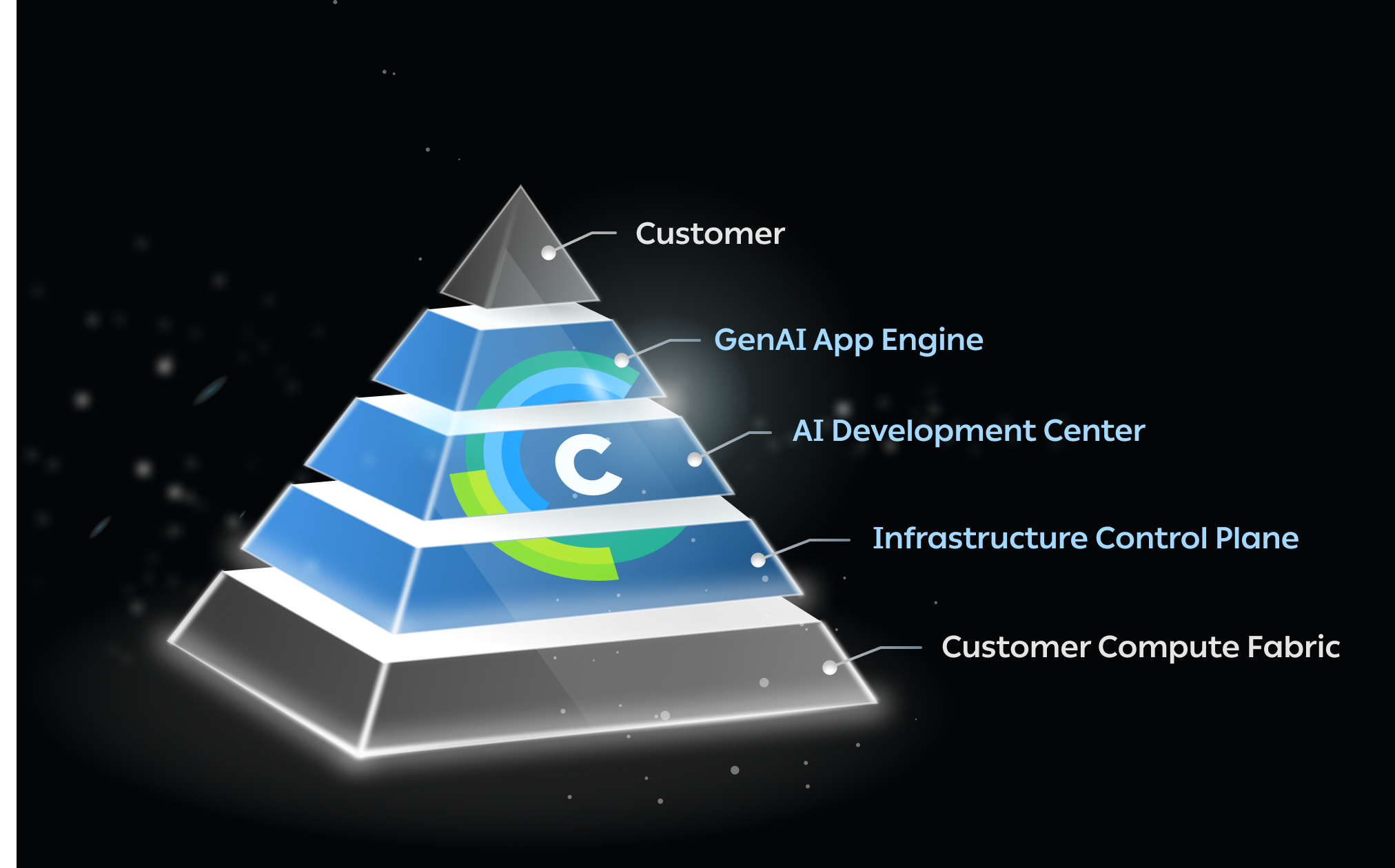
ClearML is an AI infrastructure platform aimed at organizations that need to run machine learning and generative AI workloads across their own hardware, the cloud, or a mix of both. Rather than being a single tool for building models, it is positioned as a three-layer system: an infrastructure control plane for managing GPU clusters, a development environment for training and testing models, and a deployment layer for running GenAI applications. The platform is marketed toward enterprise-scale operations, with the site citing adoption by over 2,100 organizations.

What each layer does

  • Infrastructure Control Plane: Connects and manages GPU clusters whether they are on-premises, cloud-based, or hybrid. It includes multi-tenancy, role-based access control, quota management, and usage-based billing or chargebacks. A notable detail is support for fractional GPUs and priority-based job scheduling, which helps teams share expensive compute without idle capacity.
  • AI Development Center: A workspace for developing, training, and testing models that can be accessed remotely, so data scientists are not tied to a specific machine.
  • GenAI App Engine: Deploys large language models onto existing clusters. ClearML handles networking, authentication, and security, and the site describes launching GenAI workloads with a single click while a scheduler manages placement.

Who it is for

The primary audience is enterprise IT and platform teams who need to give multiple internal groups controlled access to shared GPUs, plus ML engineers who want a consistent workflow from experimentation to production. If your team is small and runs everything on a single cloud account with no need for quotas or tenant isolation, the governance features may be more than you need. If you are coordinating several teams, regions, or a hybrid estate, the control-plane approach addresses a real coordination problem.

A practical next step

Before committing, list the environments you actually need to connect (on-prem, AWS, Azure, GCP, hybrid) and check how ClearML handles each. Then decide whether your priority is cost control through fractional GPUs and chargebacks, or speed of GenAI deployment. The platform has a free tier and a demo request option, so a reasonable approach is to trial it against one real project with a defined budget and a small team, then evaluate whether the scheduling and access controls reduce manual coordination.

For context on the broader category, comparable platforms include Weights & Biases for experiment tracking and Kubeflow for Kubernetes-native ML pipelines.

How does ClearML help manage GPU clusters across on-premises, cloud, and hybrid environments?

ClearML approaches GPU management as an infrastructure control plane rather than a single training tool. Its stated role is to connect and manage GPU clusters across on-premises, cloud, or hybrid setups, then expose that capacity to AI teams through a governed layer. The core idea is that IT keeps control of the physical and cloud resources while data scientists and engineers get self-service access.

What the platform does

  • Connects heterogeneous clusters. On-prem, cloud and hybrid GPU resources are managed through one control plane, so teams are not locked into a single environment.
  • Provides one-click GPU-as-a-service. IT can offer GPU provisioning with minimal configuration, letting end users consume resources without handling cluster setup themselves.
  • Shares capacity across teams. Quota management lets admins divide resources among projects and teams, while fractional GPUs allow dynamic allocation so smaller jobs do not monopolise a whole device.
  • Schedules by priority. Jobs can be queued and scheduled across any cluster setup based on priority, which matters when demand exceeds available GPUs.
  • Isolates tenants. Multi-tenancy provides separate networks and storage per tenant, reducing the risk of data leakage between teams or customers.
  • Tracks usage for chargeback. Billing is usage-based, calculated from computing hours and storage, so internal teams or external customers can be charged back accurately.

Where it fits

This is most relevant to platform and MLOps teams in organisations that already have GPUs in more than one place, or that need to serve multiple internal teams from a shared pool. A research lab with a single on-prem cluster and one team has less to gain; a company running burst training in the cloud alongside an on-prem cluster, with several teams competing for capacity, is closer to the target case.

The trade-off is the usual one for a control plane: you gain visibility, quotas and scheduling, but you adopt another layer between users and their clusters. That layer needs to be configured and maintained, and its value depends on how much resource contention and governance pressure you actually have. The GenAI App Engine sits on top of the same infrastructure, deploying LLMs onto managed clusters with networking, authentication and security handled by the platform.

Next step

If you are evaluating it, list your current GPU sources, how many teams share them, and how you allocate capacity today. If the honest answer involves spreadsheets, manual cluster requests or idle GPUs, request a demo and ask specifically how quota, fractional GPU allocation and priority scheduling would map onto your existing clusters. Pricing details are available at ClearML.

Can ClearML streamline AI model development and training workflows?

Yes. ClearML is built around exactly that job: its platform is described as a three-layer solution that carries an AI workflow from development through production, with an AI Development Center for developing, training and testing models that teams can reach from anywhere, and an Infrastructure Control Plane that manages GPU clusters across on-premises, cloud and hybrid setups.

Where it helps most

  • Compute access: teams get remote GPU access and one-click GPU provisioning rather than waiting on manual cluster setup.
  • Scheduling: priority-based job scheduling runs on any cluster setup, so urgent training jobs can jump ahead of routine ones.
  • Sharing and limits: quotas and dynamic fractional GPUs let admins split resources across projects and teams.
  • Isolation and cost visibility: multi-tenancy keeps networks and storage separate per tenant, and usage-based chargebacks are calculated from compute hours and storage.

A concrete scenario. A platform team with an on-prem GPU cluster and burst cloud capacity could give each research group a tenant with a quota, let individual engineers launch training jobs remotely, and charge each group back by GPU hours consumed. That replaces a queue managed by email and spreadsheets with a governed, self-service setup.

Trade-offs to weigh. A three-layer platform is a commitment: someone has to own cluster integration, tenant and quota policy, and billing configuration. Smaller teams with a single cluster and no chargeback needs may find lighter experiment-tracking tooling sufficient. The GenAI App Engine is aimed at deploying LLMs onto your own clusters with networking, authentication and security handled for you, which matters if you must keep models in-house rather than calling a hosted API.

Next step: check whether your environment is Kubernetes-based and whether you need multi-tenant chargeback. If both are true, the infrastructure layer is where the value concentrates; if neither is, start with the development and training features alone. Pricing details are listed at ClearML.

How does ClearML simplify GenAI deployment and LLM management?

ClearML's GenAI App Engine is designed to take the operational friction out of getting LLMs onto your own compute. Rather than assembling networking, authentication, and security yourself, you deploy a workload onto a cluster you already control and let ClearML's scheduler place it. A single click launches the workload; the platform handles the surrounding plumbing. That is the core of the simplification: the model-serving layer sits on top of the same infrastructure you use for training, so you are not building a separate stack for GenAI.

What the platform takes off your plate

  • Provisioning and placement: The Infrastructure Control Plane connects GPU clusters across on-premises, cloud, or hybrid setups, and priority-based scheduling assigns jobs to clusters. For GenAI, this means you are not hand-managing node allocation for each LLM deployment.
  • Access and identity: ClearML manages networking and authentication for deployed apps, so exposing an internal LLM endpoint to the right users does not require bespoke gateway work.
  • Multi-tenancy and isolation: Isolated networks and storage per tenant reduce the risk of one team's data or prompts leaking into another's environment — relevant when several business units share a GPU pool.
  • Cost governance: Quota management, fractional GPUs, and usage-based chargebacks by compute hour and storage let admins cap sprawl instead of discovering it on the invoice.

Where the trade-off sits

The simplification is real but it is platform-shaped: you get easier deployment because ClearML assumes control of scheduling, identity, and resource policy. Teams that already run a mature Kubernetes and service-mesh stack may find overlap, and the value depends on how much of your compute you are willing to route through one control plane. It is also aimed at enterprise scale — the page cites 2,100+ organizations — so a solo developer with one GPU may find the machinery heavier than the problem.

A concrete scenario

An ML platform team supports three product groups, each wanting its own fine-tuned LLM behind an internal API. Using the control plane, the admin carves the shared GPU cluster into quotas, gives each group an isolated tenant, and lets each team launch its GenAI workload without filing an infrastructure ticket. Networking and auth are inherited from the platform, and monthly usage is charged back per group.

Next step

Before committing, list the deployment steps your team performs today — cluster access, ingress, auth, secrets, scaling — and check which of those ClearML absorbs for your environment. Compare it with your existing orchestration tooling, such as Kubernetes, and review the vendor's own pricing and deployment documentation at ClearML to confirm fit for your cluster topology.

What security and multi-tenancy features does ClearML offer for enterprise AI infrastructure?

ClearML's security and multi-tenancy story is aimed at IT and platform teams that need to give many internal groups access to shared GPU capacity without letting those groups see or affect each other. Based on the product page, the relevant features are:

  • Secure multi-tenancy — isolated networks and storage per tenant, explicitly framed as eliminating the risk of data or information leakage between tenants.
  • Role-based access control (RBAC) — built into the infrastructure control plane so administrators can scope who can do what.
  • Billing and chargebacks — usage-based chargebacks calculated from computing hours and storage consumption, which supports cost accountability per team or project.
  • Quota management — admins allocate and cap resources across multiple AI projects and teams.
  • Dynamic fractional GPUs — lets administrators govern sprawling compute usage by splitting GPU capacity rather than handing out whole devices.
  • Managed access for GenAI deployments — when deploying LLMs, ClearML handles networking, authentication and security, so teams don't wire those up themselves.

How to read this in practice. The multi-tenancy and RBAC features matter most when you have a central GPU cluster serving several business units, regulated data, or external customers. Isolation plus quotas plus chargebacks is the combination that makes a shared cluster politically workable: each team gets a boundary and a bill. If your setup is a single team on a dedicated cluster, RBAC and billing still help with audit trails, but tenant isolation buys you less.

A concrete scenario: an enterprise platform team runs an on-prem Kubernetes cluster plus cloud burst capacity. They create a tenant per department, assign quotas, enable fractional GPUs so small experiments don't monopolize an A100, and turn on chargebacks so each department sees its monthly compute hours. Data science teams then self-serve from the AI Development Center without IT provisioning each environment by hand.

Next step: before committing, ask the vendor two questions — how tenant isolation is enforced (network and storage boundaries versus logical separation only) and whether RBAC and billing integrate with your existing identity provider and cost-allocation system. Those answers determine how much manual administration remains. You can compare tiers and deployment options at ClearML.

How does ClearML's pricing work for different enterprise needs?

ClearML does not publish a single flat rate for enterprise use. Its pricing page is the starting point, and the structure follows the platform's three layers: infrastructure control, AI development, and GenAI deployment. In practice, cost scales with how much of that stack you use and how many people and GPUs you connect.

ClearML

What typically drives the cost

  • Compute connected to the control plane. The platform manages GPU clusters across on-premises, cloud, or hybrid environments, and billing features support usage-based chargebacks by computing hours and storage, so your spend tracks actual consumption rather than a fixed seat count.
  • Users and tenants. Multi-tenancy and role-based access control mean pricing often reflects the number of teams or isolated tenants you provision, not just individual logins.
  • Deployment scope. Using the GenAI App Engine to deploy LLMs onto your clusters adds a layer beyond classic ML training, which can change the commercial conversation.

How to match pricing to your enterprise need

Enterprise need What to ask about
Small ML team, existing cloud GPUs Entry-level or free tier limits and whether cloud compute is billed separately
Multiple departments sharing clusters Per-tenant or per-user pricing, quota management, chargeback setup
Regulated or air-gapped environment Self-hosted or on-premises licensing and support terms
GenAI/LLM deployment at scale Pricing for the app engine layer and managed networking/auth

A practical next step

Before requesting a demo, list your GPU count, number of active users, and whether you need on-prem, cloud, or hybrid. That trio usually determines which pricing tier applies and prevents a vague quote. Review the official pricing page for current tiers, then ask specifically how compute hours and storage are metered.

Related questions

More questions →
How Does ClearML Deploy GenAI Models and LLMs?

ClearML deploys GenAI models and LLMs through its GenAI App Engine, the third layer of its AI Infrastructure Platform. You launch a workload with a single click onto clusters you already control, and ClearML handles networking, authentication, and security for you; a scheduler then places and runs the workload. This applies when your LLMs are meant to run on your own infrastructure — on-premises, cloud, or hybrid — rather than on a vendor-hosted endpoint.

Where GenAI deployment sits in the platform

ClearML describes its platform as a three-layer solution:

Layer Role
Infrastructure Control Plane Connects and manages GPU clusters (on-prem, cloud, hybrid); multi-tenancy, RBAC, billing, quota management, priority-based scheduling, fractional GPUs
AI Development Center Environment for developing, training, and testing models, accessible from anywhere
GenAI App Engine Deploys LLMs onto your clusters with ClearML handling networking, authentication, and security

The GenAI App Engine depends on the layers beneath it: the clusters it deploys to are the ones registered and governed by the Infrastructure Control Plane.

The deployment flow

  1. Connect your compute. GPU clusters — on-premises, cloud, or both — are attached through the Infrastructure Control Plane, which manages and optimizes GPU resources across those environments.
  2. Launch the workload. From the GenAI App Engine, you start any GenAI workload with a single click. ClearML's stated design goal is "effortless" deployment of LLMs onto your clusters.
  3. Let ClearML handle the plumbing. Networking, authentication, and security are managed by the platform rather than configured per deployment.
  4. Let the scheduler place the work. After launch, the scheduler handles the rest — workload placement across the cluster setup, using priority-based job scheduling.

The result is that the operational burden shifts from per-model deployment engineering to a launch-and-schedule model.

What "customizable workflows and managed access" means in practice

ClearML pairs GenAI deployment with customizable workflows and managed access. In platform terms, that connects to the governance features of the control plane:

  • Multi-tenancy with isolated networks and storage per tenant, which the platform presents as eliminating the risk of data or information leakage between tenants.
  • Role-based access control for who can reach which resources.
  • Quota management so admins can share resources across multiple AI projects and teams.
  • Granular billing with usage-based chargebacks based on computing hours and storage.

For a GenAI deployment, this matters because LLM serving tends to be resource-hungry and shared: quotas and priority scheduling decide which team's inference workload gets GPUs first, and tenant isolation decides whether two business units can safely share the same cluster.

A concrete scenario

Suppose an enterprise has an on-premises GPU cluster plus burst cloud capacity. Using ClearML: IT registers both environments in the Infrastructure Control Plane and sets quotas per team. A data science team then deploys an LLM from the GenAI App Engine with one click; ClearML provisions networking, authentication, and security, and the scheduler places the job according to priority. Compute hours consumed are attributed back to the team through usage-based billing. No separate deployment pipeline has to be built for the model.

What to verify before committing

The platform page supports the deployment mechanics above, but a few things are worth confirming directly, since the source material does not specify them:

  • Which model formats and serving runtimes the GenAI App Engine accepts.
  • Kubernetes specifics — the page mentions simplifying Kubernetes and cloud deployment but does not detail the integration.
  • Pricing and plan limits. A pricing page exists at clear.ml/pricing; the source does not state costs, free-tier boundaries, or whether a trial requires a demo request. The page offers both "Start Free" and "Request Demo," so check which applies to your use case.
  • Scale claims. The page cites 2,100+ organizations using ClearML; treat that as a vendor-reported figure.

If your requirement is deploying LLMs onto infrastructure you already own or rent, and you want scheduling, tenancy, and access control handled by the platform, ClearML's GenAI App Engine is built for exactly that. If you need a fully managed model API with no cluster of your own, this is a different category of tool.

How Does ClearML Manage GPU Clusters and Compute Resources?

ClearML manages GPU clusters through its Infrastructure Control Plane, a layer that connects and optimizes GPU resources across on-premises, cloud, and hybrid environments. It gives IT teams a way to offer one-click GPU-as-a-Service (GPUaaS) with multi-tenancy, quota management, and priority-based scheduling, while giving AI teams remote access to those resources. This applies if you run AI/ML workloads at enterprise scale and need to share or govern compute across multiple projects and teams.

What the Infrastructure Control Plane Does

The Infrastructure Control Plane is the layer responsible for connecting to and managing GPU clusters regardless of where they live — on-prem, cloud, or both. Its stated goals are high performance and cost optimization. For IT and platform teams, it provides:

  • One-click GPUaaS with multi-tenant access, so end users can provision GPUs with minimal configuration.
  • Quota management to share resources across multiple AI projects and teams.
  • Dynamic fractional GPUs to govern and cap sprawling compute usage.
  • Priority-based job scheduling across any cluster setup.

How Resource Sharing and Isolation Work

ClearML's multi-tenancy is designed to keep each tenant's networks and storage isolated, which the platform describes as eliminating the risk of data or information leakage. Combined with role-based access control, this means an admin can open GPU capacity to many teams without those teams seeing each other's data or infrastructure.

Billing is usage-based: granular chargebacks are calculated on computing hours and storage consumption, so costs can be attributed back to the teams or projects that incurred them.

How Scheduling and Utilization Are Optimized

Rather than assigning whole GPUs permanently, ClearML uses priority-based scheduling and fractional GPU allocation. In practice this means:

  • Jobs are queued and dispatched according to priority on whatever cluster is available.
  • A single physical GPU can be split so smaller workloads don't hold an entire device idle.
  • Admins can set quotas that cap how much compute any one team consumes.

The intended result is higher compute utilization and fewer idle GPUs, which is where much of the cost optimization comes from.

Where This Fits in the Broader Platform

The Infrastructure Control Plane is one of three layers in the ClearML AI Infrastructure Platform:

Layer Role
Infrastructure Control Plane Connect and manage GPU clusters; multi-tenancy, RBAC, billing, scheduling
AI Development Center Develop, train, and test models, accessible from anywhere
GenAI App Engine Deploy LLMs onto your clusters; ClearML handles networking, authentication, and security

The GenAI App Engine builds on the same infrastructure: you launch a GenAI workload with a single click and the scheduler places it on available cluster capacity.

What to Check Before Adopting

  • Environment fit — the platform explicitly targets on-prem, cloud, and hybrid, so confirm your specific cluster stack is supported.
  • Governance needs — if you need per-team chargebacks or strict tenant isolation, those are built-in features rather than add-ons.
  • Scale — ClearML states that 2,100+ organizations use the platform, which is a signal of enterprise adoption but not a guarantee of fit for your workload profile.
  • Pricing and access terms — the site links to a pricing page and offers "Start Free" and "Request Demo" options; check those pages directly for current terms, since the specifics aren't stated on the main page.

For teams whose main pain point is idle or ungoverned GPUs spread across environments, the Control Plane's combination of fractional allocation, quotas, and priority scheduling is the core mechanism to evaluate.

What Is ClearML? An AI Infrastructure Platform Explained

ClearML is an AI infrastructure platform that connects and manages GPU clusters across on-premises, cloud, and hybrid environments, then layers AI development and GenAI deployment tooling on top. It's built for enterprise-scale AI teams — the site cites 2,100+ organizations using it — and is most relevant if your problem is fragmented compute, inconsistent dev-to-production workflows, or deploying LLMs without rebuilding networking and auth yourself. If you only need a single training script runner or a notebook environment, the platform is likely broader than your need.

The three-layer architecture

ClearML describes itself as a three-layer solution spanning development to production:

Layer What it does Who it's for
Infrastructure Control Plane Connects and manages GPU clusters (on-prem, cloud, hybrid); multi-tenancy, RBAC, billing, quota management, fractional GPUs, priority-based job scheduling IT and platform teams provisioning compute
AI Development Center Environment for developing, training, and testing AI models, accessible from anywhere ML engineers and data scientists
GenAI App Engine Deploys LLMs onto your clusters; ClearML handles networking, authentication, and security Teams shipping GenAI applications

The layering matters because it separates who owns compute from who consumes it. An IT admin can expose one-click GPU-as-a-service with quotas, while an ML engineer works in the development layer without negotiating cluster access directly.

What the Infrastructure Control Plane actually solves

The control plane is the part most enterprises evaluate first. According to the site, it:

  • Manages and optimizes GPU resources across on-premise, cloud, and hybrid setups
  • Provides multi-tenant, one-click GPU-as-a-service with minimal configuration
  • Shares resources across projects and teams using quota management
  • Governs compute usage with dynamic fractional GPUs
  • Schedules jobs by priority on any cluster setup
  • Isolates networks and storage per tenant to reduce data leakage risk
  • Supports usage-based chargebacks by computing hours and storage

The practical takeaway: if your GPUs sit idle in one team's cluster while another team waits, quota management plus fractional GPUs plus priority scheduling is the specific mechanism aimed at that. Multi-tenancy with isolated storage is the feature to check if you serve internal teams or external customers who can't share infrastructure.

Remote GPU access and deployment

ClearML positions remote GPU access and AI deployment as a simplification layer over Kubernetes and cloud deployment. The stated goal is "hassle-free resource consumption" — you consume GPU resources without managing the underlying orchestration yourself. For GenAI specifically, the claim is that you can launch a workload with a single click and let the scheduler place it.

That's the value proposition to test against your own stack: if you already have a mature internal platform team and Kubernetes tooling, the question is whether ClearML replaces work you'd otherwise do or adds a layer on top of it.

Who should consider it

Likely a fit if you:

  • Run GPU clusters across more than one environment (on-prem + cloud, or hybrid)
  • Need to give multiple teams or tenants isolated, quota-controlled access to shared GPUs
  • Want chargeback or showback based on compute hours and storage
  • Are deploying LLMs and don't want to build networking, auth, and security around them
  • Operate at a scale where idle GPU time is a real cost line

Probably not a fit if you:

  • Run a single small cluster for one team
  • Only need experiment tracking or a model registry
  • Have no multi-tenant or chargeback requirement

Next step

The site offers two entry points: Start Free and Request Demo. Pricing details are published at clear.ml/pricing — check that page directly for current tiers and terms, since plan structure and any usage limits aren't specified in the material summarized here. If you're evaluating for an enterprise rollout, the demo path is the one that maps to the multi-tenancy, quota, and billing features that distinguish the platform.

How to Get Started with ClearML

ClearML offers two entry points depending on who you are and what you need to evaluate: a Start Free option for self-serve onboarding, and a Request Demo option for enterprise evaluation. If you want to try the platform yourself, start with the free option. If you are evaluating ClearML for an organization that needs to connect GPU clusters, manage multi-tenant access, or deploy GenAI models at scale, request a demo so you can see the infrastructure and governance features in context.

What ClearML actually is

ClearML describes itself as an AI Infrastructure Platform built as a three-layer solution that covers the workflow from development to production:

Layer What it does
Infrastructure Control Plane Connects and manages GPU clusters across on-premises, cloud, or hybrid environments
AI Development Center Environment for developing, training, and testing AI models, accessible from anywhere
GenAI App Engine Deploys LLMs onto your clusters, with ClearML handling networking, authentication, and security

The platform is aimed at three broad groups: IT teams managing compute, AI builders developing and training models, and organizations deploying GenAI workloads. ClearML states that 2,100+ organizations worldwide use it.

Choosing your starting point

Start Free — for hands-on evaluation

Choose this if you want to explore the platform directly without a sales conversation. It is the natural fit for individual AI builders or small teams who want to see how the development and deployment workflow feels before committing.

Request Demo — for enterprise evaluation

Choose this if your decision involves infrastructure you don't personally control. The features that matter most in an enterprise evaluation — multi-tenancy, role-based access control, quota management, billing, and GPU provisioning — are admin- and IT-facing, so a guided demo is the practical way to assess them.

What to evaluate, by role

If you are an AI builder: focus on the AI Development Center. The relevant question is whether you can develop, train, and test models from wherever you work, and whether the GenAI App Engine's one-click workload launch and scheduler match how you deploy models today.

If you are on an IT or platform team: focus on the Infrastructure Control Plane. ClearML positions it around connecting and managing GPU clusters across on-prem, cloud, and hybrid setups, with these specific capabilities worth verifying against your environment:

  • Multi-tenant, one-click GPU-as-a-Service with minimal configuration
  • Quota management for sharing resources across projects and teams
  • Dynamic fractional GPUs to govern compute usage
  • Priority-based job scheduling on any cluster setup
  • Isolated networks and storage per tenant
  • Usage-based chargebacks based on computing hours and storage

If you are deploying GenAI: focus on the GenAI App Engine and confirm how networking, authentication, and security are handled for your cluster setup, since ClearML states it manages these on your behalf.

Practical next steps

  1. Decide whether you are evaluating as an individual builder (Start Free) or on behalf of an organization with shared infrastructure (Request Demo).
  2. For a demo, come with your actual environment in mind: which clusters are on-prem versus cloud, how many teams need access, and what your current compute-utilization or cost-allocation pain points are.
  3. For the free option, work through a real task — training a model or deploying a workload — rather than a toy example, so you can judge the workflow end to end.

A note on pricing

ClearML's site links to a pricing page, but the available page content does not specify plan tiers, costs, or what the free option includes. Treat "Start Free" as an onboarding path, not as confirmation that the platform is free for your use case — check the pricing page or ask during a demo before assuming cost or access terms.

What Pricing and Plans Does ClearML Offer?

ClearML does not publish plan names or prices on its homepage. The site points to a dedicated pricing page at clear.ml/pricing, and the homepage offers two entry paths: a self-serve "Start Free" option and a "Request Demo" path for enterprise buyers. If you need a concrete number before committing, the pricing page and a demo conversation are the two places to get it — the homepage alone won't answer the question.

What the homepage tells you about cost structure

The homepage describes ClearML as a three-layer AI infrastructure platform and emphasizes enterprise-scale operation. That framing matters for pricing because the product is built around infrastructure that enterprises typically meter and charge back internally:

  • Infrastructure Control Plane — connects and manages GPU clusters across on-premises, cloud, or hybrid environments, with multi-tenancy, role-based access control, and billing built in.
  • AI Development Center — an environment for developing, training, and testing models, accessible from anywhere.
  • GenAI App Engine — deploys LLMs onto your clusters, with ClearML handling networking, authentication, and security.

The billing feature described on the page is usage-based chargebacks based on computing hours and storage. That is a cost-allocation mechanism inside the platform, not a statement of what ClearML itself charges you. Keep those two things separate when you evaluate quotes.

The two ways in: Start Free vs. Request Demo

Path What it signals What to do next
Start Free A self-serve entry point exists Use it to test the workflow before any purchase conversation
Request Demo Enterprise sales motion Bring your GPU footprint, team count, and deployment model (on-prem, cloud, hybrid) to the call

The homepage does not state what "Start Free" includes, how long it lasts, or whether a credit card is required. Treat those as open questions to confirm on the pricing page rather than assumptions.

What actually drives your price

Because ClearML manages GPU clusters and multi-tenant environments, the variables that shape a quote are the same ones the platform is designed to govern:

  • Where your compute lives — on-premises, cloud, or hybrid changes the deployment and support surface.
  • How many tenants and teams you isolate, since multi-tenancy provides isolated networks and storage per tenant.
  • Quota management and fractional GPUs — the page describes dynamic fractional GPUs and quota management as ways to maximize utilization, which implies pricing scales with the resources you allocate and govern.
  • Scheduling scope — priority-based job scheduling runs on any cluster setup, so the number and type of clusters in play matters.

A practical way to evaluate it

  1. Open clear.ml/pricing and note which tiers are listed publicly versus "contact us."
  2. Start Free and run one real training job end to end — this tells you whether the development workflow fits before you discuss enterprise terms.
  3. Before a demo, write down your current monthly GPU hours, storage volume, and how many teams need isolated environments. Those are the numbers a usage-based model will be built around.
  4. Ask specifically how ClearML's own licensing relates to the usage-based chargeback feature — one is your internal cost allocation, the other is your vendor cost.

Common sticking points

  • Assuming the homepage price is the price. It isn't listed there; the pricing page is the source.
  • Confusing chargebacks with licensing. Usage-based chargebacks for compute hours and storage are a feature for billing your own teams, not necessarily ClearML's billing model to you.
  • Skipping the free path. If a self-serve option exists, using it first gives you concrete questions for the demo instead of a generic feature tour.

For the underlying platform mechanics, see What Is ClearML? An AI Infrastructure Platform Explained and How Does ClearML Manage GPU Clusters and Compute Resources?.

Website Overview

Several search or sharing settings need attention. Together they may make snippets, preview images or preferred URLs less consistent across platforms.

Domain and Registration

The domain uses .ml. Assess the website's identity and content rather than relying on the extension alone. Transfer-protection status is present, helping reduce the risk of unauthorized domain transfers. The domain has about 3 years of registration history; its current configuration provides more context than age alone.

DNS and Email

Nameservers are provided by Amazon Route 53, indicating managed DNS hosting. MX records point to the Google Workspace email service. No CNAME was found; the observed records resolve directly to addresses. SPF and DMARC are configured. DKIM status is unknown. TXT records include verification markers for Google, Atlassian, Meta, Microsoft. Such markers may also remain after a service stops being used.

TLS and Certificates

The public key uses EC with 256 bits. The server supplied a complete certificate chain. No organization name is present in the certificate; the available fields are consistent with domain validation. The certificate was issued by Let's Encrypt, commonly associated with automated certificate services. The certificate's total validity is about 89 days, consistent with a short renewal cycle.

HTTP and Browser Security

CORS permits any origin to read this response. This is common for public resources; sensitive responses need narrower handling. No X-Powered-By header was found, reducing one common source of backend fingerprinting information. All six checked browser-security headers are present. Their effectiveness still depends on the policy values and application behavior. The cf-ray response header indicates a CDN or caching proxy in the delivery path. No obvious internal addresses or debug information were found in the headers.

Technology Stack Analysis

The public page identifies Elementor 4.3.2; features: e_font_icon_svg, additional_custom_breakpoints; settings: css_print_method-external, google_font-enabled, font_display-auto, WordPress, HubSpot CMS, jQuery, Google Tag Manager, Cloudflare without precise versions, leaving fewer clues for version-specific scanning.

Search and Social Sharing

The title has 76 characters and may be truncated in search results. The meta description has 175 characters and may be shortened in search results. The Generator tag identifies Elementor 4.3.2; features: e_font_icon_svg, additional_custom_breakpoints; settings: css_print_method-external, google_font-enabled, font_display-auto, making the publishing system easier to fingerprint. Twitter Card metadata is configured. JSON-LD includes Organization data, helping describe the organization as an entity.

Hosting and Email

DNSAmazon Route 53
HostingCloudflare
EmailGoogle Workspace
Approximate IP geolocation (inferred; a CDN or proxy may differ from the origin server) United States flagUnited States Inferred 162.159.136.54

Registration details

RDAP / WHOIS

Registrar101domain GRS Limited
Registered2023-07-17
Expires2027-11-18
Domain statusclient transfer prohibited、DS automation disabled、NS automation disabled
Nameserversns-1129.awsdns-13.org、ns-1936.awsdns-50.co.uk、ns-510.awsdns-63.com、ns-850.awsdns-42.net
DNSSECunsigned

DNS records

DNS

TypeNameValueTTLPriority
Aclear.ml162.159.136.54300—
Aclear.ml162.159.137.54300—
MXclear.mlaspmx.l.google.com773571
MXclear.mlalt1.aspmx.l.google.com773575
MXclear.mlalt2.aspmx.l.google.com773575
MXclear.mlalt3.aspmx.l.google.com7735710
MXclear.mlalt4.aspmx.l.google.com7735710
NSclear.mlns-1129.awsdns-13.org172800—
NSclear.mlns-1936.awsdns-50.co.uk172800—
NSclear.mlns-510.awsdns-63.com172800—
NSclear.mlns-850.awsdns-42.net172800—
TXTclear.mlMS=ms44033708300—
TXTclear.mlatlassian-domain-verification=HNroYAa3jPssTMw2ycKiR59CDp09yhVzbRnJx4fM3LPgttLRJmzbF8o4U79U0jXG300—
TXTclear.mlca3-b26c453d17a440ad9cd08fb7c6839d31300—
TXTclear.mlfacebook-domain-verification=lz9h3e6b1kam8n8yp90tylzrd2245c300—
TXTclear.mlgoogle-site-verification=MAWBJyo9LoAzUSwvPxM6-u0QLVcpCFVDBZKEC3mudVo300—
TXTclear.mlgoogle-site-verification=iA90CwtuvUkTEWepqJQcLxxRWgbbAQzAaklpwlc_Upg300—
TXTclear.mlgoogle-site-verification=z9abufczjXTsxZIJ0Yws9k3GL3iNs6Mi-QS8po6jZ3Q300—
TXTclear.mlv=spf1 mx include:_spf.google.com include:amazonses.com include:6165398.spf07.hubspotemail.net include:_spf.elasticemail.com ~all300—
DMARC_dmarc.clear.mlv=DMARC1; p=quarantine; rua=mailto:[email protected];3600—

TLS and certificates

TLS / SSL

AssessmentNormal configuration
Supported protocolsTLSv1.2、TLSv1.3
Negotiated protocolTLSv1.3
Certificate subjectclear.ml
IssuerLet's Encrypt
Valid until2026-12-08T06:42 · Remaining when checked: 69 days
Verification detailsCertificate trust: Passed · Hostname match: Passed

HTTP response headers

HTTP

HeaderValue
content-typetext/html; charset=UTF-8
cache-controlmax-age=0
servercloudflare
strict-transport-securitymax-age=31536000; includeSubDomains
content-security-policydefault-src 'self'; script-src 'self' 'unsafe-inline' 'unsafe-eval' https://www.googletagmanager.com https://www.googleadservices.com https://consent.cookiebot.com https://consentcdn.cookiebot.com https://js.hs-scripts.com https://js.hsforms.net https://ajax.googleapis.com https://googleads.g.doubleclick.net https://script.hotjar.com https://js-na1.hs-scripts.com https://static.hotjar.com https://js.hs-analytics.net https://js.hsadspixel.net https://connect.facebook.net https://js.hs-banner.com https://static.ads-twitter.com https://cdn.heapanalytics.com https://www.redditstatic.com https://snap.licdn.com https://app.factors.ai https://assets.apollo.io https://clearout.io https://opps-widget.getwarmly.com https://data.getwarmly.com https://ddwl4m2hdecbv.cloudfront.net https://a.usbrowserspeed.com https://d-code.liadm.com https://app.salespeak.ai; style-src 'self' 'unsafe-inline' https://fonts.googleapis.com; img-src 'self' data: https:; font-src 'self' data: https://fonts.gstatic.com; connect-src 'self' https://www.google.com https://docs.clear.ml static.hsappstatic.net https://*.hotjar.com https://*.algolia.net https://*.algolianet.com wss://*.hotjar.com https://px.ads.linkedin.com https://*.hotjar.io https://forms.hsforms.com https://stats.g.doubleclick.net https://api.ipify.org https://analytics.google.com https://t.co https://clearout.io https://api.clearout.io https://analytics.twitter.com https://www.facebook.com https://hubspot-forms-static-embed.s3.amazonaws.com https://connect.facebook.net https://api.hubapi.com https://analytics.google.com https://www.google-analytics.com https://www.googleadservices.com https://pagead2.googlesyndication.com https://consentcdn.cookiebot.com https://px.ads.linkedin.com https://api.factors.ai https://pixel-config.reddit.com https://aplo-evnt.com https://opps-widget.getwarmly.com https://data.getwarmly.com https://*.getwarmly.com wss://*.getwarmly.com https://pro.ip-api.com https://alocdn.com https://9xgnrndqve.execute-api.us-west-2.amazonaws.com https://a.usbrowserspeed.com https://hpklbne62y3wpitjb6lc6zyxza0wobdv.lambda-url.us-west-2.on.aws wss://q3rcfjn8g4.execute-api.us-west-2.amazonaws.com https://22i9zfydr3.execute-api.us-west-2.amazonaws.com; frame-ancestors 'self' https://docs.clear.ml https://clear.ml; object-src 'none'; frame-src 'self' https://www.youtube.com https://www.youtube-nocookie.com https://app.salespeak.ai https://docs.clear.ml https://forms.hsforms.com https://consentcdn.cookiebot.com; worker-src 'self' blob:;
x-frame-optionsSAMEORIGIN
x-content-type-optionsnosniff
referrer-policyno-referrer-when-downgrade
permissions-policygeolocation=(), microphone=(), camera=()
access-control-allow-origin*

Identified technologies

Elementor 4.3.2; features: e_font_icon_svg, additional_custom_breakpoints; settings: css_print_method-external, google_font-enabled, font_display-autoWordPressHubSpot CMSjQueryGoogle Tag ManagerCloudflare

Pages, Search and Sharing

Meta descriptionUnlock enterprise-scale AI with ClearML’s AI Infrastructure Platform. Manage GPU clusters, streamline AI/ML workflows, and deploy GenAI models effortlessly. Try ClearML today!
Canonical URLhttps://clear.ml/
LanguageEnglish (default)
Twitter Cardsummary_large_image
All bots 2 allowed · 1 disallowed
  • Allow/
  • Allow/wp-admin/admin-ajax.php
  • Disallow/wp-admin/

Recent Updates

  • Website images
  • Screenshots
  • Network details
  • Website Technologies
  • Pages and Search Information
  • TLS and certificates
  • DNS Information
  • Domain Registration

User reviews (0)

  • No reviews yet.