
 简体中文
简体中文 English
codepip.com
Learn to code by playing games
At a glance
- Category
- Education & Learning
- Language
- English
- Paid-content signal
- Paid contentObserved
- Registered
- 2017
- Hosting
- CloudflareInferred
- HTTPS certificate trusted
- PassedObserved
- Last updated
Related questions
More questions →What Features Do You Get With a Free Codepip Account?
A free Codepip account gives you three things: checkpoints that save your progress and let you resume it from any device, achievements you can track and share, and access to new releases covering the latest coding topics. You create the account from the Sign up link in the site header, and the site describes it as free — no payment is required to register. Paid Pro plans exist separately for certain games, but they are not needed to get the free account features.
The Three Free Account Features
Checkpoints: save and resume progress
Checkpoints store your in-game progress so you can pick up where you left off, on any device. In practice, this means you can start a game on a laptop and continue it later on another machine after logging in, rather than restarting from the beginning.
Achievements: track and share
Achievements record what you have accomplished in the games and let you share those accomplishments. This is useful if you want a visible record of what you have completed across the different titles.
New Releases: discover new topics
The New Releases feature helps you find games that teach newer coding topics. Because Codepip adds games over time (for example, Anchoreum for CSS anchor positioning is marked "Free New"), this is how you keep up with what has been added.
What the Free Account Does Not Include
The free account is separate from Pro access. Several games on the platform are labeled Pro, such as Cascade, Code Crunchers, Console Caper, CSS Scoops, and Querymon. The site lists Pro plans (monthly, annual, lifetime, and group plans) on a separate Plans page, but the provided site information does not state which specific games each plan unlocks or what each plan costs. Treat game access as something to confirm on the Plans page rather than assuming a free account covers Pro titles.
Free Games You Can Play
Some games are explicitly marked Free and are a natural starting point with a free account:
| Game | Topic | Status |
|---|---|---|
| Flexbox Froggy | CSS flexbox | Free |
| Grid Garden | CSS grid | Free |
| Anchoreum | CSS anchor positioning | Free, New |
| Tailwind Trainer | Tailwind utility classes | Free, Beta |
Other titles, including Flexbox Froggy Pro, are Pro versions that extend a free game with additional practice levels.
How to Create the Account
- Go to codepip.com.
- Select Sign up in the top navigation (next to Log in).
- Complete registration to create the free account.
- Log in before or during play so checkpoints and achievements are tied to your account.
Expected result: after signing up and logging in, your progress is saved and you can resume it from another device, and your achievements are recorded.
Common Pitfalls
- Playing without logging in. Checkpoints and achievements depend on the account, so progress made while signed out may not be saved to your profile.
- Assuming free means all games. The free account unlocks account features; individual Pro games are a separate matter.
- Expecting pricing details here. The site links to Pro plans, but current prices and what each tier includes are not specified in the available information — check the Plans page directly.
Is It Worth Registering?
If you are working through the free games (Flexbox Froggy, Grid Garden, Anchoreum, Tailwind Trainer), registering costs nothing and adds progress saving across devices plus an achievement record — clear value if you play over multiple sessions. If your goal is a specific Pro game, decide based on the Plans page, since the free account alone does not establish access to Pro titles.
What Codepip Pro Plans Are Available and How Do You Choose One?
Codepip offers three individual Pro plan options — monthly, annual, and lifetime — plus separate group plans, with payment handled through Stripe. The right choice depends on how long you expect to keep practicing and whether anyone else will use the account. The site lists plan pages and sign-up links but does not publish prices in the available material, so check each plan page for current cost before committing.
The plan options
| Plan | Sign-up entry | Best suited for |
|---|---|---|
| Monthly | codepip.com/pro/monthly/ | Short-term or trial use, or a single focused push before an interview |
| Annual | codepip.com/pro/annual/ | Regular practice across a year at a lower commitment than lifetime |
| Lifetime | codepip.com/pro/lifetime/ | Long-term, open-ended learning with no renewal to track |
| Group | codepip.com/pro/#groups | Teams, classrooms, or multiple learners under one arrangement |
All four are reached from the Plans page at codepip.com/pro/. The individual plans each have their own sign-up link; group plans are described on the same page under a dedicated section.
What Pro unlocks
Pro is tied to specific games rather than the whole catalog. Free games include Flexbox Froggy, Grid Garden, Anchoreum (marked Free and New), and Tailwind Trainer (Free, Beta). Pro games cover CSS (Cascade, CSS Scoops, CSS Surgeon, Nth Cart, Selector Showdown), JavaScript (Code Crunchers, Disarray, Intl Delivery, Regex Machina, Stringo, Console Caper), and HTML/SQL (Nester, Pathfinder, Sourcery, Querymon).
A free account already provides checkpoints (saved progress accessible anywhere), achievements, and new-release discovery. Pro adds access to the Pro-labeled games and, in the case of Flexbox Froggy Pro, infinite practice levels for mastering flexbox.
How to choose
Work through these questions in order:
- Which games do you actually need? If your goals are covered by Flexbox Froggy, Grid Garden, Anchoreum, or Tailwind Trainer, a free account may be enough. If you want CSS selectors, transforms, JavaScript arrays/strings/regex, SQL, or Emmet practice, those sit behind Pro.
- How long will you practice? A single interview prep sprint favors monthly. Ongoing skill maintenance favors annual. If you expect to return to the games over years, lifetime avoids repeated decisions.
- Is it just you? Multiple learners should look at the group section rather than buying individual plans.
- Confirm the price. Open the relevant plan page — pricing is not stated in the material available here, so verify the current figure and billing terms at sign-up.
Practical notes
- Payment runs through Stripe, so a standard card checkout applies.
- Progress features (checkpoints, achievements) are tied to a free account; create one before or during sign-up so game progress is saved.
- The games are browser-based and short-form by design — Cascade is described as "rapid-fire CSS microgames," and user feedback on the site praises the pacing and repetition. That format suits frequent short sessions more than long study blocks, which is a point in favor of monthly or annual plans you can dip into.
Verification and common snags
After signing up, confirm Pro access by opening a Pro-labeled game (for example, CSS Scoops or Disarray) while logged in — it should be playable rather than showing an upgrade prompt. Common issues: signing up without being logged into the free account you want progress attached to, and assuming a plan covers all games when free and Pro titles are mixed across the catalog. If you are buying for a group, use the group section rather than stacking individual subscriptions.
Codepip Free vs. Pro Games: What You Get at Each Level
Codepip labels each game Free or Pro on its game list, and that label is the main difference in access: free games can be played without a paid plan, while Pro games are tied to Codepip's paid plans. A free account is separate from game access — it lets you save progress and earn achievements, but it does not turn Pro games into free ones. Codepip's site lists paid plans (monthly, annual, lifetime, and group) through its Plans pages, but does not publish prices on the pages reviewed here, so check the Plans page for current cost.
The free games
These are marked Free on Codepip's game list:
| Game | Topic |
|---|---|
| Flexbox Froggy | CSS flexbox |
| Grid Garden | CSS grid |
| Anchoreum | CSS anchor positioning (listed as New) |
| Tailwind Trainer | Tailwind utility classes (listed as Free Beta) |
Flexbox Froggy and Grid Garden are the best-known entry points — user testimonials on the site specifically call out both as helpful for learning CSS layout. Anchoreum and Tailwind Trainer are newer additions, and Tailwind Trainer is still in beta, so expect it to be less polished than the established games.
The Pro games
Most of the catalog is marked Pro, covering a much wider range of topics:
- CSS: Cascade (rapid-fire CSS microgames), CSS Scoops (selectors), Nth Cart (
:nth-child()), Selector Showdown (specificity), CSS Surgeon (transform), Flexbox Froggy Pro (flexbox with infinite practice levels) - JavaScript: Code Crunchers (math), Disarray (array methods), Stringo (string methods), Regex Machina (regular expressions), Console Caper (browser dev console), Intl Delivery (internationalization API)
- HTML: Nester (nesting), Pathfinder (file paths), Sourcery (Emmet)
- SQL: Querymon (database queries)
Two patterns are worth noting. First, several Pro games are advanced versions of free ones — Flexbox Froggy Pro adds infinite practice levels on top of the free Flexbox Froggy. Second, the Pro catalog goes well beyond CSS layout into JavaScript, HTML tooling, and SQL, which the free tier barely touches.
What a free account adds
Codepip's homepage lists three features available with a free account:
- Checkpoints — save progress and resume from any device
- Achievements — track and share in-game achievements
- New Releases — discover games on new coding topics
So the free account is about persistence and tracking, not unlocking content. If you only play free games, an account still helps you keep your place across sessions.
How to decide
Stay on free games if you're learning CSS layout basics. Flexbox Froggy and Grid Garden cover flexbox and grid thoroughly, and Anchoreum adds anchor positioning. This is enough for a beginner working through layout fundamentals.
Consider a Pro plan if you want JavaScript practice (arrays, strings, regex, math), SQL, HTML tooling like Emmet, or deeper CSS drilling such as selector specificity and infinite flexbox practice. The Pro catalog is where most of the topic coverage lives.
Check before paying if cost matters to you: the site links to monthly, annual, lifetime, and group plans but the reviewed pages don't show prices. Visit the Plans page directly, and note that group plans exist if you're buying for a class or team.
One practical middle path: start with the free games and a free account, and upgrade only when you've finished them and want the JavaScript or SQL material. Since progress is saved to your account, nothing is lost by starting free.
What Is Codepip and How Does It Help You Learn to Code?
Codepip is a browser-based platform that teaches web development through short, focused games. It suits learners who already know a concept in theory and want repetition-based practice, or beginners who prefer hands-on play over video courses. You can start with free games and create a free account to save progress and achievements; paid Pro versions of many games and subscription plans also exist.
What Codepip actually is
Codepip describes itself as "the platform for your favorite web development games." Each game targets one narrow skill — CSS selectors, flexbox, JavaScript arrays, SQL queries — and turns the practice into a level-based challenge. You play in the browser, get immediate feedback on each attempt, and move to the next level when you succeed.
The catalog covers:
- CSS: Flexbox Froggy, Grid Garden, CSS Scoops (selectors), CSS Surgeon (transform), Cascade, Selector Showdown (specificity), Nth Cart (
:nth-child()), Anchoreum (CSS anchor positioning), Tailwind Trainer - HTML: Nester (nesting), Pathfinder (file paths), Sourcery (Emmet)
- JavaScript: Disarray (array methods), Stringo (string methods), Code Crunchers (math), Regex Machina (regular expressions), Console Caper (dev console), Intl Delivery (internationalization API)
- SQL: Querymon
Several games are marked Free (Flexbox Froggy, Grid Garden, Anchoreum, and Tailwind Trainer in beta); many others are marked Pro.
How the game format helps learning
The mechanism is deliberate repetition with instant correction. Instead of reading about justify-content values, you move a frog across a grid by writing the property and value, and the level only clears when your CSS produces the right layout. That tight loop — attempt, see the result, adjust — is what makes the format work for retention.
For example, if you need to remember the difference between align-items and align-content, Grid Garden and Flexbox Froggy force you to apply each one to real layouts until the distinction sticks. The same applies to :nth-child() patterns in Nth Cart or array methods like map and filter in Disarray.
The games are also scoped small on purpose. A session can be five minutes or an hour, and each level is a single concept, so you can target a weak spot rather than sit through a full course.
What a free account adds
The site lists three account features:
| Feature | What it does |
|---|---|
| Checkpoints | Saves your progress and lets you resume from any device |
| Achievements | Tracks and lets you share in-game achievements |
| New Releases | Surfaces games covering newer coding topics |
You can play without an account, but progress won't persist across sessions or devices.
Free vs. Pro: what to consider
The site distinguishes free games from Pro games and links to monthly, annual, lifetime, and group plans (billing through Stripe). The available material confirms that plans exist and that group plans are offered, but does not state prices or what each tier includes beyond the Free/Pro game labels. Before subscribing, check the Plans page for current pricing and confirm which games your tier unlocks — especially if you're targeting a specific topic like SQL or regex, since those titles are marked Pro.
A reasonable approach: start with the free games (Flexbox Froggy, Grid Garden, Anchoreum, Tailwind Trainer) to test whether the format fits how you learn. If it does and you want the Pro catalog, compare the monthly plan against annual or lifetime based on how long you expect to practice.
Who it fits and who it doesn't
Codepip works well if you:
- Are learning CSS layout and want drills beyond tutorials
- Need to shore up a specific weak area before an interview or project
- Prefer short, replayable exercises over long lessons
It is less suited to complete beginners seeking structured curriculum, explanations of why a concept works, or non-web topics — the games assume you can read and write basic code and focus on practice rather than instruction. Pair it with a course or documentation for the conceptual side, and use Codepip for the reps.
What coding games are available on Codepip?
Codepip hosts a catalog of browser-based coding games organized by web development topic. CSS has the largest selection, followed by HTML, JavaScript, and a few specialized topics like SQL and Tailwind. Most games are marked "Pro," while a handful are free to play, including Flexbox Froggy, Grid Garden, Anchoreum, and the beta Tailwind Trainer.
CSS games
CSS is Codepip's deepest category, covering layout, selectors, transforms, and utility classes.
| Game | Focus | Access |
|---|---|---|
| Flexbox Froggy | CSS flexbox fundamentals | Free |
| Flexbox Froggy Pro | Flexbox mastery with infinite practice levels | Pro |
| Grid Garden | CSS grid | Free |
| Anchoreum | Positioning and sizing elements with CSS anchor | Free, new |
| Cascade | Rapid-fire CSS microgames | Pro |
| CSS Scoops | CSS selectors | Pro |
| Nth Cart | The :nth-child() selector |
Pro |
| Selector Showdown | CSS selector specificity | Pro |
| CSS Surgeon | Scaling, rotating, and moving elements with transform |
Pro |
| Tailwind Trainer | Tailwind utility classes | Free, beta |
If you are new to layout, start with Flexbox Froggy and Grid Garden before moving to the Pro variants. Selector-focused games (CSS Scoops, Nth Cart, Selector Showdown) target a different skill set and are worth revisiting separately.
HTML games
Three Pro games cover HTML structure and file organization:
- Nester — practice nesting HTML code correctly.
- Pathfinder — construct file paths.
- Sourcery — write HTML using Emmet abbreviations.
JavaScript games
JavaScript games split into math, arrays, strings, console, and internationalization:
- Code Crunchers — JavaScript math.
- Disarray — JavaScript array methods.
- Stringo — JavaScript string methods.
- Regex Machina — regular expressions.
- Console Caper — getting the most out of the browser developer console.
- Intl Delivery — the JavaScript internationalization API.
Other topics
- Querymon — SQL database queries (Pro).
How to choose
Match the game to the skill you want to drill rather than working through the catalog in order. Layout problems point to Flexbox Froggy or Grid Garden; selector confusion points to CSS Scoops or Selector Showdown; array and string method recall points to Disarray or Stringo. Free games let you sample a topic before deciding whether the Pro tier is worth it for the deeper practice levels.
A free account adds checkpoints (saved progress accessible from any device), achievements, and notifications about new releases. Pro plans are listed separately on the site's Plans page, with monthly, annual, lifetime, and group options.
Website Overview
An established domain and managed infrastructure suggest continuity of operations and may support dependable delivery, although neither guarantees service quality. Page metadata, canonical configuration and social previews work together to provide more consistent search and sharing presentation.
Domain and Registration
Registered in 2017, this domain has about 9 years of history. That suggests continuity, although ownership and purpose may have changed. Transfer-protection status is present, helping reduce the risk of unauthorized domain transfers. The registrar is NameCheap, Inc., a widely used domain service provider. The domain uses the common .com extension, which is not an independent safety signal.
DNS and Email
Nameservers are provided by Cloudflare, indicating managed DNS hosting. MX records point to the Namecheap Private Email email service. No CNAME was found; the observed records resolve directly to addresses. SPF and DMARC are configured. DKIM status is unknown. DNSSEC signatures were not detected, so this additional DNS authenticity protection is not confirmed.
TLS and Certificates
The public key uses EC with 256 bits. The server supplied a complete certificate chain. No organization name is present in the certificate; the available fields are consistent with domain validation. The certificate was issued within the Google Trust Services cloud or CDN ecosystem. The certificate's total validity is about 90 days, consistent with a short renewal cycle.
HTTP and Browser Security
The response lacks these common security headers: HSTS, CSP, X-Content-Type-Options, Referrer-Policy, clickjacking protection. No X-Powered-By header was found, reducing one common source of backend fingerprinting information. The cf-ray response header indicates a CDN or caching proxy in the delivery path. No obvious internal addresses or debug information were found in the headers. The Server header identifies cloudflare without an exact version.
Technology Stack Analysis
The public page identifies WordPress, jQuery, Bootstrap, Google Analytics, Stripe, Cloudflare without precise versions, leaving fewer clues for version-specific scanning.
Search and Social Sharing
Twitter Card metadata is configured. The title has 40 characters, within a common display range. A meta description is present, with 30 characters. No Generator meta tag is publicly exposed. A viewport declaration is present, providing a basis for mobile layout.
Hosting and Email
 Cloudflare
 Namecheap Private Email
Registration details
| Registrar | NameCheap, Inc. |
|---|---|
| Registered | 2017-04-14 |
| Expires | 2033-04-14 |
| Domain status | client transfer prohibited |
| Nameservers | arnold.ns.cloudflare.com、heather.ns.cloudflare.com |
| DNSSEC | unsigned |
DNS records
| Type | Name | Value | TTL | Priority |
|---|---|---|---|---|
| A | codepip.com | 104.21.66.48 | 300 | — |
| A | codepip.com | 172.67.201.28 | 300 | — |
| AAAA | codepip.com | 2606:4700:3031::ac43:c91c | 300 | — |
| AAAA | codepip.com | 2606:4700:3036::6815:4230 | 300 | — |
| MX | codepip.com | mx1.privateemail.com | 300 | 10 |
| MX | codepip.com | mx2.privateemail.com | 300 | 10 |
| NS | codepip.com | arnold.ns.cloudflare.com | 86400 | — |
| NS | codepip.com | heather.ns.cloudflare.com | 86400 | — |
| TXT | codepip.com | v=spf1 +ip4:63.250.40.174 +include:spf.web-hosting.com include:spf.privateemail.com include:mailgun.org -all | 300 | — |
| DMARC | _dmarc.codepip.com | v=DMARC1; p=quarantine; rua=mailto:[email protected]; pct=100; | 300 | — |
TLS and certificates
HTTP response headers
| Header | Value |
|---|---|
| content-type | text/html; charset=UTF-8 |
| server | cloudflare |
| permissions-policy | private-state-token-redemption=(self "https://www.google.com" "https://www.gstatic.com" "https://recaptcha.net" "https://challenges.cloudflare.com" "https://hcaptcha.com"), private-state-token-issuance=(self "https://www.google.com" "https://www.gstatic.com" "https://recaptcha.net" "https://challenges.cloudflare.com" "https://hcaptcha.com") |
Identified technologies
Pages, Search and Sharing
| Meta description | Learn to code by playing games |
|---|---|
| Canonical URL | https://codepip.com/ |
| Language | English (default) |
| Twitter Card | summary |
Social Sharing Preview
11 fields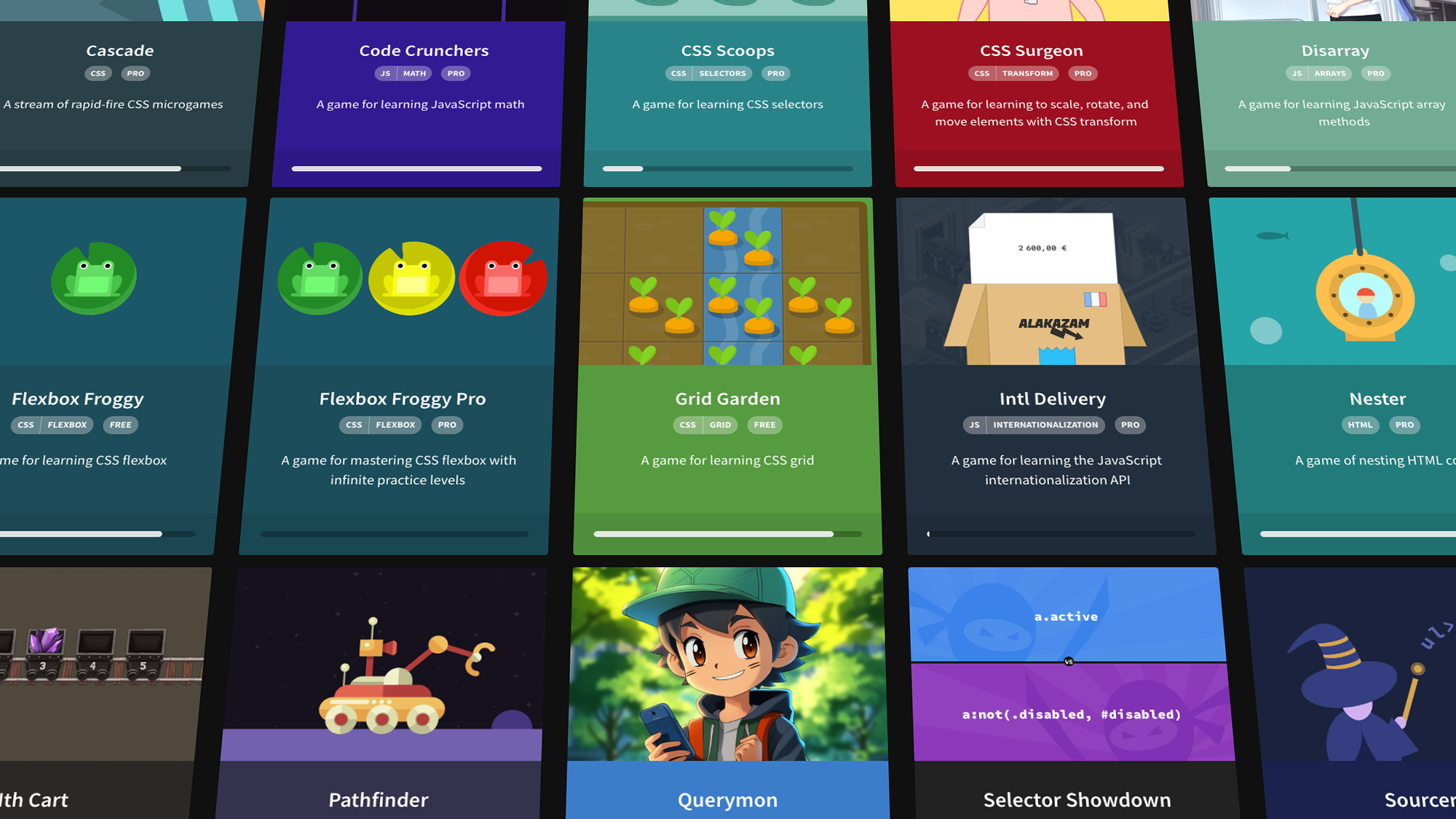

robots.txt (opens in a new tab)
2 rulesAll bots 1 allowed · 1 disallowed
- Allow
/wp-admin/admin-ajax.php - Disallow
/wp-admin/
No matching rules.
Sitemaps
1Recent Updates
- Website images
- Screenshots
- Network details
- Website Technologies
- Pages and Search Information
- HTTP Response Information
- TLS and certificates
- DNS Information
- Domain Registration
- Website profile
- Website Description
- Website Name
- Website profile
- Website Description
- Website Name
User reviews (0)