Website profiles · Technology insights · Alternatives

collegemagazine.com

The ultimate college guide written by students at your campus. From university rankings to career advice & academic tips to student health & dating.

No paid content found
Visit website
Profile views 5 Outbound visits 1 Normal
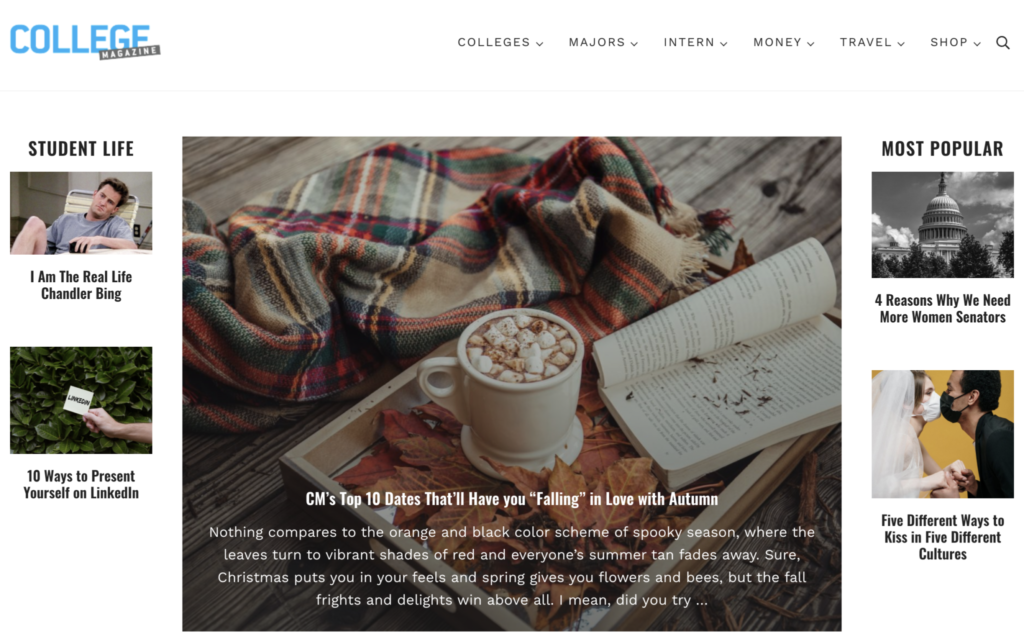
College Magazine Full homepage screenshot

At a glance

Category
Education & Learning
Language
English
Paid-content signal
No paid content foundObserved
Registered
2000
Hosting
CloudflareInferred
HTTPS certificate trusted
PassedObserved
Last updated

Website review

This review may include AI-generated content and is not individually verified. Domain, certificate and other facts come from the observed data on this page.

What is College Magazine?

College Magazine is a student-written college guide and search tool. Its stated purpose is to help students find a school that fits, then compare and evaluate options. The site combines practical tools with first-person campus coverage: a college quiz that builds a personalized list, saving and comparison features, a dashboard for tracking schools, and student-written reviews. It also covers broader topics such as majors, career advice, academic tips, health, and dating.

What you can actually do there

  • Take a quiz and get a personalized list of colleges and graduate schools.
  • Save favorites, compare schools side by side, and keep everything in a dashboard.
  • Read reviews and campus write-ups from current students.
  • Browse school profiles that include enrollment context and student-life impressions.
  • Use guidance on choosing a major and general college-life advice.

Who it suits

It is most useful for high school students building a college list, transfer students reconsidering options, and families who want student perspectives rather than only official brochures. The comparison and saving tools are the practical core; the articles and reviews are better for feel and culture than for hard data like exact costs or admission statistics.

Trade-offs to keep in mind

Student-written content is vivid and honest but uneven in depth and can reflect one person's experience. The school profiles here are starting points, not final sources for deadlines, net price, or program requirements. A sensible next step: shortlist three to five schools with the quiz and comparison tools, then verify costs, deadlines, and program details on each college's official website. For official financial aid information in the US, use Federal Student Aid.

How do I use College Magazine's quiz to find colleges that match my preferences?

Start the quiz from the "Take Our College Quiz" prompt on the homepage, answer honestly about your academics, location, size, and campus culture, then use the results as a shortlist rather than a verdict. College Magazine frames the quiz as a three-step flow: tell it about yourself, get a personalized match list based on your results, and explore colleges from there. The site also offers save-and-compare tools and student-written reviews, so the quiz works best as the first move in a longer research process.

What the quiz asks and what you get

The page describes the process in three parts:

  • Take the quiz — you provide details about yourself and what you want from a school.
  • Find your match — the site builds a personalized college list from your answers.
  • Explore — you browse those colleges, save favorites, and compare options.

Because the matching is only as good as your inputs, treat the quiz as a filter, not an answer key. If you answer vaguely, expect a generic list.

How to answer so the results are useful

Decide your non-negotiables before you begin, and keep them consistent:

Preference Decide before the quiz Why it matters
Location In-state, region, or anywhere Removes schools you would never attend
Size Small, medium, large Shapes class experience and social life
Cost Budget ceiling and aid needs Prevents wasted applications
Major Confirmed or still exploring Changes which schools qualify
Campus feel Urban, suburban, rural, sports, arts Hard to judge from rankings alone

If a question feels ambiguous, answer for the student you are now, not an idealized version. You can retake the quiz after your priorities shift.

After the quiz: verify before you commit

The quiz produces candidates; your own research produces a decision. College Magazine's campus reviews are written by current students, which gives you a peer perspective that official brochures rarely provide. Use them alongside, not instead of, other sources:

  • Read student reviews on College Magazine for day-to-day campus culture.
  • Check official admissions pages for requirements and deadlines.
  • Use College Board for testing and financial aid basics.
  • Compare outcomes with Niche or U.S. News rankings, keeping in mind each uses different methods.
  • Confirm costs directly with each school's net price calculator.

A practical next step: build a list of 8–12 quiz matches, save them in the site's comparison tool, then cut it to 5–7 after reading two student reviews and one official page per school. That mix of personal fit, peer experience, and verified facts is what turns a quiz result into a real shortlist.

Can I compare colleges side-by-side on College Magazine and what factors can I compare?

Yes. College Magazine includes a save-and-compare workflow: you can save schools while browsing, build a custom list, and use comparison tools to view options side by side. The site also offers a college quiz that generates a personalized list, plus student-written reviews you can use alongside the comparison view.

Factors you can compare

According to the page evidence, the comparison tools are designed around these decision factors:

Factor What to look at Why it matters
Fit with your goals Quiz results and MatchMaker-style recommendations Narrows a long list to schools aligned with your academic interests and preferences
Enrollment and campus profile Descriptions such as enrollment statistics and class size Helps distinguish large universities from small colleges
Academic environment Mentions of coursework rigor, professors, and majors Shows whether the day-to-day academic experience matches your expectations
Campus life and culture Student-written reviews and campus descriptions Reveals social atmosphere, community feel, and what students actually experience
Location and lifestyle References to nearby cities, beaches, and regional vibe Affects weather, travel, internships, and weekend options
Cost and value Not specified in the page evidence Check each school's official net price calculator and financial aid page directly

A practical way to use it

Start with the quiz to build a personalized list, then save every school that interests you. When you have five to eight saved, open the comparison view and sort them by the factors above. Treat the student reviews as qualitative evidence, not rankings: one student's "close-knit community" may be another's "everyone knows your business."

For official data that College Magazine does not cover, such as graduation rates, net price, and program requirements, cross-check with College Scorecard and each college's own website. If you are comparing graduate programs, GradSchools.com can help you filter by degree level and field.

How do student reviews on College Magazine help me evaluate a college's campus life and academics?

Student reviews on College Magazine are most useful as a first-person reality check on what a campus feels like day to day, not as a substitute for official data. The site frames its reviews as “Real Talk Reviews” written by current students, so they tend to surface details that brochures and rankings skip: how large introductory classes actually feel, whether professors are reachable, how easy it is to make friends, what weekends look like, and whether the surrounding area adds to or limits student life. Because the reviews are tied to individual schools and paired with comparison tools, you can read a handful of perspectives on one campus and then line them up against another.

What reviews are good at showing

  • Academic texture: workload, grading culture, class sizes, professor accessibility, and whether students feel supported or left to sink.
  • Social and campus life: dorm culture, clubs, Greek life, sports, nightlife, and how inclusive or cliquey the atmosphere seems.
  • Fit and trade-offs: whether a school suits a certain personality, budget mindset, or career goal, including the downsides students mention.

What they cannot do alone

Reviews are subjective and often skew toward students who feel strongly, positively or negatively. A single review is an anecdote; several reviews pointing the same way are a pattern. Use them to generate questions, then verify with official sources.

A practical way to use them

  1. Read at least three to five reviews per school, noting repeated themes rather than one-off complaints.
  2. Separate academic comments from social ones, since a strong program can coexist with a quiet campus.
  3. Save and compare schools using the site’s dashboard, then check official pages for graduation rates, costs, and program requirements.
  4. Cross-reference with other student-review communities such as Niche or Unigo, and confirm facts on the college’s own site.

A useful decision rule: treat reviews as evidence about culture and daily experience, and treat official data as evidence about outcomes and cost. When a review claim matters to your decision, ask an admissions office or a current student directly before ruling a school in or out.

What advice does College Magazine offer for choosing a major or navigating career decisions?

College Magazine's main advice for choosing a major is to start with a structured self-assessment rather than a list of popular fields. Its quiz asks about your interests and goals, then generates a personalized list of colleges; the "Find a Major" section is framed as showing you how to choose, not which major to pick. In practice, that means treating major selection as a matching exercise: clarify what you want from your studies, then compare programs against it.

For career decisions, the site's emphasis is on student-written experience. Current students contribute reviews and first-person articles about campus life, academics and post-graduation paths, so the career guidance you get is peer perspective rather than counselor or employer advice. The site also offers tools to save and compare colleges, which is useful if your major choice and your school choice are entangled — common when a program only exists at certain institutions.

How to use it in practice

  • Run the quiz early, then verify. Use the generated list as a starting point for research, not a verdict. Check each school's actual major requirements and course catalog directly.
  • Read reviews with a filter. Student reviews are strong on day-to-day reality — class sizes, professor accessibility, workload culture — and weaker on long-term salary or hiring data.
  • Separate the two decisions. Major choice is about what you want to study; career direction is about what you want to do. College Magazine leans on the first and offers anecdotal help with the second.

Where it fits and where it doesn't

Your situation College Magazine's fit
Undecided, want to explore options Good starting point via quiz and major-finding guidance
Comparing specific schools Useful, thanks to save-and-compare tools and student reviews
Need salary, licensure or job-market data Limited — look to official sources
Want counselor-level career planning Limited — peer perspective, not professional advising

A concrete example: a student torn between environmental science and environmental engineering could use the quiz and reviews to understand campus culture at schools offering each, then confirm which programs actually lead to the roles they want by checking department pages and licensing or graduate-school requirements.

For career specifics — expected earnings, required credentials, hiring trends — go to authoritative sources such as the U.S. Bureau of Labor Statistics' Occupational Outlook Handbook at U.S. Bureau of Labor Statistics, and check individual university department pages for program outcomes.

Is College Magazine free to use and what do I get by creating an account?

College Magazine is free to use. The site’s own sign-up pitch says “Free and no strings attached,” and the core tools it describes—the college quiz, saving and comparing schools, and reading student reviews—are presented as available through a free account rather than a paid subscription.

What an account appears to give you

  • A personalized college list. You take a quiz about your preferences and aspirations, and the site builds a matched list of colleges and graduate schools.
  • Saving and comparing. You can bookmark schools as you browse, then use comparison tools to weigh them side by side.
  • A dashboard. The site frames the account as a “personalized college dashboard,” which is where your saved schools and comparisons live.
  • Review access and participation. You can read student-written reviews, and the site also invites you to write your own.
  • Major and resource guidance. It advertises help choosing a major plus “facts that cut through the noise,” alongside the school profiles.

What to weigh before signing up

The value depends on how you use it. If you are early in a search and want a shortlist fast, the quiz-and-save loop is genuinely useful—you can browse profiles, stash contenders, and compare them without rebuilding a spreadsheet. If you already have a firm list of schools, the account adds less; you may get more from reading the student reviews directly.

Two practical cautions. First, the school profiles and reviews are written by students, so treat them as lived-experience color rather than verified data—check enrollment, costs, and program details against each school’s official site. Second, the personalized recommendations reflect the quiz inputs, so a thin or rushed quiz will produce a generic list; answer it as specifically as you can.

A useful next step

Before creating an account, run a five-minute test: take the quiz, save three schools you already know you like, and see whether the comparison view surfaces anything you did not already know. If it does, the account is earning its place. If it only restates your existing list, use the site as a free browsing and review resource without investing more time in the dashboard.

For broader context on a school you are seriously considering, cross-check with the institution itself and with independent official sources such as College Board for testing and financial aid information, or Federal Student Aid for aid and loan details.

Related questions

More questions →
How to Save and Compare Colleges on College Magazine

You can save and compare colleges on College Magazine by creating an account, browsing or searching for schools, saving the ones you like, and then using the site's comparison tools to view them side by side. The site describes this as "free and no strings attached," and the core workflow is built around four features: a college quiz, saved schools, comparison tools, and a personalized dashboard.

What You Need Before You Start

  • A web browser and an internet connection.
  • A free College Magazine account, which the site says is required to "save your favorite schools, compare options, and access exclusive resources."
  • A rough idea of what you're looking for — location, size, major, or campus vibe — though the quiz can help you figure this out as you go.

Step-by-Step: Saving and Comparing Colleges

1. Take the College Quiz (optional but useful)

The quiz asks you "a little bit about yourself and what you're looking for." Based on your answers, College Magazine generates a personalized list of colleges. This is a good starting point if you don't already have schools in mind.

2. Browse schools and save your favorites

As you explore school profiles, use the Save option on each one. The site lists example schools you can save, including Adelphi University, Santa Fe College, Emerson College, University of South Florida, The College of William and Mary, Temple University, Stanford University, The College of New Jersey, Sarah Lawrence College, Penn State University, Flagler College, and University of California, Santa Cruz.

Each profile includes details like enrollment statistics, class size, campus culture, and student-written descriptions. For example, the Flagler College entry notes an average class size of 18 students, while the Sarah Lawrence College entry describes a liberal arts atmosphere.

3. Build your personalized dashboard

Once you've saved schools, they appear in your dashboard. College Magazine describes this as a place to "build and compare your custom list." The dashboard is where saved schools, quiz results, and comparison tools come together.

4. Compare schools side by side

Use the Compare tool to view saved colleges against each other. The site frames this as a way to "compare schools with ease and clarity to find your perfect academic match." The comparison is designed to cut through marketing language and present facts in a consistent format.

5. Read student reviews

College Magazine emphasizes "Real Talk Reviews" — authentic takes "straight from current students on college campus." These are useful for the things statistics don't capture, like social life, professor accessibility, or campus culture. The site describes its content as "written by students, for students."

6. Explore majors and additional resources

If you're undecided, the site offers guidance on finding a major, plus resources described as "facts that cut through the noise."

What Each Tool Does

Tool What it does When to use it
College Quiz Asks about your preferences and generates a personalized school list At the start, if you don't have a shortlist
Save Schools Bookmarks schools as you browse Throughout your search
Compare Tools Places saved schools side by side When narrowing down your list
Dashboard Centralizes saved schools, quiz results, and comparisons To manage your whole search in one place
Reviews Student-written accounts of campus life To check the feel of a school beyond stats
Find a Major Guidance on choosing a field of study If your major is still undecided

Common Snags to Expect

  • You need an account to save and compare. Browsing may be open, but saving favorites and using comparison tools requires joining.
  • Quiz results are a starting point, not a verdict. Treat the generated list as suggestions to explore, not a final answer.
  • Reviews vary in depth. Since they're student-written, quality and detail differ from school to school. Cross-check anything important against official sources.
  • Comparison works best with a manageable list. Saving 20 schools makes side-by-side comparison less useful than saving 4–6.

The Short Version

Create a free account, take the quiz if you need direction, save schools as you browse, then use the dashboard and compare tools to weigh your options. Student reviews and major-finding resources fill in the gaps that raw statistics leave open. The whole process is designed to be seamless — the site's own framing is "Find the Best College for You" without the usual friction.

What Does It Mean to Be an IB Student? Roles and Expectations Across the Four Programmes

Being an IB student means more than attending a school that offers an International Baccalaureate programme. It means learning through a specific framework that asks you to think critically, communicate clearly, and take responsibility for your own progress. The IB's four programmes — the Primary Years Programme (PYP), Middle Years Programme (MYP), Diploma Programme (DP), and Career-related Programme (CP) — share a common philosophy but place different demands on students at each stage.

This article explains what the IB expects from students, how responsibilities change across the four programmes, and how families can prepare for the transition.

The foundation: the IB learner profile

Across all four programmes, the IB describes ten attributes it hopes students develop. These are usually called the learner profile. Students are encouraged to be:

  • Inquirers — curious and skilled at asking good questions
  • Knowledgeable — exploring ideas across a range of subjects
  • Thinkers — using critical and creative thinking
  • Communicators — expressing ideas confidently in more than one language
  • Principled — acting with integrity and fairness
  • Open-minded — appreciating other perspectives and cultures
  • Caring — showing empathy and respect
  • Risk-takers — approaching uncertainty with courage
  • Balanced — attending to intellectual, physical, and emotional well-being
  • Reflective — assessing their own learning and experience

These attributes are not a checklist to complete. They describe habits and dispositions that teachers look for and that students are expected to demonstrate over time. In practice, they shape how lessons are taught, how projects are assessed, and how students are asked to behave toward one another.

How student responsibilities differ across the four programmes

Each programme has its own structure, age range, and expectations. The table below summarises the main differences.

Programme Typical age range Core expectation of the student Main assessment emphasis
PYP 3–12 Active participation, curiosity, and reflection on learning Teacher observation, portfolios, student-led conferences
MYP 11–16 Connecting subjects to real-world contexts; developing research and self-management skills Criterion-based assessment, personal project, interdisciplinary units
DP 16–19 Independent academic work across six subject groups plus core requirements External exams, coursework, extended essay, theory of knowledge
CP 16–19 Combining academic study with career-related learning and a reflective project Career-related study, DP courses, personal and professional skills

PYP: building the habits of inquiry

In the PYP, the student's main job is to engage. Children are expected to ask questions, work with others, and reflect on what they have learned. The emphasis is on developing curiosity and basic research skills rather than on formal examinations. Students often take part in units of inquiry that connect subjects, and they may lead conferences where they explain their learning to parents.

MYP: making connections and managing yourself

The MYP asks students to go further. They study eight subject groups and are expected to connect what they learn to the world around them. A key responsibility is the personal project, an independent piece of work that students plan, research, and complete over an extended period. This is often the first time students must manage a long-term deadline largely on their own. Service learning also becomes more structured, and students are encouraged to reflect on their role in the community.

DP: depth, independence, and the core

The DP is the most academically demanding of the four programmes. Students typically study six subjects, three at higher level and three at standard level, and complete three core requirements:

  • Theory of knowledge (TOK) — a course that asks how we know what we claim to know
  • The extended essay — an independent research paper of up to 4,000 words
  • Creativity, activity, service (CAS) — a programme of ongoing experiences outside academic study

DP students are expected to manage a heavy workload, meet external examination deadlines, and produce original academic work. Independent study is not optional; it is central to the programme.

CP: academic study with a career focus

The CP is designed for students who want to combine academic courses with career-related learning. Students take at least two DP courses alongside a career-related study programme, and complete a reflective project. They also develop personal and professional skills. The CP suits students who learn best when their studies connect directly to a practical field, while still requiring the critical thinking and communication skills common to all IB programmes.

How assessment and independence change as students progress

One of the clearest patterns across the IB is the shift from teacher-led assessment toward student-led responsibility.

In the PYP, teachers observe and document learning, and students are guided through reflection. In the MYP, students are assessed against published criteria and must increasingly manage their own projects. By the DP and CP, students are preparing for external examinations and independent research, and they are expected to organise their time, seek help when needed, and meet deadlines without constant reminders.

This progression is deliberate. The IB wants students to leave as self-directed learners who can think for themselves.

Common misconceptions about being an IB student

Several myths circulate about the IB. Here are a few clarifications.

  • "IB students must be geniuses." The programmes are demanding, but they are designed for a broad range of students. Effort, curiosity, and organisation matter as much as raw ability.
  • "The IB is only about exams." Assessment includes projects, portfolios, oral work, and service. The DP has external exams, but the core requirements are equally important.
  • "Students must be fluent in a second language before starting." Language learning is part of the IB, and support is usually available. Requirements vary by programme and school.
  • "IB students have no free time." The workload is real, but the learner profile includes balance. Schools generally encourage students to manage their time and well-being.
  • "All IB schools are the same." Schools implement the programmes in different ways, and the range of subjects and support offered can vary.

Preparing for the transition into an IB programme

If you are a student or a parent preparing to enter an IB programme, the following steps can help.

  1. Read the programme guide for your specific programme. The IB publishes curriculum and assessment information for PYP, MYP, DP, and CP. Understanding the structure reduces surprises.
  2. Talk to current students and teachers. Ask about workload, deadlines, and what support is available.
  3. Build organisational habits early. A simple planner, weekly review, and clear study space make a difference, especially in the MYP and DP.
  4. Practise reflection. The IB asks students to think about their own learning. Keeping a short journal or notes on what worked and what did not is useful preparation.
  5. Ask about language and subject choices. Requirements differ by programme and school, so confirm the details with the school directly.
  6. Plan for the core requirements. In the DP, the extended essay, TOK, and CAS take time. Starting early and setting interim deadlines helps.
  7. Use school support. Coordinators, counsellors, and teachers are there to help. Asking for guidance is part of being a successful IB student.

A practical summary

Being an IB student means developing the learner profile attributes while meeting the specific demands of your programme. In the PYP, that means curiosity and participation. In the MYP, it means making connections and managing independent work. In the DP, it means academic depth and completing the core. In the CP, it means combining academic study with career-related learning and reflection.

Across all four, the common thread is responsibility: for your learning, your time, and your contribution to the community around you. Understanding that early makes the transition smoother and the experience more rewarding.

Are the Student Reviews on College Magazine Reliable for Choosing a College?

Student reviews on College Magazine are useful as a supplement to official data, not as a replacement for it. They are written by current students about their own campuses, so they capture subjective experience—social life, dorm culture, professor accessibility, campus vibe—that rankings and statistics rarely show. The right way to use them is to treat them as one input among several: cross-check claims against official sources, look for patterns across multiple reviews, and weigh them against your own priorities.

What the Reviews Actually Are

College Magazine describes its content as "written by students, for students," and its review section as "Real Talk Reviews" offering "the authentic college scoop straight from current students on college campus." That framing tells you two things:

  • The source is peer experience, not institutional reporting. A reviewer writing about Temple University or Sarah Lawrence College is describing what their own day-to-day felt like, not compiling verified metrics.
  • The value is in the subjective layer. Details like average class size at Flagler College (the site notes it as 18 students) or the "close-knit community" framing for Temple sit alongside personal impressions of what those facts feel like in practice.

This is the same category of information you'd get from a campus visit or a conversation with a friend who attends—useful, but shaped by one person's circumstances.

Where Reviews Help and Where They Don't

Question Student reviews Official data
What's the social atmosphere like? Strong Weak or absent
How approachable are professors? Strong Rarely captured
What's the dorm/food reality? Strong Sometimes reported, often sanitized
Graduation and retention rates Unreliable Authoritative
Cost, aid, and net price Unreliable Authoritative
Program-specific outcomes Weak Authoritative

Reviews answer "what does it feel like to be here," while official sources answer "what are the numbers." Neither substitutes for the other.

How to Use Them Well

  1. Read several reviews of the same school, not one. A single student's experience can reflect a major, a dorm, or a single bad semester. Patterns across reviewers are more informative than any individual take.
  2. Separate observation from opinion. "The library is open 24 hours during finals" is checkable. "The vibe is toxic" is a signal to investigate, not a conclusion.
  3. Verify anything decision-critical. If a review mentions a program being cut, a housing shortage, or a safety concern, confirm it through the school's official site or a current student you can contact directly.
  4. Match reviews to your own priorities. A review complaining about a quiet campus is a warning if you want energy and a recommendation if you want calm.

A Practical Example

Suppose you're comparing two schools and one review says a campus "feels more like a community than a commuter school." That's a claim about culture. To act on it, you'd:

  • Check whether other reviewers describe the same thing.
  • Look at the school's own data on the percentage of students who live on campus.
  • Ask an admissions contact or a current student whether that holds for your intended major.

If the review and the data agree, you have a reasonably confident picture. If they conflict, the conflict itself is worth investigating before you commit.

The Bottom Line

College Magazine's student-written reviews are reliable as qualitative context and unreliable as standalone evidence for factual claims. Use them to generate questions and to sense-check the culture of a campus, then resolve those questions with official data and direct contact. The site's own framing—pairing "Real Talk Reviews" with comparison tools and school data—reflects that same division of labor: reviews for feel, data for facts.

What Is College Magazine and What Can Visitors Find on collegemagazine.com?

College Magazine is a student-written college guide and school-matching platform. Its stated purpose is to help prospective students "find the best college for you" by combining editorial articles with interactive tools: a college quiz, saved school lists, side-by-side comparisons, student reviews, and major-finding resources. It is aimed at students researching colleges and graduate schools, and its editorial content is described as "written by students, for students."

What the site is

The homepage positions College Magazine around a single task: matching visitors with schools that fit their goals. The core promise is a personalized list of colleges generated from a quiz, plus tools to save and compare those schools.

The site describes itself as:

  • A college guide covering university rankings, career advice, academic tips, student health, and dating.
  • A matching service that builds a personalized college list based on quiz answers.
  • A review platform where current students share campus experiences.
  • A comparison tool for weighing schools against each other.

What visitors can actually do

The homepage lays out a set of concrete actions rather than just articles to read.

Feature What it does
College Quiz Asks about your preferences and generates a personalized list of matching colleges
Save Schools Lets you bookmark favorites while browsing
Compare Provides tools to compare colleges side by side
Write Reviews Lets students share their own campus experience
Find a Major Offers guidance on how to choose a major
Resources Presents "facts that cut through the noise"

The site states that saving and comparing schools is "free and no strings attached," and that joining gives access to exclusive resources. Note that this describes the save-and-compare feature specifically; the page evidence does not state terms for any other part of the site.

The content: student-written campus profiles

A large part of the value is short, first-person-style campus summaries. The homepage surfaces entries for schools including Adelphi University, Santa Fe College, Emerson College, University of South Florida, The College of William and Mary, Temple University, Stanford University, The College of New Jersey, Sarah Lawrence College, Penn State University, Flagler College, and University of California, Santa Cruz.

These entries read as impressions rather than statistics — for example, Flagler College is noted for an average class size of about 18 students, Sarah Lawrence is described as feeling "like living in a liberal arts major's" world, and Penn State is summarized with "something ALWAYS happens on campus." That tone is the point: the site frames its reviews as "the authentic college scoop straight from current students."

How the matching flow works

The homepage describes a three-step process:

  1. Take the quiz — tell the site about yourself and what you're looking for.
  2. Find your match — based on your results, it creates a personalized list of colleges.
  3. Explore — browse a variety of colleges and use the site's guidance to narrow down a fit.

Alongside this, you can save schools as you browse, build and compare a custom list, and write your own reviews.

Who it's for

College Magazine fits best if you are:

  • Early in a college search and want a starting list rather than a single answer.
  • Interested in student perspectives on campus culture, not just rankings and statistics.
  • Looking to compare several schools in one place and keep track of favorites.

It is less suited to someone who wants official admissions data, tuition figures, or application deadlines — the page evidence describes editorial and community content, not an official data source.

Bottom line

collegemagazine.com is a student-run college guide that pairs advice articles on rankings, careers, academics, health, and dating with practical matching tools: a quiz, saved lists, comparisons, student reviews, and major guidance. Visit it if you want a personalized shortlist and candid student takes; treat the campus write-ups as impressions to weigh alongside official school data.

What College Advice and Resources Does College Magazine Offer Beyond School Search?

College Magazine offers student-written articles and guides on majors, careers, academics, health, dating, and campus life, plus a few interactive tools that sit alongside its school-search features. The site describes itself as "the ultimate college guide written by students at your campus," covering everything from university rankings to career advice, academic tips, and student health and dating. If you're past the "which school?" stage—or want to browse advice independently of the college quiz—these sections are where you'll spend your time.

What content categories does the site cover?

Based on the site's own description, College Magazine organizes its editorial content around these areas:

Category What it covers
University rankings School comparisons and rankings
Career advice Guidance for jobs and career planning
Academic tips Study and coursework advice
Student health Health-related content for college students
Dating Relationships and dating in college

The site also emphasizes that its content is "written by students, for students," which shapes how the advice reads—first-person campus experience rather than institutional marketing copy.

Finding a major

College Magazine includes a dedicated "Find a Major" entry point with the framing "We'll show you how to choose." This is a guidance resource rather than a searchable major database, so treat it as a starting point for thinking through the decision. A practical way to use it: read the major-selection guidance first, then cross-reference against specific schools you've saved, since major availability varies by campus.

Campus life and student experience content

The school profiles on the site are written from a student perspective and include lived details rather than just statistics. Examples from the site's school listings:

  • Penn State University — "Something ALWAYS happens on campus... and I mean always."
  • Flagler College — notes an average class size of just 18 students.
  • Sarah Lawrence College — described as feeling "a bit like living in a liberal arts major's" world.
  • Adelphi University — the profile opens with enrollment statistics before the student take.

These profiles double as campus-life content: they tell you what daily life feels like at a school, not just its numbers. If you're researching a specific campus, reading its profile gives you the student-experience angle that rankings pages usually skip.

Tools that work alongside the articles

The advice content doesn't stand alone—it connects to the site's interactive features:

  • College Quiz — you answer questions about yourself and what you're looking for; the site then builds a personalized college list from your results.
  • Save & Compare — save favorite schools, compare options, and access resources. The site states this is "free and no strings attached," though you join (create an account) to use it.
  • Write Reviews — share your own experience of a school.
  • Compare tools — side-by-side comparison of colleges.
  • MatchMaker — described as smart recommendations tailored to your academic desires and personal vibe.

A sensible workflow: use the quiz or MatchMaker to generate a candidate list, save schools to compare them, then read the student-written articles and profiles to fill in the qualitative picture the comparison tools can't give you.

How to browse the advice content

  1. Start from the main navigation or the "Explore Schools that Fit Your Style" section.
  2. Use the category framing (rankings, career, academics, health, dating) to jump to the topic you need.
  3. For major decisions, go to "Find a Major" and work through the guidance.
  4. For a specific school, open its profile to read the student-written summary.
  5. Pair what you read with the save-and-compare tools if you're still building a shortlist.

What to keep in mind

The reviews and profiles are student-authored, so they reflect individual experience—useful for atmosphere and day-to-day reality, less so for verified data like graduation rates or financial aid. Use them to complement, not replace, official school statistics. The site's own framing ("Facts that cut through the noise") suggests it aims to balance data with real talk, but the student voice is the main value here.

Website Overview

Identifiable technologies and additional version or configuration signals make the service easier to fingerprint, which may help targeted scanners narrow their checks. An established domain and managed infrastructure suggest continuity of operations and may support dependable delivery, although neither guarantees service quality.

Domain and Registration

Registered in 2000, this domain has about 25 years of history. That suggests continuity, although ownership and purpose may have changed. Transfer-protection status is present, helping reduce the risk of unauthorized domain transfers. The registrar is GoDaddy.com, LLC, a widely used domain service provider. The domain uses the common .com extension, which is not an independent safety signal.

DNS and Email

The observed email authentication setup is incomplete: SPF is missing. Nameservers are provided by Cloudflare, indicating managed DNS hosting. MX records point to the Google Workspace email service. No CNAME was found; the observed records resolve directly to addresses. TXT records include verification markers for Google. Such markers may also remain after a service stops being used.

TLS and Certificates

The public key uses EC with 256 bits. The server supplied a complete certificate chain. No organization name is present in the certificate; the available fields are consistent with domain validation. The certificate was issued within the Google Trust Services cloud or CDN ecosystem. The certificate's total validity is about 90 days, consistent with a short renewal cycle.

HTTP and Browser Security

The response lacks these common security headers: HSTS, CSP, Referrer-Policy, clickjacking protection. No X-Powered-By header was found, reducing one common source of backend fingerprinting information. The cf-ray response header indicates a CDN or caching proxy in the delivery path. No obvious internal addresses or debug information were found in the headers. The Server header identifies cloudflare without an exact version.

Technology Stack Analysis

The public page identifies Site Kit by Google 1.189.0, WordPress, jQuery, Cloudflare, with exact versions exposed for 1 technologies. These details can narrow vulnerability checks, although exposure alone is not a vulnerability.

Search and Social Sharing

The Generator tag identifies Site Kit by Google 1.189.0, making the publishing system easier to fingerprint. Twitter Card metadata is configured. JSON-LD includes Organization data, helping describe the organization as an entity. The title has 56 characters, within a common display range. A meta description is present, with 148 characters.

Hosting and Email

DNSCloudflare
HostingCloudflare
EmailGoogle Workspace
Approximate IP geolocation (inferred; a CDN or proxy may differ from the origin server) Location unknown Inferred 104.26.14.222

Registration details

RDAP / WHOIS

RegistrarGoDaddy.com, LLC
Registered2000-11-20
Expires2027-11-20
Domain statusclient delete prohibited、client renew prohibited、client transfer prohibited、client update prohibited
Nameserversbill.ns.cloudflare.com、jule.ns.cloudflare.com
DNSSECunsigned

DNS records

DNS

TypeNameValueTTLPriority
Awww.collegemagazine.com104.26.14.222300—
Awww.collegemagazine.com104.26.15.222300—
Awww.collegemagazine.com172.67.69.112300—
AAAAwww.collegemagazine.com2606:4700:20::681a:ede300—
AAAAwww.collegemagazine.com2606:4700:20::681a:fde300—
AAAAwww.collegemagazine.com2606:4700:20::ac43:4570300—
MXcollegemagazine.comaspmx.l.google.com3001
MXcollegemagazine.comalt1.aspmx.l.google.com3005
MXcollegemagazine.comalt2.aspmx.l.google.com3005
MXcollegemagazine.comalt3.aspmx.l.google.com30010
MXcollegemagazine.comalt4.aspmx.l.google.com30010
NScollegemagazine.combill.ns.cloudflare.com86400—
NScollegemagazine.comjule.ns.cloudflare.com86400—
TXTcollegemagazine.comgoogle-site-verification=I55p3LEYHAVYcDdaQEBDKMUrbCCe1TI1_Ao_DaiKEgE300—
TXTcollegemagazine.comgoogle-site-verification=JI_-c320BEksGJlF1fWvWz2ioH09RFbVHcf3OO8ad9U300—
TXTcollegemagazine.comgoogle-site-verification=VC6jaU-UW1wgvC0McqbRkUy5Q7W890PDecrT6gH-dXU300—
DMARC_dmarc.collegemagazine.comv=DMARC1; p=none; rua=mailto:[email protected]300—

TLS and certificates

TLS / SSL

AssessmentNormal configuration
Supported protocolsTLSv1.2、TLSv1.3
Negotiated protocolTLSv1.3
Certificate subjectcollegemagazine.com
IssuerGoogle Trust Services
Valid until2026-11-10T16:11 · Remaining when checked: 33 days
Verification detailsCertificate trust: Passed · Hostname match: Passed

HTTP response headers

HTTP

HeaderValue
content-typetext/html; charset=UTF-8
servercloudflare
x-content-type-optionsnosniff
permissions-policyprivate-state-token-redemption=(self "https://www.google.com" "https://www.gstatic.com" "https://recaptcha.net" "https://challenges.cloudflare.com" "https://hcaptcha.com"), private-state-token-issuance=(self "https://www.google.com" "https://www.gstatic.com" "https://recaptcha.net" "https://challenges.cloudflare.com" "https://hcaptcha.com")

Identified technologies

Site Kit by Google 1.189.0WordPressjQueryCloudflare

Pages, Search and Sharing

Meta descriptionThe ultimate college guide written by students at your campus. From university rankings to career advice & academic tips to student health & dating.
Canonical URLhttps://www.collegemagazine.com/
LanguageEnglish (default)
Twitter Cardsummary_large_image

No rules found

User reviews (0)

  • No reviews yet.