
 简体中文
简体中文
dayoneapp.com
The award-winning journal app for capturing life as you live it. Free to download on iPhone, Android, iPad, and Mac. Now available on the web.
At a glance
- Category
- News
- Language
- English
- Paid-content signal
- Paid contentObserved
- Registered
- 2011
- Hosting
- Automattic, IncInferred
- HTTPS certificate trusted
- PassedObserved
- Last updated
Related questions
More questions →How Does Day One Protect My Journal Privacy and Data?
Day One protects a journal with three separate layers: a passcode or biometric lock on the app, end-to-end encryption for synced content, and automatic backups paired with the ability to export your data at any time. The company's own framing is that "you own the data, we keep it safe." Those protections apply to the journal app on iPhone, Android, iPad, Mac, and Apple Watch, and to the web version accessible from any browser — so the answer is the same regardless of which device you open it on.
The three protections, and what each one actually does
1. Passcode and biometric lock
This is the front door. Day One lets you protect the journal with a passcode and biometric security, so someone holding your unlocked phone still can't open the app and read entries. It's the layer that matters most in everyday situations: a borrowed phone, a shared desk, a device left on a table.
Worth being clear about the boundary: an app lock controls access to the app. It is not the same thing as encrypting the underlying data, and it doesn't protect against someone who has your device passcode and your biometrics.
2. End-to-end encryption
Day One states that entries are protected with end-to-end encryption. In practice, end-to-end encryption means the content is encrypted on your device and can only be decrypted by your devices — not by the service in between. That's the layer that matters for synced entries moving between your phone, tablet, Mac, and the web.
Two practical consequences follow from this, and both are worth knowing before you commit years of writing:
- Your account credentials become the key to your journal. If you lose access to your account and the recovery path, encrypted content is not something support can simply read back to you.
- Encryption protects data in transit and at rest on the service side, not a compromised device. If malware is running on your unlocked phone, encryption elsewhere doesn't help.
3. Automatic backups and export
Day One runs automatic backups and lets you export your data anytime. This is the part that answers the "am I locked in?" question. Export means you can take your journal out of the app in a usable form rather than leaving it stranded. Backups mean a lost or broken device doesn't mean a lost journal.
The combination is what makes the ownership claim meaningful: encryption keeps others out, and export keeps you from being trapped.
How the layers fit together
| Layer | What it protects against | What it does not cover |
|---|---|---|
| Passcode / biometric lock | Someone with your unlocked device opening the app | Someone who knows your device passcode |
| End-to-end encryption | Content being read in transit or on the service side | Malware on an unlocked device; lost account access |
| Automatic backup + export | Device loss, and being unable to leave with your data | Nothing on its own — it's a recovery and portability layer |
Read the table as a chain rather than a menu. Each layer covers a different failure, and the gaps are the ones you'd expect: your device, and your account credentials.
What this means if privacy is your main reason for choosing a journal app
Day One's privacy story is strong on the dimensions that matter for a personal journal: the app is locked, synced content is end-to-end encrypted, and your writing is exportable. The site also notes over 150,000 five-star reviews, and several long-term users describe multi-year libraries — one cites a 1,469-day journaling streak, another thousands of entries going back to 2014. Longevity like that only works if people trust the storage, which is the practical test of these protections.
Two conditions to weigh before you start:
- You are responsible for account recovery. End-to-end encryption is a trade: no one else can read your journal, including in a recovery scenario. Set up recovery options deliberately rather than assuming them.
- Device hygiene still matters. The lock and encryption don't substitute for a device passcode and basic care about what runs on your phone.
Day One is free to download on iPhone, Android, iPad, Mac, and Apple Watch, with a web version, and the site describes it as free to use and "better with the Gold plan." If you want the specific limits of the free tier versus Gold — including anything tied to encryption, backup, or export — check the plans and pricing pages directly, since those details determine whether the free version covers your needs.
Where Can I Download or Log In to Day One?
Day One is available as a free download on iPhone, Android, iPad, Mac, and Apple Watch, and you can also access your journal from any browser. Existing users can log in through the official site at dayoneapp.com. Pricing details for the Gold plan live on the site's Pricing and Gold pages.
Download the Day One App
The app is free to download across all supported platforms. Use the official store links below rather than searching third-party sites.
| Platform | Where to get it |
|---|---|
| iPhone / iPad | App Store |
| Android | Google Play |
| Mac | Day One Mac application (linked from dayoneapp.com) |
| Apple Watch | Paired with the iPhone app |
| Web | Any browser at dayoneapp.com |
After installing, open the app and either create a new journal or sign in to an existing account to sync your entries.
Log In to Your Journal
If you already have a Day One account, the site provides a Login now entry point. From there you can reach your journal on the web or confirm your account before signing in on a new device. Because Day One syncs across devices, logging in on a new phone, tablet, or computer should surface the same entries you've already written.
Check Pricing and the Gold Plan
Day One is free to use, and the site notes it is "better with the Gold plan." To see what Gold includes and what it costs, go to the Pricing or Gold pages on dayoneapp.com. The site does not state prices directly on the homepage, so treat those dedicated pages as the source of truth for current plans.
What You Get Before Paying
Even on the free tier, the app covers the core journaling experience:
- Writing and design — a focused layout for text entries.
- On This Day — revisit entries from past dates.
- Rich media — add photos, videos, drawings, or audio recordings.
- Privacy tools — passcodes, biometric security, end-to-end encryption, and automatic backups.
- Data ownership — export your data at any time.
The site reports over 150,000 five-star reviews and lists Apple Editors' Choice and an Apple Design Award among its recognitions.
Common Questions When Getting Started
- Which platform should I start on? Start where you already write — the phone app for quick capture, the Mac app for longer sessions, or the browser if you're on a shared or work computer.
- Do I need an account to try it? You can download and open the app first; signing in is what connects your entries across devices.
- Where do I confirm what Gold costs? Only the Pricing and Gold pages on dayoneapp.com — the homepage doesn't list figures.
What Is Day One Journal App? Features, Platforms, and Who It's For
Day One is a journaling app for capturing daily life across iPhone, Android, iPad, Mac, Apple Watch, and any web browser. It's free to download and use, with a Gold plan for additional features. It suits people who want a private, structured place to write and attach media over years — and who value revisiting past entries. If you only need a plain text file or dislike subscription tiers, it may be more than you need.
What you can actually do in Day One
The app centers on writing entries, but text is optional. According to the site, you can add photos, videos, drawings, or audio recordings to bring entries to life. That makes it usable as a photo journal, a voice memo log, or a sketchbook as much as a written diary.
A standout feature is On This Day, which resurfaces entries from the same date in past years. The site frames it as a way to "take a trip back in time" without a time machine. Users quoted on the page describe it as a daily motivator — one reviewer calls it a "constant source of joy."
Platforms and access
| Platform | Availability |
|---|---|
| iPhone, Android, iPad | Free download |
| Mac | Award-winning desktop app |
| Apple Watch | Supported |
| Web | Access your journal from any browser |
You can start on one device and reach the same journal from another, including through a browser login.
Privacy and data ownership
The site states plainly: "You own the data, we keep it safe." Concretely, that means:
- Passcodes and biometric security to lock the journal
- End-to-end encryption
- Automatic backups
- Export your data anytime
The export option matters if you're wary of lock-in — you can take your journal elsewhere rather than leaving it trapped in one app.
Free vs. Gold
Day One is free to download and free to use. The site describes it as "better with the Gold plan" but doesn't detail Gold's specific features on this page. For current pricing and what Gold includes, check the pricing and Gold pages directly rather than assuming.
Who it's for
Day One fits you if:
- You want one journal across phone, tablet, desktop, and web
- You like mixing text with photos, audio, and drawings
- Revisiting old entries (On This Day) appeals to you
- Privacy controls and data export are priorities
It may not fit if you want a one-time purchase with no subscription, or if a simple notes app already covers your needs.
The site cites over 150,000 five-star reviews and Apple honors including App of the Year, Editors' Choice, and an Apple Design Award. Long-term users quoted on the page describe journaling streaks of 1,469 days and libraries going back to 2014 — a signal that the app holds up over years of daily use.
What Is the Difference Between Day One Free and Gold Plans?
Day One is free to download and use across iPhone, Android, iPad, Mac, Apple Watch, and any web browser, and the Gold plan adds a fuller feature set on top of that free tier. The official site states plainly that the app is "Free to use" and "Better with the Gold plan," and it links to dedicated Pricing and Gold pages for the current specifics. If you journal occasionally and mainly want a private place to write, the free version covers the core experience. If journaling is a daily habit, or you want the more advanced capture and security features, Gold is the tier the site positions as the upgrade.
What the free version gives you
The homepage describes the free download as available on every major platform, with the browser option letting you reach your journal from any computer. The core pitch — "Beautiful, award-winning design" and a layout with "everything you need and nothing you don't" — describes the writing experience itself, which is the foundation of the app rather than a paid add-on.
Free access also includes the entry types the site highlights: text, plus photos, videos, drawings, and audio recordings to "bring your journal entries to life." The "On This Day" feature, which resurfaces past entries so you can revisit moments from years ago, is presented as a headline capability of the app rather than a Gold exclusive.
What Gold adds
The site's own framing is that Day One is "Better with the Gold plan," and it maintains a separate Gold page alongside its Pricing page. That structure tells you the paid tier is where the extended feature set lives, but the homepage excerpt does not itemize which specific features sit behind Gold. To see the exact current split — storage limits, number of devices or journals, sync behavior, and any premium capture or export options — you need to open the Pricing and Gold pages directly, since those are the authoritative and most current source.
Privacy and data ownership apply to your journal
One thing worth separating from the free-versus-Gold question: the site's privacy claims are about the app as a whole, not a paid perk. Day One states that "You own the data, we keep it safe," and describes protection via passcodes and biometric security, end-to-end encryption, and automatic backups with the ability to export your data anytime. If data ownership and exportability are your main concerns, those are described as part of the product's design rather than something you unlock by paying.
How to decide
| Your situation | Reasonable starting point |
|---|---|
| You write occasionally and want a private, well-designed journal | Start free; the core writing and media features are included |
| You journal daily and want the fullest feature set | Review the Gold plan on the Pricing page |
| You care most about encryption, backups, and exporting your data | Check the site's privacy and data-ownership details, which apply to the app overall |
| You want to compare exact limits and features | Go straight to the Pricing and Gold pages for current specifics |
The practical next step
Because the homepage confirms the free tier and the existence of Gold but does not publish the feature-by-feature breakdown, the reliable move is to open dayoneapp.com/plans/ and dayoneapp.com/premium/ and compare them side by side. Match what you find against how often you journal and which features you actually use — that comparison, not a general recommendation, is what should drive the upgrade decision.
What Can I Capture and Revisit in Day One?
Day One is built around two halves of the same habit: putting moments in, and getting them back out. You can capture text, photos, videos, drawings, and audio recordings in a single entry, then revisit past entries through the On This Day feature, which resurfaces what you wrote on the same date in earlier years. It runs on iPhone, Android, iPad, Mac, and Apple Watch, and you can also open your journal from any browser — so the same library is available whether you're writing at a desk or adding a photo from your phone.
What you can put into an entry
The app's own framing is "Tell your story, words optional," which is the clearest summary of its capture range. An entry is not limited to typed text.
- Text — the default, and the fastest way to get a thought down.
- Photos — attach images directly to an entry.
- Videos — include clips alongside or instead of writing.
- Drawings — sketch inside the entry rather than describing something in words.
- Audio recordings — record voice instead of typing.
The practical effect is that an entry can be a single line of text, a photo with a caption, a voice memo, or a mix of all of these. If you already keep a physical journal, one user describes photographing handwritten pages and uploading them to Day One to keep everything in one place — a useful pattern if you don't want to choose between paper and digital.
How you revisit the past
The main revisit mechanism is On This Day, which shows you entries from the same date in previous years. The site describes it as taking "a trip back in time," and it's the feature users mention most often when explaining why they keep journaling.
Two things make it work in practice:
- It requires history to be useful. On This Day gets more valuable the longer you've been writing, so the payoff is cumulative rather than immediate.
- It works best when entries are dated and consistent. A daily or near-daily habit gives the feature more to surface.
Users describe it as a daily motivator and a reason to keep going. One long-running user reports a streak of over 1,400 consecutive days, and another describes pulling out the app to answer questions like "when did we" or "where were we when" — which is really a search-and-recall use case rather than a reading one.
What kinds of things people record
Based on how the app is described and how users talk about it, entries tend to fall into a few buckets:
| Use case | What an entry might contain |
|---|---|
| Travel | Photos, video, location context, short notes |
| Daily life | A few lines about the day, often with a photo |
| Mood and reflection | Longer text, private by default |
| Important events | Mixed media — images plus written detail |
| Ongoing projects | Photos of physical notes or progress |
There's no required format. The app's design goal, in its own words, is "a layout that has everything you need and nothing you don't," which is why entries can be as short as a photo and a sentence.
Keeping entries available across devices
Capture and revisit both depend on your journal being in one place. Day One is available on iPhone, Android, iPad, Mac, and Apple Watch, and the web version means you can reach your journal from any browser. That matters for the revisit side: a memory surfaced on your phone is the same entry you can open and expand on your laptop later.
The site also states that you own your data, with passcodes and biometric security, end-to-end encryption, automatic backups, and the ability to export your data at any time. If privacy is the deciding factor for you, those specifics are worth checking against the current plans page before committing.
What to check before you start
- Free vs. Gold. The app is free to download and free to use, and the site says it's "better with the Gold plan." Which capture or revisit features sit behind Gold isn't specified on the page, so check the pricing and Gold pages if a specific feature matters to you.
- Platform coverage. If you use a device outside iPhone, Android, iPad, Mac, Apple Watch, or a browser, confirm support before relying on it.
- History matters for On This Day. If revisiting the past is your main reason for journaling, expect the feature to become more useful over months and years, not on day one.
Website Overview
An established domain and managed infrastructure suggest continuity of operations and may support dependable delivery, although neither guarantees service quality. Page metadata, canonical configuration and social previews work together to provide more consistent search and sharing presentation.
Domain and Registration
Registered in 2011, this domain has about 15 years of history. That suggests continuity, although ownership and purpose may have changed. The registrar, MarkMonitor Inc., specializes in corporate domain and brand management, suggesting attention to domain asset protection. Transfer-protection status is present, helping reduce the risk of unauthorized domain transfers. The domain uses the common .com extension, which is not an independent safety signal.
DNS and Email
Nameservers are provided by Amazon Route 53, indicating managed DNS hosting. MX records point to the automattic.com email service. No CNAME was found; the observed records resolve directly to addresses. SPF and DMARC are configured. DKIM status is unknown. TXT records include verification markers for Google. Such markers may also remain after a service stops being used.
TLS and Certificates
The public key uses EC with 256 bits. The server supplied a complete certificate chain. No organization name is present in the certificate; the available fields are consistent with domain validation. The certificate was issued within the Google Trust Services cloud or CDN ecosystem. The certificate's total validity is about 89 days, consistent with a short renewal cycle.
HTTP and Browser Security
The response lacks these common security headers: CSP, X-Content-Type-Options, Referrer-Policy, clickjacking protection. No X-Powered-By header was found, reducing one common source of backend fingerprinting information. No obvious internal addresses or debug information were found in the headers. The Server header identifies nginx without an exact version. No explicit CDN or WAF marker was found in the response headers.
Technology Stack Analysis
The public page identifies WordPress, React, jQuery, Google Tag Manager, nginx without precise versions, leaving fewer clues for version-specific scanning.
Search and Social Sharing
Twitter Card metadata is configured. JSON-LD includes Organization data, helping describe the organization as an entity. The title has 43 characters, within a common display range. A meta description is present, with 142 characters. The observed directives allow indexing and link following.
Hosting and Email
 Amazon Route 53
 San Francisco, California, United States
Inferred
199.16.172.28
San Francisco, California, United States
Inferred
199.16.172.28
Registration details
| Registrar | MarkMonitor Inc. |
|---|---|
| Registered | 2011-02-17 |
| Expires | 2027-02-17 |
| Domain status | client delete prohibited、client transfer prohibited、client update prohibited |
| Nameservers | ns-1268.awsdns-30.org、ns-1724.awsdns-23.co.uk、ns-345.awsdns-43.com、ns-666.awsdns-19.net |
| DNSSEC | unsigned |
DNS records
| Type | Name | Value | TTL | Priority |
|---|---|---|---|---|
| A | dayoneapp.com | 199.16.172.28 | 300 | — |
| A | dayoneapp.com | 199.16.173.70 | 300 | — |
| MX | dayoneapp.com | mx1.dfw.automattic.com | 3600 | 10 |
| MX | dayoneapp.com | mx2.ams.automattic.com | 3600 | 10 |
| NS | dayoneapp.com | ns-1268.awsdns-30.org | 172800 | — |
| NS | dayoneapp.com | ns-1724.awsdns-23.co.uk | 172800 | — |
| NS | dayoneapp.com | ns-345.awsdns-43.com | 172800 | — |
| NS | dayoneapp.com | ns-666.awsdns-19.net | 172800 | — |
| TXT | dayoneapp.com | google-site-verification=JIEoSYJZvOq6zBuCkdmrPl6Bk6XhddocCkiU7tncd00 | 300 | — |
| TXT | dayoneapp.com | google-site-verification=_a_4hBRwlsM5Eug8fdoXmO9bxPibOvZZOgO-VKYr2bU | 300 | — |
| TXT | dayoneapp.com | google-site-verification=bS6A9twFrXpXBFLQyHaf3mD6ORCMxc2K38QBdNWAumE | 300 | — |
| TXT | dayoneapp.com | v=spf1 a include:amazonses.com include:_spf.google.com include:mail.zendesk.com include:_spf.automattic.com ~all | 300 | — |
| DMARC | _dmarc.dayoneapp.com | v=DMARC1; p=reject; pct=100; ri=86400; rua=mailto:[email protected]; ruf=mailto:[email protected]; | 300 | — |
TLS and certificates
| Assessment | Normal configuration |
|---|---|
| Supported protocols | TLSv1.2、TLSv1.3 |
| Negotiated protocol | TLSv1.3 |
| Certificate subject | tls.automattic.com |
| Issuer | Google Trust Services |
| Valid until | 2026-11-07T10:23 · Remaining when checked: 31 days |
| Verification details | Certificate trust: Passed · Hostname match: Passed |
HTTP response headers
| Header | Value |
|---|---|
| content-type | text/html; charset=UTF-8 |
| cache-control | max-age=299, must-revalidate |
| server | nginx |
| strict-transport-security | max-age=31536000 |
| permissions-policy | private-state-token-redemption=(self "https://www.google.com" "https://www.gstatic.com" "https://recaptcha.net" "https://challenges.cloudflare.com" "https://hcaptcha.com"), private-state-token-issuance=(self "https://www.google.com" "https://www.gstatic.com" "https://recaptcha.net" "https://challenges.cloudflare.com" "https://hcaptcha.com") |
Identified technologies
Pages, Search and Sharing
| Meta description | The award-winning journal app for capturing life as you live it. Free to download on iPhone, Android, iPad, and Mac. Now available on the web. |
|---|---|
| Canonical URL | https://dayoneapp.com/ |
| Language | English (default) |
| Twitter Card | summary_large_image |
Social Sharing Preview
12 fields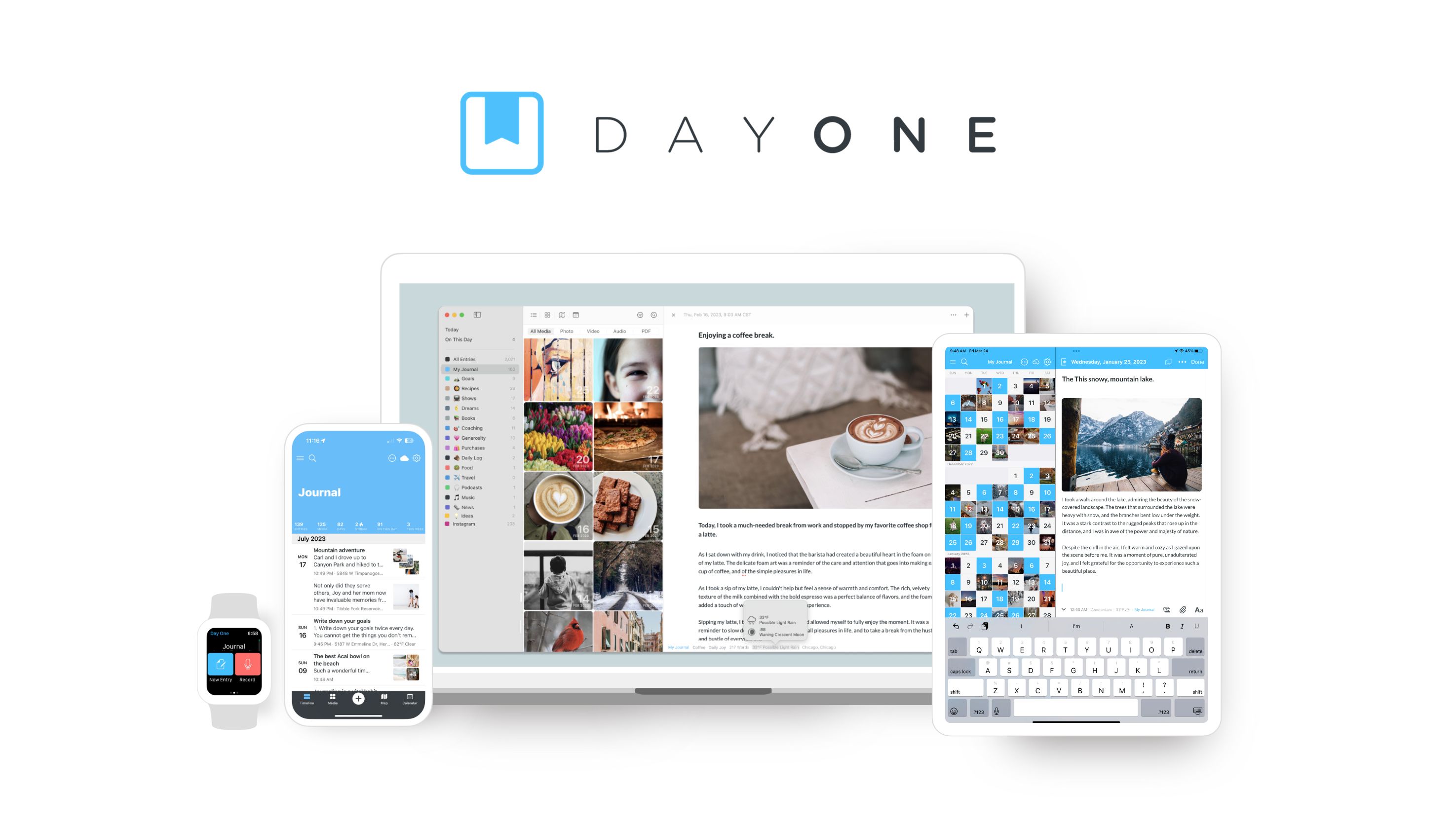
robots.txt (opens in a new tab)
0 rulesAll bots 0 allowed · 0 disallowed
No matching rules.
Sitemaps
1Recent Updates
- Website images
- Screenshots
- Network details
- Website Technologies
- Pages and Search Information
- HTTP Response Information
- TLS and certificates
- DNS Information
- Domain Registration
- Website profile
- Website Description
- Website Name
- Website profile
- Website Description
- Website Name
User reviews (0)