Website profiles · Technology insights · Alternatives

desktophut.com

Enrich your desktop with 67,000+ free 4K live wallpapers and animated backgrounds. Download high-quality video wallpapers for Windows PC, Mac, and mobile.

No paid content found
Visit website
Profile views 5 Outbound visits 1 Normal
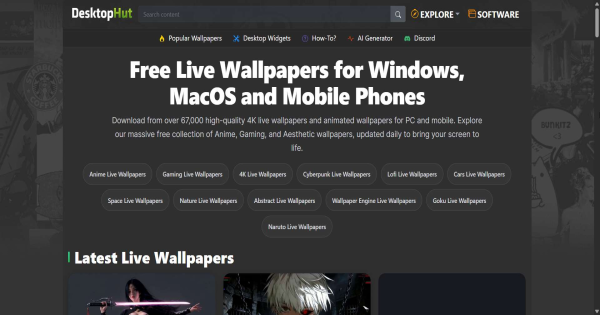
DesktopHut Full homepage screenshot

At a glance

Category
Video & Film
Language
English
Paid-content signal
No paid content foundObserved
Registered
2015
Hosting
OVH SASInferred
HTTPS certificate trusted
PassedObserved
Last updated

Website review

This review may include AI-generated content and is not individually verified. Domain, certificate and other facts come from the observed data on this page.

What is DesktopHut?

DesktopHut is a free gallery of live and animated wallpapers for desktop and mobile devices. Its catalog is organized around moving backgrounds — video-style wallpapers rather than static images — with a stated library of 67,000+ items spanning 4K and HD resolutions. The homepage is built for browsing: a Trending Now row, a Recently Viewed section, and a paginated "More Animated Wallpapers" grid, each tile showing a preview, resolution, and a like count.

The content leans heavily toward fandom and gaming: anime characters (Hatsune Miku, Itachi, Chainsaw Man), game tie-ins (Minecraft, Grand Theft Auto, Jett from Valorant), plus nature and abstract scenes like Midnight Meadow or Prismatic Focus. Some entries are interactive web wallpapers, such as a Minecraft time-and-weather scene, rather than plain video loops.

Who it suits

  • Windows or Mac users who want a moving desktop without paying for a wallpaper app
  • Anime and gaming fans looking for character-specific backgrounds
  • People who prefer browsing a curated feed over searching a marketplace

Trade-offs to weigh

  • Free galleries often vary in source quality and licensing; check the individual wallpaper page if you plan to reuse it publicly.
  • Animated wallpapers consume more GPU and battery than static ones, which matters most on laptops.
  • Resolution labels tell you the pixel size, not whether the motion looks smooth on your monitor.

A practical next step: open the Trending Now row, filter mentally by your screen resolution (3840x2160 for a 4K monitor), and preview two or three before downloading. If you want a broader comparison of wallpaper sources, Wallpaper Engine covers a paid app ecosystem, while DesktopHut itself is the free gallery described here.

How do I install a live wallpaper from DesktopHut on Windows?

On Windows, DesktopHut itself is a download gallery rather than an installer. You download a video file from the site, then use a separate live-wallpaper app to play it on the desktop. The page lists 4K and HD animated backgrounds for Windows, Mac and mobile, with resolutions such as 3840×2160 and 4096×2304 shown on individual entries.

Typical Windows workflow

  1. Open the wallpaper page you want on DesktopHut and download the file. Live wallpapers are usually delivered as video (often MP4 or WebM), so check the format before downloading.
  2. Install a desktop video-wallpaper player. Common choices are Wallpaper Engine (paid, Steam), Lively Wallpaper (free, open source), or the built-in Windows options if the file is a plain video.
  3. In the player, choose "Add wallpaper" or "Open file" and select the downloaded video.
  4. Set it to your target monitor. On multi-monitor setups, apply it per display rather than globally.
  5. Adjust performance settings if needed: pause when a full-screen app or game is running, cap the frame rate, and lower the resolution for weaker GPUs.

Quick comparison of common players

Tool Cost Best for Trade-off
Lively Wallpaper Free Trying live wallpapers without paying Fewer community-made scene effects
Wallpaper Engine Paid Large library, per-monitor control, game-friendly pausing Costs money and adds a background process
Windows built-in slideshow/video Free Simple, low-risk use No real animation controls or per-monitor rules

Practical notes

  • Match the wallpaper resolution to your monitor. A 4096×2304 file on a 1080p screen is fine but wasteful; downscaling saves GPU load.
  • Live wallpapers use more battery and GPU than static images. On a laptop, set the player to pause on battery or when a game is fullscreen.
  • If a download is a .web file, it is a web-based wallpaper and generally needs a player that supports that format rather than a standard video player.
  • Keep downloaded files in one folder so your player can find them later, and delete ones you no longer use to save disk space.

As a next step, pick one wallpaper from the Trending Now list, download it, and test it in Lively Wallpaper first. If it runs smoothly, consider Wallpaper Engine for finer control.

Which DesktopHut wallpapers are compatible with Wallpaper Engine?

DesktopHut doesn't label individual wallpapers as "Wallpaper Engine compatible" in the material available; it presents a gallery of live and animated wallpapers with resolutions like 3840x2160 and 4096x2304, and the site's own keywords include "wallpaper engine wallpapers." So the practical answer is: compatibility depends on the file format you download, not on the wallpaper's theme or resolution.

What to check before downloading

Wallpaper Engine can import local video files (MP4/WebM) and some image formats directly, but it cannot run arbitrary executables or web widgets from other sites as native scenes. On DesktopHut, the safest bets are entries whose previews are ordinary video loops:

  • Nature/ambient loops such as Midnight Meadow, Silent Rain: Gothic City, Lavender Sky, and Minecraft – Relaxing Fireplace.
  • Anime and gaming loops such as Hatsune Miku, Sakura Katana, Jett in Air, Itachi: Crow Genjutsu, and Spider-Man: Red & Blue.
  • Clock-style wallpapers like Ink Samurai Clock, which often ship as video rather than interactive scenes.

Entries marked "WEB" in the listing (for example Minecraft — Time & Weather or Outer Wilds Star System) are the ones most likely to be interactive or browser-based rather than plain video, so treat those as the least predictable for Wallpaper Engine import.

A quick decision rule

If a wallpaper's download is a video file, it will almost certainly work in Wallpaper Engine via "Open from file" or by adding it to a local folder. If the download is an installer, a .exe, or a web package, it may not.

For a wider pool of wallpapers already packaged for that app, Wallpaper Engine hosts the official Workshop, and Steam Community hosts the Workshop browser. If you want static 4K alternatives, Wallhaven and Unsplash are useful.

Next step: pick one DesktopHut wallpaper you like, download it, and check the file extension before importing — that single check tells you more than any category label.

What anime and gaming live wallpapers are available on DesktopHut?

DesktopHut's gallery leans heavily toward anime and gaming subjects, with the two categories often overlapping — anime characters from games, and game scenes rendered in an anime style. From the page evidence, the visible catalog includes:

Anime and manga characters

  • Hatsune Miku (listed as the #1 trending item)
  • Sakura Katana
  • Yuji Itadori: Blue Flame (Jujutsu Kaisen)
  • Itachi: Crow Genjutsu and Itachi: Crimson Halo (Naruto)
  • Chainsaw Man Reze: The Bomb Devil
  • Kuroko: Neon Dunk
  • Arlecchino: The Knave (Genshin Impact)
  • Tokyo Revengers – Takemichi e Hinata
  • White Rose & Blue Eyes

Gaming titles and game-adjacent scenes

  • Jett in Air (Valorant)
  • Minecraft: Japanese Summer, Minecraft – Relaxing Fireplace, Minecraft – Relaxing Cherry Grove, and a Minecraft time-and-weather wallpaper
  • Grand Theft Auto VI: The Album
  • Outer Wilds Star System
  • Spider-Man: Red & Blue, Doctor Doom, and Silver Surfer entries (comic/film characters that also appear in games)

Stylized non-franchise pieces that fit the same audience

  • Ink Samurai Clock, Peerless Katana, Silent Rain: Gothic City, The Fallen Angel Monochrome, Prismatic Focus, Midnight Meadow, Lavender Sky, Yawning Cat: Sky Reflection

How to choose among them

The main practical split is between character wallpapers (a single figure, often with a neon or dramatic backdrop) and ambient loops (Minecraft fireplaces, rainy gothic cities, meadows). Character pieces suit a static desk setup where you want the wallpaper to be the focal point; ambient loops are easier on the eyes during long work sessions and pair better with a cluttered desktop.

A second split is resolution. The page shows items at 3840x2160, 4096x2304, 4096x2560, 3840x1080 and 1920x1080. If you use an ultrawide monitor, the 3840x1080 entries (Chainsaw Man Reze, Minecraft – Time & Weather) are the ones built for that aspect ratio; standard 16:9 panels should stick to the 3840x2160 and 4096x2304 files to avoid cropping.

A quick next step

Pick one character wallpaper and one ambient loop, then alternate between them — for example, Hatsune Miku for a showcase desktop and Minecraft – Relaxing Fireplace for work hours. If you want a wider pool of the same kind of content beyond this gallery, Wallpaper Engine hosts a large user-uploaded library of animated wallpapers, and Steam Community Workshop pages are where many of those creators publish.

How can I find 4K animated wallpapers for specific resolutions like 3840x2160?

DesktopHut is built around exactly that kind of search: its gallery lists each wallpaper with its resolution, and the page evidence shows many entries tagged 3840x2160, 4096x2304, 3840x1080 and 4096x2560, so you can scan the labels and skip anything that doesn't match your monitor. The catalogue is described as 67,000+ free live and animated wallpapers for Windows, Mac and mobile, with daily updates.

H3 Practical ways to narrow it down on DesktopHut

  • Use the resolution shown on each thumbnail or card as your first filter. For a standard 16:9 4K display, look for 3840x2160; for a 16:10 monitor, 3840x2400 or 4096x2560 is closer; for an ultrawide, 3840x1080 appears in the listings.
  • Check whether a wallpaper is marked WEB or as a video file. WEB entries in the evidence, such as Minecraft — Time & Weather and Outer Wilds Star System, tend to be interactive or browser-style backgrounds, while the numbered-resolution entries are the usual video live wallpapers.
  • Browse the Trending Now and Recently Viewed sections first if you want popular picks, then use the page-by-page navigation to go deeper.
  • Search by theme or franchise if you already know the style you want — the gallery mixes anime (Hatsune Miku, Itachi, Chainsaw Man), gaming (Minecraft, GTA VI, Jett), nature (Midnight Meadow, Lavender Sky) and abstract pieces (Prismatic Focus).

H3 Matching resolution to your setup If your monitor is 3840x2160, a 4096x2304 wallpaper will usually still look sharp because it is larger and can be scaled down, but a 1920x1080 file will look soft on a 4K panel. For a 3440x1440 ultrawide, a 3840x1080 file is a reasonable fit, though you may see slight letterboxing or cropping depending on how your wallpaper app handles aspect ratios. A 2560x1440 file on a 4K screen is a compromise: acceptable for busy animated scenes, less so for crisp static detail.

H3 A concrete workflow

  1. Decide your target resolution and aspect ratio.
  2. Open DesktopHut and scan the listed resolutions, ignoring mismatches.
  3. Preview a few candidates — the site provides preview buttons for each entry.
  4. Download and apply through your live wallpaper tool, such as Wallpaper Engine if the file is a supported video or scene format.

If you want a broader pool to compare against, Wallpaper Engine hosts a large Workshop library where resolution filters are built into the search, and Wallhaven is useful for high-resolution static and some animated backgrounds with strong filtering. For general desktop customisation ideas, Reddit communities such as r/wallpaperengine often discuss which resolutions work best on specific monitors.

The key decision criterion: prioritise exact or larger-than-native resolution, then theme, then popularity. A slightly oversized 4K file is almost always a safer bet than a perfectly themed 1080p one.

Is DesktopHut free, and do I need an account to download wallpapers?

DesktopHut presents itself as a free gallery of live and animated wallpapers, and nothing on the page suggests a paid tier or a required sign-in to download. The page's own framing is "Free Live Wallpapers & Animated Wallpapers," with downloads counted on individual items (for example, "416 downloads" on one wallpaper), which is the pattern you'd expect from a site where anyone can grab a file without registering.

What to expect in practice

  • No account mentioned: there is no visible login, signup or subscription prompt in the page content, so treat downloading as an open, no-registration action.
  • Free applies to the wallpapers themselves. Your real cost is elsewhere: some animated wallpapers are listed as WEB files or are tied to wallpaper-engine formats, and running high-resolution 4K video backgrounds can tax your GPU and battery. That is a hardware trade-off, not a paywall.
  • Licensing is the part to check yourself. "Free to download" is not the same as "free to reuse." If you only want a personal desktop background, that is usually fine; if you plan to repackage a wallpaper in a video, stream overlay or product, look for the site's terms or the original artist credit first.

A quick decision rule

If you just want a moving background on your own machine, go ahead and download — no account needed. If you need something you can redistribute or monetize, verify the license on the specific wallpaper page before you commit.

For comparison, Wallpaper Engine is the paid Steam app many of these wallpapers are built for, and Wallhaven is a well-known free static-wallpaper community if you'd rather avoid animation entirely.

Related questions

More questions →
Free Moving Wallpapers: What They Are and How to Use Them on Your Desktop

Free moving wallpapers are animated or video backgrounds you can download at no cost and set as your desktop background. DesktopHut, for example, offers a curated gallery of 4K and HD live wallpapers for PC, macOS, and mobile devices, with new options added daily. You can browse and download these files without paying, though you'll need a separate app or built-in tool to make them actually animate on your desktop.

What Counts as a Moving Wallpaper

A moving wallpaper (also called a live wallpaper or animated background) is a looping video, animation, or interactive scene that replaces your static desktop image. Unlike a JPG or PNG, it plays continuously behind your icons and windows.

Common categories you'll find in free galleries include:

  • Gaming scenes — titles like Minecraft, Grand Theft Auto VI, and Spider-Man themes
  • Anime and character art — Hatsune Miku, Chainsaw Man, Itachi, and similar
  • Nature and ambient loops — meadows, rain, fireplaces, lavender skies
  • Abstract and clock wallpapers — samurai clocks, prismatic focus effects

DesktopHut's gallery shows resolution tags like 3840x2160, 4096x2304, and 3840x1080 (ultrawide), which tells you the intended display shape before you download.

Where to Get Free Moving Wallpapers

DesktopHut is one source: a free, curated gallery of 4K and HD live wallpapers spanning Windows, Mac, and mobile. Its homepage surfaces "Trending Now," "Recently Viewed," and "More Animated Wallpapers" sections, so you can sort by popularity or pick up where you left off.

Wallpaper Engine is the other name that comes up often. It's a separate application with its own workshop of user-made wallpapers. The two aren't the same thing — DesktopHut is a download gallery, while Wallpaper Engine is a runtime that plays and manages animated wallpapers. Some files work with either, depending on format.

When choosing a source, check:

Factor Why it matters
Resolution Match your monitor (e.g., 3840x2160 for 4K, 3840x1080 for ultrawide)
Format Video files (MP4/WebM) vs. app-specific packages
Platform tags Windows, macOS, or mobile compatibility
File size Larger 4K loops use more disk and RAM

How to Set a Moving Wallpaper on Windows

Windows doesn't animate wallpapers natively, so you need a helper app.

  1. Download the wallpaper file from a gallery like DesktopHut. Note its resolution and format.
  2. Install a live wallpaper app — Wallpaper Engine is the common choice; some free alternatives exist.
  3. Import or open the file in the app. Video-format wallpapers usually load directly; app-specific packages may need the matching program.
  4. Apply it as your desktop background. The app takes over the wallpaper layer.
  5. Verify that it animates and that your icons remain visible and clickable.

Expected result: the scene loops behind your desktop icons. If it shows a still frame instead, the file format likely isn't supported by your app.

How to Set One on macOS

macOS also lacks built-in video wallpaper support in most versions. Options include:

  • Third-party apps that play video files as the desktop background
  • Some apps accept MP4/WebM directly; others need conversion first

The steps mirror Windows: download, install a compatible app, import the file, apply, then confirm it loops.

Performance and Battery Considerations

Moving wallpapers are always running, which has real costs:

  • GPU and CPU load — continuous video decoding keeps graphics hardware busy
  • Battery drain — on laptops, expect faster discharge; many apps pause the wallpaper on battery
  • RAM usage — 4K loops are heavier than 1080p ones
  • Multiple monitors — each screen running a live wallpaper multiplies the load

If your machine feels sluggish or hot, drop to a lower resolution or a simpler loop. Pausing on battery is a common setting worth enabling.

Troubleshooting Common Problems

Black screen instead of the wallpaper Usually a codec or format mismatch. Try a different file or convert it to a format your app supports.

Wallpaper loads but doesn't animate The app may not be running, or the file was applied as a static image. Re-apply it through the live wallpaper app, not the system settings.

High CPU or fan noise Lower the resolution, reduce the frame rate if the app allows, or switch to a lighter scene.

Icons hard to see Pick a darker or less busy loop, or adjust icon label shadows in your OS settings.

Wallpaper resets after reboot Some free apps don't auto-start. Enable "launch at startup" in the app's settings.

Picking the Right Wallpaper for Your Setup

Match resolution to your display first — a 4096x2304 file on a 1080p screen wastes resources, and a 1920x1080 file on a 4K monitor looks soft. Then weigh the scene's complexity against your hardware: a subtle rain loop is far lighter than a busy multi-element animation. If you're on a laptop and care about battery, favor lower resolutions and enable pause-on-battery. DesktopHut's resolution tags and trending rankings give you a quick way to filter candidates before committing to a download.

Animated Backgrounds for Desktop: What They Are and How to Use Them

Animated backgrounds for desktop are moving wallpapers — video, HTML, or app-driven scenes that replace your static image. They work on Windows and macOS, but the right format depends on your hardware: 4K video loops look best on a dedicated GPU, while lighter HTML or app-based wallpapers suit laptops and integrated graphics. DesktopHut hosts a free gallery of 4K and HD live wallpapers for PC, macOS, and mobile, updated daily, which makes it a reasonable starting point for testing whether your machine handles motion well.

What counts as an animated background

An animated background is any wallpaper that changes over time. That covers three distinct things people often mix up:

  • Live wallpaper — a looping video or rendered scene sitting on the desktop layer, behind your icons.
  • Animated wallpaper — often used interchangeably with live wallpaper, but sometimes refers to shorter, lighter motion loops.
  • Screensaver — a separate mode that only appears after idle time. It is not a background and does not run while you work.

The practical difference: a live wallpaper is always visible and always consuming some resources. A screensaver is not.

Formats and how they are delivered

Format How it runs Typical use
Video file (MP4, WEBM) Played by a wallpaper app or OS feature 4K cinematic loops, nature, abstract motion
WEB / HTML Rendered in a lightweight browser layer Interactive or data-driven scenes, like Minecraft time-and-weather wallpapers
Wallpaper app library Managed by software such as Wallpaper Engine Large collections, per-monitor control, workshop content

DesktopHut's gallery shows both video-based entries (most listings carry explicit resolutions like 3840x2160 or 4096x2304) and WEB-tagged items, such as "Minecraft — Time & Weather" and "Outer Wilds Star System." That mix tells you the site is not limited to one delivery method, so check the tag before downloading if your setup only supports video.

Performance: what to check before you commit

Motion costs resources. Before applying a 4K animated background, consider:

  • Resolution vs. your display — a 4096x2304 file on a 1080p monitor is downscaled, which is fine, but it still decodes at full size.
  • GPU and CPU load — video decoding is usually GPU-accelerated; HTML scenes can lean on CPU.
  • Battery — on laptops, any always-running animation shortens unplugged time. Lower the resolution or pause on battery if your wallpaper app allows it.
  • Multiple monitors — each screen running its own 4K loop multiplies the load.

A simple test: apply one 4K wallpaper, open Task Manager (Windows) or Activity Monitor (macOS), and watch GPU and CPU usage for a few minutes. If idle usage climbs noticeably, drop to a 1920x1080 or 2560x1440 file.

Setting an animated background

Windows

  1. Install a live wallpaper application — Windows does not animate wallpapers natively.
  2. Download a wallpaper file from a gallery such as DesktopHut.
  3. Import the file into the app and select your monitor.
  4. Set it to pause when a fullscreen app or game is running, if the option exists.

Expected result: the desktop animates behind your icons, and the app reduces or stops playback during games.

macOS

  1. Use a live wallpaper app, since macOS also lacks native video wallpaper support.
  2. Add the downloaded file to the app's library.
  3. Assign it to the desktop and choose whether it should pause on battery.

Expected result: the wallpaper plays on the desktop layer without covering open windows.

Common problems and fixes

  • Black screen after applying — the codec is unsupported. Convert the file to a standard MP4/H.264, or pick a different entry.
  • Stutter or frame drops — the resolution is too high for your GPU. Step down to 1080p or 1440p.
  • Audio playing — some video wallpapers ship with a soundtrack. Mute it in the app or use a silent file.
  • Wallpaper reverts to static after reboot — the app is not set to launch at startup. Enable it in the app's settings.
  • Animation stops when a game opens — this is usually intentional (pause-on-fullscreen). Check the app's rules before assuming it is broken.

Judging quality before you download

DesktopHut's listings expose useful signals: resolution (3840x2160, 4096x2304, and so on), a preview thumbnail, and a like or download count. Use them together — a high resolution with a healthy like count is a better bet than a large file nobody has rated. The site describes itself as a free, curated gallery of 4K and HD live wallpapers for PC, macOS, and mobile, updated daily, so newer trending entries are worth a look if you want something current rather than a static classic.

Pick one wallpaper, test your idle resource usage, and only then build a rotation. That order keeps a good-looking desktop from quietly costing you performance.

What Is DesktopHut and How Do You Use Its Free Live Wallpapers?

DesktopHut is a free, curated gallery of live and animated wallpapers for PC, macOS, and mobile, offering 4K and HD downloads that are updated daily. It suits anyone who wants a moving desktop background without paying, and the site organizes content into browsable sections like Trending Now, Recently Viewed, and More Animated Wallpapers. The main practical considerations are picking a file whose resolution matches your screen and understanding that a "WEB" wallpaper may behave differently from a standard video file.

What DesktopHut actually offers

The site describes itself as a free, curated gallery of 4K and HD live wallpapers for PC, macOS, and mobile devices, with a library stated at 67,000+ wallpapers and daily updates. Content is grouped into:

  • Trending Now — the most-viewed or most-liked wallpapers at a given moment
  • Recently Viewed — your own browsing history on the site
  • More Animated Wallpapers — the broader catalog, paged (the sample shows "Page 1 · Next →")

Each listing shows a preview, a resolution, and often a like count and download count. Examples from the gallery include:

Title Resolution Notes
Hatsune Miku Live Wallpaper 3840x2160 Trending
Ink Samurai Clock 3840x2160 Clock-style animated wallpaper
Sakura Katana Live Wallpaper 3840x2160 Trending
Prismatic Focus Live Wallpaper 3840x2592 Trending
Minecraft — Time & Weather WEB Marked "WEB" rather than a fixed resolution
Outer Wilds Star System Live Wallpaper WEB Marked "WEB"
Tokyo revengers - Takemichi e Hinata 1920x1080 174 downloads
Lavender Sky 2560x1440 —

The recurring resolutions (3840x2160, 4096x2304, 4096x2560, 3840x1080, 1920x1080, 2560x1440) tell you the library leans toward 4K and ultrawide formats, with some 1080p and 1440p options.

How to browse and pick a wallpaper

  1. Start with Trending Now if you want a quick, popular choice, or use More Animated Wallpapers to page through the full catalog.
  2. Check the resolution before downloading. Match it to your monitor: 3840x2160 for a standard 4K display, 3840x1080 for a 32:9 ultrawide, 1920x1080 for a 1080p screen. A mismatched resolution will either stretch, crop, or letterbox.
  3. Note the "WEB" tag. Some entries (Minecraft — Time & Weather, Outer Wilds Star System) are labeled WEB instead of a pixel resolution. Treat these as a different format from the fixed-resolution video wallpapers and expect them to behave differently once downloaded.
  4. Use Recently Viewed to return to something you saw earlier without re-searching.

Applying a live wallpaper on Windows, macOS, or mobile

DesktopHut provides the wallpaper files; the site's own description covers downloading for Windows, Mac, and mobile, but the exact playback method depends on your OS and whether the file is a video or a web-based wallpaper.

General approach:

  • Windows: A downloaded video wallpaper needs a live-wallpaper player to run as your background, since Windows itself only sets static images. Video-based files play through such a player; "WEB" wallpapers typically need a player that supports web content.
  • macOS: Similar logic — a live wallpaper app is required to animate the desktop, as the built-in settings handle static images.
  • Mobile: Live wallpapers are usually set through the device's wallpaper settings or a dedicated app, depending on the file format.

The site's keywords reference "wallpaper engine wallpapers," which indicates some files are intended for use with a live-wallpaper engine rather than being set directly.

Common issues and fixes

  • The wallpaper downloads but the desktop stays static. This almost always means no live-wallpaper player is running. A video file set as a normal background will only show a single frame.
  • The image is stretched or cropped. The resolution doesn't match your display. Re-download a file closer to your screen's native resolution (for example, 3840x1080 for ultrawide).
  • A "WEB" wallpaper won't play in a standard video player. WEB-tagged entries aren't standard video files; they need a player that supports web-based wallpapers.
  • Performance drops or the animation stutters. High-resolution 4K live wallpapers are more demanding than static images, especially on integrated graphics. Choosing a lower resolution (1920x1080 or 2560x1440) can reduce the load.

What to check before you commit

  • Confirm the resolution matches your monitor to avoid stretching.
  • Check whether the file is a standard video or a "WEB" entry, since they need different playback support.
  • Make sure you have a live-wallpaper player installed if you're on Windows or macOS, because the OS alone won't animate a downloaded video.
  • The site presents its wallpapers as free; no pricing or login requirements are stated in the available information, so treat any account or payment prompt you encounter as something to verify on the page itself rather than assume.
Moving Wallpapers for PC: What They Are and How to Set Them Up

Moving wallpapers for PC are animated desktop backgrounds that play video, web content, or scripted scenes behind your icons instead of showing a single static image. You can set them up on Windows or macOS, but neither OS plays them natively in the way you'd expect — you need a dedicated app or tool. This guide covers what moving wallpapers are, the formats they come in, how to install them on each platform, and how to fix the performance and black-screen issues that come up most often.

What counts as a "moving wallpaper"

A moving wallpaper (also called a live wallpaper or animated background) is any desktop background that changes over time. That covers a few distinct things:

  • Video wallpapers — a looping MP4 or WebM clip rendered as your background.
  • Web wallpapers — an HTML/CSS/JavaScript scene (often interactive, reacting to mouse or time of day).
  • App-rendered wallpapers — scenes drawn in real time by a wallpaper engine, sometimes with audio or particle effects.
  • Animated GIFs — technically animated, but usually a poor fit for full-screen desktop use because of file size, color banding, and no audio.

The key difference from a static wallpaper is that a moving wallpaper runs a continuous rendering process. That's what makes it look alive — and also what creates the CPU, GPU, and battery cost discussed below.

Formats and what actually supports them

Format Typical file type Runs natively on Windows? Runs natively on macOS?
Static image JPG, PNG, WEBP Yes Yes
Animated GIF GIF No (shows first frame) No (shows first frame)
Video MP4, WebM No No
Web / interactive HTML, JS No No
Engine-rendered App-specific Via third-party app Via third-party app

Neither Windows nor macOS ships with a built-in video or web wallpaper player. Windows historically had DreamScene (Windows Vista Ultimate only) and macOS had limited dynamic desktop options, but for real moving wallpapers on current systems you install a third-party tool. This is the single most important thing to understand before you start: the wallpaper file alone won't do anything until an app renders it.

Setting a moving wallpaper on Windows

The most common route is a wallpaper engine app. The general workflow is the same across tools:

  1. Install a wallpaper app that supports video or web wallpapers. Free and paid options exist; check current pricing on each vendor's site, since this varies and changes.
  2. Download a wallpaper file in a supported format (usually MP4, WebM, or a package format the app recognizes).
  3. Import or open the file in the app — most have a "browse" or "add" button, or you can right-click a file and choose "set as wallpaper" if the app registers a shell extension.
  4. Assign it to a monitor. Multi-monitor setups usually let you set a different wallpaper per display.
  5. Adjust playback settings — mute audio, set playback speed, pause when a full-screen app is running, or pause on battery.

Expected result: the animated background appears behind your desktop icons and persists after a reboot if the app is set to launch at startup.

Common snags:

  • Black screen instead of the wallpaper — usually a codec or GPU-acceleration issue. Try a different file format (MP4/H.264 is the safest), or toggle hardware acceleration in the app.
  • Wallpaper stops when you open a game — many apps pause automatically to save resources; check the "pause on fullscreen" setting.
  • Icons become hard to read — pick a darker or less busy wallpaper, or enable a subtle icon-label shadow.

Setting a moving wallpaper on macOS

macOS handles this differently. There's no widely used equivalent of the Windows wallpaper-engine ecosystem, so options are narrower:

  1. Check built-in Dynamic Desktop first. macOS includes dynamic wallpapers that shift with the time of day. These are technically "moving" but not video — they're a set of stills that change. If that's enough, you don't need anything else.
  2. For true video wallpapers, use a third-party app. These render a video behind the desktop. The setup mirrors Windows: install, import a video file, assign to display.
  3. Watch for permission prompts. macOS may ask for screen-recording or accessibility permissions for the app to draw behind icons. Grant only what the app needs.

Expected result: the video loops behind your desktop. Note that macOS is generally more aggressive about power management, so expect the wallpaper to pause or stop on battery more often than on Windows.

Performance and battery impact

A moving wallpaper is a continuously running render job. Realistic expectations:

  • Idle CPU/GPU use rises. A 1080p video loop is light; a 4K web wallpaper with particles and audio can be heavy.
  • Laptop battery life drops. This is the biggest practical cost. Most apps offer a "pause on battery" toggle — use it.
  • Gaming and full-screen apps should trigger an automatic pause; if yours doesn't, set it manually.
  • Multiple 4K monitors multiply the load. Consider a lower resolution or a static wallpaper on secondary displays.

If your fans spin up or the machine feels warm at idle after setting a wallpaper, that's the wallpaper, not a background process — try a simpler file or lower the resolution.

Where to get free moving wallpapers

DesktopHut is a free, curated gallery of 4K and HD live wallpapers for PC, macOS, and mobile, with the library described as updated daily and containing 67,000+ wallpapers. Its catalog is organized into sections like Trending Now, Recently Viewed, and More Animated Wallpapers, and the listings show resolution and format tags — for example, entries tagged at 3840x2160, 4096x2304, and 3840x1080, plus some marked "WEB" for web-based wallpapers. Categories visible in the gallery include anime (Hatsune Miku, Itachi, Chainsaw Man), gaming (Minecraft, Grand Theft Auto VI, Jett), and nature (Midnight Meadow, Lavender Sky).

When browsing a source like this, check two things before downloading: the resolution (match or exceed your monitor's native resolution) and the format tag (video vs. web), since that determines which app can play it.

Quick decision guide

  • Want the simplest option? Use your OS's built-in dynamic wallpaper (macOS) or a static image. No performance cost.
  • Want video wallpapers on Windows? Install a wallpaper engine app, then download MP4/WebM files. This is the most flexible path.
  • On a laptop and care about battery? Enable "pause on battery" in your wallpaper app, or skip moving wallpapers entirely.
  • On macOS and want true video? Expect a narrower app selection and more power-management friction.
  • Just want something that looks alive without the cost? A high-quality static 4K image of a dynamic scene often reads as "moving" at a glance with zero overhead.

Website Overview

An established domain and managed infrastructure suggest continuity of operations and may support dependable delivery, although neither guarantees service quality. Page metadata, canonical configuration and social previews work together to provide more consistent search and sharing presentation.

Domain and Registration

Registered in 2015, this domain has about 11 years of history. That suggests continuity, although ownership and purpose may have changed. The domain uses the common .com extension, which is not an independent safety signal.

DNS and Email

The observed email authentication setup is incomplete: DMARC is missing. Nameservers are provided by serveriai.lt, indicating managed DNS hosting. MX records point to the desktophut.com email service. No CNAME was found; the observed records resolve directly to addresses. DNSSEC signatures were not detected, so this additional DNS authenticity protection is not confirmed.

TLS and Certificates

The public key uses EC with 256 bits. The server supplied a complete certificate chain. No organization name is present in the certificate; the available fields are consistent with domain validation. The certificate was issued by Let's Encrypt, commonly associated with automated certificate services. The certificate's total validity is about 89 days, consistent with a short renewal cycle.

HTTP and Browser Security

The response lacks these common security headers: X-Content-Type-Options. CORS permits any origin to read this response. This is common for public resources; sensitive responses need narrower handling. No X-Powered-By header was found, reducing one common source of backend fingerprinting information. No obvious internal addresses or debug information were found in the headers. The Server header identifies nginx without an exact version.

Technology Stack Analysis

The public page identifies Google Analytics, nginx without precise versions, leaving fewer clues for version-specific scanning.

Search and Social Sharing

Twitter Card metadata is configured. The title has 59 characters, within a common display range. A meta description is present, with 154 characters. The observed directives allow indexing and link following. No Generator meta tag is publicly exposed.

Hosting and Email

DNSserveriai.lt
HostingOVH SAS
Emaildesktophut.com
Approximate IP geolocation (inferred; a CDN or proxy may differ from the origin server) Canada flagCanada Inferred 66.70.207.122

Registration details

RDAP / WHOIS

RegistrarName SRS AB
Registered2015-08-04
Expires2027-08-04
Domain statusactive
Nameserversns1.serveriai.lt、ns2.serveriai.lt、ns3.serveriai.lt、ns4.serveriai.lt
DNSSECunsigned

DNS records

DNS

TypeNameValueTTLPriority
Awww.desktophut.com66.70.207.1223412—
MXdesktophut.comdesktophut.com360010
NSdesktophut.comns1.serveriai.lt86400—
NSdesktophut.comns2.serveriai.lt86400—
NSdesktophut.comns3.serveriai.lt86400—
NSdesktophut.comns4.serveriai.lt86400—
TXTdesktophut.comv=spf1 a a:node01.kaifas.lt mx ptr redirect=spf.serveriai.lt3600—

TLS and certificates

TLS / SSL

AssessmentNormal configuration
Supported protocolsTLSv1.2、TLSv1.3
Negotiated protocolTLSv1.3
Certificate subjectdesktophut.com
IssuerLet's Encrypt
Valid until2026-11-20T20:52 · Remaining when checked: 58 days
Verification detailsCertificate trust: Passed · Hostname match: Passed

HTTP response headers

HTTP

HeaderValue
content-typetext/html; charset=UTF-8
cache-controlno-cache, private
servernginx
strict-transport-securitymax-age=31536000; includeSubDomains
content-security-policydefault-src * 'unsafe-inline' 'unsafe-eval' data: blob:;
x-frame-optionsALLOWALL, SAMEORIGIN
x-content-type-optionsnosniff, nosniff
referrer-policyno-referrer-when-downgrade, strict-origin-when-cross-origin
permissions-policygeolocation=(), microphone=(), camera=(), interest-cohort=()
access-control-allow-origin*
set-cookieRedacted

Identified technologies

Google Analyticsnginx

Pages, Search and Sharing

Meta descriptionEnrich your desktop with 67,000+ free 4K live wallpapers and animated backgrounds. Download high-quality video wallpapers for Windows PC, Mac, and mobile.
Canonical URLhttps://www.desktophut.com
LanguageEnglish (default)
Twitter Cardsummary
All bots 1 allowed · 9 disallowed
  • Allow/
  • Disallow/my/favorites
  • Disallow/random
  • Disallow/discover
  • Disallow/download/
  • Disallow/track-download/
  • Disallow/redirect/
  • Disallow/edit/
  • Disallow/upload-wallpaper
  • Disallow/system/

Recent Updates

  • Website images
  • Screenshots
  • Pages and Search Information

User reviews (0)

  • No reviews yet.