
 简体中文
简体中文 English
Website review
This review may include AI-generated content and is not individually verified. Domain, certificate and other facts come from the observed data on this page.
What is FitHero?
FitHero is a workout-tracking app for logging gym sessions on Android and iOS. Its focus is speed and clarity: you pick a routine or an exercise, log your sets, and see your history on the same screen rather than flipping through a notebook.
What it does
- Tracks weight, reps, time, and distance, with support for estimated 1RM, RPE effort logging, and supersets, tri-sets, and giant sets.
- Shows progress through charts and keeps personal records, with data visible only to you.
- Includes built-in videos and instructions for its exercises, plus a library of 400+ exercises.
- Supports metric or imperial units, dark theme, English and Spanish, and backup/restore that can move data between iOS and Android.
Who it suits
Someone who wants a clean, ad-free log without a paywall and likes the idea of adding their own exercises or building combo flows. The page's review quotes come from an Android user who self-taught lifting and uses it daily, an iOS user who calls it clean and intuitive, and another Android user who values the absence of ads and paywalls and the ability to add custom exercises. Those are users' observations, not independent testing; the practical takeaway is that the app leans toward simplicity and flexibility rather than coaching or nutrition planning.
Trade-off to consider
It is a tracker, not a trainer. If you want guided programming, form correction, or diet features, you would pair it with something else. If you mainly want fast set logging and progress charts, it fits.
Next step: install it, pick one routine, and log a single session. That tells you within minutes whether the logging flow matches how you train.
How does FitHero compare to using a notebook or other workout tracking methods?
FitHero is built to replace a paper notebook first and foremost: it keeps the same simple logging loop (pick an exercise, enter weight/reps/time/distance, move on) but stores every session so you can see trends instead of flipping back through pages. The trade-off is that a notebook never runs out of battery, works with zero setup, and lets you scribble anything; FitHero adds structure, searchable history and charts, which is where a notebook gets weak.
Where the app clearly beats a notebook
- Progress over time. FitHero visualises progress with charts and tracks personal records, so you don't have to manually compare last month's page to today's.
- Exercise guidance in place. Built-in videos and instructions sit next to the logging screen, so a beginner doesn't need a separate browser tab or a coach's demo mid-set.
- Structured set types. It records 1RM estimates, RPE for effort, and supersets/tri-sets/giant sets — things a notebook can hold but not calculate or organise for you.
- No lost data. Backups and restore let you move history between iOS and Android, which a paper log can't do at all.
- Distraction-free. Reviews from Android and iOS users specifically praise the lack of ads and paywalls, which matters if you've tried ad-heavy trackers.
Where a notebook or another method still wins
- Zero friction and zero dependency. No phone, no charging, no app updates. If you train in a basement gym or prefer leaving your phone in a locker, paper is simpler.
- Unlimited free-form notes. Injuries, mood, sleep, cues from a coach — a notebook takes any of it. FitHero is organised around sets, reps and exercises, so free-form journaling is not its strength.
- Spreadsheets suit people who want full control over formulas and long-term data analysis, at the cost of manual entry and no built-in exercise library.
- Dedicated lifting apps (for example Strong) tend to compete on the same logging-plus-charts ground; the practical difference usually comes down to interface feel and which exercise library you prefer, so test one workout in each before committing.
A concrete way to decide
Think about what actually breaks your current routine. If you forget what you lifted last week, or you're guessing at how hard a set felt, an app with history, RPE and 1RM estimates solves a real problem. If your issue is that you never finish logging because the app is slow or nagging, a notebook will outperform it.
A useful first step: run one full session in FitHero using a routine you already know, and log RPE on your hardest set. If the entry takes less time than writing it down and the chart afterwards tells you something you didn't already know, it's worth switching. If not, keep the notebook and use the app only for the exercise library and videos.
Can I import my existing workout data into FitHero from another app or spreadsheet?
FitHero's own page does not describe a spreadsheet import or a migration tool from other apps. What it does describe is data backup and restore, plus transfer of your data between iOS and Android. That is device-to-device movement of FitHero data, not an importer for a CSV or a competitor's export file.
So the practical answer depends on what you have:
- Another app's export (CSV, JSON, etc.): no import path is documented on the page. Assume manual entry unless you find an importer inside the app itself.
- FitHero data on another phone: backup and restore is the intended route, and it works across iOS and Android.
- A paper notebook or spreadsheet you want to keep using as a log: FitHero is built for logging sets in-app (weight, reps, time, distance, plus 1RM, RPE and supersets), so a spreadsheet becomes a reference you read rather than data you load.
A realistic migration approach
If you are moving from a spreadsheet, don't try to recreate years of history on day one. Instead:
- Create the exercises you actually train now, using custom exercise entry if your movements aren't in the library.
- Start logging fresh from your next session.
- Keep the spreadsheet open only to copy your current working weights and rep ranges into your first few sessions.
- Use the progress charts and personal records to rebuild history going forward — the value is in the trend, not in back-filling every old set.
Decide based on your goal
| Your goal | Sensible move |
|---|---|
| Keep a complete historical archive | Keep the spreadsheet as the archive; log new work in FitHero |
| See progress charts for old lifts | Accept that charts start from your first logged session |
| Move FitHero between phones | Use backup and restore |
One caveat worth testing yourself: because backup/restore is the only data-movement feature named on the page, check whether a restore replaces or merges with existing entries before you rely on it. If you want to compare options, Strong and Hevy are established trackers that also publish their own import and export positions, which is worth reading before you commit your history to any one app.
How does FitHero estimate my one-rep max (1RM) from the sets I log?
FitHero estimates your one-rep max (1RM) from the sets you log, but the page doesn't state the exact formula it uses. What it confirms is that 1RM estimation is a built-in feature tied to your logged sets: you record weight, reps, time and distance, and the app turns that data into an estimated 1RM alongside charts and personal records. See FitHero.
In practice, most trackers derive an estimate from a weight-and-reps pair using a standard formula, so the number is a calculated projection rather than a tested max. A common approach is the Epley formula: 1RM ≈ weight × (1 + reps ÷ 30). So a set of 100 kg for 5 reps estimates roughly 117 kg. Other apps use Brzycki or Lombardi variants, which give slightly different results, especially at higher rep ranges.
What this means for you:
- Estimates are most reliable at low-to-moderate reps (roughly 1–6). At 10+ reps, formulas tend to overestimate for many lifters.
- Logging RPE alongside weight and reps helps you judge whether an estimate reflects a true max effort or a submaximal set.
- Because the app visualises progress over time, the trend matters more than any single estimate.
If you want to verify how FitHero calculates it, the quickest route is to log the same weight and reps in the app and compare the estimate against a formula you trust, then check the app's help section or contact support for the exact method.
What should I do if I can't find a specific exercise in FitHero's library?
Add it yourself. FitHero supports custom exercises alongside its built-in library, so a missing movement doesn't block your logging.
H3 How to handle it
- Create the exercise manually with the name you use in your own training, then log sets against it the same way you would a built-in one.
- Keep the name consistent (for example, "Cable Lateral Raise (single arm)") so your history and charts stay grouped under one entry instead of splitting across near-duplicates.
- If the movement is a variation of something already listed, decide whether it deserves its own entry. Separate entries are better when you want to track progress on that variation specifically; otherwise log it under the closest built-in exercise and note the difference in your routine.
H3 When a custom entry is the better call
- Machines and gym-specific equipment that vary by location
- Unilateral or tempo variations you program regularly
- Rehab or mobility work you want counted
A useful rule: if you'd want to see a progress chart for it, give it its own entry. If it's an occasional swap, reuse the closest match.
If you think the exercise belongs in the shared library, the site's excerpt invites users to reach out about contributing, so a request is reasonable. For a second opinion on exercise naming conventions and technique reference, ExRx.net maintains a long-standing exercise directory.
Is my workout data private and secure when using FitHero?
FitHero states that your workout data is private: the page says “your data is only shown to you,” and it also mentions data backups so you can transfer logs between iOS and Android. In practice, that means the app is designed as a personal log rather than a public social feed — your sets, reps, personal records and progress charts are not presented as shared content.
What the page does not specify is the security side in detail. There is no information about encryption in transit or at rest, account authentication, or how backups are stored. So “private” here is a product-design statement, not a full security guarantee.
Practical privacy checklist for any gym tracker
- Use a device passcode and biometric lock. If someone has your unlocked phone, they can often open your fitness app.
- Protect your account. Use a strong, unique password and enable two-factor authentication if the app offers it.
- Understand backups. FitHero supports backup and restore across iOS and Android, which is convenient — but it also means your data may exist outside your phone. Check where backups are stored and whether they are protected.
- Review app permissions. A workout tracker needs little beyond storage and possibly health-platform access; be cautious about unnecessary permissions.
- Export or delete deliberately. If you stop using the app, know how to remove your data rather than leaving an unused account behind.
A realistic scenario
Suppose you train at a commercial gym and log squats, bench press and deadlifts on a shared iPad or a phone you sometimes hand to a training partner. FitHero’s private-by-default design keeps your history out of a public feed, but it will not stop someone holding your unlocked device from scrolling through your logs. A screen lock plus keeping the app behind biometric authentication matters more than the app’s privacy wording alone.
If privacy is your deciding factor, compare how each tracker handles accounts and backups rather than relying on “your data is only shown to you.” You can check FitHero’s own details at FitHero and compare with a mainstream alternative such as Strong or Hevy.
 Namecheap
 Netlify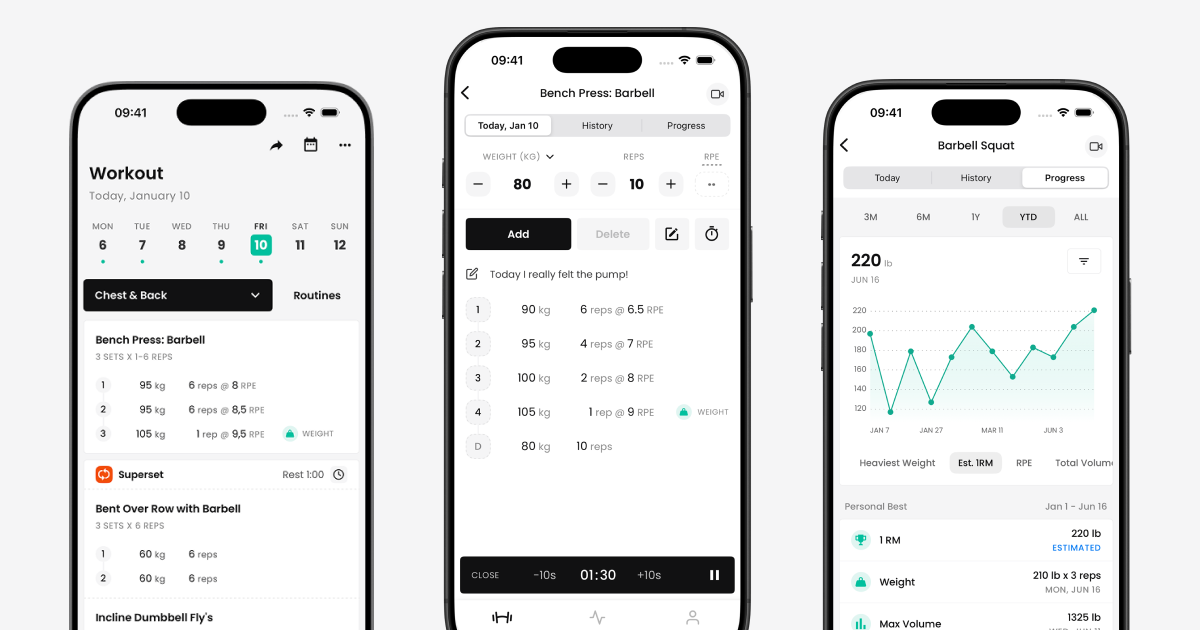

User reviews (0)