Website profiles · Technology insights · Alternatives

fliptip.ai

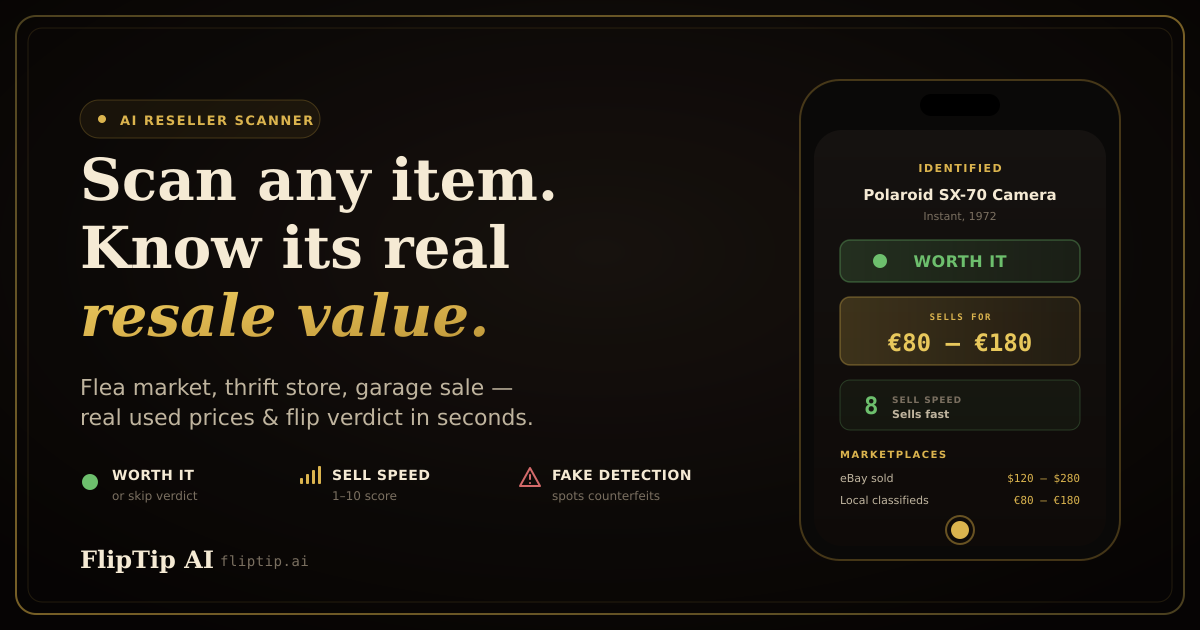
Snap a photo at a thrift store, garage sale or flea market. AI shows its resale value from real eBay sales, your profit after fees and whether to buy it.

Paid content Multilingual
Visit website
Profile views 5 Outbound visits 1 Normal
FlipTip AI Full homepage screenshot

At a glance

Category
Artificial Intelligence
Language
English
Paid-content signal
Paid contentObserved
Registered
2026
Hosting
CloudflareInferred
HTTPS certificate trusted
PassedObserved
Last updated

Website review

This review may include AI-generated content and is not individually verified. Domain, certificate and other facts come from the observed data on this page.

What is FlipTip AI?

FlipTip AI is a mobile reseller tool that turns a phone photo into a resale decision. You point your camera at an item in a thrift store, at a garage sale or flea market, and it identifies the product, checks what it has actually sold for, and tells you whether the buy is worth it. The emphasis is on completed sales rather than asking prices, which is the difference between a hopeful listing and money someone really paid.

What it does on a scan

  • Identification: recognizes brand and model from a photo; barcode scanning is also offered.
  • Price check: pulls sold-price data from marketplaces, with local marketplaces used where the major resale platforms don't operate.
  • Profit math: shows your profit after fees, not just the resale price.
  • Sell-speed score: indicates how quickly the item tends to move.
  • Buy-or-skip verdict: a clear "Worth it" or "Skip" call with a score.
  • Fake checks: flags possible counterfeits during the scan.
  • Scan modes: single scan, multi-scan of several items, batch processing for a whole pile, and barcode.

Beyond sourcing, it bundles reseller workflow features: a listing writer, a profit dashboard, and "Treasure Radar" augmented-reality arrows that point toward valuable items at a market, with a smart-glasses version marked as beta.

Who it suits

A weekend flipper who checks sold listings by hand on a phone will feel the difference most: the page cites roughly five minutes of manual lookup per item, and the app's pitch is compressing that into seconds while you're still standing at the stall. A high-volume reseller benefits from batch scanning a whole box rather than deciding item by item. A casual declutterer who sells a few things a year probably doesn't need the radar or dashboard layers.

What to weigh

The verdict is only as good as the sold data behind it, so treat it as a fast second opinion rather than a guarantee — condition, completeness and seasonality still move real prices. The tool also leans on subscription tiers, with a free plan and a 30-day trial of the higher tier that includes the listing writer, fake alerts, sell-speed data and profit dashboard, capped at a small number of scans per day. If you scan occasionally, the free tier may be enough; if sourcing is a regular habit, the paid tier is where the workflow features live.

A practical first test: take it to one store and scan ten items you already know well. If the sold prices and verdicts match your own judgment, it's earning a place in your sourcing routine. For broader reseller context, eBay publishes its own sold-listings data, and Poshmark and Mercari are the other marketplaces named in its price checks.

How do I use FlipTip AI to check an item's resale value at a thrift store or garage sale?

Point your phone at the item, take one photo, and read the verdict. FlipTip AI is built for exactly that moment: you are standing in a thrift store aisle or at a garage sale, you cannot look up sold listings by hand, and you need a buy-or-skip answer in seconds. The scan compares what the item actually sold for — not what sellers are asking — and returns a resale value, your profit after fees, a sell-speed score and a Worth it or Skip call, per FlipTip AI.

The three-step flow

  1. Snap a photo. One tap at the stall, in the aisle, or later at home. No setup or spreadsheet needed.
  2. Let the AI identify and price it. It recognises brand and model, checks sold prices across marketplaces, and runs authenticity checks in parallel.
  3. Read the verdict. You get the resale price, estimated profit after fees, how fast it tends to sell, and a clear buy-or-skip score.

Which scan mode fits your situation

Situation Mode Why
One item, want a quick answer Single scan Instant verdict while you stand there
Unsure of a brand or model Multi scan (up to 5 photos) More angles help identification
A whole box or pile to sort Batch scan Process many items without repeating the flow
Item still has a barcode Barcode scan Fastest path when packaging is intact

A realistic garage-sale example

You spot a boxed small kitchen appliance marked $12. You photograph it. Suppose the app returns a sold-price range in the $40s, a profit figure after marketplace fees that still clears your $12 outlay, and a fast sell-speed score. That combination — positive profit plus fast turnover — is what the Worth it verdict is signalling. If the profit after fees lands near zero, or the sell-speed score is slow, the same scan tells you to walk, even when the item looks valuable.

Two things to check before you trust a verdict

  • Fee assumptions. Profit is calculated after fees, so confirm the marketplace and fee structure match where you actually plan to sell. A thin margin on one platform can vanish on another.
  • Condition and completeness. The AI sees the photo, not the missing cable or the scratch on the back. Adjust your own judgement for anything the camera cannot capture.

Practical next step

Run a free trial scan on an item you already own and know the value of. Compare the app's sold-price figure and profit estimate against what you would have guessed. That calibration tells you how much weight to give the verdict before you rely on it at a live sale — and it costs you nothing but one photo.

Can FlipTip AI tell me whether an item is worth buying for resale?

Yes. FlipTip AI is built around exactly that decision: you photograph an item, and it returns a resale value, your estimated profit after fees, a sell-speed score, and a clear "Worth it" or "Skip" verdict. The verdict is the point of the product — it is not just a price lookup that leaves the judgment to you.

What the verdict is based on

According to the site, each scan runs several checks in parallel:

  • Real sold prices — completed sales with dates, rather than what sellers are asking.
  • Marketplace coverage — eBay, Mercari and Poshmark where those operate, plus local marketplaces elsewhere.
  • Fake detection — a scan for counterfeits, which matters most for branded clothing, sneakers, bags and electronics.
  • Profit after fees — so the number you see is closer to what you keep, not the gross sale price.
  • Sell speed — an indication of how quickly the item moves, which separates a quick flip from money tied up for months.

How this fits a real sourcing trip

Say you are at a flea market and a vendor wants a price for a vintage camera. Instead of standing there searching sold listings on your phone, you snap one photo and get a verdict in seconds. The site's own framing is that manual sold-price research takes roughly five minutes per item; the app compresses that into the moment before you pay.

Three practical caveats:

  1. A verdict is an estimate, not a guarantee. Sold data tells you what comparable items fetched, not what your specific copy will fetch. Condition, completeness and accessories can move the number a lot.
  2. Fees and shipping vary by platform and by item weight. Treat the profit figure as a starting estimate and sanity-check it for bulky or heavy goods.
  3. Fake alerts reduce risk but do not eliminate it. For high-counterfeit categories, still inspect stitching, serials and packaging yourself.

Who gets the most from it

  • Frequent thrifters and flea-market sellers who make many small buy/skip calls per outing.
  • Beginners who do not yet have a feel for which brands and categories hold value.
  • Batch buyers clearing a whole pile, using the multi-scan and batch options rather than one item at a time.

Casual sellers moving a few items a year will likely find a free sold-listings search on eBay sufficient, though the fee-adjusted profit math is the part manual searching does not do for you.

A sensible way to test it

Before trusting the verdict on a real purchase, run it against items you already know well — things you have sold before and know the true sale price and fees for. If the app's numbers line up with your own experience across a handful of scans, you can lean on it at the stall. The site offers a 30-day trial of its Hustler tier with three scans a day and no card required, which is enough volume for that kind of calibration.

What fees and costs does FlipTip AI consider when calculating my profit on a resale item?

FlipTip AI is built to answer one question before you pay: what will this item actually net me? According to the site, every scan returns a verdict that includes "your profit after fees," alongside a sell-speed score and a Worth it / Skip recommendation. The fee-aware profit figure is presented as part of the core scan result, not a separate calculator you have to run yourself.

What the page says the profit calculation includes

  • Resale value from completed sales, not asking prices. The scanner pulls real sold-price data — "what it actually sold for, not what people are asking" — from eBay, Mercari and Poshmark where those marketplaces operate, and from local marketplaces elsewhere. Because the starting number is a sold price rather than a list price, the profit estimate isn't inflated by optimistic sellers.
  • Profit after fees. The buy-or-skip verdict is described as carrying "a score, profit and checks," and the feature listing for that verdict explicitly mentions profit after fees. So marketplace selling costs are deducted before you see the number.
  • Sell speed. A sell-speed score indicates how quickly the item moves. This isn't a fee, but it belongs in the same decision: a $40 margin on something that sits for eight months ties up your cash differently than a $40 margin that clears in a week.
  • Authenticity checks. The AI "scans for fakes" as part of the same pass. A counterfeit or misidentified item has no resale margin at all, so this functions as a cost-avoidance check rather than a line item.

What the page does not spell out

The site doesn't publish a breakdown of which specific fee categories feed the profit figure — for example, whether it models final value fees, payment processing, promoted-listing spend, shipping supplies or return allowances separately, or bundles them into one deduction. If you need that granularity, the practical test is to scan an item whose numbers you already know from a past sale and compare FlipTip's profit figure against your own spreadsheet.

A concrete way to use it

Say you're at a garage sale looking at a used camera lens priced at $60. You snap it, and the app returns a sold-price range, a profit-after-fees number and a sell-speed score. If the profit after fees lands near or below your $60 outlay, the verdict should read Skip regardless of how high the asking-price listings look online — that gap between asking and sold is exactly what the tool is designed to close.

Fees to sanity-check on your own side

The app's job is the resale math; your job is the sourcing side. Before trusting any profit number, subtract what you'll actually pay to acquire and move the item:

  • Purchase price, plus any buyer's premium or sales tax at estate sales
  • Outbound shipping if you're not using calculated shipping
  • Packaging and supplies
  • Your time, especially for slow-moving categories
  • Marketplace-specific fees for any channel outside the ones FlipTip covers

If you sell across several platforms, eBay and Mercari publish their own fee schedules, which are worth checking against the deductions the app applies so you can confirm the two agree.

Decision criterion

Treat the profit-after-fees figure as a floor, not a forecast. If the margin survives your own acquisition and shipping costs with room to spare and the sell-speed score is strong, the verdict is worth acting on. If the margin only works at the asking price rather than the sold price, walk away — that's the failure mode the tool exists to prevent.

How accurate are FlipTip AI's price estimates and how does it detect fake items?

FlipTip AI's core claim is that it shows real sold prices, not asking prices — that distinction is the main accuracy argument. It checks completed sales on eBay, Mercari and Poshmark where those marketplaces operate, and local marketplaces elsewhere, then deducts fees to show profit. Accuracy, in practice, depends on two things: whether the item was identified correctly (brand, model, variant) and whether there are enough recent completed sales to compare against. Common, well-documented items will have deep sold history and tight estimates; obscure, vintage or variant-heavy items will have thin data and wider ranges, regardless of how good the recognition is.

How it detects fakes

The page says the scanner "scans for fakes" as part of the same parallel check that identifies the item and pulls prices. It does not detail the method. Treat counterfeit detection as a flag, not a verdict: photo-based checks can catch obvious tells (wrong logo proportions, packaging, stitching, hardware) but struggle with good counterfeits, and they can be thrown off by lighting or a single angle. If a scan raises a fake alert, verify the specific tell yourself — check the tag, serial or date code, and compare against known-authentic photos — before you commit money.

What to watch in your own results

  • Check the sold dates. Recent comps matter more than a high average from two years ago.
  • Match condition and completeness. A sold price for a boxed, tested unit is not the price for a loose, untested one.
  • Sanity-check the profit math. Confirm the fee assumptions match the platform you'll actually sell on.
  • Re-scan ambiguous items with a second photo of labels, model numbers or hallmarks.

A practical test before trusting it

Take five items you already know well — things you've sold before — and scan them. Compare FlipTip's resale estimate and verdict against what you actually got. That tells you more about accuracy for your niche than any general claim.

FlipTip offers a free 30-day trial with a limited daily scan count and a free plan afterward, so this test costs nothing but time. The verdict feature is described here: Buy-or-Skip verdict.

Does FlipTip AI have a free plan or trial, and what features are included?

FlipTip AI offers a free 30-day trial of its Hustler tier, and a free plan that continues after the trial ends. The trial requires no credit card, so there is nothing to cancel if you decide not to continue.

What the trial includes

According to the site, every new account gets Hustler features free for 30 days, capped at 3 scans per day:

  • Real sold-price data (completed sales rather than asking prices)
  • A listing writer
  • Fake-item alerts
  • Sell-speed scoring
  • A profit dashboard
  • The Worth it / Skip buy-or-skip verdict on each scan

What the free plan covers

The page states the free plan lasts "forever after" the trial, but it does not spell out exactly which features remain free versus which require a paid tier. The feature list marks some capabilities as FLIPPER+ (the paid tier) — for example, Treasure Radar, Smart glasses, and the full range of scan modes (Quick, Multi, Batch, Barcode). The free plan appears to retain basic scanning and the buy-or-skip verdict, since those are labeled FREE on the page.

Practical takeaway

If you are a casual thrifter testing whether sold-price lookup actually speeds up your sourcing, the 30-day trial is the low-risk way to try the full toolkit. If you scan more than a few items per outing, note the 3-scans-per-day trial limit — it is easy to hit in a single store. Before the trial ends, check the in-app pricing screen to confirm which features your account keeps on the free plan, because the public page does not fully separate free from paid.

A useful next step: run the trial on a familiar category you already know well, and compare FlipTip's sold-price and profit estimates against your own experience. That tells you quickly whether the verdicts are trustworthy enough to act on at the stall.

Related questions

More questions →
How to Use Ahrefs for Your First SEO Audit: A Step-by-Step Tutorial

If you're new to Ahrefs and want to run your first SEO audit, the fastest path is: open Site Explorer, enter your target URL, review the Overview for a health snapshot, then dig into Organic Keywords, Top Pages, and Site Audit to find specific problems. From there, build a short prioritized to-do list instead of trying to fix everything at once.

This tutorial walks through that workflow using a realistic starting scenario, explains what the numbers mean, and shows how to turn findings into actions.

Before You Start: Pick a Narrow Scope

A common beginner mistake is auditing an entire large website on day one. The reports become overwhelming, and you can't tell which issues matter.

Instead, choose one of these starting points:

  • A single important page (your homepage or a key product/service page)
  • A small site (under ~50 pages, e.g., a personal blog or small business site)
  • One section of a bigger site (e.g., /blog/)

For this tutorial, assume you're auditing a small business site with about 30 pages. The same steps scale up later.

You'll need an Ahrefs account to follow along. Ahrefs offers paid plans, and pricing and feature limits change over time, so check the current Pricing page for what's included in each tier before committing.

Step 1: Enter Your Target in Site Explorer

Site Explorer is Ahrefs' core tool for analyzing any website or URL.

  1. Open Site Explorer from the top navigation.
  2. In the search box, paste your domain (e.g., example.com).
  3. Choose the Exact URL or Domain mode depending on scope. For a full-site view, use Domain or Prefix; for a single page, use Exact URL.
  4. Press Enter.

You'll land on the Overview report. Don't try to absorb everything — focus on four numbers first.

Reading the Overview Snapshot

Metric What it tells you How to use it
Ahrefs Rank (AR) Relative strength of the site's backlink profile vs. others in the database Useful for comparing against competitors, not as a standalone goal
Organic traffic Estimated monthly visits from search A rough trend indicator, not exact analytics
Organic keywords Estimated number of keywords the site ranks for Shows breadth of visibility
Backlinks / Referring domains Total links and unique sites linking to you Referring domains matter more than raw backlink count

Important caveat: Ahrefs' traffic and keyword numbers are estimates based on its own data. They won't match Google Search Console or your analytics exactly. Treat them as directional, not absolute.

Step 2: See What You Already Rank For

Go to Organic Keywords in the left sidebar. This shows queries where your site appears in search results.

Sort by Traffic (descending) to see which pages bring the most estimated visitors. Then look for:

  • Keywords ranking in positions 4–15 — these are often the easiest wins. A small content or on-page improvement can push them onto page one.
  • Keywords with high volume but low position — potential opportunities if the topic is relevant.
  • Irrelevant keywords — if you rank for something off-topic, it may signal thin or mismatched content.

Write down 5–10 of the position 4–15 keywords. These become your first optimization targets.

Step 3: Find Your Best and Weakest Pages

Open Top Pages. This ranks your URLs by estimated organic traffic.

Look for two things:

  1. Your top performers — understand what topics and formats work. Can you create more content like this?
  2. Pages with traffic but poor rankings — these may need on-page fixes (title, headings, internal links).

If a page gets zero traffic and targets a topic you care about, it's a candidate for a rewrite or consolidation.

Step 4: Run a Technical Site Audit

Now move to Site Audit. This crawls your site and flags technical and on-page issues.

  1. Click Site Audit → New project.
  2. Enter your domain and set crawl settings (default is usually fine for a small site).
  3. Start the crawl and wait for it to finish.

Once complete, you'll see a Health Score and a list of issues grouped by category.

Which Issues to Fix First

Not all issues are equal. Prioritize in this order:

Priority Issue type Why it matters
1 Broken links (404s) Bad for users and crawl efficiency
2 Pages blocked from indexing They can't rank at all
3 Missing or duplicate title tags Directly affects click-through and relevance
4 Slow-loading pages Affects experience and rankings
5 Thin content Low value to users and search engines

Ignore low-impact warnings (like minor meta description length) until the big items are handled.

Step 5: Turn Findings Into a To-Do List

You now have raw data. Convert it into a short, actionable list. Example:

  1. Fix 3 broken links found in Site Audit.
  2. Rewrite title tags on 5 pages with duplicate titles.
  3. Improve 4 pages ranking in positions 6–12 by adding missing subtopics and internal links.
  4. Remove or update 2 thin pages with no traffic.

Keep the list to 5–10 items max for your first audit. Finishing a short list beats starting a long one.

Common Beginner Mistakes

  • Chasing every red flag. Site Audit flags many minor issues. Fix what affects rankings and users first.
  • Trusting estimates as exact numbers. Ahrefs data is modeled, not measured from your analytics.
  • Auditing a huge site too early. Start small to learn the interface.
  • Ignoring search intent. A page can be technically perfect but still fail if it doesn't match what searchers want.
  • Forgetting to re-crawl. After fixes, run Site Audit again to confirm improvements.

Where to Go Next

Once your first audit is done:

  • Compare with competitors using Site Explorer's Competing Domains and Content Gap reports.
  • Track keyword rankings over time with Rank Tracker.
  • Explore backlink opportunities in the Backlinks and Link Intersect reports.
  • Set up recurring Site Audit crawls so new issues surface automatically.

Your first audit isn't about perfection — it's about building a repeatable habit: enter a target, read the key reports, pick the highest-impact fixes, and act. Do that once a month and your site's health compounds.

What Is FlipTip AI and What Does It Do?

FlipTip AI is an AI thrift scanner and resale app: you photograph an item at a thrift store, garage sale, flea market, or estate sale, and it returns the item's resale value based on real sold prices, your profit after fees, how fast it sells, and a buy-or-skip verdict. It fits resellers who source in person and want a decision at the stall rather than after getting home. The core value is that it checks what items actually sold for, not what sellers are asking.

What a scan actually returns

According to the site, each scan runs several checks in parallel and produces a decision, not just a number:

  • Real sold prices — completed sales with dates, drawn from eBay, Mercari, and Poshmark where those marketplaces operate, and from local marketplaces elsewhere. The site says it checks 12+ local marketplaces.
  • Profit after fees — what you'd clear, not the gross sale price.
  • Sell-speed score — an indicator of how quickly the item moves.
  • Buy-or-skip verdict — a score plus a clear "Worth it" or "Skip" call on every scan.
  • Fake checks — the AI scans for counterfeits as part of identification.

The distinction between sold and asking prices matters most in thrift sourcing, where listed prices are often aspirational. A verdict built on completed sales is the app's main claim to usefulness.

How you use it

The site describes a three-step flow with no setup, spreadsheets, or manual scrolling through sold listings:

  1. Snap a photo — point your phone at the item at the stall, in the aisle, or at home.
  2. AI identifies and prices it — it recognizes brand and model, checks sold prices across marketplaces, and runs fake checks in parallel.
  3. Read the verdict — you get resale price, profit, sell-speed score, and a Worth it / Skip call.

Scanning modes scale with the situation: a single scan for one item, multi-scan (one item, up to 5 photos), batch scan for a whole pile, and barcode scan. The site lists single scan and barcode as available on the free tier, with multi, batch, and barcode also tied to the paid tier.

Beyond scanning: the rest of the resale loop

FlipTip positions itself as an all-in-one reseller app covering spot, price, and sell:

Stage Feature Notes from the site
Spot Treasure Radar Live AR arrows point at valuable items, with a price
Spot Smart glasses (beta) Radar arrows and verdicts in your field of view
Decide Worth it / Skip verdict Score, profit, and checks on every scan
Sell Listing writer Part of the Hustler tier
Track Profit dashboard Part of the Hustler tier

Treasure Radar and smart glasses are listed under the paid FLIPPER+ tier; the listing writer, fake alerts, sell speed, and profit dashboard are listed under Hustler.

Pricing and what you get free

The site's offer is specific: every new account gets Hustler free for 30 days, including real sold prices, the listing writer, fake alerts, sell speed, and the profit dashboard — with 3 scans a day. No card is required and there is nothing to cancel, and a free plan continues after the trial. A pricing page exists, but the source material doesn't state paid tier prices, so check the site directly for current numbers.

Who it's for, and when it isn't the right tool

It's aimed at in-person sourcers: flea market, thrift store, garage sale, and estate sale buyers who need a fast call on whether an item is worth the asking price. The site's own framing — "built from a real problem at the stall" — and its counters (items scanned, hours of price checking saved, resale value found) point at that use case.

It's less suited to you if you source primarily online, already know your categories well enough to price without lookup, or need deep historical price analytics rather than a single buy/skip decision. The 3-scans-a-day limit on the free tier also constrains high-volume sourcing, so batch scanning a large haul depends on the paid tier.

The practical test: take it to one sourcing trip and scan items you'd normally look up by hand. If the verdicts match your own judgment on items you know well, the sold-price data is doing its job.

How FlipTip AI Scans an Item and Decides If It's Worth Buying

FlipTip AI turns a phone photo into a buy-or-skip decision in three steps: snap the item, let the AI identify it and pull real sold prices, then read the resale value, profit, sell-speed score, and verdict. It's built for resellers sourcing at thrift stores, garage sales, flea markets, and estate sales — anyone who wants to know what something actually sold for before paying, not what sellers are asking. New accounts get a 30-day Hustler trial (no card required) with 3 scans a day, and a free plan afterward.

The 3-step scan-and-decide flow

Step 1: Snap a photo of the item

Point your phone at the item — at the stall, in the thrift store aisle, or at home — and take one photo with a single tap. No setup, spreadsheets, or scrolling through sold listings is required.

What you input: one photo of the item. Expected result: the app has an image to identify.

Step 2: AI identifies it and checks the prices

The AI recognizes the brand and model, checks what the item sells for across 12+ local marketplaces, and scans for fakes — all in parallel.

What happens under the hood:

  • Brand and model recognition
  • Sold-price lookup on eBay, Mercari, and Poshmark where they operate, plus local marketplaces everywhere else
  • Fake/counterfeit checks

Expected result: a matched item with real completed-sale data, not asking prices.

Step 3: See resale value and decide

You get the resale price, your profit after fees, a sell-speed score, and a clear Worth it or Skip verdict.

What the verdict includes:

  • Resale price
  • Profit after fees
  • Sell-speed score (how fast it moves)
  • Buy-or-skip score and verdict

Expected result: a decision you can act on before paying.

What FlipTip checks on every scan

Check What it tells you
Real sold prices Completed sales with dates — not asking prices
Profit after fees Your take-home after marketplace fees
Sell speed A score for how quickly the item sells
Fake alerts Whether the item may be counterfeit
Buy-or-skip verdict A score plus a Worth it / Skip call

The core distinction: FlipTip shows what the item actually sold for, not what people are asking. That's the number that determines whether you make money.

Scan modes: single, multi, batch, and barcode

FlipTip supports several scanning modes depending on how you're sourcing:

  • Single scan — one item, instant verdict (live demo available)
  • Multi scan — scan multiple items at once
  • Batch scan — process a whole pile
  • Barcode scan — scan by barcode
  • Quick scan — one item, 5 photos

Single scan and barcode are listed as free; multi, batch, and quick scan are tied to FLIPPER+.

How to verify a scan is trustworthy

  • Confirm the app is showing sold prices with dates, not active listings.
  • Check the profit figure reflects fees, not just gross resale value.
  • Read the sell-speed score — a high profit on a slow mover ties up your cash.
  • Heed fake alerts before buying branded or high-demand items.

Common sticking points

  • Asking price vs. sold price: if you only see asking prices, you're not getting the real signal. FlipTip's value is the completed-sales data.
  • Fees change your margin: profit after fees is the number that matters, not the sticker resale price.
  • Scan limits: the free 30-day Hustler trial includes 3 scans a day. Heavy sourcing days may need more.
  • Marketplace coverage: eBay, Mercari, and Poshmark are checked where they operate; elsewhere the app uses local marketplaces.

Who this is for

If you source secondhand goods and want a fast, photo-based answer to "what's it worth and should I buy it," this flow fits. If you only need occasional price checks, the free plan's 3 scans a day may be enough. If you're processing piles at a time, batch and multi scan (FLIPPER+) are the relevant modes.

What Do You Get With FlipTip AI's Free Trial and Free Plan?

New FlipTip AI accounts get 30 days of the Hustler tier free, with no card required and nothing to cancel. During those 30 days you get real sold prices, the listing writer, fake alerts, sell speed, and the profit dashboard — capped at 3 scans a day. When the trial ends, you keep a free plan permanently rather than losing access.

That structure matters if you're deciding whether the app fits how you source. The trial is the full decision-making toolkit; the free plan is the ongoing floor. Here's what each actually covers.

What the 30-day Hustler trial includes

FlipTip describes the trial as "30 days of Hustler free" with "no card required" and "free plan forever after." Every new account gets it automatically — there's no separate signup step described.

The features listed as part of the trial:

  • Real sold prices — completed sales with dates, not asking prices
  • Listing writer — generates listing copy for items you scan
  • Fake alerts — flags potential counterfeits during a scan
  • Sell speed — a score for how quickly an item moves
  • Profit dashboard — tracks profit across your sourcing

The scan limit during the trial is 3 scans a day. That's the main constraint to plan around: at 3 scans daily you can test the verdict logic on a handful of items per sourcing trip, but not batch-process a whole haul.

What happens after the trial

The trial does not convert into a paid subscription you have to cancel. FlipTip states there's "nothing to cancel" and that a free plan continues indefinitely. So the decision point isn't "cancel or get charged" — it's "does the free plan still do enough for me."

The page doesn't spell out the free plan's scan limit or which of the five trial features carry over. What it does show is that several capabilities sit behind a FLIPPER+ tier, including:

Feature Tier shown
Quick, Multi, Batch & Barcode scanning Free / FLIPPER+
Treasure Radar (live AR arrows) FLIPPER+
Smart glasses (beta) FLIPPER+
Worth it / Skip verdict Free
Real sold prices Free

So the buy-or-skip verdict and real sold prices are marked as available on the free tier, while higher-volume scanning modes and the AR radar are FLIPPER+ features. If your workflow depends on scanning a whole pile at once, that's the line to check before your trial ends.

How the trial maps to an actual sourcing trip

The three-step flow is: snap a photo, the AI identifies the item and checks prices across 12+ local marketplaces while scanning for fakes, then you get resale price, profit, sell-speed score, and a Worth it or Skip verdict.

At 3 scans a day, a realistic trial use looks like this:

  1. Pick your three highest-uncertainty items at the stall or store — the ones where you genuinely don't know the resale value.
  2. Scan each one and read the verdict alongside the profit-after-fees number, not just the resale price.
  3. Compare the verdict against your own guess. The useful test isn't whether the app is right once — it's whether it changes your buy decisions in a direction you'd have missed.

FlipTip claims about 5 minutes of manual sold-price lookup saved per scanned item, which is the practical value of the 3-scan cap: roughly 15 minutes of research replaced per day during the trial.

What to verify before you rely on it

The page doesn't state the free plan's daily scan limit, whether the listing writer and fake alerts persist after the trial, or what FLIPPER+ costs. Those are the three things to confirm in-app before your 30 days run out — especially the scan limit, since that determines whether the free plan is usable for your sourcing volume or just a demo.

If you source a few items at a time and mainly need sold-price data plus a buy/skip call, the free tier's listed features cover the core loop. If you scan in bulk or want the AR radar, plan on FLIPPER+ and check its pricing directly, since it isn't published on the page reviewed here.

Where Does FlipTip AI Get Its Resale Prices and Profit Estimates?

FlipTip AI bases its numbers on completed sold prices from marketplaces like eBay, Mercari, and Poshmark, then subtracts fees to show your estimated profit. The key distinction: it pulls what items actually sold for, not what sellers are asking. That matters because asking prices on thrift and resale listings are often inflated and never convert to a sale. If you're deciding whether to buy an item to flip, sold-price data is the more reliable anchor.

The data source behind each scan

When you snap a photo, FlipTip AI identifies the item and checks its resale value against real sold listings. According to the site, the app:

  • Checks real sold prices on eBay, Mercari, and Poshmark where those platforms operate
  • Uses local marketplaces everywhere else when the major platforms aren't available in your region
  • Shows completed sales with dates — so you can judge how recent and relevant the price is

The date on each sold record is what lets you sanity-check the estimate. A sold price from three months ago carries different weight than one from last week, especially for items with volatile demand.

How the profit estimate is built

The resale value alone isn't your profit. FlipTip AI calculates profit after fees, which is the number that actually tells you whether a flip is worth doing. The scan returns:

Output What it tells you
Resale price What the item sold for, based on completed sales
Profit after fees Your estimated take-home after platform fees
Sell-speed score How quickly similar items move
Worth it / Skip verdict A buy-or-skip call combining the above

The verdict is a score-based recommendation, not a guarantee. It's a decision aid — you still apply your own judgment on condition, demand, and how fast you need to turn inventory.

Why "sold" beats "asking"

The core reliability question is whether the price reflects real demand. FlipTip AI's approach — pulling completed sales rather than active listings — addresses the most common mistake new resellers make: pricing off what others are hoping to get. An item listed at $80 that never sells tells you nothing. The same item that sold for $45 last week tells you what the market will actually pay.

What to keep in mind

  • Platform coverage varies by region. eBay, Mercari, and Poshmark data applies where those platforms operate; elsewhere the app leans on local marketplaces, so accuracy depends on how much local sold data exists.
  • Fees are estimated, not exact. Your real fees depend on the platform, category, shipping, and promotions you use.
  • Sold data is historical. A price that held last month can shift with trends, seasonality, or a flooded market.

FlipTip AI offers a free 30-day trial of its Hustler tier (3 scans a day, no card required) and a free plan afterward, so you can test whether its sold-price estimates match what you see moving in your own market before relying on it for sourcing decisions.

Website Overview

Page metadata, canonical configuration and social previews work together to provide more consistent search and sharing presentation. An active inbound-mail setup with incomplete authentication may leave the domain more open to impersonation. Provider hosting alone does not close that gap.

Domain and Registration

The domain was registered less than a year ago and has limited historical evidence to assess. Transfer-protection status is present, helping reduce the risk of unauthorized domain transfers. The registrar is NameCheap, Inc., a widely used domain service provider. Registration contact information is publicly available through RDAP. The domain uses the common .ai extension, which is not an independent safety signal.

DNS and Email

The observed email authentication setup is incomplete: DMARC is missing. Nameservers are provided by Cloudflare, indicating managed DNS hosting. MX records point to the Zoho Mail email service. No CNAME was found; the observed records resolve directly to addresses. DNSSEC signatures were not detected, so this additional DNS authenticity protection is not confirmed.

TLS and Certificates

The public key uses EC with 256 bits. The server supplied a complete certificate chain. No organization name is present in the certificate; the available fields are consistent with domain validation. The certificate was issued by Let's Encrypt, commonly associated with automated certificate services. The certificate's total validity is about 89 days, consistent with a short renewal cycle.

HTTP and Browser Security

No X-Powered-By header was found, reducing one common source of backend fingerprinting information. All six checked browser-security headers are present. Their effectiveness still depends on the policy values and application behavior. The cf-ray response header indicates a CDN or caching proxy in the delivery path. No obvious internal addresses or debug information were found in the headers. The Server header identifies cloudflare without an exact version.

Technology Stack Analysis

The public page identifies Cloudflare without precise versions, leaving fewer clues for version-specific scanning.

Search and Social Sharing

Twitter Card metadata is configured. JSON-LD includes Organization data, helping describe the organization as an entity. The page declares 29 language or regional alternatives using hreflang. The title has 60 characters, within a common display range. A meta description is present, with 153 characters.

Hosting and Email

DNSCloudflare
HostingCloudflare
EmailZoho Mail
Approximate IP geolocation (inferred; a CDN or proxy may differ from the origin server) Location unknown Inferred 104.21.26.233

Registration details

RDAP / WHOIS

RegistrarNameCheap, Inc.
Registered2026-03-20
Expires2028-03-20
Domain statusclient transfer prohibited
Nameserverskai.ns.cloudflare.com、nina.ns.cloudflare.com
DNSSECunsigned

DNS records

DNS

TypeNameValueTTLPriority
Afliptip.ai104.21.26.233300—
Afliptip.ai172.67.168.149300—
AAAAfliptip.ai2606:4700:3033::6815:1ae9300—
AAAAfliptip.ai2606:4700:3037::ac43:a895300—
MXfliptip.aimx.zoho.eu60010
MXfliptip.aimx2.zoho.eu60020
MXfliptip.aimx3.zoho.eu60050
NSfliptip.aikai.ns.cloudflare.com86400—
NSfliptip.ainina.ns.cloudflare.com86400—
TXTfliptip.aiv=spf1 include:zohomail.eu ~all600—
TXTfliptip.aizoho-verification=zb38163890.zmverify.zoho.eu600—

TLS and certificates

TLS / SSL

AssessmentNormal configuration
Supported protocolsTLSv1.2、TLSv1.3
Negotiated protocolTLSv1.3
Certificate subjectfliptip.ai
IssuerLet's Encrypt
Valid until2026-12-13T02:32 · Remaining when checked: 67 days
Verification detailsCertificate trust: Passed · Hostname match: Passed

HTTP response headers

HTTP

HeaderValue
content-typetext/html; charset=UTF-8
content-languageen
cache-controlmax-age=0
servercloudflare
strict-transport-securitymax-age=31536000; includeSubDomains
content-security-policydefault-src 'self'; script-src 'self' 'unsafe-inline' https://www.paypal.com https://www.sandbox.paypal.com https://*.paypal.com https://*.paypalobjects.com https://cdnjs.cloudflare.com https://generativelanguage.googleapis.com https://static.cloudflareinsights.com; style-src 'self' 'unsafe-inline' https://fonts.googleapis.com; font-src https://fonts.gstatic.com https://*.paypalobjects.com; connect-src 'self' https://generativelanguage.googleapis.com wss://generativelanguage.googleapis.com https://www.googleapis.com https://accounts.google.com https://oauth2.googleapis.com https://cloudflareinsights.com https://www.paypal.com https://www.sandbox.paypal.com https://*.paypal.com https://*.paypalobjects.com https://nominatim.openstreetmap.org; img-src 'self' data: blob: https://*.googleusercontent.com https://*.paypal.com https://*.paypalobjects.com https://*.gstatic.com https://maps.gstatic.com https://*.google.com https://i.ebayimg.com https://*.ebayimg.com https://*.ebaystatic.com; frame-src https://www.paypal.com https://www.sandbox.paypal.com https://*.paypal.com https://*.paypalobjects.com https://www.google.com https://maps.google.com; worker-src 'self' blob:; media-src 'self' blob: data:;
x-frame-optionsDENY
x-content-type-optionsnosniff
referrer-policystrict-origin-when-cross-origin
permissions-policycamera=(self), microphone=(self), geolocation=()

Identified technologies

Cloudflare

Pages, Search and Sharing

Meta descriptionSnap a photo at a thrift store, garage sale or flea market. AI shows its resale value from real eBay sales, your profit after fees and whether to buy it.
Canonical URLhttps://fliptip.ai/
LanguageEnglish (default) · Multilingual
Twitter Cardsummary_large_image
All bots 1 allowed · 14 disallowed
  • Allow/
  • Disallow/admin
  • Disallow/auth.php
  • Disallow/paypal.php
  • Disallow/data/
  • Disallow/scan
  • Disallow/history
  • Disallow/api.php
  • Disallow/api_markets.php
  • Disallow/api_markets_country.php
  • Disallow/api_geoip.php
  • Disallow/email.php
  • Disallow/cron_emails.php
  • Disallow/cron_worthseo.php
  • Disallow/markets

User reviews (0)

  • No reviews yet.