
 简体中文
简体中文 English
Website review
This review may include AI-generated content and is not individually verified. Domain, certificate and other facts come from the observed data on this page.
What is Floccus used for?
Floccus is a free, open-source tool for syncing bookmarks (and tabs) across browsers and devices through storage you choose, rather than through a vendor's cloud account. According to its site, it works with Nextcloud, Linkwarden, Karakeep, WebDAV, Git, Google Drive and Dropbox, with OneDrive listed as planned. The pitch is deliberately narrow: it "simply syncs and gets out of your way," with no ads and no data collection.
Who it suits
- Self-hosters who already run Nextcloud Bookmarks or a WebDAV share and want browser bookmarks to follow them between machines.
- Privacy-minded multi-browser users who keep Firefox at home and Chrome at work and don't want a browser account as the middleman.
- People syncing into a link manager such as Linkwarden or Karakeep, so saved pages land in an organised archive rather than a flat bookmark bar.
What to weigh
The feature matrix on the page is the honest part: capabilities differ by backend. End-to-end encryption is listed for Nextcloud and WebDAV, but not for Linkwarden, Karakeep, Git, Google Drive or Dropbox. Bookmark order is preserved everywhere except Linkwarden. Mobile support is the bigger caveat—the mobile app syncs to a folder inside the app, not to mobile browsers, and the site itself calls browser support on mobile "sparse." Safari is not supported at all.
A practical next step: if you already have a Nextcloud instance, start there, since it combines E2EE with ordering and the widest feature coverage. If you don't, decide whether you're comfortable storing bookmarks unencrypted in Drive or Dropbox before choosing that route. For a fuller browser-level alternative, see Mozilla's own sync documentation, or Nextcloud if you're evaluating the server side.
How do I set up Floccus to sync bookmarks between two browsers?
Floccus syncs bookmarks between two browsers by giving each browser the same storage backend and the same sync profile, rather than connecting the browsers to each other directly. You set up the backend once, then point both browsers at it.
Basic setup path
- Pick a backend. Floccus supports Nextcloud (via the Bookmarks app), Linkwarden, Karakeep, WebDAV, Git over HTTPS, Google Drive and Dropbox. OneDrive is listed as planned, and Safari is not supported due to technical limitations.
- Install the Floccus extension in both browsers. Add it from each browser's extension store, then open its options.
- Create an account/profile in browser A. Choose your backend, enter the server address or sign in to the cloud service, and complete the connection. For self-hosted options like Nextcloud or WebDAV you'll need the server URL and credentials; for Google Drive or Dropbox it's an OAuth sign-in.
- Map the bookmark folder. Decide which local folder Floccus should sync (or let it create one). Choose the matching folder on the server side.
- Repeat in browser B with the same backend and the same server-side folder. This is the step that makes the two browsers converge — they both read and write to one shared location.
- Run a manual sync in both, then verify. Check that a test bookmark added in one browser appears in the other after syncing.
Choosing a backend for a two-browser setup
| Backend | Good fit when | Trade-off to weigh |
|---|---|---|
| Nextcloud Bookmarks | You already self-host Nextcloud | Requires the Bookmarks app; extra moving part |
| WebDAV | You have any WebDAV share (e.g., a NAS) | You manage the file storage yourself |
| Google Drive / Dropbox | You want zero server maintenance | Data sits in a third-party cloud |
| Git over HTTPS | You want versioned history of changes | More technical to configure |
| Linkwarden / Karakeep | You want bookmarks alongside a read-later or archive tool | Tied to that app's feature set |
The page's feature matrix shows differences worth checking against your needs: end-to-end encryption is marked available for Nextcloud, WebDAV, Google Drive and Dropbox, but not for Linkwarden, Karakeep or Git. Folder-order preservation is shown for most services except Linkwarden. If you keep bookmarks in nested folders and care about their order, confirm the backend you pick supports it.
Practical notes
- Mobile is separate. The Floccus mobile app currently syncs to a folder inside the app, not to mobile browsers, so don't expect the same two-way flow on a phone.
- Start with a small test folder. Sync one folder with a handful of bookmarks before pointing Floccus at your main collection, so you can see how it handles duplicates and existing entries.
- Sync direction matters. If both browsers already have large, different bookmark sets, decide up front whether to merge them into the shared folder or start from one browser's set to avoid a messy first sync.
As a next step, open the extension options in browser A, complete the backend connection, and run one manual sync before configuring browser B — that isolates any credential or folder-mapping problem to a single side. The official site, Floccus bookmarks sync, links to get-started guides and per-backend instructions.
Which storage services can I use with Floccus, and which one fits self-hosting versus cloud convenience?
Floccus can sync bookmarks through several storage backends, and the choice mainly comes down to how much control you want over where the data lives. According to the feature matrix on Floccus bookmarks sync, the options are:
- Nextcloud Bookmarks — self-hosted or hosted Nextcloud, with end-to-end encryption and order preservation
- Linkwarden — self-hosted link manager, order preservation but no E2EE listed
- Karakeep — self-hosted, order preservation, no E2EE listed
- WebDAV share (xbel/html files) — your own server or any WebDAV host
- Git over HTTPS — a repository as the sync store
- Google Drive, Dropbox — consumer cloud storage
- OneDrive — listed as planned, not yet available
Self-hosting versus cloud convenience
| Backend | Best for | Trade-off |
|---|---|---|
| Nextcloud, Linkwarden, Karakeep | People who already run a server and want bookmarks in an app they control | Requires maintaining that service; setup is heavier |
| WebDAV, Git | Minimalist self-hosters who just want a file store | You manage the storage yourself; no bookmark app UI |
| Google Drive, Dropbox | Users who want the fastest setup and no server | Your bookmarks sit in a third-party cloud account |
A practical rule: if you already run Nextcloud, its Bookmarks app is the natural fit because you get a browsable interface plus E2EE. If you have no server and no interest in one, Drive or Dropbox gets you syncing in minutes. WebDAV and Git sit in between — good when you have storage but don't want a dedicated bookmark service.
Two caveats from the page: Safari is not supported due to technical limitations, and the mobile app currently syncs to a folder inside the app rather than to mobile browsers. So check your browser mix before committing. As a next step, pick the backend that matches infrastructure you already have, then confirm it appears in the feature matrix with the capabilities you need (E2EE, order preservation, mobile).
Does Floccus encrypt my bookmarks end-to-end, and how do I enable that?
End-to-end encryption depends on where you store your bookmarks. Floccus supports E2EE with several storage backends, but not all of them, and the page does not show a single global "enable encryption" switch. The feature matrix on Floccus bookmarks sync marks E2EE as available for Nextcloud Bookmarks, WebDAV, Google Drive and Dropbox, while Linkwarden and Karakeep are shown without it.
What that means in practice
- Nextcloud Bookmarks App: E2EE is listed as supported, along with HTTP/HTTPS bookmark handling, keeping order, and mobile support.
- WebDAV share (xbel, html): E2EE is supported, and the matrix also marks FTP/FTPS and JavaScript bookmarks as handled.
- Google Drive and Dropbox: E2EE is supported, with FTP/FTPS and JavaScript bookmarks also marked as handled.
- Git over HTTPS: E2EE is not marked as supported.
- Linkwarden and Karakeep: E2EE is not marked as supported.
If privacy is the deciding factor, a self-hosted Nextcloud Bookmarks instance or a WebDAV share gives you both control of the storage location and E2EE. Google Drive and Dropbox are easier to set up but place the encrypted data in a third-party account.
How to enable it
The page confirms E2EE exists for the supported services but does not spell out the exact steps. The reliable next step is the "Get started" or guides section on the site, then the account settings for the storage service you chose. In practice, enabling E2EE usually means setting a passphrase in the Floccus account configuration for that service, and you must use the same passphrase on every device that syncs that account. Without the matching passphrase, other devices cannot read the bookmarks.
Decision criterion
Choose Nextcloud, WebDAV, Google Drive or Dropbox if encrypted bookmarks matter to you. Choose Linkwarden, Karakeep or Git if their other features matter more, accepting that the page does not list E2EE for them. Also note that Safari is currently unsupported, so a mixed Mac and Windows setup needs a different browser on the Mac side.
Can Floccus sync browser tabs as well as bookmarks, and what are the limitations?
Yes. Floccus syncs browser tabs as well as bookmarks, but the two features have different limits.
Bookmarks
Floccus syncs bookmarks across browsers and devices through a storage backend you choose, such as Nextcloud, Linkwarden, Karakeep, WebDAV, Git, Google Drive or Dropbox. The feature matrix shows bookmark syncing across most of these services, with end-to-end encryption and order preservation on several of them. It is free, open-source software with no ads or data collection, according to the site.
Tabs
Tab syncing is supported, and the site points readers to separate guides for it. The key limitation is mobile: the mobile app "currently only syncs to a folder in the mobile app, not to mobile browsers," and support across mobile browsers is described as sparse. Safari is not supported at all because of technical limitations.
Practical takeaway
If your goal is bookmark consistency across desktop browsers, Floccus is a strong fit. If you mainly want open tabs mirrored between phone and desktop browsers, expect gaps on mobile and check the tab-syncing guides before committing.
As a next step, decide which backend you already trust—for example a self-hosted Nextcloud or WebDAV share—and confirm that it appears in the feature matrix for the features you need. For background on the storage options, see Nextcloud and Linkwarden.
Why doesn't Floccus work with Safari, and what are my alternatives on iOS?
Floccus doesn't support Safari because of technical limitations in how the browser handles extensions and the APIs a sync tool needs; the project states this plainly rather than promising a fix. In practice, that means Safari on macOS and any browser on iOS that relies on Safari's engine aren't covered, so you can't use Floccus to keep Safari bookmarks in step with Chrome or Firefox on your other machines.
What this means on iOS
Floccus does offer a mobile app for iOS and Android, but its mobile support is narrower than the desktop story. According to the project, the mobile app currently syncs bookmarks to a folder inside the app rather than into mobile browsers, and support across mobile browsers is described as sparse. So even where Floccus runs on iOS, expect to manage bookmarks in the app or a file, not to have them appear directly in Safari's bookmark list.
Practical alternatives
- Use a cross-platform browser on iOS. If your bookmarks live in Chrome, Firefox, Edge or Brave, install that browser on the iPhone and sign in; its own sync handles bookmarks across devices without Floccus. This is the simplest route if you're willing to change which browser you use on the phone.
- Sync through a service Floccus already supports, then read it elsewhere. Floccus can sync to a Nextcloud Bookmarks instance, Linkwarden, Karakeep, WebDAV, Git, Google Drive or Dropbox. If you keep bookmarks in one of those, you can reach them on iOS through that service's own app or web interface, even though Safari itself stays out of the loop.
- Try a bookmark manager with first-class iOS support. Linkwarden and Karakeep are both targets Floccus can sync with, and each offers its own way to browse saved links on a phone; check their current iOS options before committing.
- Accept a manual bridge. Export bookmarks as an HTML file and import them into Safari or a bookmarks app on iOS periodically. Crude, but workable if Safari must remain your phone browser.
How to decide
If Safari on iPhone is non-negotiable, pick a bookmark service with its own iOS app and skip Floccus for that device, using it only on desktop browsers. If you mainly need bookmarks to follow you across Chrome and Firefox on computers, Floccus remains a good fit, and you can treat the phone as a separate, lighter setup. A reasonable next step is to list which browsers you actually use on each device, then check the Floccus feature matrix to confirm your chosen storage backend covers them before configuring sync.
 Namecheap
 Fastly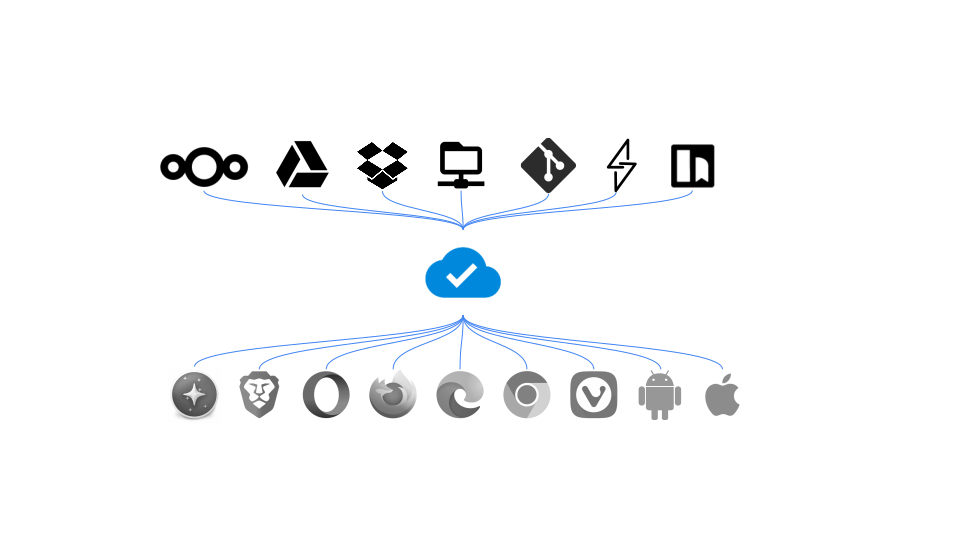

User reviews (0)