Website profiles · Technology insights · Alternatives

fonts.coollabs.io

coolLabs Fonts: A privacy-friendly drop-in replacement for Google Fonts

No paid content found
Visit website
Profile views 0 Outbound visits 0 Normal
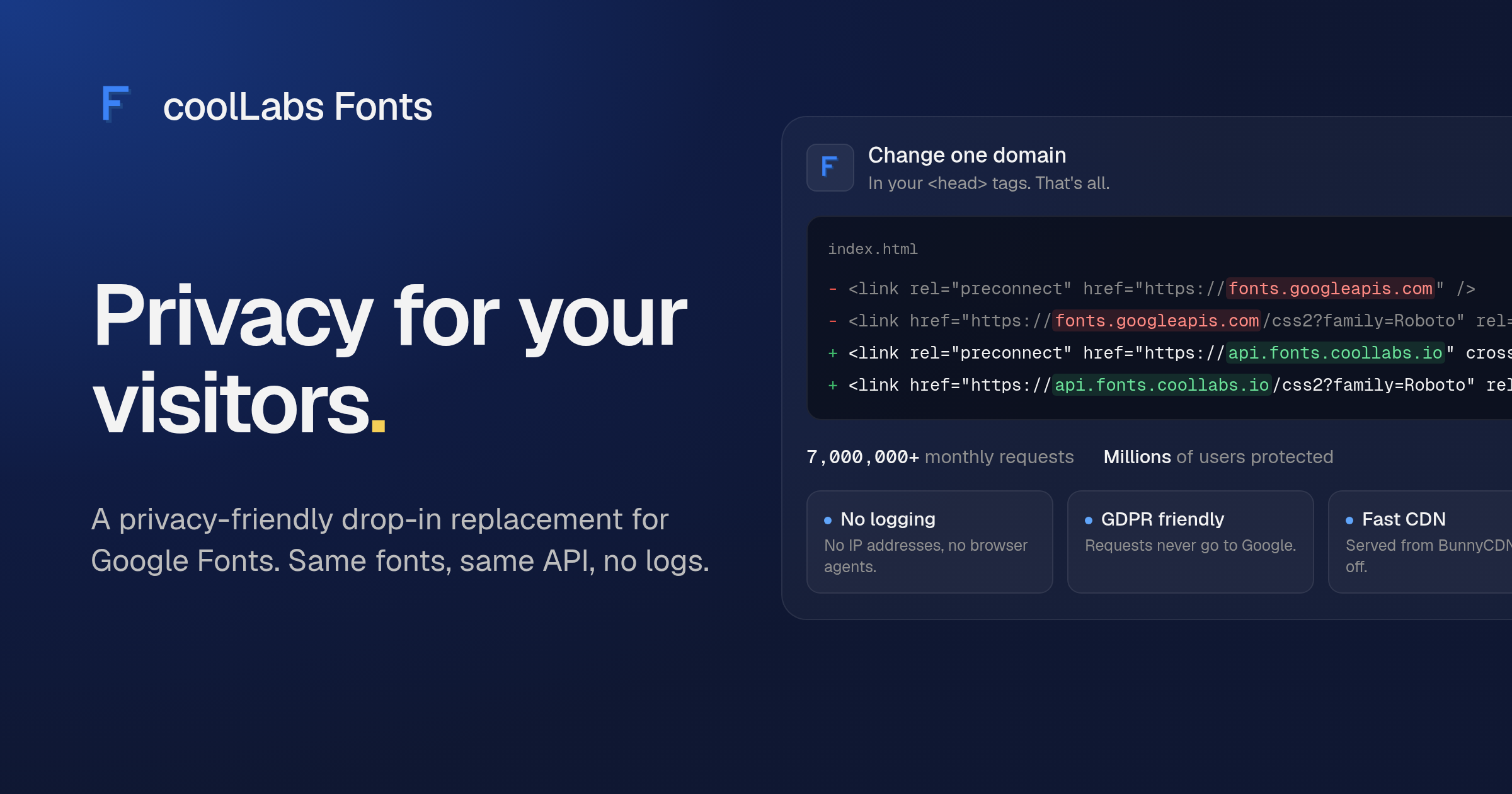
coolLabs Fonts Full homepage screenshot

At a glance

Category
Security & Privacy
Language
English
Paid-content signal
No paid content foundObserved
Registered
Unknown
Hosting
Hetzner Online GmbHInferred
HTTPS certificate trusted
PassedObserved
Last updated

Website review

This review may include AI-generated content and is not individually verified. Domain, certificate and other facts come from the observed data on this page.

What is coolLabs Fonts?

coolLabs Fonts is a free, open-source replacement for Google Fonts that serves the same fonts through a different domain, so your visitors' font requests never reach Google. It is aimed at site owners who want Google Fonts' convenience and font library but are uncomfortable sending visitor data—IP addresses, browser details—to Google's servers.

What it does

According to the site, the service mirrors Google Fonts' css and css2 API endpoints, and Material Icons are available through the same swap. In practice, you keep your existing font links and change fonts.googleapis.com to api.fonts.coollabs.io; nothing else about how you reference fonts needs to change. The operator states that the API does not log requests, and that font files are delivered via BunnyCDN with logging disabled there as well. The service is described as free, sponsor-funded, with no ads, and the API is a small open-source server.

Where it fits

  • Privacy-sensitive sites: blogs, documentation, or small business sites in the EU where you want to avoid third-party requests to Google without giving up familiar fonts.
  • Existing Google Fonts users: projects already using css2 links, where a one-line domain change is far less work than self-hosting font files.
  • Teams wanting to self-host later: because the API is open source, a domain swap now does not lock you into a hosted service.

The trade-off is that you are still depending on a third party, just a different one—a small volunteer-run project rather than a large provider. If uptime guarantees or long-term maintenance matter, self-hosting the open-source server or hosting the font files yourself is the more durable option; the drop-in swap is the low-effort middle ground.

Next step

Check that every font family, weight, and icon set your site uses resolves through the new domain before switching production traffic—test a staging copy first. If you also use other Google-hosted assets, Google Fonts remains the reference for browsing families, but plan a separate approach for anything beyond fonts and Material Icons.

How do I switch my website from Google Fonts to coolLabs Fonts?

Change the Google Fonts domain in your <link> tags to api.fonts.coollabs.io. coolLabs Fonts is designed as a drop-in replacement: the same fonts, the same css and css2 endpoints, only the hostname changes.

The basic swap

Find your Google Fonts stylesheet link, which looks like this:

<link href="https://fonts.googleapis.com/css2?family=Roboto&display=swap" rel="stylesheet">

Replace fonts.googleapis.com with api.fonts.coollabs.io:

<link href="https://api.fonts.coollabs.io/css2?family=Roboto&display=swap" rel="stylesheet">

That's the whole change. Keep the family, display and other query parameters as they are. If you load Material Icons, use the same domain swap on the icon stylesheet link.

If your CSS imports fonts

Sites that use @import instead of a <link> tag need the same edit:

@import url("https://api.fonts.coollabs.io/css2?family=Inter&display=swap");

What changes for your visitors

According to coolLabs' own description, the API does not log IP addresses, browser agents or request details, and font files are served from BunnyCDN with logging disabled. Font requests no longer go to Google's servers, which is the practical reason many site owners make this switch for GDPR-related privacy work. If your privacy policy or cookie notice mentions Google Fonts, review that wording after the swap so it matches what your site actually does.

A quick check after switching

  • Open your page and confirm the fonts still render as expected.
  • Check the browser's network panel to confirm requests go to api.fonts.coollabs.io and not fonts.googleapis.com.
  • Look for any leftover Google Fonts references, such as a second link tag, an @import in a theme stylesheet, or fonts loaded by a CMS plugin or page builder.

That last point matters most on WordPress, Shopify or similar platforms, where a theme or plugin may inject the Google Fonts link for you. In that case, look for a font-setting option in the theme or plugin, or edit the template that outputs the link.

When to consider an alternative

coolLabs Fonts is a hosted service run by a small open-source project. If you would rather not depend on any third-party font host, you can self-host the font files instead: download the fonts, serve them from your own domain, and write your own @font-face rules. That removes third-party requests entirely, at the cost of managing the files and updates yourself. For a quick, low-effort privacy improvement on an existing Google Fonts setup, the one-line domain swap is the simpler path.

Does using coolLabs Fonts actually help with GDPR compliance for visitor data?

Yes, in a practical sense: coolLabs Fonts removes one of the most common ways visitor data reaches Google. Google Fonts is loaded from Google's servers by default, so each visitor's browser makes a request that exposes their IP address and user agent to Google. coolLabs Fonts serves the same fonts from a different domain, so those requests no longer go to Google. The project states that its API does not log IP addresses, browser agents or request details, and that font files come from BunnyCDN with logging disabled.

What it changes, and what it doesn't

Concern Effect of switching
Font requests reaching Google's servers Removed; requests go to api.fonts.coollabs.io instead
Logging by the font service The project says its API logs nothing
CDN-level logging Stated as disabled on BunnyCDN for font files
Your site's overall GDPR position Unchanged; this only addresses the font request

The last row matters most. Self-hosting fonts or using a non-logging provider helps with the specific issue of third-party font requests, but it does not replace a privacy notice, a lawful basis for processing, cookie consent where needed, or handling of other third-party scripts. If fonts were your only Google contact point, the swap closes that gap; if you also use Google Analytics, embeds or tag managers, those still need their own review.

Who benefits most

  • Sites with EU visitors that currently load Google Fonts directly and want a low-effort fix.
  • Teams that can't self-host fonts (no build pipeline, or many font variants) but want to avoid Google's servers.
  • Projects already using the Google Fonts CSS API, since the change is a domain swap in the <link> tag, and the css2 and css API endpoints plus Material Icons are supported.

The trade-off is dependence on a small, sponsor-funded project rather than a large provider. If uptime guarantees or a formal data processing agreement matter to you, self-hosting the font files on your own domain is the more controlled option, at the cost of managing files and caching yourself.

Next step

Check your page source for fonts.googleapis.com. If it appears, replace that domain with api.fonts.coollabs.io in the link tags, then reload the page and confirm in your browser's network panel that no requests go to Google. Compare the result with Google Fonts documentation if you need to confirm which endpoints your setup uses, and consider [[site: Bunny.net|Bunny.net]] if you want to understand the CDN layer.

What happens to my site if coolLabs Fonts goes offline or stops being maintained?

Your site's text stays intact, but web fonts stop loading from that domain. Browsers then fall back to whatever font stack you declared, or to the browser default if you declared none. The usual result is a visible layout shift and a different typeface, not a broken page. Fonts requested through the css2/css endpoints also fail, so any @font-face rules served by coolLabs Fonts never arrive.

Reduce the blast radius before you switch

  • Declare real fallbacks. Put a system stack after each family, e.g. font-family: "Inter", system-ui, -apple-system, "Segoe UI", sans-serif;. The page then degrades to a close-enough face instead of Times New Roman.
  • Self-host the files you rely on. Download the WOFF2 files once and serve them from your own domain. This removes the third-party dependency entirely and is the strongest protection against any font CDN disappearing. coolLabs Fonts is open source, so its server code can also be self-hosted if you want the same API on your own infrastructure.
  • Keep the swap reversible. If you use the drop-in approach, the change is one domain in your <link> tags. Note it in your project so a future maintainer can point it back to Google or to your own host in seconds.
  • Check whether you actually need the CDN. Google Fonts mirrors the same families, so switching back is a one-line edit. Other privacy-oriented font hosts exist as alternatives, though availability and coverage vary.

A concrete scenario

A small marketing site swaps fonts.googleapis.com for the coolLabs domain to keep visitor IPs away from Google. Six months later the service stalls. Visitors on slow connections see the fallback stack first, headings reflow, and the hero section looks off-brand until the font request times out. Because the site declared system-ui as a fallback, nothing is unreadable; the fix is to change one domain or, better, to commit the two or three WOFF2 files to the repo and drop the external request.

Decision criterion

Use the hosted service if you want zero setup and accept a third-party dependency with a graceful fallback. Self-host the font files if typography is central to your brand or you cannot tolerate any external point of failure. Either way, the fallback stack is the part that decides how bad an outage looks.

Can I self-host coolLabs Fonts instead of relying on the hosted API?

Yes. coolLabs Fonts describes the hosted API as a small open-source HTTP server that the project itself self-hosts with Coolify on a Hetzner server. Because the server code is open source, you can run the same service on your own infrastructure instead of pointing at api.fonts.coollabs.io. The page's "View source" link is the natural starting point for the code and setup details.

What changes when you self-host

Concern Hosted API (api.fonts.coollabs.io) Your own instance
Domain swap Change fonts.googleapis.com to the coolLabs domain in your <link> tags Change it to your own domain; keep the same css/css2 paths
Logging Project states the API logs nothing You control and can verify the logs yourself
Font file delivery Served from BunnyCDN with logging disabled You supply and serve the font files; CDN choice is yours
Uptime and scaling Maintained by the project Your responsibility
Cost and maintenance Free, sponsor-supported Your server and bandwidth costs, plus updates

Who this suits

Self-hosting makes sense if your organization already runs small services and wants font requests to stay entirely inside its own network — for example, an internal tool or a site with strict data-residency rules. It also appeals to teams that prefer to audit the code they deploy rather than trust a third party's logging claims.

For a typical blog or marketing site, the domain swap to the hosted API is far less work: the page states it supports the css2 and css endpoints and Material Icons, so one domain change covers most existing Google Fonts markup. Self-hosting adds operational work — deploying the server, mirroring font files, and keeping it patched — that only pays off if you need that control.

A practical next step

Before committing, check the repository's deployment instructions and confirm how font files are sourced: the hosted service relies on BunnyCDN, so a self-hosted instance needs its own copy of the files or a CDN of your choosing. If you want to compare approaches, the Google Fonts documentation at Google Fonts explains the original API endpoints, and Coolify is the deployment tool the project names for its own hosting.

How are coolLabs Fonts and the project's CDN funded if there are no ads or investors?

coolLabs Fonts says it is funded through sponsors rather than ads or investors. The site describes the service as "free, because of our sponsors" and asks users who find it useful to support the project so it can stay free for everyone. There is no indication of paid tiers, ad placements or venture backing.

The CDN arrangement is separate from funding: font files are served through BunnyCDN with logging disabled on BunnyCDN's side, according to the page. The API itself is a small open-source HTTP server self-hosted with Coolify on a Hetzner server. So the practical costs are hosting and CDN delivery, and the stated model is voluntary sponsorship covering them.

As a next step, if you plan to rely on the service for a production site, check the project's sponsorship or donation page linked from the site and consider contributing if the traffic is meaningful. A reasonable decision criterion: use the drop-in replacement when visitor privacy and GDPR-friendliness matter and you can accept a community-run service; if you need contractual uptime guarantees, treat sponsorship as goodwill rather than a service-level commitment and plan a fallback such as self-hosting the open-source server.

Related questions

More questions →
What Is coolLabs Fonts?

coolLabs Fonts is a privacy-friendly drop-in replacement for Google Fonts. It serves the same fonts through a different domain and, according to the project, does not log anything about your visitors. You use it by changing fonts.googleapis.com to api.fonts.coollabs.io in your font tags. This suits sites that already use Google Fonts and want to keep the same fonts and API while moving font requests away from Google's servers.

What problem it solves

Google Fonts requests go to Google's servers, which means your visitors' details reach Google. coolLabs Fonts keeps the same font service but routes requests elsewhere. The project states that the API does not log IP addresses, browser agents, or request details, and that font files are served from BunnyCDN with logging disabled on their side.

The practical effect: font requests no longer go to Google, so visitor details stay away from Google's servers. The project describes this as GDPR friendly.

How to switch

The change is a single domain swap in your existing font tags.

Before:

<link href="https://fonts.googleapis.com/css2?family=Roboto&display=swap" rel="stylesheet">

After:

<link href="https://api.fonts.coollabs.io/css2?family=Roboto&display=swap" rel="stylesheet">

Steps:

  1. Find every fonts.googleapis.com reference in your HTML or CSS (font <link> tags and @import rules).
  2. Replace the domain with api.fonts.coollabs.io, keeping the rest of the URL unchanged.
  3. Load the page and confirm the fonts render as before.

Expected result: the same fonts appear, but requests go to coolLabs Fonts instead of Google.

What it supports

Capability Detail
Google Fonts CSS API Supports the css2 and css endpoints
Material Icons Available through the same domain swap on the icon endpoint
Delivery Font files served from BunnyCDN
Logging Project states the API logs nothing and CDN logging is disabled

Because it mirrors Google Fonts' API endpoints, existing font URLs generally work after the domain change. If a font or icon set is available through Google Fonts' CSS API, the same URL path should work on the coolLabs domain.

Who it is for

  • Sites already using Google Fonts that want to stop sending font requests to Google.
  • Projects with privacy or GDPR concerns about third-party requests to Google.
  • Developers who want a minimal change rather than reworking their font setup.

It is less relevant if you already self-host fonts or use a different font delivery method, since the main benefit is the one-line domain swap.

Things to know

  • It is a third-party service. You are still depending on an external domain for font delivery, just not Google's. Check that this fits your privacy requirements.
  • Availability depends on the project. The service is described as open source, self-hosted on a Hetzner server, and funded by sponsors. There is no stated uptime guarantee in the provided material, so consider a fallback font stack in your CSS.
  • Verify after switching. Load a page with the new domain and confirm fonts and icons render. If a font fails to load, check that the URL path matches the original Google Fonts URL exactly.
  • Pricing and access terms are not specified in the available material beyond the project describing itself as free and open source; confirm current terms on the site if you need certainty.

The project reports over 7,000,000 monthly requests, which suggests real-world use, but treat that as the project's own figure rather than an independent measurement.

What Are Open-Source UI Element Libraries and How Do They Differ From UI Frameworks?

An open-source UI element library is a collection of individual, ready-made interface pieces—buttons, cards, inputs, toggles, loaders—that you copy into your own project and adapt. A UI framework, by contrast, is a structured system of components, conventions, and often a theming layer that governs how your whole interface is built. The practical difference: an element library gives you a snippet; a framework gives you a way of working. If you need a polished button in ten minutes, reach for the element library. If you're building a 40-screen product with a team, you probably want the framework.

What "open-source UI element library" actually means

The term gets used loosely, so it helps to separate the parts:

  • Open-source: the code is publicly available, and the license tells you what you may do with it—copy, modify, redistribute, or use commercially.
  • UI element: a single, self-contained piece of interface, usually small enough to read in one sitting. A button with hover states, a pricing card, a search field.
  • Library: a browsable, searchable collection of those elements, typically contributed by many different people.

On a site like Uiverse, elements are shared by a community and written in plain CSS or Tailwind. You find one you like, copy the markup and styles, paste them into your project, and adjust colors, spacing, and text to fit. There's no package to install and no build step required—which is exactly the appeal, and also the source of most of the confusion.

Element library vs. UI framework: the core differences

Dimension Open-source UI element library UI framework / design system
Unit of reuse A single snippet you copy A component you import or call
Installation None; paste into your code Package install, config, sometimes a provider
Consistency Depends on you; each element may look different Enforced by shared tokens and APIs
Theming Manual edits per element Central theme/config file
Updates You own the copy; no upstream updates Version bumps bring fixes and changes
Accessibility Varies per contributor; must be checked Usually tested and documented
Best for Prototypes, landing pages, small sites, one-off needs Multi-page apps, teams, long-lived products
Learning curve Low—read the CSS Higher—learn the API and conventions

The table isn't a verdict. It's a map of trade-offs. Element libraries win on speed and freedom; frameworks win on consistency and maintenance.

Licensing and attribution: what to check before you paste

This is where people get into trouble, and it's worth slowing down for.

  1. Find the license. Every element or collection should state one. Common open-source licenses include MIT, Apache-2.0, and BSD. Some projects use copyleft licenses like GPL, which can impose obligations if you redistribute your code.
  2. Understand what the license permits. MIT and Apache-2.0 are permissive: you can typically use the code in commercial and closed-source projects. Copyleft licenses may require you to release derivative source under the same terms.
  3. Check attribution requirements. Permissive licenses usually require you to keep the copyright notice and license text somewhere in your project. That's a real obligation, not a formality.
  4. Look for per-element terms. On community sites, the site's overall terms and the individual contributor's stated wishes may differ. If a contributor asks for credit, honor it.
  5. When in doubt, ask or avoid. If a snippet has no license at all, you don't have clear permission to reuse it. Treat "no license" as "not open source," even if the code is publicly visible.

This article is general information, not legal advice. For commercial products with real exposure, have someone qualified review the licenses you're relying on.

How to use a community element in your project: a practical workflow

Here's a repeatable process that avoids most of the usual mess.

1. Start from a real need, not a browsing session

Decide what you need first—"a compact primary button with a loading state"—then search. Browsing aimlessly produces a pile of pretty snippets that don't fit together.

2. Copy the smallest version that works

Take the markup and the styles. Strip anything you don't need: demo wrappers, extra animations, decorative layers. Less code means fewer surprises.

3. Convert it to your conventions

If your project uses design tokens or CSS variables, replace hard-coded values:

/* Before: hard-coded */
.button { background: #4f46e5; border-radius: 8px; }

/* After: token-based */
.button { background: var(--color-primary); border-radius: var(--radius-md); }

This one step is what keeps a copied element from looking like a foreign object in your UI.

4. Check accessibility before you ship

Community elements vary widely here. Verify at minimum:

  • Keyboard focus is visible and the element is reachable by Tab.
  • Color contrast meets WCAG AA (4.5:1 for normal text).
  • Interactive elements use semantic HTML (<button>, not a clickable <div>).
  • Form inputs have associated labels.
  • Motion respects prefers-reduced-motion.

5. Test in context

Paste it into a real page with real content. Long labels, small screens, and dark mode break more copied elements than anything else.

6. Note where it came from

Keep a short comment or an internal credits file: source, license, date. Future you—and your legal reviewer—will be grateful.

Where element libraries genuinely shine

  • Prototypes and demos: you need something clickable today, not a design system.
  • Landing pages and marketing sites: a handful of distinctive elements, each custom.
  • Filling gaps: your framework lacks one specific component, and you don't want to build it from scratch.
  • Learning: reading well-made CSS is one of the fastest ways to improve.
  • Small projects: a personal site doesn't need a theming architecture.

Where they fall short

  • Consistency at scale: ten elements from ten contributors rarely look like one product.
  • Maintenance: you own every copy. When your design changes, you edit each one.
  • Accessibility debt: you inherit whatever the contributor did or didn't do.
  • No upstream fixes: a bug fixed in the original won't reach your copy.
  • Integration friction: different naming conventions, different units, different assumptions about resets.

When to choose which

Choose an element library when the scope is small, the timeline is short, or you need a few distinctive pieces rather than a whole system.

Choose a framework or design system when multiple people build multiple screens over months, when consistency is a product requirement, or when accessibility and theming need to be guaranteed rather than checked.

A hybrid works well for many teams: adopt a framework for the structural components—forms, navigation, layout—and borrow individual elements for the places where you want personality. Just route every borrowed element through the same token and accessibility checks, so it lands as part of your system rather than beside it.

The short version: open-source UI element libraries are a fast, flexible way to get good-looking interface pieces into a project. They are not a substitute for a design system, and the license and accessibility details are the part worth reading carefully.

Does coolLabs Fonts Support the Same API Endpoints and Material Icons as Google Fonts?

Yes. coolLabs Fonts is built as a drop-in replacement for Google Fonts: it supports the css2 and css API endpoints, and Material Icons are available through the same domain swap. In practice, you keep your existing font URLs and change only the hostname from fonts.googleapis.com to api.fonts.coollabs.io.

What "drop-in replacement" means here

The service describes itself as "Google Fonts, without Google" — same fonts, same API, but without logging anything about your visitors. Because the request format stays the same, existing <link> tags and @import rules continue to work after the domain change.

Google Fonts host coolLabs Fonts host What stays the same
fonts.googleapis.com api.fonts.coollabs.io Path, query parameters, font families, weights
fonts.googleapis.com (icon endpoint) api.fonts.coollabs.io Material Icons request format

How to switch: step by step

  1. Find your font references. Search your templates, CSS, or build config for fonts.googleapis.com. This covers both <link href="..."> tags and @import url(...) statements.
  2. Replace the hostname only. Change fonts.googleapis.com to api.fonts.coollabs.io. Leave the rest of the URL — family names, :wght@ ranges, display=swap, and so on — untouched.
  3. Check icon usage separately. If you load Material Icons, apply the same domain swap to the icon endpoint URL.
  4. Verify in the browser. Reload the page, open DevTools → Network, and confirm font files are requested from the coolLabs domain and render correctly. Check the computed font-family on a few elements to make sure the intended family is applied.

Example: a typical stylesheet link

Before:

<link href="https://fonts.googleapis.com/css2?family=Inter:wght@400;700&display=swap" rel="stylesheet">

After:

<link href="https://api.fonts.coollabs.io/css2?family=Inter:wght@400;700&display=swap" rel="stylesheet">

The css2 path and all parameters are preserved; only the domain changed.

Compatibility details worth knowing

  • Both API generations are supported. Sites still using the older css endpoint don't need to migrate to css2 first.
  • Material Icons work the same way. The icon endpoint is reachable through the swapped domain, so icon fonts don't need a separate provider.
  • Font files are served from BunnyCDN, with logging disabled on the CDN side according to the project. This matters if your reason for switching is privacy rather than performance.
  • The service is open source and runs as a small HTTP server, so you can inspect or self-host it if you need full control.

Common snags when swapping

  • Hard-coded URLs in multiple places. Font links often live in a theme file, a CMS setting, and a CSS file at once. Grep the whole project rather than editing the first match.
  • Cached CSS. If fonts still load from Google after the change, clear your site cache or CDN cache and hard-reload the browser.
  • Content Security Policy. If your CSP allowlists fonts.googleapis.com, add api.fonts.coollabs.io to style-src and font-src, or the swap will be blocked silently.
  • Preconnect hints. Update any <link rel="preconnect" href="https://fonts.googleapis.com"> and fonts.gstatic.com hints to point at the new domain, otherwise you keep connections to Google for no benefit.

Is the swap worth it for you?

Choose coolLabs Fonts if you want to keep your current Google Fonts markup and typography while removing Google from the font request path — for example, when a privacy review flags third-party font requests. The one-line domain change keeps migration effort low and is reversible.

Stay with Google Fonts directly if you depend on features beyond the css/css2 endpoints and Material Icons, or if your organization requires a formally contracted provider. The project is funded by sponsors and described as free, but the available material doesn't document service-level guarantees, so treat availability as a consideration for production sites.

Is coolLabs Fonts Free and Open Source?

Yes. coolLabs Fonts is free to use and open source. The project states it is "open source and free forever," with no ads and no investors; it is funded by sponsors. The API is described as a small open-source HTTP server, self-hosted with Coolify on a Hetzner server.

What "free" means here

The site presents free access as a sponsorship-supported model rather than a paid tier:

  • No ads and no investors — funding comes from sponsors.
  • Free forever — the project's stated commitment, with an invitation to sponsor it if it helps you.
  • No pricing page or payment flow is mentioned in the available site material, so there is no documented paid plan to compare against.

The site does not describe usage caps, account requirements, or a commercial license. If you need contractual guarantees for a business deployment, treat those as open questions to confirm with the project rather than assumptions.

What "open source" covers

The open-source claim applies to the API server itself, not necessarily to the font files it serves:

Component What the site says
API server A small open-source HTTP server
Hosting Self-hosted with Coolify on a Hetzner server
Font delivery Font files served from BunnyCDN, with logging disabled on BunnyCDN's side
Fonts themselves Same fonts as Google Fonts; the site does not make a separate licensing claim about the font files

Because the fonts are the same ones Google Fonts distributes, check the license of each typeface you use if licensing matters for your project.

How the free service stays privacy-friendly

The funding model connects to the privacy pitch: no ads or investors means no monetization of visitor data. The site says the API logs nothing — no IP addresses, browser agents, or request details — and that font requests never reach Google's servers, which keeps visitor details away from Google. Font files come from BunnyCDN with logging fully disabled on their side.

Practical takeaway

If you want a drop-in replacement for Google Fonts without a paid dependency, coolLabs Fonts fits: swap fonts.googleapis.com for api.fonts.coollabs.io in your font tags, and the same css2 and css API endpoints plus Material Icons are supported. If you need a formal support contract or explicit font licensing documentation, verify those directly with the project before relying on it in production.

Is coolLabs Fonts GDPR friendly, and what data does it log?

coolLabs Fonts is designed as a privacy-friendly, drop-in replacement for Google Fonts: it serves the same fonts through the same CSS API, but the API does not log IP addresses, browser agents, or request details, and font files are delivered via BunnyCDN with logging disabled on their side. That makes it a reasonable option for GDPR-conscious sites that want to stop sending visitor data to Google's servers — though it is a technical privacy measure, not a legal guarantee, and you should still confirm it fits your own compliance obligations.

What coolLabs Fonts actually changes

The core mechanism is a domain swap. Instead of requesting stylesheets from fonts.googleapis.com, your pages request them from api.fonts.coollabs.io. The service states it supports the css2 and css API endpoints of Google Fonts, so existing font declarations keep working after the change. Material Icons are supported too, using the same domain swap for the icon endpoint.

Because the font requests no longer go to Google, visitors' details stay away from Google's servers. The project positions this as a GDPR-friendly setup: font loading is a routine part of nearly every page view, so routing it through a third party that logs requests is exactly the kind of data flow privacy-conscious sites try to avoid.

What data is and isn't logged

Data point What coolLabs Fonts says
IP addresses Not logged by the API
Browser user agents Not logged by the API
Request details Not logged by the API
Font file delivery Served from BunnyCDN, with logging disabled on their side completely
Google involvement Font requests do not go to Google's servers

The project also describes itself as open source: the API is a small open-source HTTP server, self-hosted with Coolify on a Hetzner server. That matters for verification — you can inspect the server code rather than taking the logging claims on faith.

How to switch your site over

  1. Find your font links. Look in your HTML <head> for <link> tags pointing at fonts.googleapis.com, including any css2 stylesheet URLs and Material Icons links.
  2. Change the domain. Replace fonts.googleapis.com with api.fonts.coollabs.io in each of those tags. The project's instruction is literally: "In your tags, change fonts.googleapis.com to api.fonts.coollabs.io. That's all!"
  3. Verify the result. Load a page and check in your browser's network panel that font CSS and font files now come from api.fonts.coollabs.io (and the CDN), with no remaining requests to fonts.googleapis.com. Confirm the fonts render as before.
  4. Check icons separately. If you use Material Icons, apply the same domain swap to the icon endpoint and confirm the icons still display.

Common snags: font URLs hard-coded in a CMS theme, a plugin, or a CSS @import rather than a <link> tag will be missed by a simple search-and-replace; and any locally cached or preloaded references need updating too.

Limits worth knowing before you decide

  • It's a privacy measure, not a compliance certificate. The no-logging design and the removal of Google from the request path reduce the data flow, but whether your site meets GDPR depends on your full setup — consent handling, other third parties, and your own records. Treat the service's claims as inputs to that assessment, not a substitute for it.
  • You're trusting a smaller operator. coolLabs Fonts is run by a small open-source project funded by sponsors ("Free, because of our sponsors"), not a large provider. The open-source server code and the stated CDN logging configuration are the things to check if that trust matters to you.
  • Self-hosting is the stronger option. If you want the most control, hosting font files yourself removes the third-party request entirely; coolLabs Fonts is the lower-effort middle ground when you want Google Fonts compatibility without Google.

If your goal is simply to stop font requests from reaching Google while keeping the same fonts and API, the one-domain swap is a quick, low-risk change. If your goal is a documented GDPR position, use it as one component and verify the logging behavior against the project's source and CDN configuration.

Website Overview

Identifiable technologies and additional version or configuration signals make the service easier to fingerprint, which may help targeted scanners narrow their checks.

Domain and Registration

Unknown

DNS and Email

Nameservers are provided by Cloudflare, indicating managed DNS hosting. MX records point to the Fastmail email service. No CNAME was found; the observed records resolve directly to addresses. SPF and DMARC are configured. DKIM status is unknown. TXT records include verification markers for Google, Microsoft. Such markers may also remain after a service stops being used.

TLS and Certificates

The certificate uses an RSA 4096-bit public key, offering broad client compatibility. The server supplied a complete certificate chain. No organization name is present in the certificate; the available fields are consistent with domain validation. The certificate was issued by Let's Encrypt, commonly associated with automated certificate services. The certificate's total validity is about 89 days, consistent with a short renewal cycle.

HTTP and Browser Security

The Server header exposes the software version: nginx/1.31.6. This makes version-targeted checks easier, but is not proof of an exploitable vulnerability. The checked browser-security headers were not detected, leaving fewer explicit browser-side safeguards. No X-Powered-By header was found, reducing one common source of backend fingerprinting information. No obvious internal addresses or debug information were found in the headers. No explicit CDN or WAF marker was found in the response headers.

Technology Stack Analysis

The public page identifies nginx 1.31.6, with exact versions exposed for 1 technologies. These details can narrow vulnerability checks, although exposure alone is not a vulnerability.

Search and Social Sharing

No homepage canonical URL was detected. If duplicate URLs exist, consolidation may be less explicit. Twitter Card metadata is configured. The title has 14 characters, within a common display range. A meta description is present, with 71 characters. The observed directives allow indexing and link following.

Hosting and Email

DNSCloudflare
HostingHetzner Online GmbH
EmailFastmail
Approximate IP geolocation (inferred; a CDN or proxy may differ from the origin server) Germany flagFalkenstein, Saxony, Germany Inferred 49.12.14.2

Registration details

RDAP / WHOIS

Unknown

DNS records

DNS

TypeNameValueTTLPriority
Afonts.coollabs.io49.12.14.2300—
MXcoollabs.ioin1-smtp.messagingengine.com30010
MXcoollabs.ioin2-smtp.messagingengine.com30020
NScoollabs.ioclint.ns.cloudflare.com86400—
NScoollabs.ioyolanda.ns.cloudflare.com86400—
TXTcoollabs.ioMS=ms27943740300—
TXTcoollabs.iogoogle-site-verification=wwMObuMkeJ_xiCmO6sO9sfN2SBanOTMDN9b-vUlgt-g300—
TXTcoollabs.iov=spf1 include:spf.messagingengine.com mx ~all300—
DMARC_dmarc.coollabs.iov=DMARC1; p=reject; pct=100300—

TLS and certificates

TLS / SSL

AssessmentNormal configuration
Supported protocolsTLSv1.2、TLSv1.3
Negotiated protocolTLSv1.3
Certificate subjectfonts.coollabs.io
IssuerLet's Encrypt
Valid until2027-01-06T08:30 · Remaining when checked: 68 days
Verification detailsCertificate trust: Passed · Hostname match: Passed

HTTP response headers

HTTP

HeaderValue
content-typetext/html
cache-controlno-cache
servernginx/1.31.6

Identified technologies

nginx 1.31.6

Pages, Search and Sharing

Meta descriptioncoolLabs Fonts: A privacy-friendly drop-in replacement for Google Fonts
Canonical URLNot detected
LanguageEnglish (default)
Twitter Cardsummary_large_image
All bots 1 allowed · 0 disallowed
  • Allow/

User reviews (0)

  • No reviews yet.