
 简体中文
简体中文 English
Website review
This review may include AI-generated content and is not individually verified. Domain, certificate and other facts come from the observed data on this page.
What is HelixNotes?
HelixNotes is a free, open-source note-taking app that stores your notes as plain Markdown (.md) files on your own disk. It runs on desktop (Linux, Windows, macOS) and mobile (Android, iOS/iPadOS), requires no account, and leaves syncing up to you — for example, pointing it at your own WebDAV server or a folder you already sync another way. The app's own framing is "your notes, your files, your rules," and its FAQ explicitly states there is no HelixNotes cloud and no team collaboration suite.
What it actually does
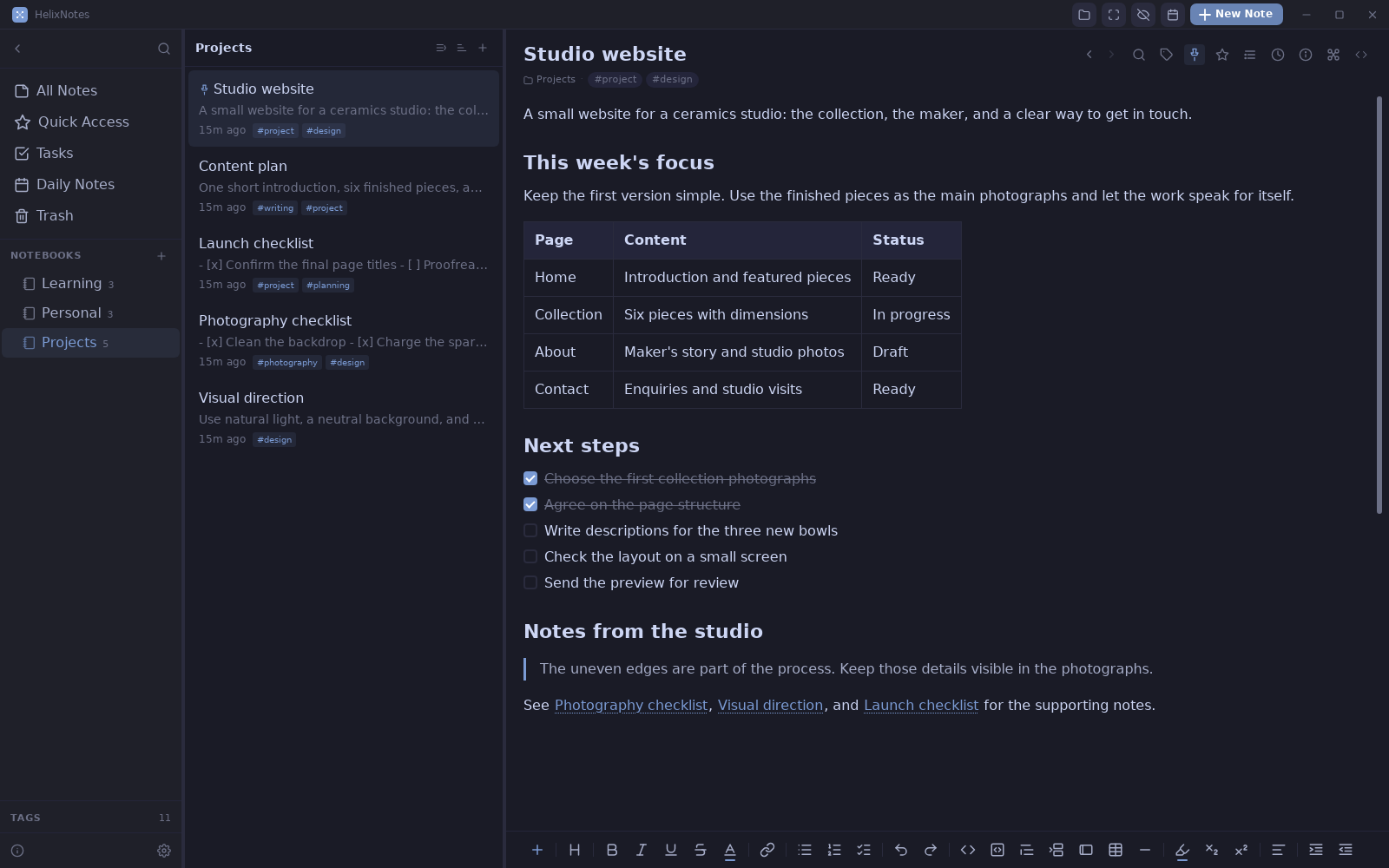
- Editing: A WYSIWYG-style Markdown editor with slash commands, tables, code blocks with highlighting, and live KaTeX math, plus a raw source mode. Files stay readable in any plain-text editor.
- Tasks: Checklists written as
- [ ]anywhere in your vault are collected into one Tasks view, with per-row priority and due dates, list or calendar layout. - Linking:
[[wiki links]]build a graph view you can hover to trace connections. - Daily notes: A calendar where each date maps to a note, useful for standups or journaling.
- Search and extras: Full-text search (Tantivy, CJK-aware), Mermaid diagrams, version history with diffs, automatic backups, an outline panel, tags with autocomplete, callouts, focus mode, multi-window, and customizable shortcuts.
- Optional AI: Local via Ollama, or bring your own API key.
- Migration: An Obsidian importer and an external
.mdviewer.
Who it suits, and the trade-off
It fits people who want file ownership and portability: a writer keeping a decade of notes in a folder, a developer who wants notes in the same Git repo as code, or anyone who distrusts a hosted notes service. The deliberate cost is collaboration — no shared workspace, no real-time co-editing, no vendor-run sync. You also own the sync and backup setup, so a misconfigured WebDAV target is your problem to debug.
Next step: Download it, point it at an existing folder of .md files (or import from Obsidian), and check whether your current sync method — Dropbox, Syncthing, Git, WebDAV — behaves well across desktop and phone before committing your whole vault. If you mainly need a shared team wiki, this is the wrong tool; if you want your notes to outlive any single app, it is a strong candidate.
How does HelixNotes store my notes compared to cloud-based note apps?
HelixNotes stores your notes as plain .md files on your own disk, not in a vendor's cloud database. The app is a local editor over a folder of Markdown files — the page describes it as "plain Markdown files on your own disk," readable with cat, with no HelixNotes cloud and no account required. Cloud apps typically keep notes in a proprietary store on their servers, exposing them through the app's UI and export tools.
The practical differences
| Aspect | HelixNotes (local files) | Typical cloud note app |
|---|---|---|
| Where notes live | .md files in a folder you choose |
Vendor's servers, proprietary format |
| Account | None required | Usually required |
| Sync | Optional, to your own WebDAV server | Built-in, via the vendor |
| Access without the app | Any text editor, cat, other Markdown tools |
Often export or web login only |
| Collaboration | Not offered — not a team suite | Often a core feature |
| Offline | Native state | Varies, often cached |
The trade-off is explicit on the page: no hosted workspace, no team collaboration, no HelixNotes cloud. You gain file ownership and portability; you give up the convenience of sync and sharing that "just works" out of the box. Sync becomes your responsibility — the app supports optional WebDAV to your own server, and the page's framing is "sync them your way, or don't."
A concrete scenario
Suppose you keep a work journal and project notes. With HelixNotes, you point it at, say, ~/notes, and every entry is a file you can open in VS Code, grep, commit to Git, or back up with rsync. Daily Notes, tasks and [[wiki links]] are just conventions layered over those files. If you later switch tools, your notes are already in the most portable format available.
If instead you need two people editing the same page simultaneously, or you want zero setup on a new device, a cloud app fits better. HelixNotes suits a single writer who values ownership and is willing to arrange sync and backups.
How to decide
Ask two questions: do you need real-time collaboration or zero-config sync across devices, and are you willing to manage your own backup and sync? If you answered no and yes, local files win. If yes and no, a cloud service is the simpler choice.
As a next step, download HelixNotes and open it against a small test folder before moving an existing vault. Confirm the file layout and that your chosen sync method (WebDAV or a file-sync tool) behaves as expected. For comparison, see Obsidian, which also works on local Markdown files and is named on the HelixNotes page as an import source, and Joplin, another open-source notes app with its own sync options.
How do I sync my HelixNotes vault across devices without a HelixNotes account?
HelixNotes doesn't run its own cloud service, so syncing is something you arrange yourself. The app stores your notes as plain .md files in a vault folder, and the page lists optional WebDAV sync to your own server. That means the practical answer is: pick a file-sync or WebDAV provider you already control, point it at your vault folder, and let it replicate the files.
Three common approaches
- WebDAV to your own server. This is the option HelixNotes names directly. If you already run Nextcloud, ownCloud, or a self-hosted WebDAV endpoint, this keeps everything on infrastructure you manage. Best fit if you're comfortable running a server and want no third party in the loop.
- A general file-sync client. Dropbox, Syncthing, or similar tools sync any folder on disk. Because notes are plain files, the sync tool doesn't need to know anything about HelixNotes. Syncthing is the natural pick if "no account" is a hard requirement, since it's peer-to-peer rather than account-based.
- Git. If you like version history and are willing to commit and push manually or on a schedule, a Git remote gives you sync plus a full audit trail. HelixNotes already provides its own version history and automatic backups locally, so Git is more about cross-device transport than safety net.
A concrete scenario
You write on a Linux laptop and read on Android during a commute. Set your vault folder inside a Syncthing shared folder on both devices, or point HelixNotes' WebDAV sync at your Nextcloud instance. Either way, the same .md files appear on both sides without an account.
How to decide
| If you want… | Choose |
|---|---|
| Zero third-party accounts | Syncthing or self-hosted WebDAV |
| Minimal setup, already paying for storage | Your existing file-sync client |
| History and branching across devices | Git remote |
Watch out for
Don't run two sync mechanisms over the same vault at once — conflicting writers can produce duplicate or clobbered files. Also avoid syncing a vault while you're actively editing on two devices; let one side finish syncing before you start on the other. If you use a mobile sync app, confirm it handles hidden folders and file extensions, since some mobile clients skip dotfiles.
Next step: check HelixNotes' own Docs page for the exact WebDAV fields it expects before configuring a server. For a background on the protocol itself, see Nextcloud.
Can I import my existing Obsidian vault into HelixNotes?
Yes. HelixNotes lists Obsidian import among its features, so you can bring an existing vault across rather than rebuilding your notes by hand. Because HelixNotes works on plain Markdown files stored on your own disk, the practical starting point is your vault folder itself: the .md files, your folder structure, and any attachments are the substance being moved, not a proprietary database export.
What tends to carry over well
- Plain Markdown notes, including headings, tables, code blocks and checklists.
- Folder and subfolder structure, since HelixNotes reads files from disk rather than an internal store.
[[wiki links]], which HelixNotes uses natively and visualises in its graph view.- Task lines in
- [ ]format, which feed its single Tasks view.
Where to check by hand
- Obsidian-specific syntax such as Dataview queries, certain plugin blocks and unusual callout variants may not render identically.
- Tags should mostly survive as text, but confirm autocomplete picks them up after import.
- Attachments and embedded files are worth spot-checking, especially if your vault uses non-standard link paths.
- If you rely on Obsidian's own sync, plan your replacement separately: HelixNotes offers optional WebDAV sync to a server you control, and no account is required either way.
A sensible next step is to copy — not move — your vault to a test folder, import that copy, and open a handful of your most link-heavy and task-heavy notes. If the graph and Tasks view populate as expected, repeat with the real vault. Keep the original untouched until you are satisfied; with plain files, reverting is simply a matter of pointing HelixNotes back at the old folder.
For comparison, Obsidian itself is documented at Obsidian, and if you want to see how a plain-Markdown, local-first workflow is described by its makers, start at HelixNotes.
How do I use the Tasks view to manage checklists and due dates across all my notes?
The Tasks view is a roll-up: it scans your vault for Markdown checklist syntax (- [ ]) and collects every matching item into one list, so you don't have to remember which note a task lives in. HelixNotes describes it as pulling every - [ ] checklist from across your notes into a single view, where you can set priority and due dates per row, then work in a list or drag tasks around a calendar.
A practical workflow
- Keep tasks inline in the notes where they belong — meeting notes, project pages, daily notes. Write them as normal
- [ ]items. - Open the Tasks view to see the aggregate. Because the source is plain Markdown, the task still reads correctly in any other editor.
- Assign priority and due dates on the rows that need them. Due dates matter most for anything time-bound; priorities help when the list gets long.
- Switch between list and calendar depending on the question you're asking: the list for "what's next," the calendar for "what lands this week."
- Drag items on the calendar to reschedule rather than editing dates by hand.
Where it fits and where it doesn't
This suits one person managing their own commitments across many notes — a freelancer tracking client follow-ups, a student with reading tasks scattered through course notes, or anyone doing daily standups. It is not a shared task manager: HelixNotes states it is not a hosted workspace or team collaboration suite, and there is no account or cloud service. If your team needs assignment, comments and notifications, this is the wrong layer.
Two things worth deciding before you commit:
- Sync is your problem, deliberately. Tasks live in files on your disk, and HelixNotes offers optional WebDAV sync to your own server. If you want tasks on your phone without running anything, that's friction you'll feel daily.
- Checklist discipline pays off. Since the view is only as good as your
- [ ]usage, tasks written as prose ("need to email Sam") will never appear. Pick one convention and stick to it.
If you already keep notes in Obsidian, HelixNotes lists an Obsidian import, so you can bring an existing vault and its checklists across rather than starting over. For a broader look at the app itself, see HelixNotes.
What features does HelixNotes lack compared to team collaboration tools?
HelixNotes is deliberately a personal, local-first Markdown app, so the gaps appear exactly where team features usually live. According to its own page, it is "not a hosted workspace or a team collaboration suite": there is no HelixNotes cloud, no account to create, and no bundled sync service. If you need a shared workspace where teammates log in and edit the same document, HelixNotes is not trying to be that.
What's missing for team use
- No shared cloud workspace or account system. Collaboration depends on your own file-sharing setup rather than a product-hosted space.
- No real-time co-editing. Nothing on the page describes multiple cursors or live simultaneous editing; sync is file-level, via optional WebDAV to your own server.
- No comments, mentions or review/approval workflows. Version history with diffs exists, which helps one person track changes, but it isn't threaded discussion or sign-off.
- No roles or permissions. Access control comes from wherever the files live (a shared drive, a Git repo, your WebDAV server), not from the app.
- No team admin, SSO or audit tooling, and no built-in chat or task assignment to other people. The Tasks view collects your own checklists with priority and due dates.
Where it overlaps anyway
Some features look team-ish but are personal conveniences: [[wiki links]] and a graph for connecting your own notes, Daily Notes for standups or journaling, full-text search, Mermaid diagrams, and an outline panel. The Android, iOS, Linux, Windows and macOS builds let one person carry the same vault across devices.
How to decide
| Need | HelixNotes | Typical team suite |
|---|---|---|
| Shared hosted workspace | No | Yes |
| Real-time co-editing | No | Usually yes |
| Comments and approvals | No | Usually yes |
| Permissions and admin | No (handled by your storage) | Yes |
| Plain files you own | Yes | Rarely |
A practical next step: if your "team" is really two or three people who already share a folder or Git repo, HelixNotes can work if you accept turn-taking rather than live editing. If you need concurrent editing, comments and access control, pair your notes with a tool built for that, such as Notion or Slite. For an open-source, self-hosted option with shared editing, HedgeDoc is worth comparing.
 Stockholm, Stockholm County, Sweden

User reviews (0)