

 Paid content
 Visit website
 Updated: 2026-09-23 10:59
 Language: English (default)
 Access: Normal
 Profile views 8
  Outbound visits 1
 Website Review
What is Import.io?
Import.io is web data infrastructure: it turns complex, changing websites into structured data that AI systems and analytics teams can use. Instead of having an AI agent browse pages like a human, Import.io handles the messy parts — finding pages, getting through dynamic or blocked sites, extracting typed data, and keeping it current — then delivers the result as usable output.
Its page describes five connected capabilities:
- Search — fresh web results ranked for retrieval, so an agent gets relevant pages rather than raw links.
- Access — fetching and rendering dynamic, blocked or authenticated pages at scale.
- Extract — converting pages into structured, model-ready data.
- Research — turning an objective into sourced, structured answers.
- Monitor — tracking changing pages and emitting structured events.
A worked example from the site: maintaining a live dataset of private-label grocery pricing across major US retailers — thousands of SKUs, updated hourly, delivered to an agent as events.
Who it suits: data teams and AI builders who need reliable web data at volume — pricing intelligence, commerce analytics, market monitoring, or feeding agents clean context. It is less about occasional one-off scraping and more about ongoing, maintained pipelines.
Trade-off to weigh: managed infrastructure reduces the burden of rendering, blocking and verification, but it is a platform commitment rather than a lightweight script. If your need is a handful of static pages once a month, simpler tools may be enough; if pages are dynamic, defended, or changing constantly, the managed route tends to pay off.
Next step: define one objective you would otherwise hand to a browsing agent — for example, tracking competitor prices hourly — and check whether the platform's extraction, monitoring and delivery options fit that workflow before committing. A free trial is offered, and you can compare plans on Import.io.
How does Import.io help AI systems use web data?
Import.io positions itself as web data infrastructure for AI and analytics systems rather than a human-facing scraper. Its core idea, stated on the page, is that "your AI shouldn't browse like a human": instead of an agent opening pages and reading them like a person, Import.io turns pages, clicks and changing sites into structured data that AI systems can consume directly.
The five connected capabilities it describes
- Search — find relevant pages, ranked for retrieval rather than for human browsing.
- Access — fetch and render dynamic, blocked or authenticated pages at scale.
- Extract — convert pages into typed, verified, model-ready data.
- Research — turn an objective into sourced, structured answers with citations.
- Monitor — track changing pages and emit structured events when something changes.
The delivery side matters as much as the extraction. The page describes output as clean context and structured events delivered on demand, with an example objective maintaining a live private-label grocery pricing dataset across major US retailers — thousands of SKUs, updated hourly, delivered to an agent as events via webhook and Parquet. It also mentions regional control-plane deployments and MCP tooling for AI agents.
Why this matters in practice
A concrete scenario: a pricing analyst wants an agent that flags when a competitor changes a listed price. If the agent browses the web itself, it burns tokens on rendering, gets inconsistent page formats, and has no reliable way to know whether a page changed or simply failed to load. Routing that through an extraction and monitoring layer gives the agent a stable schema (retailer, store, SKU, price, availability, timestamp) and an event stream it can act on, so the model reasons over data instead of over HTML.
Trade-offs to weigh
- A managed platform like this suits recurring, large-scale or change-sensitive collection, where reliability and schema consistency justify the cost.
- For a one-off scrape of a handful of pages, a lightweight library or script is usually cheaper and faster to set up.
- Structured delivery is only as good as the schema you define; poorly chosen fields create clean-looking data that still doesn't answer your question.
- Blocked and authenticated page access raises legal and terms-of-service questions regardless of vendor — treat that as your responsibility, not the tool's.
Next step: pick one recurring question your team answers manually from websites today, define the exact fields and refresh cadence you'd need, then check whether the platform's extraction, monitoring and delivery options cover that shape of problem. Import.io offers a free extraction trial and a pricing page at Import.io if you want to test against a real target before committing.
Can Import.io handle dynamic or authenticated websites?
Yes. Import.io is built specifically for the messy parts of the web: dynamic, blocked and authenticated pages. Its "Access" capability is described as fetching, rendering and "getting through, at scale," and the platform markets itself as reaching "the web others can't," including pages that rely on JavaScript or require a login.
What that means in practice
- Dynamic pages: Content loaded by scripts, infinite scroll or client-side rendering is handled by rendering the page rather than just requesting raw HTML.
- Authenticated pages: Sessions behind a login can be reached, which matters for gated catalogs, account-specific pricing or member portals.
- Scale and reliability: The platform runs across multiple regions and advertises high success rates, so this is aimed at recurring, high-volume capture rather than one-off fetches.
A concrete scenario
A pricing analyst wants a live dataset of private-label grocery prices across major US retailers, refreshed hourly. Many of those pages are JavaScript-heavy and some sit behind retailer logins. Import.io's own example describes exactly this: 4,000 SKUs, hourly delivery, output as structured events to an agent via webhook and Parquet. That is the kind of job where dynamic rendering and authentication handling stop being nice-to-haves.
Where it fits versus alternatives
| Need | Import.io's emphasis | Typical trade-off |
|---|---|---|
| Dynamic/JS-heavy pages | Rendering and access at scale | More setup than a simple HTML scraper |
| Logged-in pages | Authenticated access | You manage credentials and session hygiene |
| Ongoing monitoring | Change events, not just snapshots | Better for recurring jobs than one-off pulls |
| AI/analytics pipelines | Structured, typed, verified output | Value depends on your downstream tooling |
Next step
Before committing, test one authenticated and one JavaScript-heavy target page yourself. If both return clean structured rows on a schedule you control, the platform is doing the hard part. If your targets are static HTML, a lighter tool may be cheaper. You can compare options against Import.io and general-purpose tools like Scrapy or Apify depending on whether you need managed rendering and auth or full control over your own pipeline.
What pricing and trial options does Import.io offer?
Import.io advertises a free entry point rather than publishing full plan details on its main page: a 30-day Data Extraction trial with no credit card required, plus a free extraction start option and a "Contact Sales" path for enterprise deals. A separate pricing page is linked from the site, but specific tiers and rates aren't listed in the material provided here.
Import.io
What that likely means for you
- Trying it out: The 30-day, no-credit-card trial is the natural first step if you want to test extraction on your own target sites before committing.
- Ongoing or large-scale use: The "Contact Sales" route suggests custom or volume-based pricing, which is common for managed data services and high-frequency scraping.
- Budgeting: Because no public rates are shown, treat pricing as quote-based until you confirm it directly.
How to decide
- Start the free trial and run it against one real dataset you care about (for example, a few hundred product pages).
- Measure success rate and delivery format against your needs.
- If the trial works, ask sales for pricing tied to your page volume, refresh frequency and delivery method (such as webhook or file delivery).
For context on the wider category, enterprise-focused alternatives include Zyte and Apify, while Octoparse targets lighter no-code use.
How does Import.io compare to traditional web scraping tools?
Import.io is built less as a scraping tool and more as web data infrastructure: it covers search, access, extraction, verification and monitoring, then delivers structured output to AI and analytics systems. Traditional scrapers usually stop at extraction, leaving you to handle discovery, blocking, rendering, change detection and delivery yourself.
That distinction matters most in production. A conventional scraper is a script or framework you operate; Import.io is positioned as a managed pipeline with regional control planes, event streams, webhooks and file delivery. Its own example describes maintaining 4,000 SKUs of private-label grocery pricing hourly across major US retailers, delivered as events.
H3 Where the difference shows up
| Dimension | Traditional scraping tools | Import.io (per page evidence) |
|---|---|---|
| Starting point | You supply target URLs | Search finds and ranks pages for retrieval |
| Access | You handle rendering, blocks, logins | Access layer for dynamic, blocked, authenticated pages |
| Output | Raw HTML or parsed fields | Typed, verified, model-ready data |
| Change handling | You schedule and diff yourself | Monitor emits structured change events |
| Delivery | You build storage and pipelines | Webhook and Parquet delivery, replay |
| Audience | Developers and scraper engineers | Enterprise data teams and data companies |
The trade-off is control versus maintenance. With a framework you choose every parser, proxy and retry policy, and you can adapt instantly at no platform cost; you also own every breakage when a site changes. With a managed platform you trade some of that fine-grained control, and likely more cost, for reliability engineering, scale and delivery you do not have to build.
H3 A practical example
Suppose you track competitor pricing for 3,000 products. A traditional scraper means writing per-site parsers, rotating proxies, rendering JavaScript, storing snapshots and diffing them. Import.io's described flow instead treats the objective as a live dataset: search for relevant pages, extract typed fields, verify, monitor and stream hourly events to your agent. You spend effort on schema and downstream use rather than fetch plumbing.
H3 How to decide
- Choose a framework when targets are few, stable, internal, or when you need exact control and minimal recurring cost.
- Choose a managed platform when you need many sources, frequent refreshes, verified structured output and event delivery without operating the stack.
- Test both on the same hard target: a JavaScript-heavy, partially blocked site with fields that change. Compare success rate, latency, data cleanliness and the engineering hours each month.
For a broader view of how this category is positioned, see Import.io. A useful next step is to run a small pilot on your hardest source and measure maintained rows per hour against your current scraper.
What use cases does Import.io support for enterprise data teams?
Import.io is positioned as web data infrastructure for enterprise data teams, with five connected capabilities that map to distinct enterprise use cases: search, access, extraction, research and monitoring.
Where enterprise teams typically apply it
- Pricing and market intelligence. The page's own worked example is a live private-label pricing dataset spanning major US grocery retailers: thousands of SKUs, hourly refreshes, delivered to an agent as events. This is the classic commerce-intelligence pattern — track competitor or category pricing continuously rather than running one-off scrapes.
- Feeding AI and agent systems. Import.io frames the problem as "your AI shouldn't browse like a human." Instead of letting a model fetch pages itself, the platform converts pages, clicks and changing sites into structured, verified data and events that AI systems can consume. That suits teams building retrieval pipelines, RAG-style grounding, or agent workflows that need clean, typed input.
- Analytics and data-warehouse enrichment. Structured delivery formats such as parquet and webhooks suggest the output is meant to land in existing pipelines rather than be read by hand — useful when a data engineering team wants web-derived fields joined to internal datasets.
- Ongoing change detection. Monitoring emits structured events when tracked pages change, which fits compliance watching, assortment or availability tracking, and any use case where the question is "what changed since yesterday" rather than "what does this page say now."
- Hard-to-reach sources. The access capability explicitly covers dynamic, blocked and authenticated pages, which matters for enterprise teams whose target sites are JavaScript-heavy or gated.
Who it fits, and the trade-off
The page says the infrastructure runs behind enterprise data teams and data companies, including three leading commerce-intelligence platforms. That points to buyers who need sustained, high-volume capture rather than occasional scraping: retail and CPG intelligence, financial and market research, and AI product teams. The trade-off is the usual one for managed infrastructure — you gain reliability, regional endpoints and verification, but you depend on a vendor for access resilience and pay for scale rather than writing a one-off script.
Next step
If you are evaluating it, pick one objective you already track manually — for example, hourly pricing on a defined SKU set — and test whether the platform can maintain it as a live dataset with the delivery format your pipeline expects. A 30-day data extraction trial with no credit card required is mentioned on the page, and pricing details are at Import.io.
 Hosting and Email
 Amazon Route 53
 Hosting
 Google Workspace
 Location
 United States
 Pages, Search and Sharing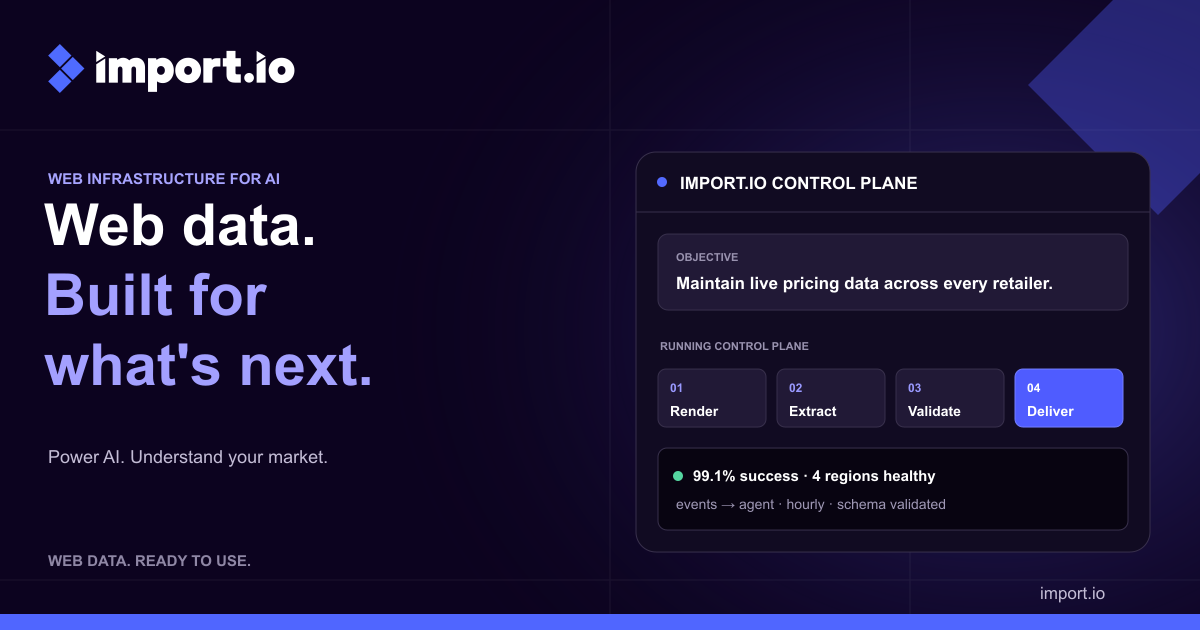



 All bots

 Registration details

 Identified technologies
User reviews (0)