Website profiles · Technology insights · Alternatives

krater.ai

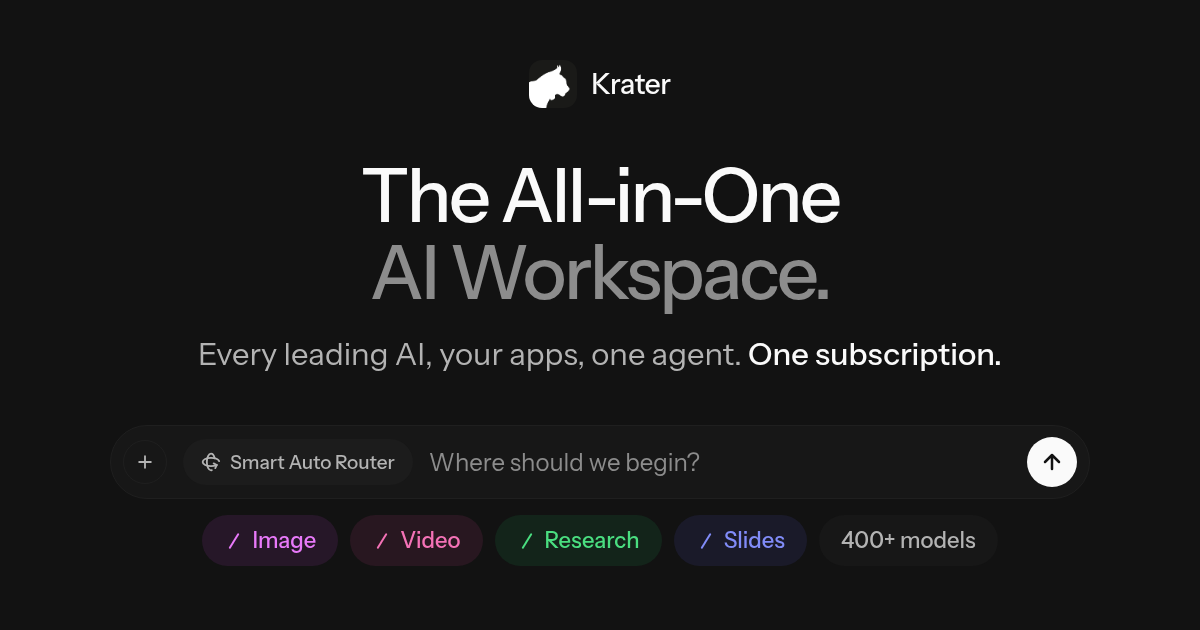
Krater is the all-in-one AI workspace: ChatGPT, Claude, Gemini and 500+ AI models, plus images, video and an agent that gets work done. One subscription.

Paid content Multilingual
Visit website
Profile views 2 Outbound visits 1 Normal
Krater Full homepage screenshot

At a glance

Category
Artificial Intelligence
Language
English
Paid-content signal
Paid contentObserved
Registered
2022
Hosting
VercelInferred
HTTPS certificate trusted
PassedObserved
Last updated

Website review

This review may include AI-generated content and is not individually verified. Domain, certificate and other facts come from the observed data on this page.

What is Krater?

Krater is an all-in-one AI workspace that puts many leading AI models behind a single subscription. According to its site, it bundles ChatGPT, Claude, Gemini and 500+ other models, plus image, video, speech and research tools, with an agent that can carry out multi-step work. It is aimed at people who want broad AI capability without juggling separate accounts and tools.

What it offers

  • Many models, one place. Pick a model yourself or let Auto Router choose one for the task.
  • Images and video. Create, edit and upscale visuals with image and video models.
  • Artifacts. Describe a visual, slide deck or website and get an editable result with a live preview.
  • Agent and Tasks. Set a goal and let Krater plan, research and browse; connect tools and schedule recurring work.
  • Memory and Projects. Keep context, style and files available across sessions.
  • Source chat. Drop in PDFs, URLs or videos to get summaries and answers.
  • Speech and audio. Text to speech, sound effects, voice changing and transcription.
  • Deep research. Web-connected research with findings saved into Keep.

Who it suits

It fits freelancers, students, marketers and small teams that regularly switch between writing, research, images and automation, and would rather pay for one workspace than several subscriptions. If you only need one model for occasional chat, a single-provider tool may be simpler and cheaper.

How to decide

Start with the job you do most: if it is research and documents, test source chat and deep research first; if it is visuals, test image and video tools; if it is repetitive operations, test Tasks and app connections. The official pricing page at Krater lists current plans, so compare the subscription against the separate tools you would otherwise pay for.

How does Krater's Auto Router decide which AI model to use?

Krater's own materials describe Auto Router as a convenience layer rather than a published algorithm: you can either pick a model yourself or let Auto Router choose one for you. The site does not document the selection criteria, so the honest answer is that the routing logic is not disclosed — what is disclosed is the intent, which is to spare you from deciding among 500+ models on every request.

What can be said from the product description

  • Auto Router sits alongside manual model selection, not instead of it. You keep the option to force ChatGPT, Claude, Gemini or any other listed model when you already know what you want.
  • It is positioned as a default for people who don't want to track which model is strongest at coding, writing, image generation or video.
  • Routing is one feature inside a broader workspace that also handles images, video, artifacts, connected apps, scheduled Tasks, Memory and Projects, and source-grounded chat. Model choice is treated as plumbing, not the main event.

How to judge it in practice

Treat Auto Router as a black box you evaluate by output, not by explanation. A sensible test is to run the same five or six real tasks through it — a long document summary, a coding fix, a marketing draft, an image edit, a research question with sources, a transcription — and compare results against two or three models you select manually. If the routed output is consistently close to your hand-picked best, the convenience is worth it; if it drifts on the task types you care about, override it.

Two decision criteria matter most:

Your situation Sensible approach
Mixed, unpredictable workload Let Auto Router pick, override only when output disappoints
Narrow, high-stakes workload (e.g. regulated writing, production code) Pin a specific model you have already validated
Cost or speed sensitivity Compare routed results against cheaper models before assuming the default is the efficient choice

A concrete scenario

A small content team drops a batch of PDFs and URLs into the workspace, asks for summaries, then requests slides and a hero image from the same context. Auto Router is the low-effort path: nobody has to argue about which model summarises best or which image model handles the style. The trade-off is predictability — the model behind a given answer may change, which complicates reproducibility if you need to explain how a specific output was produced.

If routing transparency is a hard requirement, ask support directly before committing, and check the pricing page at Krater for what the subscription actually covers.

Can I connect Krater to my existing apps and automate tasks?

Yes. Krater is built to plug into the tools you already use and then run work on your behalf. Its page lists 1,400+ app connections plus a Tasks feature that lets the agent run jobs on a schedule. So the intended workflow is: connect your apps, describe the goal, and let Krater plan, research and execute rather than you copying things between tabs.

What "connect and automate" actually covers

  • App connections: over 1,400 integrations are advertised, so the practical question is whether your specific stack (calendar, email, docs, project tracker, CRM) is among them.
  • Tasks on a schedule: recurring work like summaries, reports or updates can be set to run automatically instead of triggered by hand.
  • An agent that plans: you set a goal, and Krater plans, researches and browses to carry it out.
  • Context that persists: Memory and Projects keep your files, style and prior context, which is what makes repeated automation more useful than one-off prompts.

Where it fits best

A realistic user is someone juggling several subscriptions and manual handoffs: a freelancer pulling client notes from PDFs into a deck, or a small team scheduling weekly digests from connected tools. Krater's pitch is consolidation — one subscription covering many models, images, video, speech and an agent, rather than five separate accounts.

Trade-offs to weigh

  • Breadth vs. depth: a single workspace rarely matches a specialist tool for every job. If one task (say, professional video editing) is central to your work, keep a dedicated tool for it.
  • Integration reality: 1,400+ sounds large, but check your exact apps before committing. Missing one critical connection can break an otherwise good automation.
  • Scheduled automation needs oversight: anything running unattended should be reviewed early on, especially if it writes to shared documents or sends messages.

Practical next step

List the three apps you touch daily and the one recurring task you'd most like removed. Then check Krater's connections and Tasks against that short list — if the match is there, it's worth testing with a low-stakes automation first. You can review plans at Krater.

How does Krater handle image and video generation compared to single-model tools?

Krater's pitch is consolidation: instead of subscribing to one image or video model, you get image and video generation alongside 500+ other models under one subscription. The practical difference from a single-model tool is less about raw output quality and more about workflow — you can move from a prompt to an edited, upscaled visual without switching apps or juggling separate accounts.

What the page actually claims

Per the site, Krater lets you "create, edit and upscale with the best image and video models." It also offers an Auto Router that picks a model for you, or you can choose one manually. Artifacts — visuals, slides, websites — are described as editable with a live preview. Beyond stills and clips, the workspace covers speech, sound effects, voice changing and transcription.

How that differs from single-model tools

Dimension Single-model tool Krater (as described)
Model choice One fixed model 500+ models, manual or Auto Router
Editing Usually separate tools Create, edit, upscale in one place
Adjacent work Rare Slides, sites, tasks, transcription
Context Per-tool Memory and Projects carry style/files
Cost model One subscription per tool One subscription for the bundle

Who benefits, and the trade-off

A realistic user: a marketer who needs a hero image, a short video variant, and a voiceover for the same campaign. In a single-model setup that's three tools and three logins; here it's one workspace with shared context. The trade-off is depth. A dedicated image tool may offer finer controls for one specific model, whereas a bundled workspace optimizes for breadth and convenience. If your work is narrow and you've already mastered one model, the bundle's value is smaller.

How to decide

Ask whether your bottleneck is model quality or tool-switching. If it's the latter, a unified workspace wins. If it's the former, test the specific models you rely on first. Start at Krater and check the pricing page before committing.

What happens to my files and context when I use Memory and Projects?

Krater's Memory and Projects are the parts of the workspace that carry your context forward, so you are not re-explaining yourself in every chat. Based on the product's own description, Memory and Projects "keep your context, style and files ready," which means your stored preferences and project materials are meant to be available to the AI when you work inside that project.

What that looks like in practice

  • Files stay attached to the project. You drop in PDFs, URLs or videos to get summaries and answers, and the project is where those sources live rather than being re-uploaded each session.
  • Style and preferences persist. Memory is the layer that remembers how you like work done, so output should need less correction over time.
  • Context is scoped, not global. A project acts as a container: the context you build for one body of work sits with that work instead of bleeding into unrelated chats.

The trade-off to weigh

Convenience here depends on how cleanly projects are separated. If you mix client work, personal research and one-off experiments in the same project, memory can pull the wrong tone or reference the wrong sources. The practical habit is one project per ongoing body of work, and treat memory as something you curate rather than let accumulate.

A concrete scenario

A consultant keeps a project per client. Contracts, call transcripts and brand guidelines go in once. Memory holds the preferred report format and terminology. New requests then start from established context instead of a blank chat, and the client's material never informs another client's output.

Next step

Before committing real work, open a project, add two or three source files, and check whether a new conversation inside it actually reflects them. If it does, the setup is doing its job; if not, tighten how you have separated projects. Krater publishes its plans at Krater.

Is the one-subscription pricing worth it compared to paying for ChatGPT, Claude, and Gemini separately?

Whether one subscription is worth it depends less on the sticker price and more on how many of these tools you actually use each month. The case for consolidating is strongest when you'd otherwise pay for two or more premium AI plans, and weakest when you mostly use one model and rarely touch images, video or automation.

What you're comparing

Krater positions itself as a single workspace covering ChatGPT, Claude, Gemini and 500+ other models, plus image and video generation, speech tools, research, and an agent that runs scheduled work across 1,400+ app connections. The pitch is breadth under one bill rather than depth in any single assistant.

Buying separately, you'd typically hold several subscriptions, each with its own login, billing cycle, context and file storage. That fragmentation is the real cost — not just money, but the friction of remembering which tool holds which conversation.

Where consolidation wins

  • You regularly switch between models for different jobs (long drafting, code, quick lookups) and want to pick per task, or let an Auto Router choose.
  • You need to generate or edit images and video alongside text work, which most single-assistant plans don't cover well on their own.
  • You want files, PDFs, URLs and past research kept in one place with memory and projects, instead of re-uploading context into each tool.
  • You'd use scheduled tasks or app connections to automate recurring work — that's a capability separate chat subscriptions generally don't offer.

Where it doesn't

  • You've standardized on one assistant and know its quirks, shortcuts and ecosystem. Depth usually beats breadth for heavy daily users.
  • Your employer already pays for one or more of these tools, so your marginal cost is zero.
  • You need enterprise controls, compliance guarantees or team administration tied to a specific vendor.
  • You only need occasional chat. A single mid-tier plan plus free tiers elsewhere often costs less.

A practical decision test

List every AI subscription you currently pay for and the monthly total. Then ask two questions:

  1. Do I use more than one of them in a typical week?
  2. Do I need image, video, voice or automation that my current plans don't include?

Two yeses point toward consolidating. Two nos point toward keeping what you have. One of each means it's a close call — check whether Krater's Pricing page lands below your current combined spend before switching, and note that model access and feature limits on aggregator platforms can change, so verify the specific models you rely on are included.

A useful middle step: run both setups in parallel for one billing cycle. Track which tool you actually open each day. If the workspace becomes your default and the separate subscriptions go untouched, cancel them; if you keep returning to one vendor's app, that's your answer.

Related questions

More questions →
How Krater's Agent, Auto Router, Memory, and Projects Work Together

Krater's four core systems form a single loop: Projects hold the context, Memory carries your preferences across sessions, Auto Router picks the right model for each step, and the agent executes multi-step work on your behalf. The result is that you set up a task once — goal, files, style — and subsequent work in that workspace doesn't require re-explaining yourself or manually switching between models. This suits anyone doing recurring or multi-step knowledge work (research, content, visuals, scheduled tasks) more than someone who just wants a single chat window.

The four pieces and what each one does

System Role What it removes
Projects Keeps your context, style, and files ready for a given body of work Re-uploading and re-describing the same material each session
Memory Learns how you work and retains that across the workspace Re-stating tone, format, and preferences every time
Auto Router Chooses the best model for the task, or lets you pick one manually Deciding which of 500+ models fits each step
Agent Takes a goal, then plans, researches, and browses to complete it Manually chaining research → drafting → output steps

How they chain together in practice

The interaction is sequential, and each stage feeds the next:

  1. You define the work in a Project. Drop in the source material — the site notes you can add PDFs, URLs, or videos — so the workspace has something to reason over.
  2. Memory supplies your standing preferences. Because it learns how you work, the agent doesn't start from a blank style each time.
  3. You give the agent a goal, not a prompt. Per the site, you "set a goal" and Krater "plans it, researches, browses" — the planning step is the agent's, not yours.
  4. Auto Router assigns models per step. Rather than you choosing one model for the whole job, routing happens at the task level, so a research step and an image step can use different models.
  5. Output lands as an editable artifact. Describe a visual, slide deck, or website once and you get an editable result with a live preview, which you can then revise inside the same workspace.

The compounding effect is the point: steps 1 and 2 are one-time setup, so steps 3–5 run without you re-establishing context.

A concrete example

Say you maintain a recurring competitor digest. In a Project, you add the relevant URLs and any PDFs. Memory already knows you want a short bulleted format with sources cited. You tell the agent the goal — "summarize this week's changes across these sources." The agent plans the sweep, browses for current information, and Auto Router sends the retrieval and summarization steps to appropriate models. The digest comes back as an editable artifact. Next week you repeat only the goal; the Project and Memory are still there.

Where the surrounding features fit

These systems don't operate alone — the site lists adjacent capabilities that plug into the same loop:

  • Deep research stays connected to the web, with findings saved into Keep, so research output persists rather than disappearing into a chat log.
  • Tasks and 1,400+ app connections let Krater run work on a schedule, which is where the agent moves from on-demand to recurring.
  • Speech, sound, and voice cover text-to-speech, sound effects, voice changing, and transcription for audio-oriented steps.

What to check before relying on it

  • Model access is bundled, not individually subscribed. The site states ChatGPT, Claude, Gemini, and 500+ models come under one subscription, so the value case rests on using several of them rather than one.
  • Pricing and plan tiers aren't specified in the material available here. Check the pricing page directly before assuming what a subscription includes.
  • The agent's autonomy has boundaries. It plans, researches, and browses toward a goal, but the output is presented as an editable artifact — expect to review and revise rather than publish untouched.

If your work is repetitive and context-heavy, the Project + Memory + Auto Router + agent combination is designed to collapse the setup overhead. If you only need occasional one-off answers, the multi-system structure adds more than it saves.

How to Compress Images for the Web Without Losing Visible Quality

You can cut most images to a fraction of their original file size without any visible quality loss by doing three things in the right order: resize the image to the dimensions it will actually display at, pick the right format for the content, then apply compression at a quality level that survives a side-by-side check. The single biggest mistake is skipping step one — an oversized image compressed at maximum quality is still far heavier than a correctly sized one.

Why file size and quality are a trade-off, not a fixed setting

Every compressed image is a negotiation between three variables: how many pixels you keep, how precisely each pixel is described, and how much the format is allowed to guess.

  • Dimensions decide how many pixels exist at all. Halving width and height removes 75% of the pixel data before any compression happens.
  • Quality level decides how aggressively the encoder discards detail it thinks you won't notice.
  • Format decides the kind of discarding allowed — some formats throw away color precision, others only remove redundancy.

Because these interact, "quality 80" means something different on a 4000px photo than on a 600px thumbnail. Tune dimensions first, then quality.

Pick the format before you touch the quality slider

Format Best for Compression type Transparency Notes
JPEG Photographs, gradients, complex scenes Lossy No Smallest for photos; artifacts appear around sharp edges and text
PNG Logos, icons, screenshots, flat color, anything needing transparency Lossless (or lossy via quantization) Yes Often 5–10× larger than JPEG for photos; excellent for flat graphics
WEBP Almost everything, as a modern default Both lossy and lossless Yes Typically 25–35% smaller than JPEG at comparable quality; broad browser support
SVG Logos, icons, diagrams, charts Vector (resolution-independent) Yes Stays crisp at any size; not suitable for photos
GIF Short simple animations only Lossless, 256 colors Yes (1-bit) Superseded by WEBP/MP4 for animation in nearly all cases

Practical rule: photos → JPEG or lossy WEBP; flat graphics and transparency → PNG or lossless WEBP; anything vector → SVG.

The four levers, in the order you should pull them

1. Resize to display size (biggest win, zero quality cost)

If your layout renders an image at 800px wide, serving a 2400px original wastes roughly 89% of the pixels. Resize to the largest size it will ever be displayed at, and add a 2× version only if you need retina sharpness.

2. Choose the format

Match the format to the content type using the table above. Converting a photographic PNG to JPEG or WEBP alone can shrink it by 80% or more.

3. Set the quality level

For JPEG and lossy WEBP, most photographs hold up well between quality 70 and 85. Below ~60, banding appears in skies and blur around text. Above ~90, file size climbs steeply for gains nobody can see.

4. Strip metadata

EXIF data, camera info, and embedded thumbnails can add tens of kilobytes. Remove them unless you specifically need copyright or orientation data — and note that stripping orientation can rotate an image, so verify after export.

When lossy compression is fine, and when it isn't

Lossy is acceptable when:

  • The image is a photograph or has natural texture.
  • It's decorative or below the fold.
  • Slight softening won't be noticed at final display size.

Use lossless or vector instead when:

  • The image contains text, UI elements, or thin lines (lossy creates ringing artifacts).
  • It's a logo, icon, or diagram — SVG or PNG keeps edges clean.
  • It will be edited again later; repeated lossy saves compound degradation.
  • It's a screenshot of code or a chart where color accuracy matters.

Compressing vs. resizing: don't confuse them

Compressing reduces the bytes needed to describe the same pixels. Resizing reduces the number of pixels. They're independent, and resizing usually delivers the larger saving. A 3000×2000 photo at quality 95 might be 2 MB; the same photo resized to 1200×800 at quality 80 might be 180 KB. Doing only the quality reduction gets you maybe 40% off; doing both gets you over 90%.

A repeatable workflow

  1. Determine the maximum display width in your layout (inspect the element or check your CSS).
  2. Export at that width (plus a 2× variant if needed).
  3. Convert to the right format — WEBP as a modern default, JPEG as a fallback, PNG/SVG for graphics.
  4. Apply quality 75–85 for lossy formats and compare against the original.
  5. Strip metadata and re-check orientation.
  6. Verify before publishing (see below).
  7. Serve the right file with srcset so small screens don't download the large variant.

How to verify quality before you publish

  • View at 100% at final display size, not zoomed in — artifacts you can't see at real size don't matter.
  • Toggle between original and compressed in a viewer or an online compressor's before/after preview.
  • Check the worst-case areas: skies, smooth gradients, sharp edges, and any text.
  • Compare file sizes and ask whether the extra kilobytes buy visible improvement. If not, go smaller.
  • Test on a mid-range phone, where banding and blur are often more obvious than on a desktop monitor.

Common mistakes

  • Compressing a full-resolution image and calling it optimized.
  • Using PNG for photographs.
  • Setting quality to 100 "to be safe" — it inflates size with no visible benefit.
  • Re-saving a JPEG repeatedly, stacking artifacts each time.
  • Forgetting that GIF animations are usually better as WEBP or video.
  • Ignoring metadata, which can silently add weight.

Quick reference

Goal Do this
Photo on a webpage Resize to display width → WEBP (fallback JPEG) → quality 75–85
Logo or icon SVG; fall back to PNG if vector isn't possible
Screenshot with text PNG or lossless WEBP
Transparent photo cutout Lossy WEBP or PNG
Short animation WEBP or MP4, not GIF

The order matters more than any single setting: resize, then choose format, then tune quality, then strip metadata, then verify at real display size. Follow that sequence and you'll routinely land at 10–20% of the original file size with no quality your visitors can detect.

What Is Krater and What Can It Do?

Krater is an all-in-one AI workspace that gives you access to ChatGPT, Claude, Gemini, and 500+ other models under a single subscription. Instead of juggling separate accounts and tabs for each AI tool, you get one place to chat, generate images and video, produce speech, research the web, and run scheduled tasks. It's aimed at people who want broad model access without managing multiple subscriptions — students, professionals, and teams who use AI across different kinds of work.

What you can do with Krater

The platform bundles several capabilities that are usually spread across separate products:

  • Chat with 500+ models — Pick any model directly, or let Auto Router choose the best one for your task.
  • Make images and videos — Create, edit, and upscale using the best image and video models.
  • Build visuals, slides, and websites — Describe what you want once and get an editable artifact with a live preview.
  • Connect your tools and automate — 1,400+ app connections plus Tasks, which let Krater run work on a schedule.
  • Keep context across sessions — Memory and Projects retain your context, style, and files so you don't re-explain yourself each time.
  • Talk to your sources — Drop in PDFs, URLs, or videos and get summaries and answers.
  • Work with speech and sound — Text to speech, sound effects, voice changing, and transcription.
  • Run deep research — Connected to the web, with findings saved straight into Keep.

How it differs from a plain AI chatbot

A standard chatbot gives you one model and a single conversation thread. Krater's design centers on doing work rather than just answering questions:

Dimension Typical single-model chatbot Krater
Model access One model 500+ models, with Auto Router
Output types Mostly text Text, images, video, speech, slides, websites
Context Per-conversation Memory and Projects persist across work
Automation Manual prompting Tasks run on a schedule; 1,400+ app connections
Research Manual copy-paste Web-connected, findings saved to Keep
Agent Limited or none An agent that plans, researches, and browses toward a goal

The agent angle is the biggest functional difference: you set a goal, and Krater plans it, researches, and browses to get the work done — rather than waiting for you to drive every step.

Who it's for

Krater fits best if you:

  • Use several AI tools regularly and want to consolidate them into one subscription.
  • Need more than text — images, video, voice, or generated slides and sites.
  • Want AI to remember your context and run recurring tasks instead of re-prompting from scratch.
  • Prefer not to decide which model to use each time (Auto Router handles that).

It's less of a fit if you only need occasional single-model chat and don't care about images, automation, or persistent context.

Pricing and access

Krater is positioned around one subscription for all the models and features above, and the site describes it as "the best value in AI." Payment is handled through Stripe. For current plan tiers, limits, and exact pricing, check the Pricing page — the specific figures aren't stated in the material available here, so confirm them there before subscribing.

The platform reports being trusted by 100K+ users, used by people at various companies and by students.

Does Krater Give You ChatGPT, Claude, Gemini, and 500+ Models in One Subscription?

Yes — Krater is positioned as an all-in-one AI workspace where a single subscription covers ChatGPT, Claude, Gemini, and 500+ other models, according to the site's own description. You can either pick a specific model yourself or let the built-in Auto Router choose one for your task. The exact model list, usage limits, and current price live on Krater's pricing page, so treat the "500+" figure as a headline claim to verify there before you commit.

What "one subscription, many models" actually means

The core promise is consolidation: instead of paying for and switching between separate ChatGPT, Claude, and Gemini accounts, you access them (and hundreds of others) from one workspace under one bill. Krater describes itself as "The All-in-One AI Workspace" with "All the world's best AI, on one subscription," and says it's trusted by 100K+ users.

That framing matters if your main pain point is subscription sprawl and tab-switching rather than any single model's unique capability.

How model selection works

Krater offers two paths, and the choice affects how much control you have:

Approach How it works Best when
Pick any model You manually choose the model for the task You know which model fits (e.g., a specific reasoning or writing style)
Auto Router Krater automatically selects the best model for you You don't want to think about model choice

If you have a strong preference for a particular model on a particular job, manual selection keeps you in control. If you just want a good result without deciding, Auto Router handles the routing.

What else comes with the workspace

Model access is only part of the offering. The same subscription bundles adjacent capabilities, which is relevant if you'd otherwise stitch together several tools:

  • Images and video — create, edit, and upscale using image and video models
  • Visuals, slides, and websites — describe something once and get an editable artifact with a live preview
  • 1,400+ app connections and Tasks — connect your tools and let Krater run work on a schedule
  • Memory and Projects — keep your context, style, and files ready across sessions
  • Talk to your sources — drop in PDFs, URLs, or videos for summaries and answers
  • Speech, sound, and voice — text to speech, sound effects, voice changing, transcription
  • Deep research — web-connected, with findings saved into Keep
  • An agent that does the work — set a goal and Krater plans, researches, and browses

How to decide if it fits you

Choose Krater's single-subscription model if:

  • You currently pay for multiple AI services and want to consolidate
  • You switch between models often and want one place to do it
  • You want image, video, research, and automation alongside chat models

Look elsewhere or verify carefully first if:

  • You depend on one specific model's exact version or features — confirm it's in Krater's current lineup
  • You need guaranteed usage limits or throughput — check the pricing page for what each tier includes
  • Your work requires data-handling terms you haven't confirmed

Before you subscribe

Two things are worth checking directly on Krater's pricing page:

  1. The current model list — "500+" is a headline number; the specific models and any tier restrictions are what determine whether your favorites are included.
  2. Plan limits and price — the site references a subscription and Stripe as the payment platform, but the exact cost and what each plan unlocks should be confirmed there rather than assumed.

The short answer to the original question is yes: one Krater subscription is designed to give you ChatGPT, Claude, Gemini, and hundreds more, with manual or automatic model selection. The practical answer is to verify the current model roster and plan terms on the pricing page, since those details change and determine whether it replaces the subscriptions you already pay for.

How Krater Pricing and Subscription Work

Krater is a subscription-based AI workspace: one paid plan is intended to cover ChatGPT, Claude, Gemini, and 500+ other models, plus image, video, speech, research, and agent features. Payment is handled through Stripe, and the exact price, tiers, and billing terms are listed on Krater's Pricing page. If you only need a single chatbot, a multi-model subscription may be more than you need; if you regularly switch between models and tools, the value case is stronger.

What the subscription covers

According to Krater's site, the product is positioned as "all the world's best AI, on one subscription." The same subscription is described as including:

  • 500+ AI models, including ChatGPT, Claude, and Gemini
  • An Auto Router that picks a model for you, or lets you choose manually
  • Image and video tools for creating, editing, and upscaling
  • Artifact building for visuals, slides, and websites, with an editable result and live preview
  • 1,400+ app connections and Tasks, so connected tools can run work on a schedule
  • Memory and Projects, which keep context, style, and files available across sessions
  • Source chat, where you drop in PDFs, URLs, or videos and get summaries and answers
  • Speech, sound, and voice, including text to speech, sound effects, voice changing, and transcription
  • Deep research connected to the web, with findings saved into Keep
  • An agent that takes a goal, plans it, researches, and browses

Krater also states it is trusted by 100K+ users. That is a usage signal from the site, not an independent review.

How pricing and payment work

Item What the available information shows
Pricing model Subscription
Where to see plans and prices Krater's Pricing page (krater.ai/pricing)
Payment processor Stripe
Free tier Not stated in the available information
Exact price, billing cycle, refunds Not stated in the available information

Because the price and plan details are not included in the source material, check the Pricing page directly before subscribing. Do not assume a free plan or a trial exists — the site describes a subscription, and no free-access terms are given.

How to decide whether it fits

Work through these conditions rather than comparing on price alone:

  1. Count how many AI tools you pay for now. If you already subscribe to two or more model providers plus separate image or transcription tools, consolidating into one subscription is the main argument for Krater.
  2. Check whether your must-have models are in the 500+ list. The site names ChatGPT, Claude, and Gemini. If your workflow depends on a specific model not mentioned, verify it is available before paying.
  3. Match features to real tasks. The subscription is worth more if you will use Tasks, app connections, source chat, or the agent — not just chat.
  4. Confirm the current price and terms on the Pricing page. Prices change, and the source material does not fix them.
  5. Decide based on usage frequency. Heavy, multi-tool users get more from an all-in-one plan; occasional single-model users may not.

Common sticking points

  • "One subscription" does not mean one fixed price for everyone. It means one plan covers many models and features. The actual cost still comes from the Pricing page.
  • Stripe is the payment channel, not a pricing signal. It tells you how you pay, not how much.
  • Model counts are a ceiling, not a guarantee of quality. 500+ models is a breadth claim; what matters is whether the specific models you rely on are included and usable.
  • Feature lists describe capability, not limits. The site does not state usage caps, rate limits, or per-feature quotas in the available information, so confirm those on the Pricing page if they affect your decision.

If your goal is to replace several AI subscriptions with one and you will use the broader workspace, Krater's model is a reasonable candidate — start by reading the Pricing page, then verify the specific models and features you need are covered.

Website Overview

Page metadata, canonical configuration and social previews work together to provide more consistent search and sharing presentation.

Domain and Registration

Transfer-protection status is present, helping reduce the risk of unauthorized domain transfers. The domain has about 3 years of registration history; its current configuration provides more context than age alone. The registrar is NameCheap, Inc., a widely used domain service provider. Registration contact information is publicly available through RDAP. The domain uses the common .ai extension, which is not an independent safety signal.

DNS and Email

Nameservers are provided by Cloudflare, indicating managed DNS hosting. MX records point to the Namecheap Private Email email service. CAA records restrict which certificate authorities are authorized to issue certificates. No CNAME was found; the observed records resolve directly to addresses. SPF and DMARC are configured. DKIM status is unknown.

TLS and Certificates

The certificate uses an RSA 2048-bit public key, offering broad client compatibility. The server supplied a complete certificate chain. No organization name is present in the certificate; the available fields are consistent with domain validation. The certificate was issued by Let's Encrypt, commonly associated with automated certificate services. The certificate's total validity is about 89 days, consistent with a short renewal cycle.

HTTP and Browser Security

The response lacks these common security headers: CSP, X-Content-Type-Options, Referrer-Policy, Permissions-Policy, clickjacking protection. CORS permits any origin to read this response. This is common for public resources; sensitive responses need narrower handling. No X-Powered-By header was found, reducing one common source of backend fingerprinting information. No obvious internal addresses or debug information were found in the headers. The Server header contains the custom value Vercel.

Technology Stack Analysis

The public page identifies Vercel without precise versions, leaving fewer clues for version-specific scanning.

Search and Social Sharing

Twitter Card metadata is configured. JSON-LD includes Organization data, helping describe the organization as an entity. The page declares 7 language or regional alternatives using hreflang. The title has 59 characters, within a common display range. A meta description is present, with 153 characters.

Hosting and Email

DNSCloudflare
HostingVercel
EmailNamecheap Private Email
Approximate IP geolocation (inferred; a CDN or proxy may differ from the origin server) United States flagUnited States Inferred 216.150.1.1

Registration details

RDAP / WHOIS

RegistrarNameCheap, Inc.
Registered2022-12-05
Expires2027-12-05
Domain statusclient transfer prohibited
Nameserversdenver.ns.cloudflare.com、jule.ns.cloudflare.com
DNSSECunsigned

DNS records

DNS

TypeNameValueTTLPriority
Akrater.ai216.150.1.1300—
MXkrater.aimx1.privateemail.com30010
MXkrater.aimx2.privateemail.com30010
NSkrater.aidenver.ns.cloudflare.com86400—
NSkrater.aijule.ns.cloudflare.com86400—
TXTkrater.aifmI+iUFatC7HpHwWrBqiBLbcVEDhit8Gn6B6XYiG5nA=300—
TXTkrater.aigoogle-site-verification=x2QJitixTQz2dXivBwX0BrKgItSjKDtEpsrVKAMJ7rM300—
TXTkrater.aiv=spf1 include:spf.privateemail.com -all300—
CAAkrater.ai0 issue "comodoca.com"3600—
CAAkrater.ai0 issue "digicert.com; cansignhttpexchanges=yes"3600—
CAAkrater.ai0 issue "letsencrypt.org"3600—
CAAkrater.ai0 issue "pki.goog; cansignhttpexchanges=yes"3600—
CAAkrater.ai0 issue "ssl.com"3600—
CAAkrater.ai0 issuewild "comodoca.com"3600—
CAAkrater.ai0 issuewild "digicert.com; cansignhttpexchanges=yes"3600—
CAAkrater.ai0 issuewild "letsencrypt.org"3600—
CAAkrater.ai0 issuewild "pki.goog; cansignhttpexchanges=yes"3600—
CAAkrater.ai0 issuewild "ssl.com"3600—
DMARC_dmarc.krater.aiv=DMARC1; p=quarantine;300—

TLS and certificates

TLS / SSL

AssessmentNormal configuration
Supported protocolsTLSv1.2、TLSv1.3
Negotiated protocolTLSv1.3
Certificate subjectkrater.ai
IssuerLet's Encrypt
Valid until2026-11-13T07:04 · Remaining when checked: 29 days
Verification detailsCertificate trust: Passed · Hostname match: Passed

HTTP response headers

HTTP

HeaderValue
content-typetext/html; charset=utf-8
cache-controlpublic, max-age=0, must-revalidate
serverVercel
strict-transport-securitymax-age=63072000
access-control-allow-origin*

Identified technologies

Vercel

Pages, Search and Sharing

Meta descriptionKrater is the all-in-one AI workspace: ChatGPT, Claude, Gemini and 500+ AI models, plus images, video and an agent that gets work done. One subscription.
Canonical URLhttps://krater.ai/
LanguageEnglish (default) · Multilingual
Twitter Cardsummary_large_image
googlebot 49 allowed · 9 disallowed
  • Allow/
  • Allow/help
  • Allow/help/contact
  • Allow/blog
  • Allow/blog/
  • Allow/library
  • Allow/reviews
  • Allow/install
  • Allow/auth
  • Allow/login
  • Allow/signup
  • Allow/explore
  • Allow/alternatives
  • Allow/partnerships
  • Allow/features/
  • Allow/discount
  • Allow/students
  • Allow/solutions
  • Allow/solutions/
  • Allow/family
  • Allow/security
  • Allow/about
  • Allow/models
  • Allow/models/
  • Allow/compare/
  • Allow/coupon/
  • Allow/pricing
  • Allow/pricing.md
  • Allow/pricing.txt
  • Allow/developers
  • Allow/api
  • Allow/api/
  • Allow/api-access/
  • Allow/enterprise
  • Allow/additions
  • Allow/additions/
  • Allow/apps
  • Allow/apps/
  • Allow/brand
  • Allow/affiliate
  • Allow/tts
  • Allow/x
  • Allow/experts
  • Allow/experts/
  • Allow/partners
  • Allow/all-in-one-ai
  • Allow/ecommerce
  • Allow/ugc
  • Allow/hub
  • Disallow/landing
  • Disallow/admin
  • Disallow/chat/
  • Disallow/join/
  • Disallow/shared/
  • Disallow/certificate/
  • Disallow/mecenat
  • Disallow/leave-review
  • Disallow/ispeech
  • IntervalCrawl delay 1 seconds
bingbot 49 allowed · 8 disallowed
  • Allow/
  • Allow/help
  • Allow/help/contact
  • Allow/blog
  • Allow/blog/
  • Allow/library
  • Allow/reviews
  • Allow/install
  • Allow/auth
  • Allow/login
  • Allow/signup
  • Allow/explore
  • Allow/alternatives
  • Allow/partnerships
  • Allow/features/
  • Allow/discount
  • Allow/students
  • Allow/solutions
  • Allow/solutions/
  • Allow/family
  • Allow/security
  • Allow/about
  • Allow/models
  • Allow/models/
  • Allow/compare/
  • Allow/coupon/
  • Allow/pricing
  • Allow/pricing.md
  • Allow/pricing.txt
  • Allow/developers
  • Allow/api
  • Allow/api/
  • Allow/api-access/
  • Allow/enterprise
  • Allow/additions
  • Allow/additions/
  • Allow/apps
  • Allow/apps/
  • Allow/brand
  • Allow/affiliate
  • Allow/tts
  • Allow/x
  • Allow/experts
  • Allow/experts/
  • Allow/partners
  • Allow/all-in-one-ai
  • Allow/ecommerce
  • Allow/ugc
  • Allow/hub
  • Disallow/landing
  • Disallow/admin
  • Disallow/chat/
  • Disallow/join/
  • Disallow/shared/
  • Disallow/mecenat
  • Disallow/leave-review
  • Disallow/ispeech
  • IntervalCrawl delay 1 seconds
slurp 10 allowed · 7 disallowed
  • Allow/
  • Allow/blog
  • Allow/features/
  • Allow/discount
  • Allow/students
  • Allow/solutions
  • Allow/solutions/
  • Allow/family
  • Allow/security
  • Allow/about
  • Disallow/landing
  • Disallow/admin
  • Disallow/chat/
  • Disallow/shared/
  • Disallow/mecenat
  • Disallow/leave-review
  • Disallow/ispeech
duckduckbot 10 allowed · 6 disallowed
  • Allow/
  • Allow/blog
  • Allow/features/
  • Allow/discount
  • Allow/students
  • Allow/solutions
  • Allow/solutions/
  • Allow/family
  • Allow/security
  • Allow/about
  • Disallow/landing
  • Disallow/admin
  • Disallow/chat/
  • Disallow/mecenat
  • Disallow/leave-review
  • Disallow/ispeech
twitterbot 1 allowed · 0 disallowed
  • Allow/
facebookexternalhit 1 allowed · 0 disallowed
  • Allow/
linkedinbot 1 allowed · 0 disallowed
  • Allow/
pinterest 1 allowed · 0 disallowed
  • Allow/
gptbot 8 allowed · 6 disallowed
  • Allow/
  • Allow/llms.txt
  • Allow/llms-full.txt
  • Allow/pricing.md
  • Allow/pricing.txt
  • Allow/blog/
  • Allow/features/
  • Allow/help/
  • Disallow/landing
  • Disallow/admin
  • Disallow/chat/
  • Disallow/mecenat
  • Disallow/leave-review
  • Disallow/ispeech
chatgpt-user 7 allowed · 6 disallowed
  • Allow/
  • Allow/llms.txt
  • Allow/llms-full.txt
  • Allow/pricing.md
  • Allow/pricing.txt
  • Allow/blog/
  • Allow/features/
  • Disallow/admin
  • Disallow/chat/
  • Disallow/landing
  • Disallow/mecenat
  • Disallow/leave-review
  • Disallow/ispeech
claude-web 7 allowed · 6 disallowed
  • Allow/
  • Allow/llms.txt
  • Allow/llms-full.txt
  • Allow/pricing.md
  • Allow/pricing.txt
  • Allow/blog/
  • Allow/features/
  • Disallow/admin
  • Disallow/chat/
  • Disallow/landing
  • Disallow/mecenat
  • Disallow/leave-review
  • Disallow/ispeech
anthropic-ai 5 allowed · 6 disallowed
  • Allow/
  • Allow/llms.txt
  • Allow/llms-full.txt
  • Allow/pricing.md
  • Allow/pricing.txt
  • Disallow/admin
  • Disallow/chat/
  • Disallow/landing
  • Disallow/mecenat
  • Disallow/leave-review
  • Disallow/ispeech
perplexitybot 7 allowed · 0 disallowed
  • Allow/
  • Allow/llms.txt
  • Allow/llms-full.txt
  • Allow/pricing.md
  • Allow/pricing.txt
  • Allow/blog/
  • Allow/features/
cohere-ai 5 allowed · 6 disallowed
  • Allow/
  • Allow/llms.txt
  • Allow/llms-full.txt
  • Allow/pricing.md
  • Allow/pricing.txt
  • Disallow/admin
  • Disallow/chat/
  • Disallow/landing
  • Disallow/mecenat
  • Disallow/leave-review
  • Disallow/ispeech
google-extended 7 allowed · 6 disallowed
  • Allow/
  • Allow/llms.txt
  • Allow/llms-full.txt
  • Allow/pricing.md
  • Allow/pricing.txt
  • Allow/blog/
  • Allow/features/
  • Disallow/admin
  • Disallow/chat/
  • Disallow/landing
  • Disallow/mecenat
  • Disallow/leave-review
  • Disallow/ispeech
oai-searchbot 7 allowed · 6 disallowed
  • Allow/
  • Allow/llms.txt
  • Allow/llms-full.txt
  • Allow/pricing.md
  • Allow/pricing.txt
  • Allow/blog/
  • Allow/features/
  • Disallow/admin
  • Disallow/chat/
  • Disallow/landing
  • Disallow/mecenat
  • Disallow/leave-review
  • Disallow/ispeech
claudebot 7 allowed · 6 disallowed
  • Allow/
  • Allow/llms.txt
  • Allow/llms-full.txt
  • Allow/pricing.md
  • Allow/pricing.txt
  • Allow/blog/
  • Allow/features/
  • Disallow/admin
  • Disallow/chat/
  • Disallow/landing
  • Disallow/mecenat
  • Disallow/leave-review
  • Disallow/ispeech
applebot-extended 7 allowed · 6 disallowed
  • Allow/
  • Allow/llms.txt
  • Allow/llms-full.txt
  • Allow/pricing.md
  • Allow/pricing.txt
  • Allow/blog/
  • Allow/features/
  • Disallow/admin
  • Disallow/chat/
  • Disallow/landing
  • Disallow/mecenat
  • Disallow/leave-review
  • Disallow/ispeech
meta-externalagent 7 allowed · 6 disallowed
  • Allow/
  • Allow/llms.txt
  • Allow/llms-full.txt
  • Allow/pricing.md
  • Allow/pricing.txt
  • Allow/blog/
  • Allow/features/
  • Disallow/admin
  • Disallow/chat/
  • Disallow/landing
  • Disallow/mecenat
  • Disallow/leave-review
  • Disallow/ispeech
amazonbot 7 allowed · 6 disallowed
  • Allow/
  • Allow/llms.txt
  • Allow/llms-full.txt
  • Allow/pricing.md
  • Allow/pricing.txt
  • Allow/blog/
  • Allow/features/
  • Disallow/admin
  • Disallow/chat/
  • Disallow/landing
  • Disallow/mecenat
  • Disallow/leave-review
  • Disallow/ispeech
duckassistbot 7 allowed · 6 disallowed
  • Allow/
  • Allow/llms.txt
  • Allow/llms-full.txt
  • Allow/pricing.md
  • Allow/pricing.txt
  • Allow/blog/
  • Allow/features/
  • Disallow/admin
  • Disallow/chat/
  • Disallow/landing
  • Disallow/mecenat
  • Disallow/leave-review
  • Disallow/ispeech
All bots 49 allowed · 8 disallowed
  • Allow/
  • Allow/help
  • Allow/help/contact
  • Allow/blog
  • Allow/blog/
  • Allow/library
  • Allow/reviews
  • Allow/install
  • Allow/auth
  • Allow/login
  • Allow/signup
  • Allow/explore
  • Allow/alternatives
  • Allow/partnerships
  • Allow/features/
  • Allow/discount
  • Allow/students
  • Allow/solutions
  • Allow/solutions/
  • Allow/family
  • Allow/security
  • Allow/about
  • Allow/models
  • Allow/models/
  • Allow/compare/
  • Allow/coupon/
  • Allow/pricing
  • Allow/pricing.md
  • Allow/pricing.txt
  • Allow/developers
  • Allow/api
  • Allow/api/
  • Allow/api-access/
  • Allow/enterprise
  • Allow/additions
  • Allow/additions/
  • Allow/apps
  • Allow/apps/
  • Allow/brand
  • Allow/affiliate
  • Allow/tts
  • Allow/x
  • Allow/experts
  • Allow/experts/
  • Allow/partners
  • Allow/all-in-one-ai
  • Allow/ecommerce
  • Allow/ugc
  • Allow/hub
  • Disallow/landing
  • Disallow/admin
  • Disallow/chat/
  • Disallow/join/
  • Disallow/shared/
  • Disallow/mecenat
  • Disallow/leave-review
  • Disallow/ispeech
  • IntervalCrawl delay 2 seconds

User reviews (0)

  • No reviews yet.