Website profiles · Technology insights · Alternatives

linuxpatch.com

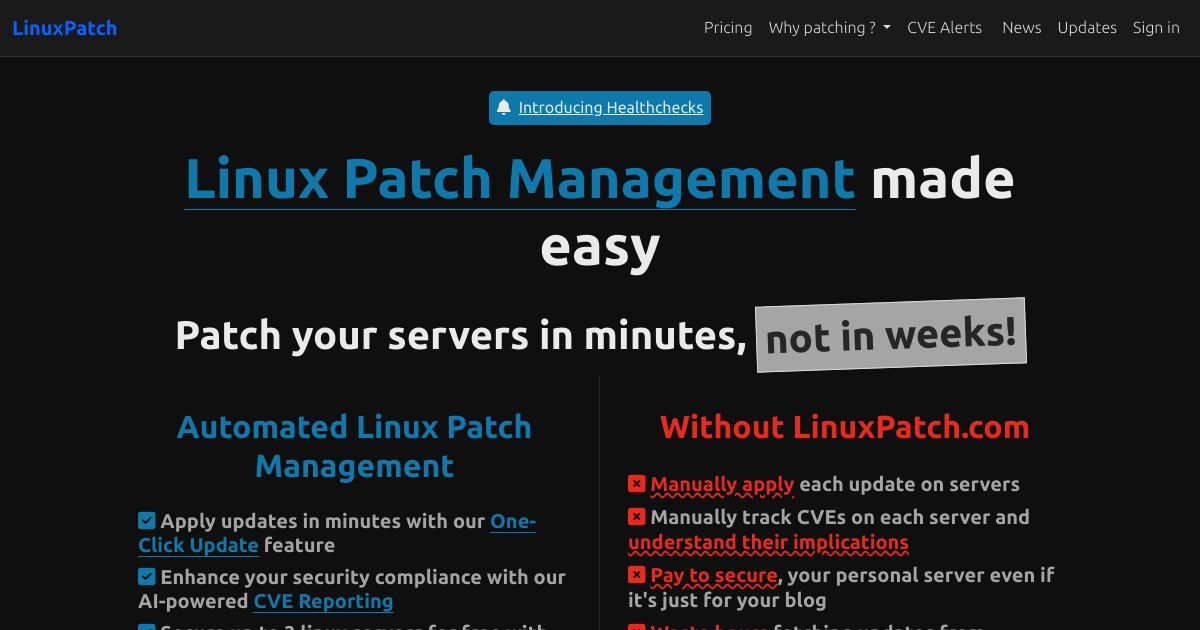
Enhance security with our Linux patch management solution. Quick setup, rapid deployment of updates. Your server safety is just a click away.

Paid content
Visit website
Profile views 9 Outbound visits 1 Normal
Secure Your Linux: Free Patch Management Solutions Full homepage screenshot

At a glance

Category
Development
Language
English
Paid-content signal
Paid contentObserved
Registered
2024
Hosting
CloudflareInferred
HTTPS certificate trusted
PassedObserved
Last updated

Website review

This review may include AI-generated content and is not individually verified. Domain, certificate and other facts come from the observed data on this page.

What is LinuxPatch?

LinuxPatch is a hosted patch-management service for Linux servers. You install a small agent with a one-line command, then use a web dashboard to push security updates, monitor server status, and review patch history across many machines. The site describes it as a simple tool for keeping Linux servers secure and up to date, with automated patching, notifications, scheduled maintenance windows, configuration backups before patching, and role-based access for teams.

It is aimed at administrators and small IT teams who want central control without building their own patch pipeline. The site lists support for Debian, Ubuntu, CentOS, Rocky Linux, AlmaLinux, Oracle Linux, openSUSE, and Amazon Linux, and shows a one-line install using an account key. A dashboard is the main interface, so it suits people who prefer clicking through updates rather than writing scripts for every host.

Three practical trade-offs matter:

  • Hosted vs. self-hosted: The main product is a cloud dashboard, but the site also lists self-hosted options and free tools. If policy forbids sending server data to a third party, the self-hosted route is the one to investigate first.
  • Automation vs. control: Automated patching and maintenance windows reduce toil, but you still need a rollback plan. The advertised pre-patch configuration backups help, but test them on a non-critical host.
  • Breadth vs. depth: Broad distribution support is convenient for mixed fleets, but confirm the specific versions you run are covered, especially older releases.

A useful next step is to try the one-line install on a single staging server, schedule one non-critical patch window, and verify that monitoring, notifications, and rollback behave as expected before rolling it out fleet-wide. If you already use configuration management, note that the site also points to Puppet modules and Ansible playbooks for larger deployments.

For context on the distributions involved, the official project sites are useful: Ubuntu, Debian, and Rocky Linux.

How does LinuxPatch automate security patching for Linux servers?

LinuxPatch automates security patching by installing a lightweight agent on each server, checking for available updates, and applying them on a schedule you define — all managed from one web dashboard. The page describes a one-line install, real-time monitoring, notifications, customizable patch schedules and maintenance windows, automatic configuration backups before patching, and role-based access for teams.

H3 How the automation typically fits together

  • Enrollment: you run the provided one-line install command with an account key; the server registers itself with the service.
  • Detection: the service tracks missing security updates for that distribution rather than relying on you to run package checks manually.
  • Scheduling: patches are applied inside maintenance windows you set, so updates don't land during peak traffic.
  • Safety net: configuration backups are taken before patching, which matters when an update touches config files.
  • Visibility: a dashboard shows patch status and history, and notifications flag failures or pending reboots.

H3 What it covers and who it suits The page lists Debian, Ubuntu, CentOS, Rocky Linux, AlmaLinux, Oracle Linux, openSUSE, and Amazon Linux, and mentions Puppet modules and Ansible playbooks for larger fleets. That makes it a reasonable fit for small teams that want patching handled without building their own pipeline, and for admins who need a single view across mixed distributions. Larger organizations with existing configuration management may prefer to keep patching inside their current tooling and use this only for reporting.

H3 A practical scenario A two-person ops team running a dozen Ubuntu and Rocky servers could enroll each host, set a Sunday maintenance window, and let patches apply automatically while keeping a rollback path via the pre-patch config backups. The trade-off is trusting a third-party agent with root-level patch execution and outbound connectivity — worth checking against your security policy.

H3 Decision criteria

  • Choose agent-based automation if you lack the time to maintain your own patching scripts.
  • Prefer your existing Ansible/Puppet setup if you already have one and only need status reporting.
  • Verify reboot handling and rollback behavior before enabling automatic reboots in production.

Next step: review the free self-hosted tools and the how-to guides on LinuxPatch to see whether the hosted dashboard or a self-managed approach matches your environment.

Can I use LinuxPatch to manage multiple Linux distributions from one dashboard?

Yes. LinuxPatch is built for exactly that: one dashboard managing servers across Debian, Ubuntu, CentOS, Rocky Linux, AlmaLinux, Oracle Linux, openSUSE, and Amazon Linux, according to the site's own compatibility list. You install an agent on each server with a one-line command, and the servers then appear together in the web dashboard for monitoring, patching, and reporting.

What "one dashboard" actually covers

  • Mixed fleets: You don't need separate tools or consoles per distribution; the same dashboard lists and acts on all supported servers.
  • Multi-server operations: The site describes one-click update deployment, real-time monitoring, notifications, and patch history tracking across servers.
  • Scheduling: Customizable patch schedules and maintenance windows let you keep different groups on different cadences (for example, staging vs. production).
  • Team access: Role-based access control is listed, so you can give colleagues scoped permissions rather than sharing one admin login.
  • Backups before patching: Automatic configuration backups before patching are advertised, which matters most on older or hand-tuned systems.
  • Scale-out options: For large fleets, the site points to Puppet modules and Ansible playbooks instead of purely manual onboarding.

A practical scenario

Say you run a small estate: two Ubuntu web servers, one Debian database host, and a Rocky Linux build machine. You'd install the agent on all four, tag or group them (production vs. internal), set a weekly maintenance window for production and a more frequent one for internal, then review the patch history each month. The dashboard replaces the alternative of SSH-ing into each box or maintaining per-distribution cron jobs and apt/dnf wrappers.

Trade-offs to weigh

  • Agent-based model: Convenience depends on installing and maintaining an agent on every host. Air-gapped or immutable systems may not fit.
  • Distribution support is a list, not a guarantee: Version-level behavior (for example, how a specific Ubuntu LTS or Debian point release handles unattended upgrades) can differ. Check your exact versions.
  • Centralization is also a single point of control: One dashboard with patch rights across the fleet needs strong access control and audit habits.
  • Free vs. paid tiers: The site mentions a free start and "pricing"/"upgrade" paths, but you should confirm current plan limits (server counts, features) directly rather than assuming.

Next step

Before rolling out broadly, install the agent on one non-critical server per distribution you run, run a patch cycle, and verify that reporting, notifications, and rollback/backup behavior meet your change-management rules. If you'd rather compare approaches, the official documentation for your distributions — such as Ubuntu or Debian — explains native unattended-upgrade mechanisms that a centralized tool would replace or supplement.

How do I install LinuxPatch on my Linux server?

LinuxPatch installs with a single command that registers the server to your account using a key from the dashboard. The page describes it as a one-line installation with no dependencies and minimal configuration.

Typical flow

  1. Create a LinuxPatch account and sign in to the dashboard.
  2. Copy your LinuxPatch key (shown as LP_KEY in the example).
  3. Run the installation command on the server over SSH.
  4. Confirm the server appears in the dashboard, then set a patch schedule or maintenance window.

The page's example command is:

export LP_KEY="your-lp-key"
curl -sSL https://linuxpatch.com/install.sh | bash

If you manage many machines, the site points to Puppet modules and Ansible playbooks as the deployment path instead of running the installer by hand on each host.

Practical notes

  • Run the command as root or via sudo, since patching touches system packages and configuration.
  • Before you start, confirm outbound HTTPS access from the server and that the key belongs to the right team or environment.
  • Test on one non-critical server first. The page mentions automatic configuration backups before patching, but verifying a snapshot or backup of your own is still sensible.
  • The page lists support for Debian, Ubuntu, CentOS, Rocky Linux, AlmaLinux, Oracle Linux, openSUSE, and Amazon Linux, so check your distribution is covered before rolling out.

If you prefer not to send a script straight into a shell, download the installer, read it, then execute it locally — the site also publishes self-hosted tooling and configuration generators for related setup work. See LinuxPatch for the current installer and dashboard key.

What free tools does LinuxPatch offer for self-hosted patch management?

LinuxPatch's self-hosted/free tooling is a set of generators and configuration helpers rather than a full self-hosted patch server. The page lists these free tools:

  • LinuxPatch.com — the main hosted patching dashboard
  • Docker Generator — build Docker configurations
  • LXC Configurator — generate LXC container configs
  • Docker Configurator and Podman Configurator — container runtime configs
  • Ubuntu/Debian APT Sources Generator — produce apt source lists
  • RockyLinux YUM Repository Generator — produce yum repo files
  • Debian/Ubuntu Preseed Generator — automate Debian/Ubuntu installs
  • Ubuntu Zsh Config Generator and Ubuntu MOTD Generator — shell and login-message configs
  • Puppet Manifest Generator, Ansible Playbook Generator, Terraform Code Generator — infrastructure-as-code templates
  • Cloud-init Configuration Generator — cloud instance bootstrap configs
  • Ubuntu Unattended Upgrades Generator — automatic update configs
  • Ubuntu Netplan Configuration Generator — network configs

What this actually means for you

These tools help you set up and configure Linux systems — container specs, package repositories, unattended upgrades, provisioning code — rather than providing a self-hosted patch-management server of your own. The core patching product itself (automated patches, dashboard, monitoring, reporting, role-based access, scheduling) is delivered through LinuxPatch's hosted service, with a one-line install script and integrations for Puppet and Ansible for scaling.

A practical scenario

If you run a small fleet of Ubuntu and Rocky Linux servers and want free, scriptable building blocks, you could use the APT Sources Generator and Unattended Upgrades Generator to standardize repository and update settings, then use the Ansible Playbook or Terraform Generator to roll those out consistently. That gives you repeatable configuration without writing everything by hand.

Decision criterion

Choose these free tools if your goal is generating correct configuration files and provisioning templates for Linux servers. If your goal is a self-hosted patch-management console that you run on your own infrastructure, note that the page markets the patching dashboard as the product itself, with self-hosted options referenced under "Self-Hosted" — check that section directly to confirm what can run on your own hardware versus what stays in the hosted service.

Next step: Start with the generator matching your distro and workflow (for example, the Ubuntu Unattended Upgrades Generator or the Ansible Playbook Generator), test the output on one non-critical server, and only then apply it fleet-wide. For official documentation on the underlying mechanisms, see Ubuntu and Ansible.

How do I upgrade Ubuntu LTS versions using LinuxPatch guides?

LinuxPatch's own guides treat Ubuntu LTS version upgrades as manual, step-by-step procedures rather than something the patching dashboard does for you. The site's how-to pages cover specific paths — Ubuntu 20.04 LTS to 24.04 LTS, Ubuntu 23.10 to 24.04 LTS, and Ubuntu 24.04 LTS to 24.04.1 LTS — so you pick the page matching your current release and target.

How to use them

  1. Confirm your current version with lsb_release -a or cat /etc/os-release.
  2. Open the LinuxPatch how-to for that exact source-and-target pair on LinuxPatch. If your combination isn't listed, don't improvise from a neighbouring guide — the supported jump paths differ.
  3. Work through the guide's commands in order, on a server you can afford to take offline.
  4. Reconnect the machine to LinuxPatch afterwards so patching and monitoring resume on the new release.

Where the product fits

LinuxPatch's dashboard handles ongoing patches, update deployment, schedule windows and patch history. A distribution upgrade — moving from one Ubuntu LTS release to the next — is a different class of operation, and the guides are written as standalone walkthroughs. Treat the upgrade as a maintenance project, then let the tool resume routine patching.

Practical cautions

  • Snapshot or back up the server before starting. A release upgrade rewrites package sources and can leave services misconfigured.
  • Check whether your hosted applications and any third-party repositories support the target release before you begin.
  • LTS-to-LTS jumps are the safer, better-documented route; interim releases have shorter support and narrower guide coverage.
  • If you manage many machines, stage the upgrade on one non-critical server first and note what breaks.

Next step

Identify your current release, find the matching how-to, and read it end to end before running anything. If no guide covers your pair, upgrade in supported stages (for example, via the intervening LTS) rather than skipping versions.

Related questions

More questions →
How to Get Started with LinuxPatch on Your Linux Servers

LinuxPatch is a patch management tool for Linux servers that installs with a single command and is managed from a web dashboard. You can get started in three steps: create an account, run the one-line installer on each server, then manage patching from the dashboard. It supports Debian, Ubuntu, CentOS, RockyLinux, AlmaLinux, OracleLinux, OpenSUSE, and Amazon Linux.

Before You Start

You need:

  • A Linux server running one of the supported distributions listed above
  • Shell access with permission to run an install script (typically root or sudo)
  • An email address to register, or a Google account for sign-in
  • Outbound HTTPS access from the server so the installer can reach linuxpatch.com

The site describes setup as minimal-configuration and dependency-free, so you do not need to pre-install agents or language runtimes.

Step 1: Create Your Account

Go to linuxpatch.com and register with an email address and a password of at least 8 characters, or use Sign in with Google. After registering, you get an LP_KEY — the key that links a server to your account. Keep it somewhere you can copy from, since you will paste it into the install command.

Step 2: Install the Agent with One Line

On each server you want to manage, run these two commands:

export LP_KEY="your-lp-key"
curl -sSL https://linuxpatch.com/install.sh | bash

What happens:

  • export LP_KEY=... puts your account key into the shell environment for the current session.
  • curl -sSL https://linuxpatch.com/install.sh downloads the installer silently, following redirects.
  • | bash pipes the script into your shell, which performs the installation.

Expected result: the script completes and the server appears in your dashboard, associated with your account via the key. If you run the installer without setting LP_KEY first, the server has nothing to register against — set the variable in the same shell session before piping the script.

Step 3: Manage Servers from the Dashboard

Once the agent is installed, the dashboard is where day-to-day work happens. Documented capabilities include:

Capability What it gives you
Real-time server monitoring Current state of each registered server
One-click update deployment Push patches without logging into each host
Customizable patch schedules and maintenance windows Control when patching runs
Automatic configuration backups before patching A restore point taken ahead of changes
Detailed reporting and patch history Audit trail of what was applied and when
Multi-server management All servers from a single dashboard
Role-based access control Separate permissions for team members
Instant notifications Alerts on patch and server events

The site also advertises secure, encrypted connections via SSL/TLS and 24/7 technical support and documentation.

Scaling Beyond Manual Installs

If you manage many servers, the one-line install does not have to be run by hand on each one. LinuxPatch provides Puppet Modules and Ansible Playbooks for deployment at scale, which let you fold the agent install into configuration management you already run. The site also offers a set of free self-hosted tools and generators — including Docker, LXC, and Podman configurators, APT and YUM repository generators, preseed and cloud-init generators, and Ansible, Puppet, and Terraform generators — useful if you want to standardize server builds alongside patching.

Common Stops

  • Key not set: the most common failure is running the curl command in a new shell where LP_KEY was never exported. Export it again or add it to your shell profile for the session.
  • No dashboard entry after install: check that the server can reach linuxpatch.com over HTTPS; restricted egress will block registration.
  • Wrong distribution assumptions: compatibility is broad but limited to the listed families. Confirm your distribution is on the list before troubleshooting further.

What to Decide Next

If you run a handful of servers and want patching handled with minimal setup, the account-plus-one-line-install path is the whole job. If you run fleets, decide up front whether you will deploy via Puppet or Ansible rather than installing manually, so agent rollout stays consistent with the rest of your provisioning.

What Is AI Programming and How Are Developers Actually Using It?

AI programming is the practice of using machine-learning models to generate, complete, review, or test code inside a developer's existing workflow. It covers everything from a single-line autocomplete suggestion in an IDE to a chat assistant that explains an unfamiliar function to an autonomous agent that opens a pull request on its own. The practical dividing line is not the model but the level of human oversight: the more a tool acts without review, the narrower the tasks it should be trusted with.

The four things AI actually does in a codebase

Most day-to-day use falls into a few recognizable activities:

  • Completion — predicts the next line or block as you type, based on the file and surrounding context.
  • Generation — produces a function, class, config file, or migration script from a natural-language description.
  • Explanation and review — summarizes what a piece of code does, flags suspicious patterns, or suggests a refactor.
  • Testing and debugging — writes unit tests for existing code, proposes fixes for a failing test, or traces a stack trace back to a likely cause.

These are not separate products so much as separate modes. The same assistant that autocompletes a loop can also be asked to write the test for it.

Tool categories and where each fits

Category Typical form Best for Main trade-off
IDE copilot Inline suggestions in the editor Boilerplate, repetitive patterns, unfamiliar syntax Suggestions arrive without context about your architecture
Chat-based assistant Side panel or separate window Explaining code, drafting a design, debugging a stack trace You must paste or describe context manually
Autonomous agent Runs commands, edits files, opens PRs Multi-file changes, dependency upgrades, test scaffolding Highest blast radius; needs the tightest review

The categories overlap, and many tools now span more than one. The useful question is not which category is best but how much of the change you are willing to accept without reading it line by line.

What a realistic workflow looks like

A common pattern, for example when adding a new API endpoint:

  1. Describe the endpoint in a comment or chat prompt — method, path, expected input and output.
  2. Let the assistant draft the handler and the data model.
  3. Read the draft and correct the parts that assume an API or library version you don't use.
  4. Ask the assistant to generate tests for the happy path and at least one failure case.
  5. Run the tests, then review the diff as you would any teammate's pull request.

The assistant compresses the first draft; it does not remove steps 3 and 5. Teams that skip the review step are the ones that report the worst outcomes.

Where it breaks down

The limitations are consistent enough to plan around:

  • Hallucinated APIs. Models invent function names, parameters, and library methods that look plausible and compile-fail or, worse, silently do the wrong thing.
  • Insecure suggestions. Generated code may interpolate user input into queries, disable certificate checks, or hardcode credentials because the training data contained those patterns.
  • Licensing and provenance. Suggestions may closely resemble licensed source; teams need a policy on what is acceptable to commit.
  • Data privacy. Pasting proprietary code into a hosted assistant may send it to a third party. Check whether your tool runs locally, offers an enterprise tier with data controls, or is approved for your codebase.
  • Stale knowledge. Models have a training cutoff and will confidently describe an older version of a framework.

None of these make the tools unusable. They make verification mandatory.

How to verify AI-generated code

Treat every suggestion as an untrusted contribution:

  • Compile and run it. A suggestion that doesn't build is a cheap failure; catch it before review.
  • Check every external call. Confirm the function exists, the signature matches, and the version is the one you depend on.
  • Read for security. Look specifically at input handling, authentication, secrets, and anything touching the network or filesystem.
  • Test the edges. Ask for failure cases, not just the happy path, and add the ones the model missed.
  • Keep the diff small. A 20-line suggestion is reviewable; a 400-line agent-generated refactor is not, at least not in one pass.

How teams adopt it gradually

The lowest-risk entry point is tasks where a mistake is cheap and visible: writing tests for existing code, generating documentation comments, scaffolding a config file, or translating a snippet between languages. From there, teams typically move to in-editor completion for routine code, then to chat-based assistance for debugging and design questions. Autonomous agents that modify multiple files tend to come last, and usually behind a branch-and-review gate rather than direct commits.

The pattern that holds up: start where you would notice an error immediately, expand only after the review habit is established, and keep a human accountable for anything that reaches production.

Can LinuxPatch Be Deployed at Scale with Puppet or Ansible?

Yes. LinuxPatch states on its homepage that if you need to deploy at scale, you can use its Puppet Modules or Ansible Playbooks. That makes it a fit for teams that already manage fleets of Linux servers through configuration management rather than logging into each host. The one-line install script remains the fastest path for a single server or a quick trial; Puppet and Ansible are the intended route when the same setup must run across many machines.

What the site actually says about scale deployment

The homepage carries a short line under the signup area: "Need to deploy at scale? Use our Puppet Modules or Ansible Playbooks." No further detail on module names, parameters, or repository locations appears in the page evidence, so treat this as a documented capability rather than a step-by-step guide you can copy from the homepage alone.

What is documented in more depth is the manual path:

export LP_KEY="your-lp-key"
curl -sSL https://linuxpatch.com/install.sh | bash

The page describes this as a one-line installation that is cross-platform, has no dependencies, and needs minimal configuration. The same page lists "Quick Start in 30 seconds" and "Instant Access" as headings, and says you get started in three steps.

When Puppet or Ansible is the right choice

Use configuration management when the install command has to run identically on many hosts and stay reproducible. A reasonable split:

Situation Sensible approach
One server, evaluating the product One-line install script
A handful of servers, occasional changes Install script, run manually per host
Dozens to thousands of servers, existing Puppet or Ansible setup Puppet Modules or Ansible Playbooks
Mixed estate with strict change control Configuration management, so the install is versioned and reviewable

The page also notes you can manage multiple servers from a single dashboard, which is the operational counterpart to a fleet-wide rollout: automation handles installation and configuration, the dashboard handles monitoring and update deployment.

What you get once servers are enrolled

The homepage lists these capabilities, all of which apply across a fleet rather than to a single machine:

  • Automated security patches and updates
  • Real-time monitoring and instant notifications
  • One-click update deployment from the dashboard
  • Detailed reporting and patch history tracking
  • Customizable patch schedules and maintenance windows
  • Automatic configuration backups before patching
  • Multi-server management from a single dashboard
  • Role-based access control for team collaboration
  • Secure, encrypted connections with SSL/TLS
  • 24/7 technical support and documentation

For a large deployment, the items that matter most are the patch schedules and maintenance windows (so updates do not land during peak traffic), the pre-patch configuration backups, and role-based access control (so not everyone who can see the dashboard can push updates).

Distribution coverage

The page lists universal compatibility across Debian, Ubuntu, CentOS, RockyLinux, AlmaLinux, OracleLinux, OpenSUSE, and Amazon Linux. If your fleet spans several of these, a single Puppet or Ansible workflow can target all of them rather than maintaining per-distribution scripts.

Practical steps to plan a scaled rollout

  1. Confirm your automation platform. The site names Puppet and Ansible specifically; if you use something else, the one-line script is the documented fallback.
  2. Create the account and obtain your key. The signup form asks for an email address and a password of at least 8 characters, and offers "Sign in with Google." The install example uses LP_KEY, so a key is issued as part of getting started.
  3. Test on one non-critical host first. Run the install script manually, confirm the server appears in the dashboard, and trigger a patch to see how reporting and backups behave.
  4. Move to Puppet or Ansible for the rest. Wrap the same installation and key configuration in your existing module or playbook structure so the setup is repeatable.
  5. Set schedules and access before broad rollout. Define maintenance windows and assign roles so update deployment is deliberate rather than ad hoc.

Common sticking points

  • The homepage does not document the modules. It confirms they exist but does not publish module names or usage. Expect to get specifics from the product's own documentation or support rather than from the landing page.
  • Key handling. The install example exports LP_KEY in plain text. In a Puppet or Ansible context, decide how that secret is stored and distributed before you scale.
  • Pricing is not stated on the page. The page shows a "Start Free Patching" button and a "LinuxPatch Pricing" link, but no figures. Do not assume the free start covers an unlimited fleet; check the pricing page for your expected server count.
  • Upgrades are a separate topic. The site's how-to library covers distribution upgrades (Ubuntu, Debian, Rocky Linux, CentOS) rather than the Puppet or Ansible deployment mechanics, so do not expect those guides to answer scale-deployment questions.

If your team already runs Puppet or Ansible, the documented support for both is enough to justify a trial on a small group of servers before committing the whole fleet.

Which Linux Distributions Does LinuxPatch Support?

LinuxPatch lists support for eight Linux distributions: Debian, Ubuntu, CentOS, RockyLinux, AlmaLinux, OracleLinux, OpenSUSE, and Amazon Linux. If your fleet is built from any mix of those, you can manage patching across all of them from a single dashboard rather than running a separate tool per distro family. The main caveat is that this list is what the site advertises — if you run something outside it (Fedora, Arch, SUSE Enterprise, or a minimal container image), you'd need to verify compatibility before committing.

The supported distributions

Distribution Typical use case
Debian Stable servers, long release cycles
Ubuntu Cloud instances, LTS server fleets
CentOS Legacy enterprise deployments
RockyLinux RHEL-compatible replacement for CentOS
AlmaLinux RHEL-compatible, community-supported
OracleLinux Oracle workloads and OCI environments
OpenSUSE SUSE-based infrastructure
Amazon Linux AWS EC2 instances

The list spans both the Debian/APT family (Debian, Ubuntu) and the RHEL/YUM-DNF family (CentOS, RockyLinux, AlmaLinux, OracleLinux, Amazon Linux), plus OpenSUSE. That spread is the point: a mixed environment doesn't need two or three separate patch workflows.

Why cross-distribution support matters

Most patch management friction comes from heterogeneity. A team running Ubuntu web servers, RockyLinux database nodes, and Amazon Linux workers would otherwise juggle apt, dnf, and yum separately, with different schedules and different reporting. LinuxPatch's stated value is consolidating that into one place:

  • Single dashboard for multiple servers — manage all supported distros from one interface.
  • Customizable patch schedules and maintenance windows — set policy once instead of per-distro.
  • Detailed reporting and patch history tracking — one audit trail across the fleet.
  • Role-based access control — useful when different admins own different server groups.

If your environment is homogeneous (say, all Ubuntu LTS), the cross-distro angle matters less, and a distro-native tool like unattended-upgrades may be sufficient. The comparison only favors LinuxPatch when you actually have mixed families or need centralized reporting.

How to confirm it fits your environment

  1. Inventory your distributions and versions. List every OS family and major version in your fleet. Anything outside the eight listed is a gap to check.
  2. Check the install path. The documented setup is a one-line install: export your key, then run the install script via curl. Confirm your servers can reach the endpoint and that your security policy allows piping a remote script to bash — many hardened environments require downloading and inspecting it first.
  3. Test on one non-critical host per distro family. Verify the agent installs, registers, and reports correctly before rolling out.
  4. Validate patch behavior in a maintenance window. Confirm that scheduled patches apply as expected and that the pre-patch configuration backup works on your distro.
  5. Review reporting output. Make sure the patch history and notifications give you what your compliance or audit process needs.

Common sticking points

  • Unlisted distributions. The eight supported distros are the advertised set; don't assume others work without testing.
  • Version-level support. The site lists distributions, not specific versions. Older or EOL releases (for example, an old CentOS point release) may behave differently — test before assuming.
  • Restricted networks. The one-line install requires outbound access. Air-gapped or egress-filtered environments need a different approach.
  • Pricing and account limits. The site shows a "Start Free Patching" signup and references pricing and upgrade pages, but the specific free-tier limits and paid tiers aren't detailed in the available material — check the pricing page directly before planning a large rollout.

When this is the right fit

Choose LinuxPatch if you run a heterogeneous fleet across the Debian and RHEL families (plus OpenSUSE or Amazon Linux) and want centralized scheduling, reporting, and access control. If you run a single distribution, or your servers are air-gapped, or you need support for a distro outside the eight listed, evaluate a distro-native solution or confirm compatibility first.

What Is LinuxPatch.com and What Does It Do for Linux Servers?

LinuxPatch.com is a Linux server patch and update management tool. It automates security patches and updates across multiple distributions, provides real-time monitoring and notifications, and lets you manage many servers from a single dashboard. It fits teams that run Linux servers on Debian, Ubuntu, CentOS, RockyLinux, AlmaLinux, OracleLinux, OpenSUSE, or Amazon Linux and want patching handled centrally rather than host by host.

Core capabilities

Based on the site's feature list, the tool covers:

  • Automated security patches and updates for Linux servers
  • Real-time monitoring and instant notifications
  • Dashboard-based server management
  • Detailed reporting and patch history tracking
  • SSL/TLS encrypted connections
  • Customizable patch schedules and maintenance windows
  • Automatic configuration backups before patching
  • Multi-server management from one dashboard
  • Role-based access control for team collaboration
  • 24/7 technical support and documentation

The practical value is in the combination: you define when patches run, the system backs up configuration before applying them, and you get a record of what changed. That addresses the usual patching pain — knowing what was patched, when, and being able to trace it afterward.

Supported distributions

LinuxPatch states universal compatibility across:

Family Distributions
Debian-based Debian, Ubuntu
Red Hat-based CentOS, RockyLinux, AlmaLinux, OracleLinux
SUSE OpenSUSE
Cloud Amazon Linux

If your fleet mixes these, a single dashboard avoids juggling separate patch workflows per distro.

How setup works

The site describes a "Quick Start in 30 seconds" flow with one-line installation:

export LP_KEY="your-lp-key"
curl -sSL https://linuxpatch.com/install.sh | bash

You set an API key as an environment variable, then run the install script. The site notes it is cross-platform, has no dependencies, and needs minimal configuration. After installation, servers appear in the dashboard for monitoring and update deployment.

For larger deployments, LinuxPatch offers Puppet Modules and Ansible Playbooks so you can roll out at scale instead of installing per host manually.

Who it is for

  • Sysadmins managing multiple servers who want one place to schedule and track patches
  • Teams needing audit trails — patch history and reporting support this
  • Mixed-distro environments where consistency matters
  • Organizations wanting role-based access so multiple team members can work without sharing one credential

What to verify before committing

The site shows a signup form (email and password, or Google sign-in) and a "Start Free Patching" button, plus a 4.9/5 rating from 226 reviews. It also references a "LinuxPatch Pricing" page. Pricing details and any limits on the free tier are not specified in the available material, so check the pricing page directly if cost or seat limits affect your decision.

The site also publishes free self-hosted tools and generators — Docker, LXC, Podman configurators, APT/YUM source generators, Ansible/Puppet/Terraform generators, and unattended-upgrades and cloud-init config generators — which may be useful even if you do not adopt the managed patching service.

If your goal is simply to stop manually SSH-ing into each server to run updates, LinuxPatch is built for exactly that: install once per host, then schedule, monitor, and audit from the dashboard.

Website Overview

Page metadata, canonical configuration and social previews work together to provide more consistent search and sharing presentation.

Domain and Registration

Transfer-protection status is present, helping reduce the risk of unauthorized domain transfers. The domain has about 2 years of registration history; its current configuration provides more context than age alone. The registrar is Cloudflare, Inc., a widely used domain service provider. The domain uses the common .com extension, which is not an independent safety signal.

DNS and Email

Nameservers are provided by Cloudflare, indicating managed DNS hosting. MX records point to the Hostinger Email email service. DNSSEC is enabled, allowing validating resolvers to authenticate signed DNS data. No CNAME was found; the observed records resolve directly to addresses. SPF and DMARC are configured. DKIM status is unknown.

TLS and Certificates

The public key uses EC with 256 bits. The server supplied a complete certificate chain. No organization name is present in the certificate; the available fields are consistent with domain validation. The certificate was issued within the Google Trust Services cloud or CDN ecosystem. The certificate's total validity is about 90 days, consistent with a short renewal cycle.

HTTP and Browser Security

The response lacks these common security headers: HSTS, X-Content-Type-Options, Referrer-Policy, Permissions-Policy. No X-Powered-By header was found, reducing one common source of backend fingerprinting information. The cf-ray response header indicates a CDN or caching proxy in the delivery path. No obvious internal addresses or debug information were found in the headers. The Server header identifies cloudflare without an exact version.

Technology Stack Analysis

The public page identifies Google Analytics, Cloudflare without precise versions, leaving fewer clues for version-specific scanning.

Search and Social Sharing

Twitter Card metadata is configured. JSON-LD includes Organization data, helping describe the organization as an entity. The title has 50 characters, within a common display range. A meta description is present, with 141 characters. The observed directives allow indexing and link following.

Hosting and Email

DNSCloudflare
HostingCloudflare
EmailHostinger Email
Approximate IP geolocation (inferred; a CDN or proxy may differ from the origin server) Location unknown Inferred 104.21.90.32

Registration details

RDAP / WHOIS

RegistrarCloudflare, Inc.
Registered2024-03-28
Expires2027-03-28
Domain statusclient transfer prohibited
Nameserverslia.ns.cloudflare.com、sam.ns.cloudflare.com
DNSSECsigned

DNS records

DNS

TypeNameValueTTLPriority
Alinuxpatch.com104.21.90.32300—
Alinuxpatch.com172.67.193.199300—
MXlinuxpatch.commx1.hostinger.com3005
MXlinuxpatch.commx2.hostinger.com30010
NSlinuxpatch.comlia.ns.cloudflare.com86400—
NSlinuxpatch.comsam.ns.cloudflare.com86400—
TXTlinuxpatch.combrevo-code:7502d8bd2242f0b280e68ea986a66413300—
TXTlinuxpatch.comgoogle-gws-recovery-domain-verification=54702377300—
TXTlinuxpatch.comgoogle-site-verification=2WY1F9ZBT__ehPOhr7PjE2zDltKSC7xtKglLpr-nfXQ300—
TXTlinuxpatch.comgoogle-site-verification=3ODzkw7UYUjVWfssVCtuktVlyQLYBAfV2GcWgDp9ohs300—
TXTlinuxpatch.comv=spf1 include:_spf.mx.cloudflare.net include:_spf.mail.hostinger.com include:_spf.google.com include:spf.brevo.com ~all300—
DSlinuxpatch.com2371 13 2 a7218cad9b46d55028c714e0191af912a8c94c26bcbf29c0b07eb6fc59fb3ebe86400—
DMARC_dmarc.linuxpatch.comv=DMARC1; p=none; rua=mailto:[email protected]300—

TLS and certificates

TLS / SSL

AssessmentNormal configuration
Supported protocolsTLSv1.2、TLSv1.3
Negotiated protocolTLSv1.3
Certificate subjectlinuxpatch.com
IssuerGoogle Trust Services
Valid until2026-11-28T15:17 · Remaining when checked: 61 days
Verification detailsCertificate trust: Passed · Hostname match: Passed

HTTP response headers

HTTP

HeaderValue
content-typetext/html; charset=UTF-8
cache-controlno-store, no-cache, must-revalidate
servercloudflare
content-security-policyframe-ancestors 'self'
x-frame-optionsSAMEORIGIN
set-cookieRedacted

Identified technologies

Google AnalyticsCloudflare

Pages, Search and Sharing

Meta descriptionEnhance security with our Linux patch management solution. Quick setup, rapid deployment of updates. Your server safety is just a click away.
Canonical URLhttps://linuxpatch.com/
LanguageEnglish (default)
Twitter Cardsummary
All bots 0 allowed · 12 disallowed
  • Disallow/auth/login
  • Disallow/auth/signup
  • Disallow/auth/reset
  • Disallow/auth/recovery/*
  • Disallow/auth/google/login
  • Disallow/auth/github/login
  • Disallow/auth/bitbucket/login
  • Disallow/privacy
  • Disallow/terms
  • Disallow/refund
  • Disallow/security
  • Disallow/install.sh

User reviews (0)

  • No reviews yet.