Website profiles · Technology insights · Alternatives

neuraltext.com

No paid content found

Categories: Marketing

Use the world's advanced AI to generate marketing copy and blog posts. With NeuralText you write SEO content quickly and easily instead of spending hours on it.

Visit website

Updated: 2026-09-30 17:39 Language: English (default) Access: Normal

Profile views 8 Outbound visits 0
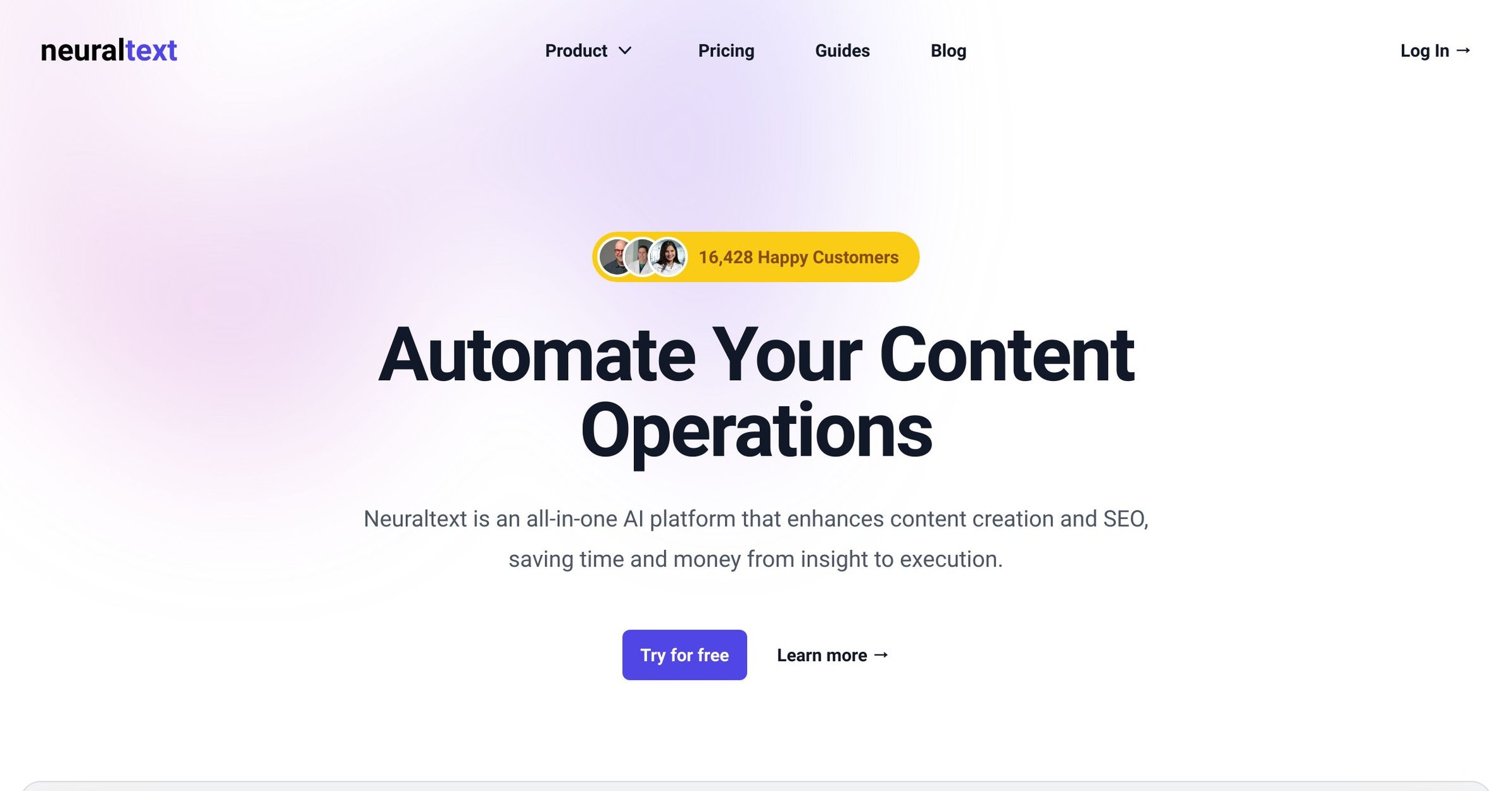
NeuralText Full homepage screenshot
Editorial Review

Website Review

What is NeuralText?

NeuralText is an all-in-one AI content and SEO platform. Its pitch is that it covers the whole content workflow — finding keyword opportunities, researching what already ranks, drafting with an AI writer, and then checking performance — rather than being just a text generator or just a keyword tool.

What it actually does

The site groups its features into four stages:

  • Plan — Keyword Clustering, which groups related queries so one page can target many of them instead of chasing each phrase separately.
  • Research — live SERP analysis and Content Briefs, built from what is currently ranking, so a writer knows what to cover before drafting.
  • Write — an AI writing assistant with inline autocompletion and a selection-based menu for rephrasing, summarising, simplifying or expanding existing text.
  • Analyze — Content Analytics tied to Google Search Console, for seeing how published pages perform and where to improve them.

There are also free standalone tools (People Also Ask, SERP Schema Extractor) that need no commitment to test the data quality.

Who it suits

The strongest fit is a small in-house content team or agency running a repeatable publishing process: a keyword researcher, a writer and a reviewer who currently pass spreadsheets and docs between three different subscriptions. The clustering-to-brief-to-draft chain is the reason to pick it over a plain AI writer. A solo blogger who mainly wants help finishing sentences will find the research layer heavier than needed.

Trade-offs to weigh

  • Consolidation means less depth per module than a dedicated rank tracker or a specialist long-form editor. If your keyword research is already excellent elsewhere, you are paying for overlap.
  • AI drafting still needs an editor. Autocompletion and paraphrasing speed up a first draft; they do not replace subject knowledge or fact-checking.
  • The free tools are the low-risk way to judge the underlying data before committing.

Next step

Pick one page you already rank for but want higher. Run its main query through keyword clustering, build a brief from the live SERP, and compare that brief against your existing page. If the gap is obvious and the brief saved you meaningful time, the platform earns its place.

How does NeuralText help with SEO content creation?

NeuralText is built around a single workflow: research a topic with real search data, draft the content with AI assistance, then check how it performs after publishing. The page describes four stages — Discovery, Research, Write and Analyze — so the SEO value comes less from the writing assistant alone and more from keeping keyword research, briefs and drafting in one place.

Where it fits in a content process

  • Keyword clustering groups related queries so one article can target several search intents instead of one page per near-duplicate phrase. That is the main lever for reducing the number of thin pages a site publishes.
  • SERP analysis and content briefs pull live search-result data into a brief, so the outline reflects what is currently ranking rather than guesswork.
  • AI writing covers inline autocompletion and a selection-based menu for rephrasing, summarizing, simplifying and expanding existing text — useful for unblocking a draft or tightening copy you already wrote.
  • Search Console integration closes the loop by showing how published pages perform, which is what turns the tool from a drafting aid into an optimization one.

Who gets the most out of it

A small in-house marketing team or a solo SEO consultant producing several articles a month is the clearest fit: one person can do research, briefing and drafting without switching between a keyword tool, a docs editor and an AI chatbot. Large editorial teams may still prefer dedicated rank-tracking and technical SEO suites, since NeuralText's emphasis is on content operations rather than crawling or site health.

A practical way to judge it

Pick one article you are about to write. Build the brief from the SERP data, draft it in the editor, and see whether the brief actually changed what you would have written anyway. If it did, the research layer is earning its place; if the AI writer is the only part you touch, a standalone writing assistant will likely be cheaper.

For comparison, Surfer and Frase occupy a similar brief-plus-draft space, while Grammarly covers editing only and Ahrefs covers research and site auditing without the drafting layer.

Can NeuralText's AI writing assistant help me overcome writer's block?

Yes. NeuralText positions its AI writer as a way to get past a blank page, not just to polish finished text. According to the page evidence, it offers inline autocompletion for ideation and a contextual menu for drafting, rephrasing, summarizing and simplifying. It also combines this with research features such as Content Brief, SERP analysis and Keyword Clustering, so the writing help sits inside a broader SEO workflow.

How it could work in practice

Imagine you need a blog post targeting a keyword but you only have a rough topic. You could start with a content brief built from SERP data, use the brief to outline the piece, then use the AI writer to expand sections, rephrase awkward passages or simplify dense paragraphs. That is more useful than a generic chatbot for SEO work because the writing step is connected to keyword and competitor research.

What to keep in mind

  • The tool can help with starting and refining, but you still need to verify facts, add original insight and edit for accuracy.
  • SEO features and writing features are separate strengths; the value comes from using them together.
  • The page shows a free trial option, so testing it on one real article is the clearest way to judge whether it fits your process.

Next step

Pick a topic you have been avoiding, run it through a brief, and draft only the introduction with the AI writer. If that gets you moving, the tool is doing its job. For alternatives, see Jasper or Surfer.

How does NeuralText's keyword clustering improve content strategy?

NeuralText's keyword clustering groups related search queries so one page can target many phrases at once, rather than forcing a separate article for every variation. The page frames this as "effortlessly targeting multiple queries with less effort," which matters because modern search engines often rank a single URL for dozens of near-identical intents.

What it changes in practice

  • Consolidation over sprawl: Instead of thin, overlapping posts, you build a few comprehensive pages around a cluster of related terms.
  • Intent alignment: The site pairs clustering with "align keyword research with search intent," so groups are meant to reflect what searchers actually want, not just shared words.
  • Compounding results: A well-clustered page can accumulate rankings across many queries, while a narrow page competes for one.

How to use it

  1. Enter a seed keyword and let the tool group related queries.
  2. Review each cluster for a single dominant intent — if two intents conflict, split the cluster.
  3. Assign one cluster to one page, then use the content brief feature to shape the outline around those queries.
  4. Track performance with the Search Console integration to see which clustered terms actually land.

Trade-offs

Clustering rewards sites that can write substantial, well-structured pages. If your team publishes short posts or lacks subject depth, forcing many queries into one page can dilute relevance. It also works best alongside a brief and SERP analysis, since clustering alone tells you what to group, not how to rank.

For a concrete scenario: a SaaS blog with ten near-duplicate posts on "email automation" could merge them into one cluster-targeted guide, then use the AI writer to expand sections and the SERP analysis to match top results. If you want to compare approaches, see NeuralText and Ahrefs.

What insights can I get from NeuralText's SERP analysis and content briefs?

NeuralText's SERP analysis and content briefs are designed to show you what already ranks for a target query and translate that into a writing plan. From the page, the workflow is: pull live SERP data, build a content brief enriched with that data, then write and optimize against it. So the insights are less "here is a score" and more "here is the competitive landscape and the structure you need to match or beat."

What the SERP analysis tells you

  • Who you are actually competing with. The live results for your query, so you can see whether the top slots are held by big publishers, forums, product pages or listicles — that shapes whether you should write a deep guide or a short commercial page.
  • What format search intent favors. If the top results are mostly how-to articles, a landing page is unlikely to rank; if they are comparison tables, a plain essay probably will not either.
  • Which subtopics keep appearing. Recurring headings and questions across ranking pages are the clearest signal of what a brief should cover.
  • Where the gaps are. Pages that rank but answer a question thinly are where a more complete piece can differentiate.

What the content brief adds

The brief turns those observations into an outline: target queries, supporting subtopics, and enrichment from SERP data. Paired with keyword clustering, it also helps you decide which related queries belong in one page rather than spread across several — reducing cannibalization and letting one strong page target a cluster of intent.

A practical way to use it

Take a query you want to rank for, generate the brief, and read the SERP section first. Ask: can I realistically produce something better than the current top three for this intent? If yes, write to the brief's structure. If no, either narrow the query or pick a cluster where the competition is weaker. Then use the Search Console integration after publishing to check whether impressions and position move for the queries the brief targeted — that closes the loop between research and result.

Trade-offs to weigh

SERP-derived briefs reflect what already ranks, so they tend to push you toward conventional structures; differentiation still has to come from your own expertise, data or angle. They are also a starting point, not a substitute for knowing your audience. If your team already has a strong research process, the value here is mainly consolidation — research, brief and drafting in one place rather than across separate tools.

For comparison, dedicated SEO suites like Ahrefs and Semrush offer broader backlink and rank-tracking depth, while NeuralText's emphasis is the brief-to-draft handoff. If your bottleneck is writing speed after research, that handoff is the reason to look closer.

How does NeuralText integrate with Google Search Console to improve content performance?

NeuralText connects to Google Search Console so you can see how existing pages actually perform in search and then act on that data inside the same platform where you research and write. The page lists a Content Analytics feature described as “Google Search Console without limitations,” meaning the integration is meant to surface query and page performance data you can use for content decisions rather than just raw reporting.

What the integration is for

  • Finding content that is close to ranking. Search Console data shows queries where a page already gets impressions or sits on page two. That is a practical shortlist for refreshing titles, adding sections or tightening intent match.
  • Connecting research to results. Because NeuralText also offers Keyword Clustering, SERP analysis and Content Briefs, the Search Console view can feed back into which briefs to create or update next.
  • Measuring impact. After you rewrite or expand a page, the same data source lets you check whether clicks and positions moved, closing the loop between writing and outcomes.

A concrete scenario

Suppose a blog post ranks around positions 8–15 for several related queries but gets few clicks. You would open the Search Console data in NeuralText, identify the queries with impressions but weak click-through, then use the AI writing assistant or a content brief to rewrite the introduction and add missing subtopics. The trade-off is that Search Console data is historical and query-level; it tells you what people searched, not why they clicked or bounced, so pair it with on-page reading and analytics.

Next step

Start with one or two pages that already have impressions but low clicks, update them using the query data, and track the same queries after a few weeks. If you want to compare approaches, general SEO suites such as Ahrefs and Semrush also use Search Console integrations, while Surfer focuses on content optimization.

Related questions

More questions →
What Is NeuralText and What Can It Do for Content and SEO?

NeuralText is an all-in-one AI platform for content creation and SEO, positioned to take a team from research through execution. According to its site, it combines keyword clustering, live SERP analysis, content briefs, an AI writing assistant, and Google Search Console integration in one place, and it says it is trusted by content teams including Forbes Advisor. It fits best if you want research and writing connected in a single workflow rather than stitched together from separate tools.

The four stages NeuralText covers

The site organizes its capabilities into four verbs: Plan, Research, Write, and Analyze.

Plan: Keyword Clustering

Keyword Clustering is described as a way to "align keyword research with search intent" and target multiple queries with less effort. Instead of optimizing one page per keyword, you group related queries so a single piece of content can address a cluster of them.

Research: Live SERP Analysis and Content Briefs

Content Briefs are built to "create and enrich content with SERP data." The research side is framed as gaining a competitive edge by seeing what already ranks, then turning that into a brief that guides the draft.

Write: AI Writing Assistant

The AI writer is positioned as a partner against writer's block. Per the site, it works in two modes:

  • Inline autocompletion for ideation, so you can move from a blog topic to a draft without leaving the editor.
  • A selection-based contextual menu for advanced drafting, including rephrasing, summarizing, and simplifying existing text.

The stated goal is to expand ideas or refine what you already wrote, rather than only generating from scratch.

Analyze: Search Console Integration

The Search Console integration is described as "Google Search Console without limitations," turning performance data into actionable insights for improving content and traffic. In practice, this is the feedback loop: see what's working, then revise.

What it does not claim

The source material does not list specific prices, plan tiers, or payment platforms, so treat cost and free-access limits as things to confirm on the pricing page rather than assume. It also does not detail export formats, language coverage, or seat limits.

Who it fits

NeuralText makes sense if your workflow currently splits keyword research, SERP checking, briefing, drafting, and performance review across different tools, and you want those steps in one platform. If you only need a standalone AI text generator with no SEO layer, or you already have a research stack you're happy with, the overlap may be less useful.

The practical next step is to open the free tools and the AI writing assistant, run one real keyword cluster through to a brief and draft, then check whether the Search Console view gives you insights you'd actually act on.

What Can AI Writing Tools Actually Do for Everyday Writing Tasks?

AI writing tools are best understood as fast, tireless assistants for the mechanical parts of writing: getting words on the page, reshaping existing text, and adjusting tone. They are genuinely useful for drafting emails, summarizing long documents, rewriting awkward sentences, and generating first-pass ideas. They are much weaker at guaranteeing factual accuracy, producing truly original insight, or understanding context they were never given. In practice, the more specific and well-fed your input, the more useful the output — and the more you treat the result as a draft to edit rather than a finished product, the better your results will be.

The Core Capabilities You Can Rely On

Most AI writing tools, including free online suites like TinyWow, cluster around a handful of repeatable tasks. These are the areas where the technology is most dependable.

Drafting from a prompt or outline

Give a tool a topic, a rough outline, or a few bullet points, and it will produce connected paragraphs. This is useful for overcoming the blank-page problem. The output is usually generic on the first pass, but it gives you something to react to and edit.

Rewriting and paraphrasing

You can paste a sentence or paragraph and ask for a clearer, shorter, more formal, or more casual version. This is one of the most reliable uses, because the tool is working with material you already know is accurate.

Summarizing

Long articles, meeting notes, and reports can be condensed into key points. Summarization works best when the source text is well-structured and not too long for the tool's input limit.

Adjusting tone and reading level

The same content can be shifted between professional, friendly, persuasive, or simple language. This is handy when you're writing for a different audience than usual.

Generating variations and ideas

Tools can produce multiple headline options, subject lines, or angles on a topic. Treat these as a brainstorm, not a shortlist of winners.

Basic proofreading and grammar

Catching typos, awkward phrasing, and inconsistent tense is a common and low-risk function.

Typical Everyday Use Cases

Task What the tool does well What still needs you
Work emails Drafts a polite, structured message from a few notes Confirming facts, names, dates, and tone fit your relationship
Social posts Generates hooks, captions, and hashtag ideas Choosing what actually represents you or your brand
Essays and schoolwork Helps outline and rephrase Original argument, citations, and checking your institution's rules
Summarizing reports Condenses long text into bullets Verifying nothing important was dropped or distorted
Product or service descriptions Produces multiple phrasing options Accuracy about features, pricing, and claims

What AI Writing Tools Genuinely Struggle With

Knowing the limits saves you from embarrassing or costly mistakes.

Factual accuracy

A tool can state something confidently that is simply wrong. It has no built-in way to verify a statistic, a date, a quote, or a legal detail. Anything factual needs independent checking.

Originality and genuine insight

Tools remix patterns from existing language. They can sound insightful without adding a new idea. If your task depends on a unique argument or firsthand experience, the tool can assist with phrasing but not supply the substance.

Context they weren't given

A tool doesn't know your company's history, your reader's mood, or the unwritten rules of your workplace. If that context matters, you have to supply it explicitly in your prompt.

Long or complex documents

Very long inputs may be truncated or lose coherence. Structure and consistency across a 20-page document are hard to maintain.

Nuance, humor, and cultural sensitivity

Tone can come out flat, overly formal, or accidentally off-key. Anything sensitive deserves a human read.

What Input a Tool Needs to Be Useful

The quality gap between a vague prompt and a detailed one is large. To get usable output, provide:

  • The goal: what the text should achieve (persuade, inform, apologize, sell).
  • The audience: who will read it and what they already know.
  • The format: email, list, paragraph, headline, 100 words, etc.
  • The tone: formal, warm, direct, playful.
  • The facts: names, dates, figures, and any must-include points.
  • Examples: a sample of your usual writing style helps match voice.

A reusable prompt template:

Write a [format] for [audience] about [topic]. The goal is to [goal]. Use a [tone] tone and keep it to [length]. Include these points: [list]. Avoid [things to avoid].

How to Judge Whether a Tool Fits Your Task

Ask three questions before you start:

  1. Is the task about language or about truth? If it's mainly reshaping words you already trust, a tool helps. If it hinges on facts, you'll need to verify everything.
  2. How costly is an error? A casual social post is low-risk. A contract, medical note, or financial claim is not — those need qualified human review.
  3. Do you have source material? Tools are far stronger when summarizing or rewriting existing text than when inventing content from nothing.

A Practical Workflow

  1. Write a one-line description of what you need.
  2. Feed the tool your goal, audience, tone, and key facts.
  3. Generate a draft.
  4. Edit for accuracy, voice, and anything the tool couldn't know.
  5. Fact-check every specific claim.
  6. Do a final human read before sending or publishing.

The Bottom Line

AI writing tools are excellent at acceleration and reshaping, and unreliable at verification and originality. Use them to draft, summarize, rephrase, and adjust tone — then apply your own judgment, facts, and voice. If you keep that division of labor clear, they can save real time on everyday writing without quietly introducing errors.

Website Overview

An established domain and managed infrastructure suggest continuity of operations and may support dependable delivery, although neither guarantees service quality. Several search or sharing settings need attention. Together they may make snippets, preview images or preferred URLs less consistent across platforms.

Domain and Registration

Registered in 2020, this domain has about 6 years of history. That suggests continuity, although ownership and purpose may have changed. Transfer-protection status is present, helping reduce the risk of unauthorized domain transfers. The domain uses the common .com extension, which is not an independent safety signal.

DNS and Email

The observed email authentication setup is incomplete: SPF is missing. Nameservers are provided by Cloudflare, indicating managed DNS hosting. MX records point to the Google Workspace email service. No CNAME was found; the observed records resolve directly to addresses. TXT records include verification markers for Google. Such markers may also remain after a service stops being used.

TLS and Certificates

The public key uses EC with 256 bits. The server supplied a complete certificate chain. No organization name is present in the certificate; the available fields are consistent with domain validation. The certificate was issued within the Google Trust Services cloud or CDN ecosystem. The certificate's total validity is about 90 days, consistent with a short renewal cycle.

HTTP and Browser Security

The response lacks these common security headers: HSTS, CSP, Permissions-Policy. No X-Powered-By header was found, reducing one common source of backend fingerprinting information. The cf-ray response header indicates a CDN or caching proxy in the delivery path. No obvious internal addresses or debug information were found in the headers. The Server header identifies cloudflare without an exact version.

Technology Stack Analysis

The public page identifies Alpine.js, Tailwind CSS, Google Tag Manager, Cloudflare without precise versions, leaving fewer clues for version-specific scanning.

Search and Social Sharing

The title has 68 characters and may be truncated in search results. The meta description has 161 characters and may be shortened in search results. Twitter Card metadata is configured. JSON-LD includes Organization data, helping describe the organization as an entity. The observed directives allow indexing and link following.

Hosting and Email

DNSCloudflare
HostingCloudflare
EmailGoogle Workspace
Location United States flagUnited States 2606:4700::6812:1e35

User reviews (0)

  • No reviews yet.

Pages, Search and Sharing

Meta descriptionUse the world's advanced AI to generate marketing copy and blog posts. With NeuralText you write SEO content quickly and easily instead of spending hours on it.
Canonical URLhttps://neuraltext.com/
LanguageEnglish (default)
Twitter Cardsummary_large_image
All bots 0 allowed · 2 disallowed
  • Disallow/accounts/login/
  • Disallow/accounts/signup/

Registration details RDAP / WHOIS

RegistrarAmazon Registrar, Inc.
Registered2020-01-07
Expires2029-01-07
Domain statusclient transfer prohibited
Nameserversharlee.ns.cloudflare.com、tanner.ns.cloudflare.com
DNSSECunsigned

DNS records

TypeNameValueTTLPriority
Aneuraltext.com104.18.30.53300—
Aneuraltext.com104.18.31.53300—
AAAAneuraltext.com2606:4700::6812:1e35300—
AAAAneuraltext.com2606:4700::6812:1f35300—
MXneuraltext.comaspmx.l.google.com3001
MXneuraltext.comalt1.aspmx.l.google.com3005
MXneuraltext.comalt2.aspmx.l.google.com3005
MXneuraltext.comaspmx2.googlemail.com30010
MXneuraltext.comaspmx3.googlemail.com30010
NSneuraltext.comharlee.ns.cloudflare.com86400—
NSneuraltext.comtanner.ns.cloudflare.com86400—
TXTneuraltext.comgoogle-site-verification=J8v_VHh7Ug9K-gFOOArZ_sOpGv-93Jz-UNzZ7xi6Dac300—
TXTneuraltext.comgoogle-site-verification=beyHadrz10p9g1zvzvFf3jQkj1qT25ddwJ-BAwc5zH8300—
DMARC_dmarc.neuraltext.comv=DMARC1; p=reject; rua=mailto:[email protected]300—

TLS and certificates

AssessmentNormal configuration
Supported protocolsTLSv1.2、TLSv1.3
Negotiated protocolTLSv1.3
Certificate subjectneuraltext.com
IssuerGoogle Trust Services
Valid until2026-12-14T19:04 · Remaining when checked: 75 days
Verification detailsCertificate trust: Passed · Hostname match: Passed

HTTP response headers

HeaderValue
content-typetext/html; charset=utf-8
content-languageen
servercloudflare
x-frame-optionsDENY
x-content-type-optionsnosniff
referrer-policysame-origin
set-cookieRedacted

Identified technologies

Alpine.jsTailwind CSSGoogle Tag ManagerCloudflare