Website profiles · Technology insights · Alternatives

openpeeps.com

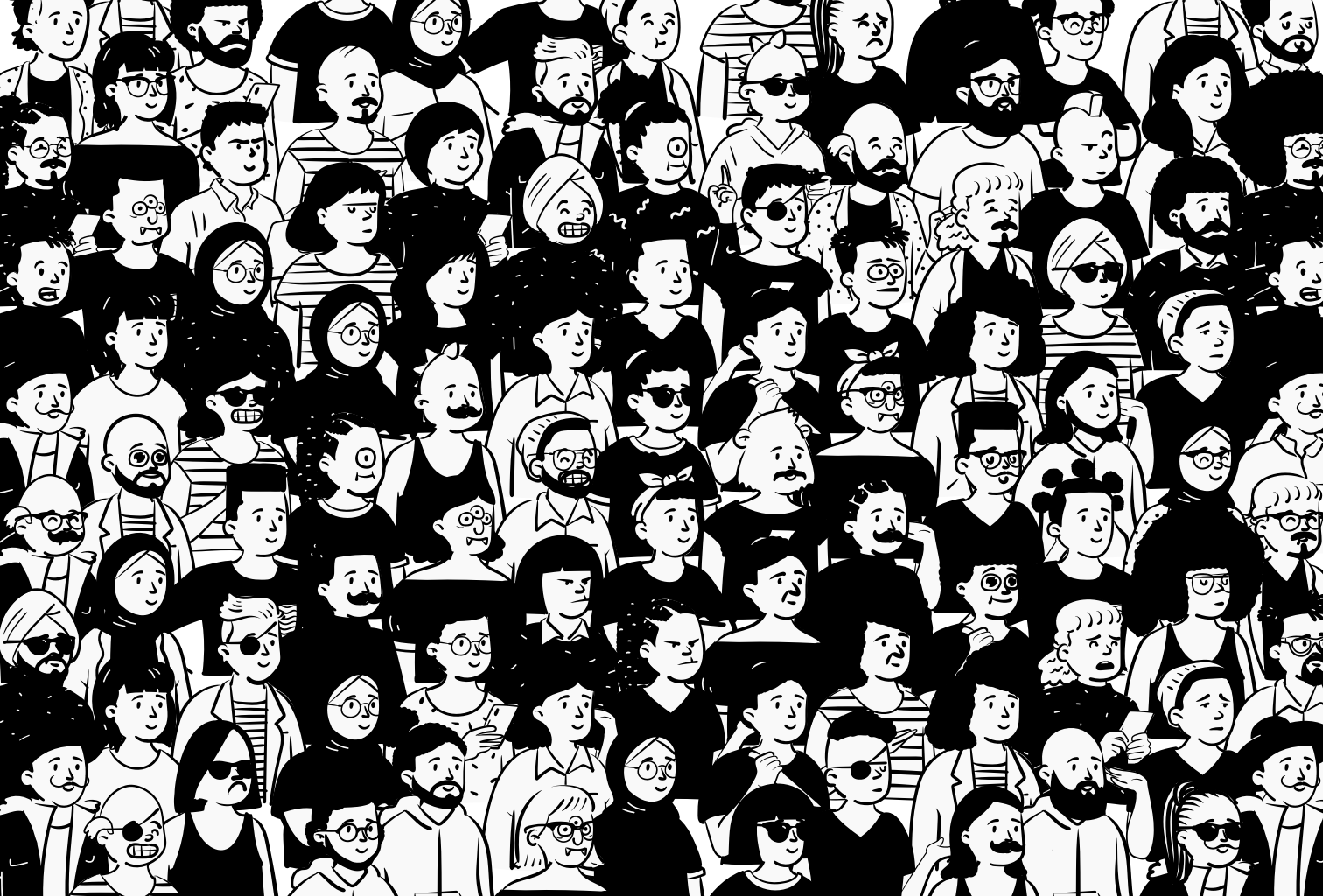
Open Peeps is a hand-drawn illustration library to create scenes of people. You can use them in product illustration, marketing, comics, product states, user flows, personas, storyboarding, quinceañera invitations, or whatever you want! ⠀

Paid content
Visit website
Profile views 11 Outbound visits 12 Normal
Open Peeps, Hand-Drawn Illustration Library Full homepage screenshot

At a glance

Category
Marketing
Language
English
Paid-content signal
Paid contentObserved
Registered
2020
Hosting
CloudflareInferred
HTTPS certificate trusted
PassedObserved
Last updated

Website review

This review may include AI-generated content and is not individually verified. Domain, certificate and other facts come from the observed data on this page.

What is Open Peeps?

Open Peeps is a free, hand-drawn illustration library of people you assemble from mix-and-match parts. Rather than downloading one fixed drawing, you build a character by combining vector arms, legs, poses, hairstyles, clothing, eyewear and facial expressions. It is released into the public domain under the CC0 License, so you can copy, modify, remix and use the artwork commercially without asking permission.

What you actually get

  • Modular vector pieces: bodies, hair (curly, long, short or none), glasses and sunglasses, facial expressions, facial hair, and standing or sitting poses.
  • Ready-made characters as PNG and SVG files, plus the editable source library.
  • A stated total of over 584,688 possible combinations, which is the main reason it feels like a system rather than a clip-art folder.

Where it fits

The library suits product illustration, marketing imagery, empty and error states, user flows, personas, storyboards, comics and invitations. If you need twenty slightly different people who still look like one visual family, assembling them from shared parts is faster and more consistent than commissioning separate drawings.

How to decide whether to use it

Your situation Open Peeps is a good fit Look elsewhere
You need many characters with a consistent style Yes — parts are designed to combine —
You want to recolour or edit the artwork Yes — SVG and vector components —
You need realistic or photographic people — Use photography
You need detailed backgrounds and scenes — Pair with a separate scene library
You want a single polished hero illustration Possible, but assembly takes time Commissioned work may be quicker

A practical example

Suppose you are building onboarding screens for a budgeting app. Create a standing Peep with a neutral expression for the welcome screen, a sitting Peep with a laptop pose for the setup step, and a smiling Peep for the success state. Reuse the same hairstyle and clothing across all three so the screens feel connected. Export as SVG if your design tool will scale them; use PNG when you need a quick drop-in.

Next step

Download the library and open it in a vector tool such as Figma, Sketch, Adobe XD or Studio, then mix nested components rather than editing each file by hand. Before committing, check that your tool handles the component structure well — that is where most of the time savings come from. For a broader set of free illustration styles to compare against, see Blush.

How can I use Open Peeps to create custom character illustrations for my projects?

Open Peeps is a mix-and-match vector library: you assemble characters from separate parts (body, arms, legs, facial expression, hair, facial hair, glasses, clothing) rather than drawing them from scratch. Because the parts are nested components, you can swap one element — say a standing pose for a sitting one — without rebuilding the whole figure. The library is released under CC0, so you can copy, modify, distribute and use the results commercially without asking permission.

A practical workflow

  1. Download the library in SVG (for editing) or PNG (for quick placement). SVG is the better default if you plan to recolour or resize.
  2. Open the files in a vector-capable tool — the site names Sketch, Figma, XD and Studio as examples.
  3. Build a base Peep, then duplicate it for each character so your cast stays visually consistent.
  4. Swap hair, glasses, facial hair and expression to differentiate people; change pose for the situation.
  5. Recolour the black-and-white starting point to match your palette, then export at the size you need.

Matching the format to the job

Your goal Better starting point Why
Product UI states, empty screens SVG, recoloured to your brand Scales cleanly, matches interface colours
Personas, storyboards, user flows Several SVG Peeps in one file Consistent cast across a sequence
Slides, social posts, marketing PNG Fast to drop in, no editing required
Invitations or one-off prints SVG, then export at print size Avoids blur from upscaling

Concrete scenario

Suppose you are writing a user-flow deck with four personas. Download the SVG set, create four base bodies, then give each a distinct hairstyle, pair of glasses and expression. Reuse the same four figures across every screen so the reader tracks who is doing what. When a persona appears in a "frustrated" state, change only the facial expression and pose — the rest of the character stays recognisable.

Decision criteria

  • Choose SVG when you need recolouring, scaling, or component-level editing.
  • Choose PNG when speed matters more than flexibility.
  • Lean on the component structure when you need many characters that look like one family; draw from scratch only if you need a style the library does not cover.
  • Check the licence terms yourself before publishing, even though the stated terms are permissive.

Next step: download the library from Open Peeps, open one SVG, and try swapping a single body part. That one experiment will tell you quickly whether the component approach fits your tool and your timeline.

What license does Open Peeps use, and can I use it for commercial purposes without attribution?

Open Peeps is released under the CC0 1.0 Public Domain Dedication. In practice, that means you can copy, modify, remix and distribute the illustrations — including for commercial work — without asking permission or paying a fee. Attribution is not required by the license, so you can use the characters in client work, products or marketing without crediting the creator.

A few practical points worth knowing:

  • No attribution required, but check your own comfort level. CC0 lets you omit credit entirely. Many designers still add a small "Illustrations by Open Peeps" line as a courtesy, especially in public-facing projects.
  • You can edit freely. The library is built as mix-and-match vector parts — arms, legs, poses, hair, facial expressions and clothing — so you can recolour, recombine and adapt characters to match a brand palette.
  • Commercial use is explicitly covered. The site lists product illustration, marketing imagery, comics, user flows, personas and storyboarding as intended uses, which signals commercial intent rather than just personal projects.
  • Watch for third-party assets. If you combine Open Peeps with other illustration sets or fonts, those may carry their own licences. CC0 applies to Open Peeps itself, not to everything you layer on top.

Next step: Download the library from Open Peeps and open the source files in Figma, Sketch or Adobe XD if you want to edit components directly. If you only need a quick character, grab a ready-made PNG or SVG export instead.

Decision criterion: choose Open Peeps when you need flexible, editable people illustrations for commercial work and want to avoid attribution paperwork. If your project requires a consistent, exclusive visual identity that no one else can reuse, CC0's public-domain nature works against you — consider a commissioned or restricted-licence set instead.

Which design tools like Figma or Sketch are compatible with Open Peeps, and how do I mix the components?

Open Peeps is built to be assembled in any vector-capable design tool, not tied to one app. The library's own instructions name Sketch, Figma, Adobe XD and Studio, and the assets ship as SVG and PNG, so the practical requirement is simply that your tool can open SVG and handle nested components or symbols.

Compatibility at a glance

Tool type Fit for mixing Peeps Why
Figma, Sketch, Adobe XD Strong Vector editing plus components/symbols and variants make swapping arms, hair and expressions fast
Illustrator, Affinity Designer, Inkscape Strong Full SVG vector editing; you assemble manually rather than through components
Canva, PowerPoint, Google Slides Workable Fine for placing finished PNG/SVG Peeps, weaker for deep component swapping
Any tool at all Fine for PNG PNG exports are ready-to-use images, not editable parts

How to mix components

  1. Download the library and open the source file in your tool.
  2. Treat each Peep as a stack of nested parts: body/pose, head, hair, facial expression, eyewear, facial hair, clothing.
  3. Duplicate a base Peep, then swap individual parts by hiding or replacing layers rather than redrawing anything.
  4. Recolor the black-and-white starting shapes to match your palette.
  5. Save your finished combination as a reusable component or symbol so a whole illustration set stays consistent.

The headline number is 584,688 possible combinations, which is the real reason to use components: you can generate a distinct cast of characters without commissioning new art.

Practical trade-offs

  • SVG gives you editable vectors and crisp scaling; PNG is faster to drop into slides, docs or email.
  • Component-based tools reward a little setup time; if you only need two or three images, editing a PNG is quicker.
  • Because the work is released under CC0, you can copy, modify, distribute and use it commercially without asking permission — useful for client work, though you should still keep your own records of what you shipped.

A concrete scenario

Say you're designing onboarding screens and need six characters in different poses and moods. In Figma, build one component with variants for pose, hair and expression, then instance it six times and change the properties. Export each instance as SVG for the app and PNG for the marketing page. That keeps the set visually coherent and takes minutes per character instead of hours.

Next step: open the download page at Open Peeps, grab the vector library, and build one test character end to end before committing to a full set.

What file formats are available for downloading Open Peeps, and how many combinations can I create?

Open Peeps offers downloadable illustrations in PNG and SVG formats. The PNG files are ready to drop into slides, docs or mockups; the SVG files are vector, so you can recolor, resize and edit individual parts without losing quality.

For combinations, the library states there are over 584,688 possible combinations when you mix the nested components—hair, facial expressions, eyewear, bodies, poses and facial hair—and customize the black-and-white starting colors.

What you can actually mix

  • Hair: curly, long, short or none
  • Eyes/eyewear: clear lenses or sunglasses
  • Emotion: different facial expressions
  • Body and pose: standing, sitting and other body language
  • Facial hair: mustache, beard and similar options
  • Colors: the black-and-white base is a starting point, not a limit

How to choose a format

If you need to… Use
Drop a character into a slide, doc or quick mockup PNG
Recolor, resize or edit individual parts SVG
Build a consistent set of personas or user-flow states SVG, then export as needed
Make a one-off invitation or comic panel Either; PNG is faster

A practical next step

If you are building persona cards or empty product states, open the SVG files in a design tool such as Figma, Sketch, Adobe XD or Studio and mix the nested components there. That workflow lets you create a reusable character system instead of downloading a new image for every scene.

Open Peeps is free for commercial and personal use under the CC0 License, so you can copy, modify, distribute and remix the work without asking permission. The library is hosted at Open Peeps.

Can I customize colors, hairstyles, and emotions in Open Peeps, and how do I get started with ready-to-download assets?

Yes. Open Peeps is built for exactly that kind of customization. Its illustration library works like building blocks: you mix vector arms, legs, bodies, hairstyles, facial expressions, and accessories to assemble a character. According to the site, the elements are nested components, so you can change colors, swap hairstyles (curly, long, short, or none), add facial hair, choose clear lenses or sunglasses, and set an emotion on the face. The library also lists over 584,688 possible combinations, so the practical limit is your patience rather than the asset count.

Getting started with ready-to-download assets

  1. Go to Open Peeps and download the library.
  2. Open the files in a vector or product design tool — the site names Sketch, Figma, XD, and Studio as examples.
  3. Pick a ready-made Peep (bust, standing, or sitting) as your starting point, or build one from components.
  4. Adjust hair, expression, clothing, pose, and colors to fit your scene.
  5. Export as PNG for quick use or SVG for scalable, editable output.

What you can use it for

The site's own examples include product illustration, marketing imagery, comics, product states, user flows, personas, storyboarding, and invitations. In practice, that means a product team might drop a sitting Peep into an empty-state screen, while a marketer might use a standing Peep in a blog header. Because the files are vector components, the same character can be recolored to match a brand palette instead of looking pasted in.

Licensing and trade-offs

Open Peeps is in the public domain under the CC0 License, so you can copy, modify, distribute, remix, and use the work commercially without asking permission. That removes the usual attribution and licensing friction. The trade-off is style: hand-drawn line-art characters suit friendly, approachable, or editorial contexts, but they will not match a photorealistic or highly corporate visual system.

A practical next step

If you are unsure whether it fits, download the library and rebuild one character in your actual brand colors inside your design tool. If the result still feels consistent with your other visuals, it is worth adopting; if not, the CC0 terms mean you have lost nothing but a few minutes.

Related questions

More questions →
Where to Download Open Peeps Illustrations and Ready-Made Characters

You can download Open Peeps illustrations directly from openpeeps.com. The page offers two routes: ready-made Peeps you can grab without editing, and the full illustration library for building your own characters. Ready-made downloads come as PNG and SVG, and the library is free for commercial and personal use under the CC0 license.

Download ready-made Peeps

If you just need a character that works immediately, use the ready-made section on the Open Peeps page. It is organized by pose type:

  • Busts — head-and-shoulders characters
  • Standing — full-body standing poses
  • Sitting — full-body seated poses

Each character is offered in both PNG and SVG. Choose PNG when you want to drop the image straight into a slide, doc, or mockup. Choose SVG when you need to scale, recolor, or edit the artwork in a vector tool.

The page also includes a Get All Combinations option and a Showcase section of work made by other people, which is useful for seeing how the pieces look in real projects before you commit to a style.

Download the full library to mix your own

Download the library when the ready-made characters do not match the pose, outfit, or expression you need. The library works like building blocks: vector arms, legs, bodies, hairstyles, clothing, eyewear, facial hair, and emotions that you combine yourself.

The page states there are over 584,688 possible combinations, and that you can mix nested components in any product design tool such as Sketch, Figma, XD, or Studio. The black-and-white starting colors are customizable, so you are not locked into the default palette.

What you can change

Element Options described on the page
Hair Curly, long, short, or none
Eyewear Clear lenses or sunglasses
Emotion Different facial expressions
Body Different poses, including standing and sitting
Facial hair Mustache, beard, and similar
Color Customizable beyond the default black and white

Licensing: what CC0 allows

Open Peeps is in the public domain under the CC0 License. According to the page, this means you can copy, modify, distribute, remix, and use the work, including for commercial purposes, without asking permission. That covers the use cases the site lists: product illustration, marketing imagery, comics, product states, user flows, personas, storyboarding, and invitations.

Where the download lives

The download entry point is the Open Peeps page itself. The site's payment platform signal points to Gumroad, so some related content or distribution may route through Gumroad. The page does not state a price for the library, and no pricing links are listed, so treat the download as free under CC0 as described rather than assuming any paid tier exists.

Practical notes before you download

  • Pick the format by workflow, not by preference. PNG for finished placement, SVG for anything you will edit or resize.
  • Download the library if you need consistency. Mixing from one library keeps proportions and line style aligned across a set of characters.
  • Check the pose category first. Busts, standing, and sitting cover most product and marketing needs, so you may not need the full library at all.
  • Keep the CC0 terms with your files if your team tracks asset licensing, since the permission comes from the license rather than from a per-file grant.
What kinds of projects can you create with Open Peeps?

Open Peeps is a hand-drawn illustration library of mix-and-match vector people, released by Pablo Stanley under the CC0 license. Because the assets are free for commercial and personal use, you can drop them into almost any project that needs human figures — product illustration, marketing imagery, comics, product states, user flows, personas, storyboards, or even personal items like quinceañera invitations. The main constraint is style, not permission: the drawings are sketchy and approachable, so they suit projects that want warmth and personality rather than photorealistic or highly polished corporate art.

What the library actually gives you

The library works like a set of building blocks. Each Peep is assembled from vector parts:

  • Bodies and poses — standing, sitting, and bust (head-and-shoulders) options
  • Hair — curly, long, short, or none
  • Eyewear — clear lenses or sunglasses
  • Facial expressions — a range of emotions you can swap
  • Facial hair — mustache, beard, and similar options
  • Clothing and color — black and white is just the starting point; you can recolor

According to the site, mixing these elements yields over 584,688 possible combinations. You can also download ready-made Peeps as PNG or SVG if you don't want to assemble your own.

Projects that fit well

Product and UX work

  • Product states — empty states, error screens, onboarding, success messages
  • User flows — showing a person moving through steps of a journey
  • Personas — giving a face to a user profile or research summary
  • Storyboarding — sketching scenes before building them out

Marketing and content

  • Marketing imagery — blog headers, landing page visuals, social posts
  • Comics — sequential panels using different poses and expressions
  • Presentations and decks — adding a human element to slides

Personal and event use

  • Invitations — the site explicitly names quinceañera invitations as an example
  • Anything else — the CC0 terms place no restriction on the type of project

How to judge whether it's the right fit

If your project needs… Open Peeps works well Open Peeps may not fit
A friendly, hand-drawn tone Yes —
Photorealistic people — Better to use photos
Full commercial freedom Yes (CC0) —
A single consistent art style Yes, if you stay within the library —
Highly detailed anatomical figures — Look for a different library

The style is the deciding factor. If you want illustrations that feel human and informal, the sketch quality is an asset. If your brand requires precision or realism, the same quality becomes a mismatch.

How to start creating

  1. Download the library from openpeeps.com — either the full set or individual ready-made Peeps in PNG or SVG.
  2. Open the files in a design tool — the site names Sketch, Figma, XD, or Studio as options for mixing nested components.
  3. Combine parts — pick a body, add hair, choose eyewear, set an expression, add facial hair, and recolor as needed.
  4. Export your finished Peep and place it in your project.

If you'd rather not build from parts, the "Grab and go" ready-to-download Peeps cover busts, standing, and sitting poses in both PNG and SVG, so you can use them immediately.

Checking the license before you publish

Open Peeps is in the public domain under the CC0 License. Per the site, this means you can copy, modify, distribute, remix, and use the work — including commercially — without asking permission. That removes the usual attribution and licensing questions, but it's still worth confirming the license terms on the site yourself before a large commercial release, since terms can be updated.

Where to find inspiration

The site includes a Showcase section where others share what they've made with the library. Browsing it is a quick way to see how the same parts get reused across very different project types — from product screens to playful personal pieces — and to judge whether the style matches what you have in mind.

What Is Open Peeps and What Is It Used For?

Open Peeps is a hand-drawn illustration library for building scenes of people. It is created by Pablo Stanley and released into the public domain under the CC0 License, which means you can copy, modify, distribute, remix, and use the work — including for commercial purposes — without asking permission. It suits designers, marketers, and creators who need people illustrations for product illustration, marketing imagery, comics, product states, user flows, personas, storyboarding, or invitations, or for anything else you can think of.

How the library works

Open Peeps is built like a set of building blocks made of vector arms, legs, and emotions. You mix these elements to create different Peeps:

  • Combine clothing and hairstyles to add flair.
  • Change emotion with different facial expressions.
  • Set the scene with different poses, including standing and sitting.

According to the site, there are over 584,688 possible combinations.

What you can customize

Element Options described
Hair Curly, long, short, or no hair at all
Eyewear Clear lenses and sunnies
Emotion A range of facial expressions
Body Different body language and poses
Facial hair Mustache, beard, and more
Color Black and white is just a starting point — colors are customizable

How to mix a Peep

Creating a character is described as easy: use any product design tool such as Sketch, Figma, XD, or Studio to mix nested components. The library also offers ready-to-download Peeps in busts, standing, and sitting poses, available as PNG and SVG files.

License and usage

The library is in the public domain under the CC0 License. You can copy, modify, distribute, remix, burn, and use the work, even for commercial purposes, without asking permission. The site also notes you can use Open Peeps with Blush.

Where to get it

You can download the library directly from openpeeps.com, where ready-to-download Peeps and a "Get All Combinations" option are available. A showcase section highlights what others are making with the library.

How to Mix and Match Open Peeps to Create a Character

Open Peeps is a hand-drawn illustration library by Pablo Stanley that works like a set of building blocks: you combine vector arms, legs, bodies, clothing, hairstyles, glasses, facial expressions, and facial hair to assemble a character, then recolor it. The library is free for commercial and personal use under the CC0 license, and the site states there are over 584,688 possible combinations. To mix a Peep, you need a product design tool that supports nested components — the site names Sketch, Figma, XD, or Studio — and the downloaded library files.

What you need before you start

  • The library files. Download Open Peeps from the site. Ready-to-download Peeps are offered as PNG and SVG, and there is a "Get All Combinations" option for the full set.
  • A component-based design tool. The site specifically lists Sketch, Figma, XD, or Studio, because the mixing method relies on nested components.
  • A decision about format. SVG is the editable vector format you need if you plan to change colors or swap parts. PNG is a flat image and won't let you mix components.

The parts you can mix

Each Peep is assembled from interchangeable elements. According to the site, you can:

  • Choose hair — curly, long, short, or none at all.
  • Add eyewear — clear lenses or sunnies.
  • Set an emotion — pick a facial expression.
  • Select a body — body language matters, so pick the pose.
  • Add facial hair — mustache, beard, or similar.
  • Change the colors — the black-and-white starting point is customizable.

Poses shown on the site include standing and sitting, and the ready-made downloads are grouped into categories such as busts, standing, and sitting.

Step-by-step: mixing a character

  1. Import the library into your design tool. Open the Open Peeps files (use the SVG/vector versions) in Sketch, Figma, XD, or Studio. The library is built as nested components, so the parts stay linked and swappable.
  2. Start with a base body. Pick a bust, standing, or sitting body as your foundation. This sets the overall pose and proportions.
  3. Swap in a hairstyle. Use the component swap to replace the default hair with curly, long, short, or no hair.
  4. Add a facial expression. Replace the face component to set the emotion you want the character to convey.
  5. Add eyewear if needed. Choose clear lenses or sunglasses, or leave the face uncovered.
  6. Add facial hair if needed. Apply a mustache, beard, or other option.
  7. Recolor the parts. Change the colors away from the default black and white to match your brand or scene.
  8. Combine clothing and hairstyles for extra flair. The site notes that layering clothing and hair options is how you add distinctiveness.

Expected result: a single, customized Peep character made of vector parts you can still edit, export, or drop into a larger scene.

Practical notes and common sticking points

  • Use SVG, not PNG, if you want to mix. PNG downloads are finished images; only the vector components can be swapped and recolored.
  • The tool matters. The nested-component workflow depends on a design tool that supports components — that's why Sketch, Figma, XD, and Studio are named rather than general image editors.
  • Color is open-ended. Black and white are described as a starting point, not a limit, so plan your palette before you start swapping.
  • The combination count is large but the method is simple. With over 584,688 possible combinations, you don't need to browse them all — build the one character you need by swapping parts one at a time.

Where Open Peeps characters get used

The library is intended for scenes of people across many contexts: product illustration, marketing imagery, comics, product states, user flows, personas, storyboarding, and invitations — the site even lists quinceañera invitations — "or anything else not on this list." Because it's in the public domain under CC0, you can copy, modify, distribute, remix, and use the work, including commercially, without asking permission.

Is Open Peeps free to use, and what does the CC0 license allow?

Yes. Open Peeps is free for both personal and commercial use under the CC0 License, which places the library in the public domain. According to the site, you can "copy, modify, distribute, remix, burn, and use the work, even for commercial purposes, without asking permission." That means you can drop these hand-drawn characters into client work, product illustrations, marketing imagery, comics, user flows, personas, storyboards, or invitations without paying a fee or requesting consent.

What the CC0 License actually permits

CC0 is a public domain dedication, not a permissive license with conditions attached. The practical difference matters:

  • No attribution required. You are not obligated to credit Pablo Stanley or link back to Open Peeps, even though the site names the author.
  • No permission needed. Commercial use is explicitly allowed, so you don't need to contact anyone before using a Peep in a paid project.
  • Modification is allowed. You can recolor, crop, remix, and combine elements freely.
  • Redistribution is allowed. You can share the files or your modified versions.

The site's own wording covers the full range: copy, modify, distribute, remix, and commercial use.

What you can build with it

Because the license is unrestricted, the library fits almost any context the site lists:

Use case Why CC0 works here
Product illustration No attribution clutter in UI
Marketing imagery Commercial use with no fee
Comics and storyboards Remixing and modification allowed
Personas and user flows Combine poses, emotions, clothing freely
Invitations and personal projects Personal use covered too

How the mix-and-match system works

The library is built like vector building blocks: arms, legs, and emotions are separate components you combine. The site says there are over 584,688 possible combinations. You can:

  • Choose curly, long, short, or no hair
  • Add clear lenses or sunglasses
  • Apply different facial expressions for emotion
  • Select standing or sitting bodies
  • Add facial hair (mustache, beard, etc.)
  • Recolor the black-and-white starting point

You assemble these in a product design tool such as Sketch, Figma, XD, or Studio by mixing nested components. Ready-to-download Peeps are also available as PNG and SVG in bust, standing, and sitting formats.

Practical points before you start

  • Format choice: Use SVG when you need to recolor or scale without quality loss; use PNG for quick placement.
  • Color customization: The default black-and-white is a starting point, not a limit — recolor to match your brand.
  • No login or payment mentioned: The page describes the library as free under CC0 and lists Gumroad as a payment platform, but the license terms themselves state no permission or fee is required for use. If you encounter a paid bundle, treat it as a separate offering from the free CC0 library.
  • Verification: If a project has strict legal review, confirm the CC0 terms on the source page, since CC0 is a well-established public domain dedication.

For most designers and teams, the answer is simple: download, remix, and ship — no attribution, no fees, no permission emails.

Website Overview

An established domain and managed infrastructure suggest continuity of operations and may support dependable delivery, although neither guarantees service quality. Several search or sharing settings need attention. Together they may make snippets, preview images or preferred URLs less consistent across platforms.

Domain and Registration

Registered in 2020, this domain has about 6 years of history. That suggests continuity, although ownership and purpose may have changed. Transfer-protection status is present, helping reduce the risk of unauthorized domain transfers. The registrar is GoDaddy.com, LLC, a widely used domain service provider. The domain uses the common .com extension, which is not an independent safety signal.

DNS and Email

Nameservers are provided by GoDaddy, indicating managed DNS hosting. No MX record was found. A conventional explicit inbound-mail route is not configured. DNSSEC signatures were not detected, so this additional DNS authenticity protection is not confirmed. The lowest observed DNS TTL is 300 seconds. No CAA record was found; there is no additional DNS-based restriction on certificate issuers.

TLS and Certificates

The public key uses EC with 256 bits. The server supplied a complete certificate chain. No organization name is present in the certificate; the available fields are consistent with domain validation. The certificate was issued within the Google Trust Services cloud or CDN ecosystem. The certificate's total validity is about 90 days, consistent with a short renewal cycle.

HTTP and Browser Security

The response lacks these common security headers: CSP, X-Content-Type-Options, Referrer-Policy, Permissions-Policy, clickjacking protection. No X-Powered-By header was found, reducing one common source of backend fingerprinting information. The cf-ray response header indicates a CDN or caching proxy in the delivery path. No obvious internal addresses or debug information were found in the headers. The Server header identifies cloudflare without an exact version.

Technology Stack Analysis

The public page identifies Webflow, Google Analytics, Cloudflare without precise versions, leaving fewer clues for version-specific scanning.

Search and Social Sharing

The meta description has 238 characters and may be shortened in search results. The Generator tag identifies Webflow, making the publishing system easier to fingerprint. No homepage canonical URL was detected. If duplicate URLs exist, consolidation may be less explicit. Twitter Card metadata is configured. The title has 43 characters, within a common display range.

Hosting and Email

DNSGoDaddy
HostingCloudflare
EmailUnknown
Approximate IP geolocation (inferred; a CDN or proxy may differ from the origin server) United States flagUnited States Inferred 198.202.211.1

Registration details

RDAP / WHOIS

RegistrarGoDaddy.com, LLC
Registered2020-02-09
Expires2029-02-09
Domain statusclient delete prohibited、client renew prohibited、client transfer prohibited、client update prohibited
Nameserversns23.domaincontrol.com、ns24.domaincontrol.com
DNSSECunsigned

DNS records

DNS

TypeNameValueTTLPriority
Acdn.webflow.com198.202.211.1300—
AAAAcdn.webflow.com2620:cb:2000::1300—
NSopenpeeps.comns23.domaincontrol.com3600—
NSopenpeeps.comns24.domaincontrol.com3600—
CNAMEwww.openpeeps.comcdn.webflow.com3600—

TLS and certificates

TLS / SSL

AssessmentNormal configuration
Supported protocolsTLSv1.2、TLSv1.3
Negotiated protocolTLSv1.3
Certificate subjectwww.openpeeps.com
IssuerGoogle Trust Services
Valid until2026-11-09T07:01 · Remaining when checked: 38 days
Verification detailsCertificate trust: Passed · Hostname match: Passed

HTTP response headers

HTTP

HeaderValue
content-typetext/html; charset=utf-8
servercloudflare
strict-transport-securitymax-age=31536000

Identified technologies

WebflowGoogle AnalyticsCloudflare

Pages, Search and Sharing

Meta descriptionOpen Peeps is a hand-drawn illustration library to create scenes of people. You can use them in product illustration, marketing, comics, product states, user flows, personas, storyboarding, quinceañera invitations, or whatever you want! ⠀
Canonical URLNot detected
LanguageEnglish (default)
Twitter Cardsummary_large_image

No robots.txt found

User reviews (0)

  • No reviews yet.